-
-
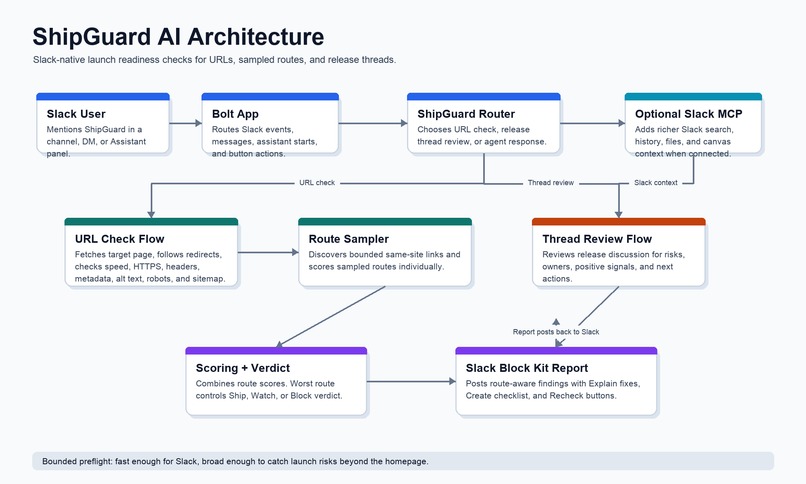
Architecture-diagram
Inspiration
Hackathon teams and product teams often coordinate launches in Slack, but the actual readiness signals are scattered: a URL in one message, an accessibility concern in another, a missing owner in a thread, and a demo checklist somewhere else. The homepage might work while another route is broken or missing launch-critical details.
ShipGuard AI was built to make launch readiness visible where the team is already working. Instead of asking builders to leave Slack and manually inspect everything, ShipGuard turns a release conversation or URL into a shared verdict and the next highest-leverage fix.
What It Does
ShipGuard AI is a Slack agent for launch-readiness preflights.
Core features:
- Checks public URLs from Slack mentions or DMs.
- Produces a clear
Ship,Watch, orBlockverdict. - Scores launch readiness across security, accessibility, performance, metadata, and reliability.
- Discovers and checks sampled same-site routes so multi-page sites and linked SPA routes are not treated as a single homepage.
- Shows route-by-route results with status, speed, score, and top findings.
- Identifies specific missing image alt text examples instead of only reporting a vague count.
- Checks common launch signals like HTTPS, selected security headers, page title, meta description, H1, language attribute,
robots.txt,sitemap.xml, and broken same-site links. - Reviews Slack release threads for blockers, ownership gaps, readiness signals, and next steps.
- Provides Slack action buttons to explain fixes, create a launch checklist, and recheck after fixes land.
- Supports Slack MCP context when connected, allowing richer release-context workflows.
How We Built It
ShipGuard AI is built with Bolt for JavaScript and the OpenAI Agents SDK.
The Slack app listens for app mentions, direct messages, Assistant panel starts, App Home opens, and report action button clicks. When a user asks ShipGuard to check a URL, the app runs a launch-readiness scanner and renders the result as a Slack Block Kit report.
The scanner fetches the target URL, follows redirects, measures response speed, checks HTTPS and selected security headers, inspects basic page metadata and accessibility signals, samples same-site links, and promotes those links into route-level checks. Each route gets its own score and verdict. The overall score averages checked route scores, while the worst route controls the final Ship, Watch, or Block verdict.
For Slack release discussions, ShipGuard can inspect thread text for accessibility, security, performance, release, and ownership signals. It returns a verdict, risk list, positive signals, checklist, and next move.
The agent also includes a fallback path so demo URL checks can still run locally even when an OpenAI key is not configured.
Architecture
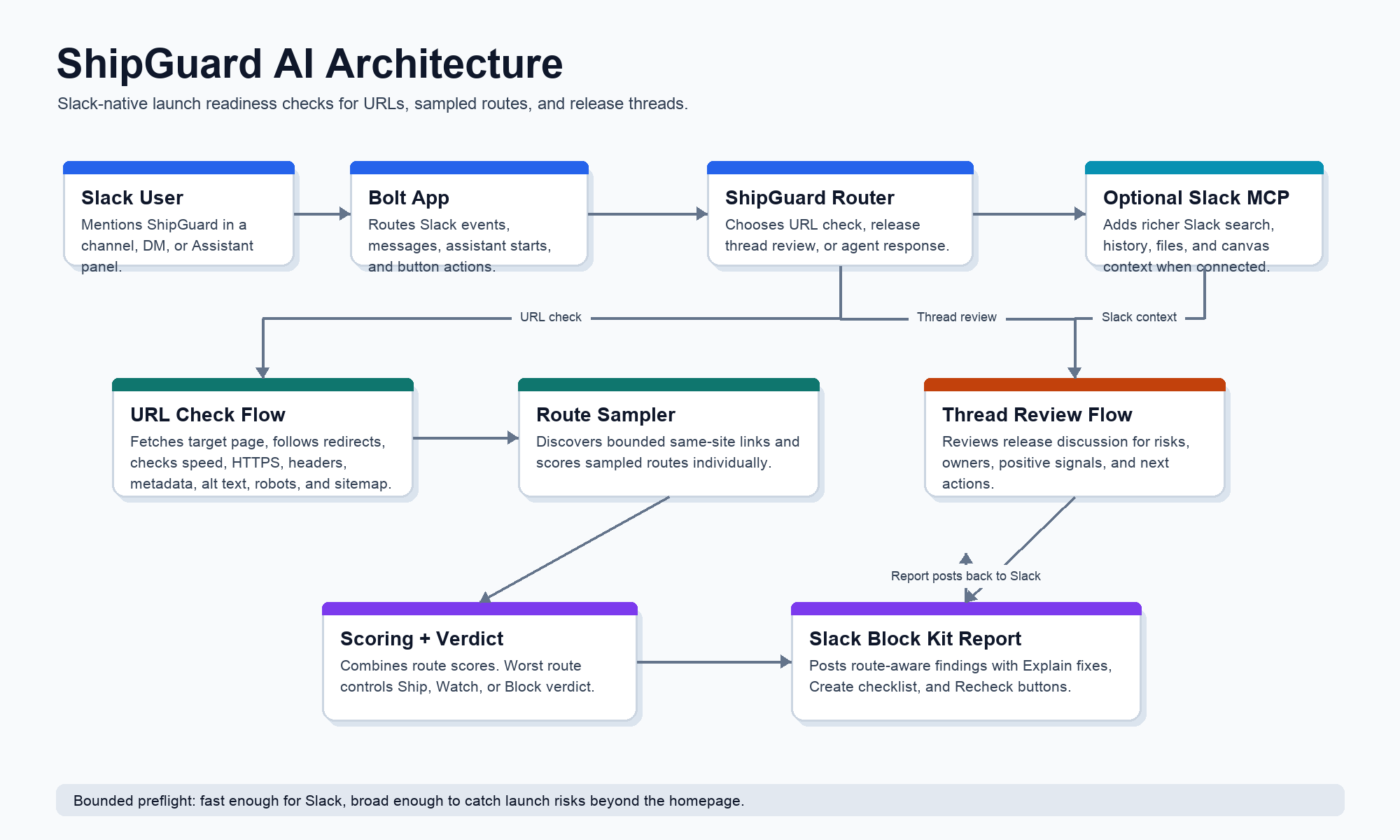
High-level flow:
- A Slack user mentions ShipGuard AI with a URL or asks for a release review.
- Bolt for JavaScript routes the event to the right ShipGuard flow.
- URL checks go through the launch-readiness scanner.
- Thread reviews inspect Slack release context.
- Results are formatted as Slack Block Kit reports.
- Users can click Explain fixes, Create checklist, or Recheck directly in Slack.
- When Slack MCP is connected, ShipGuard can use richer Slack context such as channel history, thread replies, files, and canvases.
ShipGuard AI Architecture
ShipGuard AI is a Slack-native launch-readiness agent. Users mention the app with a URL or ask for a release review, and ShipGuard responds in-thread with a verdict, route-aware report, and follow-up actions.
flowchart LR
  user["Slack user"] --> slack["Slack channel, DM, or Assistant panel"]
  slack --> bolt["Bolt for JavaScript app"]
  bolt --> router["ShipGuard event router"]

  router --> url["URL check flow"]
  router --> thread["Thread review flow"]
  router --> agent["OpenAI Agents SDK"]

  url --> scanner["Launch-readiness scanner"]
  scanner --> checks["Reachability, speed, HTTPS, headers, metadata, accessibility"]
  scanner --> routes["Sampled same-site route checks"]
  routes --> aggregate["Overall score and worst-route verdict"]

  thread --> context["Slack thread messages"]
  context --> review["Risk, positive signal, and checklist analysis"]

  agent --> mcp["Optional Slack MCP Server"]
  mcp --> slackdata["Slack search, history, files, and canvases"]

  aggregate --> blocks["Slack Block Kit report"]
  review --> blocks
  blocks --> actions["Explain fixes, create checklist, recheck"]
  actions --> slack
Main Components
- Slack app surface: App Home, direct messages, channel mentions, Assistant panel, and message actions.
- Bolt event listeners: Route app mentions, messages, Assistant thread starts, App Home opens, URL checks, thread reviews, and report actions.
- URL scanner: Fetches the target URL, checks response status, redirects, speed, HTTPS, security headers, metadata, H1/language signals, image alt text, same-site links,
robots.txt, andsitemap.xml. - Route sampler: Promotes discovered same-site links into per-route results. The target route plus sampled routes produce route-level scores and findings.
- Scoring: Each route gets a score from security, accessibility, performance, metadata, and reliability signals. Overall score averages checked route scores. The worst route verdict controls the overall verdict.
- Thread reviewer: Looks for launch risks, ownership gaps, security/accessibility/performance signals, positive readiness language, and recommended next steps.
- Slack MCP integration: When connected, the agent can use Slack context for richer launch or release discussion review.
Current Scan Boundaries
- Route discovery uses public same-site links from the initial HTML response.
- The scan is intentionally bounded so Slack reports stay fast and readable.
- JavaScript-only SPA routes may require a future browser-rendered discovery pass.
- ShipGuard is a launch-readiness preflight, not a full security, accessibility, or performance audit.
Challenges We Ran Into
The biggest challenge was making the report useful without overwhelming the Slack thread. Launch checks can produce a lot of data, especially once route-level results are included. We had to keep the report compact, scannable, and action-oriented.
Another challenge was handling single-page apps and multi-route sites honestly. A simple homepage check is not enough, but a full crawler can be slow and noisy. ShipGuard uses bounded same-site route sampling so it can catch more launch risks while keeping the Slack response fast and readable. The report clearly labels routes as sampled and notes that JavaScript-only SPA routes may need future browser-rendered discovery.
We also improved accessibility findings so they are actionable. Instead of only saying that several images are missing alt text, ShipGuard now includes sample image paths so the team knows where to start fixing.
Accomplishments
- Built a working Slack-native launch-readiness agent.
- Added URL checks with route-aware scoring and verdicts.
- Created readable Block Kit reports with per-route sections.
- Added action buttons for fix explanation, checklist creation, and recheck.
- Added Slack release-thread review for launch risks and ownership gaps.
- Made findings more actionable by including specific missing image examples.
- Kept the app testable with focused unit tests and local verification.
- Verified the core flow with public URLs including
example.com,python.org, andw3.org.
What We Learned
We learned that the best launch-readiness tool is not just a scanner. It has to fit the team's communication flow. Slack is where teams already decide whether something is ready, so the agent needs to make risks visible, explain tradeoffs, and help the team take the next step without leaving the conversation.
We also learned that route-level reporting changes the usefulness of a preflight dramatically. A homepage-only result can look safe while an important linked route still has issues. Even bounded route sampling gives teams a much better launch picture.
What's Next
Future improvements:
- Browser-rendered route discovery for JavaScript-only SPA routes.
- Optional user-provided route lists for authenticated dashboards and hidden launch flows.
- Lighthouse or Core Web Vitals integration for deeper performance checks.
- Richer accessibility checks using a dedicated accessibility engine.
- Slack canvas export for launch readiness reports.
- Marketplace-ready OAuth polish and workspace admin controls.
- Integrations with GitHub, Linear, Jira, or incident tooling to turn findings into tracked work.
Built With
- Slack Bolt for JavaScript
- Slack Block Kit
- Slack Assistant surfaces
- Slack MCP Server support
- OpenAI Agents SDK
- Node.js
- JavaScript
Demo Video Script
Built With
- agents
- bolt
- javascript
- node.js
- openai
- slack
- slack-block-kit

Log in or sign up for Devpost to join the conversation.