-
-
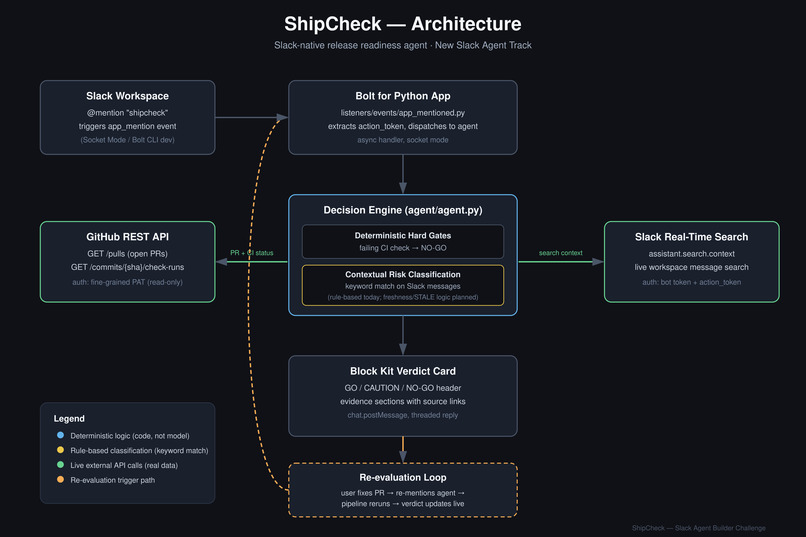
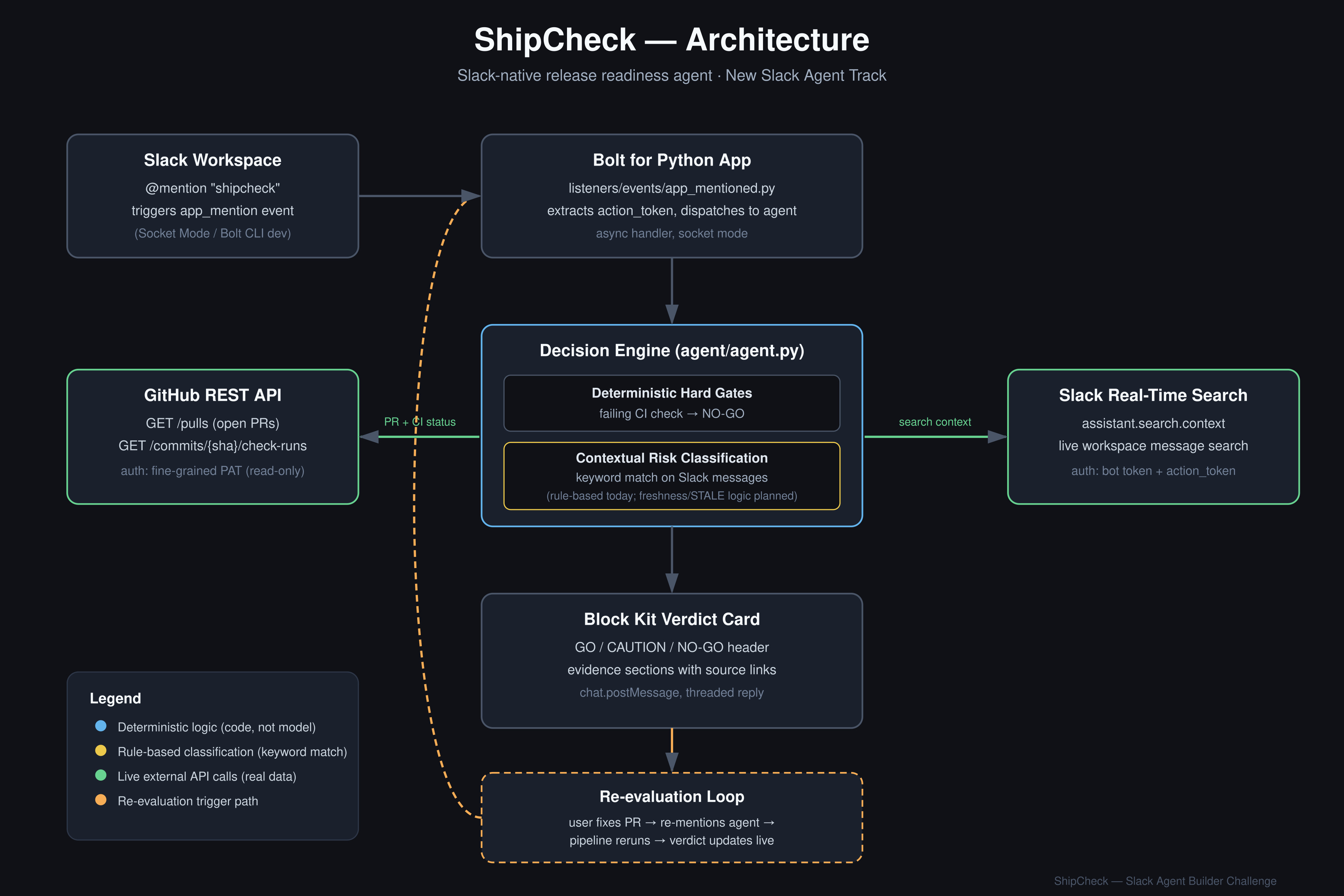
Architechture Diagram of ShipCheck
Inspiration
Every engineering team has had this moment: CI is green, the pipeline says "ready," and someone ships — only to find out five minutes later that a teammate flagged a blocker in Slack an hour earlier that nobody connected to the release. The signal existed. It just wasn't in the same place as the decision.
Release readiness isn't actually a single signal. It's two: the objective one (does the code pass its checks?) and the human one (does anyone on the team know something the pipeline doesn't?). Most tooling only looks at the first. We wanted to build something that looks at both, in the same place, at the moment someone's about to ship.
What it does
ShipCheck is a Slack-native agent that answers one question on demand: "Are we actually ready to ship?"
When you mention it in a thread, it:
- Pulls real, live pull request and CI check-run status from GitHub for a target repository
- Searches recent Slack conversation for related context using Slack's Real-Time Search API
- Applies a deterministic decision policy — a failing required check is a hard gate, no exceptions — combined with rule-based classification of Slack messages for risk-related language
- Posts a structured verdict (GO / CAUTION / NO-GO) as a Slack Block Kit card, with every piece of evidence linked back to its real source — the actual PR, the actual message
- Re-evaluates from scratch every time you ask it again — so if a blocker gets fixed, the next check reflects that immediately, in the same thread
The core thing we wanted to prove was that a verdict like this could be genuinely explainable — not "trust me," but "here's exactly what I looked at, and here's the link to each piece."
How we built it
We built on Slack's Bolt for Python framework, triggered via Slack's Agent/Assistant mention pattern rather than a slash command, since it gives a more native "thinking" experience with live status updates. For GitHub, we integrate directly against GitHub's REST API to pull pull request and check-run state. For Slack context, we use the Real-Time Search API (assistant.search.context), which required discovering that bot-token calls to that endpoint need a short-lived action_token sourced from the live triggering event — meaning the Slack search has to happen early in the request pipeline, before that token expires.
The decision layer is intentionally deterministic and rule-based rather than opaque: hard CI/PR state produces hard gates, and Slack message content is checked against a defined set of risk and resolution signals. We chose this over a less-transparent approach specifically so every verdict is traceable to something a human can go verify themselves.
Challenges we ran into
- The
action_tokentiming constraint — an early version of our RTS integration failed intermittently withinvalid_action_tokenbecause our GitHub calls (synchronous, slower) ran before the Slack search, and the token expired in between. Reordering the pipeline so Slack search happens first fixed it. - Self-referential search results — once the agent had posted a few replies, its own prior verdicts started showing up in its own Slack searches, since they contained matching keywords. We added filtering to exclude the bot's own messages from evidence consideration.
- Scoping realistic MCP vs. REST tradeoffs under time pressure — we initially planned to integrate GitHub via its official MCP server, but given the implementation timeline, we made the deliberate call to use GitHub's REST API directly instead. The Real-Time Search integration still fulfills the challenge's required-technology criteria, and this let us spend the remaining time proving the harder part — a real, live re-evaluation loop — rather than protocol plumbing.
- Windows development environment friction — multiple rounds of debugging PowerShell-specific quirks (heredoc/paste corruption, Python version mismatches, a Windows-specific bug in the Slack CLI's hook invocation requiring the PowerShell call operator) before the local dev loop was stable.
Accomplishments that we're proud of
- A genuinely real re-evaluation loop, not a staged demo. We can break a live CI check, ask ShipCheck for a verdict (NO-GO, with a real linked failing check), fix the check, ask again in the same thread, and watch the verdict flip to GO — driven entirely by actual state changes, not scripted output.
- Every piece of evidence is a real, clickable link. Nothing in a ShipCheck verdict is asserted without a source — PRs link to PRs, messages link to permalinks.
- Diagnosing and fixing the RTS
action_tokentiming issue, which isn't documented clearly and required tracing through raw event payloads to understand. - A working Block Kit presentation — a structured, color-coded verdict card with evidence sections, not a wall of plain text.
What we learned
The most interesting technical lesson was how much Slack's newer Agent/Assistant surfaces (streaming status, thinking indicators, threaded verdict cards) change what a "bot reply" can feel like versus a traditional slash-command response — it reads much more like a native product feature than a chat command.
The most important product lesson was about honesty in scope: it's tempting to describe a rule-based system as "intelligent," but a system that's explainable and correct is more valuable than one that appears smarter than it is. We'd rather ship something narrower that we can defend completely than something broader that we can't.
What's next for ShipCheck
- Freshness-aware evidence classification — automatically excluding older, already-resolved Slack mentions from a verdict using timestamp comparison, rather than relying on keyword matching alone.
- Multi-repo, multi-workspace configuration — moving from a single hardcoded demo repository to a setup flow a team could actually install and use.
- GitHub MCP server integration as the primary GitHub data path, completing the architecture we originally scoped before time constraints led us to REST for this submission.
- Richer risk signal detection, potentially including sentiment or urgency scoring on top of the current keyword-based classification.

Log in or sign up for Devpost to join the conversation.