-
-
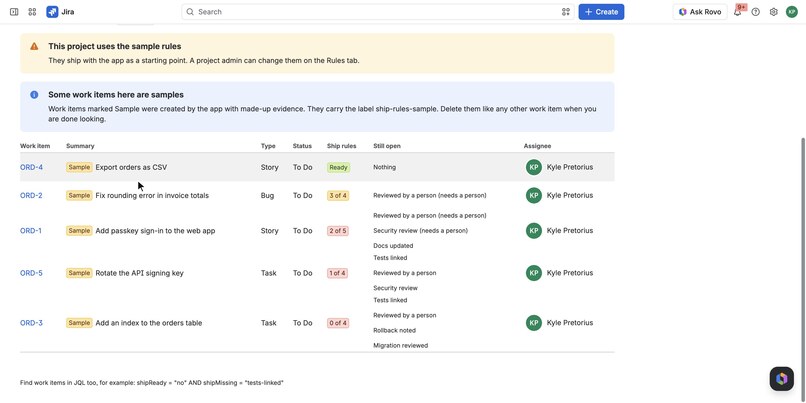
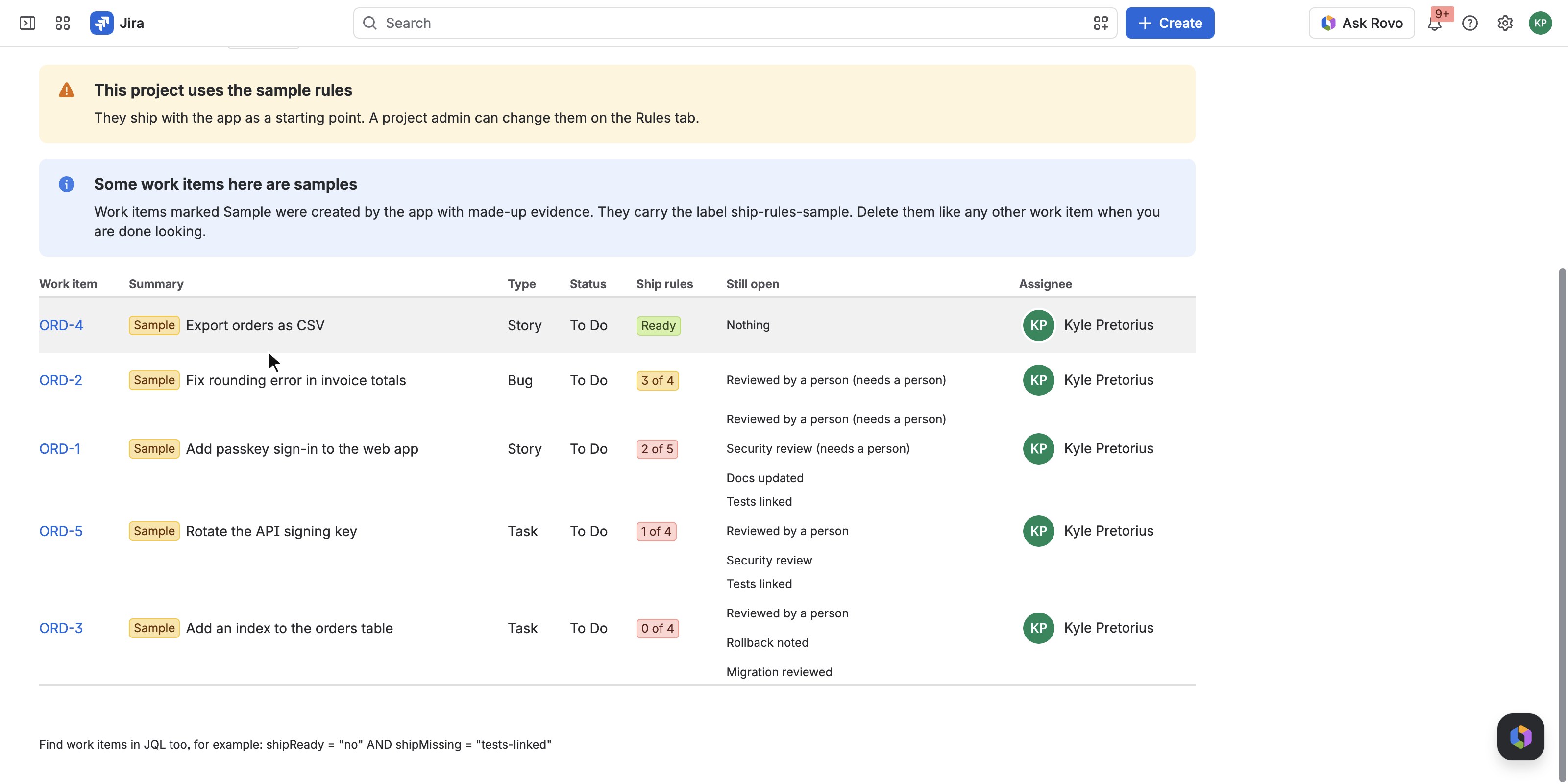
Ship readiness board right after first run: sample work items, closest to shipping first, with the rules still open.
-
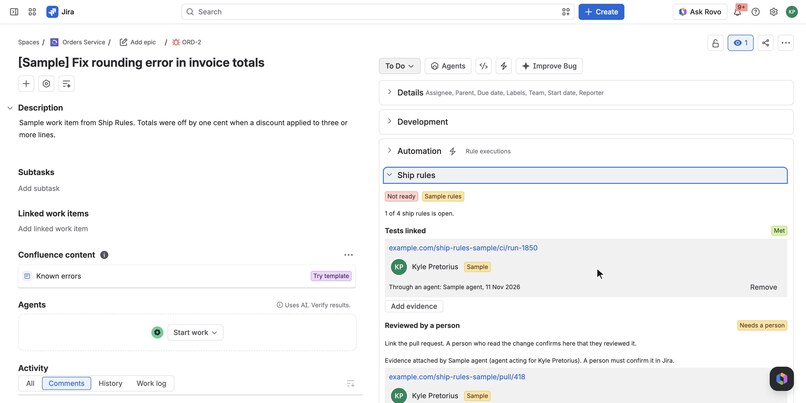
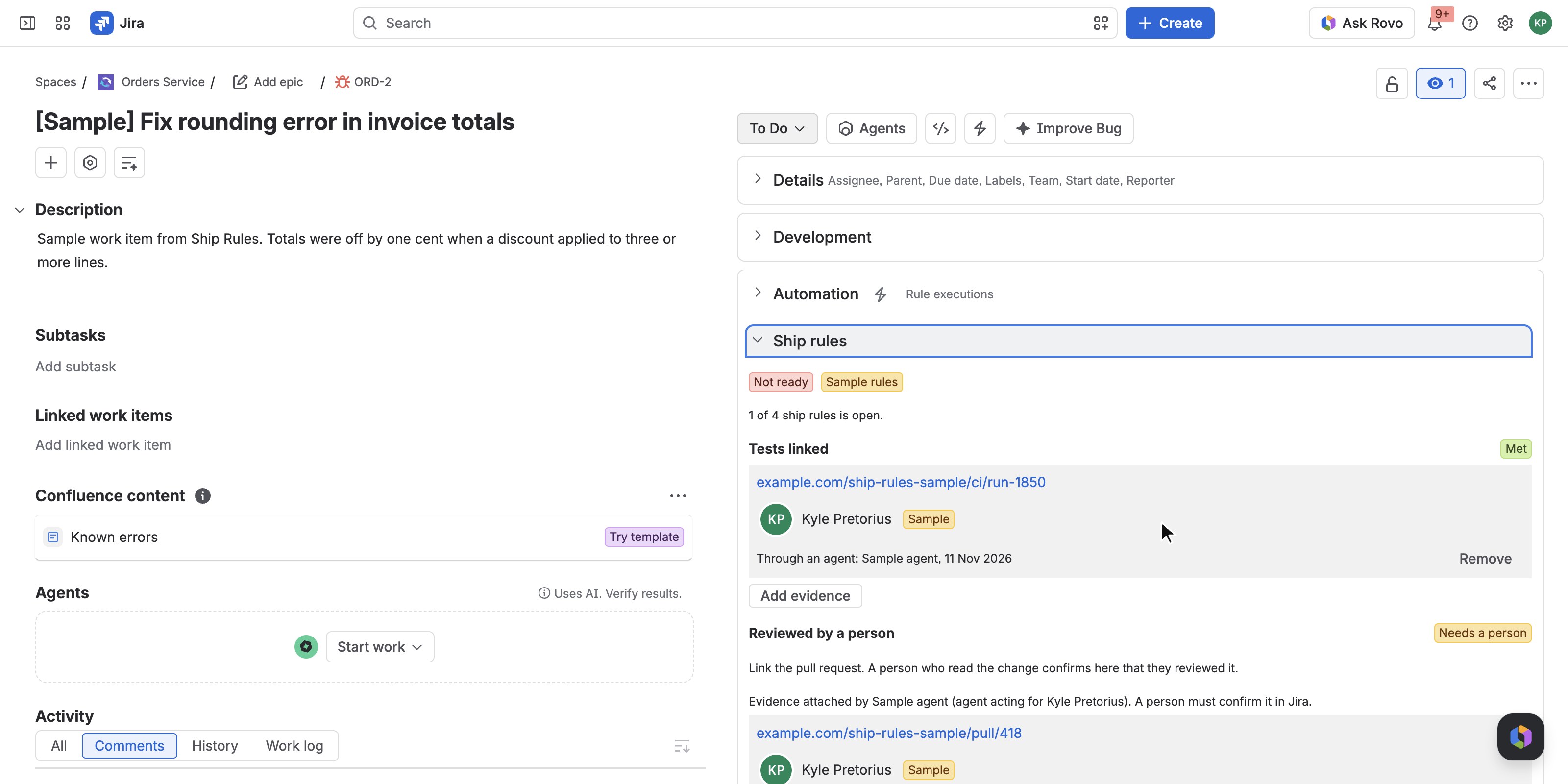
Ship rules panel on a work item: the verdict with reasons, and each rule with its evidence and who attached it.
-
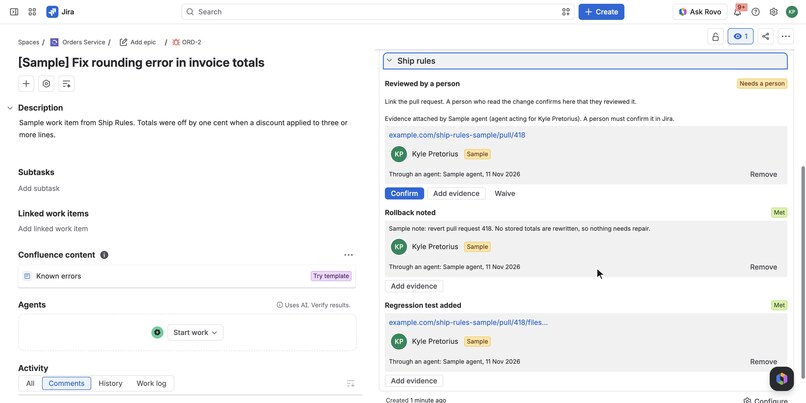
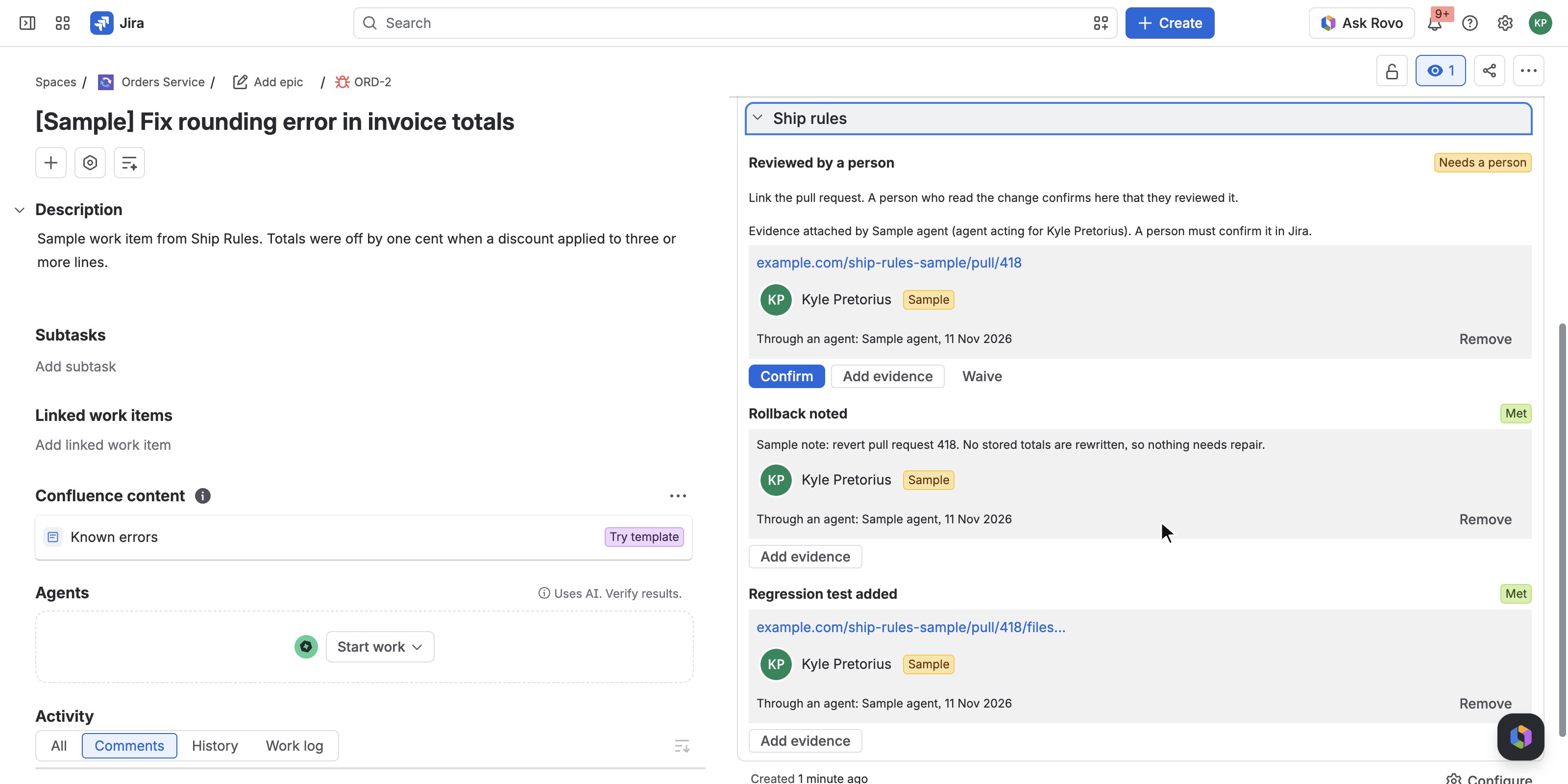
A person-only rule: an agent attached the pull request, but only a person can press Confirm.
-
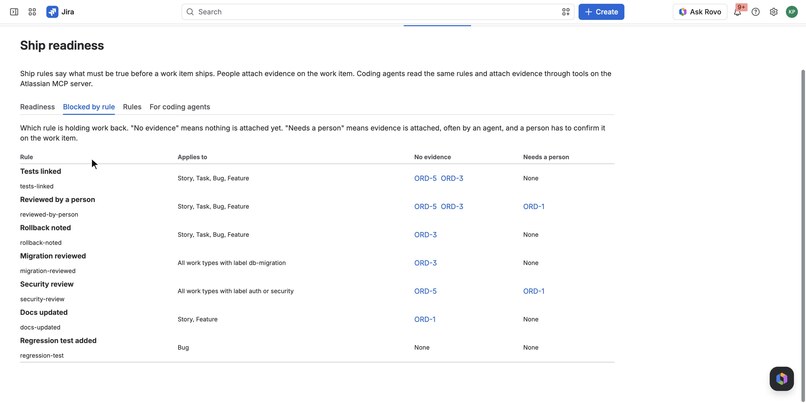
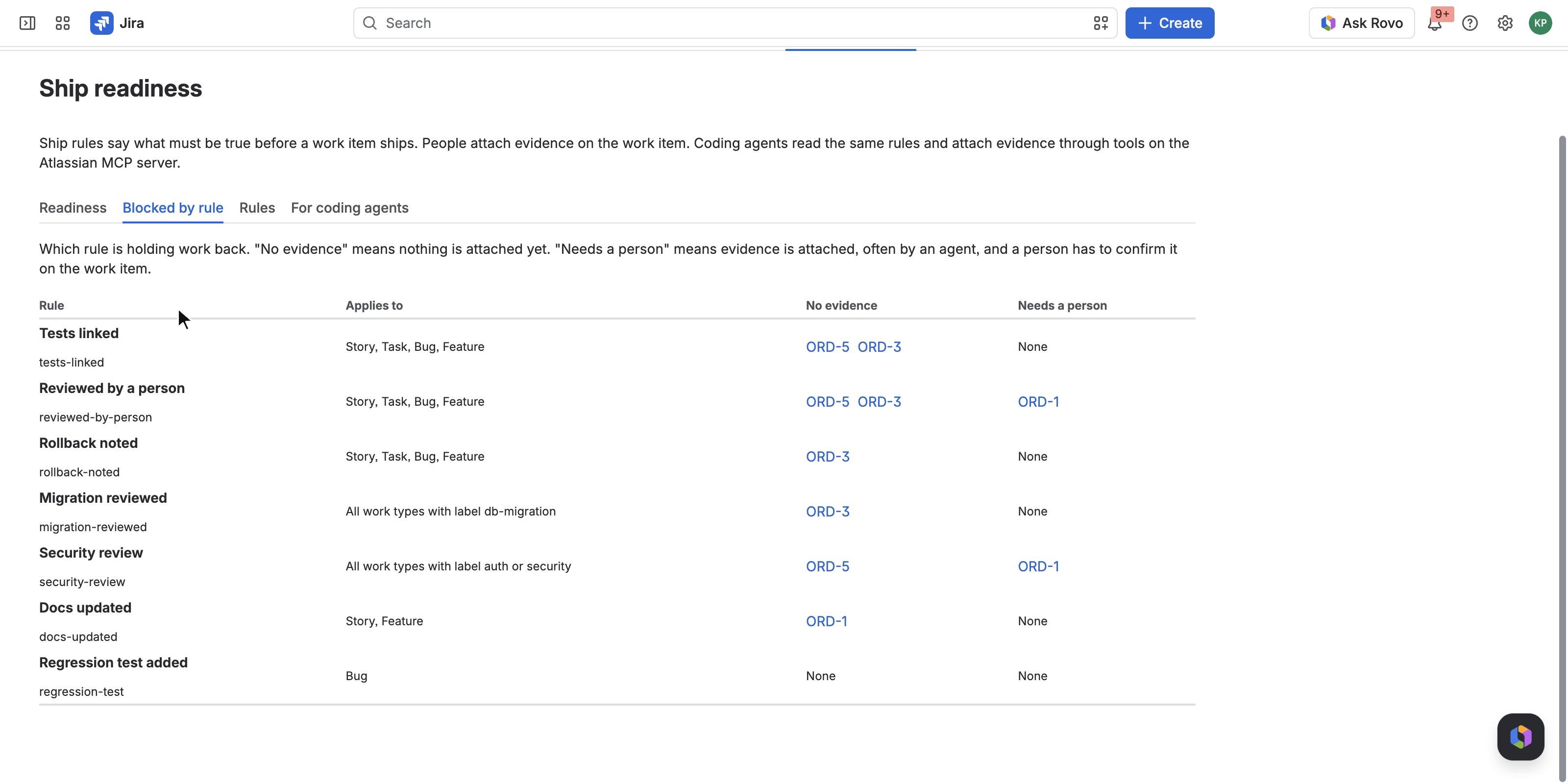
Blocked by rule: which rule holds back which work items, with no evidence yet or waiting for a person.
-
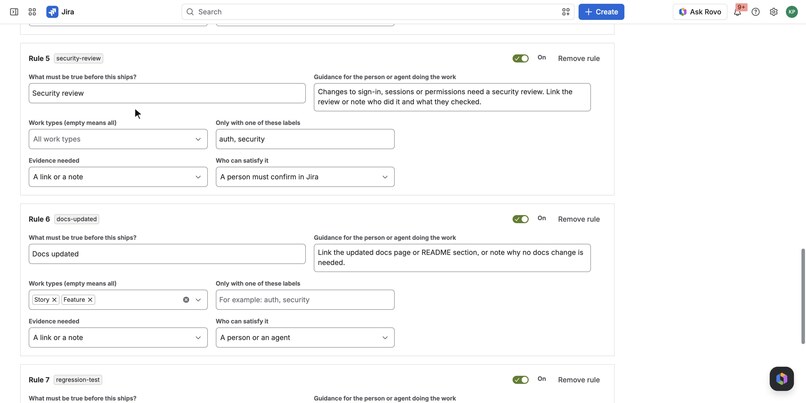
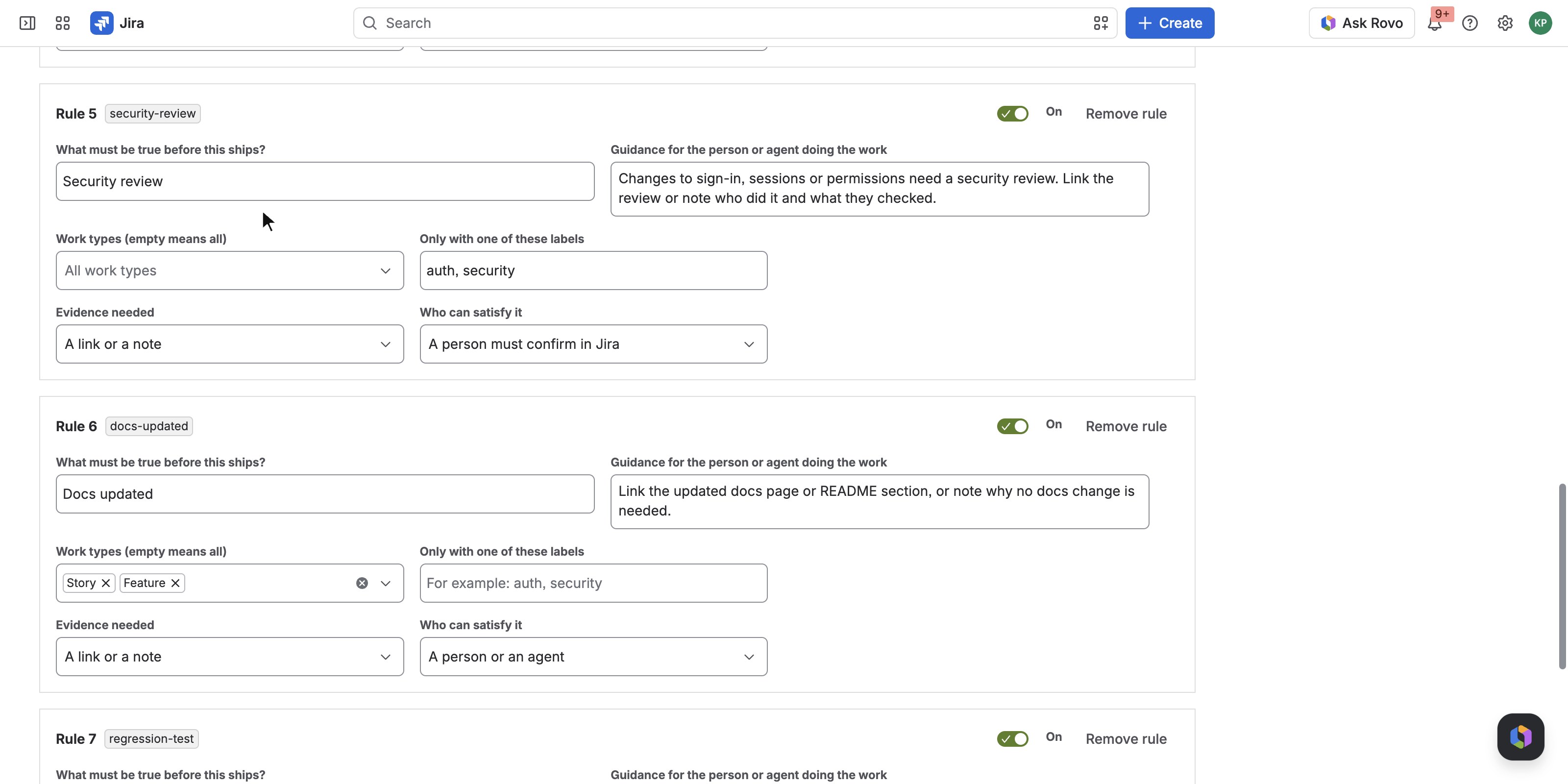
Rules editor: Security review applies to the labels auth or security, and a person must confirm it in Jira.
-
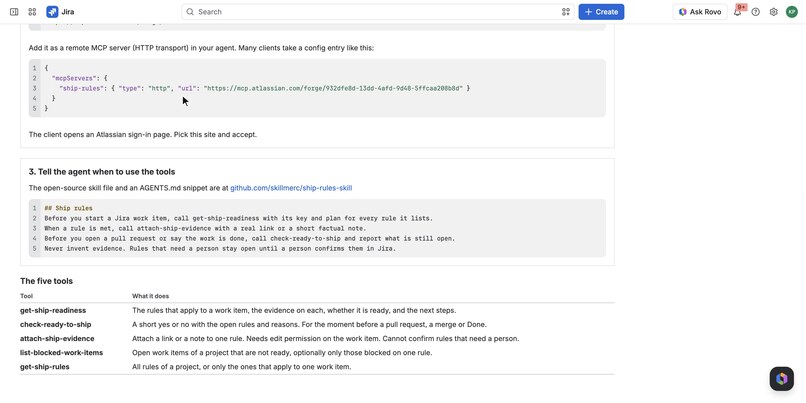
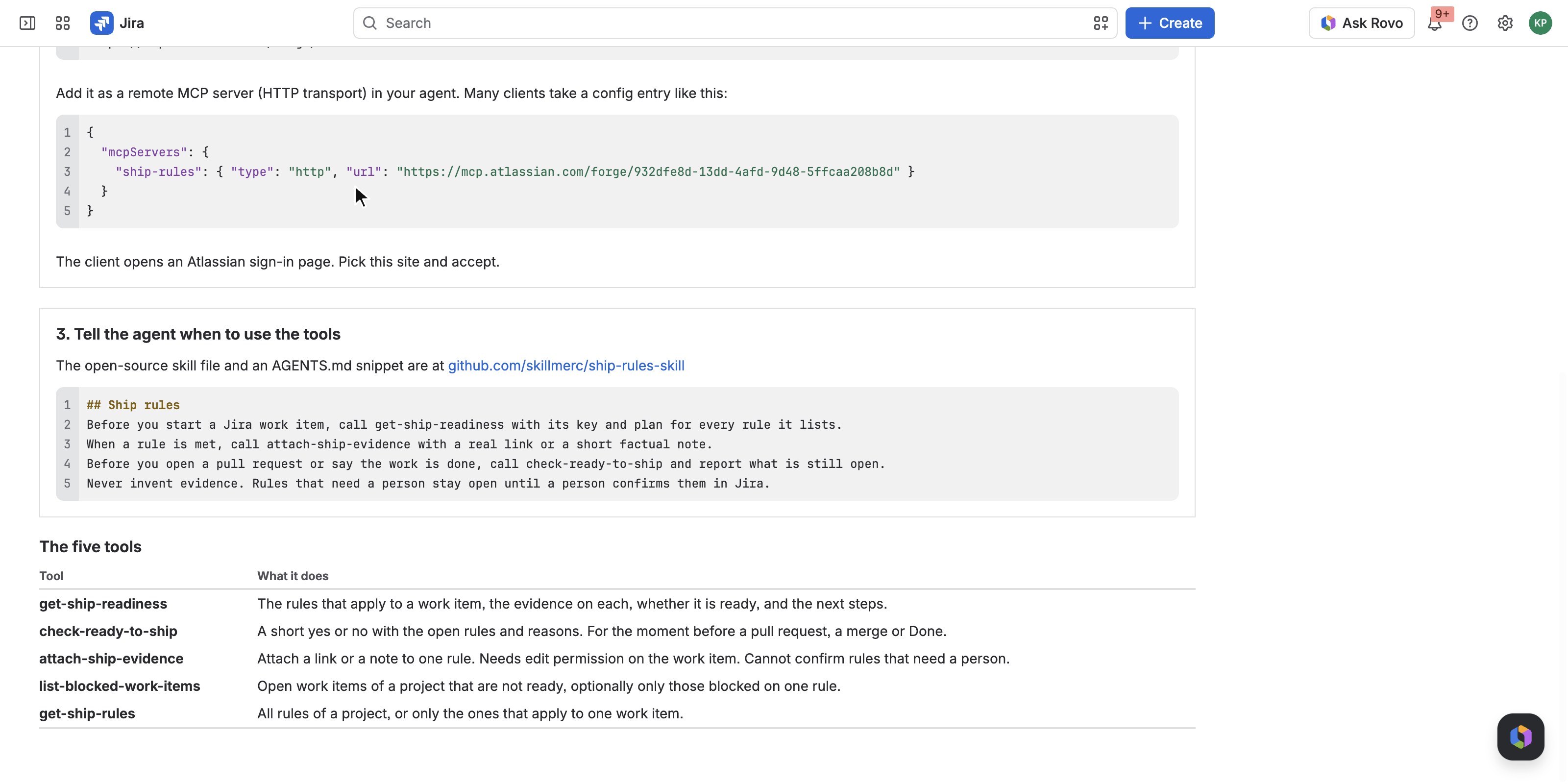
For coding agents: the MCP endpoint, the AGENTS.md snippet and the five tools.
-
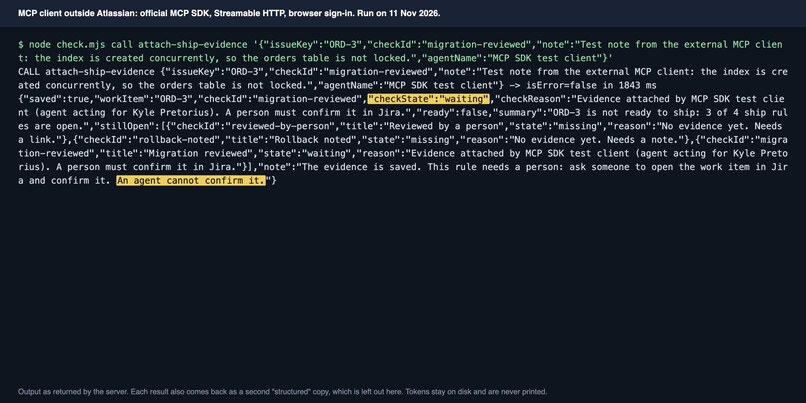
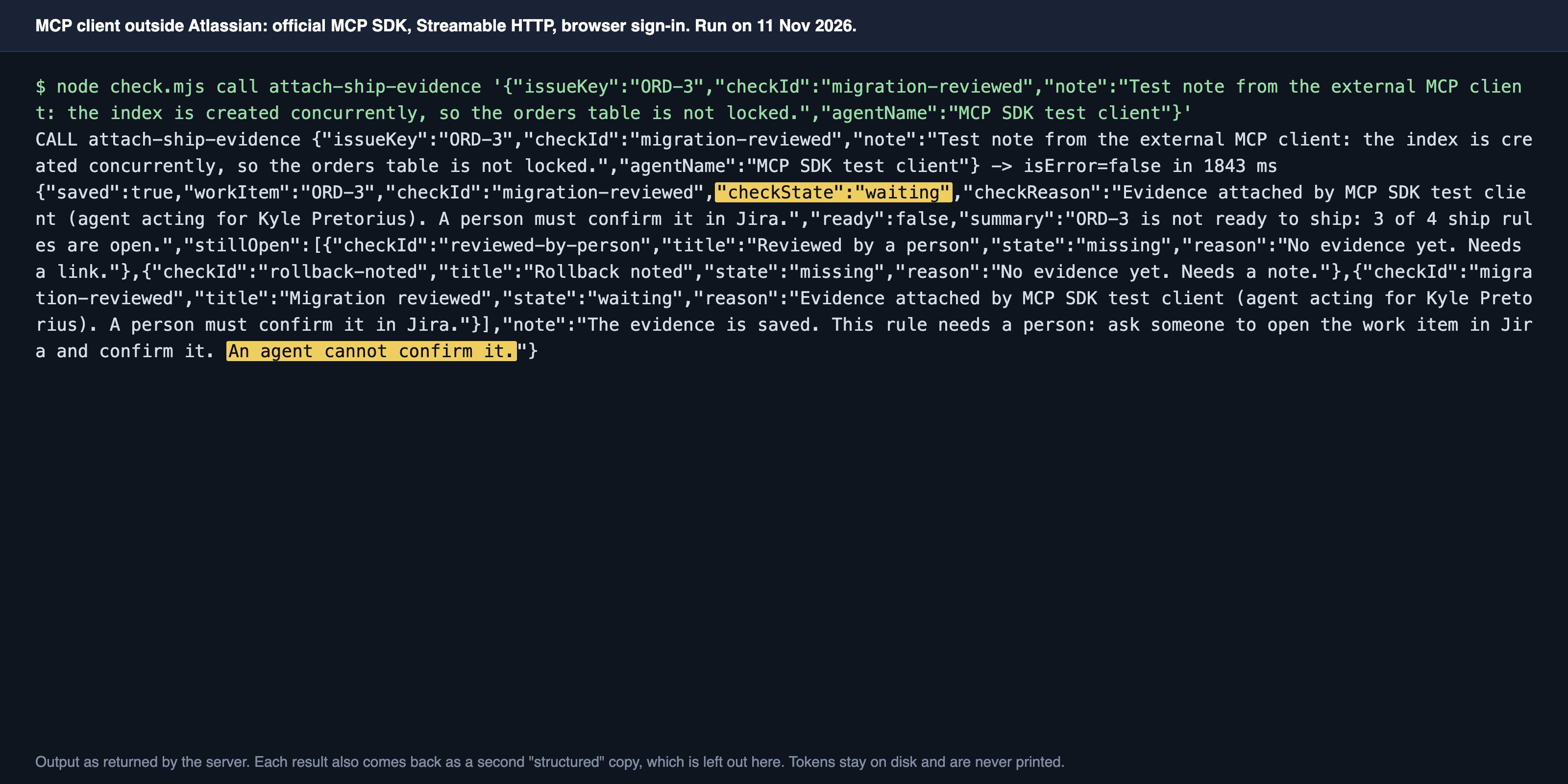
An MCP client outside Atlassian attaches a note through the Atlassian MCP server. The app answers: waiting, a person must confirm.
-
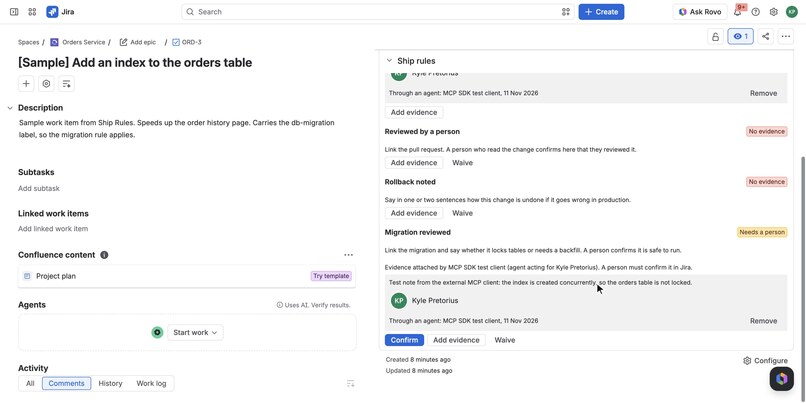
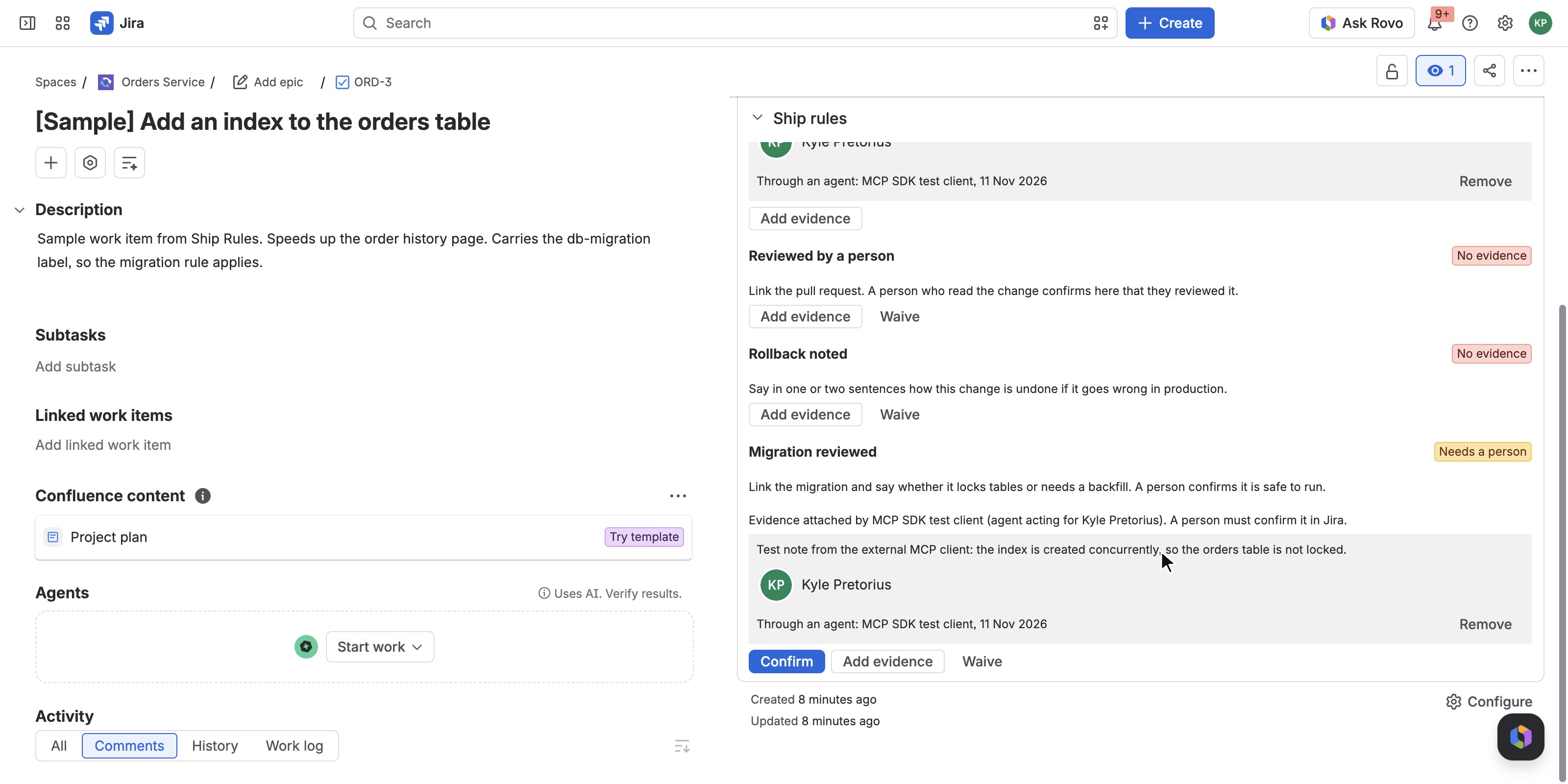
The evidence from that client on the work item in Jira, marked Through an agent, with the rule still at Needs a person.
Inspiration
More and more of a team's code is written by a coding agent that was handed a Jira work item. The agent reads the summary and the description. It does not read the things the team learned the hard way: a change to sign-in gets a security review, a migration gets a second pair of eyes, every change ships with a way to roll it back, a bug fix comes with a test that fails without it.
Those rules live in people's heads, or on a wiki page nobody opens. A new developer picks them up over a few months. An agent never does. It opens a pull request, says "done", and a person finds out in review what was skipped.
Checklist apps do not solve this. A tick box can be ticked by anyone, and an agent cannot see it at all. We wanted the rules to be something an agent can ask for, work to, and leave proof against, with a clear line for the checks only a person may sign.
What it does
Ship Rules for Jira keeps a project's ship rules and shows, for every work item, whether they are met and why not.
- Rules by work type, label and component. A project admin writes the rules on a settings page: what must be true, guidance for whoever does the work, which work types, labels or components it applies to, whether the evidence is a link, a note or either, and who can satisfy it. "Security review" can apply only to work items labelled
authorsecurity. "Regression test added" only to bugs. - Evidence, not tick boxes. A rule is met when someone attaches a link or a note. The panel on the work item shows each rule, its evidence, who attached it, when, and whether it came from a person in Jira or through an agent (and which agent).
- Checks only a person may sign. A rule can be set to "a person must confirm in Jira". An agent can attach the evidence, but the rule stays open, marked "Needs a person", until a person confirms it on the work item. No tool can confirm or waive a rule.
- A verdict with reasons. "ORD-3 is not ready to ship: 2 of 4 ship rules are open", then each open rule and what it is waiting for. The panel carries a lozenge ("Ready" or "2 of 4") without being opened.
- A project view. The "Ship readiness" page lists open work items closest to shipping first, and a second tab shows which rule is holding back which work items, split into "No evidence" and "Needs a person".
- Five tools for agents, through the Atlassian MCP server.
get-ship-readiness,check-ready-to-ship,attach-ship-evidence,list-blocked-work-items,get-ship-rules. An agent connected to the app's MCP endpoint can read the rules before it starts, attach the pull request and the test run as it goes, and ask whether the item is ready before it says "done". - An open-source skill.
SKILL.mdand anAGENTS.mdsnippet tell an agent when to call which tool and what it must not do (invent evidence, argue a rule away in a note). The same file ships inside the app as a Rovo skill. - Searchable in JQL.
shipReady = "no" AND shipMissing = "tests-linked", orshipWaiting = "security-review", for boards, filters and automation. - A nudge, not a wall. If a work item is moved to Done with rules still open, the app adds one comment listing them. A person can waive a rule on a work item with a reason, and the waiver shows on the panel. The comment can be switched off per project.
- Ship Rules Guide (Rovo agent). For people who would rather ask in chat: "Is this work item ready to ship?", "What is blocking this project?".
- Sample rules and sample work items. One click loads a sample rule set and five work items marked [Sample] with sample evidence, so every state is on screen straight away. Sample rules, sample work items and sample evidence are labelled as such in the UI and in tool results.
Built by SKILLMERC with an AI coding agent; all features shown are implemented and tested.
How to install and try it (for judges)
You need a Jira Cloud site where you are an admin. About three minutes for the Jira part.
Install
- Open the installation link: Install Ship Rules for Jira (short link to the same page: https://skillmerc.github.io/ship-rules/install/). Pick your site, install into Jira and accept the scopes. The app makes no call outside Atlassian.
- Open any software project (newer sites call it a space). In the project's tab bar choose Ship readiness. On a narrow window it sits under More.
- Press Use sample rules and add 5 sample work items. The board fills in about ten seconds. If it shows four work items, press Refresh once. Everything it adds is marked Sample and labelled
ship-rules-sample.
In Jira
- Open the sample work item "Fix rounding error in invoice totals". In the right-hand column open Ship rules (collapse Details if you want more room). Three rules are met with sample evidence attached through an agent. "Reviewed by a person" says Needs a person. Press Confirm. The work item turns Ready to ship.
- Open "Add an index to the orders table". Use Add evidence on "Rollback noted" and type a note. Try a note of two letters to see the refusal. Use Waive on a rule and give a reason.
- Add the label
authto any work item. The "Security review" rule appears on its panel within a few seconds. - Move a work item with open rules to Done. The app comments with what is still open.
- Back on Ship readiness, look at the Blocked by rule tab, then Rules (edit a rule or add one, Save), then For coding agents.
- In Jira search, try
shipReady = "no" AND shipMissing = "tests-linked".
The MCP tools
Simplest, if your site has Rovo: open Rovo chat, choose the agent Ship Rules Guide, open a sample work item and ask "Is this work item ready to ship?". Or in Rovo Studio create an agent, Add tools, Connected apps, Ship Rules for Jira, add the tools and ask it which work items are blocked.
From an MCP client outside Atlassian:
- In Atlassian Administration open Apps, Sites, your site, Connected apps, Ship Rules for Jira, View app details. Under Tools press Enable tools ("Expose tools to MCP-compatible apps"). It is off by default.
- Add
https://mcp.atlassian.com/forge/932dfe8d-13dd-4afd-9d48-5ffcaa208b8dto your client as a remote MCP server (HTTP). Sign in, pick the site, Accept. - Call
get-ship-readinessfor one of the sample work items, thenattach-ship-evidencewith a link on "Tests linked" for "Add an index to the orders table". Reload the work item: the evidence is on the panel, marked as coming through an agent.
No client at hand? The repository https://github.com/skillmerc/ship-rules-skill has a small Node client under examples/mcp-client-check that does the same from a terminal. It is the client shown in the video.
How we built it
Everything runs on Forge. The app makes no call outside Atlassian and is eligible for Runs on Atlassian.
Jira
jira:issueContextfor the panel, withdynamicPropertiesfor the live lozenge and a display condition on a work item property, so the panel only appears in projects that have ship rules.jira:projectPagefor the readiness board andjira:projectSettingsPagefor the rule editor, both UI Kit.jira:entityPropertyindexes a small readiness property on each work item, which gives the JQL aliasesshipReady,shipMissingandshipWaiting.- A
triggeron work item created, updated and deleted keeps that property right when a label or work type changes which rules apply, adds the "moved to Done with open rules" comment, and deletes the evidence record with the work item. - Forge KVS holds the rules per project and one evidence record per work item. The work item property is a derived copy for search and is never read back as truth, so editing it by REST changes nothing.
Rovo and MCP
- Five
actionmodules, each a Forge function over the app's stored data. - One
rovo:mcpmodule lists those five actions as tools. That is what makes them available to custom agents in Rovo Studio and, once an admin turns it on, to outside clients athttps://mcp.atlassian.com/forge/<app id>. - A
rovo:skillmodule ships the sameSKILL.mdwe publish as open source, and a smallrovo:agentuses the tools and the skill in chat.
Permissions
Tools act for the signed-in person. A tool call may read a work item only if that person can see it, and may attach evidence only if that person can edit it. The caller is taken from the invocation context, never from the tool inputs. A work item the person cannot see gets the same answer as one that does not exist.
Input checks
Every tool input goes through one validation module before anything else: work item and project keys, rule ids, links (http or https only, no embedded user name or password, length cap), notes (length limits, control and direction characters stripped), the agent's self-reported name. A rule that needs a link refuses a note alone. Errors come back as plain sentences that tell the agent what to change.
Tests
86 automated tests with in-memory Jira and storage: rules and applicability, evidence, readiness, the permission paths for an admin, an editor, a viewer and an outsider, the tools, the trigger, and the manifest itself.
Best app with Atlassian MCP: what we ran
Ship Rules for Jira exposes five tools through the Atlassian MCP server with one rovo:mcp module. The tools are the product, not an add-on: they are how an agent learns what "done" means for a work item and how it leaves proof.
What we ran on 11 November 2026, all as one signed-in user:
- An MCP client outside Atlassian. A small client built on the official MCP SDK (Streamable HTTP, OAuth with dynamic client registration and PKCE) connected to
https://mcp.atlassian.com/forge/<app id>from a laptop, listed the five tools and called all five on a production install, includingattach-ship-evidence. The evidence appeared on the Jira work item marked "Through an agent: MCP SDK test client" for the signed-in person. A rule that needs a person stayed open after the client attached evidence, and became met only when a person pressed Confirm in Jira. The video shows a run of this client and the result in Jira. - The MCP Inspector CLI listed the same five tools on the production install and called
check-ready-to-ship. - A custom agent in Rovo Studio, with two of the tools added and no instructions, ran both.
- The app's own Rovo agent used the tools and the skill in chat, including Rovo's confirmation card before the write.
- Bad input from the outside client was answered by the Forge function with a plain error and nothing stored: a
javascript:link, a rule that does not apply to the work item, an unknown work item, a malformed key.
Open source, as the bonus describes: SKILL.md and an AGENTS.md snippet at https://github.com/skillmerc/ship-rules-skill , MIT licence, with the example client.
Known limits
- Packaged coding agents are untested. We did not run an editor or terminal coding assistant end to end. What we ran is an MCP SDK client and the MCP Inspector CLI against the same endpoint and sign-in flow.
- Refusals for other users are covered by tests only. Our test sites have one real user, and he is a site admin. That a user without edit permission, a user who cannot see a work item and a user outside the project are refused is covered by automated tests on both code paths, not by a second real account.
- Outside clients need an organization admin to turn on "Expose tools to MCP-compatible apps" for the app first.
- The app does not open or verify an evidence link. It records who attached it and through which channel.
- Moving a work item to Done with open rules is flagged with a comment, not blocked.
- The readiness board lists up to 100 open work items.
- In Rovo chat the agent shows initials instead of its icon.
Challenges we ran into
- A call from an outside client is not the person. In the Jira UI,
asUser()works. In a call that arrived from an outside MCP client, the same call was refused, although the invocation context still names the account. Atlassian documents this as a known issue. Our first fallback, the bulk permission check, was refused too, because it needs a global admin permission a Forge app does not have. The tool answered "not found", which is the right failure, but not a product. The version that works reads as the app and then asks Jira's "find users with permissions" search for exactly the calling account on exactly that work item. We only found any of this because we ran a real client instead of trusting the deploy. - Who is an agent? An app cannot verify that a caller is an AI. What it can know is the channel: the Jira panel is used by a person, a tool call comes through an agent. So evidence records the channel, and the agent's name is treated as a label, never as a credential.
- Tool names change by environment. Outside clients see
get-ship-readiness_developmenton a development install andget-ship-readinesson production. The skill tells the agent to use whichever form its client lists. - Scope lists. Atlassian's sign-in page rejected our test client when it asked for fewer scopes than the server advertises, so the client asks for the advertised set.
Accomplishments that we're proud of
- The MCP path is proven from outside Atlassian: a client signed in, listed the five tools and called all of them against a production install, and the evidence it attached showed up on the Jira work item as coming through an agent.
- The line between "an agent may attach this" and "a person must sign this" is enforced in one place and has no tool that crosses it.
- A judge sees the product working about ten seconds after one click, on labelled sample data.
What we learned
- Rules an agent can query are easier to follow than rules buried in a prompt. A tool that answers "what does done mean for this work item" gives the agent the team's context at the moment it needs it.
- Error messages are the agent's user interface. "The ship rule security-review does not apply to ORD-3. Rules that apply: ..." tells the caller what to change. "Invalid input" does not.
- Test the outside path early. Every surprise in this build was in the gap between "it deploys" and "a client can call it".
What's next
- A workflow validator for teams that want Done blocked, not just flagged.
- Evidence that checks itself: read the build status or the pull request state from connected development tools instead of trusting a link.
- Rule sets shared across projects.
- A test pass with packaged coding agents, and with a second user account on a real site.
Links
- Demo video: https://www.youtube.com/watch?v=O-KoKrYG7JQ
- Skill, AGENTS.md snippet and example client (MIT): https://github.com/skillmerc/ship-rules-skill
- Product page: https://skillmerc.github.io/ship-rules/
- Privacy: https://skillmerc.github.io/ship-rules/privacy/
- Terms: https://skillmerc.github.io/ship-rules/terms/
- Support: [email protected]
Built With
- forge
- javascript
- jira
- mcp
- node.js
- rovo
