Description
Release managers and tech leads ask the same question before every release: can we ship this version? The answer usually comes from scanning a Jira board by hand. Ship Check answers it from the data and shows its evidence.
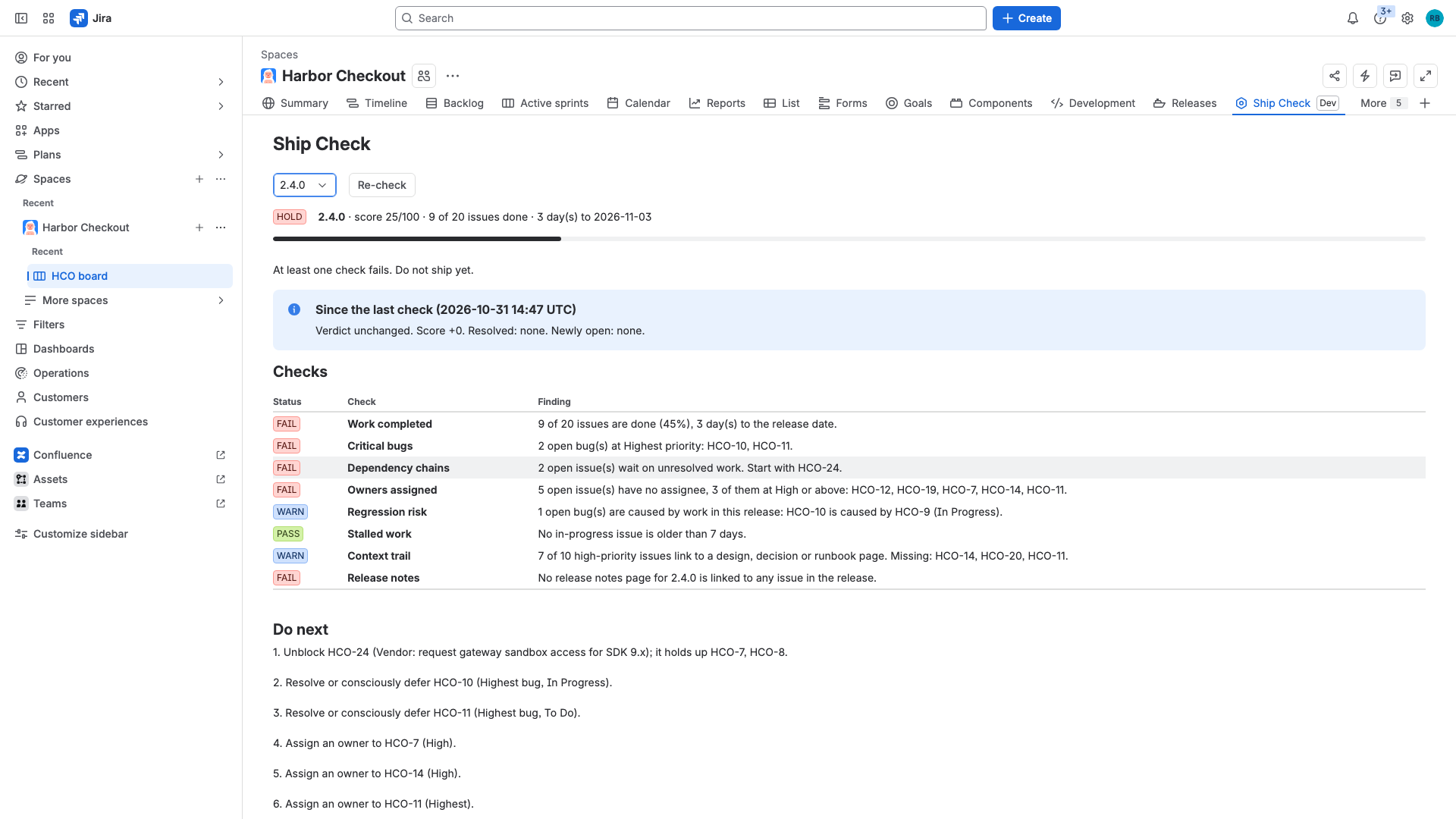
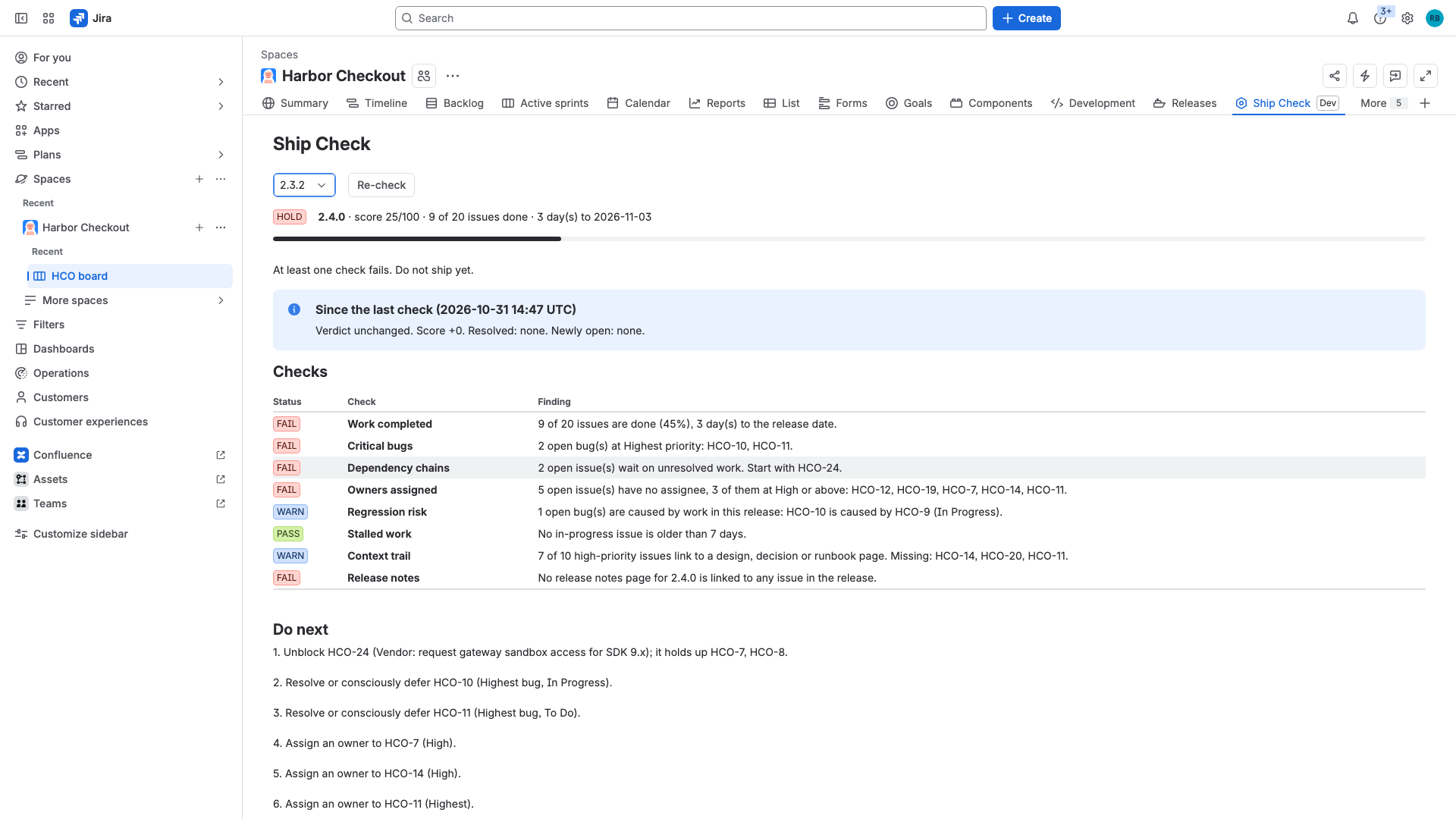
Pick a Jira version and Ship Check reads every issue that carries that fix version. It runs eight checks: how much work is done, open critical bugs, dependency chains, owners, regression risk, stalled work, linked context, and release notes. It returns a verdict (SHIP, AT RISK or HOLD), a score and an ordered list of what to do next.
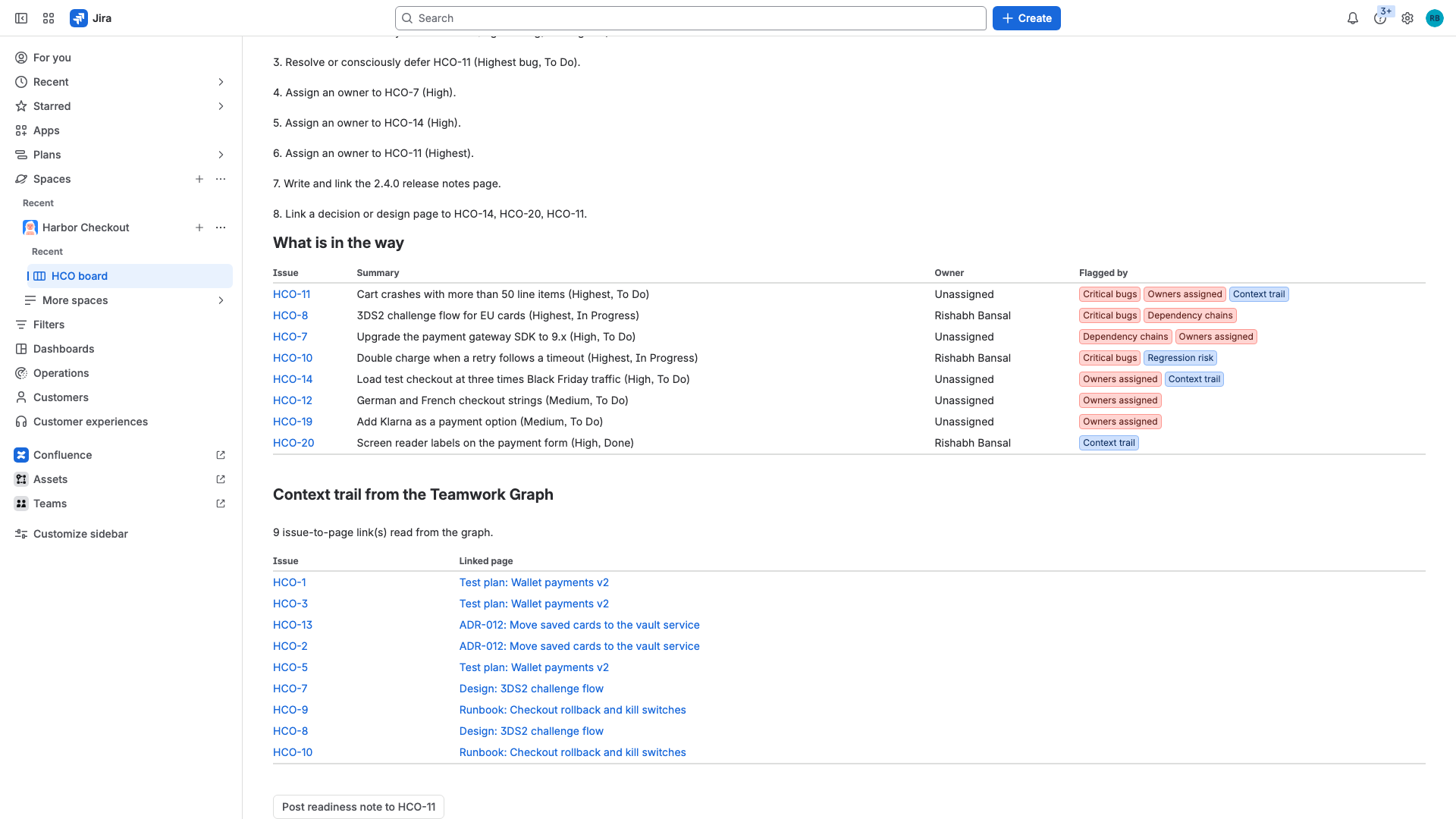
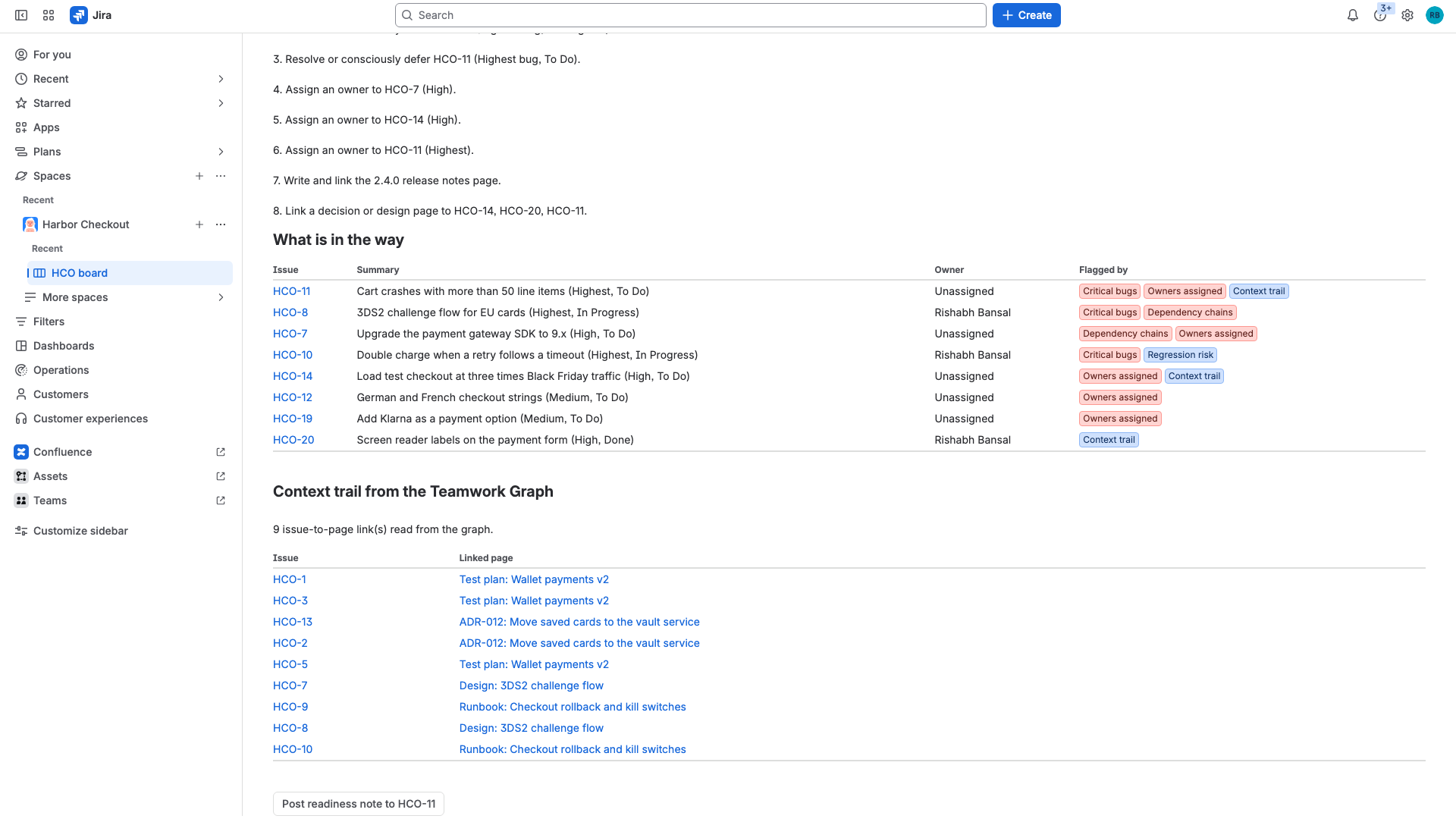
Two checks use the Teamwork Graph. The graph knows which Confluence pages are linked to which Jira work items, so Ship Check can tell that a Highest-priority issue has no design, decision or runbook page behind it, and whether a release notes page exists for the version. If the graph cannot be read, those two checks say "unknown" and the report marks its confidence as partial. They are never counted silently.
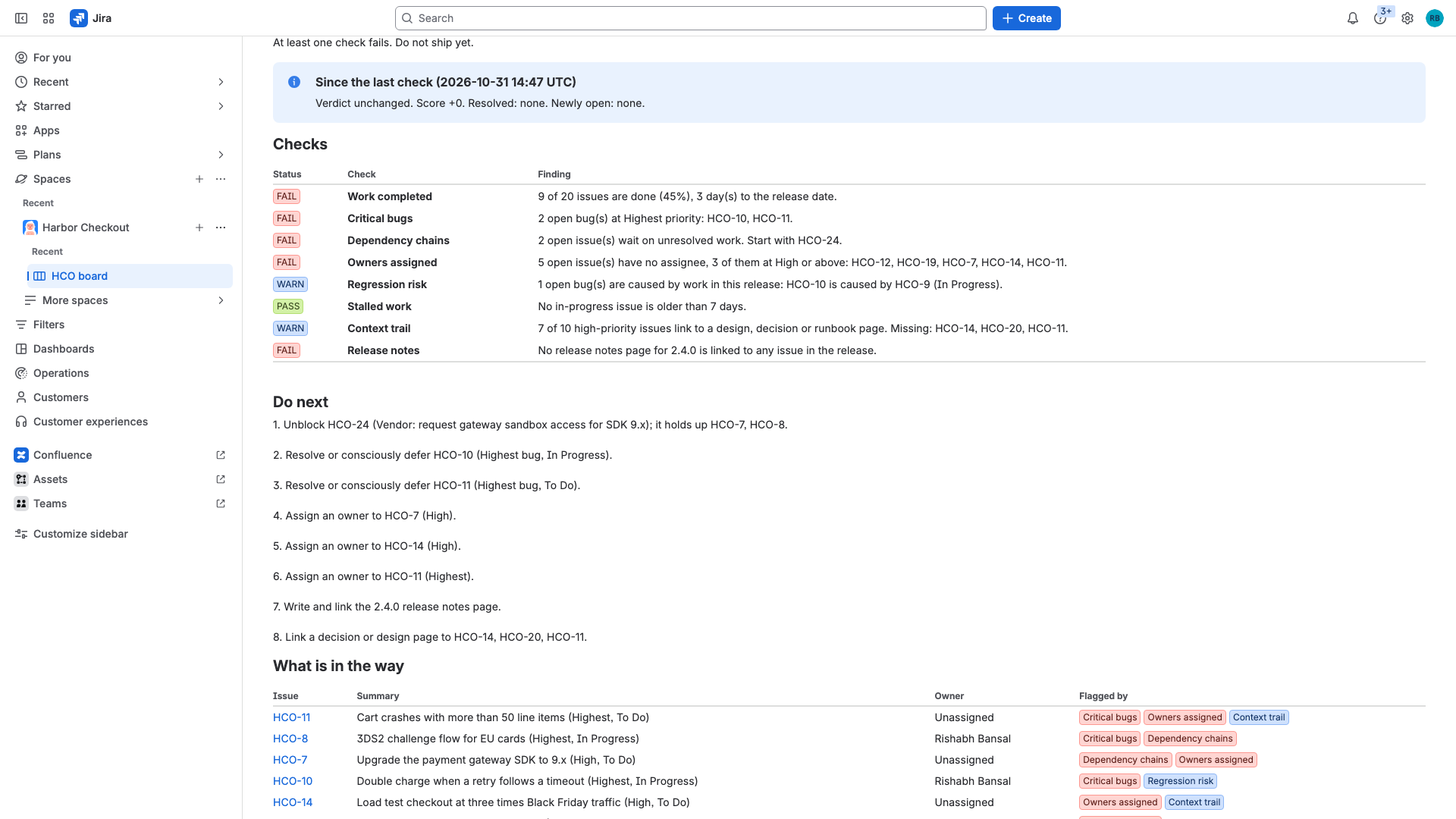
The dependency check follows "is blocked by" links through unresolved issues, including issues outside the release. On the sample project, HCO-8 waits on HCO-7, which waits on HCO-24 (a vendor access request that is not in the release). The report names HCO-24 as the first thing to unblock.
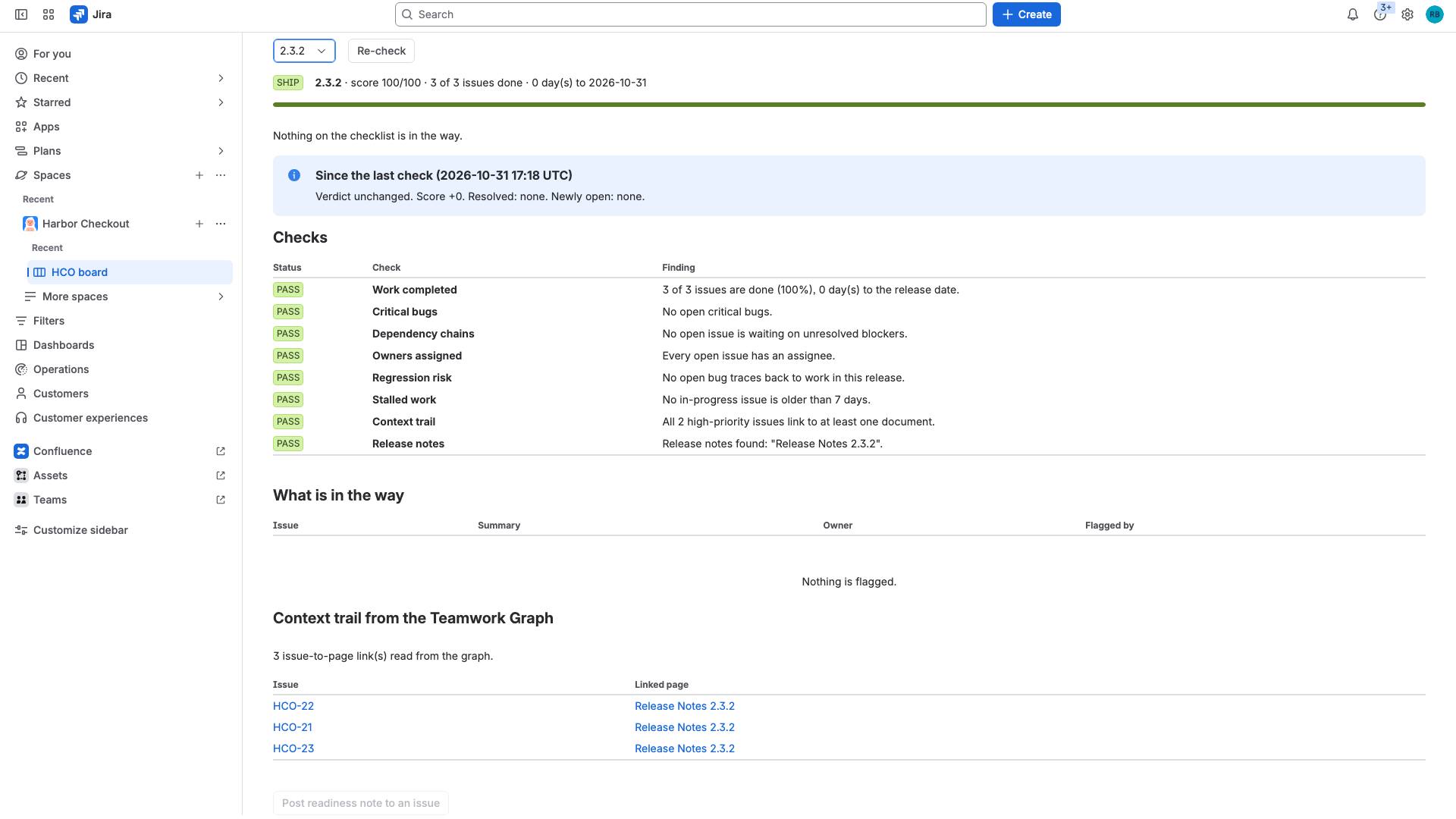
On the sample project, release 2.4.0 scores 25 out of 100 and gets HOLD: 9 of 20 issues are done, two Highest-priority bugs are open, five issues have no owner, and no release notes page exists. Release 2.3.2 gets SHIP, and its release notes page is found through the graph. The sample data is synthetic and is created by a script in the repository.
The same logic is also packaged as a Rovo agent, five reusable Rovo actions and a Rovo MCP server, so a person, a Rovo agent and an outside tool such as Claude Code or Cursor can ask the same questions and get the same facts. Every run is stored as a snapshot, so the next run shows what was resolved and what newly opened.
How it was built
Forge app on Node.js 24 with UI Kit. Modules: jira:projectPage, rovo:agent, rovo:mcp and five action modules (list-releases, assess-release, explain-blockers, find-context-gaps, post-readiness-note). The readiness rules are pure functions with no Forge or network code. A node:test suite of 23 tests covers every rule, blocker-chain tracing with cycles and outside issues, the "unknown" handling for missing graph data, snapshot diffs, and the full assess, explain and post-note flows against a stubbed Jira and a stubbed graph. Jira data comes from the Jira REST API as the calling user. Graph data comes from requestTeamworkGraph through persisted Cypher queries over the content_entity_links_entity relationship. Snapshots use Forge key-value storage.
AI tools used: Claude Code was used to write and review the code, and ElevenLabs text to speech narrates the video. The Rovo agent prompt tells the model not to state anything that is not in an action result.
How it meets the main technology requirement
Ship Check is a Forge app (manifest.yml with five module types) that integrates with Jira (project page, REST API as the user), Rovo (agent, reusable actions, MCP server) and the Teamwork Graph (read scopes read:graph:issue:jira and read:graph:page:confluence, persisted Cypher queries executed through requestTeamworkGraph). It was created during the submission period.
Bonus prizes to select
- Best apps with Teamwork Graph integration. Verified live: Ship Check reads the graph on a real Jira and Confluence site.
- Best Agents (rovo:agent plus reusable rovo:action modules). Implemented and deployed, not exercised live. See the verification note below.
- Best app with Atlassian MCP (rovo:mcp module). Implemented and deployed, not exercised live. See the verification note below.
- Not selected: Best Marketplace published app. Atlassian's docs say an app that needs more than one Atlassian app can only be listed as a paid app, and Ship Check needs both Jira and Confluence scopes for its graph reads. A listing would need a paid-app vendor setup with payment and tax details, so it was not submitted.
Description
Release managers and tech leads ask the same question before every release: can we ship this version? The answer usually comes from scanning a Jira board by hand. Ship Check answers it from the data and shows its evidence.
Pick a Jira version and Ship Check reads every issue that carries that fix version. It runs eight checks: how much work is done, open critical bugs, dependency chains, owners, regression risk, stalled work, linked context, and release notes. It returns a verdict (SHIP, AT RISK or HOLD), a score and an ordered list of what to do next.
Two checks use the Teamwork Graph. The graph knows which Confluence pages are linked to which Jira work items, so Ship Check can tell that a Highest-priority issue has no design, decision or runbook page behind it, and whether a release notes page exists for the version. If the graph cannot be read, those two checks say "unknown" and the report marks its confidence as partial. They are never counted silently.
The dependency check follows "is blocked by" links through unresolved issues, including issues outside the release. On the sample project, HCO-8 waits on HCO-7, which waits on HCO-24 (a vendor access request that is not in the release). The report names HCO-24 as the first thing to unblock.
On the sample project, release 2.4.0 scores 25 out of 100 and gets HOLD: 9 of 20 issues are done, two Highest-priority bugs are open, five issues have no owner, and no release notes page exists. Release 2.3.2 gets SHIP, and its release notes page is found through the graph. The sample data is synthetic and is created by a script in the repository.
The same logic is also packaged as a Rovo agent, five reusable Rovo actions and a Rovo MCP server, so a person, a Rovo agent and an outside tool such as Claude Code or Cursor can ask the same questions and get the same facts. Every run is stored as a snapshot, so the next run shows what was resolved and what newly opened.
How it was built
Forge app on Node.js 24 with UI Kit. Modules: jira:projectPage, rovo:agent, rovo:mcp and five action modules (list-releases, assess-release, explain-blockers, find-context-gaps, post-readiness-note). The readiness rules are pure functions with no Forge or network code. A node:test suite of 23 tests covers every rule, blocker-chain tracing with cycles and outside issues, the "unknown" handling for missing graph data, snapshot diffs, and the full assess, explain and post-note flows against a stubbed Jira and a stubbed graph. Jira data comes from the Jira REST API as the calling user. Graph data comes from requestTeamworkGraph through persisted Cypher queries over the content_entity_links_entity relationship. Snapshots use Forge key-value storage.
AI tools used: Claude Code was used to write and review the code, and ElevenLabs text to speech narrates the video. The Rovo agent prompt tells the model not to state anything that is not in an action result.
How it meets the main technology requirement
Ship Check is a Forge app (manifest.yml with five module types) that integrates with Jira (project page, REST API as the user), Rovo (agent, reusable actions, MCP server) and the Teamwork Graph (read scopes read:graph:issue:jira and read:graph:page:confluence, persisted Cypher queries executed through requestTeamworkGraph). It was created during the submission period.
Bonus prize write-ups
Best apps with Teamwork Graph integration: Ship Check consumes the graph to find the Confluence pages linked to each work item in a release. It queries as the invoking user. Because a missing scope returns an empty result instead of an error, it separates "the query failed" from "no rows" and reports unknown instead of guessing. Verified live on a real Jira and Confluence site: 3 issue-to-page links for release 2.3.2 and 9 for release 2.4.0, shown in the demo video.
Best Agents: the Ship Check agent (rovo:agent) uses five reusable rovo:action modules that other agents can invoke as tools. The only write action, post-readiness-note, uses the UPDATE verb so users confirm before it runs. The action functions are covered by unit tests with stubbed Jira and graph responses.
Best app with Atlassian MCP: the rovo:mcp module exposes four read-only actions as tools (list-releases, assess-release, explain-blockers, find-context-gaps). The repository includes skills/ship-check/SKILL.md for third-party agents. The endpoint is https://mcp.atlassian.com/forge/a93caeb3-a2e1-44d0-99dc-82fb67e345c3, and an admin enables the tools per site.
Verification note for the two Rovo bonus entries: both modules are in the deployed production version of the app, and the app installs with them. On the developer site used to build the app, Rovo chat was not available and Ship Check was not listed under Connected apps, so the agent and the MCP tools could not be run end to end there. The MCP endpoint does respond for this app: it returns OAuth discovery metadata and its consent screen names ship-check, but it reports that the account has no supported site because external exposure is not enabled. Judges whose site has Rovo enabled can exercise both.
Instructions for judges
- Open the installation link, choose a site that has Jira and Confluence, and install on both.
- In Jira, create a company-managed Scrum project with key HCO, then run: ATLASSIAN_SITE= ATLASSIAN_EMAIL= ATLASSIAN_API_TOKEN= node scripts/seed-demo-data.mjs (about one minute). Any project that has fix versions also works without seeding.
- Open the project and select the "Ship Check" tab. Choose version 2.4.0 (HOLD) and 2.3.2 (SHIP).
- The Context trail and Release notes checks need two persisted Teamwork Graph queries registered for the app (docs/teamwork-graph.md). Until they are, those two checks show "unknown" and the other six checks still work.
- For the agent and the MCP server, Rovo must be available on the site. An admin then enables the tools under Atlassian Administration, Apps, Sites, your site, Connected apps, Ship Check. In Rovo, choose the "Ship Check" agent and ask "Can we ship 2.4.0?" with project key HCO.
Known limits
- Verified live: the project page, Jira data, blocker chains, Teamwork Graph reads, snapshots.
- Not exercised live: the Rovo agent chat and the MCP tool calls (see the verification note).
- Persisted Teamwork Graph queries are registered per app id, so another copy of the app needs its own registration.
- Stalled-work detection is covered by unit tests only, because sample issues cannot be back-dated.
- The sample release dates were set relative to the day the data was seeded.
Built With
- atlassian-confluence
- atlassian-jira
- forge
- javascript
- model-context-protocol
- react
- rovo
- teamwork-graph
