ShieldMail: Protect Your Privacy with Anonymous Email Addresses
Inspiration
In an increasingly digital world, personal email addresses are constantly exposed to spam, phishing attempts, and data breaches. Signing up for services, newsletters, or browsing online often requires an email, leading to an overflowing inbox and privacy concerns. I was inspired to create ShieldMail as a robust solution to empower users with control over their digital identity, offering a secure and disposable way to interact online without compromising their primary inbox or personal data. My goal was to build a comprehensive platform, combining a powerful web application with a seamless Chrome extension, to provide temporary email addresses and advanced management features for both users and administrators. This entire project, from initial concept to final deployment, was meticulously crafted using Bolt AI, leveraging its unparalleled capabilities to streamline development and innovation at every stage.
What it does
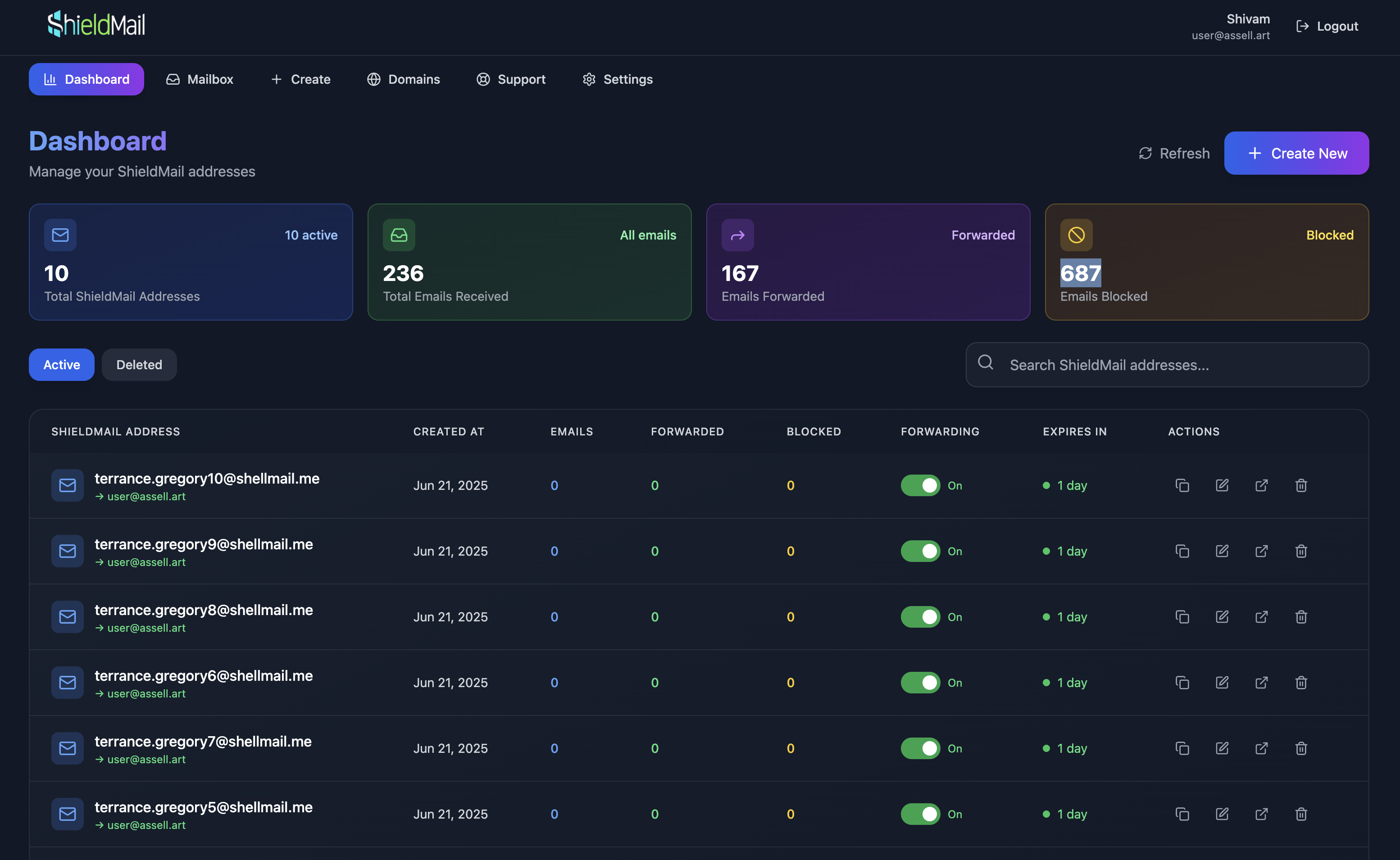
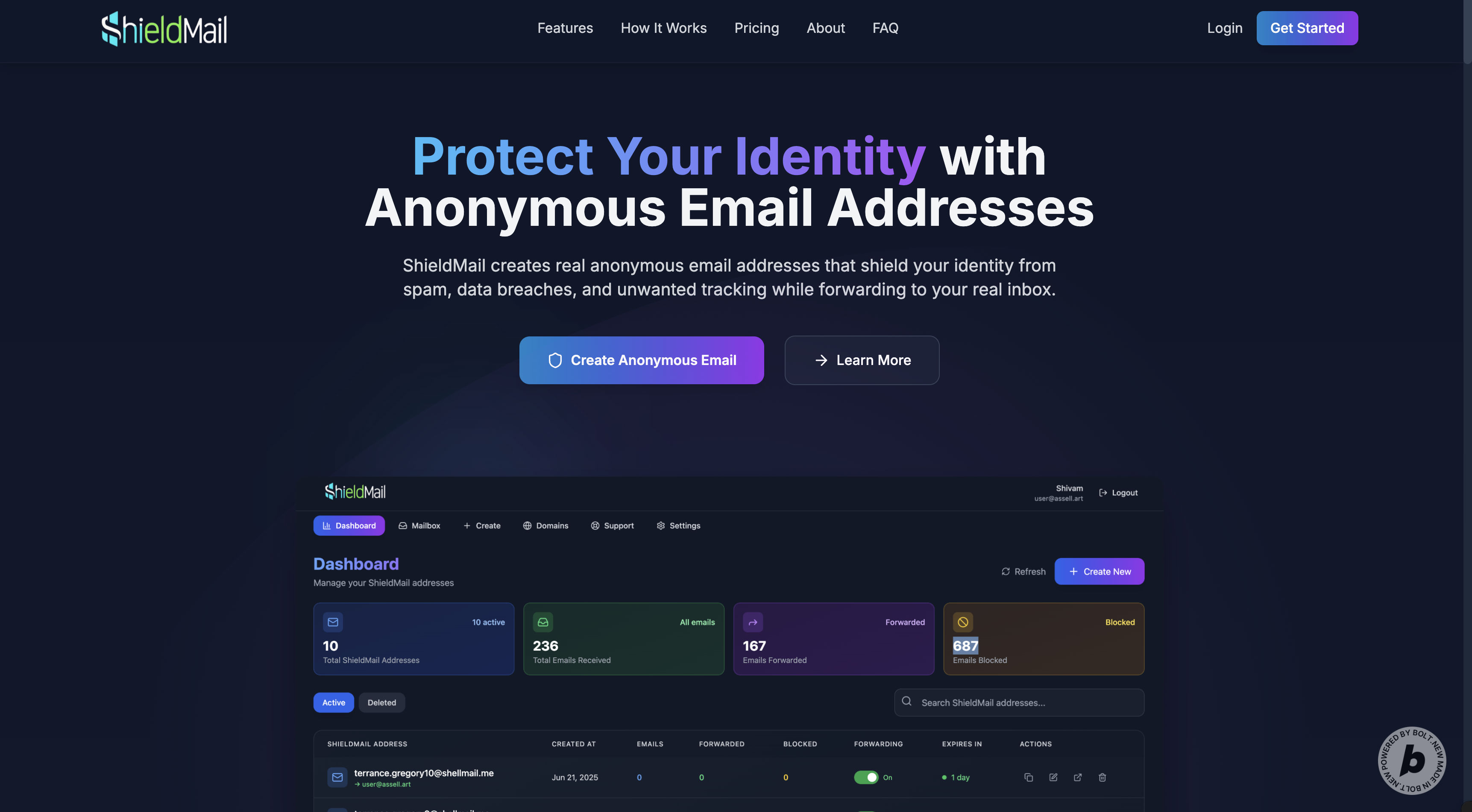
ShieldMail is a full-featured temporary email service designed for privacy and convenience, available as both a web platform and a Chrome extension, seamlessly integrated to enhance user experience.
For Users (Web Platform)
| Feature | Description |
|---|---|
| Temporary Email Creation | Instantly generate disposable email addresses with customizable prefixes and selectable domains. |
| Flexible Durations | Choose email lifespans from hours to permanent, with options for 1 month, 1 year, and permanent durations for premium users. |
| Real-time Inbox | Receive and view incoming emails in real-time within a clean, intuitive interface, including support for HTML content and spam status detection. |
| Email Forwarding | Securely forward received emails to a personal inbox, keeping the primary address hidden. Supports forwarding to multiple recipients for premium users. |
| Reply Functionality | Reply to emails directly from the temporary address, maintaining anonymity (Premium feature). |
| Compose Email | Send new emails directly from your temporary ShieldMail addresses (Premium feature). |
| Custom Domain Support | Premium users can add and manage their own domains for personalized temporary emails, complete with DNS verification (MX, SPF, DKIM, TXT records) and detailed status messages. |
| Tagging & Organization | Categorize temporary emails with custom tags for better management and filtering. |
| Account Management | Update profile, change password, and manage account status. |
| Activity Log | View a detailed log of all your user actions, including logins, email creations, and account changes. |
| Deleted Email Management | Move temporary emails to a "deleted" state, with options to restore them (re-activating them for a limited duration) or permanently delete and blacklist them to prevent reuse. |
| Transfer Email | Transfer ownership of a temporary email address to another user (Premium feature). |
| Extend Email Expiration | Extend the lifespan of existing temporary email addresses (Premium feature). |
| Subscription Management | Apply promo codes to subscriptions and activate discounted premium plans. |
For Users (Chrome Extension)
| Feature | Description |
|---|---|
| One-Click Email Generation | Generate temporary email addresses with a single click, either via a button next to email input fields or through the extension's popup. |
| Automatic Field Filling | Automatically fill email input fields on webpages with generated temporary emails, intelligently detecting various input types. |
| Customizable Email Creation | Specify prefixes, select domains, choose durations (24 hours, 7 days, 30 days, 1 year, permanent), and enable/disable forwarding directly from the popup. |
| Context Menu Integration | Right-click on email fields to generate and fill temporary emails. |
| Real-Time Email Management | View, copy, delete, or toggle forwarding for temporary emails within the popup. |
| Stats Dashboard | Monitor personal usage stats (total emails, active emails, received emails, expiring soon). |
| Settings Customization | Configure default duration, domain, forwarding email, and button visibility directly from the extension. |
| Auto-Login to Dashboard | Seamlessly log into the web dashboard using stored tokens, providing a unified experience. |
| Notifications | Display success/error notifications for actions like email generation or copying. |
| Onboarding Experience | Guides new users through account creation and extension usage with an interactive HTML page. |
For Administrators (Web Platform)
| Feature | Description |
|---|---|
| Comprehensive Dashboard | Insights into system health, user activity, and email statistics, including total users, active users, emails today, verified domains, and active temporary emails. |
| User Management | Create, edit, delete accounts, manage user roles (user/admin), and update account statuses (active/inactive/banned). View user-specific email and temporary email counts. |
| System Settings | Configure global SMTP settings (host, port, user, password, from email/name), email processing parameters (max emails per user, default duration, max email size), and toggle features like email forwarding, spam filtering, and auto-delete. |
| API Key Management | Generate and manage API keys for programmatic access, defining granular permissions (read, create, update, delete) for various resources (users, subscriptions, promo codes, emails, domains, temporary emails). |
| Promo Code System | Create and manage promotional codes with customizable discounts (percentage/amount), usage limits, validity periods, and applicability to different billing cycles (monthly/annual). |
| Blacklist Management | Block unwanted emails, domains, or IP addresses from interacting with the system, with reasons and creation timestamps. |
| Email Testing | Send test emails to verify inbound processing, check delivery status (sent, received, failed), and troubleshoot mail server configurations. |
| Log Viewer | Access and analyze various system logs (error, warning, info, API, security, performance, email processing) with filtering, search capabilities, and options to clear old logs. |
| Support Ticket System | Efficiently manage user support requests, view message history, reply to tickets, and update ticket statuses (open, in progress, resolved, closed). |
| Subscription Management | View all user subscriptions, assign and update user subscriptions (plan type, duration), and revert users to free plans. |
| Webhook Settings | Configure webhook URLs for various system events (new user registration, account deactivation, account deletion, promo code usage, subscription expiry, password reset). |
How I built it
ShieldMail was built as a robust full-stack application with a tightly integrated Chrome extension, leveraging modern technologies and innovative tools. The entire project was conceived, designed, and implemented using Bolt AI, which powered every line of code and every architectural decision. Here's the breakdown of my AI-driven development process:
Web Platform
- Frontend: Developed with React 18 and TypeScript for a dynamic, type-safe UI. Tailwind CSS enabled rapid, responsive styling, with Lovable (an AI design tool) providing key design elements and ensuring a visually appealing and user-friendly interface. Vite served as the lightning-fast build tool, and React Router DOM handled seamless navigation. Lucide React provided crisp, modern icons.
- Backend: Powered by PHP, delivering a scalable and secure API. It interacts with a MySQL database for all data storage, handling user authentication (JWT), email processing, and comprehensive admin controls.
- Email Ingestion: Integrated deeply with Postfix to pipe incoming emails to a custom PHP script. This script, largely generated by Bolt AI, is responsible for parsing complex raw email content (including multipart messages, HTML bodies, and attachments), extracting sender, recipient, subject, and body, and storing it in the database. It also performs real-time spam detection and updates email statuses (delivered, forwarded, spam).
- Database: MySQL serves as the central data repository, storing user profiles, temporary emails, received emails, domain configurations, system settings, activity logs, API keys, promo codes, and support tickets, all with optimized schema design for performance.
- Authentication: JWT (JSON Web Tokens) ensures secure user authentication and robust role-based access control, with features like password reset and 2FA setup.
Chrome Extension
- Manifest: Uses Manifest V3 for enhanced security and performance, with necessary permissions for storage, activeTab, scripting, tabs, and contextMenus. It supports all websites.
- Popup Interface: Built with HTML, JavaScript, and CSS, featuring a multi-screen interface (login, main, email created) with intuitive tabs. Styled with Tailwind-inspired CSS variables for a consistent look. Grok, an AI assistant, was instrumental in fine-tuning minor code adjustments and optimizing the popup's functionality and responsiveness.
- Onboarding Page: A responsive HTML page designed to guide new users through account creation and extension usage, featuring dynamic placeholder image generation for missing screenshots.
- Content Script: Injects a ShieldMail button next to email input fields, intelligently detected via advanced heuristics and a MutationObserver for dynamic page changes. It handles button positioning, real-time notifications with CSS animations, and direct field filling.
- Background Script: Manages all API calls, updates the context menu dynamically, and orchestrates quick email generation using a service worker.
- Email Generation: Generates realistic and unique random prefixes, leveraging a Namefake Proxy (an AI-powered service) for more authentic-sounding names, or falling back to adjective-noun combinations. Supports customizable durations and forwarding options.
- Security: Validates extension context, uses secure API calls with JWT, and includes robust error handling for authentication issues.
Additional Tools and Services
- Domain: Secured a free domain through Entri Ionos, enabling a professional and memorable URL (shieldmail.site) for the API and web platform.
- Demo Video: Created using Eleven Labs text-to-speech for high-quality narration, producing a professional and engaging demo for the hackathon submission.
- Deployment: Deployed on a ServerKade.com VPS server, with their exceptional support ensuring smooth setup, configuration, and scalability for both the web platform and API.
Challenges I ran into
Web Platform
| Challenge | Description |
|---|---|
| Complex Email Parsing | Handling diverse email formats (multipart, HTML, plain text) from various clients (e.g., Gmail, Outlook) and accurately extracting content and metadata, including spam status, required a highly robust and adaptable PHP parser. |
| Mail Server Integration | Configuring Postfix to correctly route incoming emails to my custom PHP script was a significant challenge, involving intricate setup of virtual aliases, transport maps, and ensuring proper permissions for the PHP process. |
| DNS Verification | Implementing a reliable system for verifying custom domains involved validating multiple DNS record types (MX, SPF, DKIM, TXT) across different DNS providers, compounded by unpredictable DNS propagation delays. |
| Real-time Updates | Ensuring instant email display in the user's inbox without constant, resource-intensive refreshes required careful optimization of polling mechanisms and database queries. |
| Security | Protecting against common web vulnerabilities such as SQL injection, XSS, and CSRF demanded rigorous input validation, output sanitization, secure password hashing, and robust JWT-based authentication. Implementing 2FA added another layer of complexity. |
Chrome Extension
| Challenge | Description |
|---|---|
| Dynamic Email Field Detection | Accurately identifying email input fields across a vast array of websites with varied HTML structures and dynamic content proved tricky, requiring sophisticated heuristics and a MutationObserver to adapt to changes. |
| Content Script Injection & Positioning | Seamlessly injecting and positioning the ShieldMail button next to email fields on dynamically loaded pages, while ensuring it didn't interfere with existing website layouts, required precise CSS and JavaScript manipulation. |
| Context Menu Integration | Coordinating context menu actions between the content script (which interacts with the page) and the background script (which handles API calls) involved complex messaging systems and error handling. |
| Performance | Minimizing the content script's impact on page load times and overall browser performance required highly optimized DOM queries and event listeners. |
| UI Constraints | Fitting a feature-rich popup interface into Chrome's strict 360x500px size limit demanded careful design choices and efficient use of space. |
Accomplishments that I'm proud of
- Seamless AI-Powered Integration: The web platform and extension work cohesively, syncing emails, domains, and settings via a shared API, all built and refined with the continuous assistance of Bolt AI.
- Intuitive User Experience: Both the web UI and extension popup are clean, fast, and user-friendly, a testament to the design principles guided by Lovable and the iterative refinements suggested by Bolt AI.
- Robust Email Handling: The system reliably receives, parses, stores, and forwards emails, including complex multipart messages and HTML content, with integrated spam detection and status updates.
- Comprehensive Admin Panel: Offers full control over users, domains, system settings, API keys, blacklisting, promo codes, and support tickets, making it production-ready and easily manageable.
- Effective Onboarding Experience: The extension's onboarding page effectively educates new users, significantly reducing the learning curve and showcasing the product's value from the start.
- AI-Driven Development: Using Bolt AI to build the entire project, with Grok fine-tuning the extension's code and Lovable crafting a stunning web frontend, showcases the transformative power of AI-assisted development.
What I learned
- Email Protocols: Deepened my understanding of complex email protocols, including SMTP, MX, SPF, DKIM, and the intricacies of mail server configurations, particularly with Postfix.
- Chrome Extension APIs: Mastered Manifest V3, service workers, content scripts, and the nuanced messaging systems required for robust browser extension development.
- Full-Stack Integration: Gained invaluable experience integrating diverse technologies like React, PHP, MySQL, Postfix, and Chrome APIs into a cohesive and high-performing product.
- Security Best Practices: Prioritized security at every layer, from JWT authentication and 2FA implementation to rigorous input validation, output sanitization, and secure account deactivation/deletion processes.
- AI Tools in Practice: Leveraged Bolt AI for rapid development, Grok for targeted code tweaks, and Lovable for design, highlighting the immense potential of AI-driven workflows in accelerating project delivery and enhancing quality.
- Deployment & Infrastructure: Gained hands-on experience with VPS deployment on ServerKade.com and domain management via Entri Ionos, understanding the practicalities of bringing a full-stack application online.
What's next for ShieldMail
Web Platform
| Planned Feature | Description |
|---|---|
| Advanced Spam Detection | Integrate more sophisticated spam filtering solutions like SpamAssassin or Akismet for even higher accuracy. |
| User-Defined Rules | Enable users to create custom rules for automated email handling (e.g., auto-delete emails from specific senders, auto-forward based on subject keywords). |
| Multiple Payment Gateways | Expand subscription payment options by integrating additional providers beyond the current setup. |
| Analytics & Reporting | Develop more detailed usage analytics and reporting features for the admin dashboard, providing deeper insights into system performance and user behavior. |
| Mobile Applications | Develop native iOS and Android applications for on-the-go access to ShieldMail features. |
| API Expansion | Continuously add more endpoints to the external API, enabling broader developer integrations and custom solutions. |
| Performance Optimization | Further optimize database queries and server processing for even greater scalability and responsiveness. |
Chrome Extension
| Planned Feature | Description |
|---|---|
| Enhanced Field Detection | Implement machine learning models for even more accurate and robust email field detection across diverse websites. |
| Custom Button Styling | Allow users to customize the appearance and placement of the ShieldMail button on webpages. |
| Keyboard Shortcuts | Add customizable keyboard shortcuts for quick email generation and field filling. |
| Cross-Browser Support | Port the extension to Firefox, Edge, and other browsers. |
| Offline Mode | Implement caching mechanisms to allow users to view cached emails and settings even with limited or no internet connectivity. |
| Advanced Notifications | Support real-time email arrival notifications with customizable sounds and visual alerts. |
| Deeper Integration | Sync more web platform features, such as user-defined tags and rules, directly into the extension for a more unified experience. |
General
- Community Feedback: Actively incorporate user feedback to refine existing features, prioritize new developments, and enhance the overall user experience.
- Marketing & Outreach: Leverage the professional demo video created with Eleven Labs for broader promotion and engagement.
- Scalability & Infrastructure: Continue working closely with ServerKade.com to optimize VPS performance and infrastructure to support a rapidly growing user base.
ShieldMail, powered by Bolt AI, Entri Ionos, Eleven Labs and ServerKade.com, stands as a testament to the power of modern tools and AI in building privacy-focused solutions for the digital age.
Downloads
You can download the ShieldMail Chrome Extension to enhance your browsing experience with privacy-focused email solutions.
Download the Chrome Extension
Install it by enabling Developer mode and using "Load unpacked".
Want to learn more about ShieldMail?
Don't stop now! 🚀 Visit shieldmail.site to explore the platform and try the web application.
Demo Account
link Email: [email protected] Password: #FOmUO2$^QrbG!IK


Log in or sign up for Devpost to join the conversation.