

Inspiration
The modern digital experience is filled with repeated interactions—logging into portals, joining recurring Zoom calls, paying bills, opening dashboards, and performing routine clicks across the web. These repetitive tasks lead to fragmented attention, wasted time, and constant context switching. We wanted to build something that would eliminate these low-value moments and give users back their focus. SHERPA was created as a solution to quietly observe user behavior and intelligently automate what should no longer require manual effort.
What it does
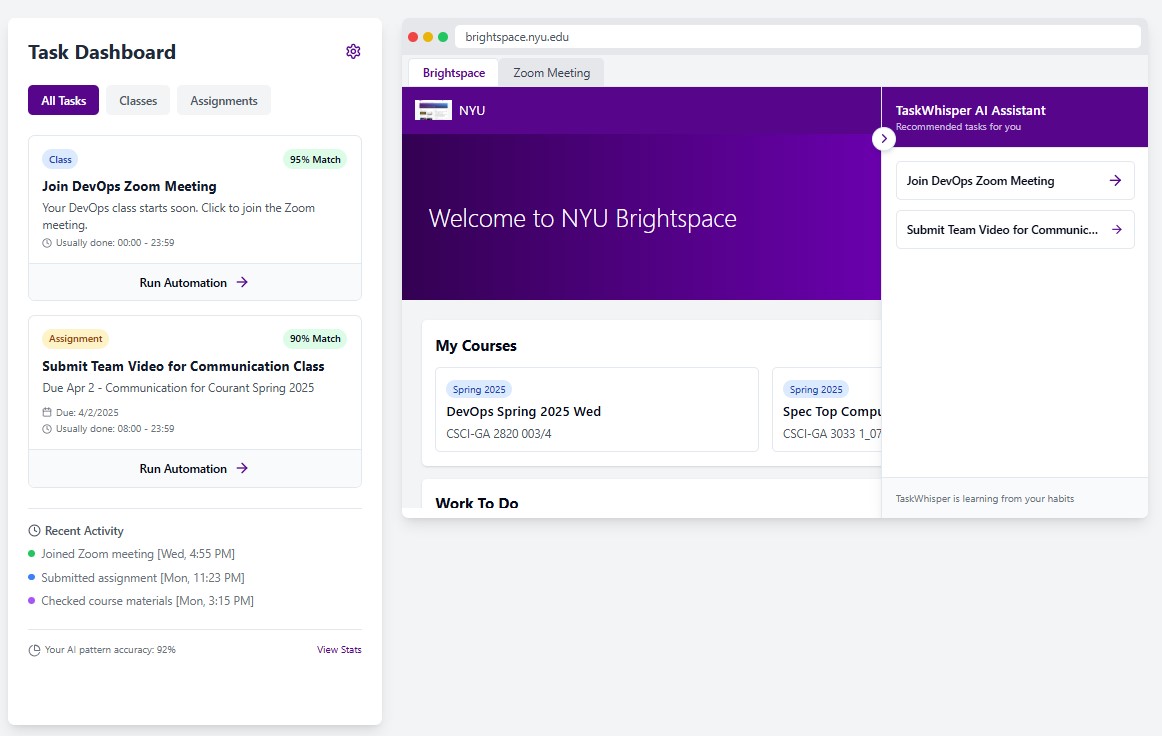
SHERPA is a browser native automation tool that learns how you use the web by passively capturing visits, clicks, and behavioral patterns. It identifies recurring workflows, such as logging into banking portals or joining weekly meetings, and then prompts the user to automate those tasks at the right moment. It requires no setup or manual programming. Over time, SHERPA becomes smarter, helping users reclaim their time by eliminating digital repetition.
How we built it
SHERPA is built as a Chrome extension using the native Chrome Extension APIs. These APIs allow us to track and store user interactions entirely on the client side, with no external dependencies.
Chrome APIs used:
chrome.runtimefor message passing between content and background scriptschrome.storage.localfor secure, client side log storagechrome.tabsandchrome.scriptingfor tracking user tab activity and injecting automation prompts
Logs are captured in structured JSON format and stored locally inside the user's browser, making the tool secure, fast, and private.
For the user interface, we built a lightweight frontend using:
- Vite for high-speed development
- TypeScript for safety and maintainability
- React for dynamic, component-based views
- Tailwind CSS and shadcn-ui for a clean and consistent UI design
Challenges we ran into
- Designing a logging system that respects user flow and privacy while still capturing meaningful interactions
- Detecting recurring behavior across time without relying on exact matches
- Managing state across background scripts, tab activity, and UI prompts in a clean and maintainable way
- Making automation suggestions feel timely and helpful, not intrusive
Accomplishments that we are proud of
- Built an end-to-end local-first automation layer using only browser APIs
- Created a seamless interface that looks and feels like a native part of the user's digital routine
- Enabled zero-config automation where the system learns from behavior without the need for user setup
- Delivered a working prototype that can detect patterns and prompt automation based on real-world usage
What we learned
- The browser is a powerful environment for intelligent automation when used carefully
- Real value can be created from simple behavior logs if you structure and analyze them correctly
- A well-timed, well-designed automation prompt can reduce friction and build trust with users
- Building a passive, intelligent system that does not interrupt or overwhelm the user is a real design challenge
What's next for SHERPA
While SHERPA currently exists as a browser extension, our long-term goal is to expand it into a cross-platform automation tool that lives across devices and environments. We plan to extend SHERPA to work on desktop and mobile platforms and eventually package it as a standalone application.
In future iterations, SHERPA will integrate AI models to learn deeper behavioral patterns, adapt to more complex workflows, and intelligently determine when and how to automate user actions across the digital environment. This will allow SHERPA to become not just a tool for task automation, but a platform that understands how people work and helps them work better.
Our vision is to eliminate the friction of daily digital routines and let people focus on what actually matters.


Log in or sign up for Devpost to join the conversation.