-
-
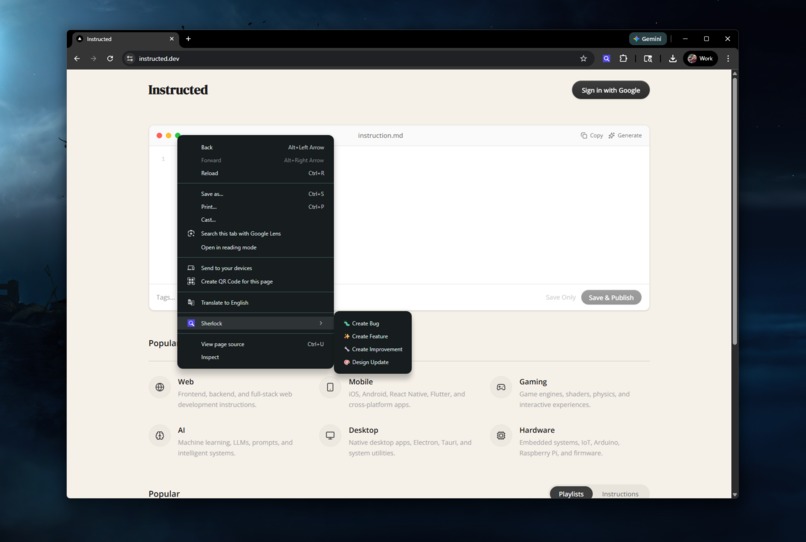
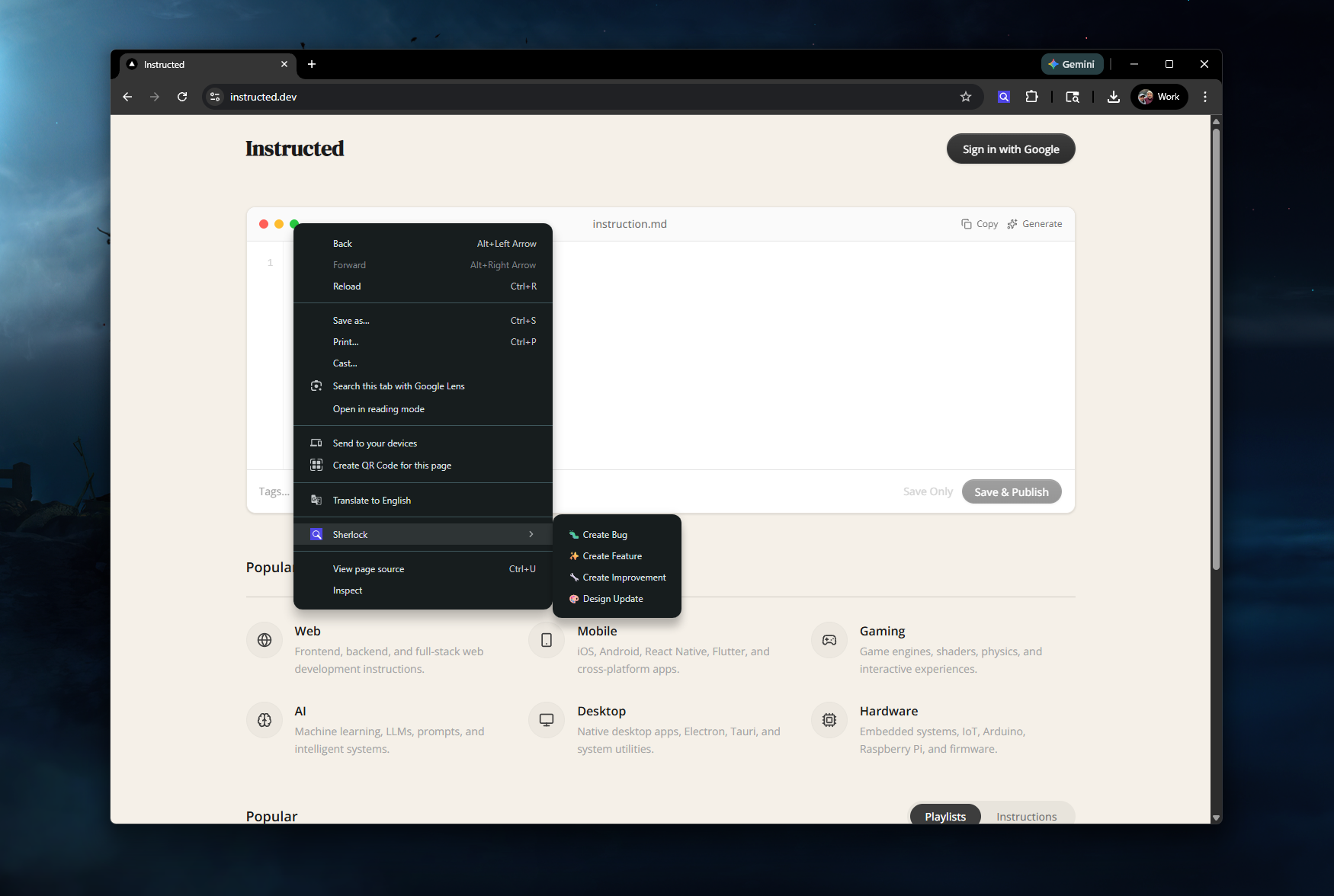
Right click to navigate to the Sherlock menu options
-
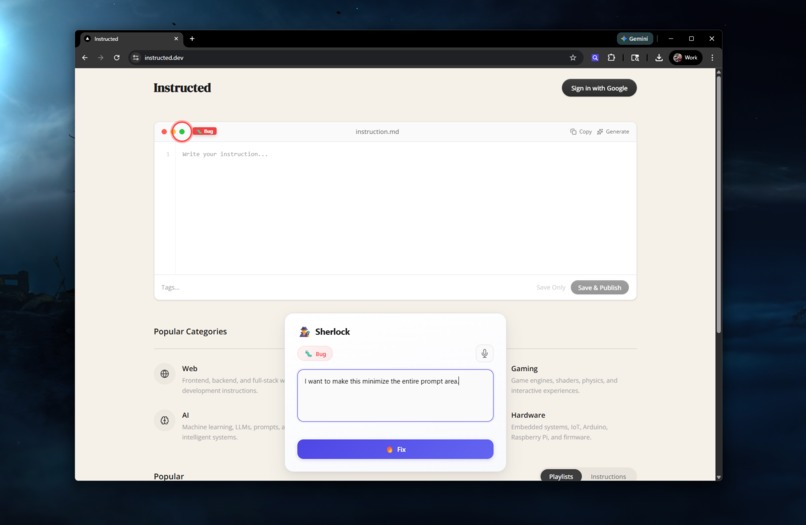
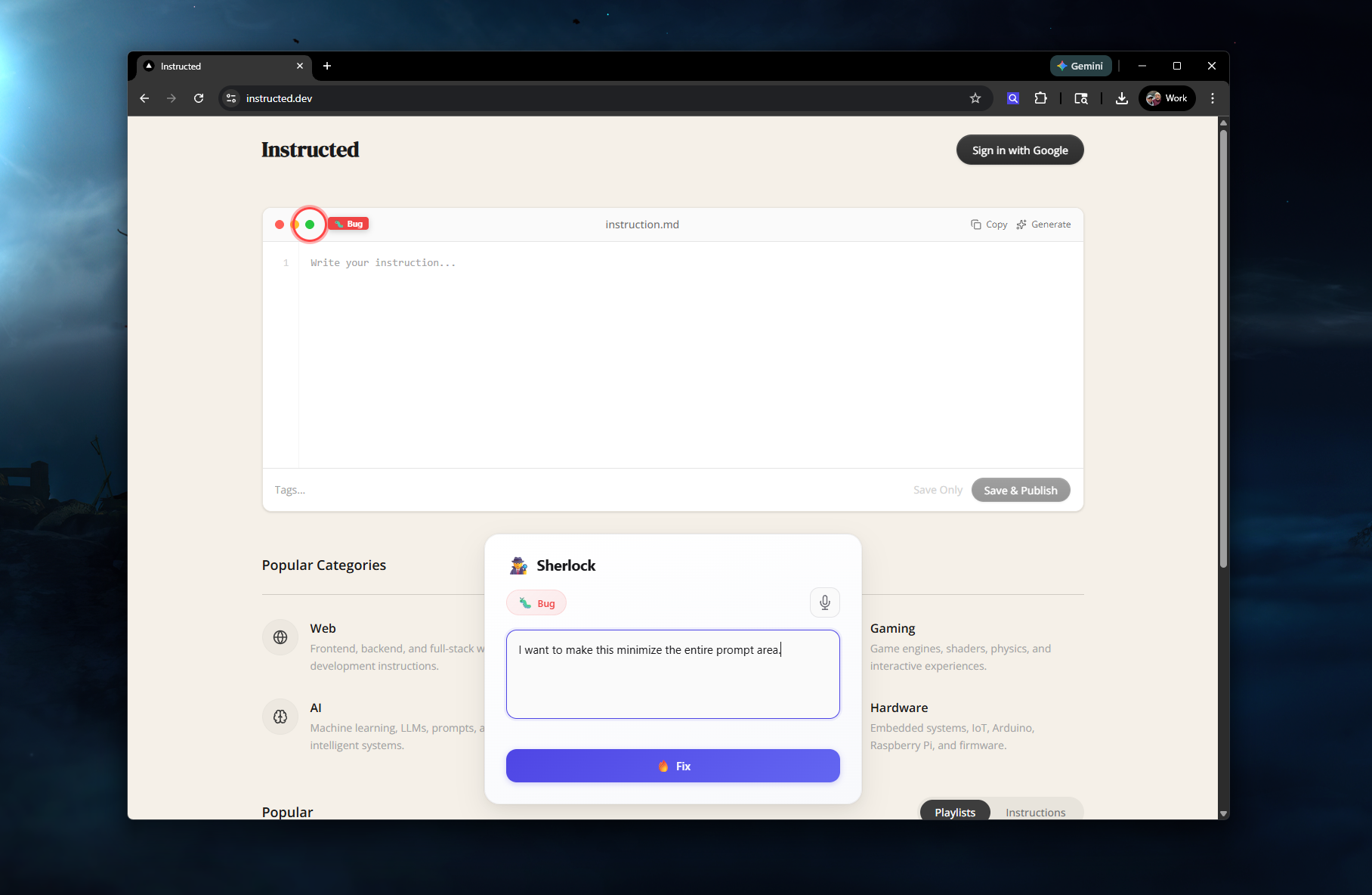
Enter your bug or idea and it will automatically add the screenshot + additional context. Once done just press Fix
-
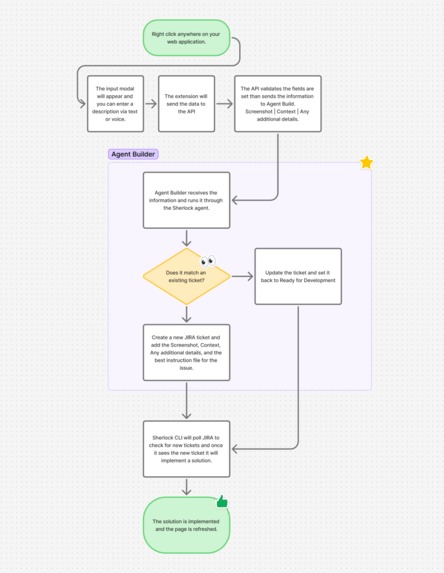
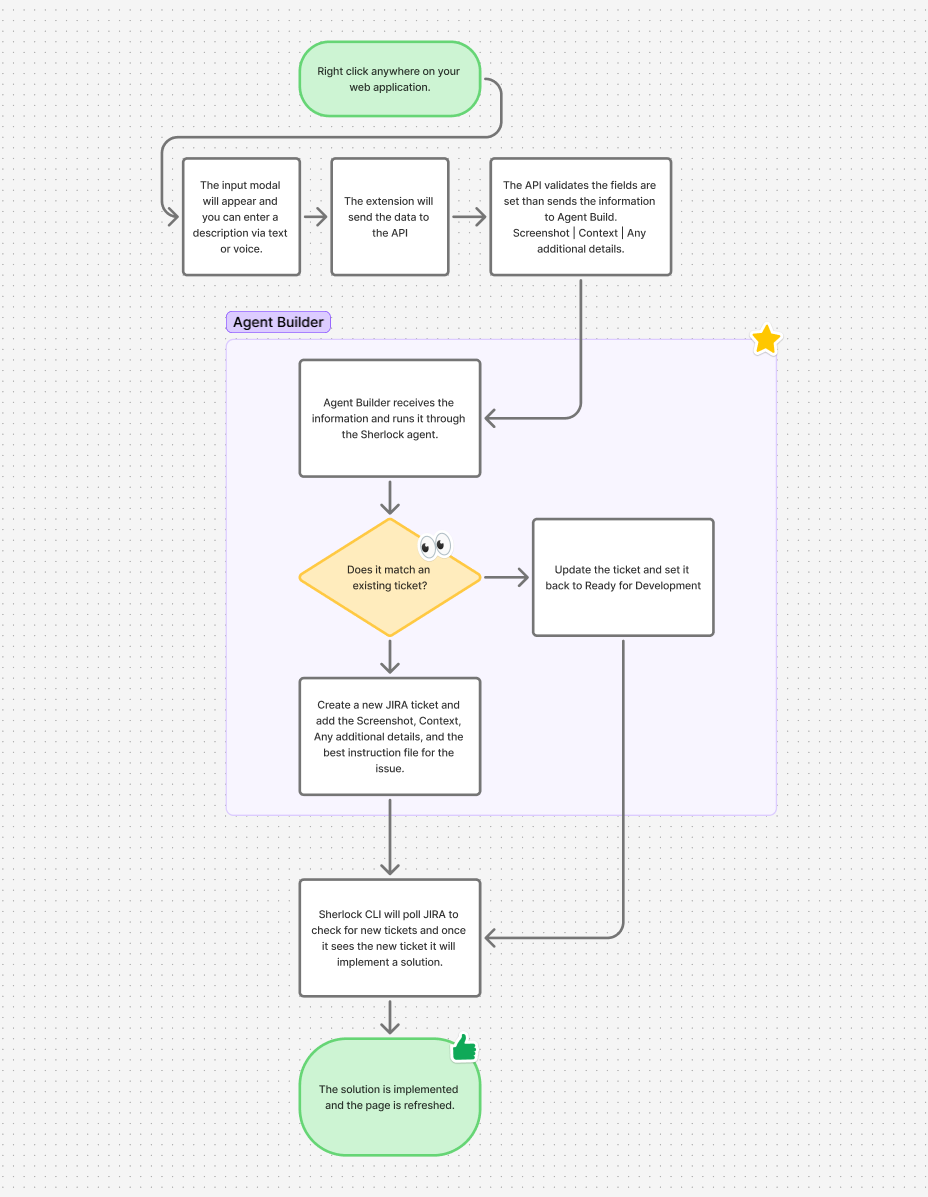
How an issue goes from identified to resolved with the help of Agent Builder
-
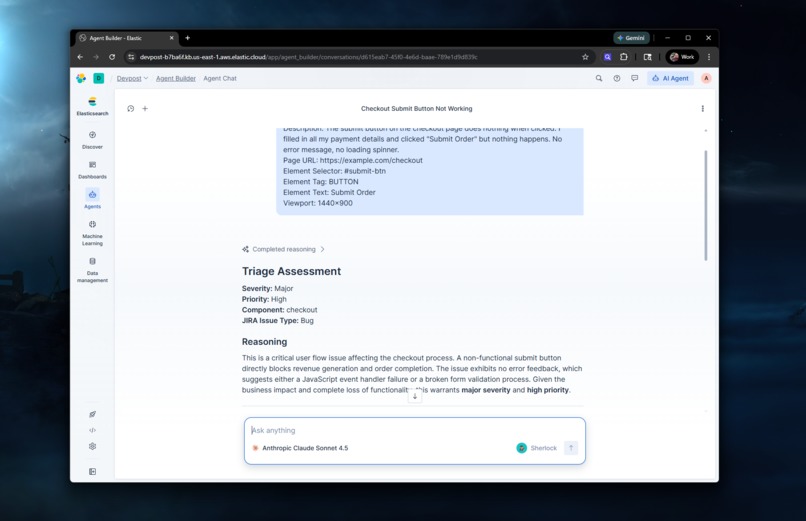
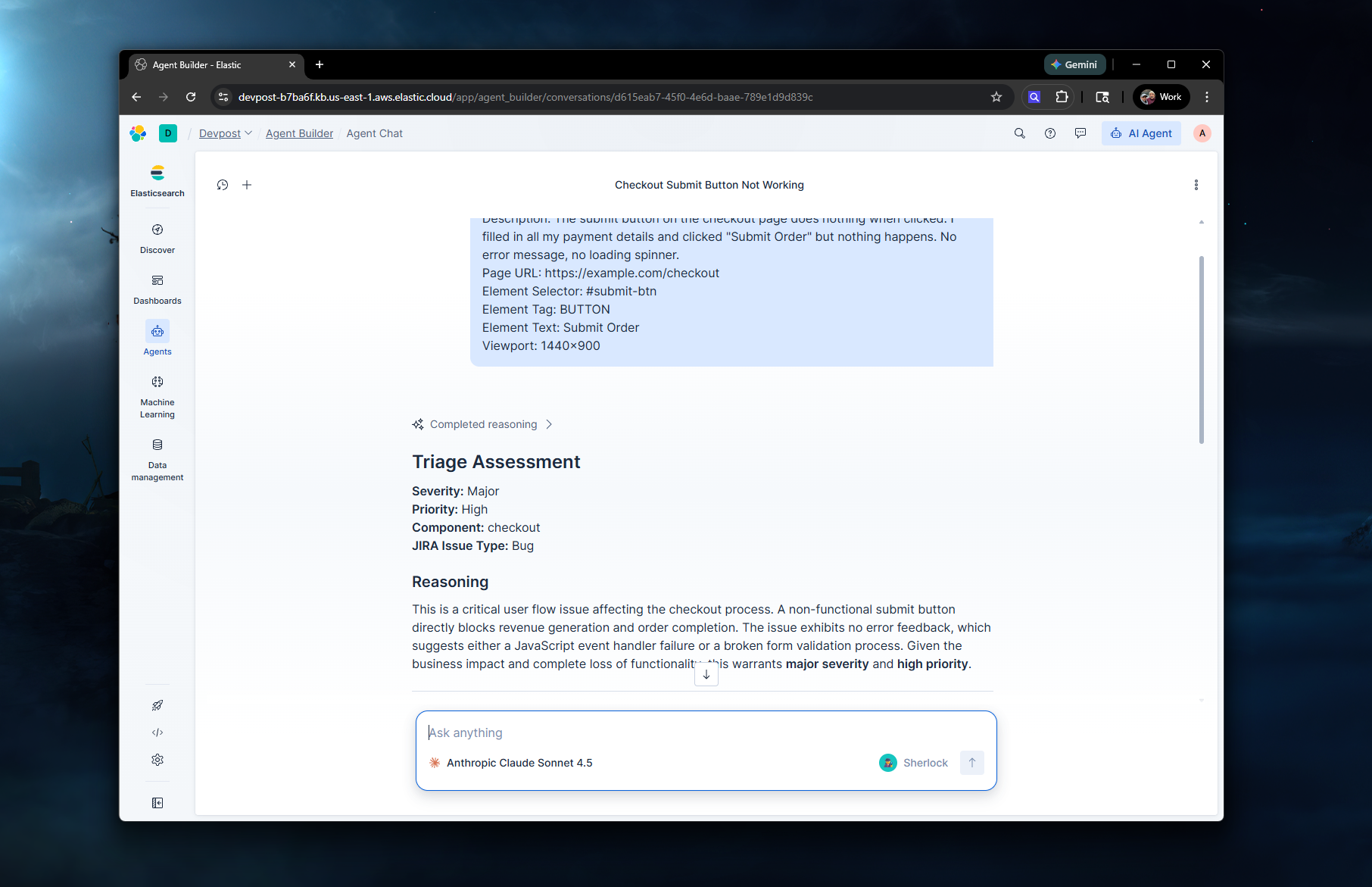
Directly using the Agent Builder agent to validate it works
-
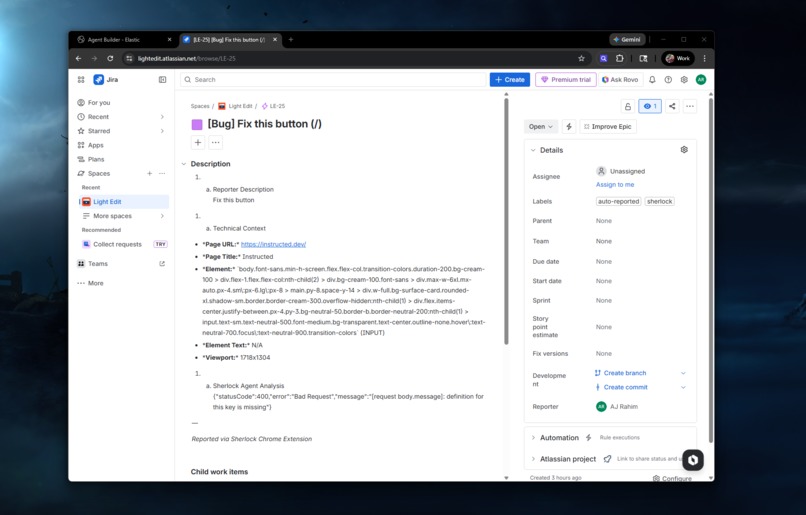
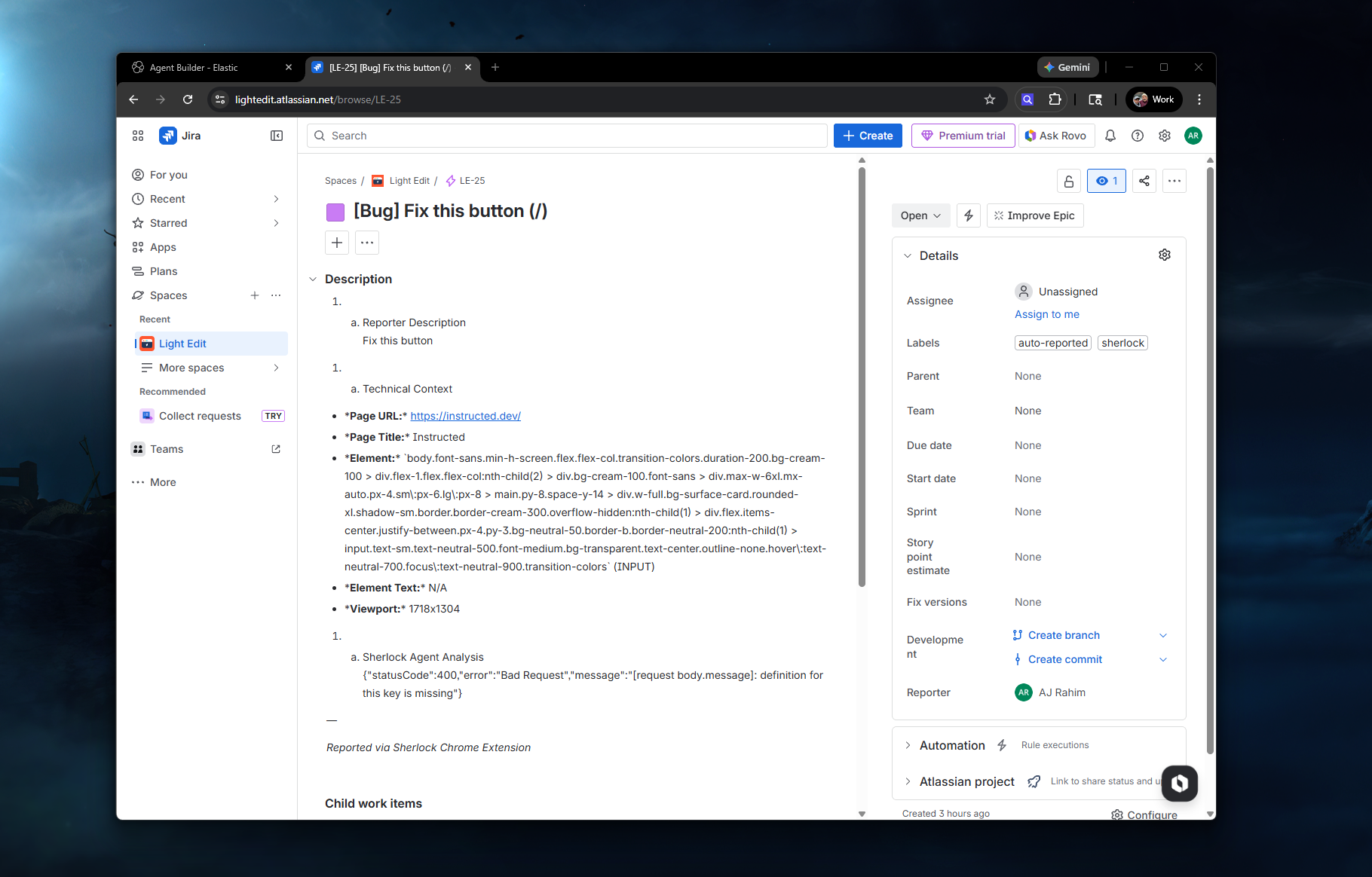
The JIRA ticket created via the Agent Builder flow
-
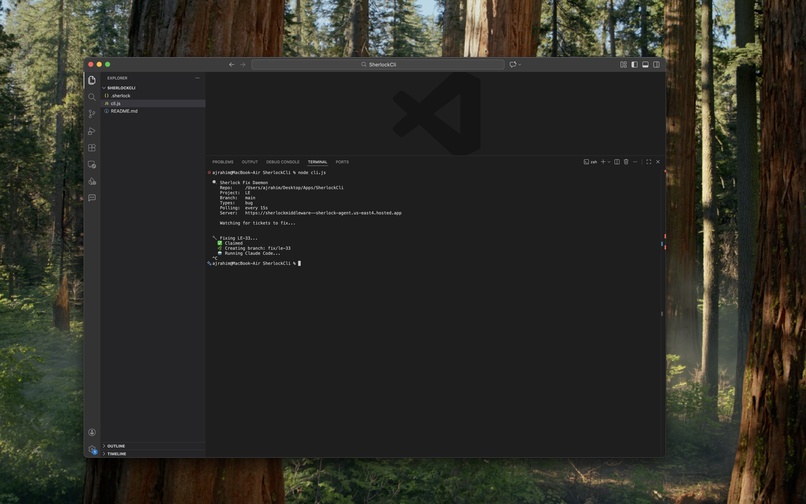
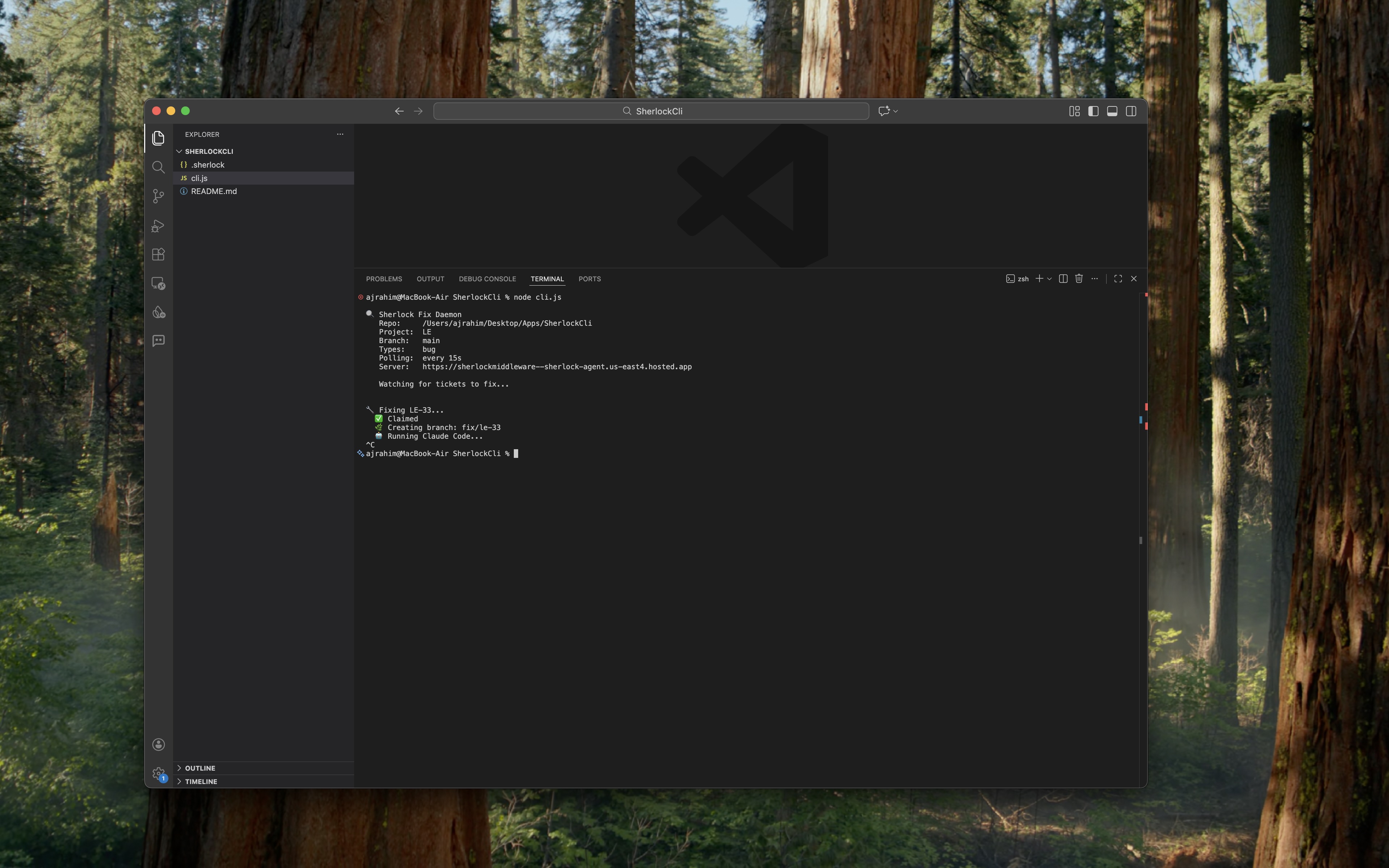
Sherlock CLI which polls JIRA and fixes code via Claude Code
Inspiration
Every team has the same broken feedback loop. Someone spots a bug during a demo, a QA tester finds something weird, a product owner notices a design issue, and now the work begins. Open JIRA. Write a ticket. Try to describe what you saw. Forget the URL. Forget the element. Attach a screenshot that doesn't show enough context. Assign it to someone. Hope the developer understands what you meant. Wait.
That process hasn't changed in years. The only people who can efficiently report and fix issues are the ones who already know the codebase, the ticket tracker, and the tools. Everyone else just sends a Slack message that gets buried.
We wanted to flip that. What if anyone on the team could right-click on the thing that's broken, say what's wrong, and have the entire pipeline from triage to ticket to fix happen automatically?
What It Does
Sherlock is a Chrome Extension backed by an Elasticsearch Agent Builder agent that turns browser feedback into triaged JIRA tickets and automated code fixes.
The flow works like this:
Right-click. You're on any web page. You see something wrong. Right-click the element and pick the issue type from the Sherlock context menu: Bug, Feature, Improvement, or Design Update.
Describe. A modal appears over the page with the element highlighted. Type what's wrong or use voice input. The extension captures the screenshot, element selector, page URL, viewport, and all the technical context automatically.
Triage. The report hits the middleware, which sends everything to the Sherlock agent in Agent Builder. The agent uses ES|QL tools to search for duplicate reports, pull relevant knowledge base context, check bug trend data, and then classifies the issue with a severity, priority, component, and JIRA issue type. It reasons through why it made those decisions.
Ticket. A JIRA ticket gets created with the agent's full analysis, the reporter's description, technical context, and the screenshot. Labels like sherlock and auto-reported get attached. The report gets indexed in Elasticsearch for future duplicate detection.
Fix. A local CLI daemon (sherlock watch) running in the developer's terminal picks up the new ticket, claims it, and dispatches Claude Code to fix the issue in the actual codebase. It creates a branch, makes the fix, runs tests, pushes, and opens a PR. The JIRA ticket gets updated with the result.
Notify. The extension gets a notification that the fix is ready for review. The whole loop from right-click to PR can happen in minutes without the reporter ever leaving their browser.
How We Built It
Sherlock is built on three layers that each handle a distinct part of the pipeline.
The Sherlock Agent lives in Elasticsearch Agent Builder and handles all the intelligence. It's a custom agent with specific triage instructions and three ES|QL tools: search_similar_reports for duplicate detection using page URL matching, bug_trends for tracking open issues by component, and search_knowledge for pulling in project documentation and known issues. The agent uses these tools to reason through every report before generating a structured ticket. Two Elasticsearch indices power this: sherlock-reports for all incoming reports with semantic search enabled, and sherlock-knowledge for project context and documentation.
The Middleware is a Node.js server that orchestrates everything. It receives reports from the Chrome Extension, calls the Agent Builder converse API for triage, creates JIRA tickets through a Kibana connector (with direct API fallback), indexes everything in Elasticsearch, and exposes a queue system for the CLI daemon to poll for work and report results. It also handles status updates and JIRA comments when fixes complete.
The Chrome Extension is the user-facing piece. Manifest V3, context menus for issue types, element detection with visual markers, a modal with voice and text input, automatic screenshot capture with the marker composited in, and background polling for fix notifications. It talks to one endpoint and never needs to know about Elasticsearch, JIRA, or the agent directly.
The CLI Daemon runs locally in the developer's terminal. It reads a .sherlock config file from the repo root, polls the middleware for tickets ready to fix, claims them, runs Claude Code with the full issue context, handles branching and PR creation, and reports results back. This keeps the auto-fix logic on the developer's machine where the code actually lives.
JIRA integration uses Elastic's built-in Kibana connector, which keeps ticket creation inside the Elastic ecosystem. The connector was set up through Dev Tools and handles issue creation, comments, and status updates.
Challenges We Ran Into
Getting Agent Builder's ES|QL tools to work correctly took more iteration than expected. The tools require explicit index mappings before they'll recognize columns, and if an index gets auto-created with dynamic mapping, the ES|QL queries silently break. We had to delete and recreate indices with proper schemas and seed them with documents before the agent could use its tools. Parameter naming was another gotcha, the UI validator rejects certain formats, so we had to switch to camelCase for tool parameters.
Serverless Elasticsearch doesn't support Workflows, which was our original plan for orchestrating the JIRA and Claude Code steps. We pivoted to the middleware approach, which ended up being cleaner and more flexible for the demo anyway.
Accomplishments We're Proud Of
The thing we're most proud of is the scope of what Sherlock connects. A right-click in a browser triggers an AI agent that reasons through the issue, creates a structured ticket in JIRA, indexes the report for future intelligence, and kicks off an automated fix in the actual codebase. That's four disconnected systems (browser, Elasticsearch, JIRA, and the local development environment) glued together through one pipeline that anyone on the team can trigger.
But the bigger point is who can trigger it. Sherlock isn't just a developer tool. A QA tester, a product owner, a designer, a stakeholder in a demo, anyone who can see the product and describe what's wrong now has a direct path from that observation to a fix. They don't need to know how to write a good bug ticket. They don't need to know what component is responsible. They don't need to assign it to the right person. The agent handles all of that. That kind of access changes how teams operate and how fast things get resolved.
The duplicate detection is another piece that gets better over time. Every report feeds Elasticsearch, so the agent gets smarter about recognizing patterns, flagging recurring issues, and avoiding duplicate tickets. The system learns from its own history.
What We Learned
Agent Builder is powerful once you understand how it wants to be used. The combination of custom instructions, ES|QL tools, and the built-in search tool gives you a lot of control over how the agent reasons through problems. But the tooling is still early, so you need to be deliberate about index design, parameter naming, and seeding data. The agent is only as good as the data and tools you give it.
ES|QL as a tool interface is an interesting pattern. Instead of writing code to query your data, you define parameterized queries and let the agent decide when and how to use them. That means the agent can search for duplicates, check trends, and pull context without any custom code on the agent side. The logic lives in the query definitions and the agent's instructions.
The biggest lesson was around architecture. Our original plan had Claude Code running on the server, but moving it to a local CLI daemon was the right call. The developer's machine is where the code lives, where the tests run, and where the git config is set up. Trying to replicate that on a server would have been fragile and unreliable. The claim-based queue pattern (where the daemon polls, claims, fixes, and reports back) keeps everything clean and lets multiple developers run the daemon in their own repos simultaneously.
What's Next for Sherlock
Sherlock works end-to-end as a proof of concept and we want to push it further.
Semantic duplicate detection. Right now duplicate search is based on page URL matching. We want to leverage the semantic_text fields we already have in the index to do true semantic similarity matching, so the agent can catch duplicates even when they're reported with completely different wording or from slightly different pages.
Team dashboards. We have the data in Elasticsearch to build Kibana dashboards showing reports over time, severity distributions, top components by open bugs, auto-fix success rates, and average resolution time. That turns Sherlock from a pipeline into a feedback intelligence layer.
Multi-repo support. The CLI daemon already reads a .sherlock config from the repo root. We want to support multiple repos polling the same middleware, with component-based routing so the right repo's daemon picks up the right ticket automatically.
Beyond bugs. The context menu already supports Feature, Improvement, and Design Update types. We want to build out the agent's handling of these so feature requests flow into Stories with acceptance criteria, design updates generate visual comparison tasks, and improvements get routed with appropriate context. The same pipeline, but smarter about what each issue type needs.
Built With
- agentbuilder
- chrome
- elasticsearch
- javascript
- node.js


Log in or sign up for Devpost to join the conversation.