Inspiration
As Linux beginners, we constantly struggled with cryptic error messages and commands that worked on Stack Overflow but failed on our systems. We'd copy-paste apt install commands only to realize we were on Arch Linux. Every AI terminal tool we tried was context-blind—they didn't know what distro we ran, what packages we had, or why commands failed. We wanted an AI assistant that actually understood OUR system, not just generic Linux.
What it does
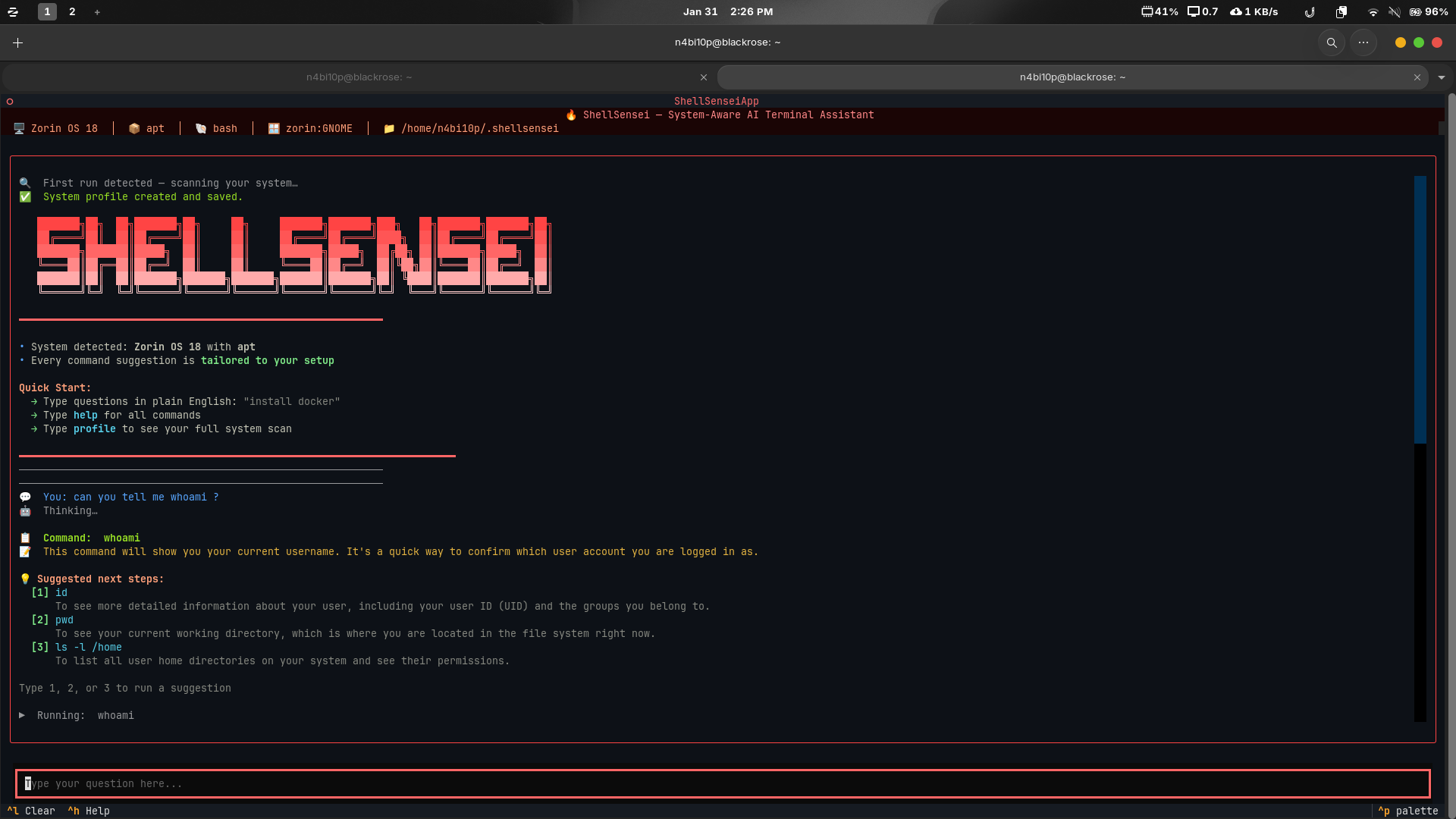
ShellSensei is a system-aware AI terminal assistant that scans your Linux environment on first run and creates a detailed profile (distro, package manager, shell, installed tools, hardware specs). Every query you make includes this profile, so the AI gives commands that actually work on your system. It auto-diagnoses errors, suggests fixes, tracks your learning progress with achievements, and prevents dangerous commands with built-in safety checks. It's like having a Linux mentor who knows your exact setup.
How we built it
We built ShellSensei using:
- Python 3.12 with Textual for the terminal UI
- Google Gemini 2.0 Flash for AI-powered responses
- psutil and distro libraries for system profiling
- ThreadPoolExecutor for parallel system checks (optimized from 30s → 170ms!)
- Custom safety regex patterns to block dangerous commands
- JSON-based progress tracking with gamified achievements
- Async architecture to keep the TUI responsive during AI calls
The system profiler detects your distro, package manager, shell, desktop environment, dev tools, and hardware—then formats it as context for every AI query. We optimized the profiling to run in under 200ms by counting packages instead of listing them all and parallelizing tool detection.
Challenges we ran into
- Input visibility crisis: Spent hours debugging why input text was invisible in the TUI—turned out Textual CSS needed explicit hex colors with
#prefix, not color names - Async API calls: Gemini SDK migration from deprecated
google.generativeaitogoogle.genaibroke everything—had to revert and handle async properly - Performance bottleneck: Initial system scan took 30+ seconds. Fixed by switching from listing 2400+ packages to just counting them (175x speedup!)
- Text wrapping: Long AI responses caused horizontal scrolling—solved with
wrap=Trueandoverflow-x: hidden - One-line installer: Making the bash script idempotent and handling partial installations cleanly
- Safety vs. usefulness: Balancing AI freedom with preventing
rm -rf /disasters
Accomplishments that we're proud of
✅ Context-aware AI that works - Commands are tailored to YOUR exact Linux setup, not generic suggestions
✅ 170ms system profiling - Optimized from 30 seconds to instant using parallel execution
✅ One-line installation - curl | bash sets up everything including venv, dependencies, and API key
✅ Beautiful TUI - Red-themed terminal interface with ASCII logo, wrapping text, and responsive layout
✅ Safety-first design - Blocks dangerous commands, requires confirmation before execution
✅ Gamified learning - Achievement system tracks progress across 9 categories
✅ Auto-error diagnosis - When commands fail, AI explains why and suggests fixes
✅ Production-ready - Proper gitignore, .env handling, error recovery, and clean architecture
What we learned
- Textual CSS quirks: Terminal UI frameworks have different styling rules than web CSS—learned about pseudo-classes, widget-specific properties, and color handling
- System profiling optimization: Sequential subprocess calls are slow—parallelization and smart caching make a massive difference
- AI context design: Including system profile with EVERY query (not just first) ensures consistent, accurate responses
- Bash script robustness: Handling incomplete installations, git repo detection, and idempotent operations is harder than it looks
- User safety: AI can suggest dangerous commands innocently—need explicit confirmation prompts and regex safety checks
- Performance vs. completeness: Don't need to list every package when a count suffices—users don't notice the difference but feel the speed
What's next for ShellSensei
🚀 Planned features:
- Command history analysis - Learn from past mistakes and suggest improvements
- Multi-distro profiles - Support for managing multiple machines (WSL, containers, SSH)
- Plugin system - Community-contributed safety rules and custom AI prompts
- Offline mode - Cache common responses for network-free usage
- Voice input - Ask questions verbally via speech recognition
- Integration with package managers - One-click install suggestions with confirmation
- Error prediction - Warn before running commands likely to fail on your system
- Tutorial mode - Interactive Linux lessons based on your skill level and installed tools


Log in or sign up for Devpost to join the conversation.