-
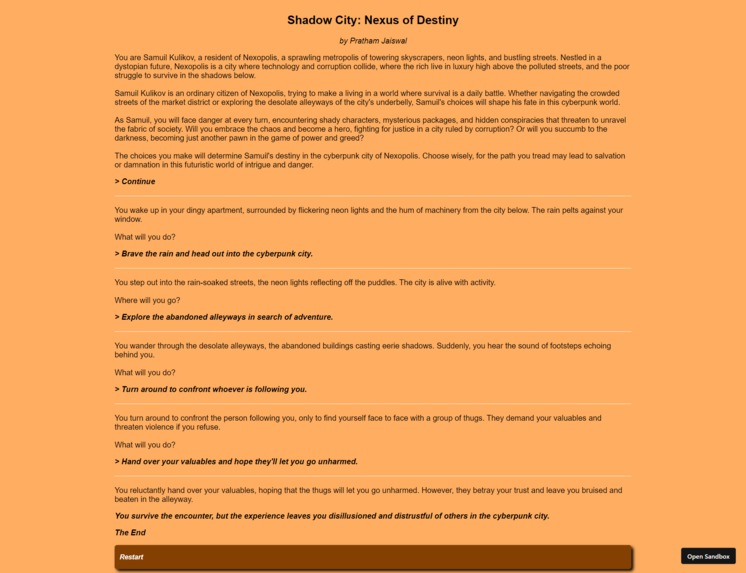
Demo
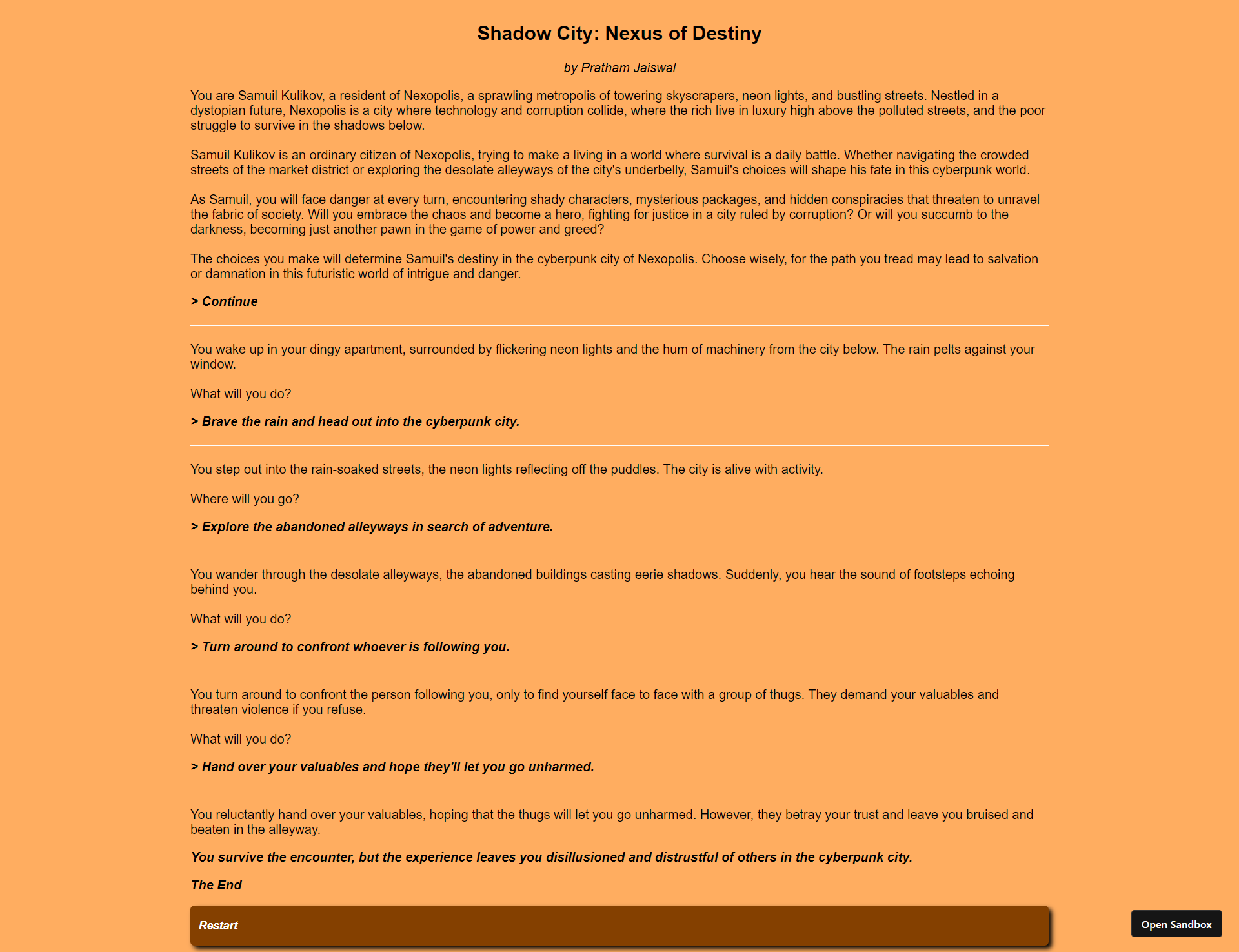
Task
Completing the GHW Games challenge - Create a Text-Based Adventure Game
What it does
A user can play this text-based adventure game on a browser.
Node Dependencies
- react
- react-dom
- react-scripts
How we built it
I've created it on codesandbox.io, using the react.js template.
Write a story in json format. Each page should have certain choices to choose from which would link to another page, till a page with an ending is reached.
{
  "title": "Shadow City: Nexus of Destiny",
  "author": "Pratham Jaiswal",
  "pages": [
    {
      "page_number": 0,
      "text": "You are Samuil Kulikov, a resident of Nexopolis, a sprawling metropolis of towering skyscrapers, neon lights, and bustling streets. Nestled in a dystopian future, Nexopolis is a city where technology and corruption collide, where the rich live in luxury high above the polluted streets, and the poor struggle to survive in the shadows below.<br/><br/>Samuil Kulikov is an ordinary citizen of Nexopolis, trying to make a living in a world where survival is a daily battle. Whether navigating the crowded streets of the market district or exploring the desolate alleyways of the city's underbelly, Samuil's choices will shape his fate in this cyberpunk world.<br/><br/>As Samuil, you will face danger at every turn, encountering shady characters, mysterious packages, and hidden conspiracies that threaten to unravel the fabric of society. Will you embrace the chaos and become a hero, fighting for justice in a city ruled by corruption? Or will you succumb to the darkness, becoming just another pawn in the game of power and greed?<br/><br/>The choices you make will determine Samuil's destiny in the cyberpunk city of Nexopolis. Choose wisely, for the path you tread may lead to salvation or damnation in this futuristic world of intrigue and danger.",
      "choices": [
        {
          "text": "Continue",
          "page": 1
        }
      ]
    },
    {
      "page_number": 1,
      "text": "You wake up in your dingy apartment, surrounded by flickering neon lights and the hum of machinery from the city below. The rain pelts against your window.<br/><br/>What will you do?",
      "choices": [
        {
          "text": "Stay indoors and continue writing your novel.",
          "page": 2
        },
        {
          "text": "Brave the rain and head out into the cyberpunk city.",
          "page": 3
        }
      ]
    },
    ...
    ...,
    {
      "page_number": 34,
      "text": "You decide to dispose of the device, not wanting to risk any potential danger it may pose. As you toss it into the nearest trash bin, you feel a sense of relief wash over you.",
      "ending": "Unbeknownst to you, the device was a ticking time bomb. As you walk away, it detonates with a deafening explosion, engulfing you in flames."
    }
  ]
}
In App.js, import the story as storyData, then create a few state variables such as:
history: which tracks the previous texts and choicescurrentPage: stores current page number to fetch data fromstoryDatacurrentText: stores text of current pagecurrentEnding: stores ending of current page, if anycurrentChoices: stores the available choices of current page, if any
Also create a reference variable currentTextRef which tracks current page text and will help scroll down to it.
import React, { useState, useEffect, useRef } from "react";
import storyData from "./story.json";
import "./styles.css";
function App() {
const [history, setHistory] = useState([]);
const [currentPage, setCurrentPage] = useState(0);
const [currentText, setCurrentText] = useState("");
const [currentEnding, setCurrentEnding] = useState("");
const [currentChoices, setCurrentChoices] = useState([]);
const currentTextRef = useRef(null);
return (
<div className="app">
<h2>{storyData.title}</h2>
<div className="author">by {storyData.author}</div>
<div className="container">
<div className="history">
{history.map((item, index) => (
<div key={index}>
<p
className="prev-text"
dangerouslySetInnerHTML={{ __html: item.text }}
/>
<p className="prev-choice">> {item.choice}</p>
<hr />
</div>
))}
</div>
<div ref={currentTextRef} />
<div className="current-text">
<p dangerouslySetInnerHTML={{ __html: currentText }} />{" "}
</div>
{currentEnding && (
<div className="current-ending">
<p>{currentEnding}</p>
<p>The End</p>
<button className="restart-btn" onClick={restartGame}>
Restart
</button>
</div>
)}
</div>
<div className="choices-container">
{currentChoices.map((choice) => (
<button
className="current-choice"
key={choice.page}
onClick={() => makeChoice(choice.page, choice.text)}
>
{choice.text}
</button>
))}
</div>
</div>
);
}
export default App;
body {
  background-color: rgb(255, 173, 96);
}

.app {
  font-family: Arial, sans-serif;
  display: flex;
  flex-direction: column;
  align-items: center;
  width: 70%;
  margin: 0 auto;
}

.author {
  font-style: italic;
}

.prev-choice {
  font-style: italic;
  font-weight: bold;
}

.choices-container {
  width: 100%;
  display: flex;
  flex-direction: column;
  gap: 10px;
}

hr {
  width: 100%;
  margin: 20px 0;
  border: none;
  border-top: 1px solid rgb(253, 253, 253);
}

.current-choice,
.restart-btn {
  background-color: rgb(132, 64, 0);
  color: white;
  cursor: pointer;
  width: 100%;
  height: 50px;
  text-align: left;
  border: none;
  border-radius: 5px;
  padding: 0 10px;
  font-size: 14px;
  font-style: italic;
  font-weight: bold;
  box-shadow: 4px 4px 6px black;
}

.current-choice:hover,
.restart-btn:hover {
  background-color: rgb(251, 144, 44);
  color: black;
}

.current-ending {
  font-style: italic;
  font-weight: bold;
}
Create a function to load the current page text and choices, which will be called everytime currentPage changes.
function App() {
  // Rest of the code

  useEffect(() => {
    loadPage(currentPage);
  }, [currentPage]);

  const loadPage = (pageNumber) => {
    const page = storyData.pages.find(
      (page) => page.page_number === pageNumber
    );
    if (page) {
      setCurrentText(page.text);
      setCurrentChoices(page.choices || []);
      if (page.ending) {
        setCurrentEnding(page.ending);
      } else {
        setCurrentEnding("");
      }
    }
  };
Create a function to append a text and selected choice to history, and go to the page referenced in the choice, each time a choice is made.
  const makeChoice = (page, choiceText) => {
    setHistory([...history, { text: currentText, choice: choiceText }]);
    setCurrentPage(page);
  };
Create a function to scroll down each time a currentText changes.
  const scrollToBottom = () => {
    if (currentTextRef.current) {
      currentTextRef.current.scrollIntoView({ behavior: "smooth" });
    }
  };

  useEffect(() => {
    scrollToBottom();
  }, [currentText]);
Create a restart function to restart the game. This is called from the restart button as implemented above.
  const restartGame = () => {
    setHistory([]);
    setCurrentPage(0);
  };
Full Code:
// App.js
import React, { useState, useEffect, useRef } from "react";
import storyData from "./story.json";
import "./styles.css";
function App() {
const [history, setHistory] = useState([]);
const [currentPage, setCurrentPage] = useState(0);
const [currentText, setCurrentText] = useState("");
const [currentEnding, setCurrentEnding] = useState("");
const [currentChoices, setCurrentChoices] = useState([]);
const currentTextRef = useRef(null);
const scrollToBottom = () => {
if (currentTextRef.current) {
currentTextRef.current.scrollIntoView({ behavior: "smooth" });
}
};
useEffect(() => {
scrollToBottom();
}, [currentText]);
useEffect(() => {
loadPage(currentPage);
}, [currentPage]);
const loadPage = (pageNumber) => {
const page = storyData.pages.find(
(page) => page.page_number === pageNumber
);
if (page) {
setCurrentText(page.text);
setCurrentChoices(page.choices || []);
if (page.ending) {
setCurrentEnding(page.ending);
} else {
setCurrentEnding("");
}
}
};
const makeChoice = (page, choiceText) => {
setHistory([...history, { text: currentText, choice: choiceText }]);
setCurrentPage(page);
};
const restartGame = () => {
setHistory([]);
setCurrentPage(0);
};
return (
<div className="app">
<h2>{storyData.title}</h2>
<div className="author">by {storyData.author}</div>
<div className="container">
<div className="history">
{history.map((item, index) => (
<div key={index}>
<p
className="prev-text"
dangerouslySetInnerHTML={{ __html: item.text }}
/>
<p className="prev-choice">> {item.choice}</p>
<hr />
</div>
))}
</div>
<div ref={currentTextRef} />
<div className="current-text">
<p dangerouslySetInnerHTML={{ __html: currentText }} />{" "}
</div>
{currentEnding && (
<div className="current-ending">
<p>{currentEnding}</p>
<p>The End</p>
<button className="restart-btn" onClick={restartGame}>
Restart
</button>
</div>
)}
</div>
<div className="choices-container">
{currentChoices.map((choice) => (
<button
className="current-choice"
key={choice.page}
onClick={() => makeChoice(choice.page, choice.text)}
>
{choice.text}
</button>
))}
</div>
</div>
);
}
export default App;
/* styles.css */
body {
  background-color: rgb(255, 173, 96);
}

.app {
  font-family: Arial, sans-serif;
  display: flex;
  flex-direction: column;
  align-items: center;
  width: 70%;
  margin: 0 auto;
}

.author {
  font-style: italic;
}

.prev-choice {
  font-style: italic;
  font-weight: bold;
}

.choices-container {
  width: 100%;
  display: flex;
  flex-direction: column;
  gap: 10px;
}

hr {
  width: 100%;
  margin: 20px 0;
  border: none;
  border-top: 1px solid rgb(253, 253, 253);
}

.current-choice,
.restart-btn {
  background-color: rgb(132, 64, 0);
  color: white;
  cursor: pointer;
  width: 100%;
  height: 50px;
  text-align: left;
  border: none;
  border-radius: 5px;
  padding: 0 10px;
  font-size: 14px;
  font-style: italic;
  font-weight: bold;
  box-shadow: 4px 4px 6px black;
}

.current-choice:hover,
.restart-btn:hover {
  background-color: rgb(251, 144, 44);
  color: black;
}

.current-ending {
  font-style: italic;
  font-weight: bold;
}
including the remaining react files such as /public/index.html, /src/index.js, /src/story.json, and package.json.
Challenges we ran into
- Writing a story - so I used ChatGPT for most of it.
Note
- The story was mostly generated by ChatGPT.

Log in or sign up for Devpost to join the conversation.