Inspiration
Buying foundation or lipstick online is a guess. A shade can look right on a product page and wrong on your skin, so shoppers often send it back. I wanted a simple tool that reads your real skin color, suggests shades, and lets you preview them on your own photo, while being honest that a preview is not a guarantee.
What it does
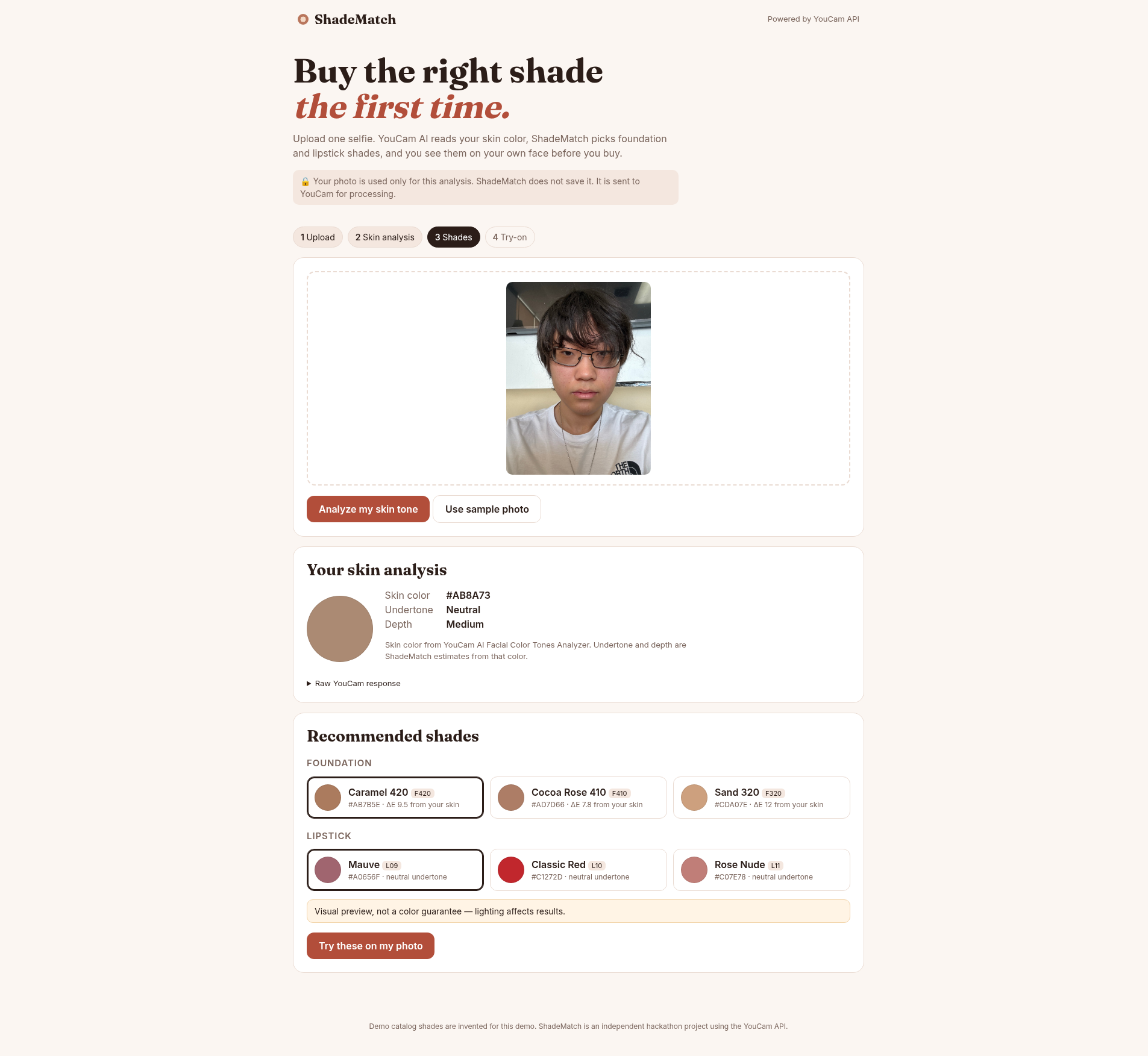
- You upload one selfie (the browser resizes it so the long side is at most 1080 px).
- ShadeMatch sends it to the YouCam AI Facial Color Tones Analyzer and gets back your skin color (plus eye, lip, eyebrow and hair colors).
- From that skin color, the app estimates your undertone (warm / neutral / cool) and depth (fair to deep).
- It recommends the 3 closest foundations and 3 suitable lipsticks from a demo catalog.
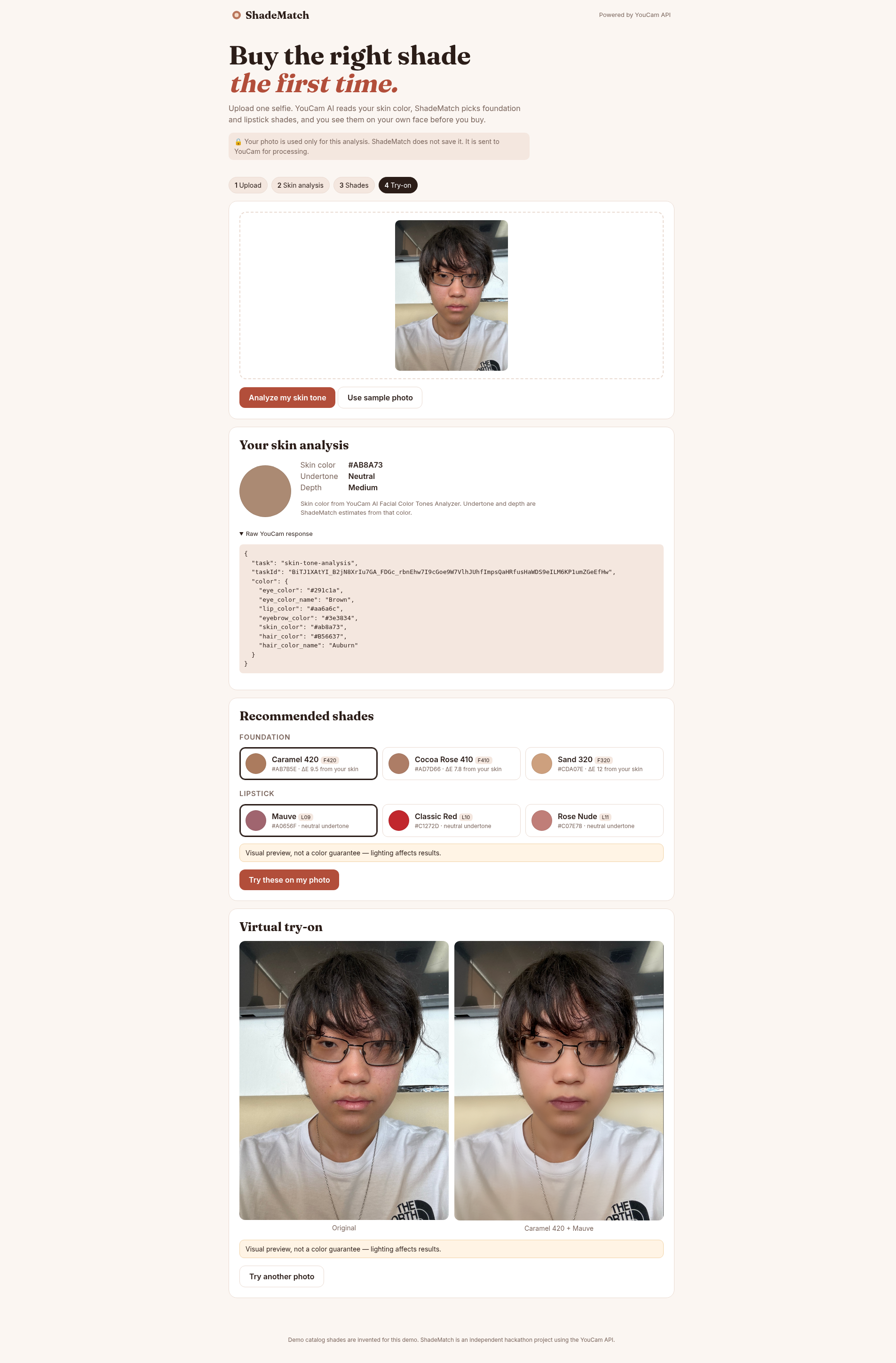
- You pick a foundation and a lipstick, and the YouCam AI Makeup Virtual Try-On applies them to your photo.
- You see the original and the try-on side by side, labeled: "Visual preview, not a color guarantee — lighting affects results."
In my test run, YouCam returned skin color #AB8A73; the app estimated a neutral undertone and medium depth, recommended Caramel 420, Cocoa Rose 410 and Sand 320 foundations and Mauve, Classic Red and Rose Nude lipsticks, and showed a real try-on of Caramel 420 + Mauve.
YouCam APIs used
- File API (
POST /s2s/v2.0/file): get an upload URL and file ID, then upload the photo. - AI Facial Color Tones Analyzer (
skin-tone-analysis): start a task and poll forresults.color.skin_color. - AI Makeup Virtual Try-On (
makeup-vto): apply foundation + lip color effects to the same uploaded file and poll for the result image URL.
How I built it
- Server: Node.js (18.17+) with no dependencies, using the built-in
httpmodule andfetch. The API key is read only from an environment variable / git-ignored.envfile and never sent to the browser. - Frontend: plain HTML, CSS and JavaScript. The photo is resized in the browser with a canvas before upload.
- Color math (
lib/color.js): the skin color hex is converted to CIELAB (sRGB → XYZ D65 → Lab).- Undertone is ShadeMatch's own estimate from the Lab hue angle: ≥ 65° reads warm, ≤ 55° reads cool, otherwise neutral.
- Depth is a bucket from Lab lightness L (fair, light, medium, tan, deep).
- Matching (
lib/catalog.js): foundations are ranked by CIE76 color difference (ΔE) to the measured skin color, with a small penalty when the undertone family differs. Lipsticks favor the same undertone family, then neutrals, adjusted for skin depth. - YouCam client (
lib/youcam.js): upload → start task → poll until success or error, with clear error messages. - Unit tests with
node --testcover the color math, catalog and request flow.
Honest preview disclaimer
Every recommendation and try-on shows: "Visual preview, not a color guarantee — lighting affects results." Screens, cameras and lighting all change how color looks.
Privacy
- The photo is sent only to the YouCam API for processing.
- ShadeMatch keeps the photo in memory for the length of one request and never writes it to disk or a database.
- YouCam keeps uploaded files for a limited time under its own file retention policy.
- No accounts, no tracking, no analytics.
Challenges
- File ID validation bug: real YouCam file IDs contain
+,/and=characters. My server's validation regex for the try-on request rejected them, so every try-on was blocked. I fixed the regex to/^[\w+/=-]{4,300}$/. - Image size limits: YouCam expects images no larger than 1920 px, and a full-size phone photo was rejected. The browser resizes the photo to at most 1080 px on the long side before upload.
- Credit balance: each full run costs about 21 units (20 for analysis, 1 for try-on). I ran out of credits during testing (
CreditInsufficiency), so I learned to avoid repeat analysis calls and test the try-on step on its own.
Limitations
- The demo catalog shades are invented for this project and are not real products.
- The undertone is the app's own estimate from the single skin color YouCam returns, not a professional color analysis.
- Lighting, cameras and screens affect results; the try-on is a visual preview only.
What's next
- Connect to a real product catalog with real shade data.
- Let users compare several shades side by side.
- Give photo tips (even light, face the camera) before analysis to get a cleaner reading.
Built With
- api
- css
- html
- javascript
- node.js
- youcam

Log in or sign up for Devpost to join the conversation.