-
-
One Pager
-
Architecture Diagram
-
WorkFlow
Inspiration
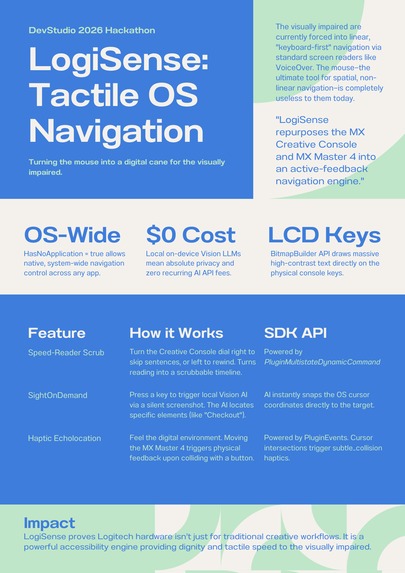
The visually impaired are overwhelmingly forced to be "keyboard-first" users. Screen readers like VoiceOver or JAWS are powerful, but they are inherently linear and often overwhelming when navigating modern, highly dynamic web applications. To find a simple "Checkout" button, a user might have to memorize dozens of keyboard shortcuts or press the "Tab" key 50 times.
We realized that the mouse - the ultimate tool for spatial, non-linear navigation - is completely useless to them. We wanted to change that. LogiSense was inspired by the idea of turning premium, off-the-shelf creator hardware (the MX Master 4 and MX Creative Console) into an active, tactile accessibility engine - essentially, a "digital cane" for the operating system.
How we designed it
(Note: As this submission is a concept/architecture entry, we focused heavily on validating the technical feasibility using the Logi Actions C# SDK.)
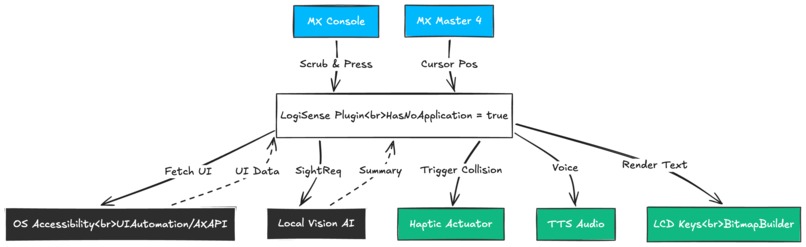
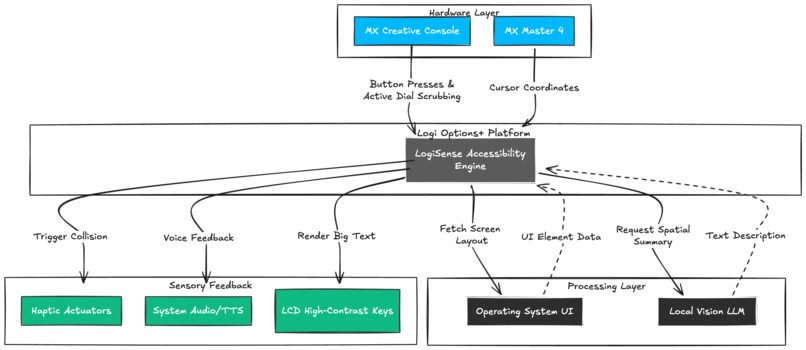
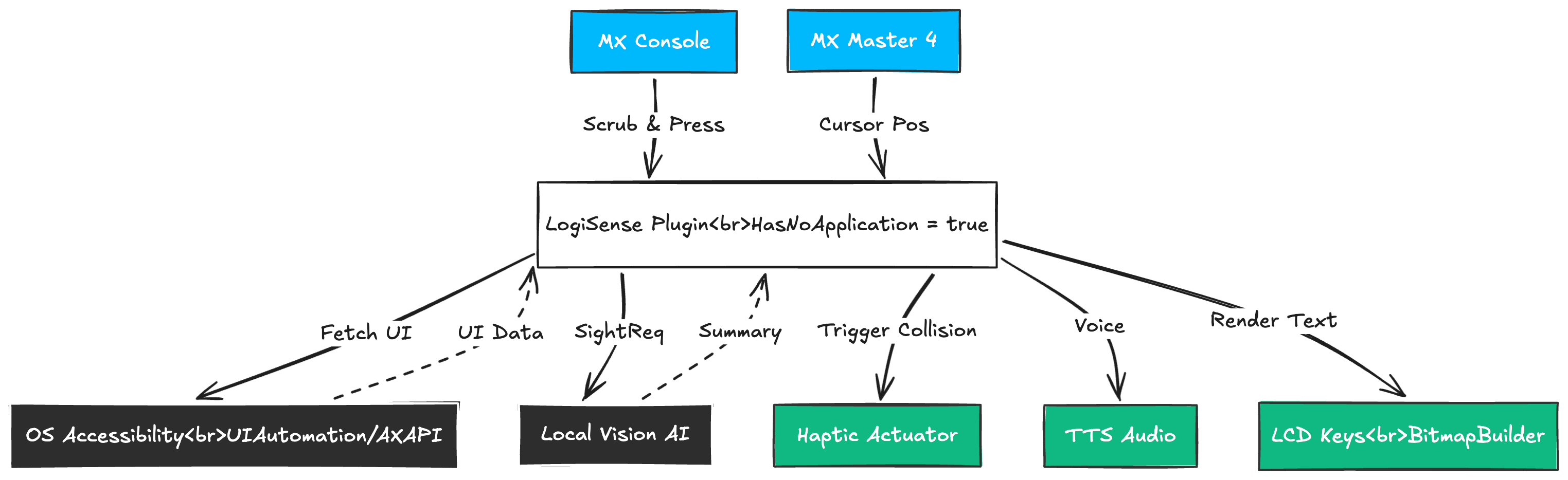
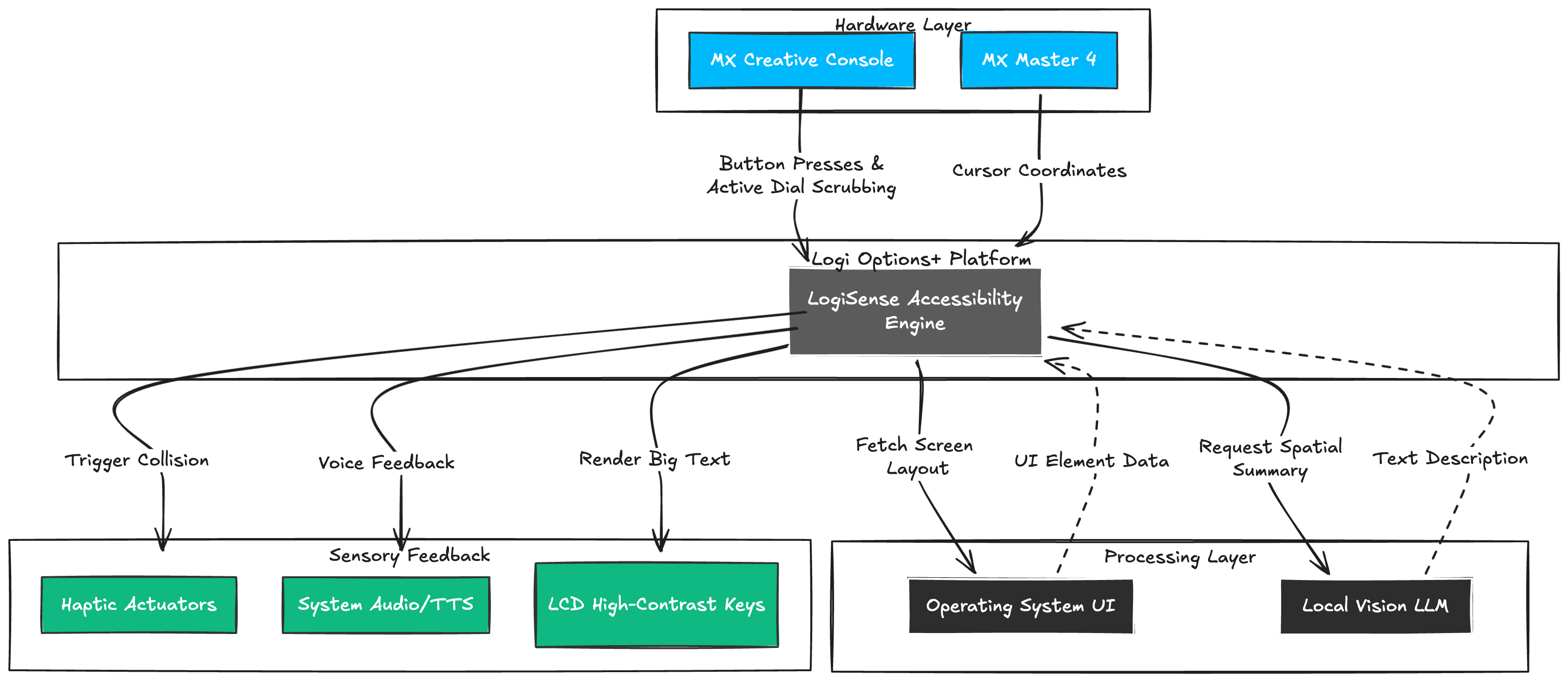
Our core architecture relies on exploiting the unique capabilities of the Logitech hardware ecosystem:
- Haptic Echolocation: By tapping into the
PluginEventsSDK, we designed a system where moving the MX Master 4 across the screen triggers physical feedback. Specifically, we designed it to use thesubtle_collisionwaveform when the cursor crosses a clickable button, and theangry_alertwaveform when hitting the edge of a monitor, preventing the user from getting "lost" off-screen. - Analog Text Scrubbing: We designed the MX Creative Console rotary dial to control a
PluginMultistateDynamicCommand. Instead of waiting for a computer to slowly read a paragraph linearly, the user turns the dial to instantly skip sentences or rewind, turning digital reading into a physical, scrubbable timeline. - SightOnDemand (Vision AI): To defeat standard Bluetooth latency, we architected a "Haptic Snapping" feature. The user presses a physical button on the keypad, triggering a local Vision AI model (like Ollama or LLaVA). The AI locates the target (e.g., the "Unsubscribe" link) and teleports the OS cursor directly to its coordinates, instantly triggering the haptic bump.
Challenges we faced
Hardware Unavailability: Our biggest immediate challenge was that we do not physically own the MX Master 4 or the MX Creative Console. Because we could not physically test the haptics, we had to rely entirely on "blind architecture", conducting a microscopic read of the Logi Actions C# SDK documentation to mathematically verify our design. Rather than guessing, we verified the exact API calls (like PluginEvents.RaiseEvent and subtle_collision waveforms) existed before designing our architecture.
The Physics of Latency: The biggest theoretical challenge was standard Bluetooth latency. If a blind user moves their mouse quickly, a 50ms delay in the haptic feedback loop means the mouse vibrates after they have already overshot the target button.
We solved this in the architecture phase by changing the paradigm from "manual hunting" to "Smart Target Snapping." By integrating a local Vision AI to find the UI elements first via voice command, the plugin can instantly snap the cursor to the exact pixel boundary, meaning the haptic response is perfectly synchronized with the user's intent.
Another challenge was financial accessibility. We explicitly designed the Vision AI bridge to run on local LLMs (Local Vision LLM) rather than relying on expensive, recurring cloud API calls (like OpenAI), ensuring the tool remains zero-cost for the end user after acquiring the hardware.
What we learned
During our deep dive into the Logi Actions C# SDK, we learned just how incredibly powerful and open the current plugin architecture is. The discovery that we could set HasNoApplication => true in the Plugin class was a breakthrough. It meant our accessibility tool could run globally over the entire Operating System - controlling the screen reader without being trapped inside a specific application window.
What's next for LogiSense
The next step is to acquire the physical hardware so we can take this validated technical architecture from paper into a fully functional C# plugin prototype. LogiSense proves that Logitech hardware isn't just for traditional creative workflows - it is a powerful accessibility engine waiting to be unlocked.
Built With
- n/a

Log in or sign up for Devpost to join the conversation.