Inspiration
I'm a freelance web developer in Ecuador. Like most freelancers, I don't lose money because clients refuse to pay — I lose it to the admin around getting paid: writing invoices, keeping track of who paid, and writing awkward reminder messages. And when I was starting out, the hardest question came even earlier: how much should I charge for this? Beginners undercharge all the time because nobody shows them how to price their own hours.
I wanted a tool that handles the whole loop — pricing, invoicing, tracking and chasing — without turning into a generic chatbot on top of an API.
What it does
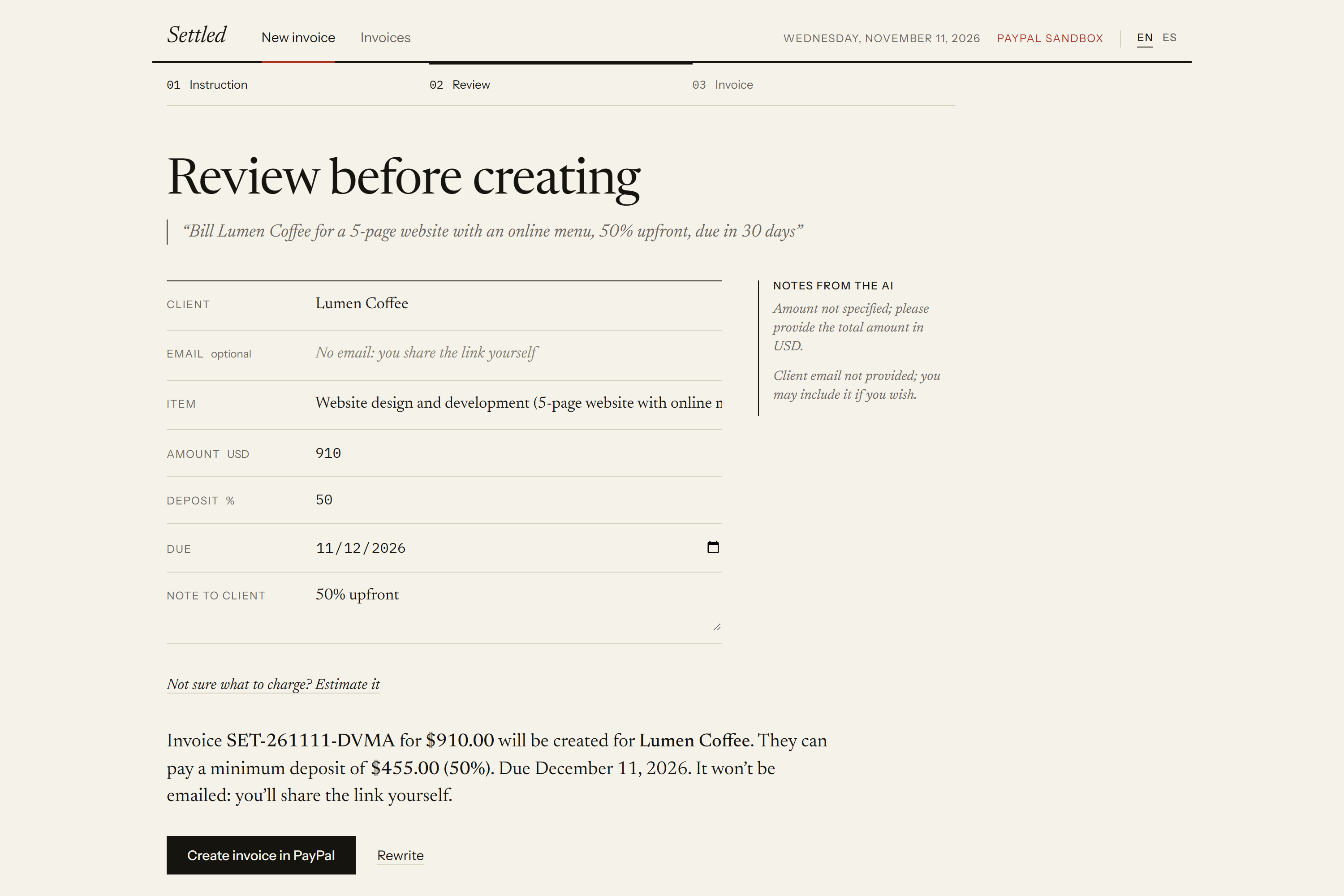
- Bill in one sentence. Type "Bill Lumen Coffee for a 5-page website, 50% upfront, due in 30 days" in English or Spanish. The AI extracts the client, item, amount, deposit and due date, and writes the item as a professional invoice line. You review it in an editable form with a one-sentence summary; nothing is created until you confirm.
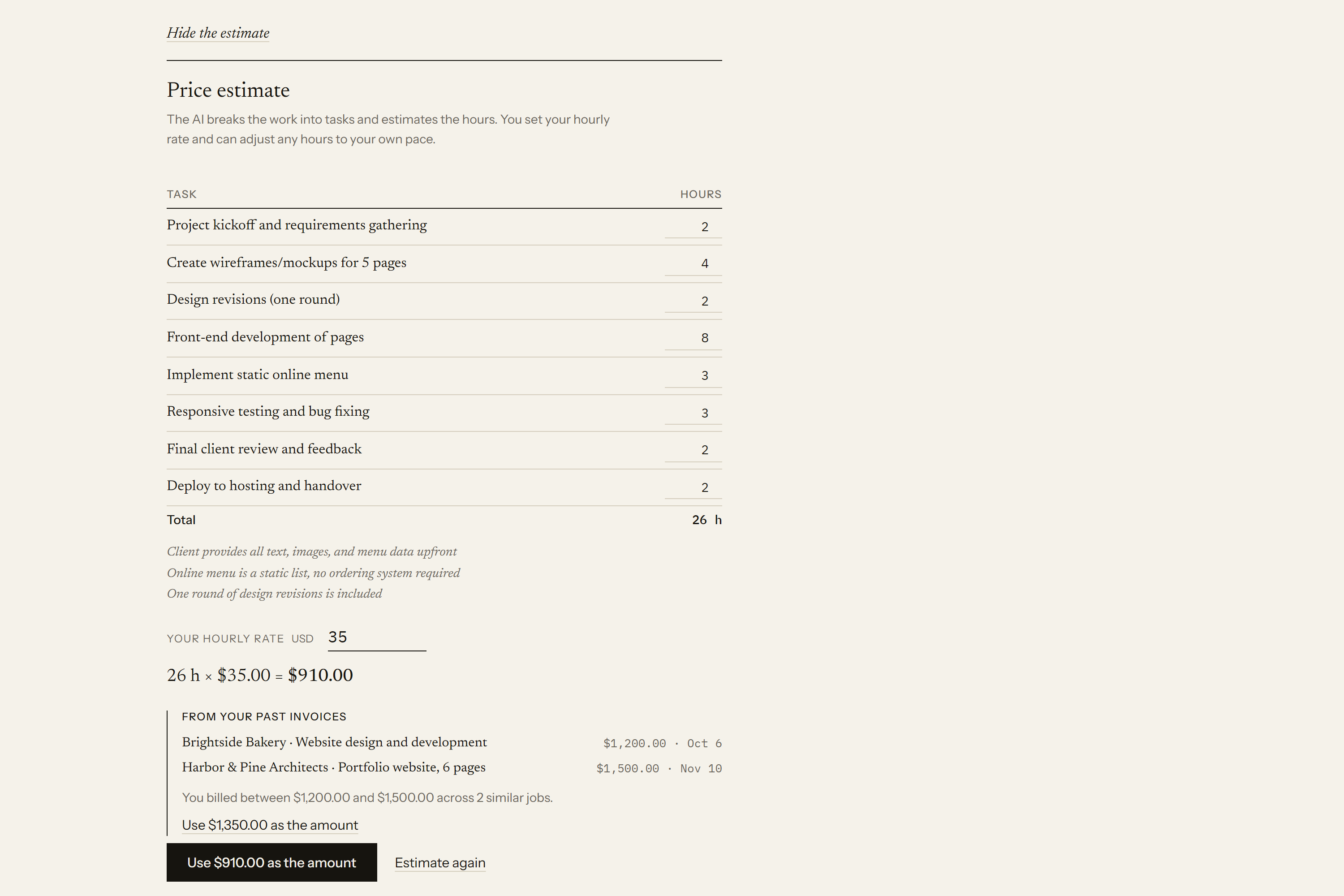
- Help pricing the job. No amount yet? The AI breaks the work into tasks with estimated hours and states its assumptions. You set your hourly rate and adjust any hours, and code computes the total:
$$\text{total} = \text{rate} \times \sum_{i} \text{hours}_i$$
From your second job on, Settled also shows what you billed for similar work, using your real PayPal history.
- Real PayPal invoices. Confirming creates and sends an invoice through the PayPal Invoicing API, with the deposit configured as a partial payment and a PayPal payment link.
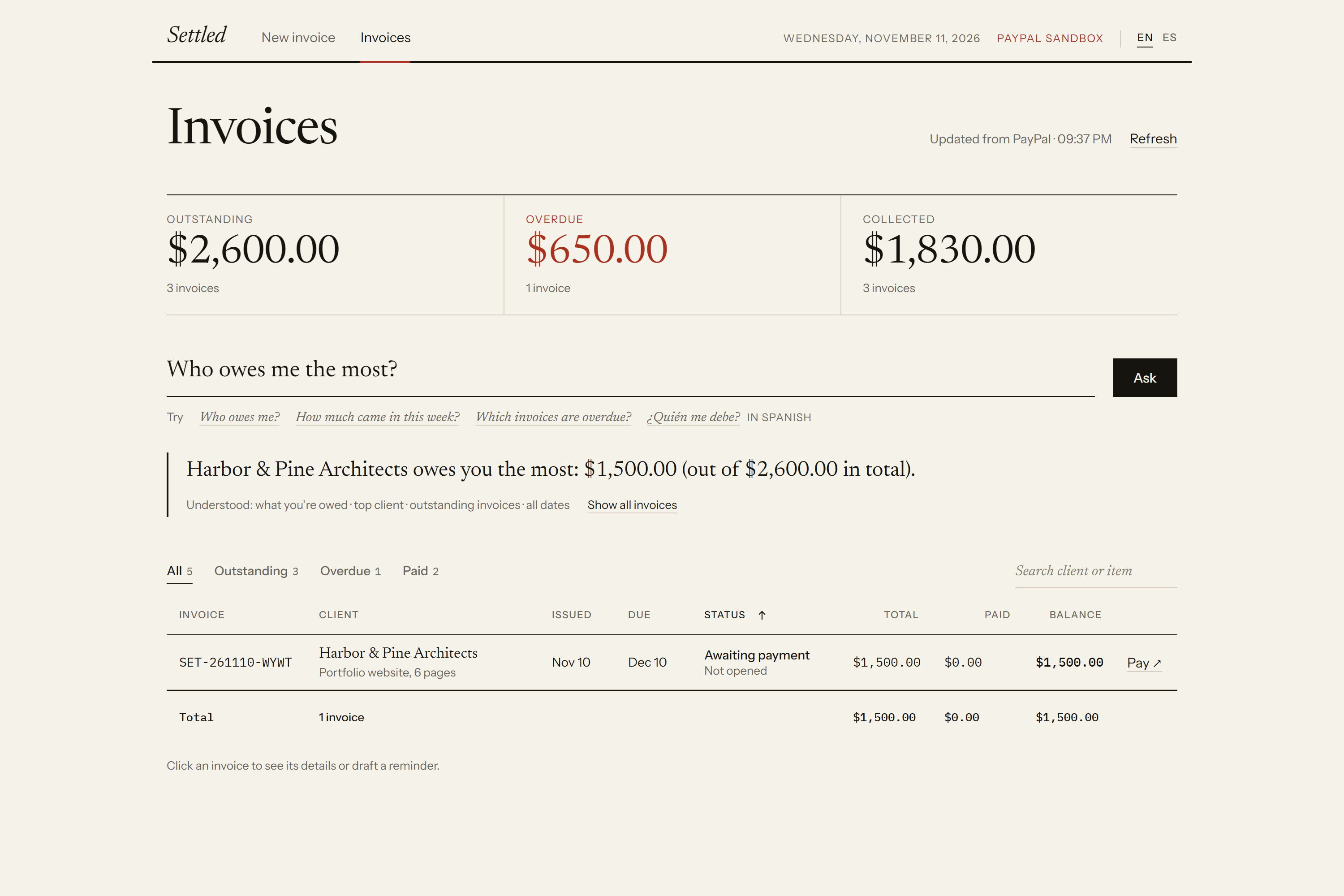
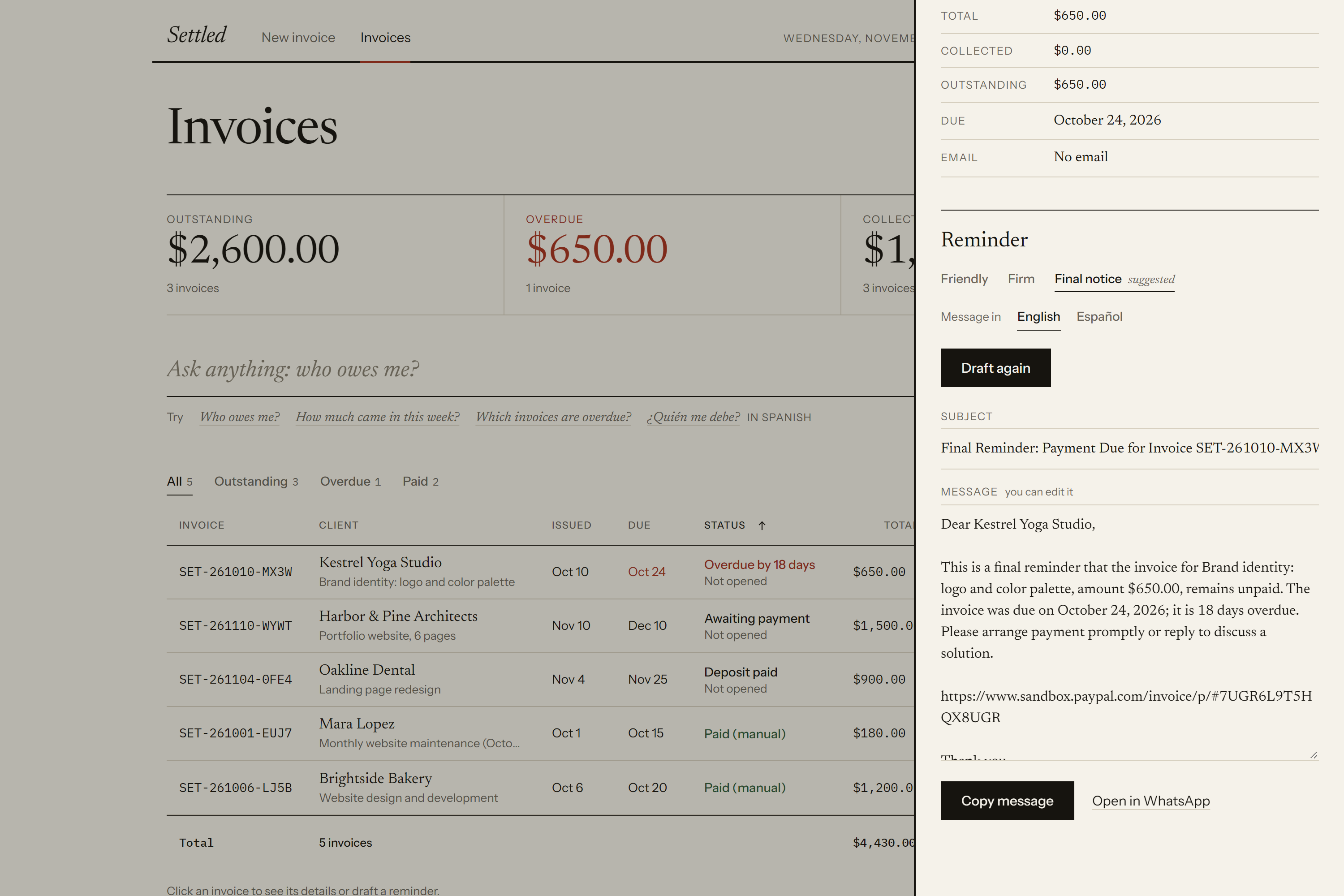
- Dashboard. An AG Grid dashboard read live from PayPal: outstanding, overdue and paid totals, urgency-first sorting, filters, search and a pinned totals row.
- Ask in plain language. "Who owes me the most?", "How much came in this week?", "¿Qué facturas están vencidas?" — the answer appears and the grid filters down to the exact invoices behind it.
- AI-drafted reminders. Click an invoice and Settled suggests a tone based on how late it is (friendly, firm or final notice). The AI drafts the reminder with the real balance, due date and payment link, in the client's language.
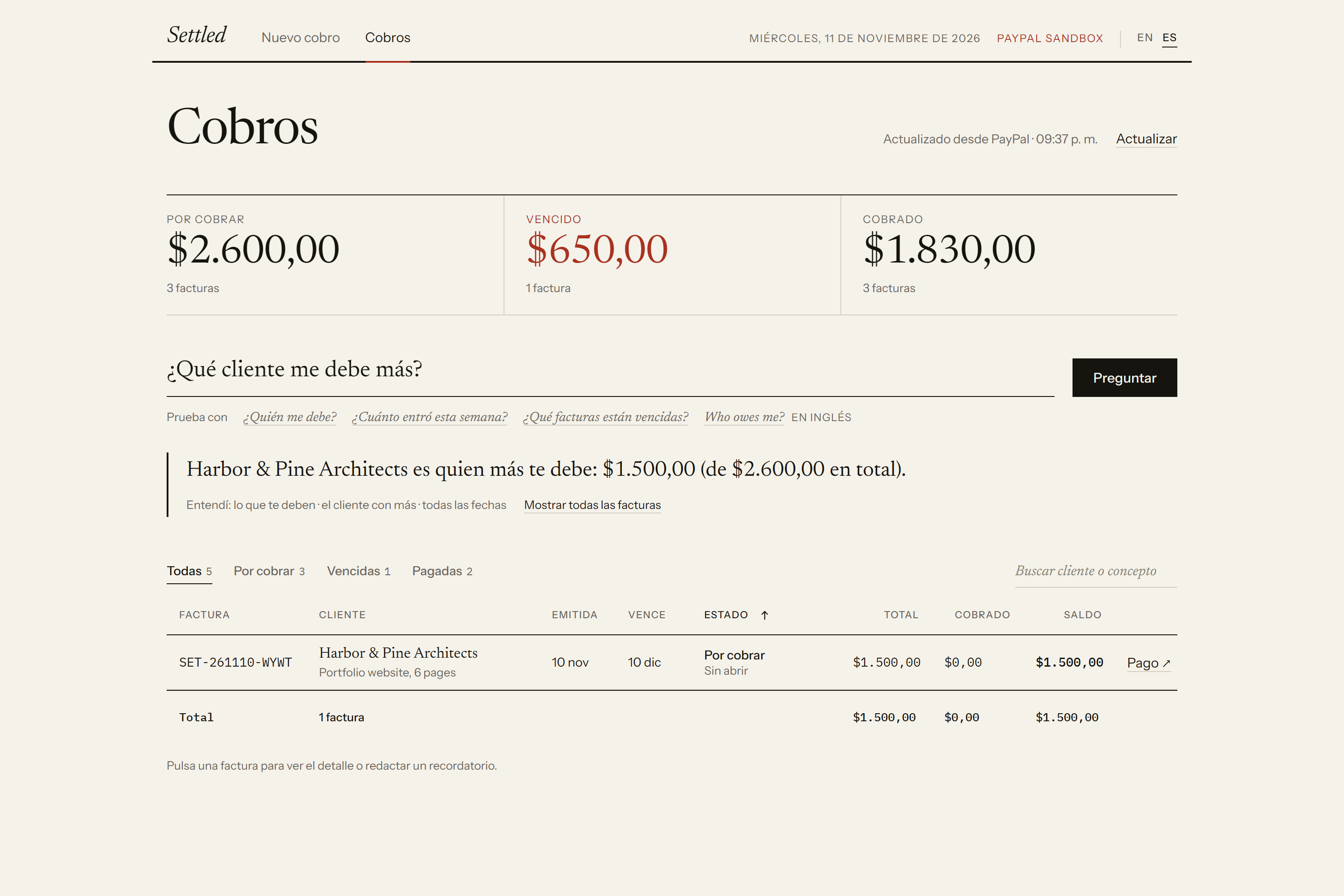
- Bilingual. The whole interface switches between English and Spanish in one click.
How we built it
- Backend: Node.js and Express. Frontend: hand-written HTML, CSS and JavaScript with an editorial design.
- PayPal Invoicing API v2 (sandbox) is the source of truth: invoices, statuses, partial payments and payment dates are always read from PayPal. A small local file only stores extras PayPal doesn't keep (the original instruction and the reminder history).
- AI:
openai/gpt-oss-120bon Groq, through its OpenAI-compatible API, always with forced tool calling, so every AI reply has a fixed schema the server validates. The provider is configurable with environment variables, so any OpenAI-compatible provider can be swapped in. - AG Grid Community for the dashboard, with a custom theme, custom cell renderers, an external filter driven by the AI's answers and adaptive columns.
- Render hosts the live demo from a Blueprint (
render.yaml), with a health check, rate limits and a guard that refuses to start against live PayPal.
The core design rule is "the AI understands, code does the math, PayPal is the source of truth":
- The AI turns language into structure: a billing instruction into invoice fields, a job description into tasks and hours, a question into a query, an invoice's situation into a reminder.
- Everything involving money is computed by code from PayPal data: totals, deposits, periods in the freelancer's time zone, "who owes me the most", and hours × rate.
- When matching past invoices, the AI only sees each invoice's item — never the amounts — so it can't invent a price.
Remove PayPal and there's nothing to invoice, track or remind about. Remove the AI and you're back to filling in forms.
Challenges we ran into
- PayPal's list endpoint doesn't include items, payment links or payment dates. We fetch each invoice's detail once and cache it, re-fetching only when the paid amount changes, so the dashboard stays fast and fresh.
- Models make confident mistakes. A reminder once said an invoice was overdue when it wasn't; "who paid me the most" was read as money owed. Each time, the fix was to move responsibility from the prompt to code: pre-written due-date situations, a structured "focus" field, and validation of every AI output.
- We tried letting the AI write the answers to questions — and in three tests it changed the meaning of the data. In a payments product, one wrong figure costs more trust than a nicer sentence is worth, so code writes the answers.
- A public demo on a free AI tier. Groq's free tier limits tokens per minute, so a few quick requests in a row could fail. The server now reads how long the provider asks to wait and retries automatically, and it caps AI calls per visitor and per day so nobody can exhaust the quota.
Accomplishments that we're proud of
- A full loop — price, invoice, get paid, track, remind, ask — that works end to end on real PayPal sandbox invoices.
- An AI feature for beginners that never invents a "market price": a transparent breakdown the freelancer can understand and correct.
- A dashboard that answers questions and shows the exact invoices behind each answer.
- Thorough error handling: timeouts, PayPal outages, duplicate confirmations, expired tokens and AI rate limits all end in a clear message, in the user's language.
What we learned
- The best use of AI here was narrow: understanding language. Arithmetic, dates and money belong in code.
- Small product decisions matter more than features: confirming before creating, showing how a question was understood, and never hiding where a number comes from.
- Building bilingual from the start changes the product: the invoice item and the reminder belong to the client's language, while notes for the freelancer follow the interface.
What's next for Settled
- Webhooks for instant payment updates instead of polling.
- Scheduled reminders, sent only with the freelancer's approval.
- Multi-currency support and live PayPal accounts after a security review.
Built With
- ag-grid
- css3
- express.js
- gpt-oss
- groq
- html5
- javascript
- node.js
- paypal
- paypal-invoicing-api
- render
