Inspiration
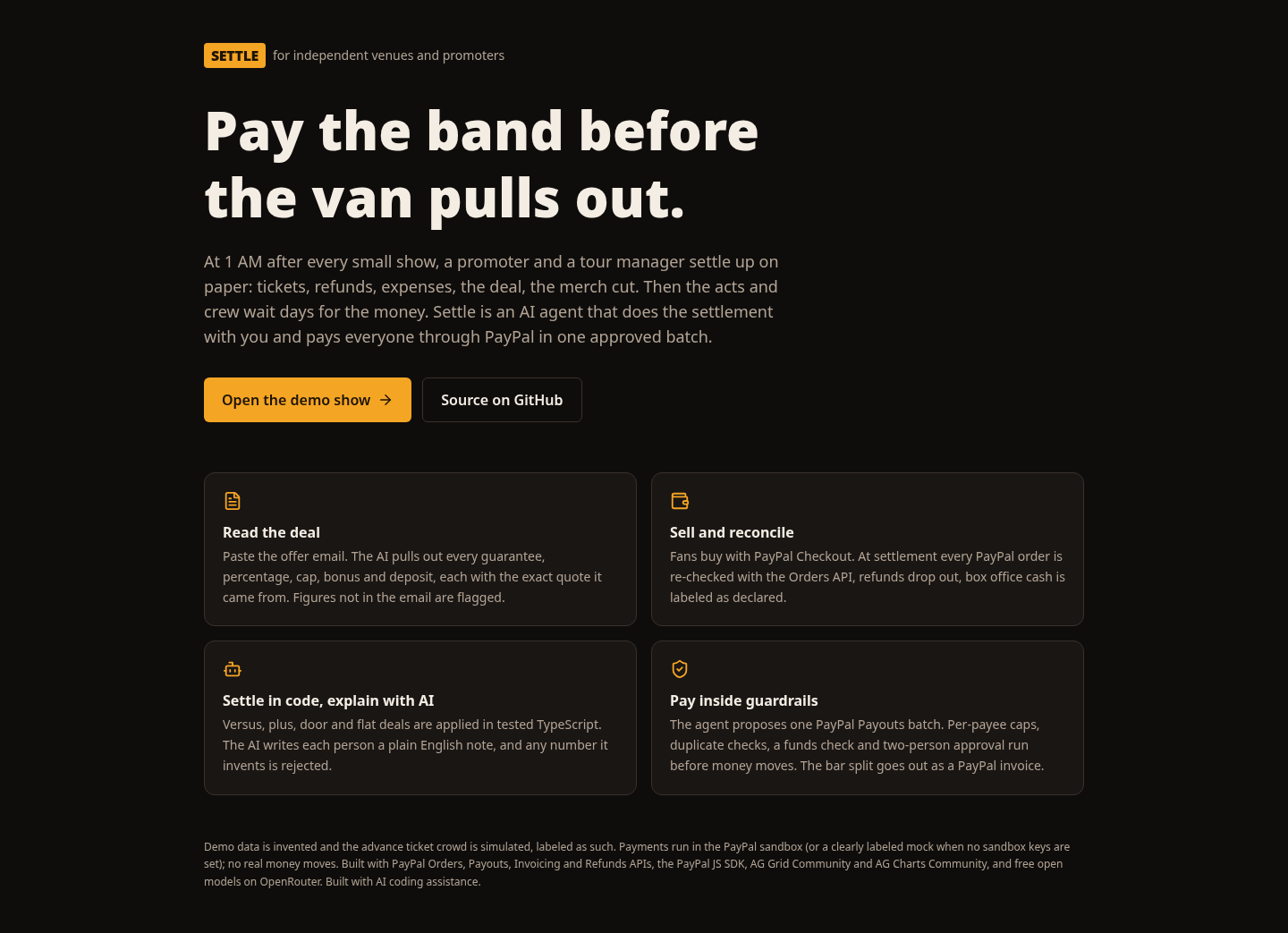
After every small show, a promoter and a tour manager sit in a back office at 1 AM and settle up. They count tickets, take out refunds, apply a deal like "$1,500 guarantee vs 80% of net after expenses, expenses capped at $3,200, $250 bonus at 350 tickets, venue keeps 15% of merch, minus the $500 deposit", and then pay the headliner, the support act, the opener, the sound engineer, security and the door. It is done on paper or in a spreadsheet, mistakes are common, and people wait days to get paid. Independent venues and DIY promoters run this every week without a back office.
What it does
Settle runs the whole night in four steps.
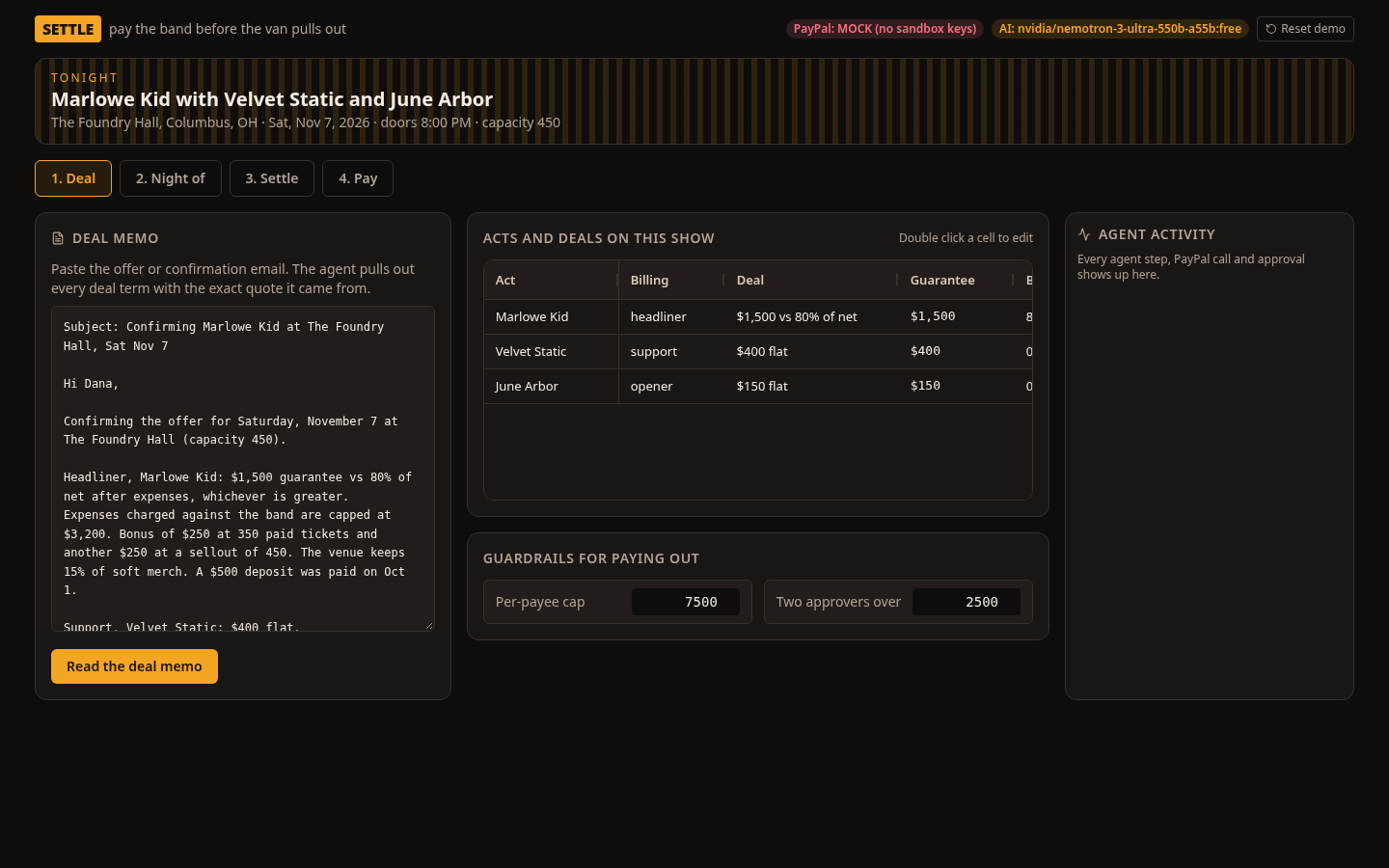
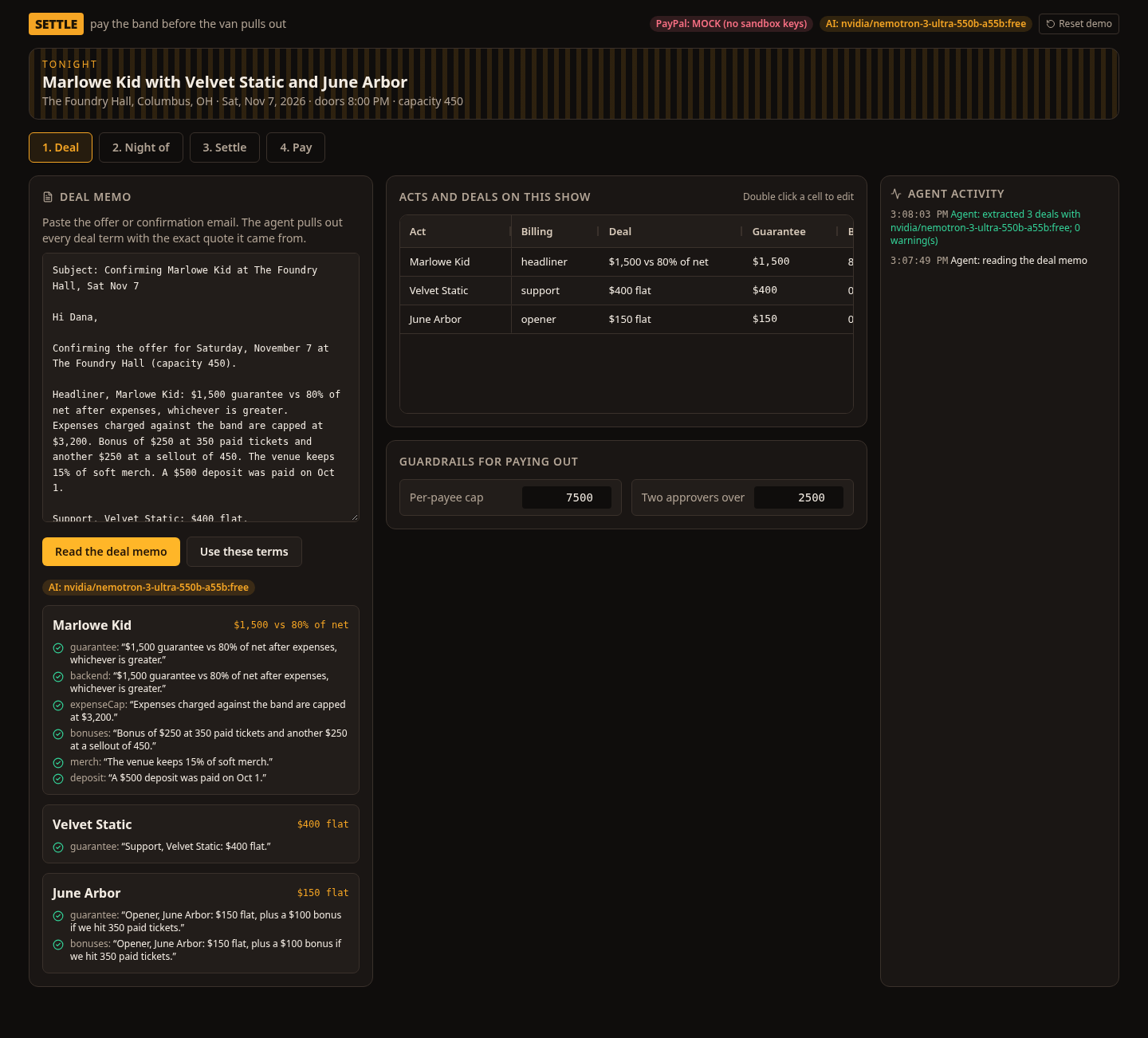
Deal. Paste the offer email. The AI extracts each act's deal (flat, versus, plus or door, with guarantee, percentage, expense cap, ticket bonuses, merch split and deposit). Every term carries the exact quote it came from, and Settle checks that each quote and each dollar figure really appears in the email. Anything that does not match is flagged for the promoter. The terms land in an editable AG Grid.
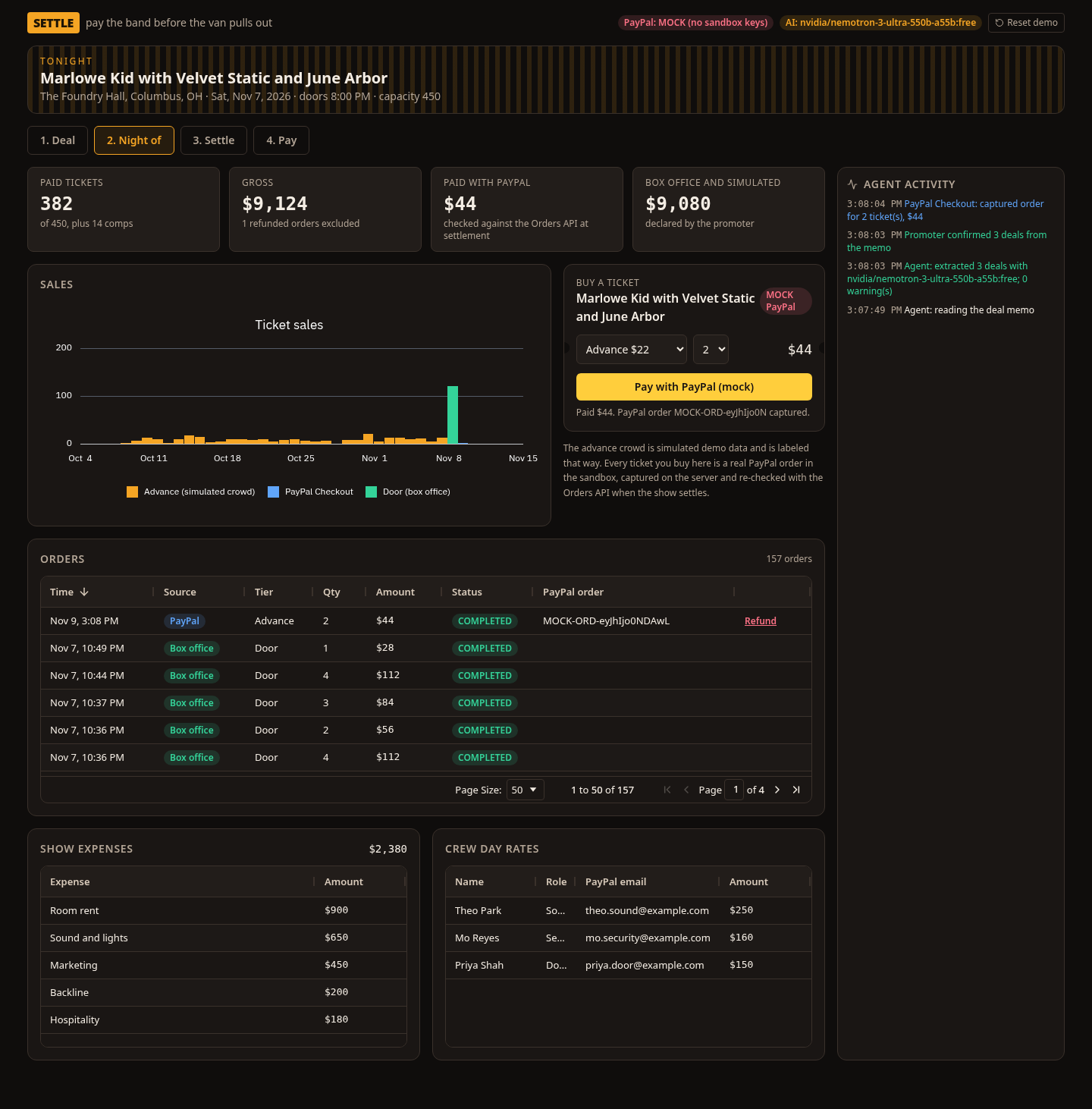
Night of. Fans buy tickets with PayPal Checkout (JS SDK Smart Buttons, orders created and captured on the server with Orders v2). A second button pays with PayPal's public sandbox test Visa, so a judge without a sandbox login can still buy a real sandbox ticket. Sales chart, orders grid with one-click PayPal refunds, and editable grids for expenses and crew day rates.
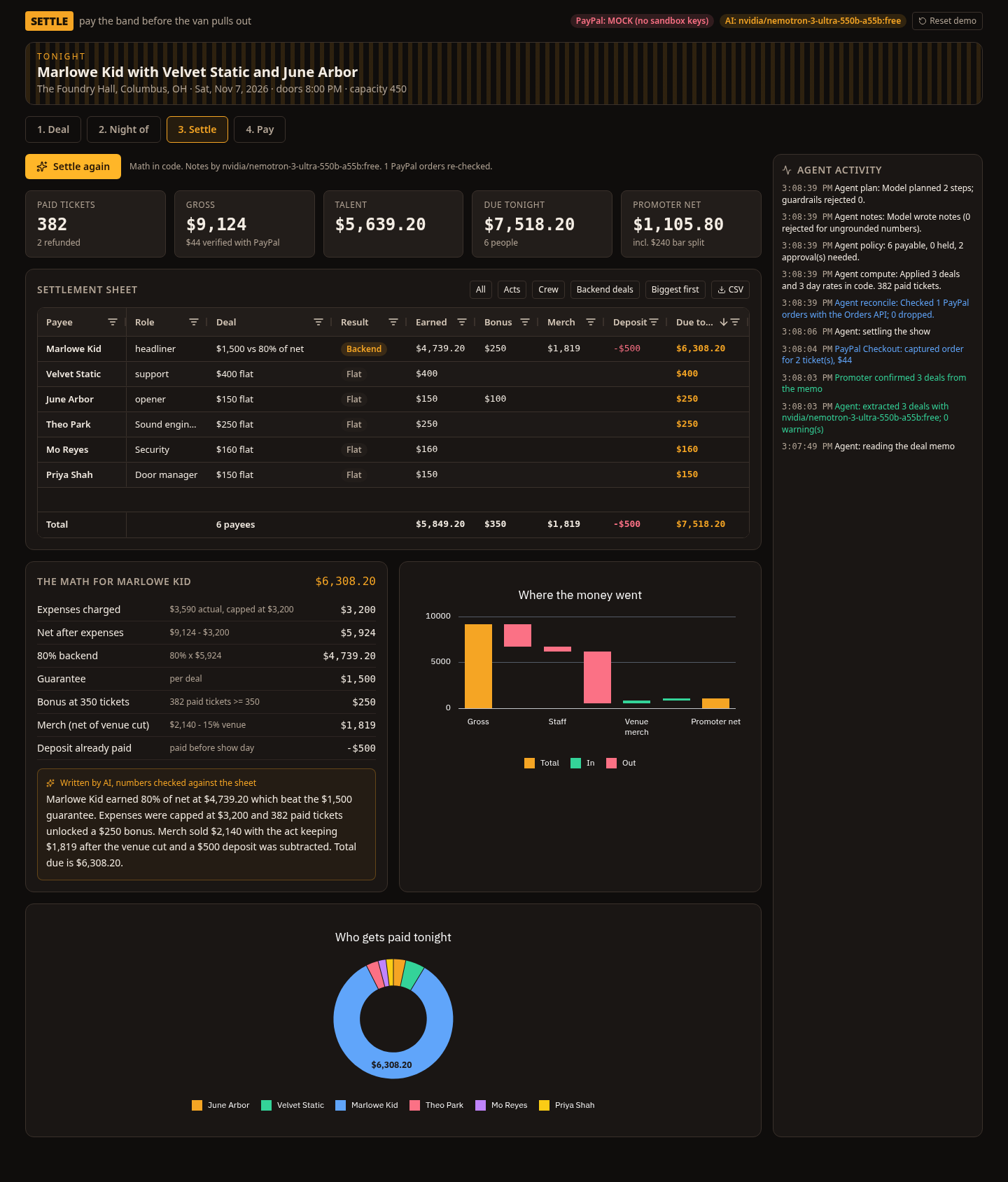
Settle. The server re-checks every PayPal ticket order with the Orders API and drops anything PayPal does not confirm. Then tested TypeScript applies every deal, cap, bonus, merch split and deposit, with a formula on every line. The AI writes each person a short plain English note, and any note that mentions a number not on the sheet is thrown out and replaced with a template.
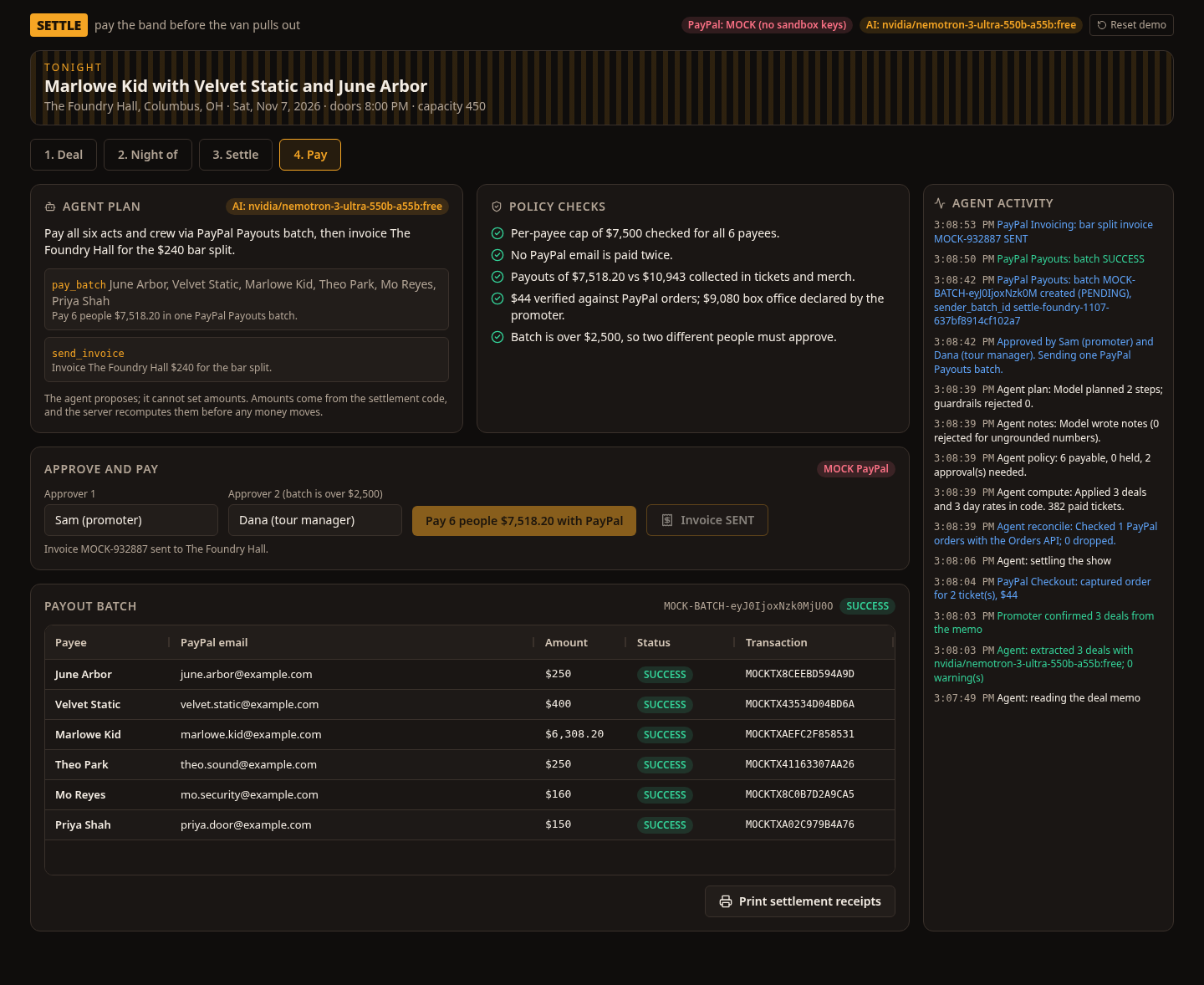
Pay. The agent proposes a plan with three tools: pay_batch, hold and send_invoice. Guardrails check it: it can only pay people the policy allows and it never sets an amount. Server policy checks run again (per-payee cap, duplicate email, funds collected, two different approvers above a threshold). Then one PayPal Payouts batch pays everyone with an idempotent sender_batch_id, and each payout status streams into the grid. The promoter's share of the bar goes to the venue as a PayPal invoice.
The hosted demo at https://settle-eight-khaki.vercel.app/show talks to the real PayPal sandbox (api-m.sandbox.paypal.com). The header reads "PayPal: sandbox" and the payment cards read "PayPal sandbox". Ticket checkout, capture, refunds, settlement reconciliation, the Payouts batch and the bar invoice are live sandbox API calls. Example sandbox IDs from the Nov 10 live run: order 67L68776MJ636371N (captured, 44.00 USD, capture 0LB826348A599921B), refund 7EC40341M4174954S (COMPLETED), the full 6-payee payout batch L57FLYNK3AL3Q ($7,518.20, PENDING, then SUCCESS) and bar invoice INV2-B2AU-UBU4-U8LX-27X2 ($240, SENT). A labeled mock adapter stays in the repo for running without credentials.
How we built it
- PayPal: Orders v2 (create, capture, get for reconciliation), Payouts v1 (create batch, get batch), Invoicing v2 (create, send, get), Payments v2 refunds, OAuth client credentials, and the PayPal JS SDK for checkout. Orders confirm-payment-source approves a ticket with the sandbox test Visa. All calls target api-m.sandbox.paypal.com and the hosted demo uses them. Live PayPal is never used. One adapter interface has the sandbox implementation and a labeled mock for running without credentials.
- AI: free open models through OpenRouter (default nvidia/nemotron-3-ultra-550b-a55b:free with two fallbacks) for deal extraction, payee notes and the payout plan. Outputs are parsed with zod and checked against the memo and the computed settlement. Every AI step has a deterministic rules fallback, and the UI always shows which one ran (the model name, or that the labeled rules fallback ran).
- AG Grid: AG Grid Community and AG Charts Community. See the sponsor notes below for the exact features and file paths.
- App: Next.js 16, React 19, TypeScript, zod, Tailwind, Vitest, hosted on Vercel. This is a new project, built during the submission period (started Nov 9, 2026).
Challenges we ran into
Keeping the AI useful without letting it touch money. The model reads and explains, but amounts only come from the settlement code, and the server recomputes the settlement and the policy before a payout or invoice is sent, so the browser cannot change a number. Free models also time out or run out of daily quota, so every AI step falls back to deterministic code instead of failing the night. That fallback is labeled in the UI so nobody mistakes a rules result for a model result.
Accomplishments that we're proud of
- The whole settlement loop works end to end: memo, tickets, reconciliation, settlement sheet, approvals, one payout batch, invoice and refunds.
- 45 automated tests cover versus, plus, door and flat deals, caps, bonuses, merch, deposits, tax, guardrails, AI grounding and the PayPal request format.
- The hosted demo runs on the real PayPal sandbox: a judge can buy a ticket, refund it, and send a payout batch without a sandbox login.
- Every number on the sheet shows its formula.
- The PayPal integration is central, not decorative: checkout, order capture, reconciliation, refunds, a payouts batch and an invoice all go through the same adapter.
What we learned
Agentic payments need a clear split of duties. Let the model plan and explain, let code compute, let policy decide, and let a person approve.
What's next for Settle
Webhooks for payout status (today the grid polls the Payouts API), settlement PDFs for each act, multi-show tours, and venue accounting exports.
Testing instructions (for judges)
Open https://settle-eight-khaki.vercel.app/show. No login. Step 1: click "Read the deal memo", then "Use these terms". Step 2: buy a ticket with the PayPal button (sandbox personal account) or with "Pay with a PayPal sandbox test card" (no login). Step 3: click "Settle the show" and click any row to see the math and the AI note. Step 4: type a second approver name and click "Pay 6 people". The header shows whether PayPal is in sandbox or MOCK mode and which AI model ran (or that the rules fallback ran). "Reset demo" restores the starting show. Run locally with the steps in the README.
The hosted demo uses the real PayPal sandbox, and the header says "PayPal: sandbox". Each visit gets its own sender_batch_id, so a retry in the same session cannot pay twice and a new visitor can still pay. Payee emails in the demo use example.com, which have no sandbox PayPal account, so PayPal marks those payout items UNCLAIMED while the batch reaches SUCCESS. Replace them with sandbox personal account emails in the Deal and Night of grids to see item status SUCCESS. To run locally, follow the README (developer.paypal.com, Apps & Credentials, Sandbox REST app).
AI disclosure
- Runtime AI: free open models on OpenRouter (default nvidia/nemotron-3-ultra-550b-a55b:free; fallbacks nvidia/nemotron-3.5-super-vl:free and google/gemma-4-31b-it:free) for deal memo extraction, payee notes and the payout plan. If no key is set, a model times out, or the free daily quota is used up, every AI step falls back to deterministic rules, and the UI labels that fallback.
- Development: Settle was built with Grok Bot, an AI coding assistant, which wrote much of the code and the submission text under human direction.
- Video: the voiceover is a synthetic text-to-speech voice (Piper), disclosed on screen. No copyrighted music.
- Demo data: all names are invented, and the advance ticket crowd is simulated and labeled as such.
AG Grid sponsor notes (Best Use of AG Grid)
Settle uses AG Grid Community and AG Charts Community only (MIT). No Enterprise features and no license key. Packages: ag-grid-community and ag-grid-react (^36.3.0), ag-charts-community and ag-charts-react (^14.3.0), declared in package.json. Eligible for the Best Use of AG Grid prizes.
AG Grid Community features, with file paths:
- Shared grid wrapper and custom dark "backstage" theme from the Theming API: themeQuartz.withPart(colorSchemeDarkWarm).withParams(...) in src/components/grid.tsx. AllCommunityModule is registered there. animateRows is on for every grid.
- Editable deal grid with validating value setters that convert dollars to integer cents, plus valueGetter, valueFormatter, pinned left column, and cellClassRules for missing PayPal emails: src/components/steps/deal-step.tsx.
- Night-of orders grid with custom cell renderers (source and status pills, a Refund button), valueFormatter, pagination (paginationPageSize={50}), and editable expense and crew grids with the same validating money value setters: src/components/steps/night-step.tsx.
- Settlement sheet in src/components/steps/settle-step.tsx: pinnedBottomRowData for a totals row, custom pill cellRenderer for deal outcomes, tooltipValueGetter on the Earned column (formula tooltips), valueFormatter on money columns, defaultColDef with filter and sortable, preset views driven by the grid API (setFilterModel and applyColumnState), CSV export via exportDataAsCsv, rowSelection with click selection, onRowClicked, onGridReady, getRowId, autoSizeStrategy type fitGridWidth, and a left-pinned Payee column.
- Payout grid that flashes status changes as they stream in (enableCellChangeFlash) and a custom status cellRenderer: src/components/steps/pay-step.tsx.
AG Charts Community features, all in src/components/charts.tsx, using AllCommunityModule and a custom ag-default-dark theme:
- Money waterfall built from stacked bar series (invisible base plus up, down and total segments): WaterfallChart.
- Payee donut (angleKey, legendItemKey, sectorLabelKey, innerRadiusRatio): PayeeDonut.
- Stacked daily ticket sales by source (advance, PayPal Checkout, door): SalesChart, used from src/components/steps/night-step.tsx. Chart data helpers live in src/lib/chart-data.ts.
Built With
- ag-charts
- ag-grid
- nemotron
- next.js
- openrouter
- paypal-invoicing-api
- paypal-js-sdk
- paypal-orders-api
- paypal-payouts-api
- react
- tailwind-css
- typescript
- vercel
- vitest
- zod
