-
-

Serxi Logo Image
-

Inspiration Scams used to be easier to spot—usually, they were full of obvious typos or promises that sounded way too good to be true. But now, scammers are using AI to generate polished, convincing emails, text messages, job offers, and fake security alerts in seconds.
The biggest problem with existing scam-detection tools is that they just throw up a warning sign and leave you hanging. They don't explain why something is dangerous. That’s especially frustrating for younger internet users, older adults, or anyone who isn't familiar with complex cybersecurity jargon.
We built Serxi to change that. Instead of just telling you a message looks sketchy, Serxi breaks it down, highlights the exact red flags, and explains what's actually going on in plain English.
What It Does Serxi is a lightweight Chrome extension that helps you analyze suspicious emails, texts, links, and messages before you interact with them.
When you paste a message into Serxi, it gives you:
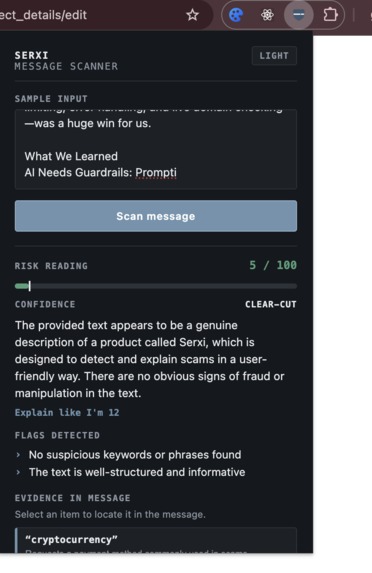
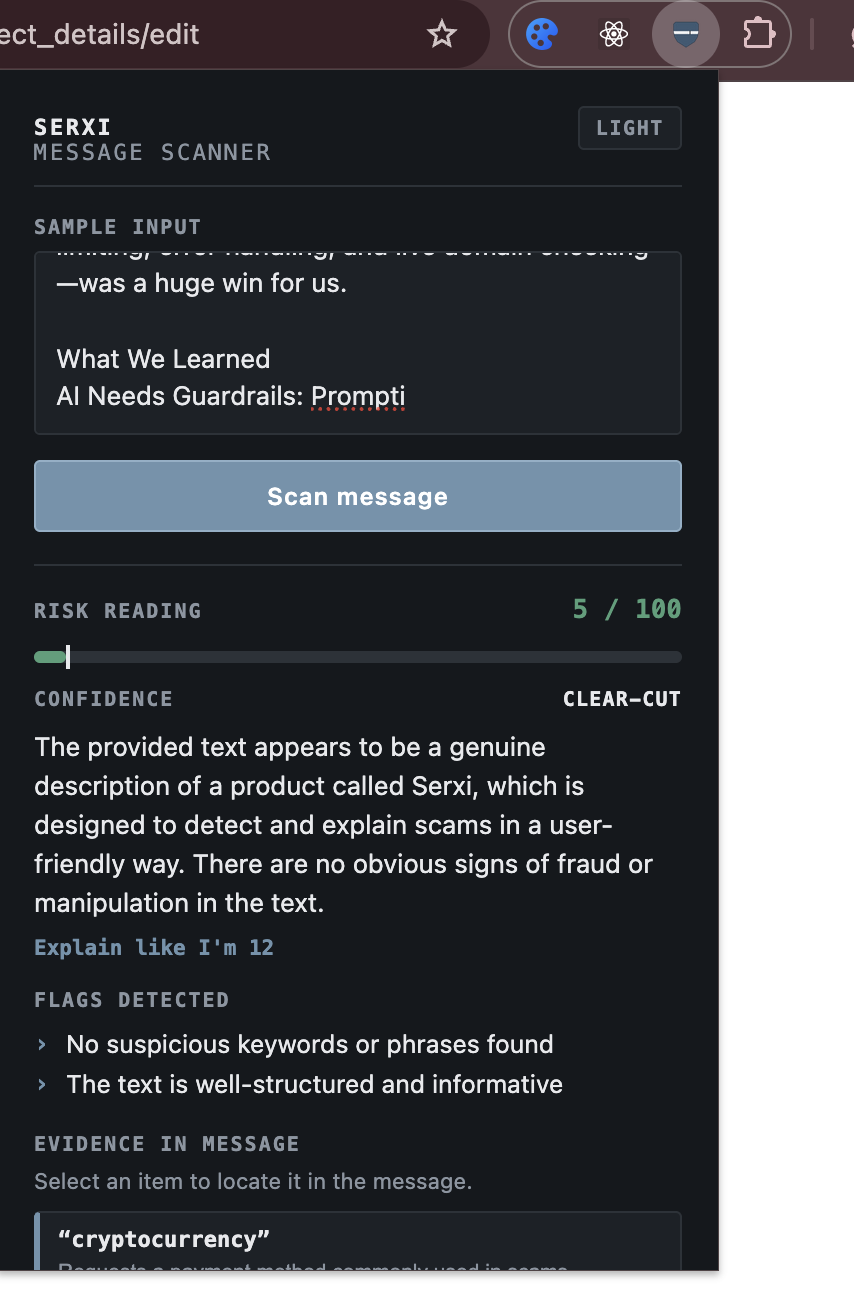
A risk score from 0 to 100 with a low, medium, or high risk rating.
A confidence score so you know how sure the tool is about its result.
A plain-English summary of what's wrong with the message, plus an "Explain Like I'm 12" toggle for an even simpler breakdown.
A breakdown of specific red flags along with exact quotes (evidence) pulled straight from the message.
Serxi actively scans for common red flags like artificial urgency, impersonation, phishing attempts, requests for passwords, and payment scams.
If a message contains links, Serxi extracts the domain names and runs a live search to check if those domains have been linked to known scams or malicious activity. You can also save your last five scans, switch between light and dark mode, export a JSON report, or share the analysis with friends or family.
How We Built It We built the frontend of Serxi using HTML, CSS, and vanilla JavaScript as a Manifest V3 Chrome extension. Using plain JavaScript kept the extension light and helped us understand how browser extensions communicate directly with external APIs.
Here is how the pipeline works under the hood:
The Backend: Built with Node.js and Express (deployed on Render), our backend accepts the user’s input via a simple POST request.
The AI Engine: We integrated Groq’s API using the Llama 3.3 70B model. To keep the AI's response reliable, we designed a strict system prompt that forces the model to return structured data containing the risk levels, summaries, and flag evidence.
URL Reputation: We added the Tavily Search API to analyze links. When a user inputs a URL, the system extracts the main domain and searches for recent reports of phishing or blacklisting. If a domain looks malicious, it raises the overall risk score and adds the evidence to the final report.
Speed & Reliability: The AI analysis and domain checks run in parallel so you aren't stuck waiting. If the AI takes longer than 10 seconds or fails, our rule-based fallback system kicks in to flag obvious bad signs—like cryptocurrency requests, gift card demands, or aggressive threat language.
Security & Storage: We set up a 5,000-character limit, rate limiting, and input validation to keep the API stable. Inside Chrome, we used the local Storage API to remember your theme and save your recent scans without needing an external database.
Challenges We Ran Into Getting Consistent AI Data: AI models love to respond with long, conversational paragraphs or Markdown formatting, but our extension needed exact data to build the UI cards and scores. We solved this by enforcing strict JSON formatting and writing validation code on the backend to double-check the data before sending it to the user.
Handling Offline / Slow API Issues: We didn't want the extension to completely break if our AI provider timed out. Building a fallback system that uses traditional pattern-matching for scam keywords took extra effort, but it ensured the extension is always usable.
Contextualizing URLs: Just because a link is in a message doesn't mean it's dangerous. We had to carefully tune our URL search logic so that normal links wouldn't trigger false alarms, while actually malicious domains were properly flagged.
Accomplishments We're Proud Of It Actually Teaches You: We didn't just build a filter; we built a tool that helps people understand how scammers operate so they can spot red flags on their own later.
Multi-Layered Approach: Combining live web searches, custom AI prompting, string matching, and fallback rules meant we created something much more reliable than a simple wrapper around an AI API.
Building a Full Product in a Hackathon: Going from zero to a fully functional extension—complete with dark mode, export features, rate limiting, error handling, and live domain checking—was a huge win for us.
What We Learned AI Needs Guardrails: Prompting an AI is easy, but making it behave consistently in a real production environment requires strict parsing, fallback options, and robust error handling.
Browser Extension Mechanics: We gained hands-on experience dealing with Chrome APIs, background scripts, local storage, cross-origin requests, and extension permissions.
Effective Security Communication: The biggest technical lesson was that safety data is only useful if people can understand it. Structuring explanations in clear language made the tool significantly better.
What's Next for Serxi Context Menu Integration: We want to eliminate copy-pasting entirely by letting users right-click text, emails, or links directly inside their browser to scan them instantly.
Deeper Technical Link Checks: We plan to add checks for domain age, lookalike domains (typosquatting), redirect chains, and threat intelligence databases.
Image Scanning (OCR): Adding text recognition so users can upload screenshots of fake text messages, social media ads, or QR codes.
Direct Messaging Plugins: Exploring privacy-focused integrations for platforms like Gmail, helping users flag scams without storing their personal data.
Built With
- css
- dotenv
- express-rate-limit
- express.js
- groq
- html
- javascript
- node.js
- tavily

Log in or sign up for Devpost to join the conversation.