Linklet – Smart, Dynamic Digital Business Cards
Inspiration
I’ve often found digital business card platforms either outdated, hard to customize, or lacking integration with users’ real online presence.
I wanted to create a simple yet powerful solution that reflects who people are—automatically. Something that looks professional, creative, or techy based on user needs, with minimal setup time and a modern user experience.
What it does
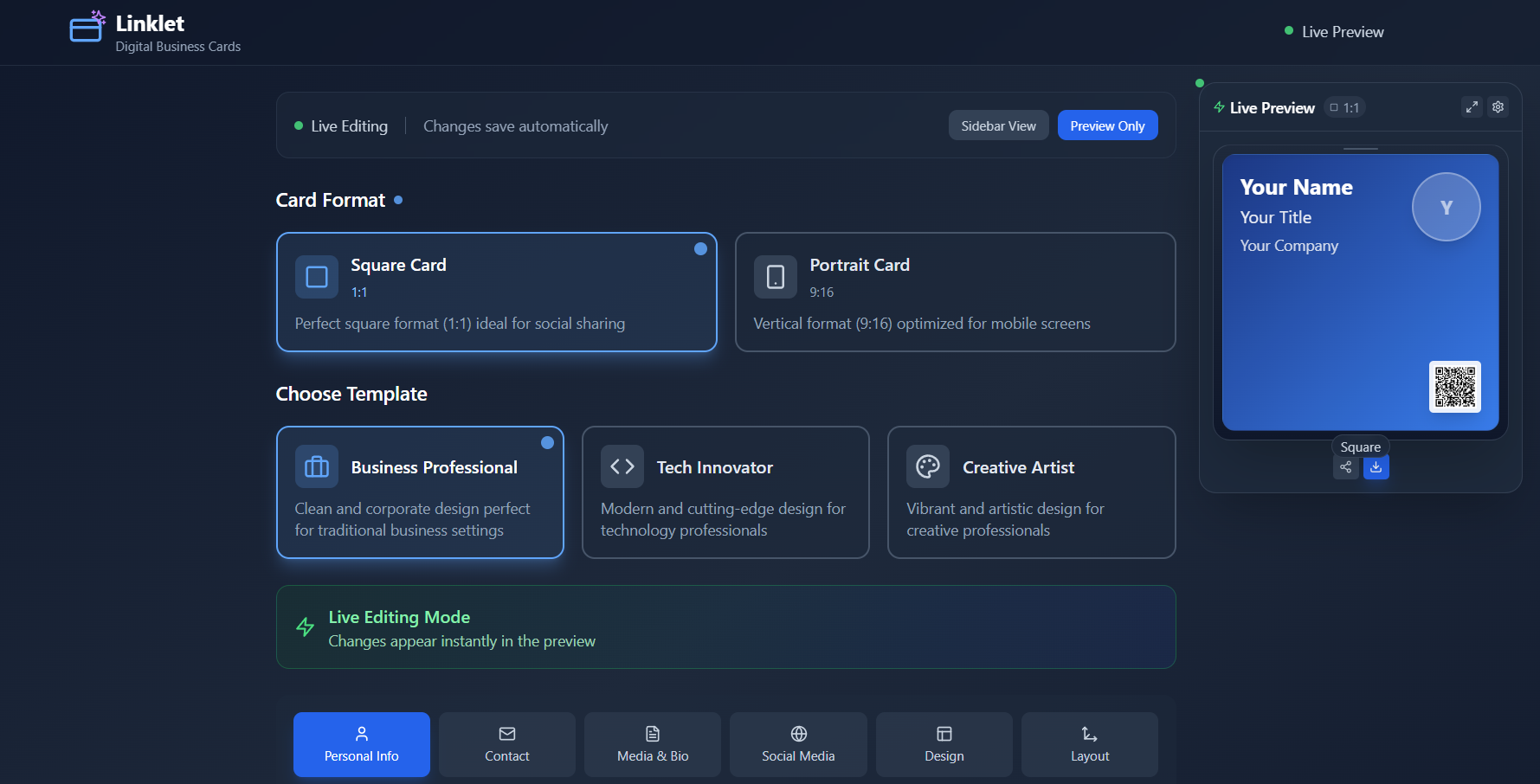
Linklet allows users to create smart, customizable virtual business cards that showcase their identity in a visually engaging and dynamic way.
Key features include:
- Smart field formatting for phone numbers, emails, and social handles.
- Three ready-to-use design templates: Business, Tech, and Creative.
- Customizable QR codes with color and image/logo upload options.
- Simple UI for adding personal websites and social media links with platform icons or dropdown menus.
- A dark-themed interface with 3–4 vibrant accent colors for visual appeal.
- A live preview that updates instantly as users make changes.
- A toggle button to easily show or hide the floating preview panel on both desktop and mobile views.
How we built it
We kickstarted development using Bolt.new, leveraging its AI-powered app scaffolding tools to quickly generate a clean, responsive web app foundation.
I crafted a detailed prompt describing the core functions: virtual business card creation, social sync, QR code generation, and theme customization.
From there, I personally customized the app by:
- Tweaking field behaviors for auto-formatting (e.g., auto-adding "@" for handles, suggesting common email domains).
- Building template selection features based on user personas.
- Designing the UI/UX with a dark background and bold accent colors for contrast and simplicity.
- Adding a real-time floating live preview with a toggle option for better editing across all device sizes.
- Improving sidebar view responsiveness to ensure text scales correctly within its container.
This blend of AI-generated scaffolding and manual UX and UI customization helped accelerate development while keeping the design aligned with the original vision.
Challenges we ran into
Limited Customization in the First Prototype
The initial version generated with Bolt.new wasn’t fully customizable. After the first round of testing, I realized the design layouts, color schemes, and QR customization options needed more flexibility to meet diverse user branding needs. This led to a second development phase focused on enhancing customization features.
Editing Experience and Floating Preview Issues
While I loved the floating preview, a few usability issues emerged:
- The preview had too much internal padding, making the card appear smaller.
- In portrait view, the full card wasn’t visible, getting cut off.
- The Edit Mode (drag-to-reposition) was non-functional and has now been fully disabled.
- A lingering message encouraging users to "open edit view to drag elements" was also removed to avoid confusion.
- On mobile, the preview covered editing controls, which led us to add the toggle button for showing or hiding the preview easily.
Sidebar View Text Overflow
In sidebar mode, the template titles and descriptions were overflowing their containers when the sidebar shrank. This required responsive text sizing and container adjustments to ensure a clean layout across all screen sizes.
Export Rendering Bug – Still Pending Fix
One known issue we couldn’t fully resolve before submission is related to the exported PNG and PDF outputs.
Currently, when users export their business card, some text and visual elements near the edges get cut off or cropped in the final file, even though they appear correctly in the live preview.
This seems to be a canvas boundary and scaling mismatch between the preview layer and the export rendering logic.
Fixing this will require adjusting export canvas size, padding, and scaling to ensure the final output matches what users design and see in-app.
Uncertainty Around Live Social Media Sync
A key feature idea was enabling live updates from users' social media profiles. However, we encountered:
- API limitations: Not all platforms provide reliable or real-time profile data access.
- User privacy and permissions: Managing sensitive data and obtaining necessary consents adds complexity.
For now, live social sync remains a long-term goal, pending further research.
Accomplishments that we're proud of
- Successfully deployed a working, highly customizable prototype.
- Integrated smart input fields for seamless data entry and formatting.
- Built a clean, dark-mode UI with vibrant accent colors for a modern, engaging look.
- Created three pre-designed templates targeting different professional styles.
- Launched a responsive floating live preview with a toggle option for better user control.
- Resolved layout and text scaling issues in sidebar view for mobile responsiveness.
What we learned
This project reinforced the value of combining AI development tools with manual UX design and user-centered thinking.
We learned that while AI-assisted scaffolding accelerates development, careful hands-on attention is essential for refining user experience, layout responsiveness, and interface clarity.
What's next for Linklet
Finalize Export Rendering Fixes:
Resolve the PNG and PDF export issue to ensure that all text and design elements render fully and cleanly without getting cut off.User Profile System:
Implement user authentication so people can create accounts and save their business cards for future access and editing.Saved Cards Dashboard ("My Cards"):
Allow users to save multiple card designs and view, compare, or re-edit them later from a dedicated dashboard.Received Cards + Folders:
Let users collect business cards shared with them by others, organize them into folders (e.g., “Networking Event 2025”, “Project Teams”), and easily search or filter by folder.Export & Download Options:
Let users download their cards in multiple formats:- PNG image
- vCard (.vcf contact file) for universal phone compatibility
- Both packaged together as a ZIP
- (Optional) PDF export
- PNG image
User Dashboard & Analytics:
Allow users to track how often their card or QR code is viewed or scanned.Mobile App Expansion:
Develop a mobile-first app for offline access, easy sharing, and contact management.Custom Domain & Hosting Options:
Enable users to publish their digital card on a personalized URL.More Templates, Fonts, and Design Patterns:
Add more diverse templates, font selection (at least 10 fonts), and visually rich background patterns, including nature textures, abstract designs, and professional layouts.Social Media Sync Feasibility Research:
Explore API options and user-permission flows for real-time profile updates.Networking & Contact Management App (Future Phase):
Looking ahead, we envision a dedicated mobile app where users can save, organize, and search digital business cards shared with them—creating a personal networking wallet.
With user consent, the app could track when and where each contact was saved, making it easier to recall connections from events or meetings.
Long-term, we also see potential for location-aware networking features, helping users discover and connect with professionals nearby, blending elements of social networking with professional contact management.
Built With
- bolt.new
- chatgpt
- netlify.app
- thispersondoesnotexist.com


Log in or sign up for Devpost to join the conversation.