Inspiration
SequenceMe was inspired by a problem I experience directly in dental education: learning clinical workflows and reasoning is often fragmented, scattered across lectures, handouts, emails, clinic sessions, and inconsistent faculty guidance. Students spend a huge amount of time trying to piece together how a procedure actually flows instead of simply practicing and improving.
I wanted to build a tool that organizes clinical procedures into a clear, visual, step-by-step structure. The goal was to create something that feels intuitive and interactive — almost like a Scratch-style drag-and-drop workspace — while also being useful for real dental education.
What it does
SequenceMe is a dental educational tool that helps students understand and organize clinical workflows more clearly, thoroughly, and efficiently.
Users can:
- browse procedures by dental discipline,
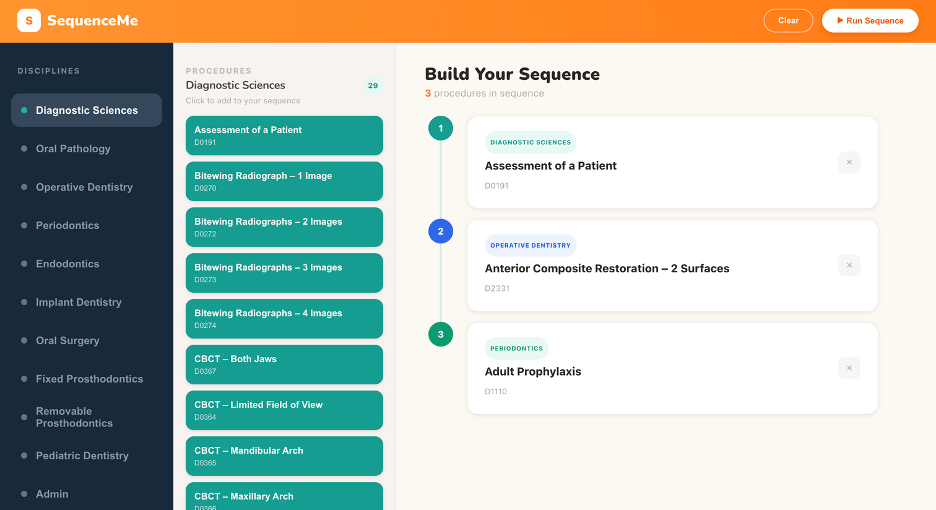
- drag or select procedures into a workspace to build a sequence,
- view that sequence in a clean visual layout,
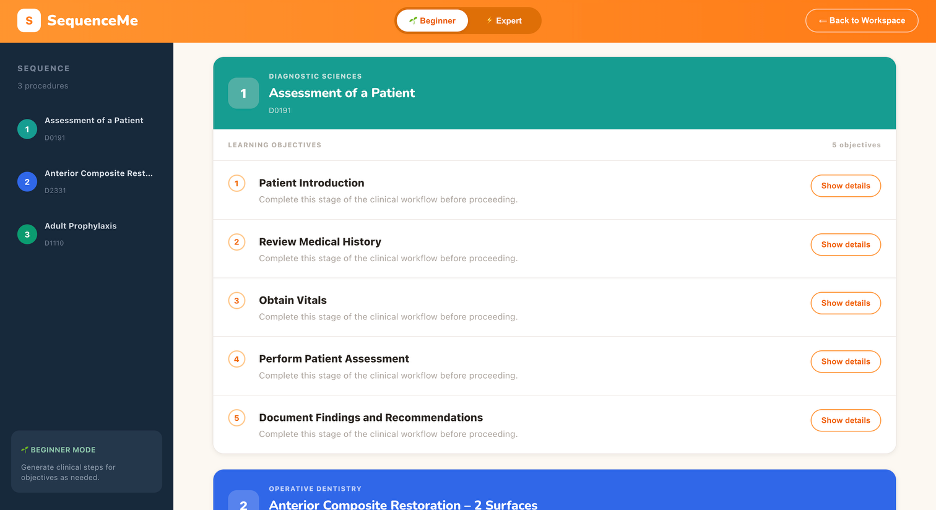
- switch between Beginner and Expert modes,
- generate a report page with organized learning objectives,
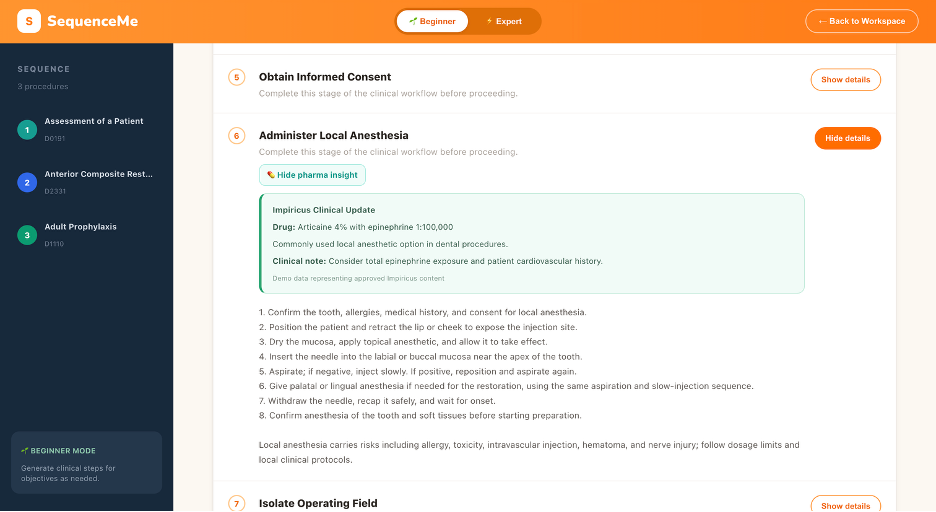
- expand individual objectives to view AI-generated clinical steps,
- and view contextual features such as pharma insight indicators when relevant.
The platform is designed to reduce cognitive overload and make clinical reasoning easier to follow.
How we built it
SequenceMe was built as a full-stack web application.
Frontend
- React
- custom CSS for the UI
- component-based structure for the workspace, report page, sidebars, header, and objective cards
Backend
- FastAPI
- API endpoints to retrieve procedures, sequences, and AI-generated guidance
AI integration
- Grok API for generating on-demand clinical explanations and objective-level guidance
Key product features built
- discipline-based procedure browsing
- color-coded procedure categories
- drag/add-to-sequence workspace
- run sequence → report workflow
- beginner/expert mode toggle
- expandable objective cards
- pharma insight indicator support
- report page layout styled for readability and structured learning
A large part of the project also involved iterative UI/UX design. I spent significant time refining the visual hierarchy, layout proportions, scrolling behavior, header, cards, and report page structure so the tool would feel polished and intuitive instead of just functional.
Challenges we ran into
This project involved a lot of technical and design challenges.
State and data flow
One of the biggest problems was making sure procedures and sequences persisted correctly when moving between the workspace and report page. I ran into issues where procedure lists would disappear after running a sequence and returning to the workspace, which required debugging how state and API-driven data were being handled.
Async behavior
Another challenge was realizing some issues were not purely state-related, but timing-related. In multiple places, the app appeared “empty” at first and only populated after waiting, which pointed to API request timing and loading behavior.
UI refinement
A major part of the challenge was getting the interface to look and feel right:
- fixed-width layout vs full-page scroll
- getting scroll to happen inside the correct panels
- sizing cards and typography appropriately
- matching the intended mockup
- controlling spacing and visual hierarchy across pages
- getting the report page proportions and height behavior correct
Time and scope
Because I was building quickly and also learning as I went, one of the hardest parts was balancing feature scope, debugging, styling, and polish under time pressure.
Accomplishments that we're proud of
Some accomplishments I’m especially proud of:
- Building a working full-stack prototype from scratch
- Creating a clean and visually distinct UI for both the workspace and report views
- Implementing a workflow that feels intuitive for students: browse → build → run → review
- Designing Beginner and Expert modes to support different learning needs
- Integrating AI-generated clinical guidance into the report structure
- Adding discipline-based color systems to make the experience easier to scan and more engaging
- Persisting through multiple rounds of debugging and design iteration to get the product into a presentable state
I’m also proud that this project reflects a real educational pain point and not just a generic technical demo.
What we learned
This project taught me a lot, both technically and conceptually.
Technical lessons
- how to structure a React app into reusable components
- how frontend state can break in subtle ways when moving between pages/views
- how asynchronous API behavior can create bugs that initially look like rendering or state issues
- how important layout architecture is for scroll behavior and responsive UI
- how much polish depends on spacing, typography, and hierarchy rather than just functionality
Product lessons
- solving a real workflow problem requires both technical logic and careful UI thinking
- educational tools need clarity more than complexity
- a tool can be much more powerful when it adapts to different user levels (beginner vs expert)
- sometimes the hardest part is not building a feature, but making it feel natural and usable
What's next for SequenceMe
There are several directions I’d like to take SequenceMe next:
- improve the quality and consistency of AI-generated clinical steps
- make pharma insights directly expandable and more interactive
- add stronger procedure data structure and validation
- allow users to save, edit, and reload sequences
- add search, filtering, and favorites
- improve drag-and-drop and workflow customization
- support exporting/shareable study sheets
- expand content across more dental disciplines and procedure types
- validate the tool with real dental students and faculty feedback
Long term, I see SequenceMe becoming a structured clinical learning platform that helps students move from scattered information toward organized reasoning, repetition, and skill development.


Log in or sign up for Devpost to join the conversation.