Inspiration
Every day, people download files, open links, and copy snippets of code without knowing whether they’re safe. Security tools are either too complex or too expensive, and most users never use them. We wanted to build a tool that makes file safety as simple as clicking “Scan” — fast, visual, and powered by AI-like intelligence, even without a real malware engine.
SentriScan was born from this idea: A futuristic, accessible threat-scanning experience for everyone.
What it does
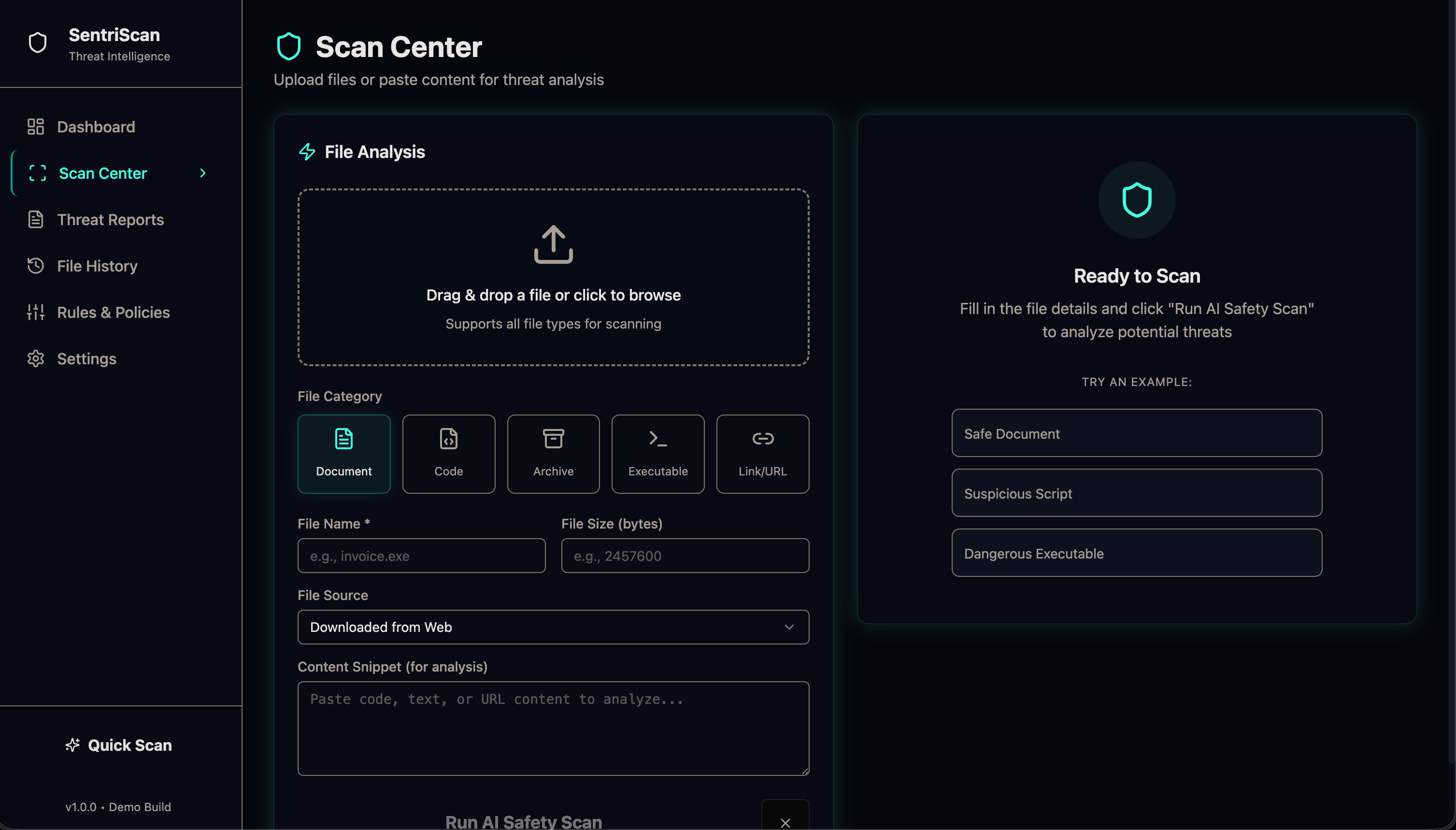
SentriScan is an AI-simulated File Safety & Threat Intelligence Scanner. Users can:
Upload or simulate files, links, or script snippets
Get instant verdicts: Safe, Suspicious, or Dangerous
See risk scores, confidence levels, and human-readable explanations
Save reports, view scan history, adjust custom rules, and export JSON/Markdown/PDF
Use a neon cyberpunk security dashboard with animations and charts
Everything behaves like a real security SaaS — but powered by deterministic heuristics and dummy datasets.
How we built it
We built the project using:
React + TypeScript for the front-end
TailwindCSS & ShadCN for UI components
Framer Motion for futuristic cyberpunk animations
Recharts for visualizing threat data
A simulated backend API using deterministic rule-based scoring
Local JSON datasets for signatures, reputation, and policies
Fully responsive layout + neon/glassmorphism theme system
The scanning engine is a lightweight rule system that checks patterns like:
suspicious keywords (powershell, eval(, macro)
risky sources (USB, unknown links)
executable flags
URL reputation (simulated)
Scores map to verdicts that feel real and explainable.
Challenges we ran into
Designing a UI that feels like a futuristic security console without overwhelming the user
Ensuring all scans behave deterministically, even with simulated randomness
Building meaningful explanations for threats while using only dummy datasets
Making the app feel like a real SaaS product, not a prototype
Time constraints — building multiple full pages, animations, and data models quickly
Accomplishments that we're proud of
A fully navigable, production-like SaaS interface
Realistic scanning flow with progress animation + logs
High-quality neon cyberpunk UI with glassmorphism
Robust simulated engine with consistent, believable results
Threat Reports with filters, export features, and detailed drill-down
A complete end-to-end experience: Landing → Scan → Reports → Settings
The final product looks and feels like something teams could actually use.
What we learned
How to design a security tool that balances usability and depth
How to simulate complex AI/AV behavior with deterministic rules
How to build a full multi-page system quickly using component libraries
The importance of good UX during high-stress flows like scanning or errors
How visuals and motion can elevate the seriousness of a technical product
What's next for Sentri Scan
We want to extend SentriScan into a real security tool with:
VirusTotal / AbuseIPDB / URLScan integrations
LLM-powered static analysis for smarter explanations
Sandbox behavioral analysis
Team workspace mode (multi-user + alerts + logs)
Offline AI scanning engine for local file privacy
A full API for security teams to integrate SentriScan into workflows
The goal: Turn this demo into a lightweight, real-world AI safety scanner.
Built With
- api
- express.js
- framer-motion
- node.js
- react
- recharts
- routes
- serverless
- shadcn-ui
- supabase-/-local-json-storage
- tailwindcss
- typescript
- vercel

Log in or sign up for Devpost to join the conversation.