Inspiration
My cycle was lost in our society's parking lot. Our residential complex has 50 flats and 16 CCTV cameras surrounding the building. When the incident happened, I — just a regular resident — spent 2 hours of frustrated clicking alongside the building manager: overshooting timestamps, losing our position when switching between the 16 cameras, and squinting at a tiny timeline bar — just to find a 30-second clip.
Our building uses a standard NVR system. It has playback, speed controls, and multi-camera views. But every action requires precise mouse clicks on a tiny timeline bar, navigating through menus, and staring continuously at screens for hours. We overshot the timestamp dozens of times and clicked through hundreds of frames one by one — trying to read the number plate of the suspect's vehicle in the moment the cycle left the parking area.
This is the reality for many people who own cameras but only touch the NVR software once something goes wrong — a residential society member, a school principal, a shop owner, a small business manager. They aren't professional CCTV operators. They are ordinary people who need to find a moment in hours of footage, fast, under stress, after something already happened.
Research confirms the scale of this challenge — security operators miss an estimated ~95% of events after just 22 minutes of continuous monitoring, a finding repeatedly cited by the surveillance industry in 2025 (fortixai.com; intelexvision.com; mycontrolroom.com). ~73% of organizations cite false positives as their #1 detection challenge — up from previous years and still climbing (2025 SANS Detection & Response Survey). In a global video surveillance market estimated at $62–85B in 2026 across multiple research firms, physical, tactile controls for forensic footage review still appear largely unaddressed.
I looked at the Logitech MX hardware and realized: this problem was designed for this hardware.
What it does
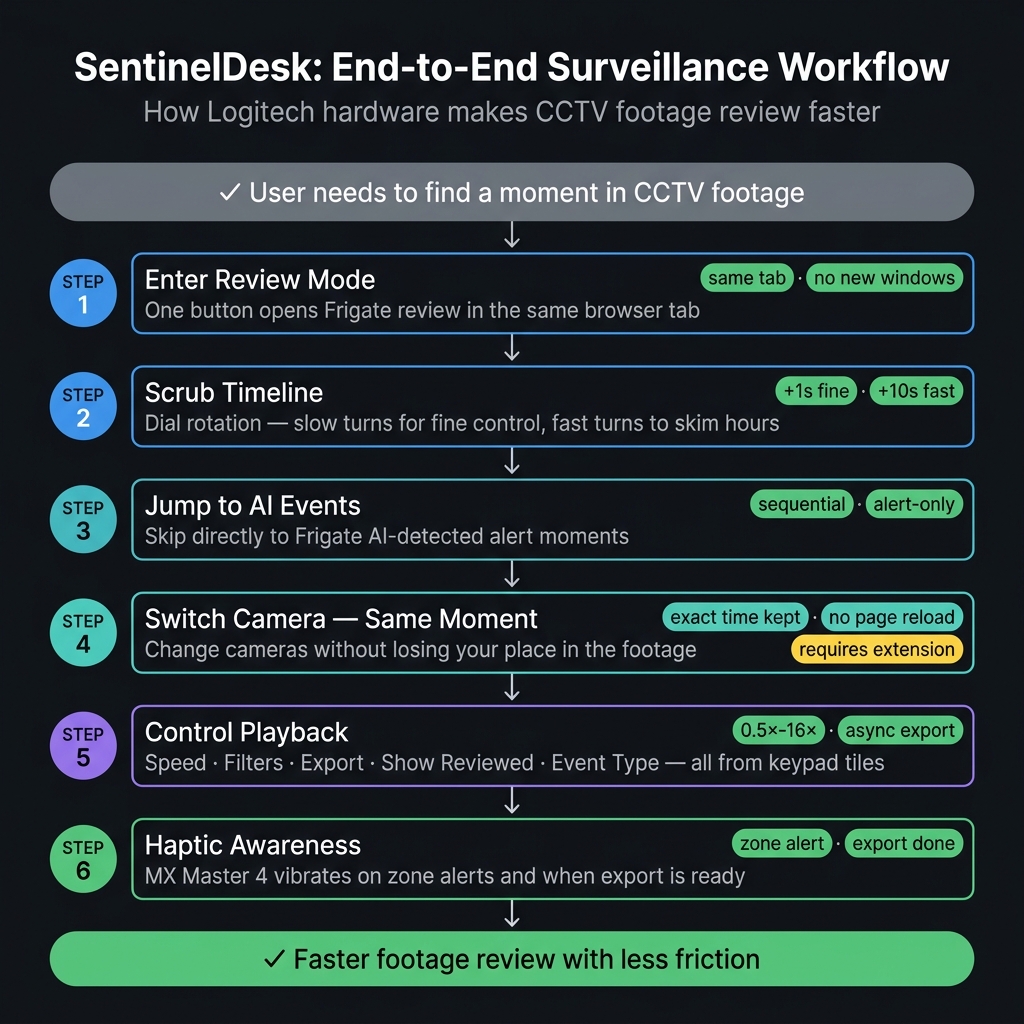
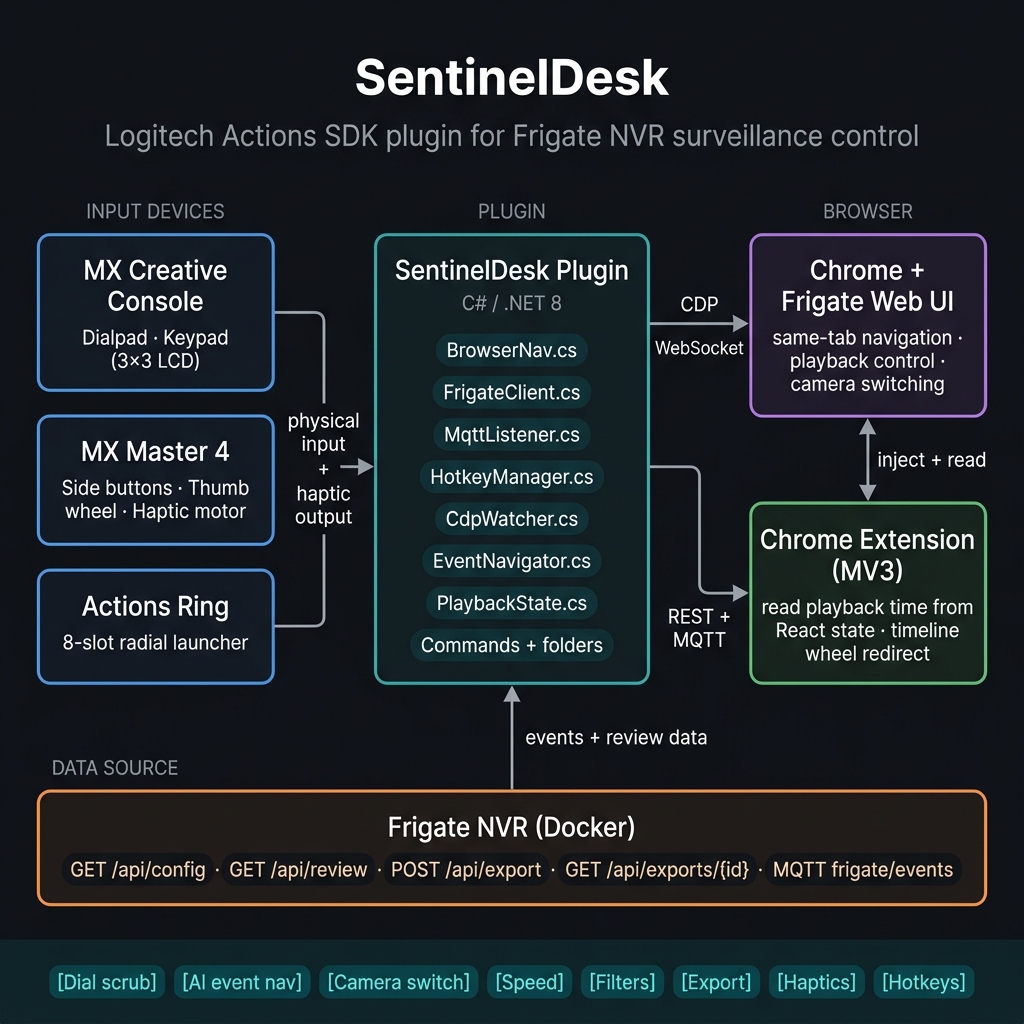
SentinelDesk is a working Logitech Actions SDK plugin that turns the MX Creative Console, MX Master 4, and Actions Ring into a tactile surveillance control surface for Frigate NVR.
It is not a concept — the plugin is built, installed via dotnet build, and tested on real hardware against a live Frigate instance with real CCTV footage.
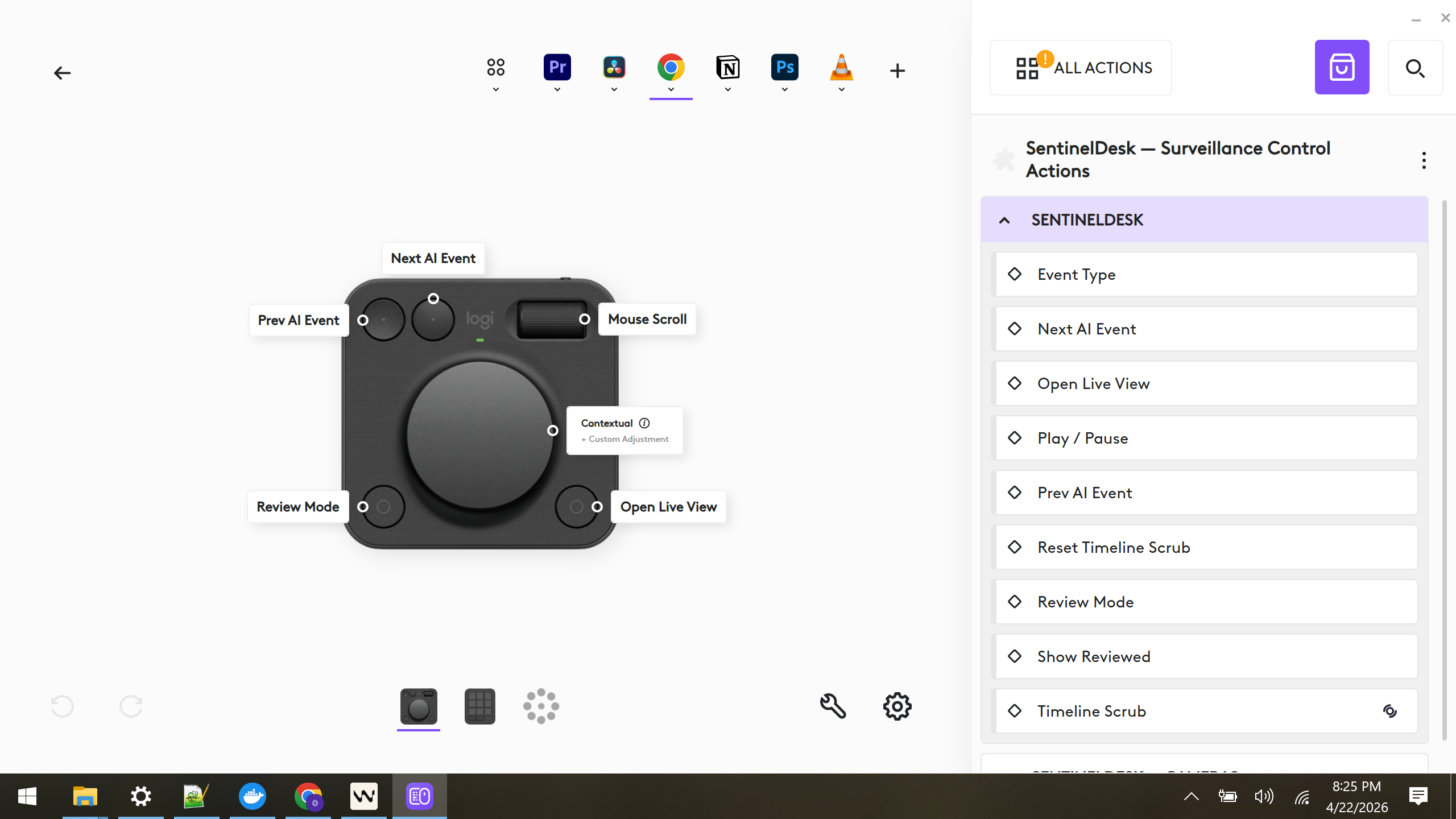
MX Creative Console Dialpad — Analog Timeline Control
- Dial = velocity-scaled timeline scrubber. Slow turns move about 1 second at a time for fine control; faster turns jump about 10 seconds at a time for quick review. Under the hood, the plugin sends simple keyboard input to the active Frigate tab.
- Four buttons: Prev AI Event · Next AI Event · Review Mode · Open Live View. These reuse the same Frigate tab through Chrome DevTools Protocol (CDP), so the workflow stays in one place instead of opening extra tabs.
- Roller: mapped to OS mouse scroll
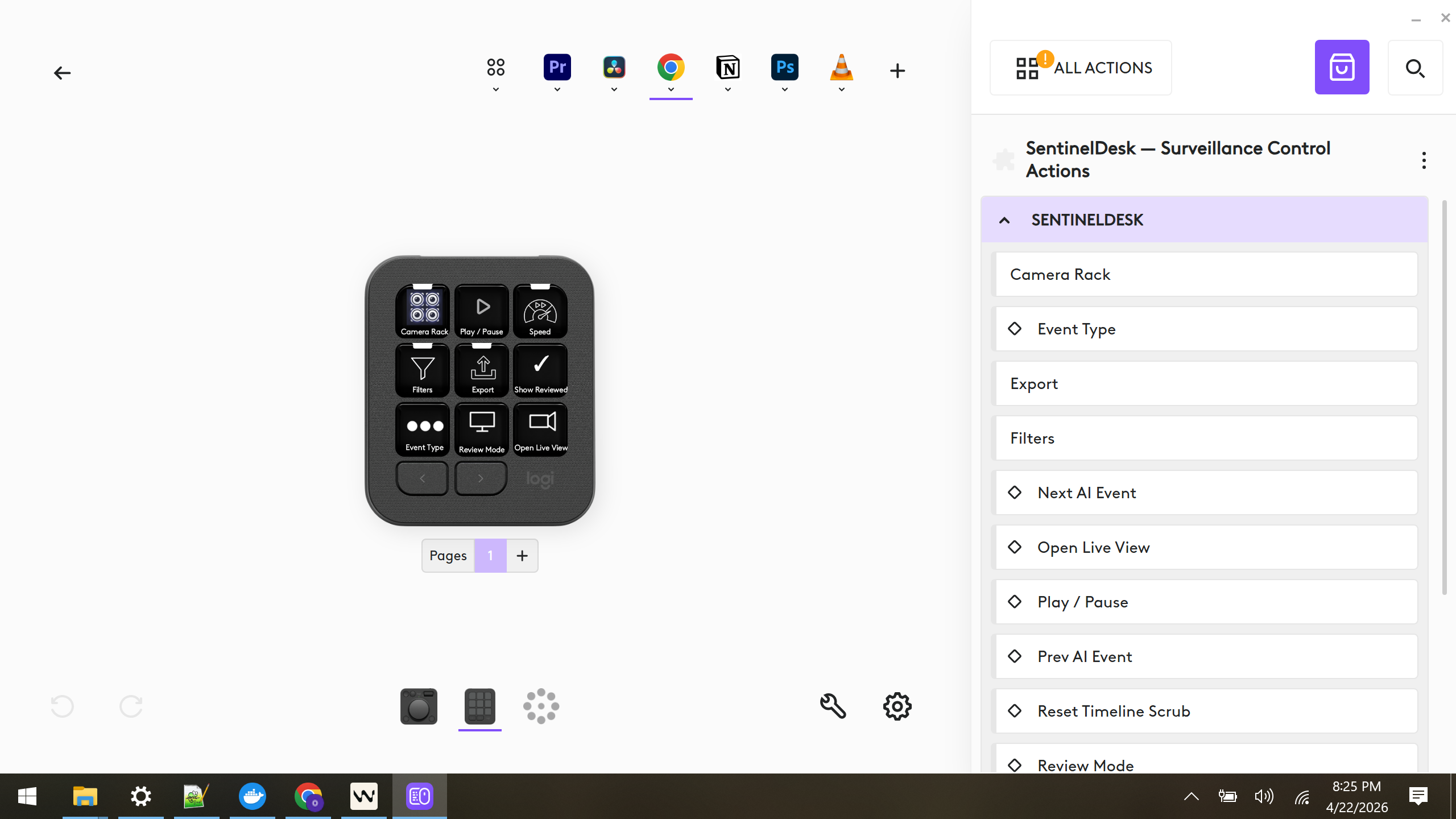
MX Creative Console Keypad — 9-Tile Control Grid
A full 3×3 LCD grid, every tile a real plugin action:
- Camera Rack — tap a camera tile to switch feeds while keeping the same review moment.
- Play / Pause — toggle playback on the active Frigate tab.
- Speed folder — 0.5× / 1× / 2× / 4× / 8× / 16× playback presets.
- Filters folder — person / car / motorcycle review filters.
- Export folder — 1 h / 4 h / 8 h / 24 h export presets for the active camera. In current testing, this behaves like a "last N hours" export ending at the latest available time; when the export finishes, the MX Master 4 can fire an
export_completedhaptic. - Show Reviewed toggle — switch reviewed items on or off.
- Event Type / Severity Cycle — cycle Alerts ⇄ Detections ⇄ Motion.
- Review Mode & Open Live View — jump between Frigate's review and live pages.
Actions Ring — On-Screen Radial Launcher
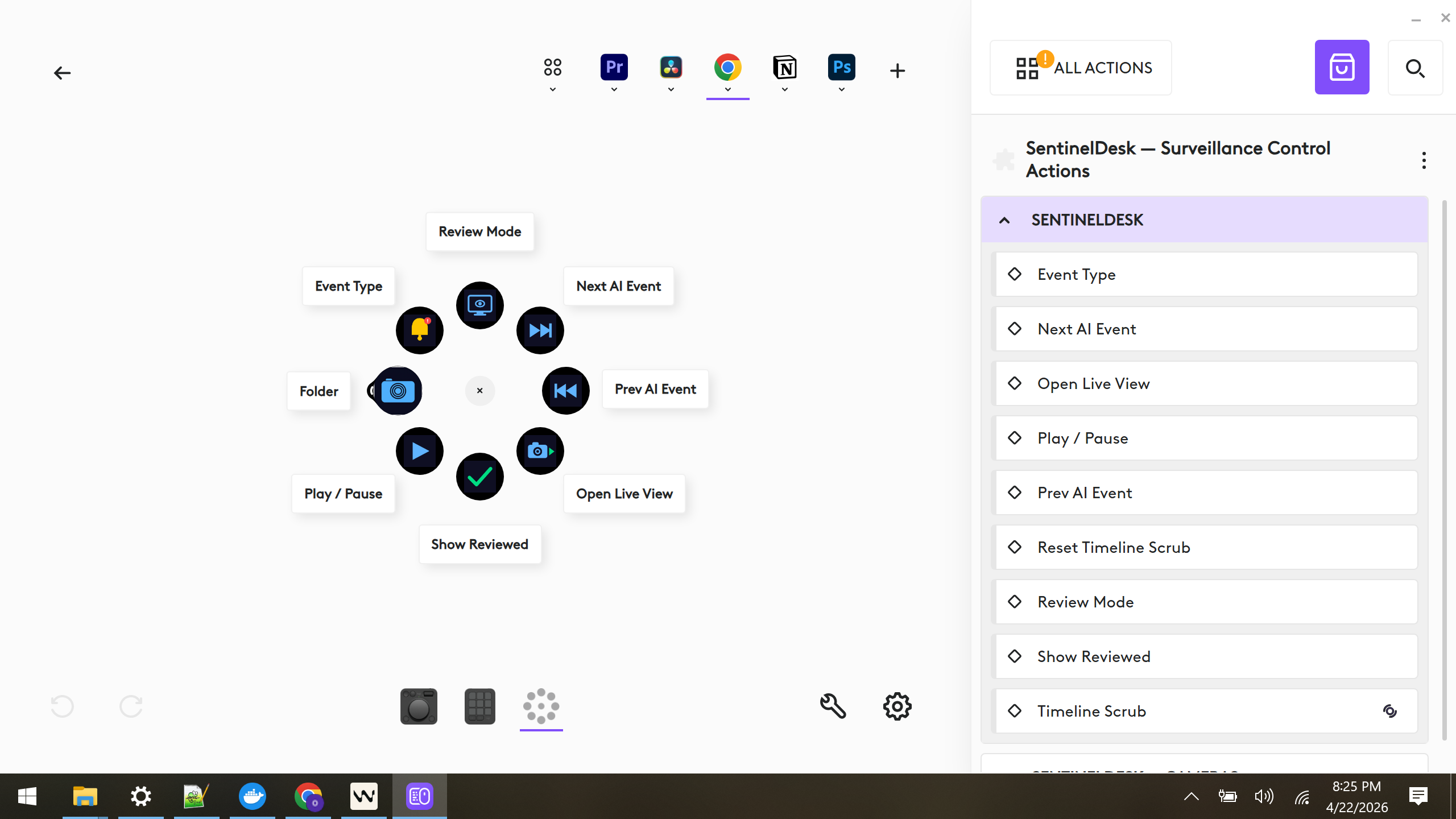
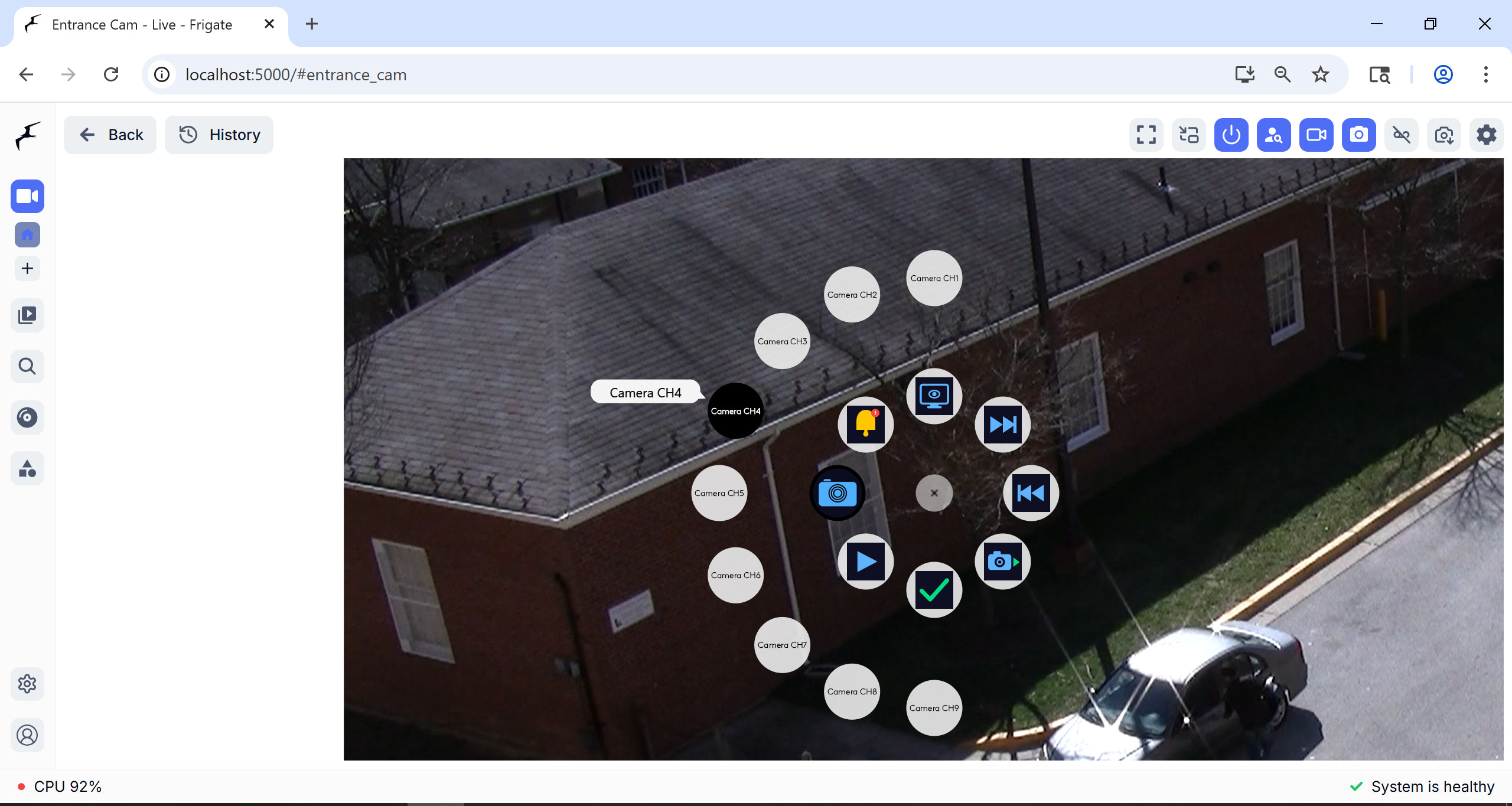
Mapped to the MX Master 4 scroll-wheel-press. It gives quick access to 7 main actions plus a nested Camera folder for direct camera switching. The code supports up to 13 channels, and the ring reuses the same action logic as the keypad.
MX Master 4 — Awareness + Shortcuts
- Alert haptic. The MX Master 4 can vibrate for important Frigate alerts.
- Export completion haptic. The MX Master 4 can vibrate when an export finishes.
- Side-button shortcuts. The four customizable thumb buttons are mapped in Logi Options+ to Next Event, Previous Event, Review Mode, and Live View. Inside the plugin, a Win32
RegisterHotKeylistener catches those shortcuts and routes them to the same workflow used by the keypad. - Horizontal scroll → Frigate 24 h timeline. The thumb-wheel tilt is redirected by the companion Chrome extension so you can move through the full-day timeline without grabbing the scrollbar.
Chrome Extension Companion (required)
A small MV3 Chrome extension is required for two things: reading Frigate's exact playback time from React state, and redirecting horizontal wheel movement onto the timeline. This is what lets SentinelDesk preserve the same review moment when switching cameras and queue exports from the current context.
How we built it
Frigate NVR (Docker, localhost:5000)
    │
    ├── REST  → cameras, snapshots, review list, export
    └── MQTT  → frigate/events (filter type=new, severity=alert)
              ↓
  SentinelDesk Plugin (C#, .NET 8, Logitech Actions SDK)
    │
    ├── BrowserNav.cs         → CDP WebSocket to localhost:9222
    ├── FrigateClient.cs      → HttpClient REST
    ├── MqttListener.cs       → MQTTnet subscribe + haptic raise
    ├── HotkeyManager.cs      → Win32 RegisterHotKey
    ├── CdpWatcher.cs         → persistent CDP Network.enable stream
    └── frigate-extension/    → Chrome MV3: React fiber reader + wheel redirect
              ↓
  MX Creative Console  ·  MX Master 4  ·  Actions Ring
Every interaction is one of five thin mechanisms:
| Mechanism | Used for | Latency |
|---|---|---|
Win32 keybd_event |
Dial arrow-keys, Play/Pause Space | sub-ms |
Win32 RegisterHotKey |
MX Master 4 side-button Ctrl+Alt+N/P/R/L | sub-ms |
CDP Page.navigate |
Open Review / Live View / specific event | 1–2 s |
CDP Runtime.evaluate |
Camera click, speed set, severity cycle, show-reviewed toggle | 1–2 s |
Chrome extension window.__sentinel |
Read exact playback timestamp | one eval |
The plugin is a single csproj built with the official LogiPluginTool; the build auto-installs a .link file into %LocalAppData%\Logi\LogiPluginService\Plugins\ for hot-reload.
Challenges we ran into
1. Frigate's playback timestamp lives only in React state. No URL or API exposed the exact scrubbed position. DOM-based reads were too slow and often wrong, so I added a companion Chrome extension to read the needed React state directly.
2. Switching cameras without losing the scrubbed position. Direct URL navigation reset the review context. The fix was to trigger Frigate's own camera-tile selection flow instead.
3. Every eval opens a new CDP WebSocket.
Chrome exposes many tabs over CDP, so the plugin had to reliably pick the active Frigate tab. A persistent CdpWatcher connection helped keep Next/Prev navigation in sync.
4. Frigate's severity toggle and Show-Reviewed switch are Radix UI primitives. These controls were harder to automate than they looked because visible labels were not reliable. The fix was to follow active state instead of matching text.
Accomplishments that we're proud of
- Core controls work on real hardware — dial scrub, 4 dialpad buttons, camera switching, play/pause, 8 Actions Ring slots, and MX Master 4 side-button shortcuts.
- Exact timestamp preservation across cameras — pressing Camera CH3 while scrubbing through a clip switches feed but keeps the same second.
- One code path for three surfaces — keypad, Actions Ring, and MX Master 4 hotkeys all call the same
RunCommand()/EventNavigatormethods. Zero duplicated logic. - Real async flow with haptic confirmation — Export folder posts to Frigate, polls until done, then fires a haptic — a genuine "set and forget" workflow on the mouse.
- A surveillance-focused Logitech Marketplace concept. As of April 2026, I did not find a listed plugin targeting security or cameras.
What we learned
- The UX problem is access, not features. Frigate already has playback, AI filtering, exports, and reviewed tracking. Every feature in our plugin corresponds to something Frigate's web UI already does — we just made each reachable in one physical press.
- Chrome DevTools Protocol + a 200-line Chrome extension is enough to deeply integrate with any modern web app — no product-side cooperation required. This pattern generalizes far beyond NVR.
- LCD tiles are a real UI surface. Per-camera keypad tiles with active-state borders turn the keypad into a compact control surface. Options+ makes this surprisingly easy once icons are baked into PNG at build time.
What's next for SentinelDesk
- Polish and validation — simplify setup, expand testing across more Frigate layouts and camera counts, and package the current workflow more cleanly for broader use.
Demo note: In the recorded demo, the Actions Ring overlay was visible during use but was not captured by the screen recorder. To make that interaction clear, I included a separate screenshot in the gallery showing how the Actions Ring appears on screen.
Built With
- .net-8
- actions-ring
- c#
- chrome
- chrome-devtools-protocol
- docker
- frigate-nvr
- haptic-feedback
- javascript
- json
- keybd-event
- logitech-actions-sdk
- manifest-v3
- mosquitto
- mqtt
- mqttnet
- mx-creative-console
- mx-master-4
- react-fiber
- registerhotkey
- rest-api
- rtsp
- user32-dll
- websocket
- win32-api
- yolo


Log in or sign up for Devpost to join the conversation.