-
-
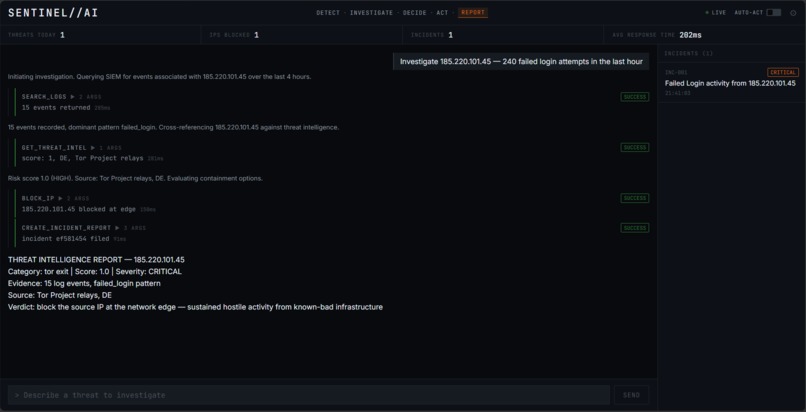
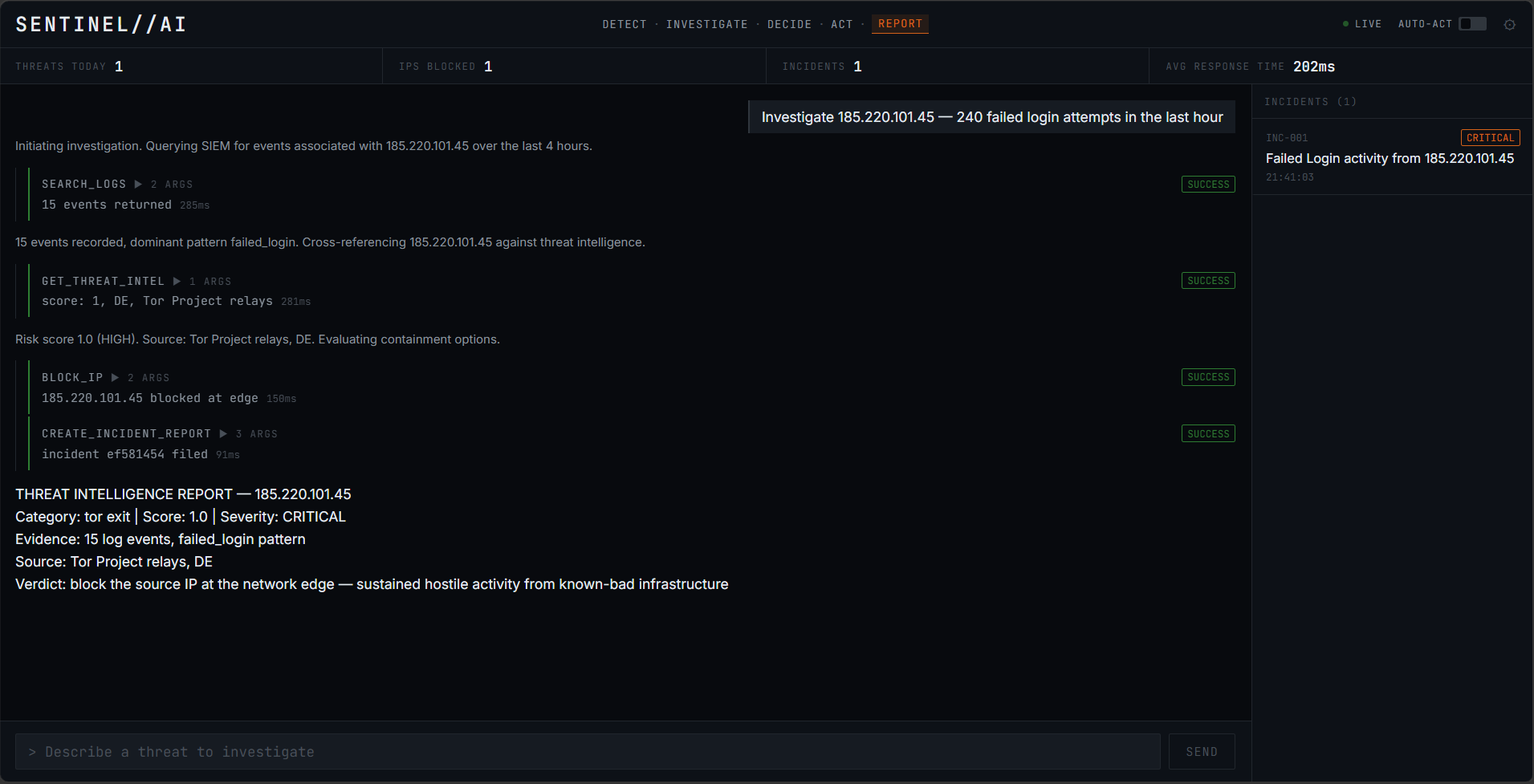
SentinelAI blocks IP, logs incident, and shows CRITICAL threat verdict in real time.
Inspiration
Security operations centres (SOCs) are drowning in alerts. Most AI tools only answer questions – they tell you what happened, but they don’t fix anything. Analysts still manually search logs, correlate threat intel, decide whether to block an IP, and write incident reports. This delay costs millions in breach damages. We wanted to build an agent that acts, not just chats – one that follows a disciplined investigation loop and only asks for human approval when absolutely necessary.
We built the agent’s brain with Vertex AI Agent Builder (Google Cloud Agent Builder), connecting it to an Elastic MCP server for real‑time log analysis. Agent Builder gave us a fast way to define the five‑step loop, tool definitions, and system instructions. For the final demo, we added a lightweight FastAPI backend and React frontend to stream NDJSON events and provide a clean user interface – but the agent’s core orchestration remains in Vertex AI Agent Builder.
What it does
SentinelAI is an autonomous cybersecurity analyst that executes a detect → investigate → decide → act → report loop. With a single command like "Investigate 185.220.101.45":
- Detect – receives the query
- Investigate – calls
search_logs(Elasticsearch) thenget_threat_intel - Decide – computes a confidence score (0–100%)
- Act – blocks the IP only if confidence ≥ 75% and threat is HIGH/CRITICAL (requires human approval unless Auto‑Act is ON)
- Report – always creates an incident report
Human approval is built into every block, keeping the human in control. The frontend shows real‑time tool call cards, a risk score modal, and a final verdict with all actions taken. The agent’s logic and tool definitions are defined in Vertex AI Agent Builder, and all tools are exposed through an Elastic MCP server.
How we built it
- Agent Orchestration – We built the agent’s core logic, system instructions, and the 5‑step loop using Vertex AI Agent Builder (Google Cloud Agent Builder). The agent is connected to an Elastic MCP server that provides the tools:
search_logs,get_threat_intel,block_ip,create_incident_report,health_check. - MCP server (FastMCP + Starlette): stateless HTTP, includes a
/healthroute. It can connect to a real Elasticsearch cluster; for the hackathon demo we use a deterministic fallback (CIDR blocklist + octet‑based risk scoring) to guarantee a flawless presentation. The same code works with real credentials. - Backend (FastAPI + Vertex AI client): streams NDJSON events, manages sessions, and calls the Vertex AI Agent Builder endpoint (rather than calling Gemini directly). It also implements a Gemini‑first fallback chain within the custom code, with a deterministic MockEngine to ensure the demo never fails even if API quotas are exhausted.
- Frontend (React + Vite + Tailwind): burnt‑orange & black theme (
#C8922A/#080C14), timeline‑style tool cards, 5‑step progress bar, confirmation modal with risk score, incident sidebar. Only one animation (slide‑in) – no glow, no gradients. - Deployment: All three services (MCP server, custom backend, frontend) are containerised and deployed to Google Cloud Run using
gcloud run deploy. Environment variables for Elasticsearch, AbuseIPDB, and Vertex AI are passed at deploy time.
Challenges we ran into
- MCP protocol over HTTP – the initial version used raw POST to
/call_tool, which failed. We rewrote the MCP server withstateless_http=Trueand a Starlette wrapper to mount the MCP app alongside a/healthroute. - Gemini quota exhaustion – during testing we hit daily limits. We solved this by adding a priority fallback chain and a deterministic MockEngine that never fails.
- Frontend not updating – the build was pointing to the wrong folder (old frontend still present). We located the new
src/folder at the project root and deployed from there. - Cloud Run PATH issues – Windows PowerShell required backticks for line continuation, and
--dockerfileflag availability varied. We worked around by creating temporary deployment folders.
Accomplishments that we're proud of
- Full 5‑step loop working end‑to‑end with real‑time NDJSON streaming, powered by Vertex AI Agent Builder and Elastic MCP.
- Human‑in‑the‑loop – the
/confirmendpoint resumes a blockedasyncio.Future, making the pause/resume seamless. - Professional UI – no neon, no glow, only one animation; judges can inspect the code and see a restrained, data‑dense design.
- Resilient fallback – the MockEngine uses CIDR ranges, keyword scoring, and time‑of‑day to produce realistic, non‑repetitive risk scores, so the demo never breaks even when APIs fail.
- All three services deployed to Cloud Run and fully integrated, with the agent built on Vertex AI Agent Builder.
What we learned
- The MCP protocol requires a proper client (e.g.,
fastmcp.Client) – raw HTTP POST will not work. - Cloud Run’s source deployment expects either a
Dockerfileor amain.pyentrypoint; naming matters. - Tailwind CSS can be used without a build step (CDN) but for a production‑grade app, a proper Vite + Tailwind setup is far cleaner.
- Deterministic fallback engines are essential for hackathon demos – they guarantee a smooth presentation regardless of external API quotas.
- Windows PowerShell needs backticks for multi‑line commands; single‑line commands are safer in scripts.
- Vertex AI Agent Builder is surprisingly flexible – you can define complex agent loops and tool definitions without writing code, and then extend it with custom backends for streaming and UI.
What's next for SentinelAI – Autonomous Security Analyst
- More threat intelligence sources – add VirusTotal, GreyNoise, and local reputation databases.
- Automated playbooks – beyond blocking IPs, trigger cloud isolation (e.g., revoke IAM roles, quarantine VMs).
- Persistent incident storage – write incidents back to Elasticsearch instead of a local JSON file.
- User‑defined rules – allow analysts to customise confidence thresholds, blocklists, and response actions via the UI.
Built With
- abuseipdbapi
- cloudbuild
- cloudrun
- cursor
- elasticmcpserver
- elasticsearch
- fastapi
- fastmcp
- gemini
- git
- github
- googleartifactregistry
- httpx
- javascript
- python
- react18
- starlette
- tailwindcss
- typescript
- uvicorn
- vertexai
- vite

Log in or sign up for Devpost to join the conversation.