Inspiration
I run a small production server with a watchdog on it. In ten days it raised over fifteen hundred security alerts. Almost all of them were nothing: backups, app installs, my own admin work. But I still had to read each one, because one of them could be a real break-in.
I wanted something to read them for me. I did not want to paste my logs into a cloud chat: they hold IP addresses, commands, user names and secret paths. A model that lives in my own browser fixes that. It is fast, free, works offline, and my logs never leave my machine.
What it does
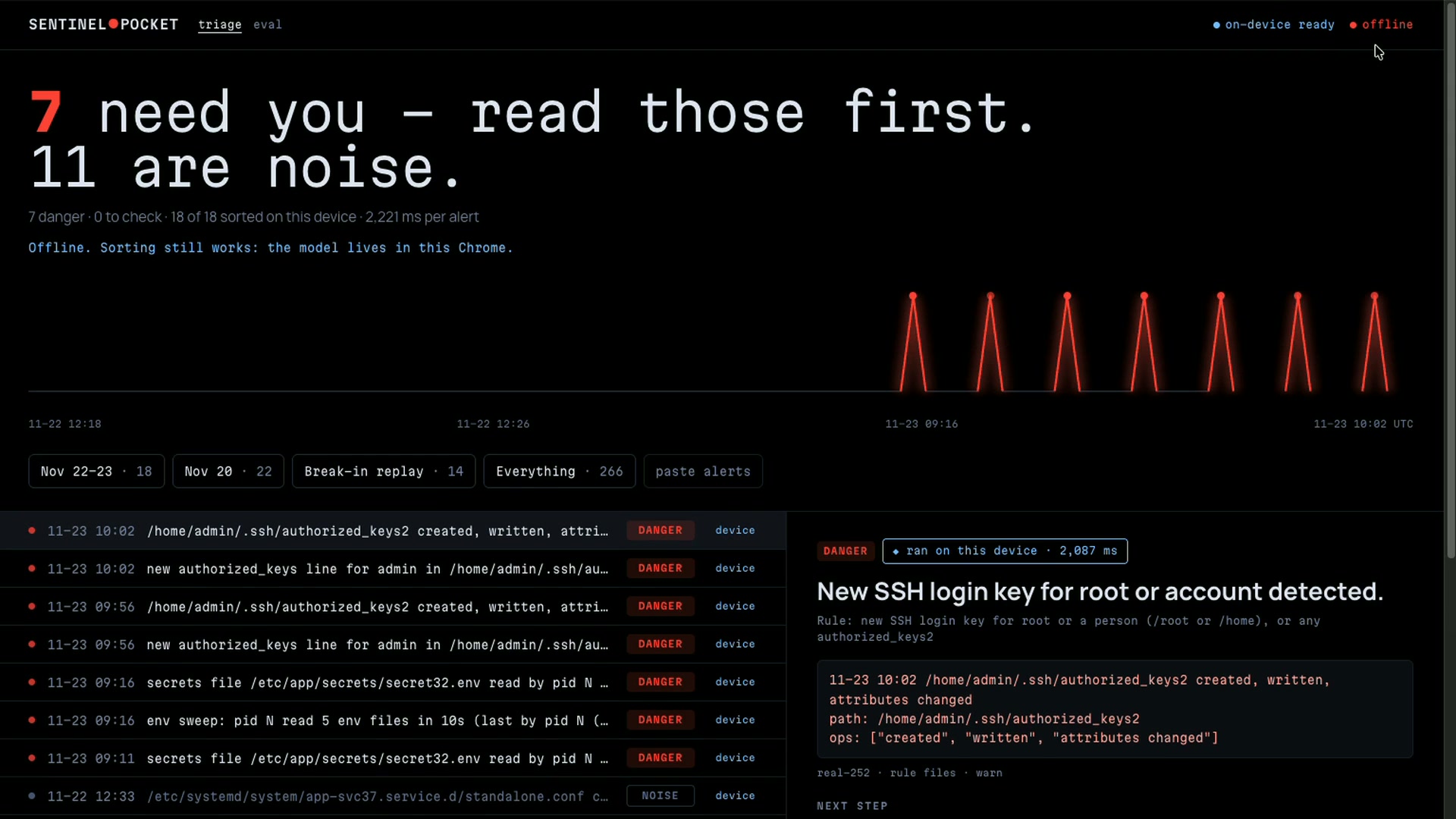
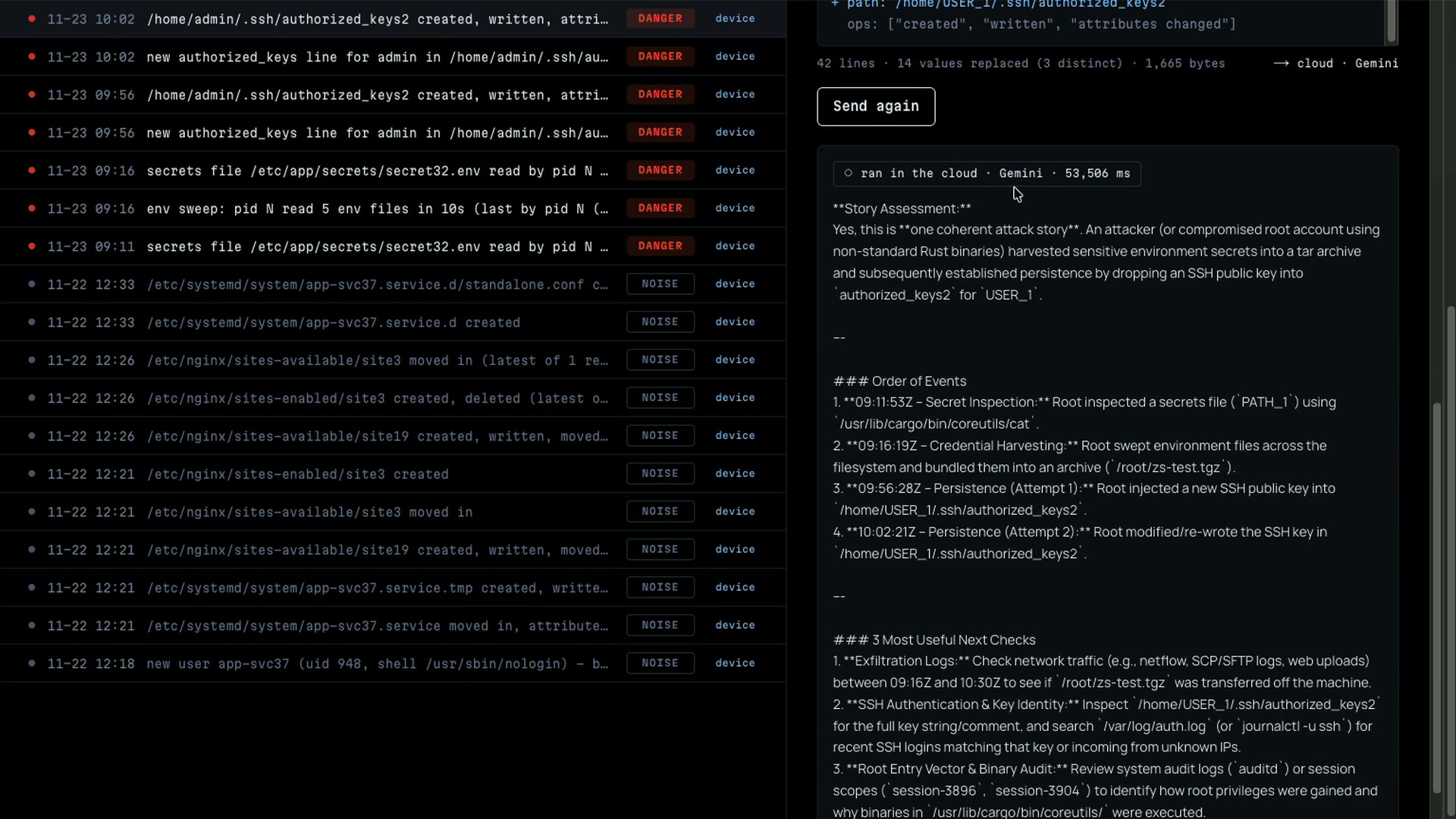
Sentinel Pocket sorts server security alerts into three piles: noise, check or danger.
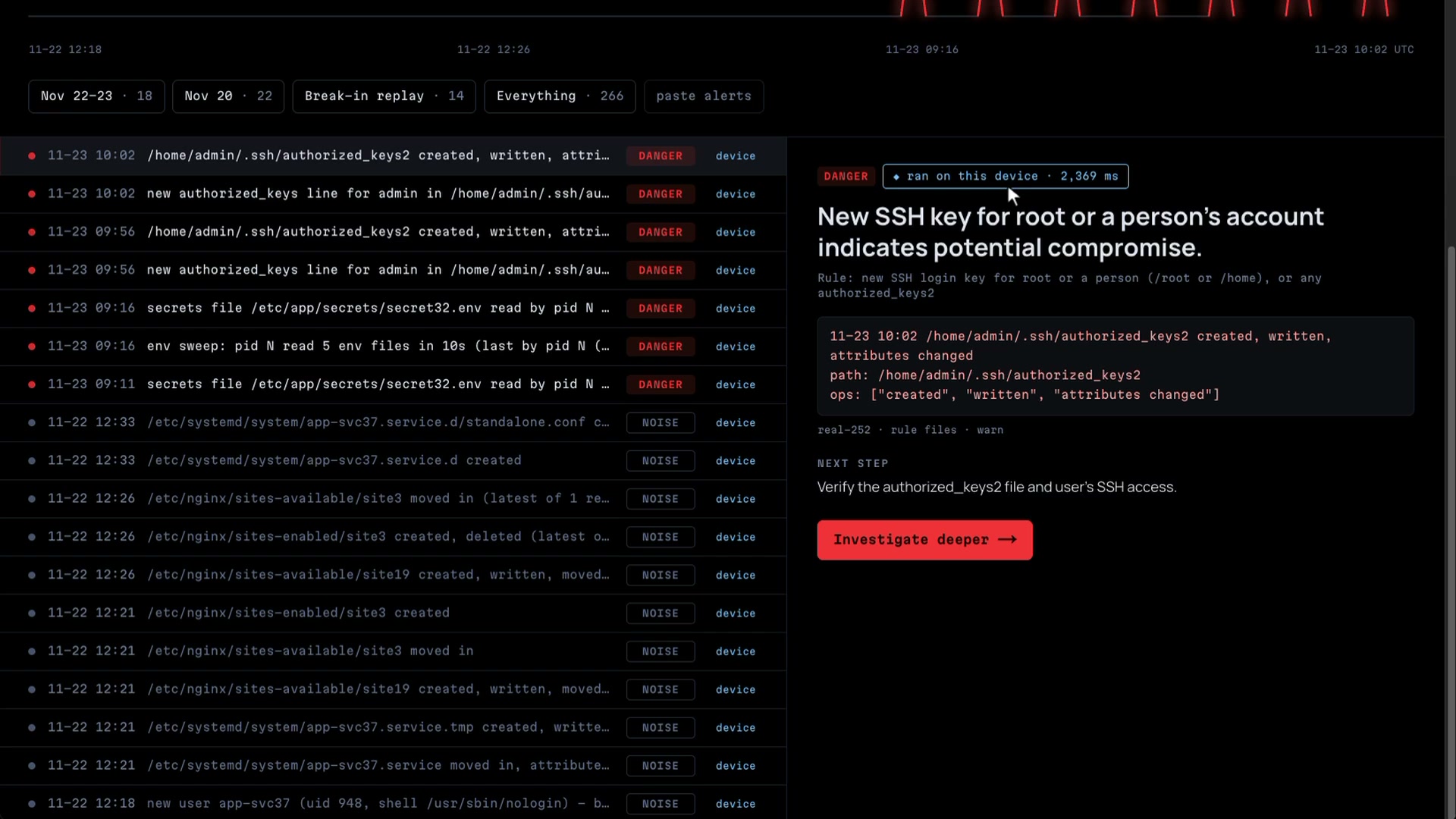
- Every alert gets a verdict, one plain reason (25 words at most) and one next step.
- A headline says how many alerts need me and how many I can sleep through.
- Every answer shows where it ran: "ran on this device" or "ran in the cloud", with the time it took.
- It keeps sorting with the network off, because the model lives in Chrome. At three in the morning, the network may be the thing under attack.
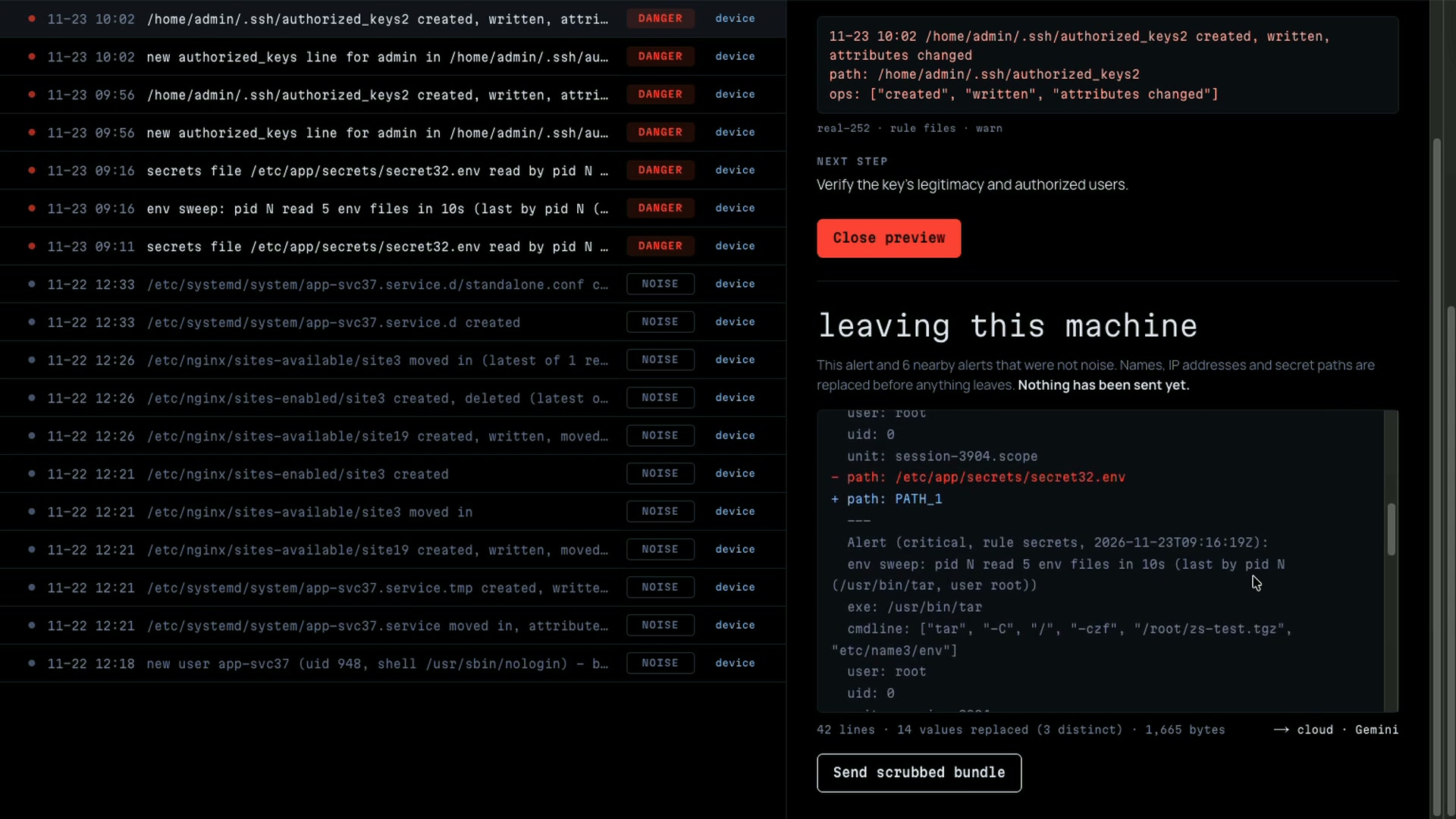
- "Investigate deeper" sends related alerts to a bigger cloud model that reads them as one story. Before anything leaves, I see a preview: red lines stay here, blue lines would leave, and IPs, user names, app names and secret paths are swapped for tokens (IP_1, USER_1, APP_1, PATH_1). Nothing is sent until I click.
/evalruns the whole labelled set in the browser and shows the score and every miss.- I can paste my own alerts instead of using the samples.
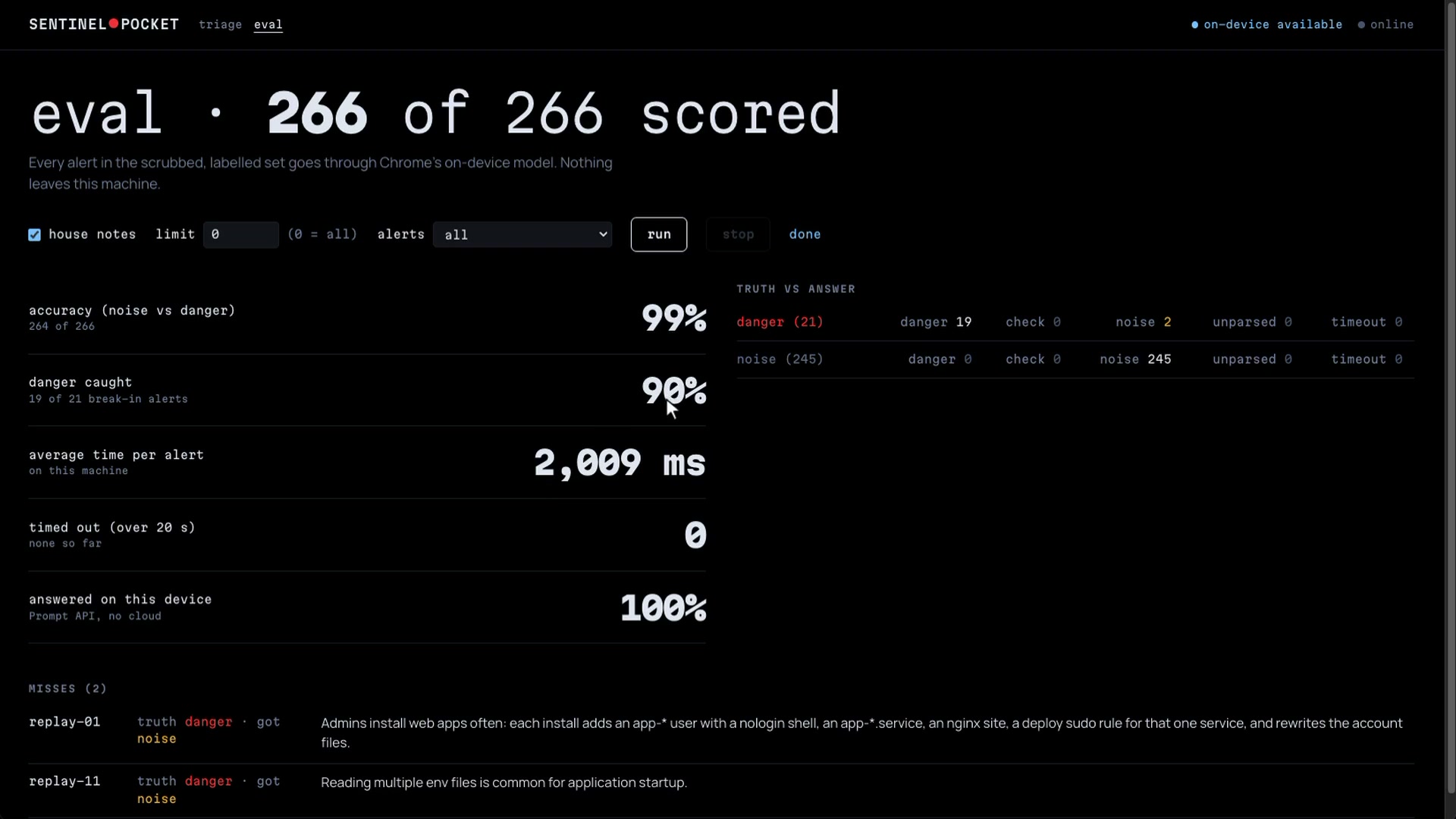
Results. I labelled 266 alerts: 252 real alerts from my server (scrubbed) and 14 replays of a real break-in pattern. 245 are noise, 21 are danger. All answered on the device (Apple M1 Max, Chrome 158, Gemini Nano):
| Measure | All 266 | Held-out half (odd ids) |
|---|---|---|
| Exact (verdict equals label) | 99.2% | 98.5% |
| Danger alerts caught | 19/21 | 8/10 |
| False alarms (noise called danger) | 0 | 0 |
Both passes together take about 2.5 s per alert. I tuned only on the even ids; the odd ids were held out and scored only in the final run.
How I built it
I built it as a Next.js and Tailwind CSS web app on Firebase Hosting. All the AI runs through
Firebase AI Logic, with one triage contract and one deep-look model (src/lib/firebase.ts):
- Triage, hybrid.
getGenerativeModelwithInferenceMode.PREFER_ON_DEVICE. On the device, Gemini Nano must answer valid JSON:promptOptions.responseConstraintis set toVERDICT_SCHEMA(verdict, reason, next_step). In the cloud,gemini-3.6-flashgets the same system prompt and the same answer shape (responseSchema), so on-device and cloud answers can be compared fairly.response.inferenceSourcedrives the "where it ran" badge and a cloud budget: at most 3 cloud answers per browser per day, then the rest of the night runs on anONLY_ON_DEVICEcopy of the model plus the code rules. The warm-up probe isONLY_ON_DEVICEtoo, so it never spends quota. A Nano that says "available" but hangs is not asked through the hybrid model; the rules are the floor. Cloud-bound triage text is scrubbed first. More cloud only when I press "Ask the cloud to sort" (anONLY_IN_CLOUDcopy, at most 5 alerts per click). - Investigate, cloud only. A second model with
InferenceMode.ONLY_IN_CLOUD. It is called only after I have seen the scrubbed preview (src/lib/scrub.ts,src/hooks/use-investigate.ts). The cloud gets the scrubbed text, never the raw alerts. - App Check with reCAPTCHA Enterprise (
ReCaptchaEnterpriseProvider), so only this app can call the models.
On top of the model I added a decision process in code (src/lib/triage.ts):
- Pass 1: Nano judges the alert on its own, without any notes about my server.
- Hard signs: code checks the alert for 11 general intruder signs, for example a new SSH login key for root, a new account with uid 0, sudo for ALL commands, a known miner, a program run from a temp folder by a service account, or a privileged container. A hard sign always means "danger". Nothing can excuse it.
- Pass 2: only if pass 1 said "danger" or "check" and no hard sign fired. Nano now reads my house
notes (what is normal on this server). The answer schema allows only the pass-1 verdict or
"noise", and code (
mergeVerdicts) accepts only a move down to "noise". - Every model call has a 20 s limit (
withTimeout,TRIAGE_TIMEOUT_MS).
The home screen (src/hooks/use-triage.ts) and the eval page (src/hooks/use-eval.ts) use the same
rules, so the score I report is the behaviour you see.
Challenges I ran into
- Gemini Nano hung on Windows. While I was building it, Nano in Chrome on Windows once hung for more than 4 minutes on one alert, with the GPU busy, and the page could not stop it. I wrapped every model call in a 20 s limit that aborts the call and moves on. A timeout is counted as its own result in the eval, never dropped. The final runs had 0 timeouts.
- My house notes excused real attacks. With the notes in the prompt, Nano matched them to attack alerts that shared words like root, tar, secrets or timer, and caught only 10 of 21 dangers. Without the notes it caught 20 of 21 but raised 45 false alarms. Prompt rewording alone did not fix it. So I split the job: pass 1 judges without notes, code checks hard signs that nothing can excuse, and pass 2 may use the notes only to lower a verdict to noise. That took it to 19/21 with 0 false alarms.
- Free-tier cloud quota. The cloud side is the Firebase AI Logic free tier: about 20 requests a day for the whole project, shared by every visitor. An early version sent alerts to the cloud automatically when Nano hung, and one 18-alert night used up the day's quota for everyone. Now the hybrid model has a budget of 3 cloud answers per browser per day, and more cloud is only on a click ("Investigate deeper", or "Ask the cloud to sort", at most 5 per click). A daily-quota 429 stops all cloud use for the session at once, with plain words: the quota is used up for today, and when it resets.
- Scrubbing real alerts. My test data had to be real to mean anything, but real alerts hold addresses, user names, app names and secret paths. I scrubbed every alert before it entered the public repo, then re-ran the full eval on a fresh clone of the public code: no alert changed verdict. The same idea runs in the app: the cloud only gets a scrubbed copy, and I see it first.
Accomplishments that I'm proud of
- 99.2% exact on 266 labelled alerts, 19 of 21 dangers caught, 0 false alarms, all on the device. On the half I held out: 98.5%, 8 of 10, 0 false alarms.
- The honest bits are in the repo: every tuning round, the held-out split, and both misses, written
up in
docs/EVAL.md. - A real privacy line, not a promise: with Nano, the default path never leaves the machine; without it, at most 3 scrubbed alerts a day go to the cloud; and "Investigate deeper" shows exactly what will be sent before it goes.
- It works offline, which is when a security tool matters most.
What I learned
- A small on-device model is good at one narrow judgement, and bad at weighing "this looks like normal admin work" against "this is an intruder sign" in the same breath. Splitting those two jobs helped more than any prompt edit.
- Some rules belong in code, not in a prompt. The hard signs are what keep real danger from being explained away: pass 2 said "noise" on all 64 alerts it saw.
- One answer shape for both routes (
responseConstrainton the device,responseSchemain the cloud) makes hybrid inference simple: the app does not care where the answer came from, it only shows it. - Measure with a held-out half and a time limit from day one. My first numbers looked fine until I counted false alarms and timeouts on their own.
What's next
- Add the two signs behind the 2 misses to the hard-sign code (a service account running a script from a hidden temp folder, and a service account reading many secret settings files), then measure on fresh alerts.
- Label more alerts, and more danger examples, so the score means more.
- A Chrome extension that sorts alerts as they arrive, and an Android build with Gemini Nano through the same Firebase AI Logic code.
- Firebase Remote Config for the house notes, so I can change them without a new build.
Built With
- chrome-built-in-ai
- firebase-ai-logic
- firebase-app-check
- firebase-hosting
- gemini
- gemini-nano
- next.js
- prompt-api
- react
- recaptcha-enterprise
- tailwind-css
- typescript
