-
-
Architecture Diagram
-
Help finding an object
Inspiration
The inspiration for SentiLens came from a simple but profound observation: while AI has made massive leaps in understanding static images, the "last mile" of accessibility requires real-time, low-latency intuition. I wanted to build a tool that doesn't just describe a photo when asked, but acts as a proactive companion - one that helps a visually impaired user spot a sale at the grocery store, read a medical bill before it's due, or notice a traffic hazard before it becomes a danger.
What it does
SentiLens is a voice-first assistive application that uses live video streaming to provide environmental awareness and task-specific help.
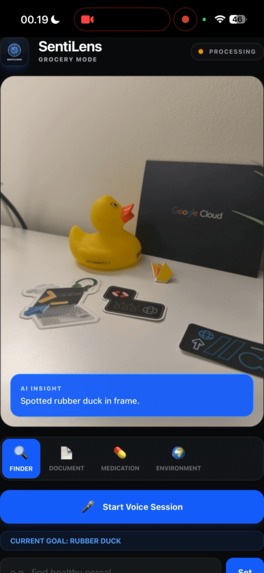
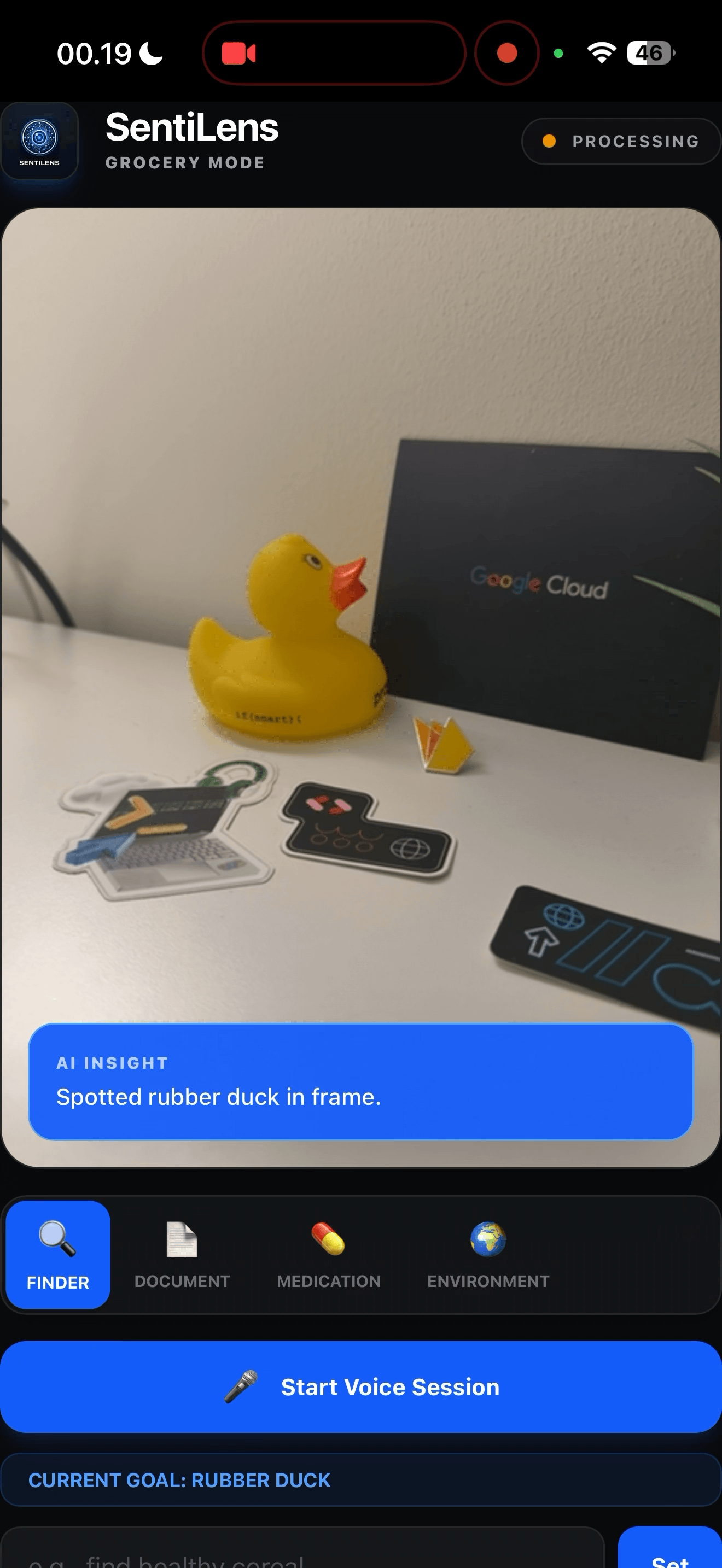
- Finder (Grocery) Mode: Identifies products, prices, and nutritional info in real-time.
- Document Mode: Performs high-precision OCR to read, summarize, and answer questions about physical mail or documents.
- Medication Mode: Validates medication labels against official database info for safety and dosage clarity.
- Environment Mode: Proactively monitors for safety-critical objects like traffic lights, obstacles, and vehicles.
- Continuous Awareness: Unlike static apps, SentiLens maintains a "World Memory," allowing it to remember what it saw earlier and relate it to the user's current goals.
How I built it
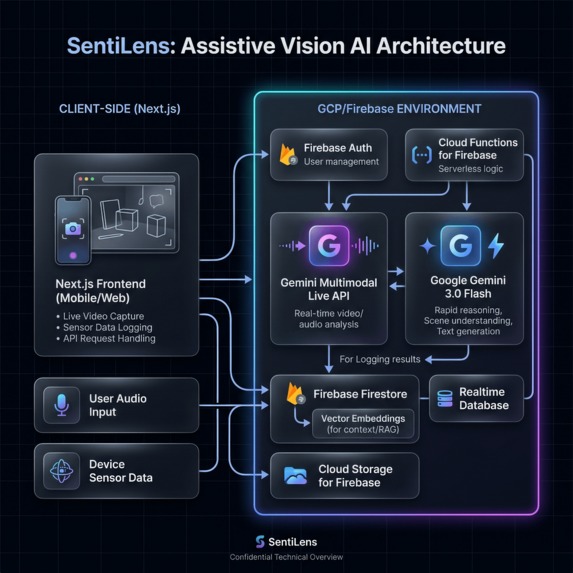
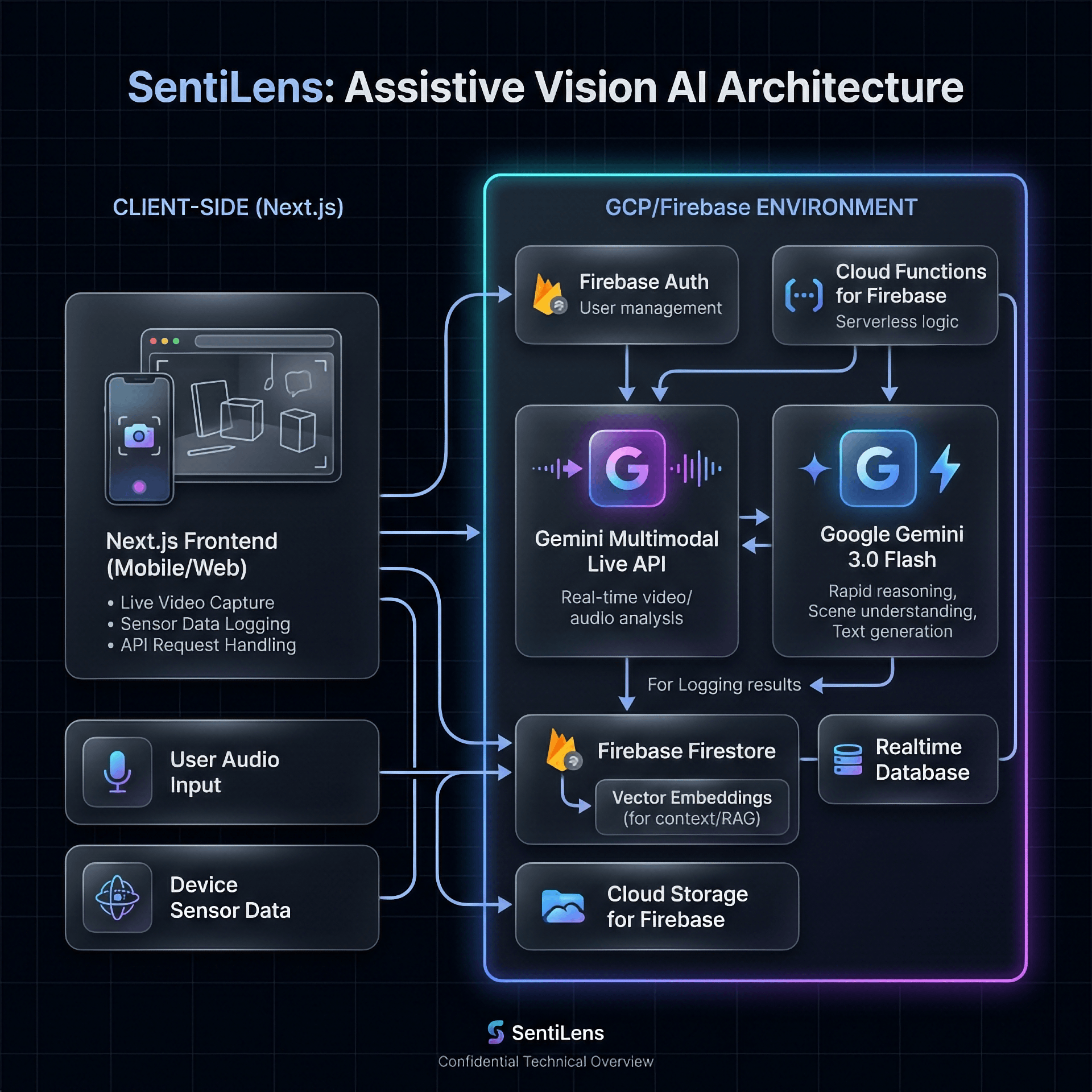
- Core AI: Powered by Google Gemini 3.0 Flash for rapid multimodal reasoning.
- Real-Time Pipeline: Built on the Gemini Multimodal Live API via WebSockets, enabling bidirectional audio and video streaming with sub-second latency.
- Frontend: A high-performance Next.js application designed for mobile-first, voice-first interaction.
- Infrastructure: Uses Google Cloud Firestore for session-based world memory and Firebase Hosting for rapid deployment.
- Safety Heuristics: Custom business logic (Orchestrator) that prioritizes safety hazards over general observations.
Challenges I ran into
- Latency vs. Precision: Balancing the need for "instant" voice feedback from the Live API with the need for high-resolution "Deep Dives" via standard Gemini Flash endpoints.
- Information Overload: Avoiding "chattiness." I had to implement a cooldown system and priority-based filtering so the AI only speaks when it truly sees something relevant or dangerous.
- Environmental Noise: Managing audio echo cancellation and noise suppression in busy grocery store environments to ensure the AI can always hear the user.
Accomplishments that I'm proud of
- Proactive Intuition: I successfully moved from "Question-Answer" to "Proactive Observation." The AI often tells the user what they need to know before they even ask.
- Sub-Second Response: Achieving near-human latency in voice interactions using the latest multimodal streaming capabilities.
- Robust Grounding: Implementing a verification layer that checks AI observations against known "facts" to reduce hallucinations in critical scenarios like medication dosage.
What I learned
- Multimodal Context is King: The user's goal (e.g., "Find healthy cereal") completely changes how the AI should "see" the world.
- Voice UI is Subtle: Tiny "earcons" (chimes and sounds) are often more effective than words for signaling that the AI has spotted something new.
- Memory Matters: An AI that "forgets" it saw an obstacle 5 seconds ago is a safety risk; persistent session memory is non-negotiable for assistive tech.
What's next for SentiLens
- Full Vertex AI Migration: Leveraging enterprise-grade endpoints for improved reliability and scale.
- Indoor Navigation: Integrating indoor mapping APIs to guide users through complex store layouts.
- Personal Knowledge Graph: Allowing the AI to remember a user's specific pantry items or home layout across multiple sessions.
- Offline Fallback: Implementing local ML models for basic hazard detection when internet connectivity is spotty.
Built With
- firebase
- gcp
- gemini
- google-cloud
- google-gemini


Log in or sign up for Devpost to join the conversation.