-
-
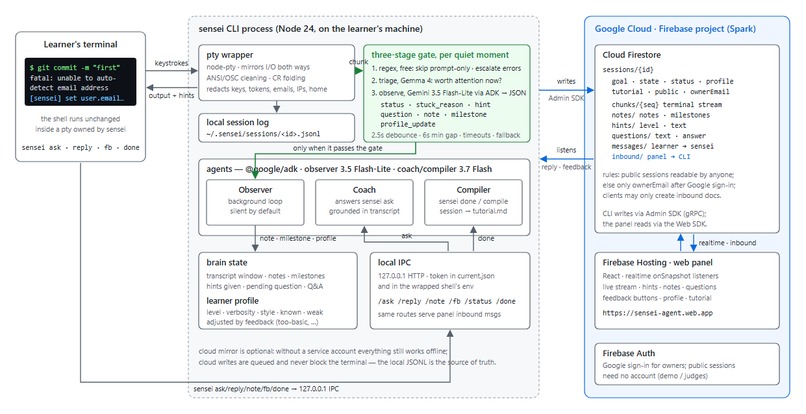
Architecture: CLI + agents run beside the terminal; Cloud Firestore is the shared brain; the panel lives on Firebase Hosting.
Inspiration
Learning a CLI tool is mostly doing: you type, it fails, you search, and you try again. Chat assistants live in another window and know only what you paste; they never see the actual stream or remember what you tried, and by the time it works, the knowledge has evaporated. I wanted the equivalent of a senior engineer sitting beside you: quiet and observant, speaking only when the evidence says you're stuck, then handing you the write-up you would never have written yourself.
What it does
sensei start wraps your shell in a pty. Every keystroke and every byte the terminal prints is captured, redacted locally (keys, tokens, emails, home paths never leave the machine), logged, and mirrored to Cloud Firestore.
A background Observer agent (Gemini 3.5 Flash-Lite via the Google ADK for TypeScript; the Coach and Compiler use Gemini 3.7 Flash) reads the messy stream — ANSI, stack traces, progress bars — and uses evidence to decide whether you're flowing, exploring, or stuck. It stays silent by default; when it speaks, it gives you one line directly in your terminal, in your language, at the level you requested. It asks a clarifying question only when the right hint depends on your intent (sensei reply answers it). It takes notes throughout the session and folds your feedback (sensei fb too-basic | confusing | just-tell-me | let-me-try) into a learner profile that persists across sessions. sensei ask gets a grounded answer from the Coach. sensei done runs the Compiler, which turns commands, errors, notes, milestones and Q&A into a step-by-step tutorial with a "pitfalls we hit" table and a 60-second spoken script.
What makes it distinct:
- The three-stage gate: a free regex filter → a cheap Gemma triage call ("worth a senior engineer's attention?") → only then the Observer. Silence is the default; the gate is why it doesn't nag.
- The hint ladder: early failures get a nudge or a direction; repeated evidence of the same failure earns an explanation of the cause; persistence earns the fix. The model evaluates the transcript against the learner profile at each tick rather than a hard-coded counter; a cooldown and echo guard reduce repetition.
- Auto-ask — a feature our first real user taught us: when a learner types natural language straight into the shell and the shell returns an error, Sensei recognizes the question, answers it, and teaches the
sensei asksyntax once.
A web panel on Firebase Hosting shows the live session, hints, notes, questions, learner profile and compiled tutorial — for a second screen, a mentor, or a judge. Replies and feedback entered in the panel flow back into the terminal through a Firestore inbound collection.
How we built it
- CLI (Node 24, TypeScript): node-pty wrapper, ANSI cleaning, regex redaction, JSONL session log, local IPC for the sub-commands.
- Agents (@google/adk
LlmAgent+InMemoryRunner): Observer on Gemini 3.5 Flash-Lite (structured JSON, thinking off for latency), Coach and Compiler on Gemini 3.7 Flash — each with per-attempt timeouts, automatic model fallback and a quota-aware circuit breaker; a Gemma 4 triage gate decides whether a bigger model needs to look at all; a free regex pre-filter runs before both. - Google Cloud: Cloud Firestore for every session artifact and as the realtime bus between CLI and panel; Firebase Hosting for the panel; Firebase Auth (Google) for owner-only sessions; security rules that let public sessions be read by anyone and clients only append to
inbound. - Panel: React + Vite + Firebase Web SDK, realtime
onSnapshotlisteners.
Challenges we ran into
- Being useful without being annoying: the first version commented on everything. The fix was structural — the three-stage gate, a hint cooldown, and a prompt that forbids cheerleading and restating.
- Model availability under load: Gemini 3.7 Flash returned 503s at peak; per-attempt timeouts, model fallback and a circuit breaker keep hints arriving in seconds rather than after a minute.
- Building from mainland China: Google Cloud billing isn't offered here, so the architecture keeps the agent on the learner's machine (where the terminal stream and API key live) and uses Firestore plus Firebase Hosting on a Spark project for the cloud side. It turned out to be the better design anyway.
- Terminal UX: printing a hint while the learner is mid-command clobbers their line — Sensei waits for Enter, then speaks.
Accomplishments that we're proud of
The Observer caught my own incorrect note ("git commit failed because user.name wasn't set") by reading the actual output — "no, the commit succeeded, see [master (root-commit) …]". The compiled tutorial was something I would actually publish. Every typo in the demo video is real; that's the point.
What we learned
Silence is a feature. Evidence in the prompt beats thinking budget for this job. Cheap models are best used as gates, not as replacements.
What's next for Sensei
Panel-side ask (the Firestore inbound pipe and rules already accept signed-in, rate-limited ask messages — the panel only needs an input box). Then voice hints via Gemini Live, a VS Code terminal integration, per-tool skill packs (git, docker, MCP), and turning the 60-second scripts into real short videos.
Data sources
The only data processed is the learner's own local terminal stream (stdout/stderr and typed commands), redacted locally before any storage. No third-party datasets.
Testing instructions
- Node ≥ 24:
git clone https://github.com/Claude-Ovo/sensei.git && cd sensei && npm install && npm run build && npm -w @sensei/cli link - Create
~/.sensei/.envwithGEMINI_API_KEY=…. English coaching is the default (SENSEI_LANG=en). The cloud mirror is optional; without a service account Sensei runs fully offline. sensei start -g "learn git: make my first commit"→ work as usual →sensei ask "…"→sensei done→exit.- Public demo sessions are visible at https://sensei-agent.web.app without signing in.
Built With
- cloud-firestore
- firebase-auth
- firebase-hosting
- gemini
- gemma
- google-adk
- node-pty
- node.js
- react
- typescript
- vite

Log in or sign up for Devpost to join the conversation.