-
-
-
-
-
-
-
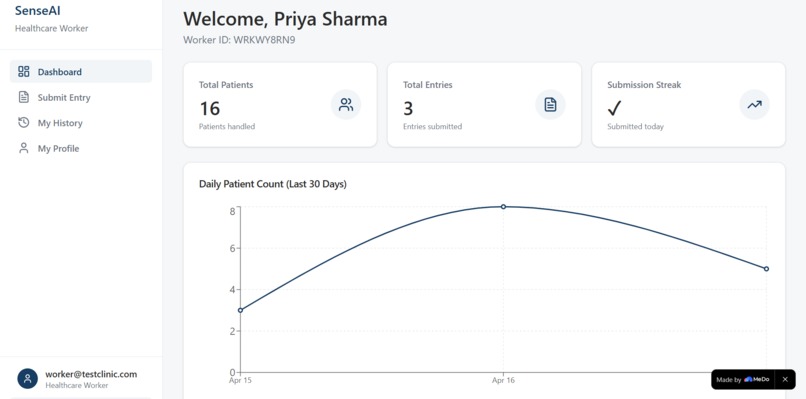
MeDo Screenshot
-
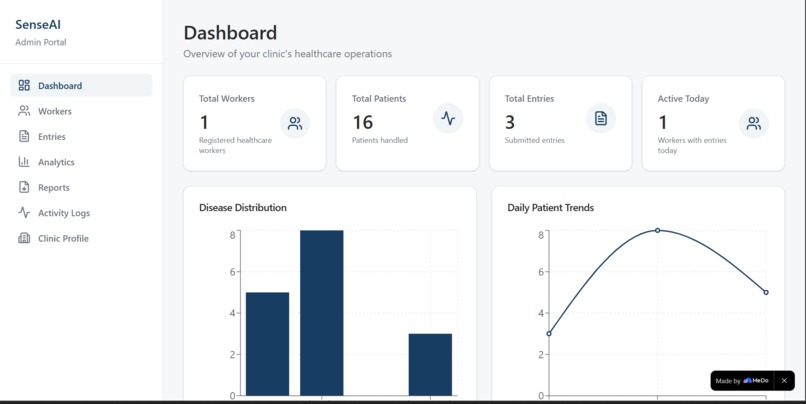
MeDo Screenshot
SenseAI — AI-Powered Rural Healthcare Assistant
Bringing intelligent, real-time clinical guidance to community health workers — even without internet.
Inspiration
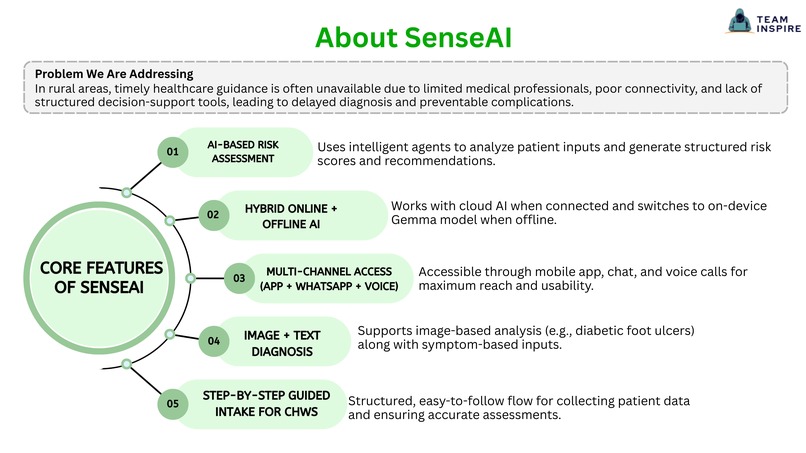
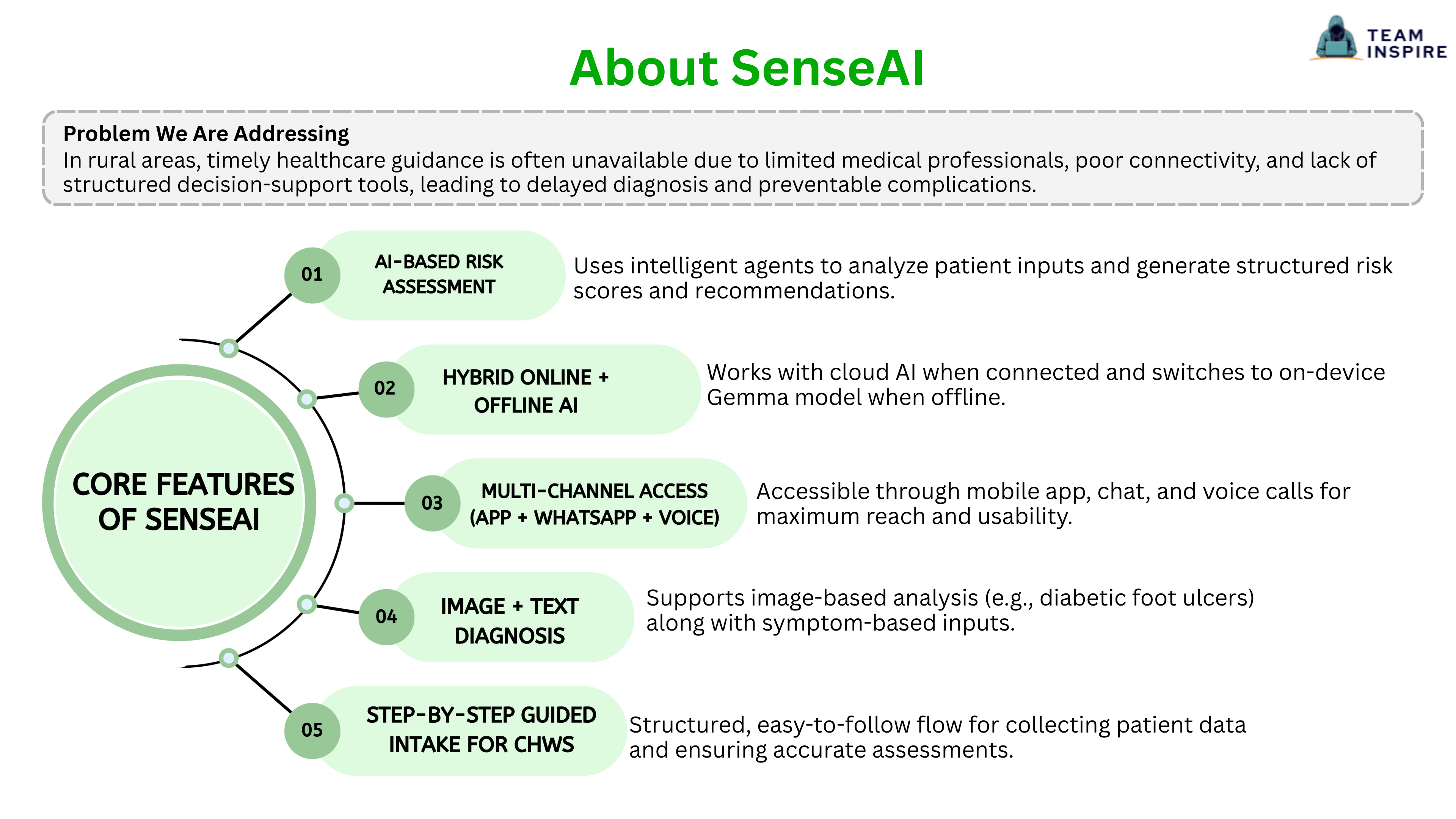
Access to timely healthcare guidance remains a major challenge in rural and low-resource areas. Community Health Workers (CHWs) often have to make critical decisions with limited tools, delayed diagnostics, and poor connectivity.
We were inspired to build a solution that could assist them with real-time risk assessment and actionable guidance — even without internet access.
What It Does
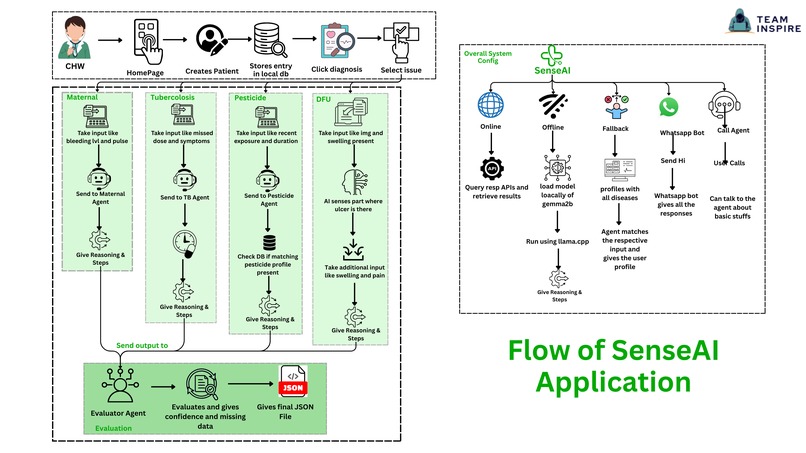
SenseAI is an AI-powered rural healthcare assistant that helps assess patient conditions and provide structured medical guidance. It supports multiple conditions including:
- Maternal Hemorrhage
- Tuberculosis Adherence
- Pesticide Exposure
- Diabetic Foot Ulcers (DFU)
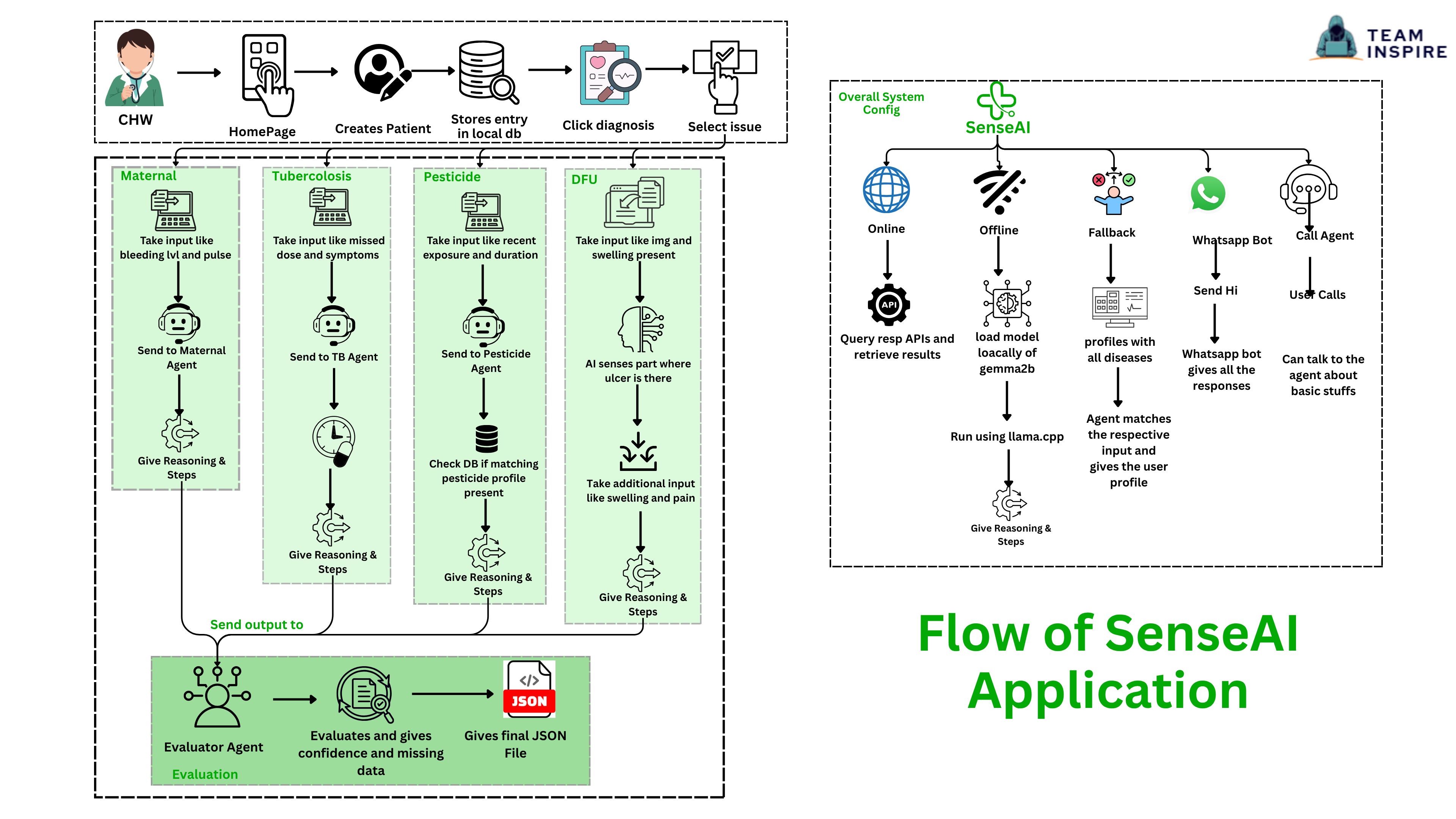
The system collects patient inputs, processes them through specialized AI agents, and outputs:
| Output | Description |
|---|---|
| Risk Score & Level | Quantified severity assessment |
| Clear Explanation | Human-readable reasoning |
| Actionable Checklist | Step-by-step guidance for CHWs |
| Missing Data Indicators | Flags incomplete assessments |
It works across multiple platforms:
- Mobile App (Flutter)
- WhatsApp Chatbot
- Voice Call Agent
How We Built It
SenseAI uses a hybrid AI architecture designed for real-world, low-resource environments.
Frontend
- Flutter mobile application for Community Health Workers
Backend
- Flask APIs handling different diagnosis agents
AI Models
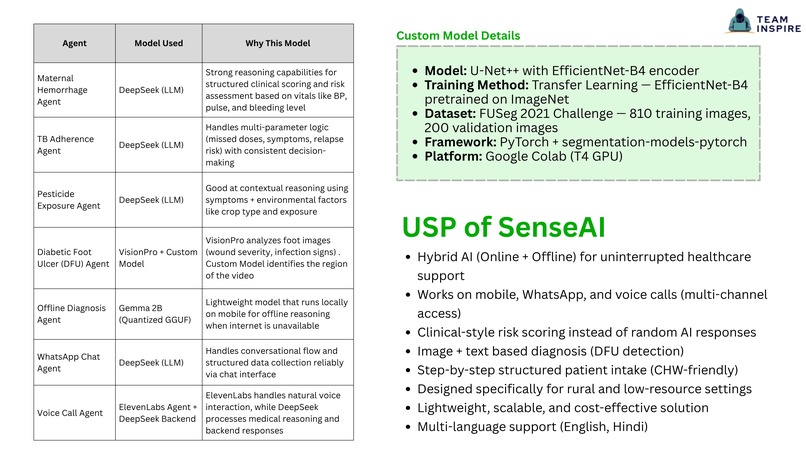
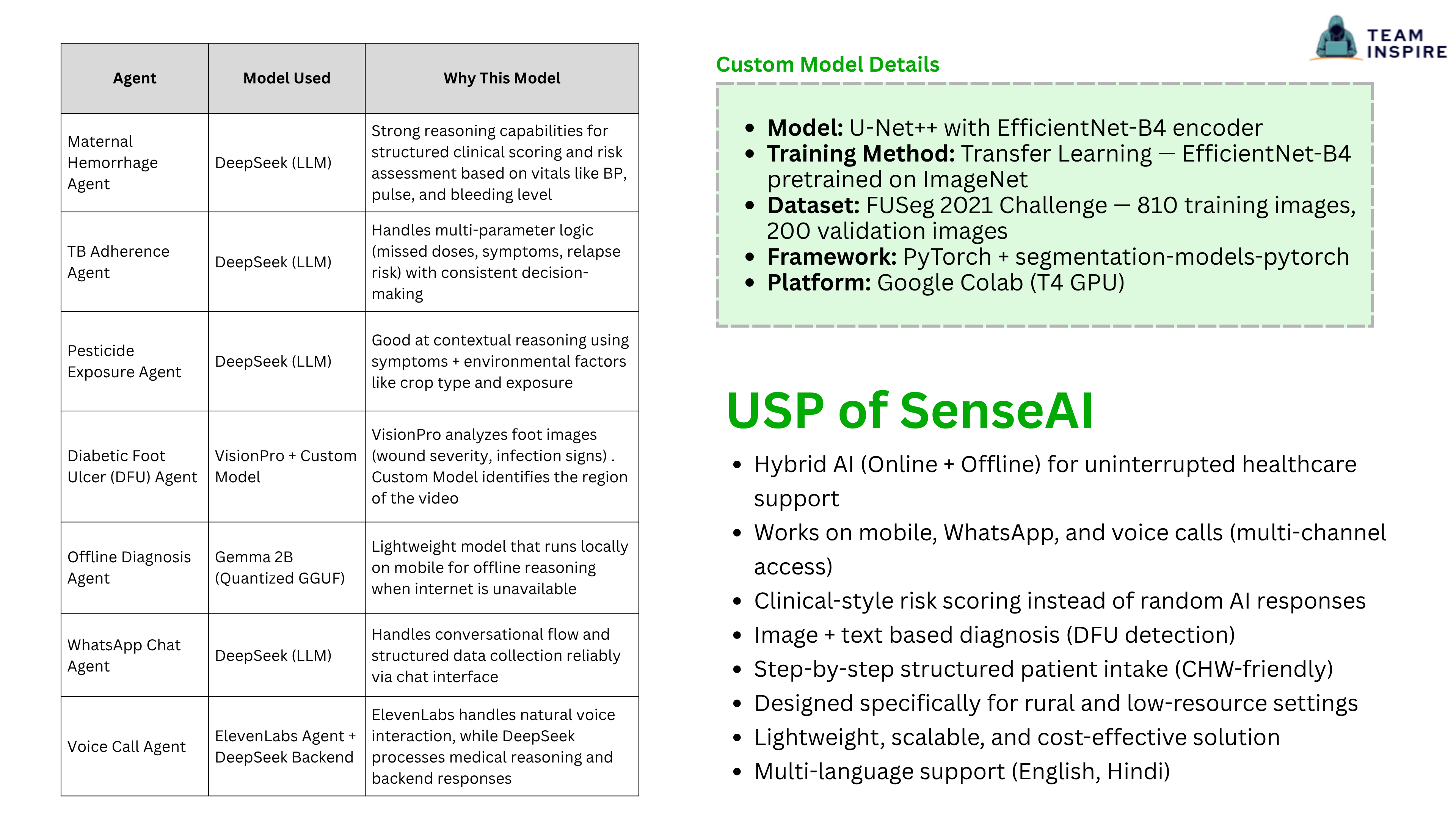
| Model | Role |
|---|---|
| DeepSeek | Reasoning and structured decision-making |
| VisionPro + Custom Segmentation | DFU image analysis |
| Gemma 2B (quantized) | Offline inference via llama.cpp |
Integrations
- WhatsApp Cloud API — Chat-based interaction
- ElevenLabs — Voice-based AI agent
Each condition is handled by a dedicated agent with structured scoring logic to ensure reliable and consistent outputs.
SenseAI Dashboard — Clinic Management Layer (Medo)
While the Flutter app serves Community Health Workers in the field, SenseAI is complemented by Medo — a browser-based clinic management dashboard built for NGO administrators and clinic supervisors who need to oversee operations, track worker activity, and analyze case data at a higher level.
What Medo Adds
The Flutter app handles the point-of-care side: CHWs assess patients, generate risk scores, and receive actionable checklists in real time. Medo closes the loop on the administrative and analytical side, giving clinic admins visibility into everything happening across their workforce.
| Layer | Tool | Users |
|---|---|---|
| Field (point-of-care) | Flutter Mobile App | Community Health Workers |
| Clinic (management & oversight) | Medo Web Dashboard | Clinic Admins / NGO Supervisors |
What Medo Does
Medo is a mobile-responsive, browser-based dashboard that requires no backend server — all data is stored in the browser's local storage, making it deployable in low-infrastructure environments without any server setup.
Authentication & Clinic Setup
- Clinic admins register their clinic (name, NGO name, location, contact) and receive an auto-generated Clinic ID
- Role-based login detects whether the user is a Clinic Admin or Healthcare Worker
- All data is strictly scoped to each clinic's ID — one clinic cannot access another's data
Worker Management
- Admins can add, edit, and remove CHWs under their clinic
- Each worker gets an auto-generated Worker ID and can log in with their credentials
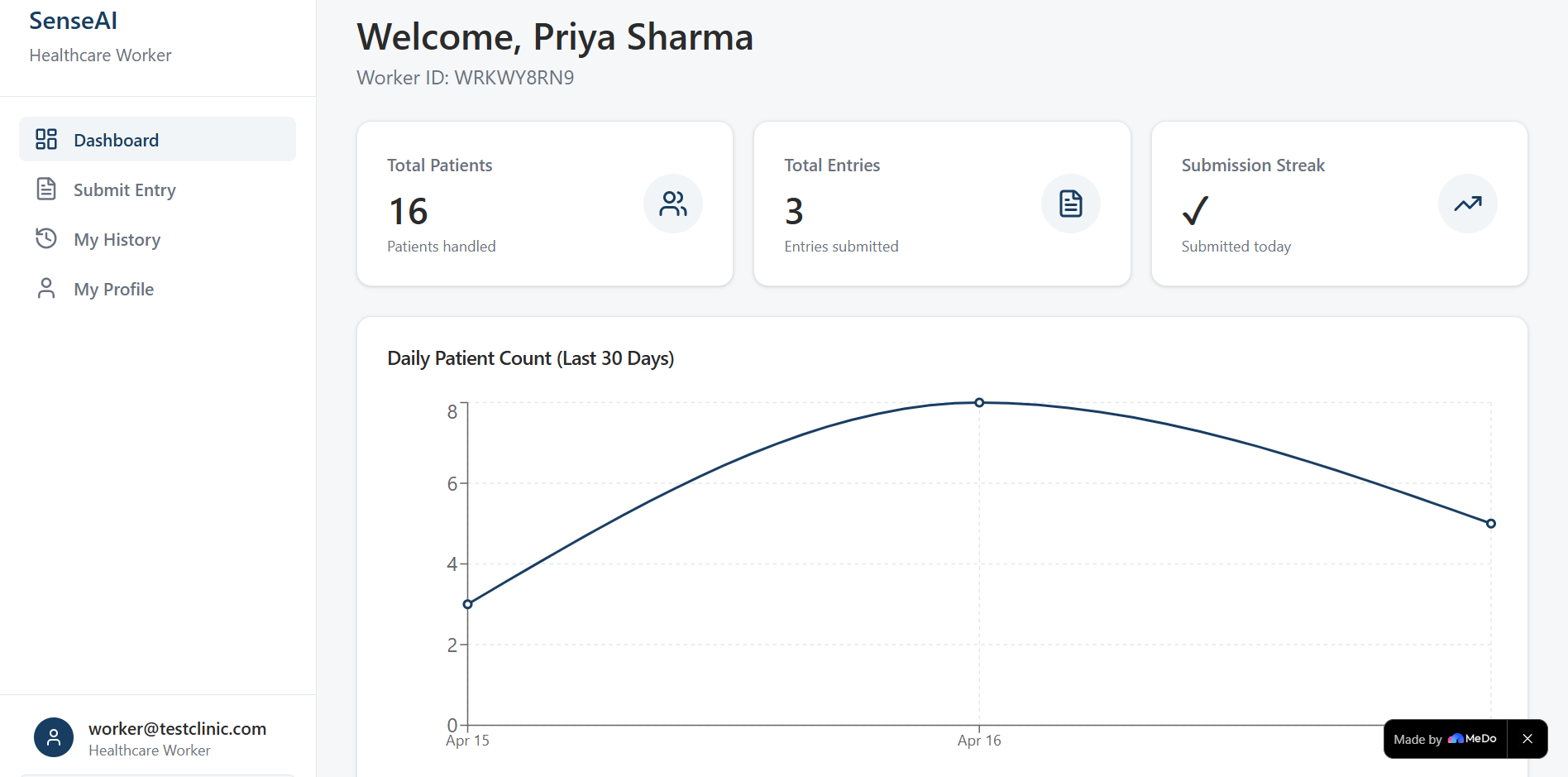
- Worker profile pages show individual stats: total patients handled, entries submitted, disease breakdown, and a daily submission streak
Patient Entry Tracking
- CHWs submit daily patient entries logging: disease type, patient count, and severity distribution (Low / Medium / High / Critical)
- Severity counts are validated to sum to the total patient count before submission
- Admins can view all entries across their clinic with drill-down to full entry details
Analytics
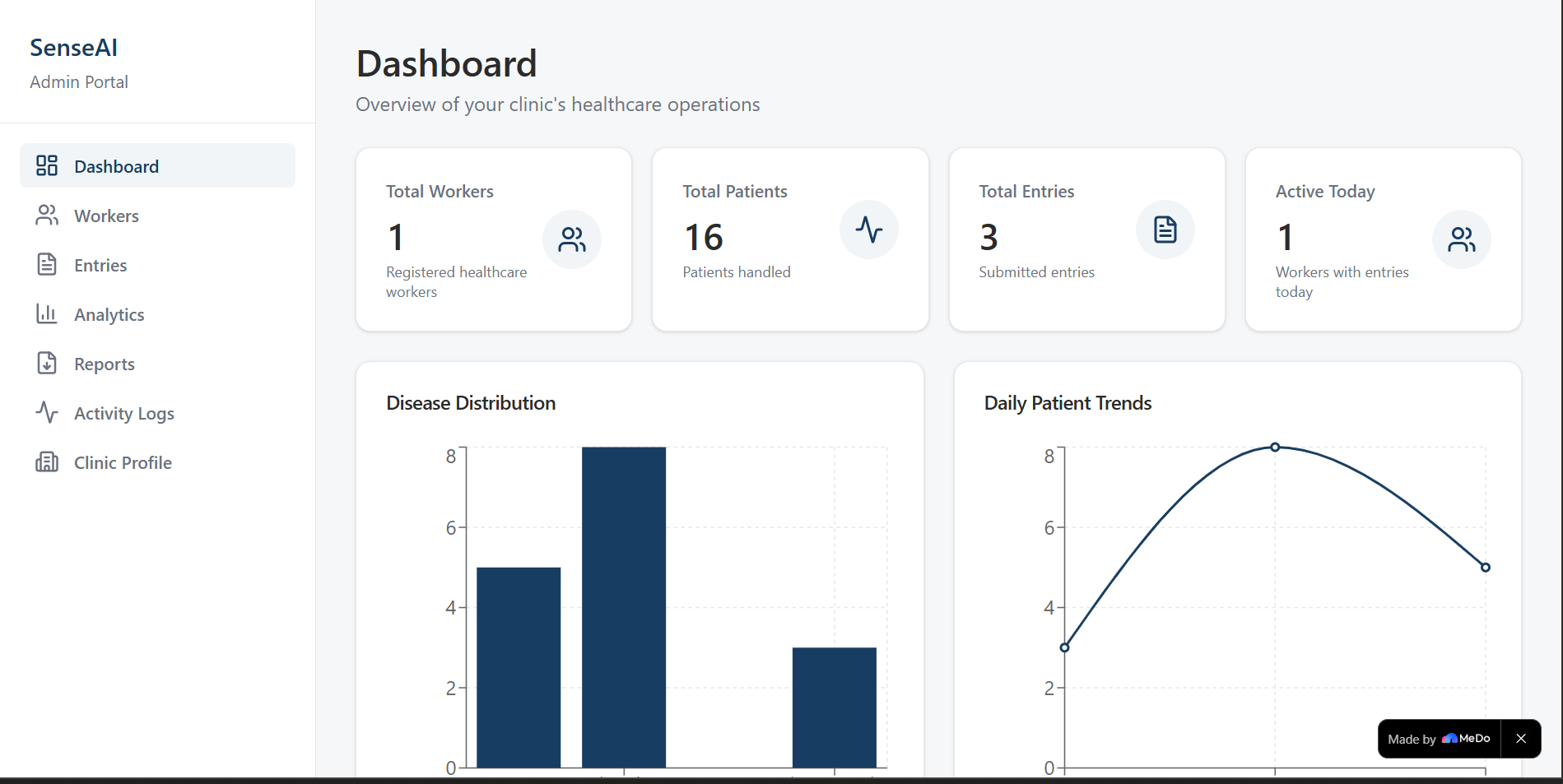
- Disease-wise patient counts (bar chart)
- Daily patient trends over time (line chart)
- Severity distribution (pie chart)
- Worker performance comparison (bar chart)
- All charts support cumulative filtering by date range, disease type, and worker
Reports & Export
- Admins can filter and preview aggregated reports, then export them in CSV, Excel, or PDF format — entirely client-side
Daily Reminder System
- Workers who have not submitted an entry for the current day are flagged on both the admin dashboard and the worker's own dashboard, ensuring no data gaps
Supported Disease Types Medo tracks the same four conditions covered by the SenseAI Flutter app:
- Maternal Hemorrhage
- Tuberculosis
- Pesticide Exposure
- Diabetic Foot Ulcer
How Medo Complements the Flutter App
The Flutter app is built for speed and offline use in the field — it gives CHWs fast risk assessments and clinical checklists when they need them most. Medo is built for oversight and accountability — it gives supervisors the data they need to understand patterns, manage their workforce, and report outcomes to NGOs and health authorities.
Together, they form a complete end-to-end healthcare workflow:
CHW in the field (Flutter)
  → Assesses patient, generates risk score and checklist
  → Logs daily patient entry into Medo

Clinic Admin (Medo Dashboard)
  → Monitors worker activity and submission streaks
  → Analyzes disease trends and severity distributions
  → Exports reports for NGO reporting and funding accountability
Challenges We Ran Into
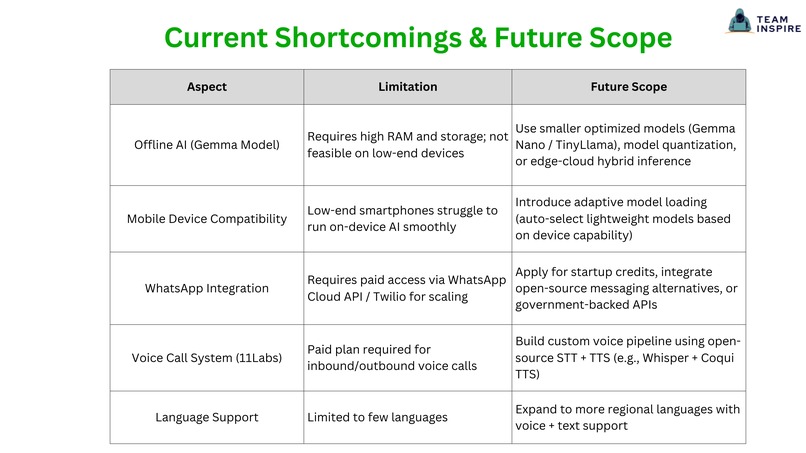
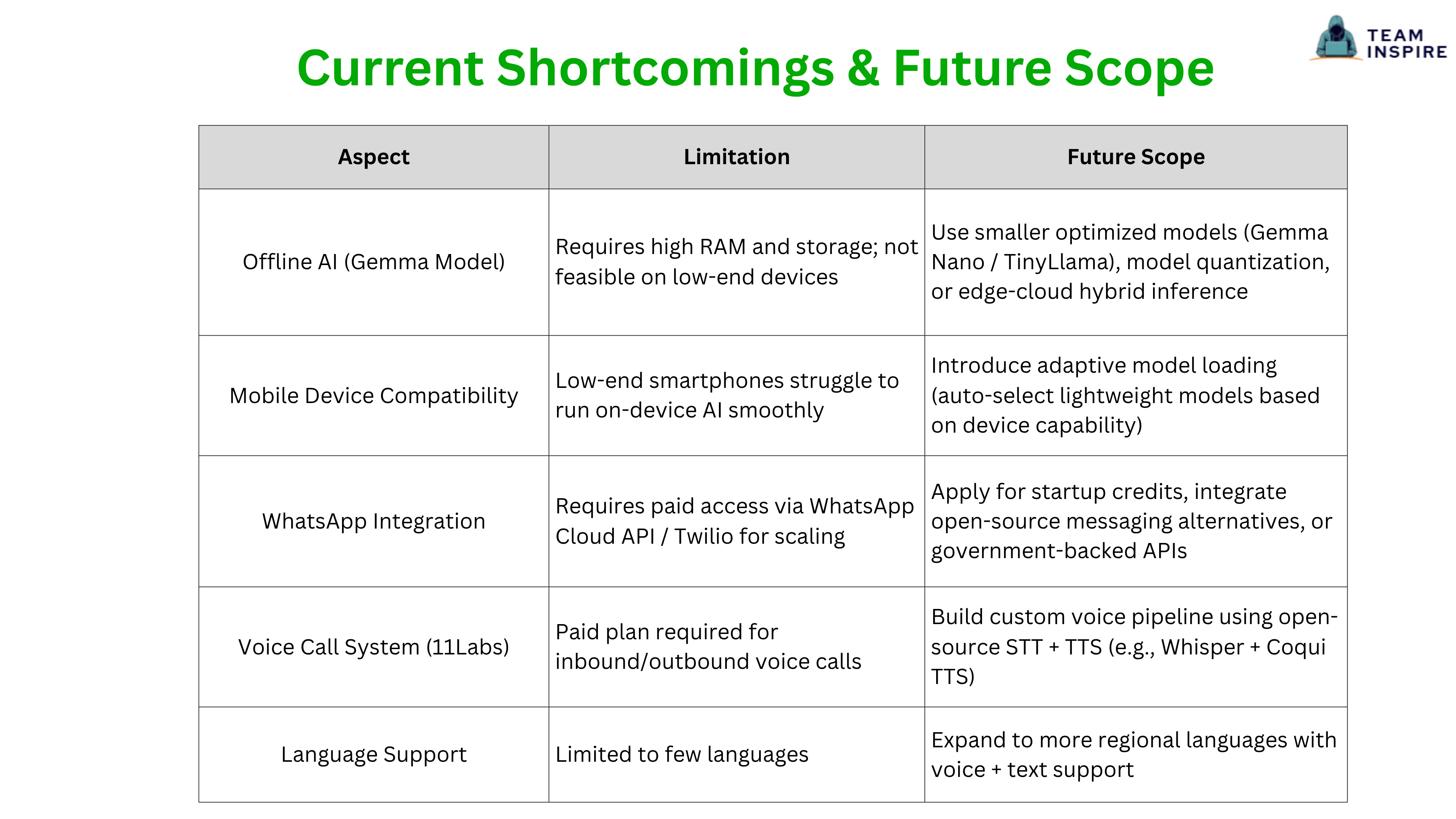
- Running AI models offline on low-end devices due to RAM and storage limitations
- Managing real-time switching between online and offline modes
- Ensuring AI outputs were not random by enforcing structured scoring logic
- Integrating multiple platforms (Flutter, WhatsApp, Voice) into a single workflow
- Handling image-based diagnosis reliably with limited datasets
Accomplishments We Are Proud Of
- Built a fully functional hybrid AI system (online + offline fallback)
- Developed multi-channel access (mobile app, WhatsApp, voice calls)
- Implemented clinical-style scoring instead of generic AI responses
- Successfully integrated image-based DFU analysis
- Paired the Flutter field app with the Medo clinic dashboard for full end-to-end workflow coverage
- Created a scalable solution tailored for rural healthcare challenges
What We Learned
- Prompt engineering alone is not enough — structured reasoning is critical
- Offline AI deployment requires strong optimization and trade-offs
- Simplicity in UI/UX is essential for real-world adoption
- Multi-platform systems need strong coordination and data consistency
- Building for real-world constraints is very different from building demos
- A field tool without a management layer creates a data black hole — the two must work together
What's Next for SenseAI
- [ ] Optimize offline models to run on low-end devices
- [ ] Expand support to more diseases — malaria, anemia, child health
- [ ] Add real-time doctor consultation and telemedicine integration
- [ ] Improve image analysis with better datasets and model training
- [ ] Support more regional languages and voice interactions
- [ ] Reduce dependency on paid APIs using open-source alternatives
- [ ] Sync Medo dashboard data with the Flutter app in real time via a lightweight backend
- [ ] Enable offline data queuing in Medo for low-connectivity clinic environments
Tech Stack
Frontend (Field)   → Flutter (Mobile App)
Frontend (Clinic)  → React.js + Tailwind CSS (Medo Dashboard)
Backend            → Flask (Python)
AI (Online)        → DeepSeek, VisionPro
AI (Offline)       → Gemma 2B via llama.cpp
Messaging          → WhatsApp Cloud API
Voice              → ElevenLabs
Image Analysis     → Custom Segmentation Model
Data Storage       → Browser Local Storage (Medo)
Built for the communities that need it most.


Log in or sign up for Devpost to join the conversation.