-
-
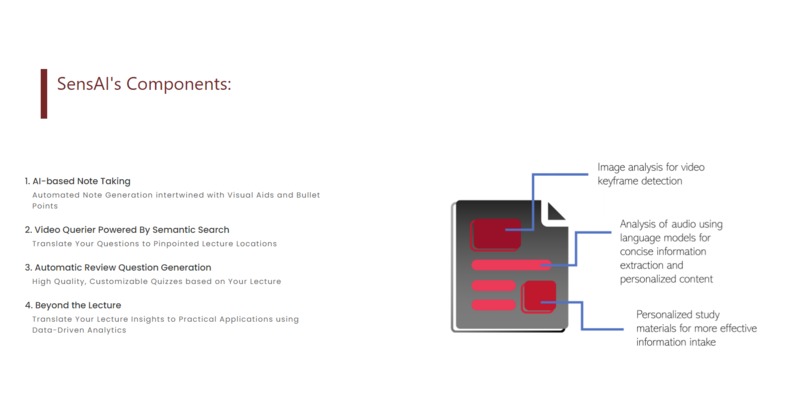
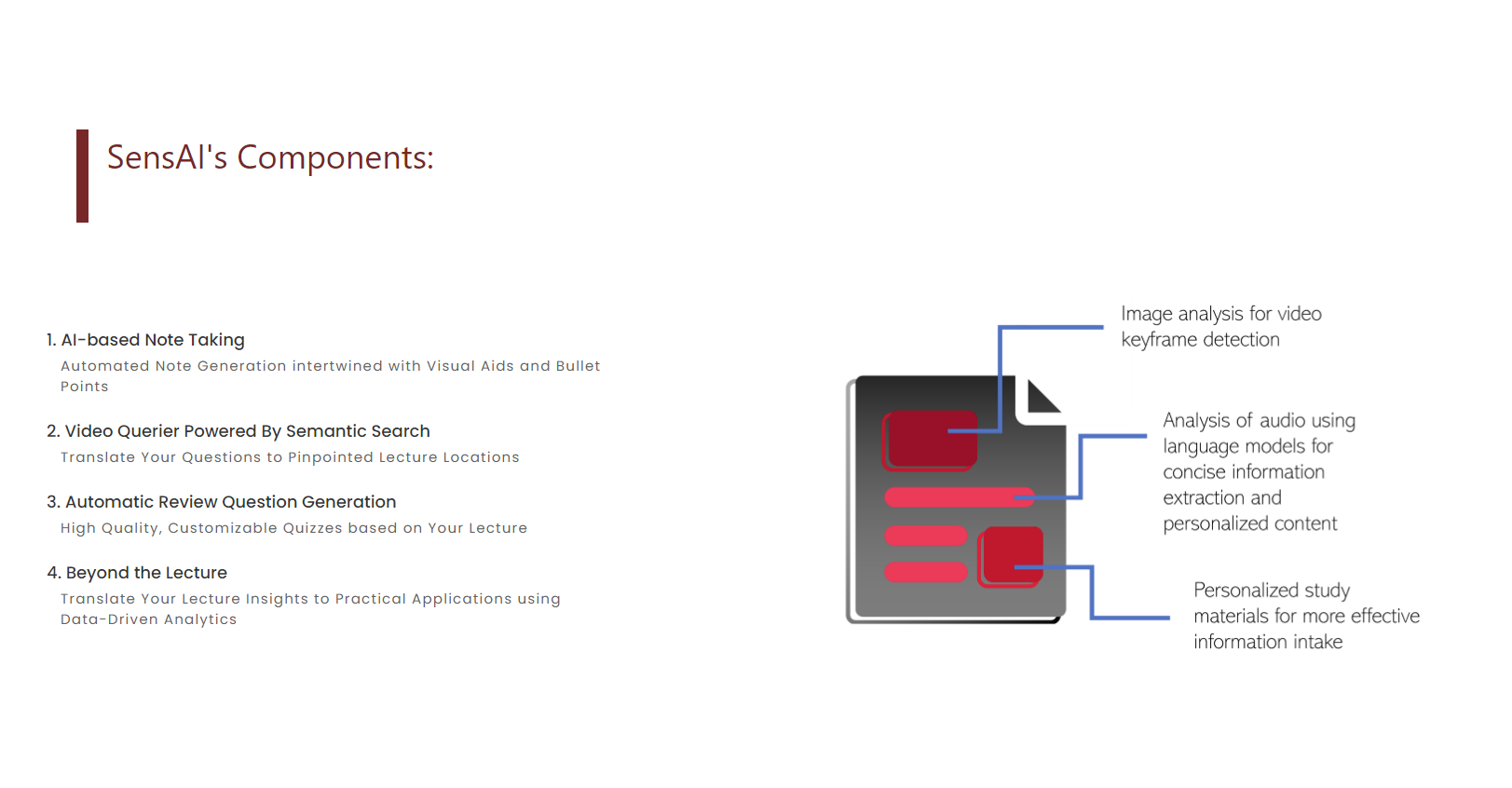
SensAI's Components
-
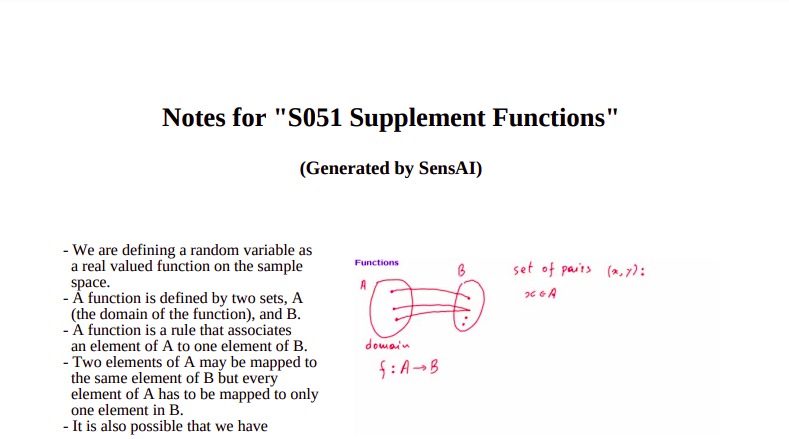
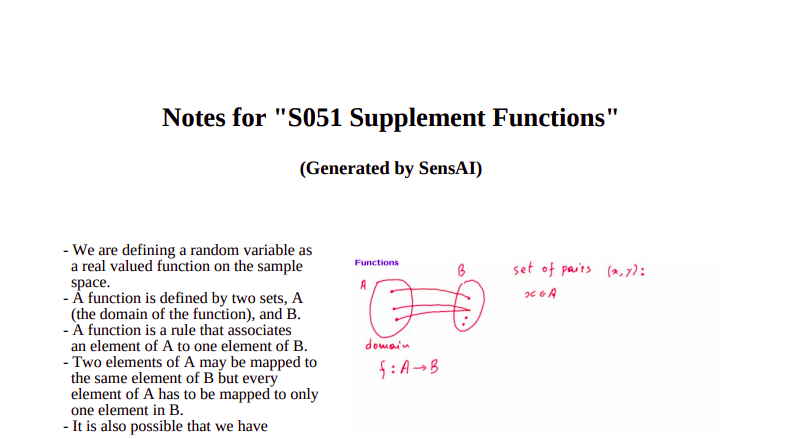
AI-Generated Notes Example
-
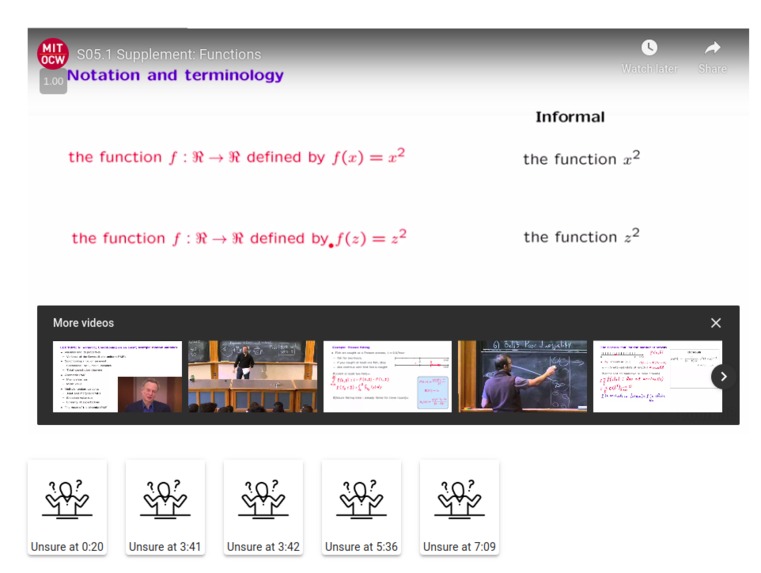
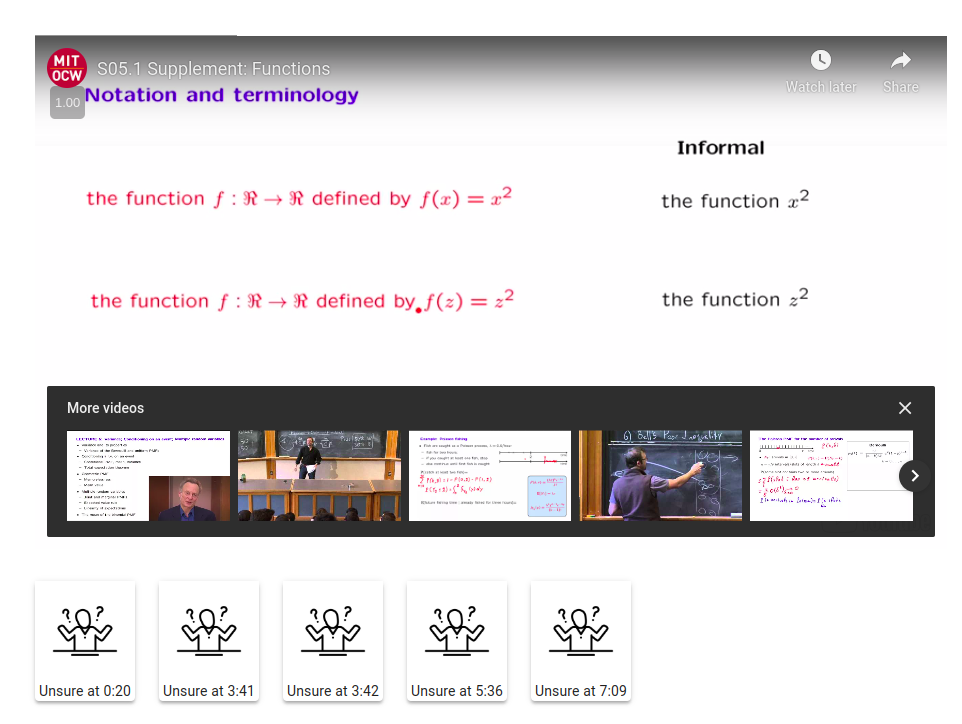
Video Player with Personal Bookmarks
-
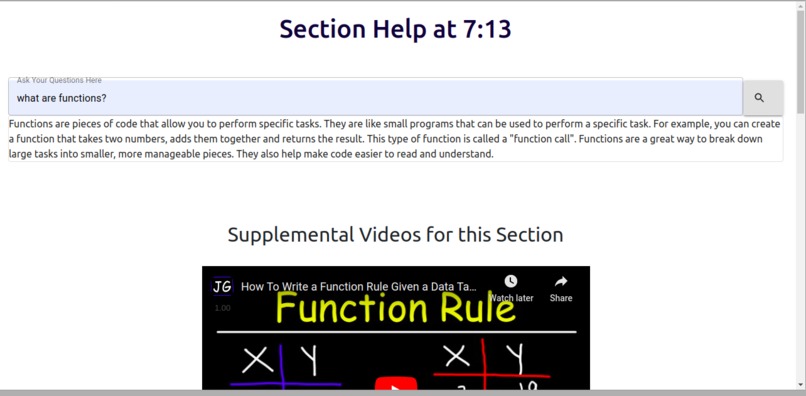
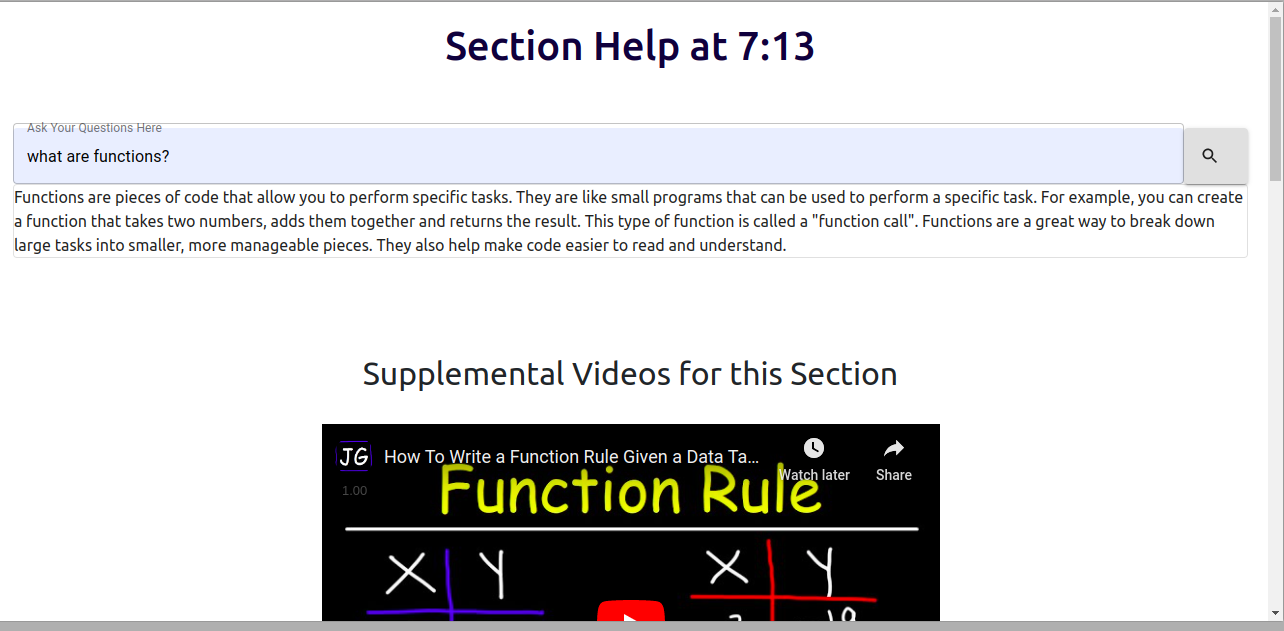
Help Section Sample
Inspiration
As college students living in an increasingly digitized education system, we've noticed the immense importance of grasping and retaining content in the form of online lectures and lessons. However, we've often found ourselves struggling to properly interact with this digital content in an effective and seamless manner. Curious about the problem, we had conversations with fellow hackers and scoured peer-reviewed literature and discovered this is a broader issue — from decrypting highly technical explanations, an overall lack of personalization, and the difficulty in discerning test-style questions from content — the way students interface with online lectures has so much room for improvement. Given our team's personal insight and experience around the problem, we decided to leverage our technical skills to design a solution.
What it does
Based on our user conversations, personal insight, and literature review, we designed a number of features aimed to help the way our users interface with online content, our primary project goal.
➡ Personalized Bookmarks
The interactive video player within SensAI allows users to mark sections that they are "unsure" about for their personal reference. This information not only helps the user personally gauge their understanding throughout lecture sections, but generates a convenient "map" of important areas for further review. Once an "unsure" section is selected, a Help Popup appears with two key features: a Concept Clarification Chatbot and Supplemental Video Recommendations.
➡ Concept Clarification Chatbot
The help section includes a GPT-3 powered Chatbot that allows users to ask questions that help clarify difficult concepts during the lecture through easy-to-understand explanations. Instead of getting lost early-on, areas for help can be quickly identified, helping personalize the lecture experience by making it tailored to specific user-needs.
➡ Supplemental Video Recommendations
In addition to a friendly chatbot for concept clarification, SensAI uses Natural Language Processing to identify relevant concepts localized around user-defined help timestamps, and provides relevant YouTube videos for supplemental learning/understanding. Users are able to review foundational concepts by high-quality creators on-demand during the lecture in a convenient and seamless manner.
➡ Notes Generation
SensAI's AI-powered note-taking module automatically generates notes on the entire lecture, with relevant visual aids and succinct bullet points available at the user's fingertips.
➡ Quiz Question Generator
Using the latest advancements in Natural Language Processing, SensAI digests the content of the entire lecture and translates that into high-quality free-response quiz questions for user reviews. Instead of trying to guess "How could quiz questions even look?" from information-dense lectures, high quality questions centered around key themes are automatically generated, perfect for independent study.
➡ Beyond The Lecture Section
To see the relevance of your classroom topics outside the lecture, SensAI provides targeted keywords that can be linked with ValueNex's RADAR platform for industry scoping through big data analytics and visualization. Uncover big-picture industry trends and international innovations in your field of study.
How we built it
Sensai is composed of a front-end written in React and a FastAPI backend.
The backend is composed of a variety of modules which allow for a wide array of supplemental learning materials:
Transcription Engine:
➡ AI Note Generation
➡ Keyframe Detection
➡ Notes Generation from Transcript
➡ Review Quiz Generation
➡ Keyword Detection
➡ Lecture prompted Question Answering Bot
➡ Supplemental Video Finder
➡ Semantic Search on Video Transcripts
The transcription engine uses the tiny version of OpenAI’s whisper, a state-of-the-art automatic speech recognition model. The output is a timestamped transcription of the video which is used for all other aspects of the site. As transcription is critical to all components of the site, we built a caching mechanism which ensures we never have to transcribe the same video multiple times.
AI note generation is broken up into 5 components. First, using the pointrend architecture model, we perform semantic search of extraneous objects ("humans", "chairs", "tables") to ensure a significant portion of the screen is not obstructed. Next, in order to distinguish key frames to include, we use morphology of the image. In particular, we calculate Canny edges of the grayscale frame for each frame, then dilate the binary edges mask. The resulting mask is also masked off using the segmentations obtained in the previous such that the "content" mask does not include extraneous objects. The keyframes are identified as those in which the Intersection-Over-Union (IOU) of adjacent frames are below a certain threshold, indicating that a significant change in content on screen has occurred. Next, we perform Optical Character Recognition (OCR) on these identified keyframes to ensure the keyframes identified are all content-filled. We remove frames which are in close proximity in time. For notes generation, we query OpenAI’s GPT-3 API to obtain notes based on the intervals of time partitioned by the keyframes. Finally, we compile the keyframes and notes into a pdf file.
The supplemental video system uses the transcript from the minute around the time when the user clicked for help. To generate keywords, we used an unsupervised automatic keyword extraction method which rests on statistical text features extracted from single documents to select the most relevant keywords of a text. We then queried the YouTube Search API to identify other videos which talk specifically about the section that the user was confused about.
The AI Note Generator and Review Quiz Generator both use OpenAI’s GPT-3 API to analyze the transcript of the lecture and produce the documents. We used precisely engineered prompts to achieve the desired output based on the transcript. With the returned text, we use ReportLab to format the output into a pdf and display it to the user.
For the Lecture-prompted Question Answering Bot, we used the transcript from the section surrounding the place where the user asked the question along with a specific question answering prompt. Using this processed prompt which encodes the user query and contextual information about the students-confusion areas, we query GPT-3 and show the user the result of the request.
We also developed a semantic search tool which allows users to search the video for a specific section. This module used a cross-encoder which scored the similarity between the query and each section of the transcript, returning the timestamps of the top-5 matches.
Accomplishments that we're proud of
Fundamentally, we are really proud of how we used new breakthrough technologies (GPT-3, Sentence-BERT Embedding, Computer Vision, Semantic Search, and more) in interesting technical implementations with high practical use cases, from video search to quiz generation. In a relatively short timespan, we were able to combine these disparate elements into one cohesive, seamless, and user-friendly platform that exceeded our engineering goals through thoughtful and detail-oriented product design. In conclusion, we've architected a solution to a highly personal problem impacting students globally through SensAI.
What we learned
We learned how to work with a team on a very tight schedule to bring a challenging to fruition. From UX design, ML integration, front-end, and back-end, our entire team grew as programmers and designers through the ordeal.
What's next for SensAI
We hope to continue improving our user experience through integration of student feedback. With this, we also envision adding a number of new features to SensAI and making the entire platform more interconnected with much more customized settings for modules (quiz-questions, note-taking, etc). We hope to make SensAI a tool that helps real students on an everyday basis.


Log in or sign up for Devpost to join the conversation.