-
-
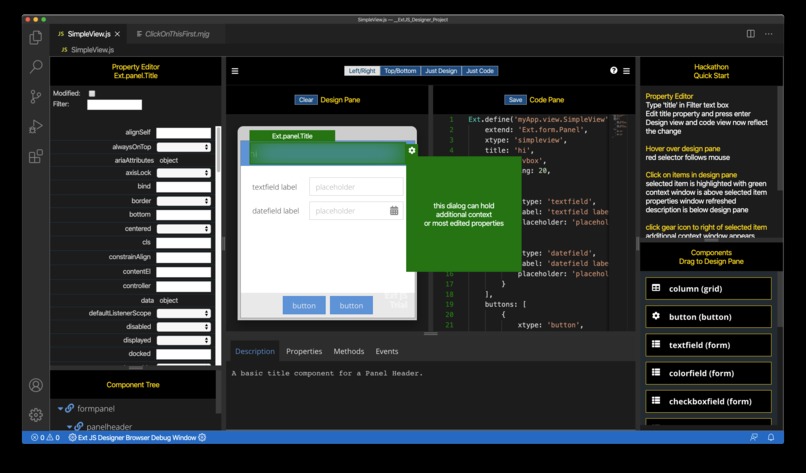
the Visual Studio Code Ext JS Designer Extension

Ext JS Designer in the Visual Studio Marketplace
https://marketplace.visualstudio.com/items?itemName=marc-gusmano.extjsdesigner
Inspiration
The desire to finally have a simple visual editor for Ext JS right within VS Code
What it does
it uses a VSCode custom editor implementation to visually edit Sencha Ext JS Views
How I built it
- Used JavaScript, Node.JS, Sencha ExtWebComponents
- Built as VSCode Custom editor Extension
- Integrates with current Sencha VSCode Plugin Extension
- Use of AST (NO metadata!!) - see https://astexplorer.net/
- Modular design (folder structure, Web Components)
- Sencha ExtWebComponents and Custom Web Components for UI elements
- Uses Ext JS Documentation output (DOXI) for properties, methods, events and integrated documentation
Challenges I ran into
custom editors are very new to VS Code making sure you can edit an Ext JS View visually with NO METADATA!
Accomplishments that I'm proud of
a true custom editor for Ext JS takes advantage of the Ext JS DOXI documentation output NO METADATA!
What I learned
this is do-able!
What's next for Sencha Ext JS Designer
Win the hackathon and become the starter open source code for Open Architect!
Built With
- doxi
- extwebcomponents
- javascript
- node.js
- vscode
- webcomponents


Log in or sign up for Devpost to join the conversation.