-
-
-
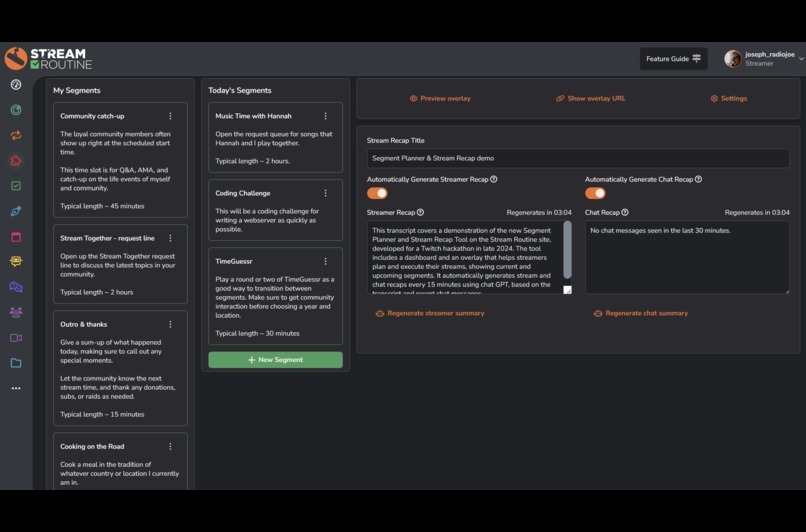
Screenshot of the Segment Planner & Stream Recap tool
Inspiration
Traditional live TV broadcasts such as morning talk shows, sports broadcasts, evening news, and late night talk shows, all utilize a combination of segments to organize their shows and lower third chyrons to keep their viewers up to date on the context of what is happening.
I wanted to build a tool that helps streamers easily keep track of their stream segments, their plan for the day, and include a connected overlay that keeps the audience automatically up to date on the context & segments of the stream.
What it does
The Segment Planner & Stream Recap page is a dashboard for streamers to use while planning and streaming. This page is broken up into two sections:
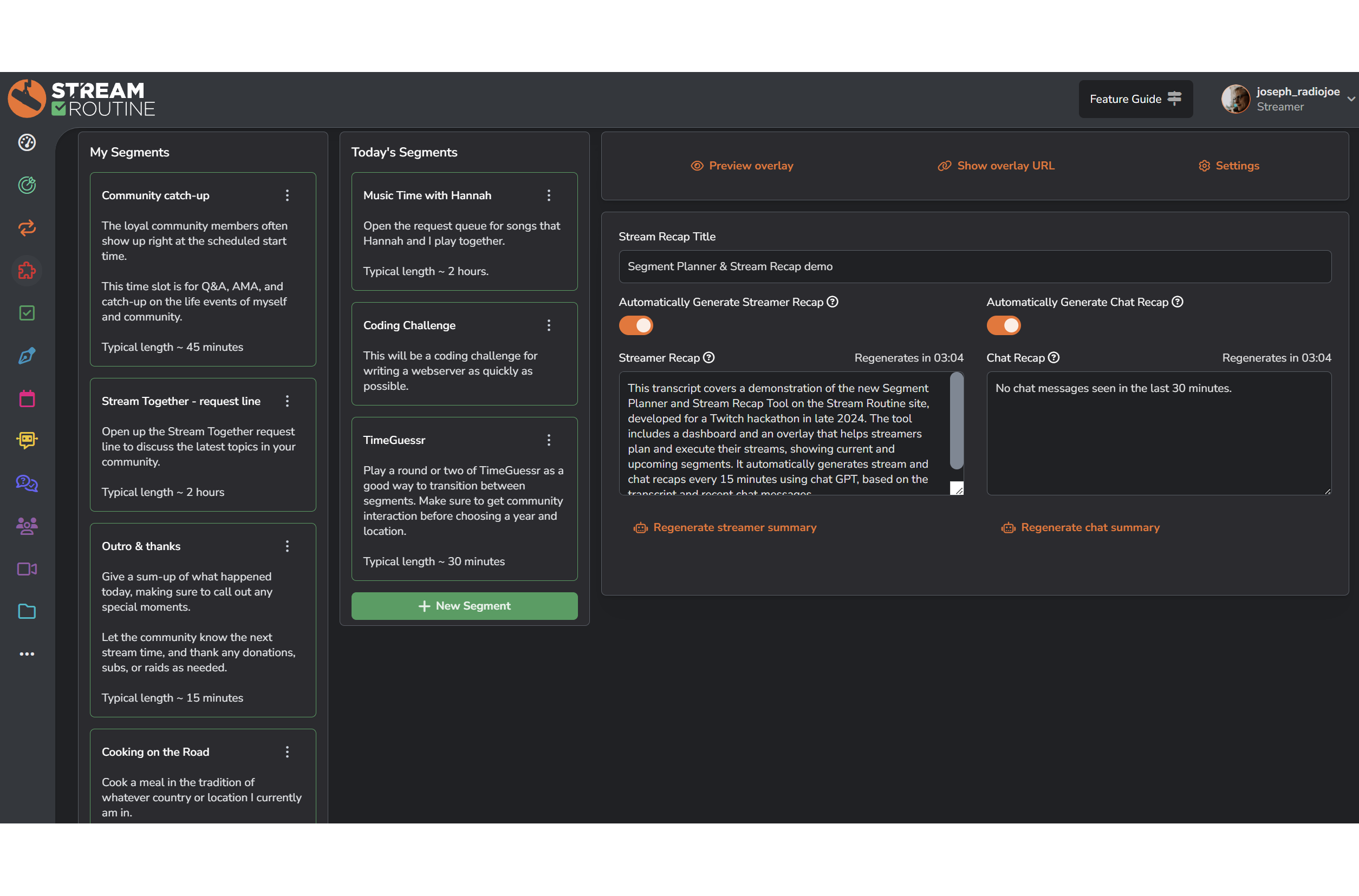
The Segment Planner is setup in two columns, My Segments and Today's Segments. While planning the stream for the day, the streamer can drag and drop over any segments in the My Segments column to the Today's Segments column in the order that they will complete them.
The Stream Recap tool, which includes an overlay for the streamer to use in OBS. The overlay keeps viewers up to date on the current segment, what the upcoming segments are, and a recap of both what the streamer has said and what chat has said.
The streamer recap can be automatically generated allowing the page to capture the audio from the streamer and turning on the "Automatically Generate Streamer Recap" switch. This will automatically log everything you say to this page, and once every 15 minutes will generate a fresh recap so that any new viewers have context for what is currently happening.
The chat recap can be automatically generated by turning on the "Automatically Generate Chat Recap" switch, and this page will automatically read the recent chat messages in the stream to generate a summary of what chat has been talking about.
The streamer can override the summaries at any time by simply changing the text in them. They might also want to turn off the automatic generation of the summaries if they prefer to manually craft them.
How we built it
We utilized the StreamRoutine platform and added a new page to the logged in area of the site specifically for this tool.
We use the Web Speech API to transcribe what the streamer says to text, a chatbot to log chat messages, and tie that together with the OpenAI API to automatically generate short summaries to be displayed on an overlay.
Challenges we ran into
Designing a user interface that we felt like made the process and workflow as easy as possible for the streamer took a few iterations. Our testing so far with a few streamers that we know has been successful.
Accomplishments that we're proud of
We are proud of how much professionalism this tool brings to a streamer with very little effort on their part.
Many streamers already have an idea in their head of the various segments that they do on their stream, even if they don't define them as such. The segment planning part of the tool gives the streamer an easy spot to do a brain dump of those segments, and provides a very easy drag & drop interface to organize their stream for that day based on their pre-existing segments. I think this will help inspire streamers to come up with more interesting segments for their stream, help them think about pacing, and generally just have a good plan going into their stream with very little effort.
Many streamers do not have a team supporting them, so coming up with an interface that is useful while streaming that also translates into an overlay that helps keep the viewers up to date I feel like is a huge leap forward for many streamers. The tie into generative AI automatically keeps the summaries up to date so the streamer doesn't have to.
What we learned
Tools like this work best when they inspire the streamer and also stay out of their way so they can focus on their stream. I feel like this tool has helped me come up with several ideas to improve some of the other offerings on the StreamRoutine site.
What's next for Segment Generation & Planning
I would like to add in an automatic translator that allows the streamer to choose other languages that they want their summary & upcoming segments to show in.
While we have other generative AI on the site in our StreamAdvisor feature, I would like to add in additional generative AI on this page that helps streamers come up with new segments for their stream.


Log in or sign up for Devpost to join the conversation.