-
-
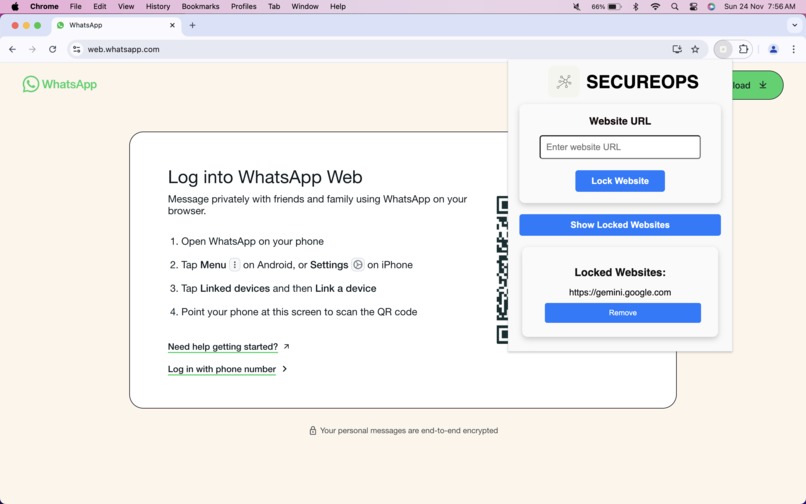
The Main dashboard of our extension.
-
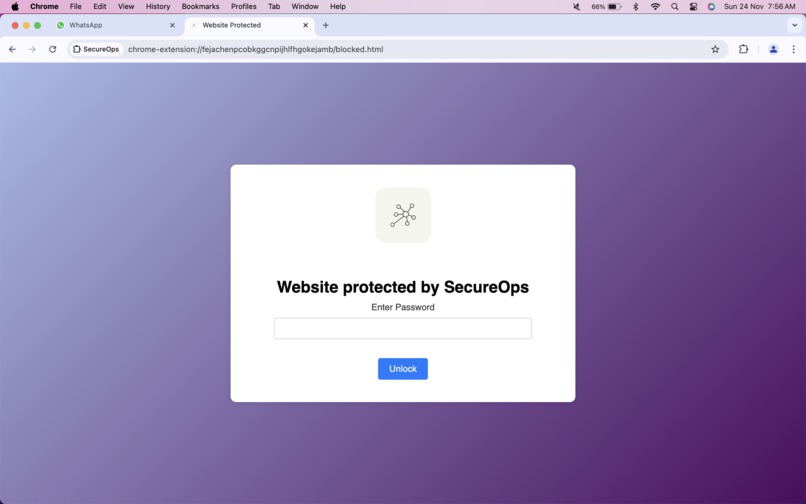
The Web Blocker Page is in action.
-
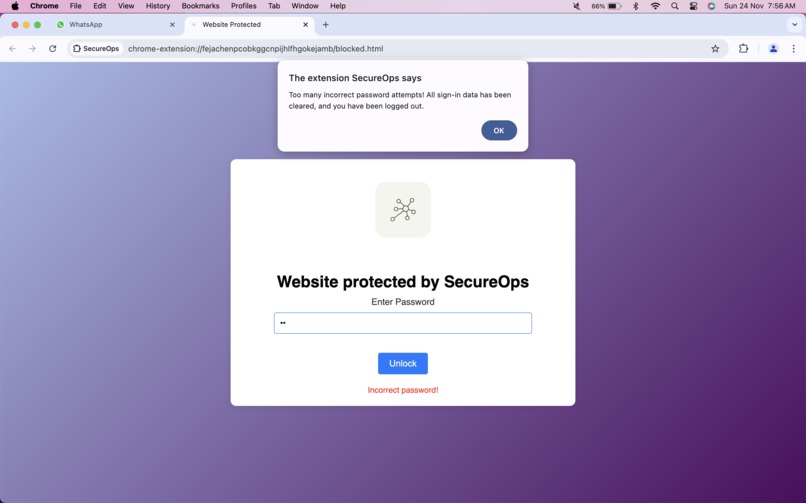
After any Suspicious Attack the Extension wipes off the necessary data and login information.


About the Project
Inspiration
The inspiration for SecureOps came from the increasing concerns around web security and privacy. With the growing number of online threats, I realized that many users need better ways to secure their most sensitive websites and personal accounts. Most users rely on passwords, but it’s often not enough to prevent unauthorized access. I wanted to create a solution that adds an extra layer of protection by locking websites behind a master password and ensuring that browsing data is cleared after repeated failed attempts.
What it does
SecureOps is a Chrome browser extension that:
- Locks websites with a master password, requiring authentication before accessing specific sites.
- Rate-limits failed login attempts, triggering security measures (like clearing browsing data) if too many incorrect attempts are made within a short time frame.
- Clears browsing data, including cookies, history, and session storage, to protect sensitive information when unauthorized access is suspected.
- Provides a simple, intuitive UI that lets users easily manage locked websites, set passwords, and monitor attempts.
How we built it
We built SecureOps using the following tools and technologies:
- HTML, CSS, and JavaScript: For building the user interface and handling user interactions such as locking/unlocking websites.
- Chrome Extensions APIs: Utilized the
storage,webNavigation,browsingData, andcookiesAPIs to manage user data and track website visits. - Manifest V3: Transitioned the extension to Manifest V3, utilizing service workers and enhanced security features to ensure the extension works efficiently and securely.
Key features such as rate-limiting and data clearing were implemented using JavaScript to interact with the browser’s APIs, while the UI was designed to provide a seamless experience for the user.
Challenges we ran into
- Handling Security Breaches: Designing an effective security system that detects multiple failed login attempts and automatically clears sensitive data was a challenge. We had to ensure that the system triggered these actions only when necessary, without disrupting the user experience.
- Migrating from Manifest V2 to V3: With Google’s move to Manifest V3, I had to update the extension to use service workers and deal with stricter content security policies.
- Website Compatibility: Websites have different structures and security mechanisms, so ensuring that the extension worked consistently across various platforms required custom logic for each locked site.
Accomplishments that we're proud of
- Successfully created a robust rate-limiting system that detects multiple failed password attempts and triggers security actions.
- Built a secure and functional extension that locks websites behind a password and clears sensitive browsing data after suspicious activity.
- Transitioned the extension to Manifest V3, ensuring future compatibility with Chrome’s evolving standards.
- Designed a user-friendly interface that provides clear feedback on locked sites and login attempts.
What we learned
- Web Security Practices: Gained a deeper understanding of securing browser extensions and implementing measures like rate-limiting, cookie management, and data clearing.
- Chrome Extensions APIs: Learned how to effectively use Chrome’s APIs to interact with browser data and create a seamless extension experience.
- Manifest V3: Became familiar with the features and limitations of Manifest V3 and adapted the extension accordingly.
- Error Handling: Developed skills in handling edge cases and errors (e.g., failed login attempts) while ensuring a smooth user experience.
What's next for SecureOps
- Multi-Platform Support: Extend SecureOps to support other browsers and platforms (e.g., Firefox, Edge).
- User Analytics: Introduce features to track and visualize login attempts and security breaches for users.
- Password Recovery: Implement a password recovery system in case users forget their master password.
- Enhanced Security Features: Add more advanced security features like multi-factor authentication and remote lock/unlock capabilities.
