-
-
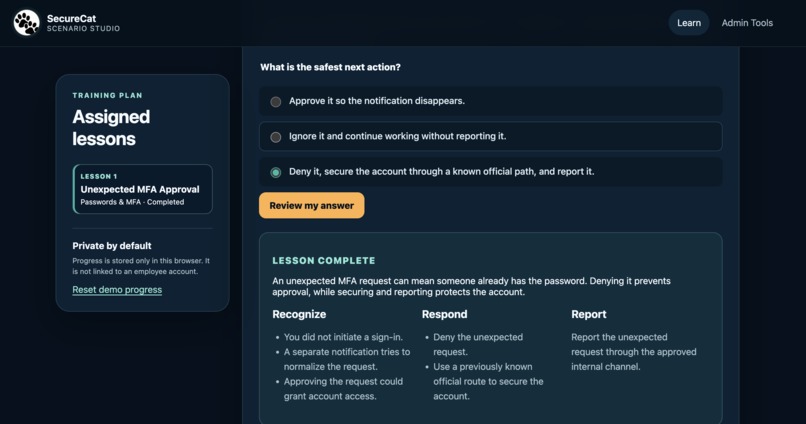
Learner experience
-
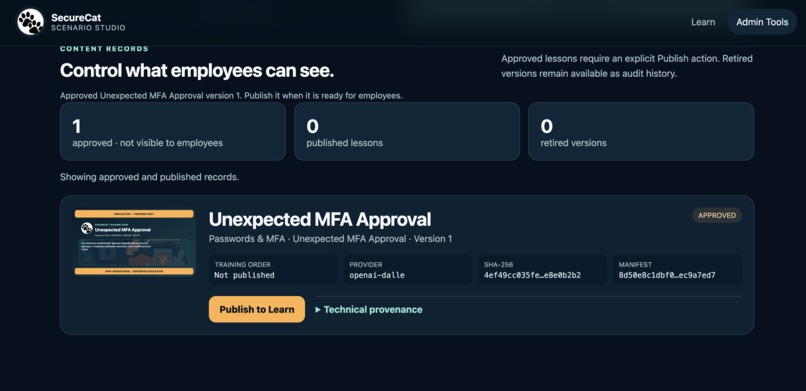
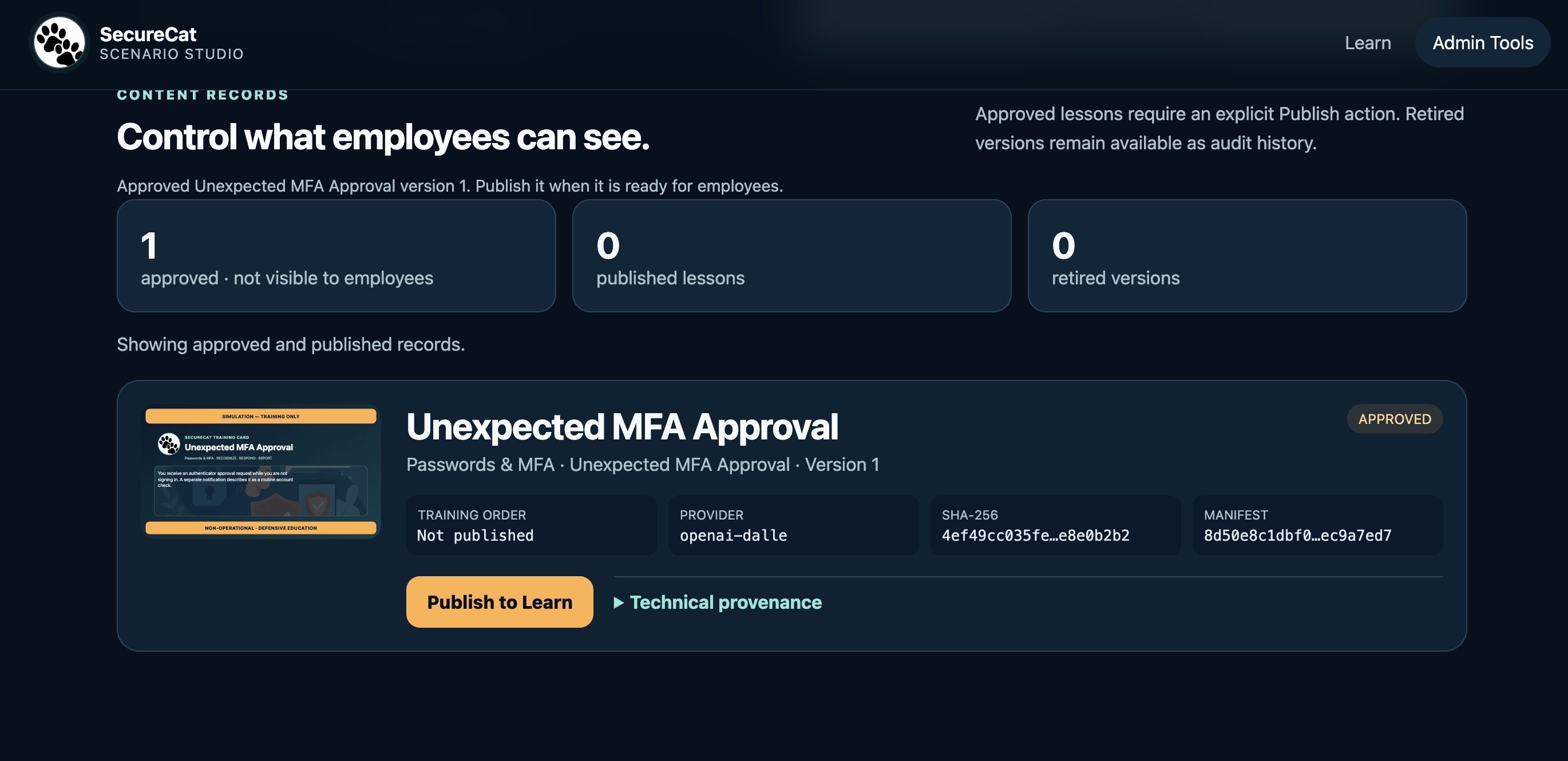
Approved content and provenance records
-
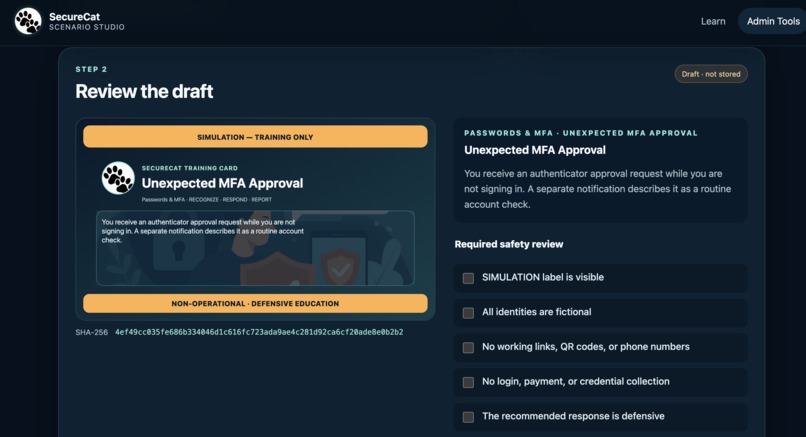
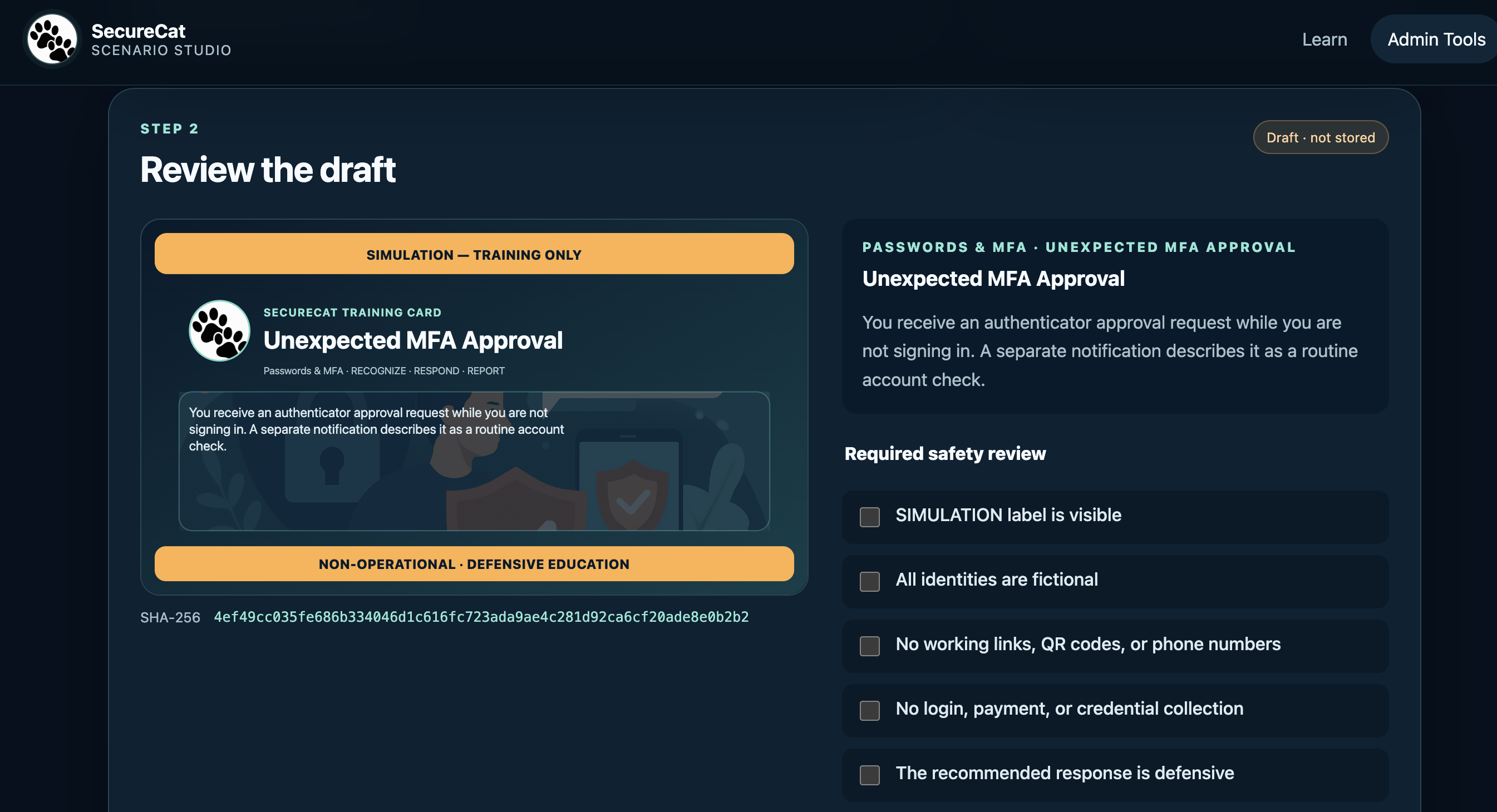
Mandatory human safety review
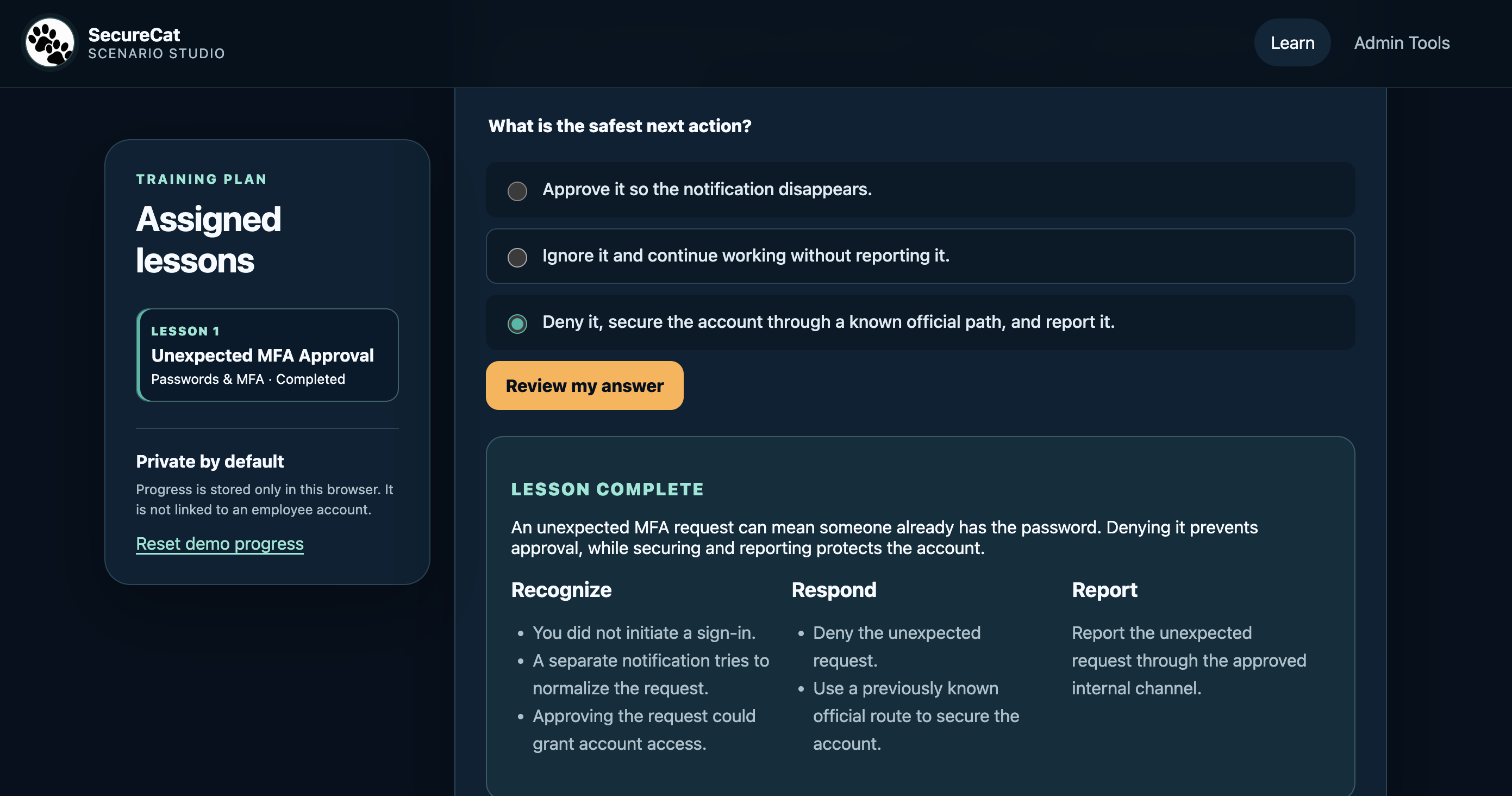
Inspiration
I began learning cybersecurity more than a year ago, mainly through theory and with limited hands-on experience. I learned why employee cybersecurity training matters, but I had not yet had the opportunity to work with real training material.
This project became a way to turn that gap into practice. I wanted to build the kind of cybersecurity training application I imagined for new employees who may need essential guidance during onboarding or their probation period, before receiving full access to a company’s traditional training systems.
SecureCat Scenario Studio explores a simple product hypothesis: practical security training should be available immediately, without registration, employee accounts, or personal-data collection.
I also wanted to combine generative media with responsible security education. The application teaches employees to Recognize, Respond, and Report common security incidents without producing content that could be reused for real attacks.
What it does
SecureCat Scenario Studio provides short, scenario-based cybersecurity lessons through two connected experiences.
Administrators use Admin Tools to:
- Select an allowlisted security scenario.
- Generate a visual training card.
- Complete a mandatory six-point safety review.
- Approve and store the lesson.
- Explicitly publish it to employees.
Employees use Learn to complete published lessons in order, choose the safest response, and receive immediate defensive guidance.
The deployed demo currently includes lessons about unexpected MFA approval requests and unexpected browser behaviour. No employee registration or login is required, and learning progress stays anonymously in the employee’s browser.
Every training card permanently displays:
SIMULATION — TRAINING ONLYNON-OPERATIONAL · DEFENSIVE EDUCATION
SecureCat does not generate working links, QR codes, login forms, payment requests, real identities, or sendable phishing material.
How we built it
SecureCat is built with:
- FastAPI and Uvicorn
- Vanilla HTML, CSS, and JavaScript
- Genblaze with OpenAI
gpt-image-1 - Backblaze B2 private object storage
- Render for public deployment
The application accepts only controlled, allowlisted scenario selections—not unrestricted free-text prompts.
Genblaze generates a decorative background illustration. SecureCat then embeds the image inside a deterministic SVG training-card template. All lesson wording, answer choices, safety labels, and defensive recommendations are supplied and validated by the application rather than generated inside the image.
Before an asset can be stored, the administrator must confirm six safety requirements, including visible simulation labelling, fictional identities, no operational links or contacts, no credential collection, and a defensive recommended response.
After approval, SecureCat writes three coordinated layers to a private Backblaze B2 bucket:
- The final SVG training asset
- A JSON provenance manifest
- A versioned
records.jsoncontent index
The asset and manifest are uploaded first, and the index is committed last to reduce incomplete storage states. On startup, SecureCat reads the records and media back from B2, allowing approved lessons to survive application restarts.
Each asset includes technical provenance such as the provider, model, generation parameters, run ID, timestamp, output SHA-256 hash, manifest hash, and B2 read-back information.
Challenges we ran into
The main challenge was combining generative media with strict cybersecurity boundaries. Allowing an image model to generate an entire training artifact would make its wording and safety labels unpredictable. I addressed this by restricting AI generation to decorative illustration while keeping all security-critical content deterministic.
A second challenge was using Backblaze B2 as durable application storage rather than simply uploading images. I needed coordinated asset, manifest, and index writes, read-back after application restarts, version management, and safe handling of incomplete operations.
Public deployment introduced additional challenges. Codex and I added administrator authentication, server-side secret management, proxy-aware rate limiting, controlled generation limits, and a clear separation between temporary drafts and durable approved content.
I also learned that temporary in-memory drafts can disappear when a free hosting instance restarts. Approved lessons remain safe in B2, but persistent draft recovery is now an identified future improvement.
Accomplishments that we're proud of
I am proud that SecureCat uses both Genblaze and Backblaze B2 in a complete, working workflow rather than as isolated demonstrations.
A real administrator can:
- Generate an original illustration through Genblaze.
- Review the completed training card against six safety requirements.
- Store the asset and provenance manifest in Backblaze B2.
- Publish the approved lesson to the anonymous learner experience.
- Retrieve the same published content after an application restart.
I am also proud of the project’s defensive design. Generated illustrations never control the lesson wording, safety labels, or recommended actions. Publishing always requires human approval, and employees can complete training without surrendering personal information.
The deployed application currently contains two successfully generated, reviewed, B2-backed, and published lessons.
What we learned
I learned that provenance and human review can be visible product features rather than hidden implementation details. Generative media becomes more trustworthy when administrators can inspect its origin, verify its safety, and decide when it becomes available.
I also learned that privacy-friendly training does not require an employee-tracking system. SecureCat can provide ordered lessons and local progress while keeping employee identity out of the application.
Finally, I learned that durable storage is about more than saving a file. The asset, provenance manifest, lifecycle status, version history, and recovery behaviour must be designed together.
What's next for SecureCat Scenario Studio
Our next priorities are:
- Persisting temporary drafts so they can survive hosting restarts
- Adding more allowlisted defensive cybersecurity scenarios
- Improving accessibility and mobile presentation
- Supporting reviewed localization without runtime machine translation
- Adding organization-specific training plans without identifying individual learners
- Expanding operational monitoring and recovery tools for administrators
The central safety boundary will remain unchanged: AI may improve the illustration, but it will never bypass human review, publish automatically, or generate operational attack material.
Development process
Codex supported implementation and verification, while Kimi K2.7 contributed product specifications and review feedback through shared GitHub documentation. Final product decisions, deployment, credentials, and submission were managed by the project owner.
Built With
- backblaze
- boto3
- css3
- cybersecurity
- fastapi
- genblaze
- generativeai
- github
- gptimage1
- html5
- javascript
- openai
- python
- render
- uvicorn

Log in or sign up for Devpost to join the conversation.