-
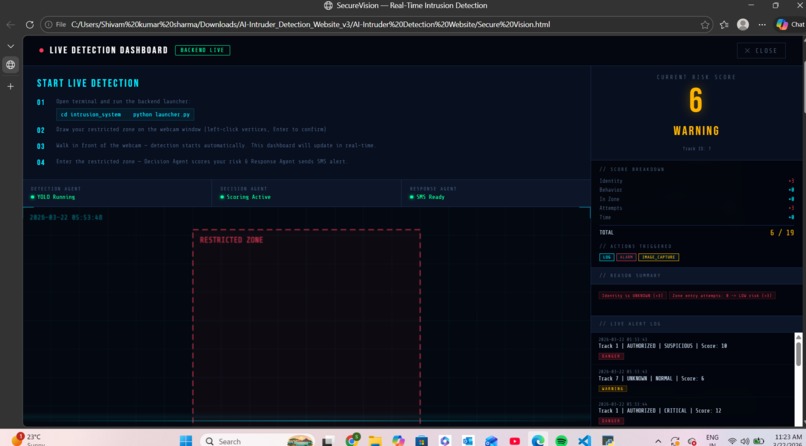
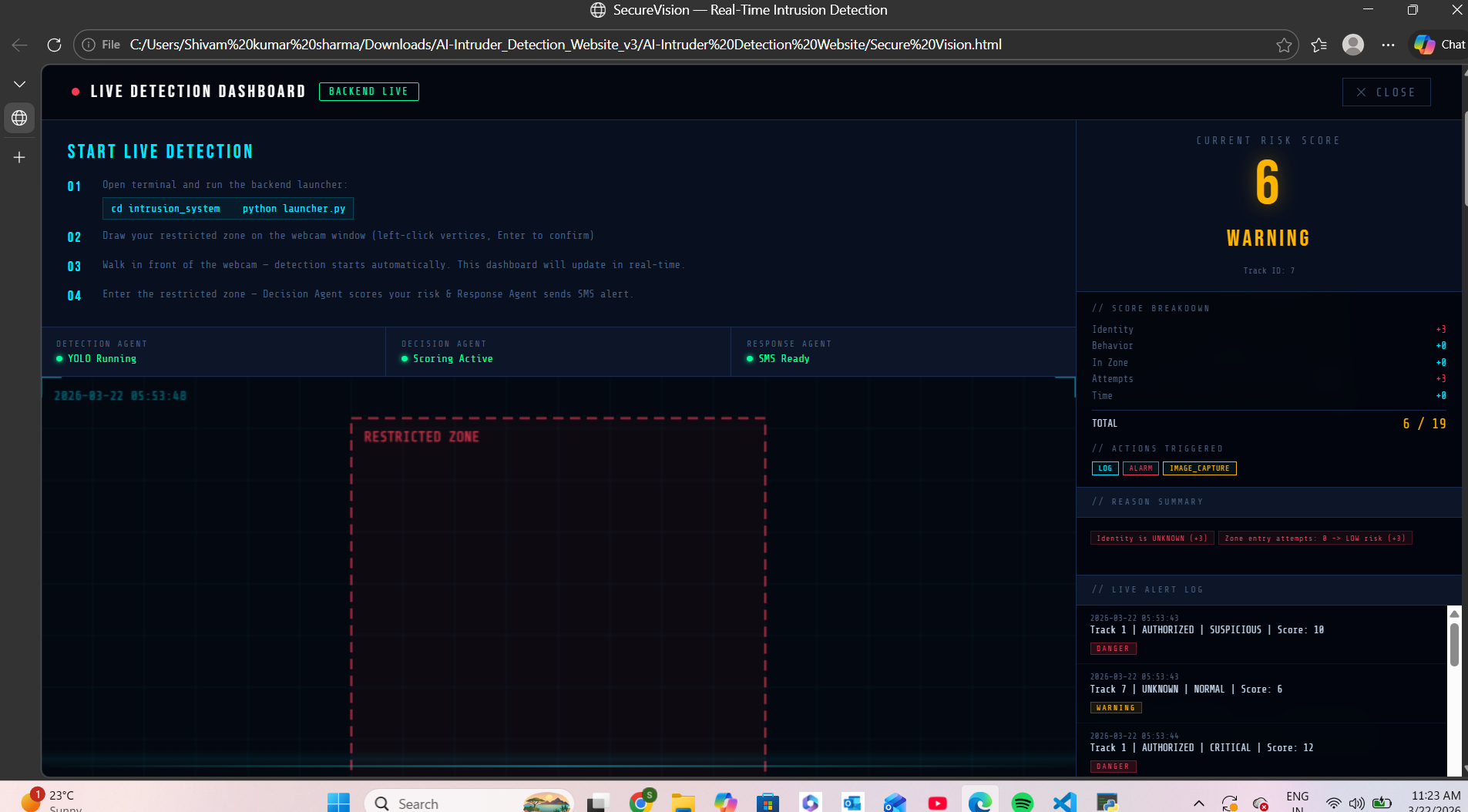
image of our ai model score
-
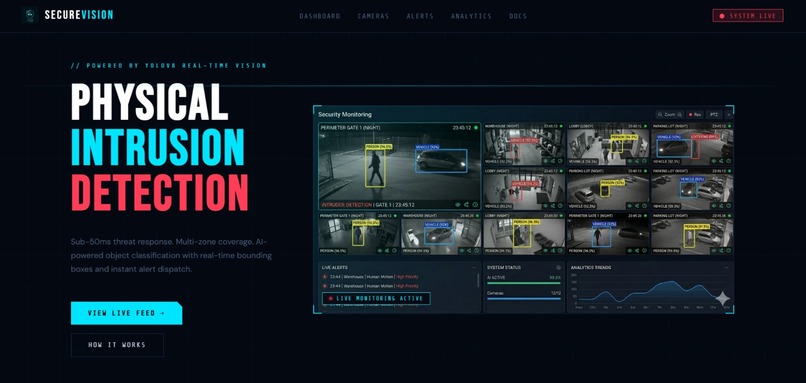
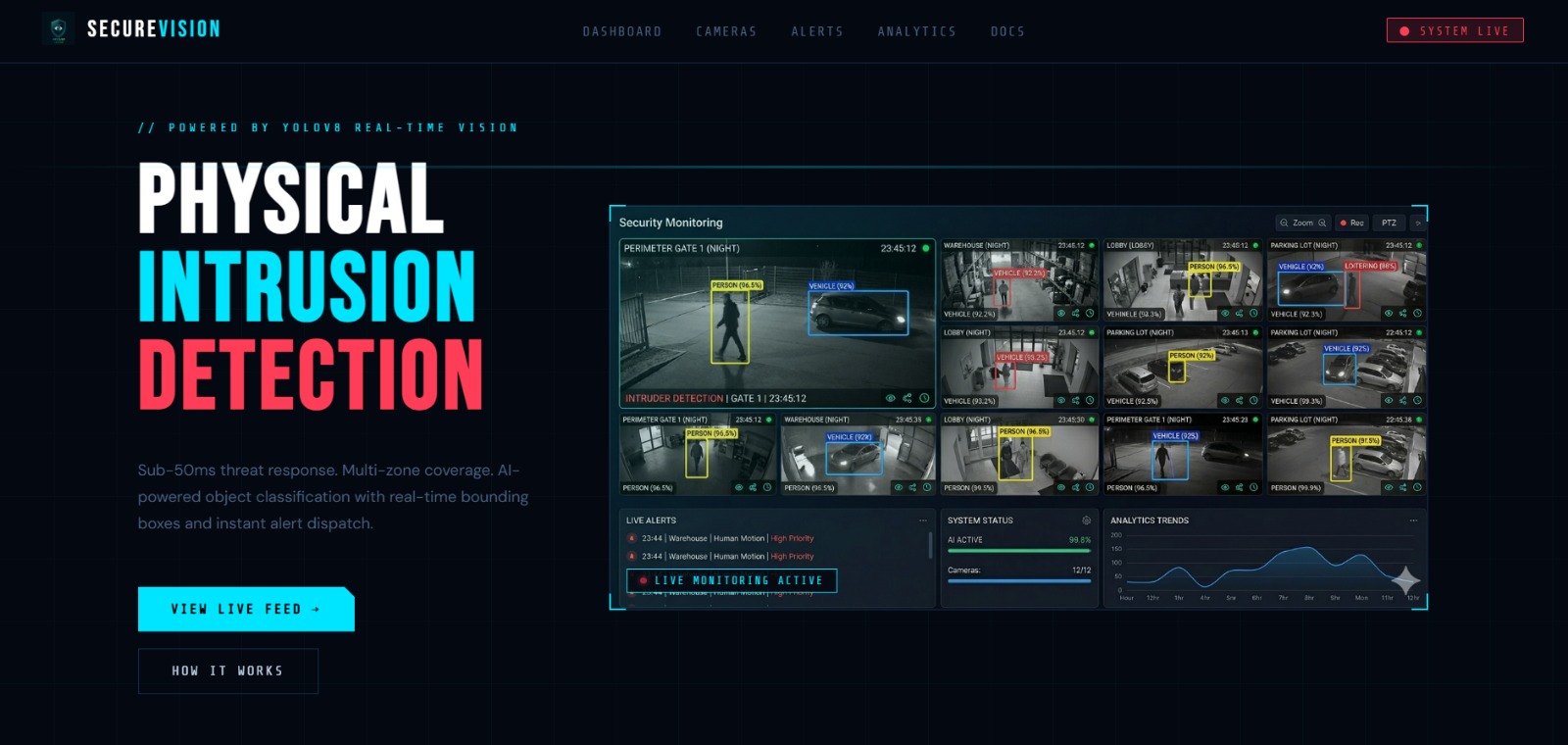
our main ui opening interface
-
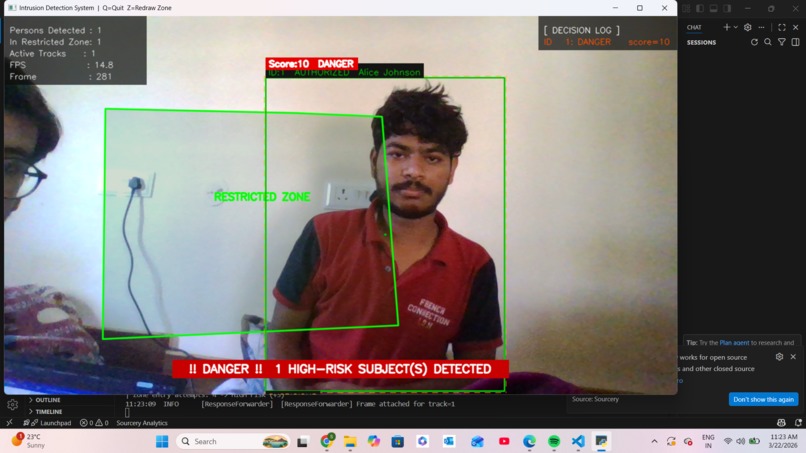
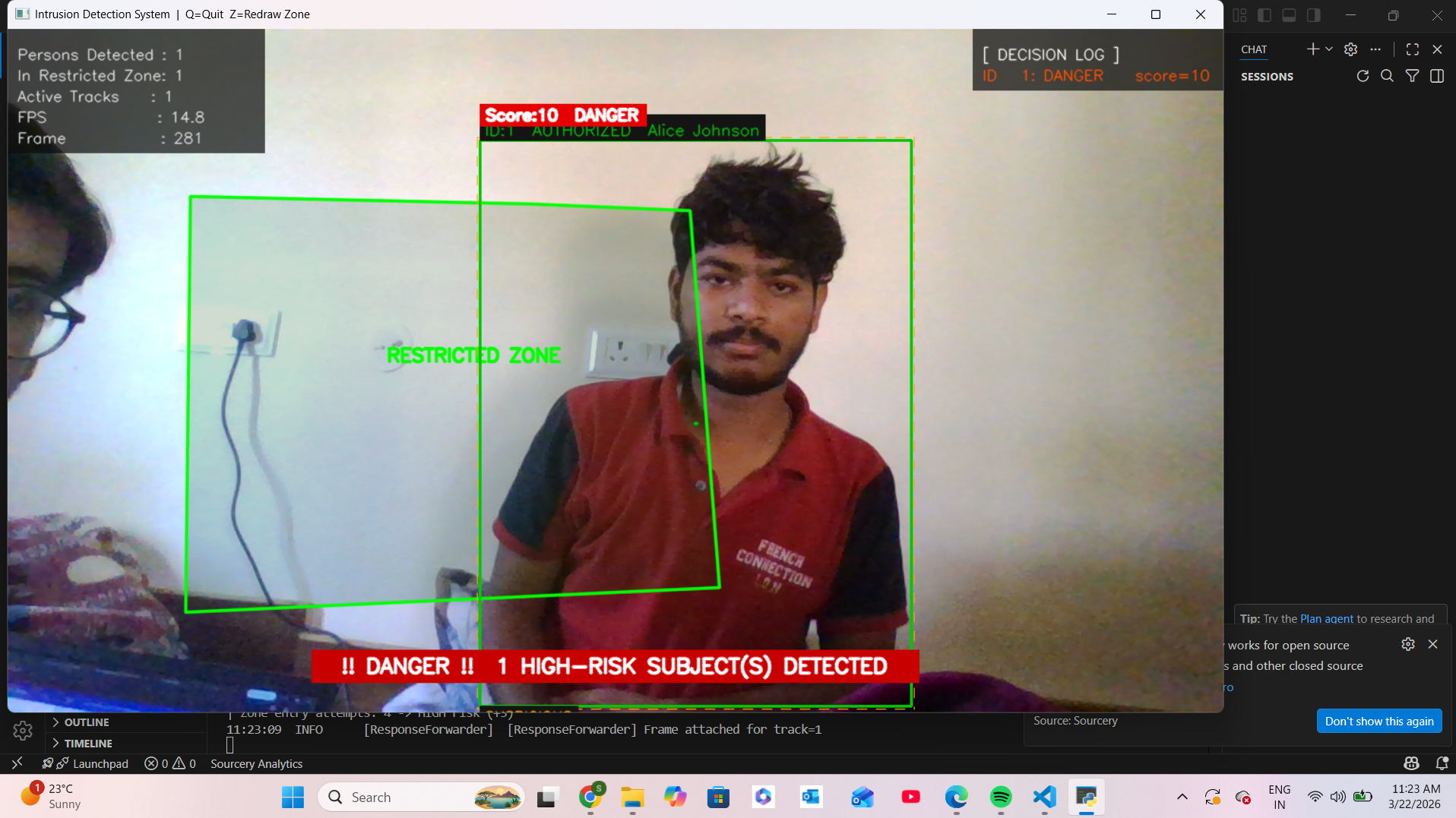
our ai intruder detection model detecting intruders in parameterized zone
Inspiration
Most security systems we see around us — CCTV cameras in offices, warehouses, and homes — are passive. They record footage, but nobody is watching in real time. A theft can happen, an unauthorized person can enter a restricted area, and the footage is only reviewed after the damage is done.
We wanted to flip this. Instead of recording and reviewing later, what if the system could think, decide, and act on its own — in real time? That question became SecureVision.
We were also inspired by the idea of multi-agent AI systems where different agents handle different responsibilities, just like a real security team would — one person watches the camera, another evaluates the threat, and a third calls for backup.
What it does
SecureVision is a real-time AI-powered physical intrusion detection system built on a 3-agent architecture:
Agent 1 — Detection Agent Uses YOLOv8 and ByteTrack to detect and track persons from a live webcam feed. Each person gets a unique tracking ID. The user draws a custom restricted zone on the camera feed, and the system monitors whether anyone enters it. It also classifies behavior as Normal, Suspicious, or Critical based on movement speed and loiter time.
Agent 2 — Decision Agent Receives detection events and calculates a real-time risk score (0–19) based on five factors: identity status, behavior classification, zone intrusion, number of repeated attempts, and time of day. It then classifies the situation as SAFE, WARNING, or DANGER.
Agent 3 — Response Agent Takes automated action based on the risk level — no human input needed:
- SAFE → logs the event
- WARNING → logs + sends SMS alert via Twilio
- DANGER → logs + SMS + voice call + alarm + captures intruder image
All of this is also visible on a live web dashboard (SecureVision website) that shows real-time detections, risk scores, score breakdowns, and alert logs.
How we built it
We built the entire system in Python using a modular architecture where each agent runs independently and communicates through REST APIs.
- Detection Agent — Python, OpenCV, YOLOv8 (Ultralytics), ByteTrack, NumPy, ray-casting algorithm for geofencing
- Decision Agent — FastAPI server (port 8001), Pydantic for schema validation, custom rule-based scoring engine, SQLite for attempt tracking
- Response Agent — FastAPI server (port 8002), Twilio SMS and Voice API, Base64 image encoding for frame capture, SQLite database for intrusion logs
- Web Interface — HTML, CSS, JavaScript with real-time polling of both FastAPI servers, CORS middleware for browser compatibility
- Launcher — A single
launcher.pystarts all three agents simultaneously using Python threading — Response Agent on port 8002, Decision Agent on 8001, Detection Agent on the main thread with live webcam
Challenges we ran into
1. Sending captured frames as JSON We needed to send the intruder's live frame from the Detection Agent to the Response Agent through the API. The challenge was embedding image data inside a JSON payload. We solved this by encoding the OpenCV frame as a Base64 string, including it in the event payload, and decoding it back to bytes on the Response Agent side.
2. Getting SMS delivered
Twilio SMS was not triggering. The .env file was not loading correctly because
the working directory changed when the Response Agent was imported from a
different folder path. We fixed this by loading the .env using an absolute
pathlib.Path instead of a relative path, and by adding CORS middleware to
both FastAPI servers so the web dashboard could connect from file:// protocol.
3. Python importing the wrong config file
Both the main system and the Response Agent had a file named config.py.
Python was picking up the wrong one, causing CAMERA_SOURCE import failures
and crashes. We renamed the Response Agent's config to ra_config.py and added
sys.path.insert(0, _THIS_DIR) at the top of every module to ensure the correct
config always loaded first.
4. Webcam conflict between browser and Python When the web interface tried to access the webcam at the same time as the Python backend (YOLOv8), the camera was locked and neither could grab frames. We resolved this by redesigning the web interface to not use the browser webcam at all — instead, the browser only polls the backend APIs for live data, while the Python backend has full exclusive access to the camera.
Accomplishments that we're proud of
- Built a fully working end-to-end multi-agent AI security system in a hackathon timeframe — from live webcam input to SMS alert on a real phone.
- The geofencing zone selector lets any user draw their own custom restricted polygon directly on the live camera feed by clicking — no technical knowledge needed.
- The risk scoring system considers five independent factors simultaneously and produces explainable output — every alert comes with a reason breakdown (e.g., "Identity UNKNOWN +3 | In Zone +4 | Odd Hours +2").
- The web dashboard updates in real time from the backend without any page refresh, showing live track IDs, risk levels, score bars, and alert logs.
- All three agents work independently and communicate only through APIs, making the architecture truly modular and production-ready.
What we learned
- How to build a multi-agent system where agents run concurrently using Python threading and communicate through REST APIs.
- How YOLOv8 and ByteTrack work together — YOLO detects objects per frame, ByteTrack maintains identity across frames using a tracking algorithm.
- How to implement a real-time geofencing system using a ray-casting algorithm (point-in-polygon) applied to every video frame.
- How to handle cross-origin resource sharing (CORS) when a local HTML file needs to fetch data from a localhost API.
- The importance of absolute file paths in multi-folder Python projects — relative paths break when the working directory changes.
- How to integrate Twilio for both SMS and automated voice calls from a Python backend with proper credential management using dotenv.
What's next for SecureVision
- Face Recognition — Replace the current track ID matching with real biometric face recognition using DeepFace or FaceNet for accurate identity verification across sessions.
- Multi-Camera Support — Monitor multiple restricted zones simultaneously from different camera angles, with each feed processed by its own Detection Agent instance.
- Cloud Dashboard — Deploy the web interface and database to a cloud server so security can be monitored remotely from any device.
- Mobile App — Push notifications and live feed directly on a phone app so security personnel receive alerts even when away from the desk.
- Edge Deployment — Run the entire system on a Raspberry Pi or NVIDIA Jetson Nano for low-cost, offline deployment without internet dependency.
- Custom YOLO Training — Fine-tune the detection model on domain-specific datasets — specific uniforms, restricted equipment, or unusual behavior patterns relevant to the deployment environment.
- IoT Integration — Connect with smart locks, sirens, and lights so the system can physically lock a door or trigger a siren automatically on a DANGER detection.


