-
-
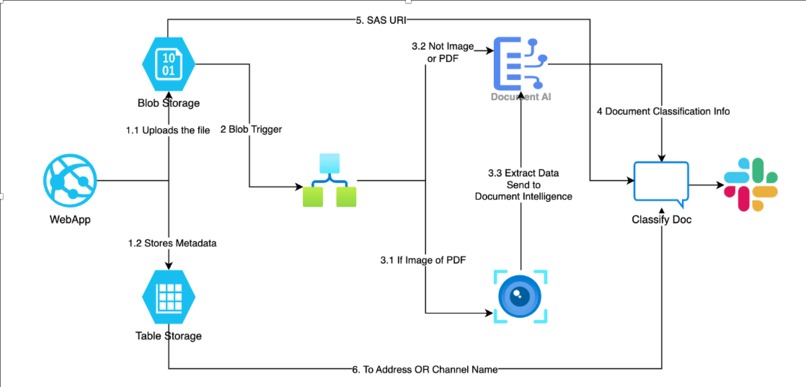
workflow
Inspiration
The idea came from the need to share files securely by classifying the documents in corporate environments, especially when sensitive documents like Contracts, Invoices or any documents that has PII involved. I wanted to automate the entire process - From uploading the file to slack notification and ensuring every shared document is processed with intelligence and accountability.
What it does
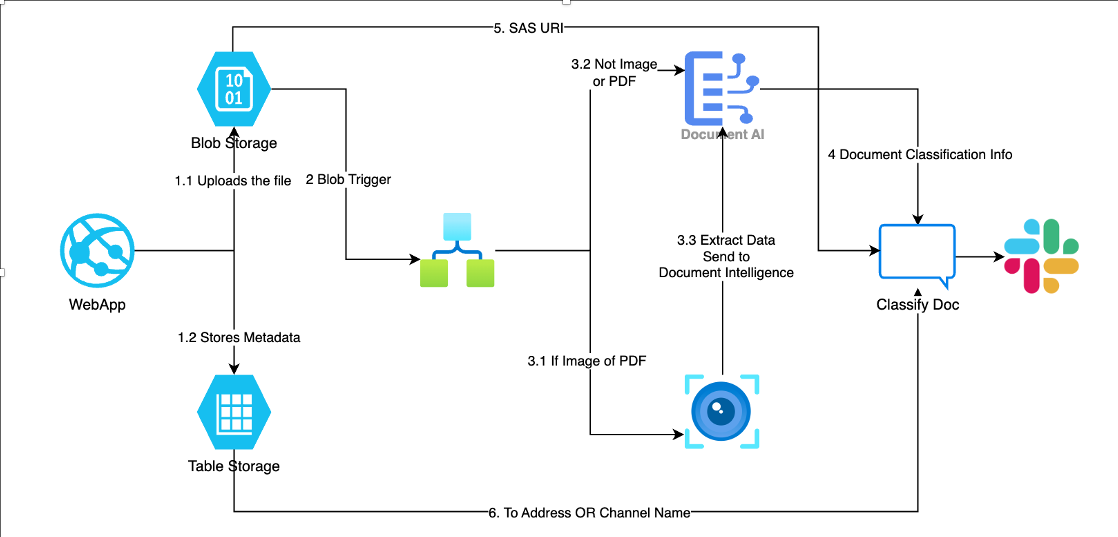
This allows user to upload the document via web app along with information about which slack group that person want to share the file. This info is stored in table storage. Once the file is uploaded, a logic app triggers Azure AI services like Document Intelligence and Computer Vision to analyze the document and classify it. Finally, a slack notification is sent with the SAS URI of the file to intended recipient or channel.
How we built it
- GitHub Copilot
- Used GitHub Copilot in Visual Studio Code to accelerate the development of Python and Flask code.
- Copilot helped generate boilerplate code for Flask routes, file upload handling, and error handling.
- Assisted in writing Azure SDK calls for integrating services like Blob Storage and Table Storage.
- Visual Studio Code
- VS Code is my primary development environment to build the front end of my application using Python and Flask.
- It offered rich support for Python, Flask, HTML and made it easy to manage templates and static assets.
- With the help of extensions like Python, Flask snippets and prettier, I could write efficient code. I also utilized the integrated terminal and debugger for testing and trouble shooting throughout the development lifecycle.
- Azure Web App
- Hosted the flask-based Python web application.
- Handled file uploads and metadata inputs.
- Enabled scalable and reliable deployment integrated with other Azure services.
- Azure Logic App
- Automatically triggered once the file is dropped in Azure Blob Storage.
- Orchestrated the end to end workflow that is to read metadata, fetch file and contents, call AI services and post the message on slack
- Azure Blob Storage
- Used to store uploaded files such as documents and images securely in a container.
- Implemented container-level policies and SAS tokens for secure access.
- Azure Table Storage
- Metadata for each uploaded file like filename, from_user, to_user or slack channel stored in a table
- Used this as a lightweight, fast access metadata store
- Logic app fetched the data from this table to determine routing.
- Azure Document Intelligence
- Processed documents such as Resumes, Invoices, contracts etc. which are in various forms like csv, excel, word, pdf, ppt etc.
- Based on the content in the file, this determined the classification of the file.
- Azure AI Vision
- I used this to process the images and screenshots which might contain PII information.
- This extracted text(OCR) and sent to Document intelligence for classification.
- Azure Key Vault
- Utilized Azure Key Vault to securely manage secrets such as Access Keys, Client ID and Client Secret.
- Azure Webapp is integrated with Azure Key Vault to fetch this information from secrets.
- Slack
- After classifying the file, Logic App sends a real time notification to the specified Slack channel or user with SAS URI, from_user and the file classification.
Challenges we ran into
Initially I intended to do a Teams integration, spent a lot of time trying to configure Teams using app registrations, direct logins etc. but I don't have the necessary licenses to make it work, so I chose a different messaging app.
Accomplishments that we're proud of
- Fully automated pipeline with no manual intervention.
- A scalable solution using native Azure components with minimal custom code.
- Successfully integrated AI services to extract and classify the documents.
What we learned
- Efficient use of Azure Table Storage for lightweight metadata logging instead of spinning up a SQL database.
- Working with Azure AI services - AI Vision and Document Intelligence
- Learned a lot on various connectors inside Azure Logic Apps.
What's next for Secure File Share Slack App
- Currently, authentication is not configured. I would like to add authentication to restrict uploads and access only to the Entra or authenticated users.
- Life cycle management based on the type of document. If it is Highly classified then the access must be restricted to few minutes and also delete the file from Storage account.
- Expand to Outlook and Microsoft Teams integration.


Log in or sign up for Devpost to join the conversation.