Inspiration
Managing secure access to private AWS databases like RDS or Document DB is a constant challenge for DevOps teams. Traditional solutions like bastion hosts or VPNs come with overhead, security risks and maintenance burdens. We wanted to eliminate those pain points using a fully AWS-native, secure, and developer-friendly approach without compromising on access, auditability or agility and cost saving.
What it does
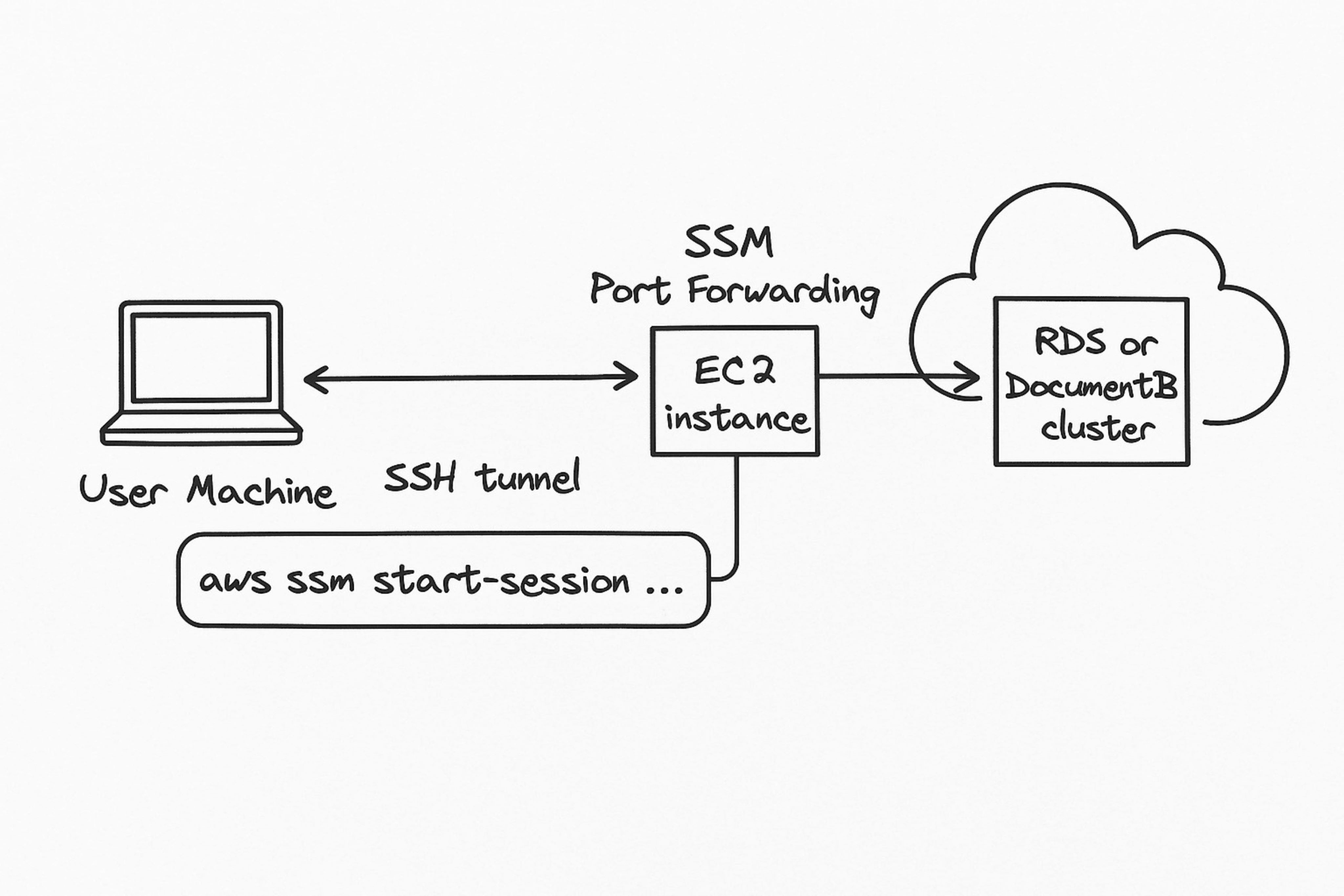
This solution enables developers, DBAs, and support engineers to connect to private AWS databases securely from their local machines—without opening a single inbound port. Leveraging AWS Systems Manager (SSM) Session Manager, users can forward database ports over a secure tunnel, allowing to familiar GUI database clients (like DBeaver, pgAdmin, Studio 3T) to seamlessly connect to RDS or Document DBs running in private subnets.
How we built it
We built the solution using the following components: AWS Systems Manager Agent (SSM Agent): Installed and running on a lightweight EC2 instance placed inside a private subnet. SSM Session Manager Port Forwarding: Used to establish a secure, temporary tunnel from the user’s local machine to the target EC2 instance. IAM Roles: Configured with fine-grained permissions to allow port forwarding while maintaining security boundaries. Local Port Forwarding Command:
       aws ssm start-session --target i-0abc123def4567890  --document-name
       AWSStartPortForwardingSession  --parameters '{"portNumber":["5432"], "localPortNumber
       ["5432"]}'
Note: we have built separate bash script to fetch the instance ID and open a tunnel to the destination DB clusters.
Connect DB Client Locally: Just open your preferred client and connect to localhost:5432 as if the DB were running locally.
Challenges we ran into
IAM Permissions Tuning: Crafting the least-privilege policy for SSM access without breaking functionality took some trial and error.
SSM Agent Connectivity: Ensuring the EC2 instance could reach SSM endpoints without public internet access required proper VPC endpoint configuration.
Database Authentication: Managing secrets securely and integrating them into client tools in a streamlined way was a secondary concern we had to solve
Security considerations of exposing an EC2 instance to the public internet.
Accomplishments that we're proud of
Eliminated the need for bastion hosts or VPNs—making our environment more secure and easier to manage. Delivered a seamless developer experience, where engineers can connect to private DBs using their preferred tools with minimal friction. Fully AWS-native solution—no third-party tools or additional infra needed.
What we learned
AWS Systems Manager is incredibly powerful when used beyond patching and automation—it can serve as a secure gateway into private AWS networks.
Least-privilege IAM design is critical when using SSM in production. Sometimes the best "network access" is no network access at all—just tightly scoped port forwarding over SSM!
What's next for Secure AWS DB Access via SSM Port Forwarding
🔐 Integrate with AWS Secrets Manager to auto-fetch credentials and inject into local sessions.
💻 Automate connection setup via CLI wrappers or browser-based database portals.
📊 SSM Session Auditing & Alerting using CloudTrail and EventBridge.
🌍 Expand to Multi-Account Access via cross-account IAM roles and central EC2 proxies.
Built With
- amazon-web-services
- documentdb
- ec2
- iam
- rds
- ssm

Log in or sign up for Devpost to join the conversation.