-
-
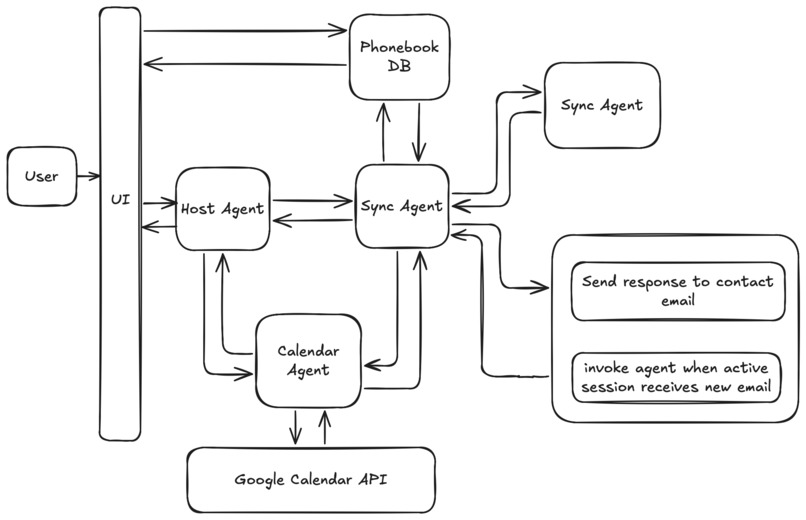
system diagram
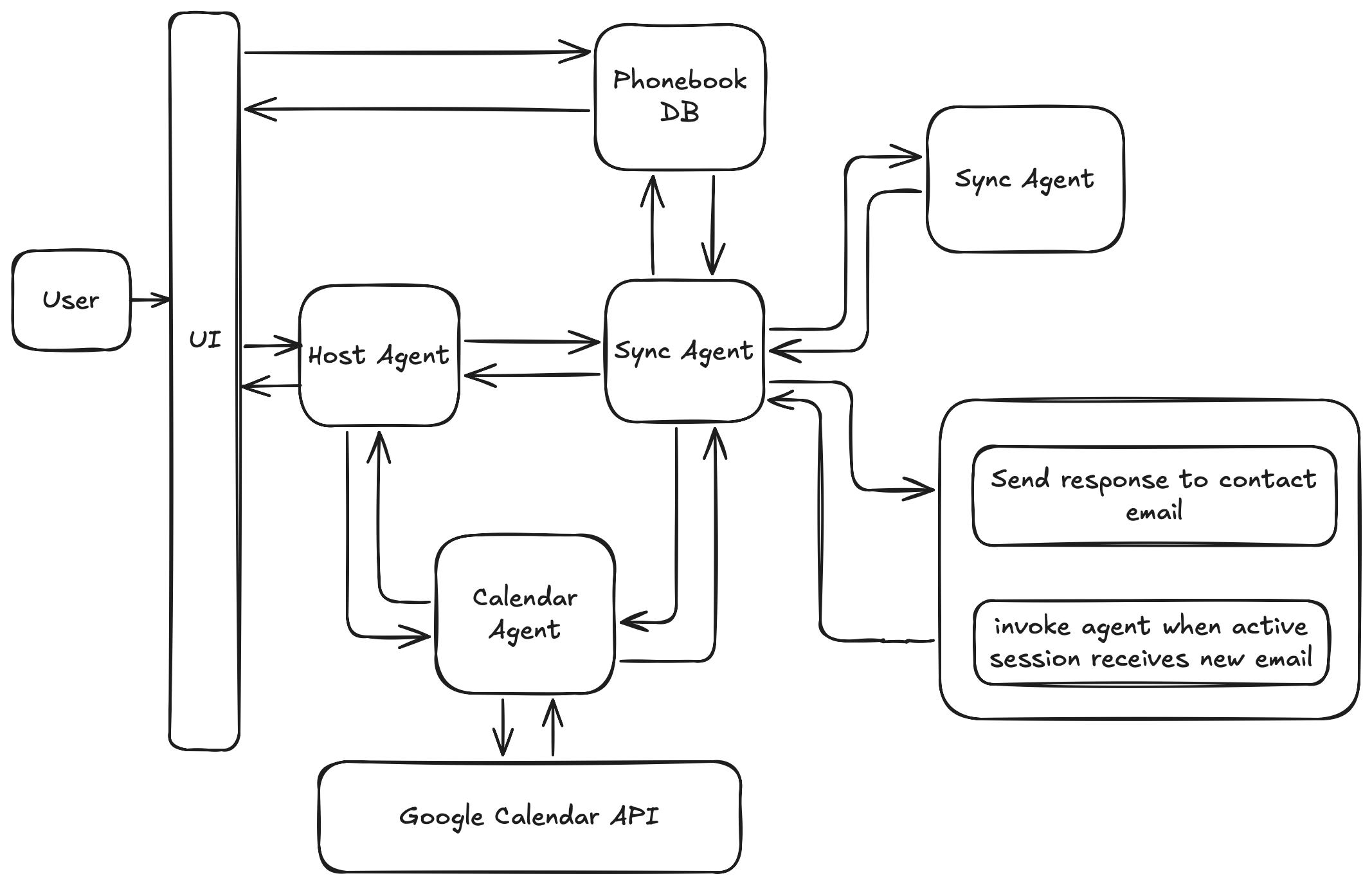
🤖 Secretary Agent Ecosystem
📌 What Inspired Me
The idea for Secretary Agent came from a simple, everyday frustration: scheduling meetings. Despite the abundance of productivity tools, coordinating times—especially with busy people or those outside your organization—still often turns into a tedious back-and-forth over email or chat. It’s not a technically difficult task, but it becomes a mentally taxing distraction. I wanted to explore whether this could be fully automated using modern AI tooling—and more importantly, in a way that gracefully supports both fully digital workflows and real human interactions.
🏗️ How I Built It
In this ecosystem, each person is equipped with three core agents:
- Host Agent: Receives input and delegates tasks
- Sync Agent: Handles meeting negotiation via A2A (if the other person has an agent) or email (if they don’t)
- Calendar Agent: Interfaces with the Google Calendar API to check availability and post events
Each agent is a self-contained Python module and communicates via lightweight protocols provided by Google ADK. The system is containerizable and could be deployed on a cloud agent platform or run locally.
🤓 What I Learned
Building this project taught me a great deal about:
- Multi-agent architecture with Google ADK: While each user runs a multi-agent setup, the system’s potential truly shines when adopted at scale. Imagine a world where every individual has their own secretary agents, communicating seamlessly with others’ agents across organizations (an example of this is shown in the video demo). In this model, your "contact method" isn't just an email—it’s an intelligent interface.
- The importance of asymmetry in agent communication: A key architectural challenge was preventing infinite negotiation loops between two identically programmed Sync Agents. The solution was an asymmetrical design, where the Sync Agent distinguishes between an initiator (who sends the request) and a responder (who replies with options). Without this, a request from Person A to B could trigger B to query A again, creating an endless loop. This role distinction keeps the logic coherent and convergent.
- Designing robust fallback systems: Autonomous systems need to account for imperfect environments. Just like in autonomous vehicles literature, we talk about different 'levels' of automation to handle environments and systems that aren't fully smart, my agent system needed to work when the other party doesn’t have an agent. I designed the Sync Agent to detect whether the invitee has a known agent; if not, it gracefully falls back to sending an email. Responses to that email thread are parsed and routed back to the original Sync Agent, which treats them as if they were agent-generated responses.
- Real-world service integration: Working with the Google Calendar API and Gmail meant managing state, authentication, and edge cases in event scheduling and communication —all while keeping the complexity abstracted from the other agents.
- The power of composable, task-specific agents: Rather than building a single, all-knowing agent, I focused on creating smaller, focused agents that collaborate—each with a clear responsibility. This keeps the system modular and easier to debug, scale, and extend.
This project also deepened my appreciation for human-AI hybrid systems. The most satisfying moments often came from designing transitions—when agents hand off to humans and vice versa—without breaking the flow or losing context.
🧱 Challenges I Faced
- Symmetric agent loops: Early tests with mirrored Sync Agents led to recursive, never-ending negotiation loops. Designing an asymmetrical protocol resolved this.
- Fallback logic: Making the system smart enough to recognize when the other party doesn’t have an agent and to fall back to email without losing context (maintaining email sessions).
- Calendar integration: Handling availability checks and calendar conflicts robustly using Google’s API, without overcomplicating the agent interface.
More Technical deep dive?
Be sure to talk a look at my code and my blog post on this project with some more details
Built With
- adk
- nextjs
- python

Log in or sign up for Devpost to join the conversation.