-
-
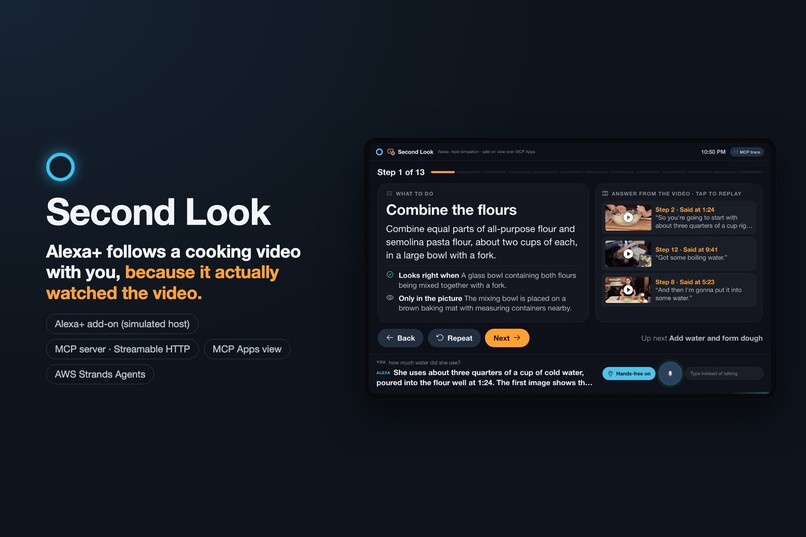
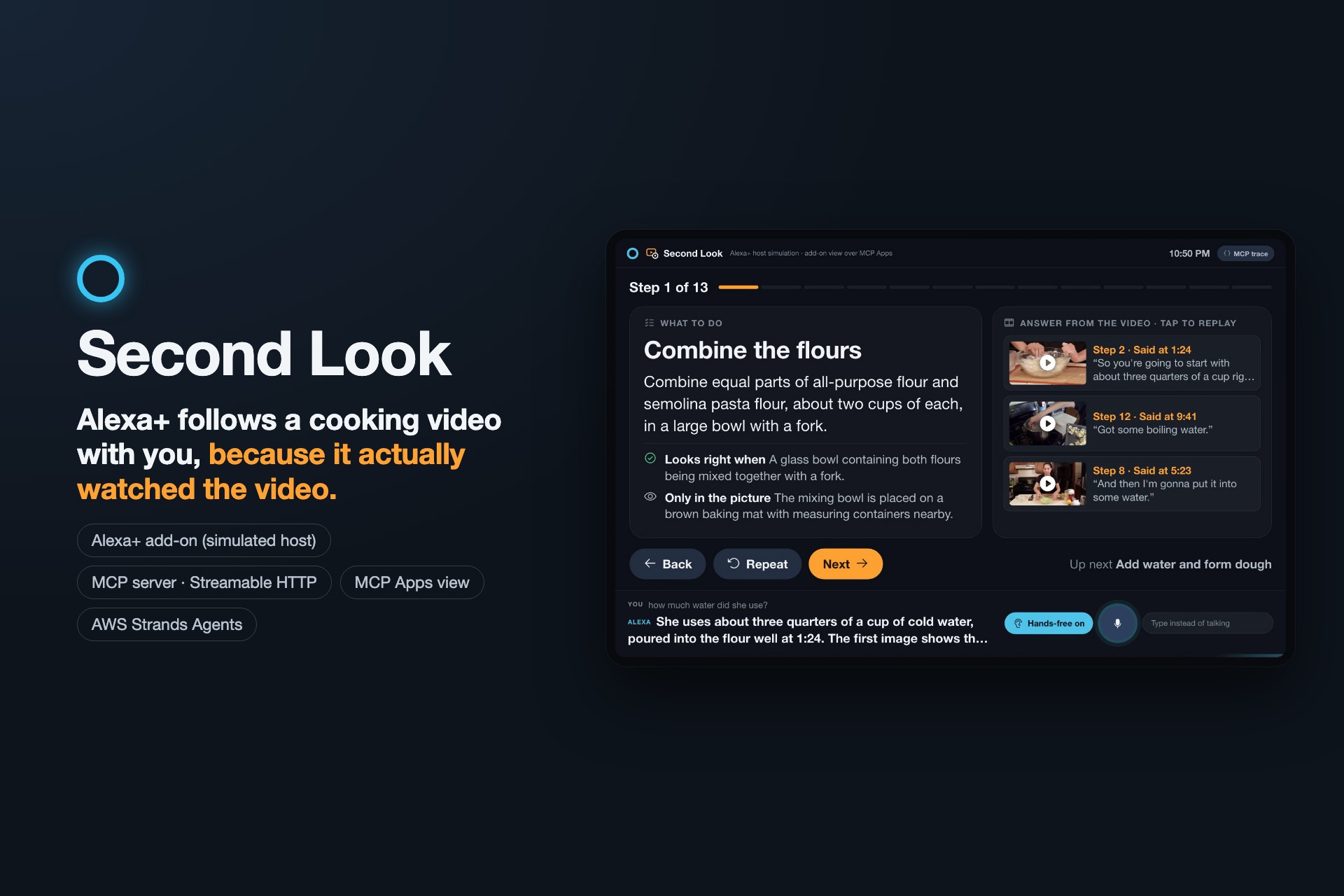
Second Look: Alexa+ follows a cooking video with you, hands-free, because it actually watched it.
-
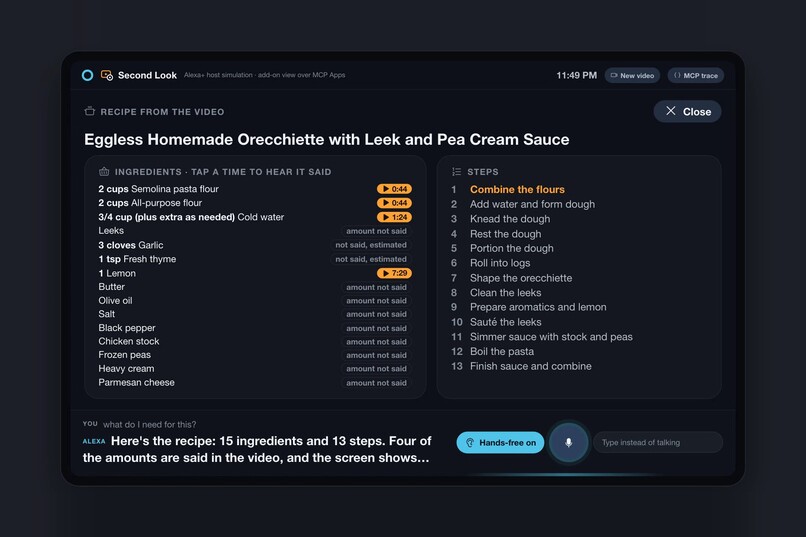
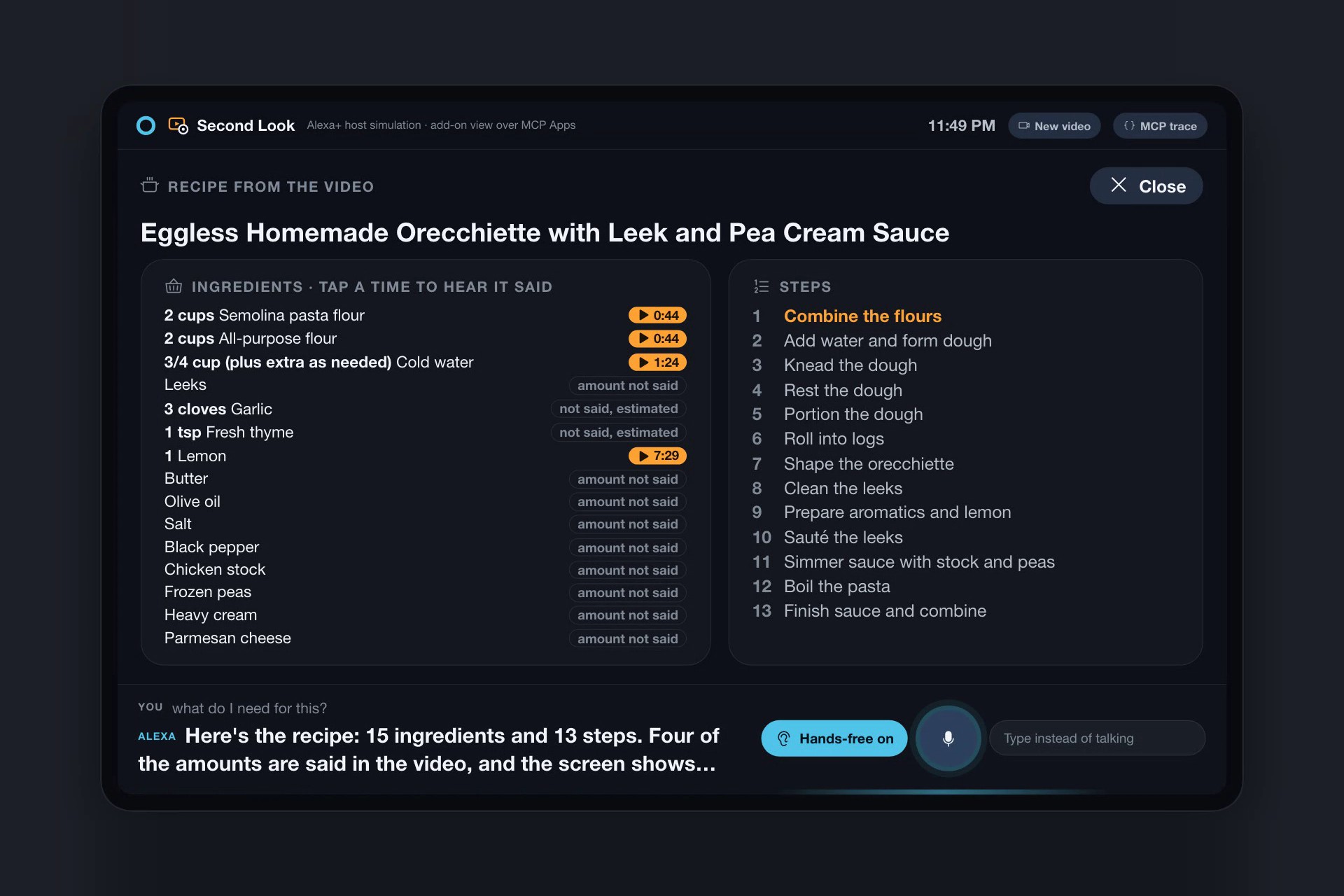
“What do I need?” The recipe from the video: amounts she says carry the moment she says them; the rest are marked estimated or not said.
-
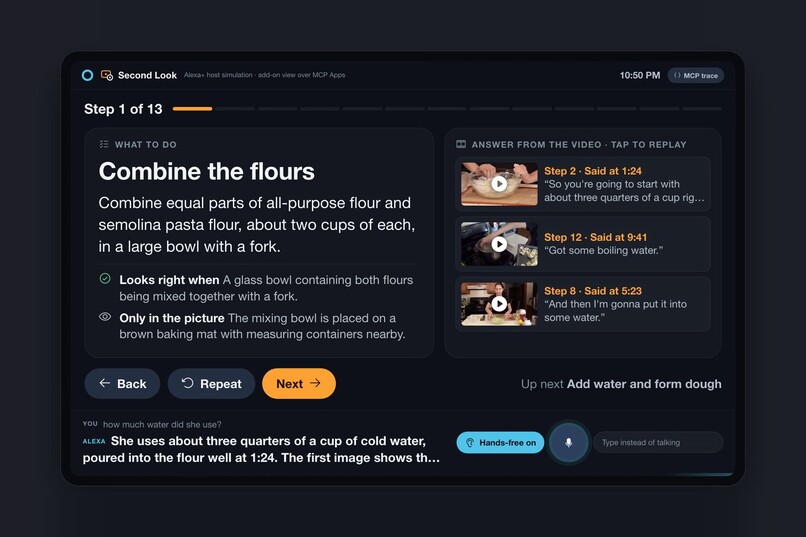
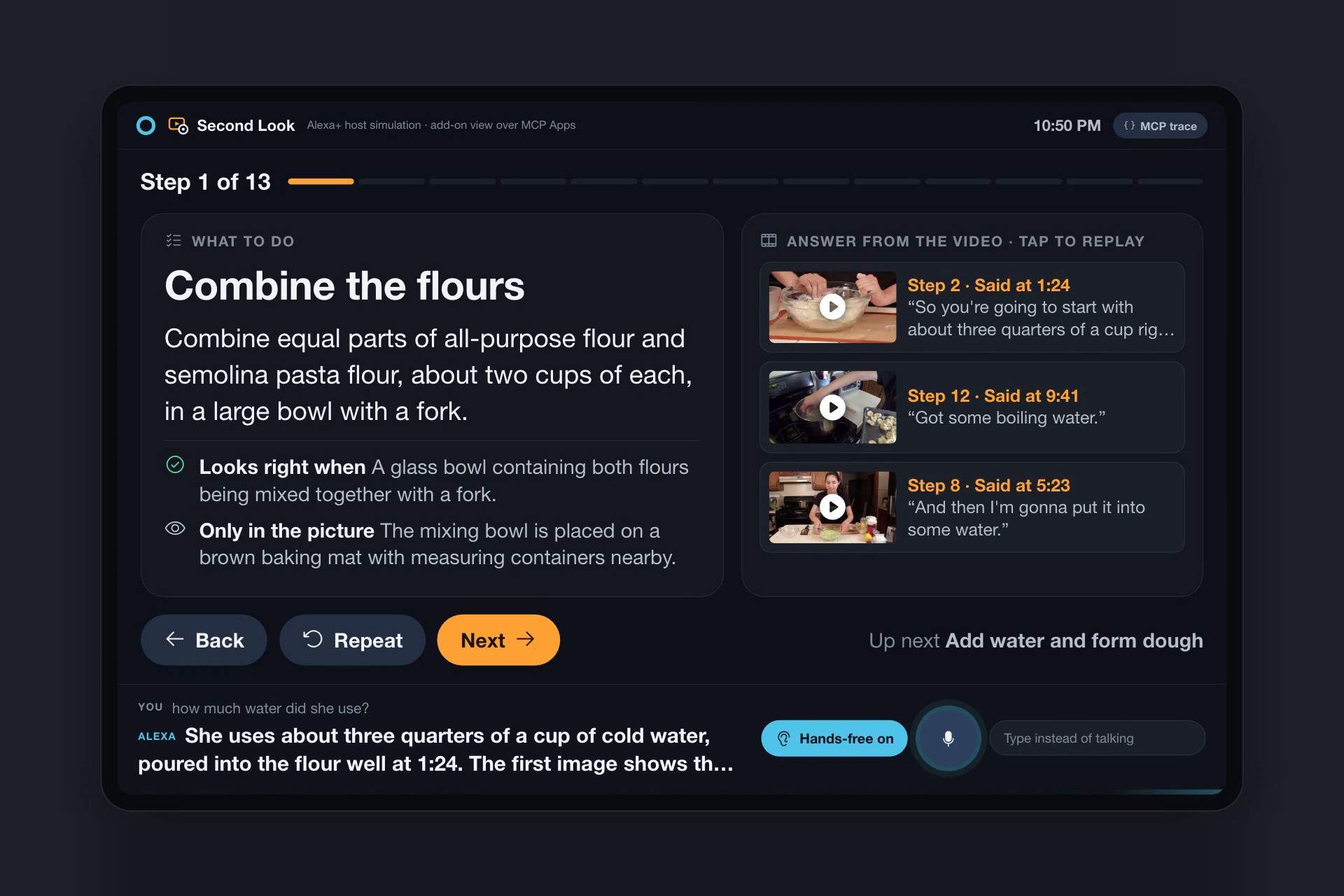
“How much water did she use?” answered from the line she says at 1:24, with evidence cards you can tap to replay.
-
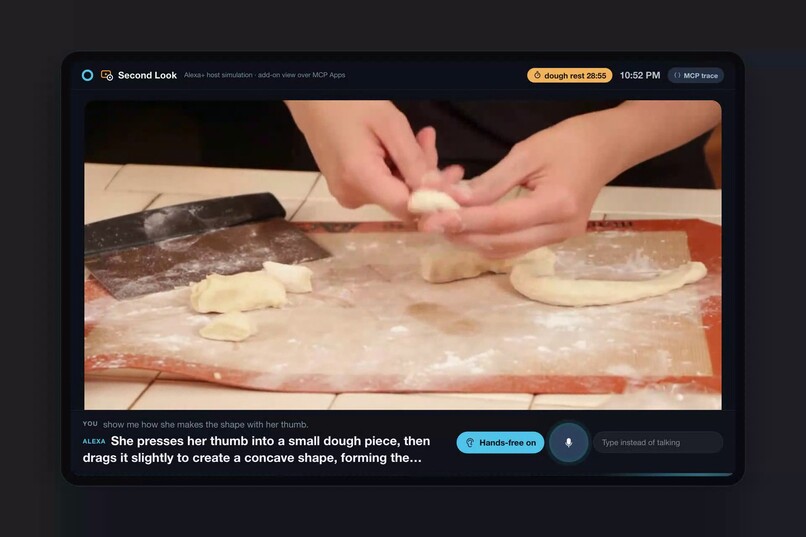
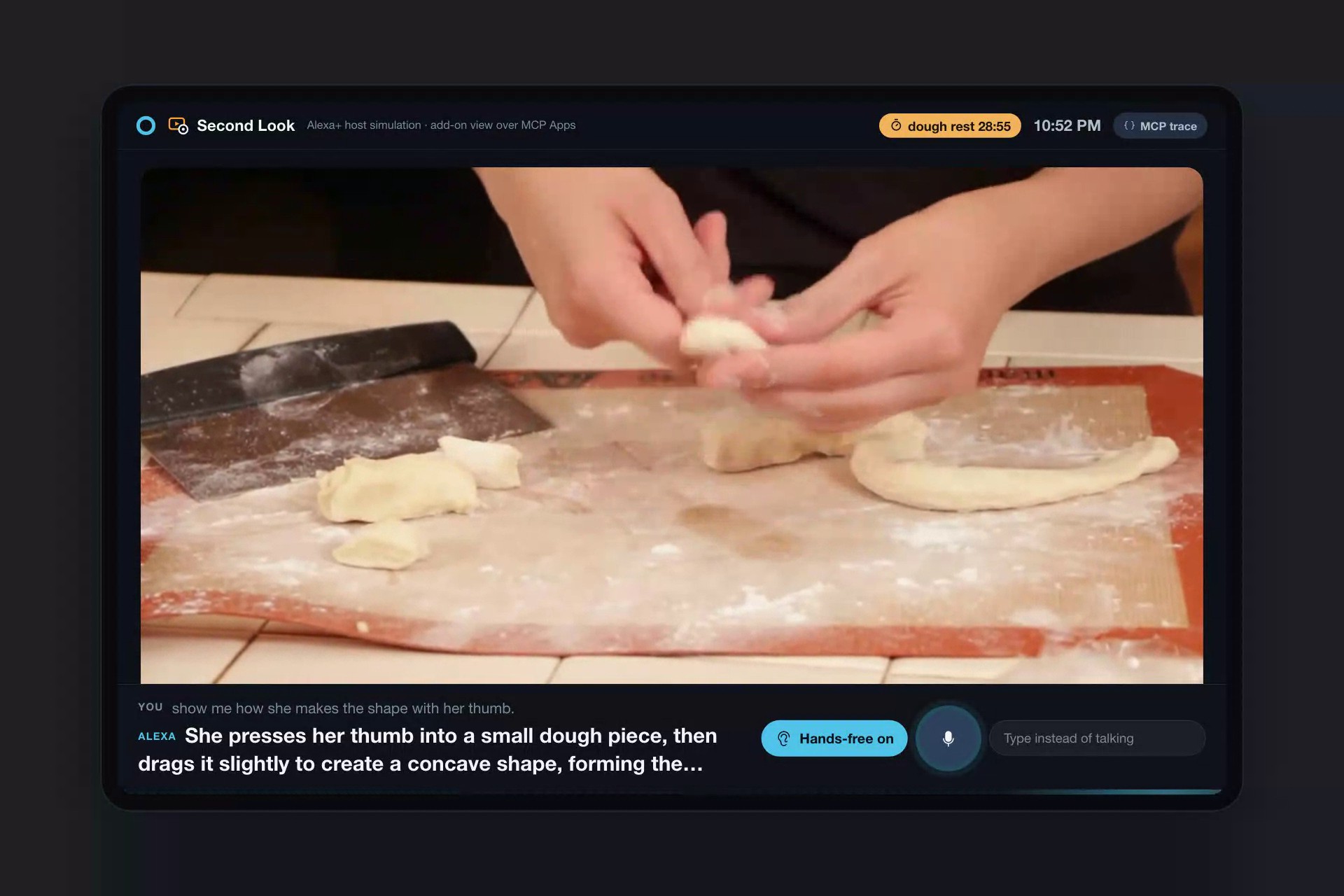
“Show me how she makes the shape with her thumb”: the frame from the video, a beat after she describes it, then the clip.
-
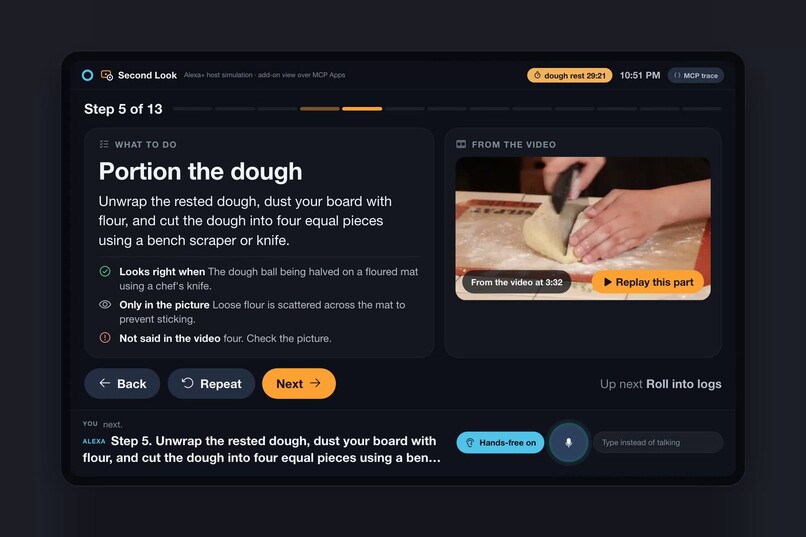
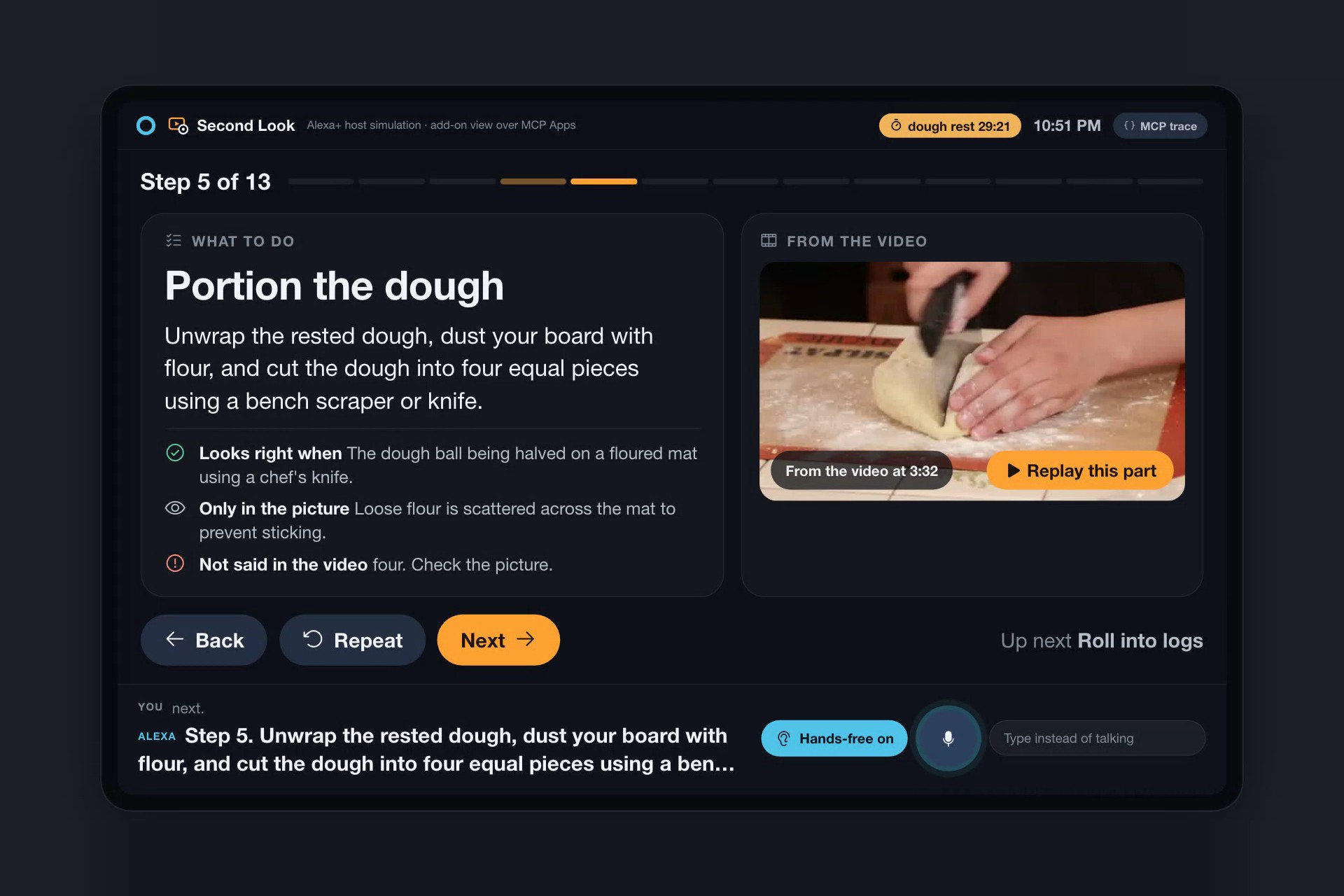
Numbers are checked against the narration: the step says “four equal pieces”, the video never says four, so the card flags it.
-
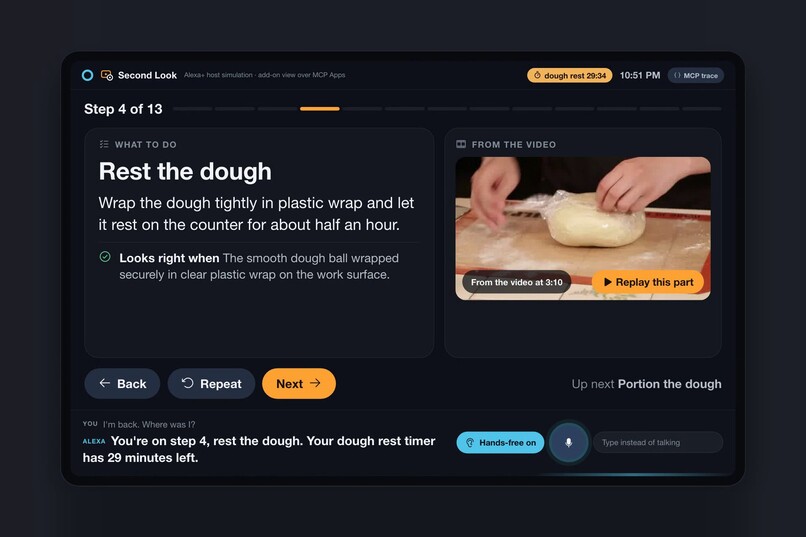
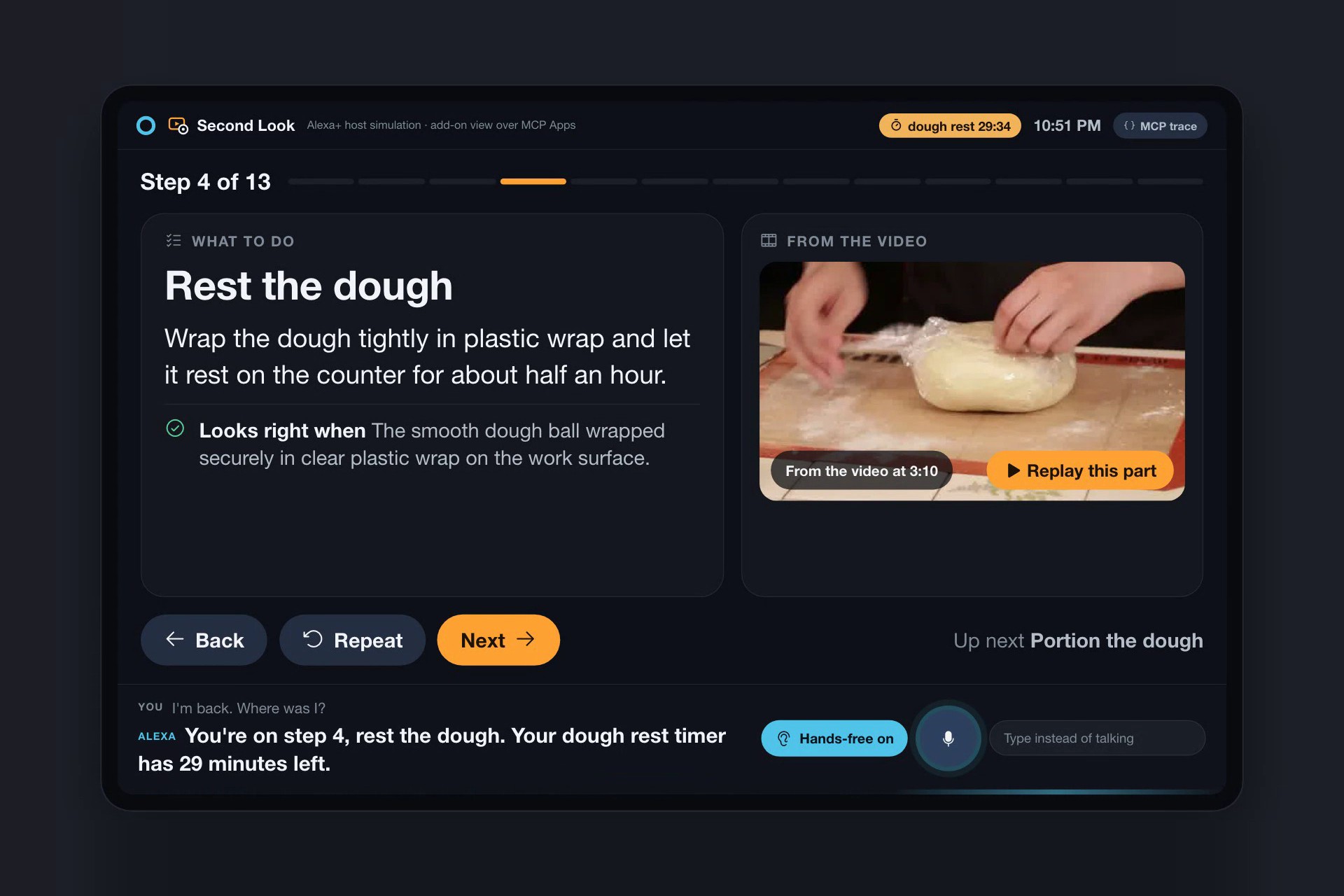
Browser closed, server restarted: “Where was I?” Step 4, and the dough rest timer is still counting.
-
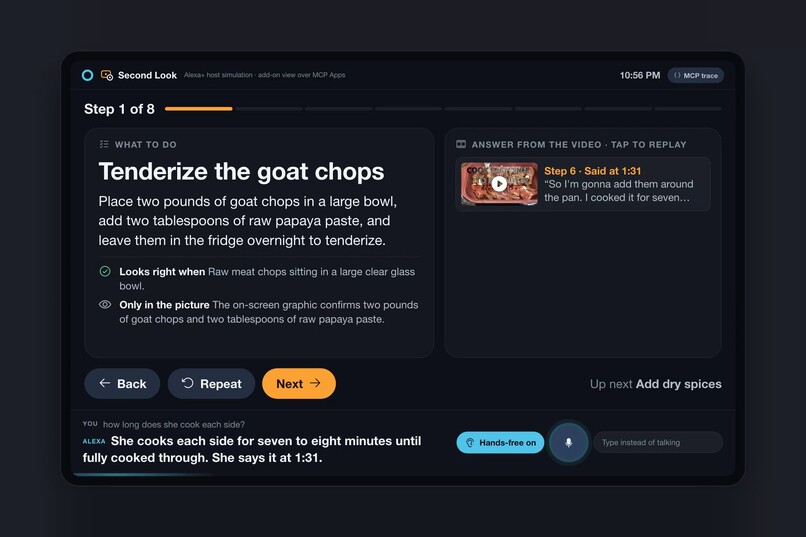
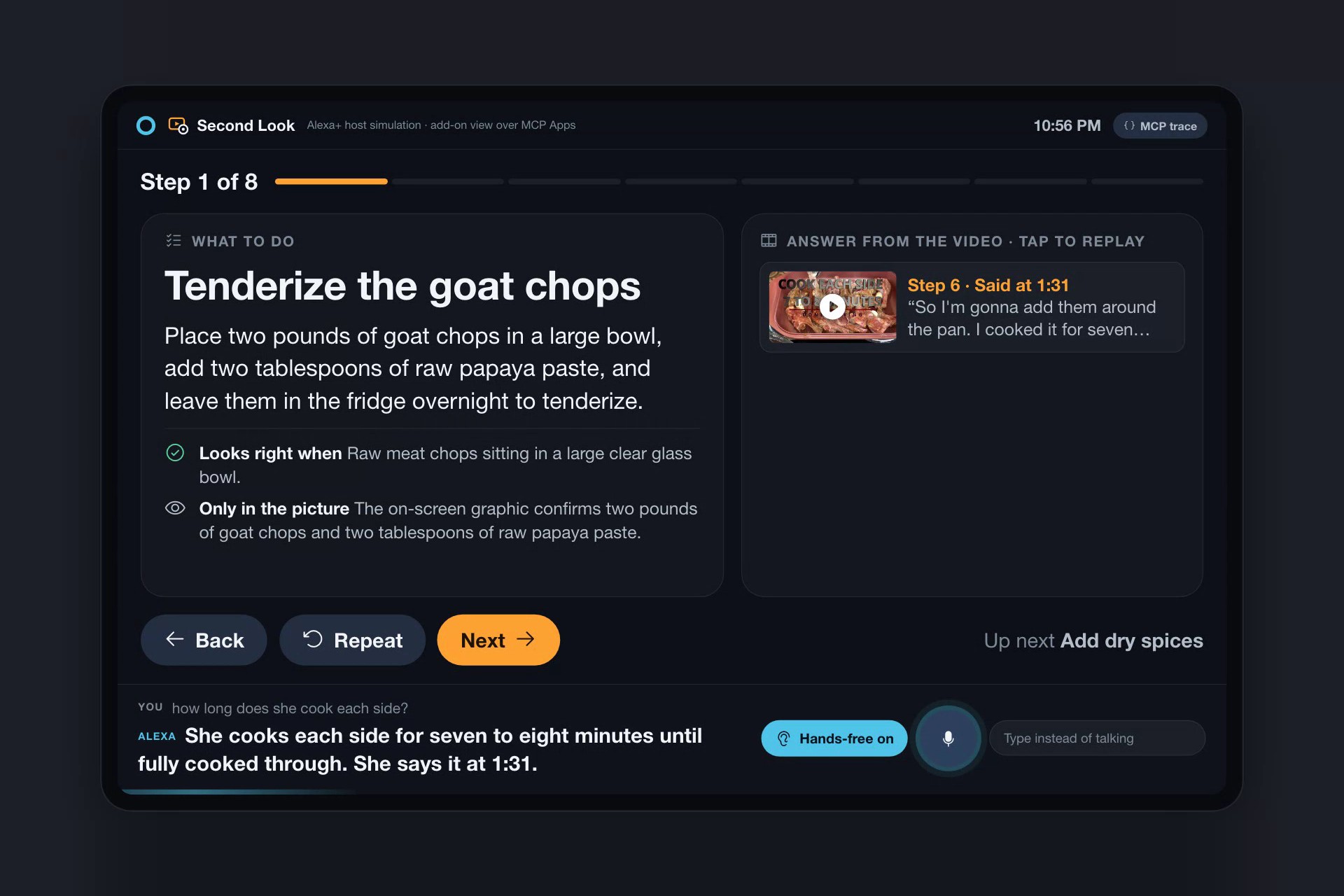
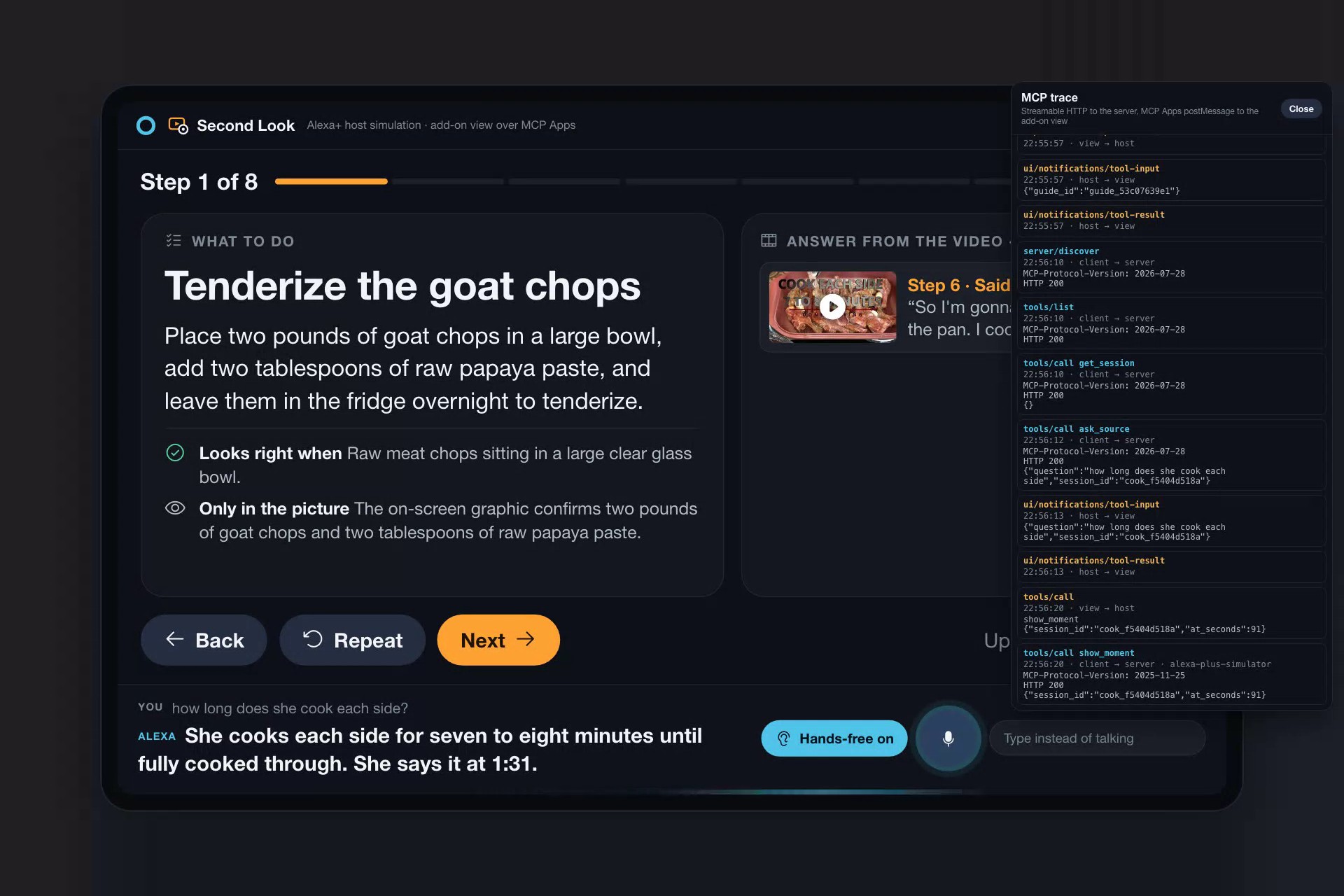
A video it had never seen, imported live: “How long does she cook each side?” answered from the line at 1:31.
-
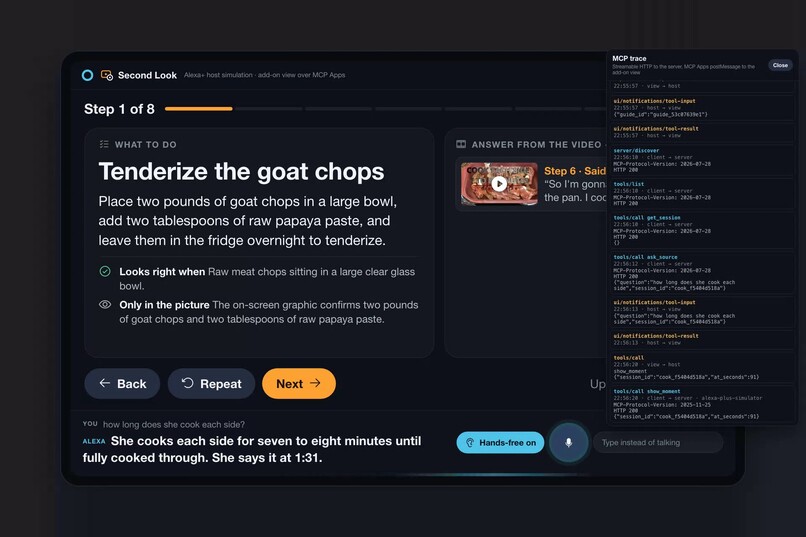
Live trace: the Strands agent’s MCP calls and the add-on view’s MCP Apps messages, one MCP server behind both.
-
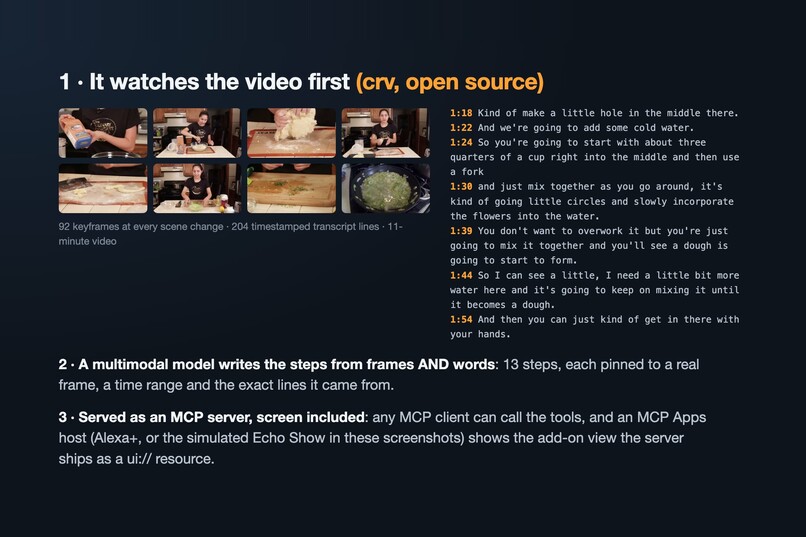
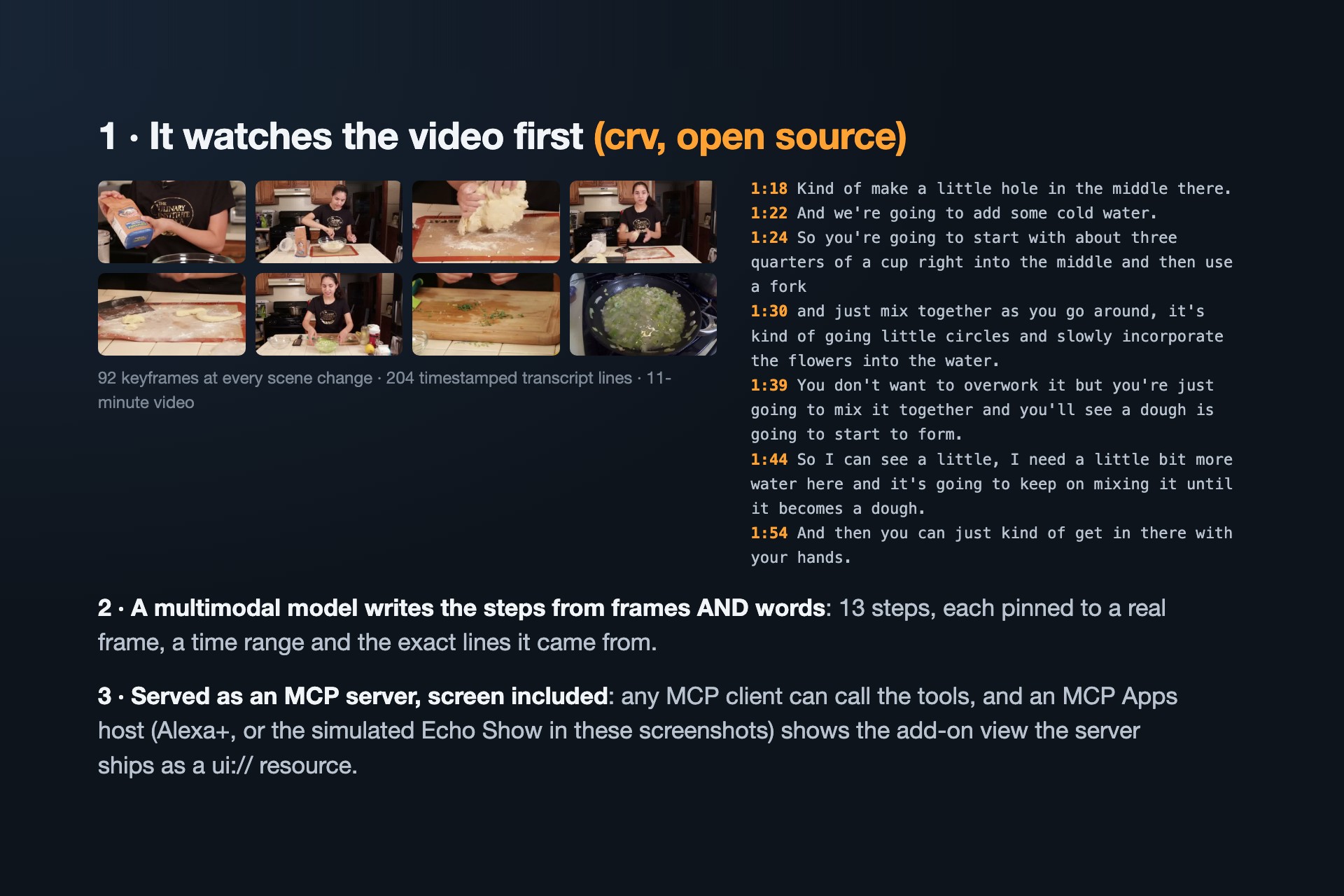
How it works: crv watches the video, a model writes steps pinned to real moments, the MCP server ships tools and screen.
In 30 seconds
- What: an Alexa+ add-on that follows a cooking video with you, hands-free, because it actually watched it. Answers come with the moments in the video that support them, ready to replay; "What do I need?" shows the recipe with the time each amount is said.
- Why: 51% of YouTube users say it is very important for figuring out how to do things they haven't done before (Pew Research Center, 2018). In a kitchen your hands are busy, so the video has to come to you.
- Built for the device: voice first, readable from across the kitchen, a hands-free wake word, and the microphone closes while a clip plays.
- How: a self-hosted MCP server (spec 2025-11-25, Streamable HTTP, 11 tools) that ships its screen as an MCP Apps view built on Amazon's Alexa+ add-on guide; an AWS Strands agent talks to it; numbers are checked against the narration.
Inspiration
Learning a dish from a video is common, and frustrating in the kitchen. Your hands are covered in dough, the video keeps going, a quantity is said once and gone, and you never know whether yours looks right. Recipe tools can turn a video's captions into text. But the most useful part of a cooking video is what you can see: how thick, how shiny, how the thumb drags. We wanted Alexa+ to be able to look at the video for you.
What it does
Second Look gives Alexa+ a video it has actually watched:
- Import a how-to video. crv (our open-source video reader) extracts a keyframe at every scene change and a timestamped transcript. A multimodal model writes a step-by-step guide from frames and words together. Every step points to a real frame, a time range and the transcript lines behind it, plus a "visible but never said" note. Before the guide is stored, every number in every step (amounts, durations, temperatures) is checked against the narration, with its unit and the ingredient word next to it; numbers that aren't said are flagged on screen, and a timer is only offered for a duration that is said. It is a lexical check, not a proof of meaning: it catches invented amounts and amounts that move to another unit or ingredient within a sentence, but an ingredient named in a neighbouring line can still be matched.
- Hands-free. Like an Echo Show, the screen keeps listening and acts only on sentences that start with "Alexa". It closes the microphone while Alexa talks and while a clip plays (the view reports when playback starts and stops), and re-arms by itself.
- The recipe, from the video. "What do I need?" shows the whole recipe on one card: ingredients with amounts, then the steps. Each amount she actually says carries the moment she says it, tap it to hear her say it; amounts the video never says are marked as estimated or not said.
- Cook along by voice. "Next." "Go back." "Repeat that." One step at a time, never skipping ahead on its own.
- Ask the video. "How much water did she use?" The answer comes from the line where she says it ("about three quarters of a cup of cold water to start; she says it at 1:24"), with evidence cards you can tap to replay that moment. "How much sugar?" gets "the video never mentions sugar", not the nearest other number.
- "Show me how she does it." For a technique described in words ("pressing the thumb into the dough"), it finds the moment she describes it, shows the frame a beat later and replays the clip, and describes details the narrator never says.
- Timers from the video. The 30-minute rest becomes a real timer, stored as a deadline.
- Resume later. State lives on the server, not in the page. Close the browser, restart the server, come back later: "I'm back, where was I?" picks up at your step, and the timer kept its deadline ("your dough rest timer has 29 minutes left").
How we built it
- An Alexa+-style add-on view over MCP Apps: Amazon's Alexa+ add-on guide describes an add-on screen as a self-contained HTML bundle that Alexa shows in a sandboxed iframe and drives over the MCP Apps postMessage bridge. Our server registers
ui://second-look/cook.html(text/html;profile=mcp-app, CSP in_meta.ui) with the MCP Python SDK's Apps extension, and the session tools point at it with_meta.ui.resourceUri. The view is authored on Amazon's 768 px base canvas with the guide's type, spacing, radius and dark card tokens. - crv-guide MCP server (Python, official MCP SDK 2.1, Streamable HTTP, protocol 2025-11-25): 11 tools (
import_video,get_import,list_guides,start_session,get_session,move_step,ask_source,show_moment,get_recipe,set_timer,cancel_timer). Tool results return text, structured content and images (the video frames). SQLite keeps guides, sessions, step progress (with a revision check so two screens can't double-move) and absolute timer deadlines. The endpoint has DNS-rebinding protection and a CORS allow-list. - Guide compiler: crv's keyframes + transcript go to Gemini with a JSON response schema (OpenAI vision as fallback, in JSON mode, validated with Pydantic). The result is checked against the real video: frame numbers, time ranges and transcript line numbers must exist, and every number in an instruction must appear in the narration it cites.
- Evidence search: BM25 over timestamped transcript windows and the frame-grounded steps; each hit is pinned to the single transcript line that answers the question, so answers cite a moment (1:24), not a range. Amount questions only match passages that mention what was asked about, and the tool reports words the video never mentions.
- Voice-ready replies: session tools return a short
speakline (like a skill's output speech) next to the full card, so Alexa says one or two sentences while the screen carries the detail. Simple intents (next, back, repeat, "where was I") go straight to the MCP tools without a model call. - Simulated Alexa+ host (Echo Show 15 class screen): an MCP client and an MCP Apps host. It reads the view resource, mounts it in a
sandbox="allow-scripts"iframe, answersui/initializewith a host context, forwards each tool result from the agent's turn (ui/notifications/tool-result) and proxies the view's owntools/call. Around it: Web Speech API voice in/out with a wake-word hands-free mode, Alexa's timers, and a live trace of both MCP and MCP Apps traffic. - Conversation: an AWS Strands Agents agent with
MCPClientover Streamable HTTP and anAfterToolCallEventhook that sends every tool result to the screen as a card (model provider: OpenAI gpt-4.1-mini or Gemini through Strands). - Tests: unit tests for the guide checks, evidence search and sessions, an MCP smoke client, and a browser test that drives hands-free mode with a scripted speech recognizer.
Challenges we ran into
- Alexa+ developer tools (MCP Toolkit, Web Simulator) are select-partners only, so we built a simulation that is a real MCP client and kept the MCP server standard (spec 2025-11-25).
- Automatic transcripts mishear cooking words ("need" for "knead", "Orcetti" for "orecchiette"). Writing steps from frames and words together fixes the wording while keeping the evidence pointing at the original lines.
- Grounding: models invent quantities, and a keyword search will happily return the water amount when you ask about sugar. Numbers are now checked against the narration with their units and ingredient words, and an amount question about something the video never mentions returns no evidence.
- Hands-free in a kitchen means the page must not hear its own voice or the cook in the video, so listening pauses during speech and playback and re-arms afterwards.
- Model availability on deadline night (Gemini returned 503 "high demand" for several models), so the guide compiler retries and falls back across models and providers.
Accomplishments that we're proud of
- "Show me how she makes the shape with her thumb" answered with the frame and clip from the video, including details the narration never says.
- True persistence: the demo closes the browser and restarts the server, and Alexa still knows your step and your timer.
- A video it had never seen, imported live in the demo, answered from the line where the cook says it.
- The add-on UI ships from the MCP server as an MCP Apps view, the way Alexa+ renders add-ons, and two different MCP clients (the Strands agent and the host) share one server's state, visible live in the MCP trace.
What we learned
MCP is a good fit for "skills" that need memory and media: structured content plus images in one tool result lets the voice side talk and the screen side show, from the same call. MCP Apps closes the loop: the same server ships the screen itself, so the add-on's UI travels with the tools instead of living in each client. And grounding has to be checked in code; asking a model to "only use the video" is not enough.
Limits
- Tested on two narrated cooking videos so far. Importing a 2.5-minute video took 2 to 12 minutes on deadline night; an import that has finished is reused at once.
- The checks are lexical (numbers, units, nearby words), not a proof of meaning, and the sentence Alexa speaks is not re-checked after the model writes it; the evidence cards on screen come from the tool, not from the model.
- Not tested on a real Alexa+ device (the developer tools are partner-only). Voice was tested in Chrome with a scripted recognizer, not yet in a noisy kitchen.
What's next
Test hands-free mode with real cooks in real kitchens, support more how-to categories (repairs, crafts, workouts), let the user point the camera at their own result and compare it to the video's frame, and run on a real Alexa+ device when the developer tools open up.
Built With
- alexa
- amazon-web-services
- claude-real-video
- ffmpeg
- gemini
- javascript
- mcp
- model-context-protocol
- openai
- playwright
- python
- sqlite
- starlette
- strands-agents
- streamable-http
- web-speech-api

Log in or sign up for Devpost to join the conversation.