-
-
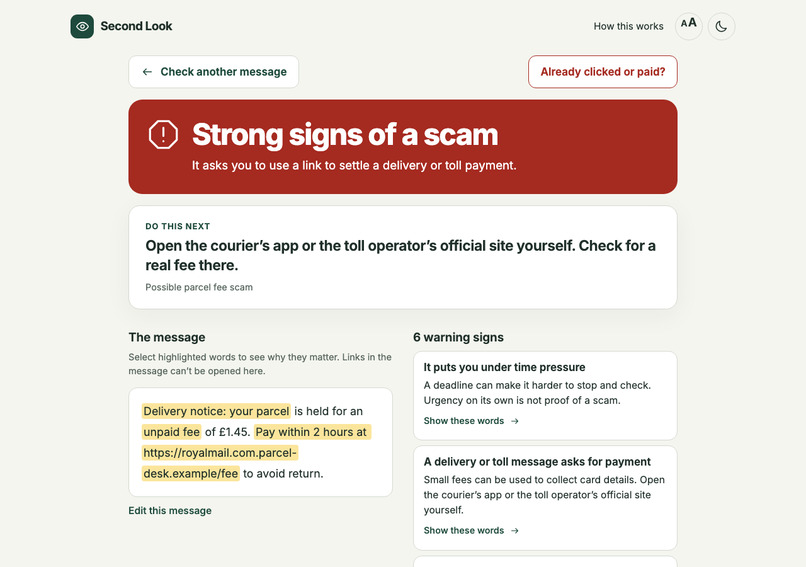
-
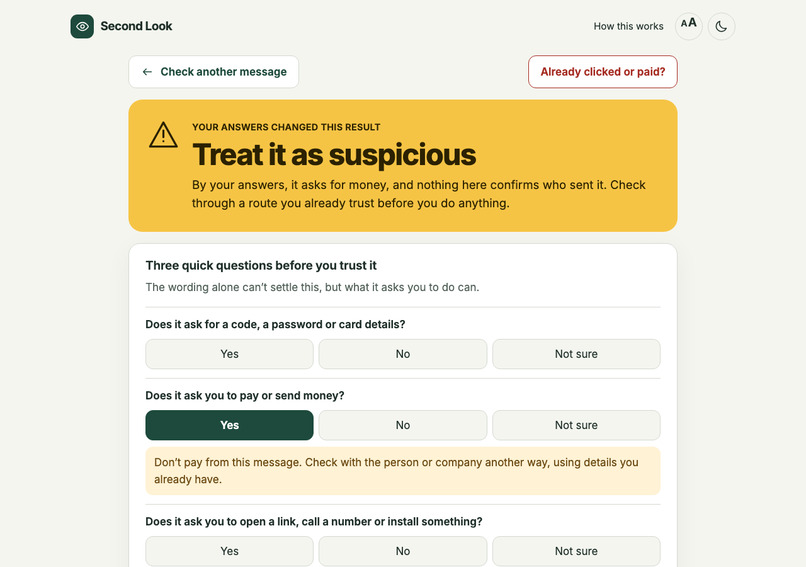
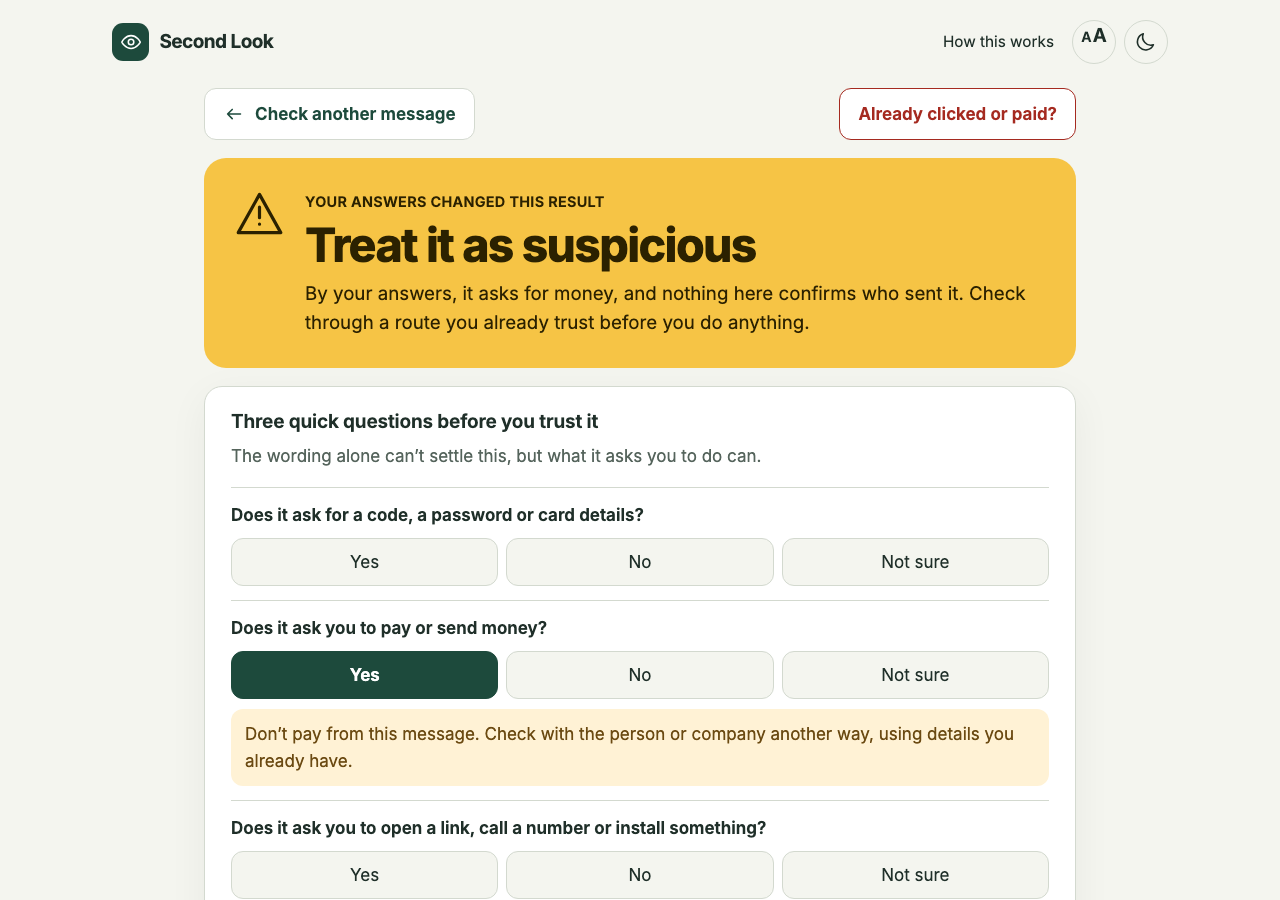
No known signs is not an all-clear. Answering 'Yes' to a money request turns the result into 'Treat it as suspicious', with a next step.
-
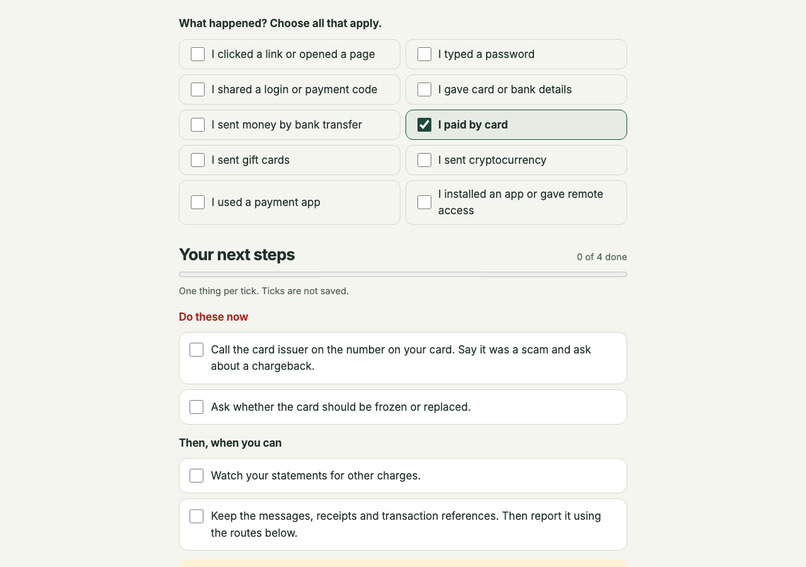
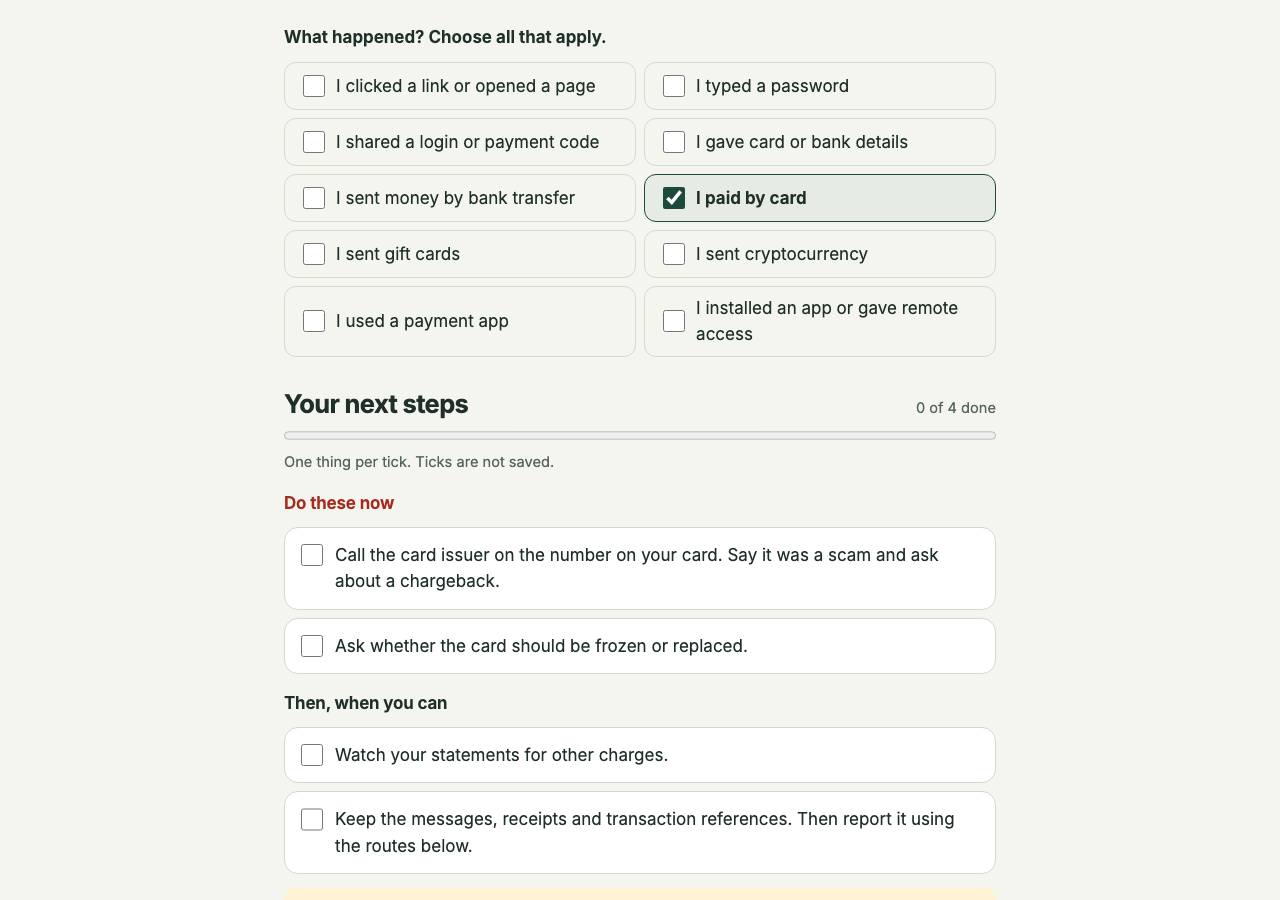
Paid by card? Contacting the card issuer comes before the later reporting steps.
-
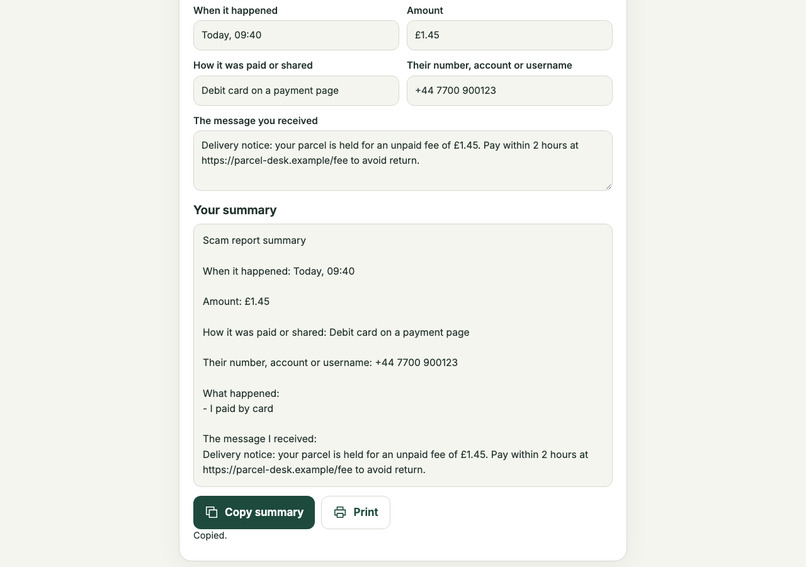
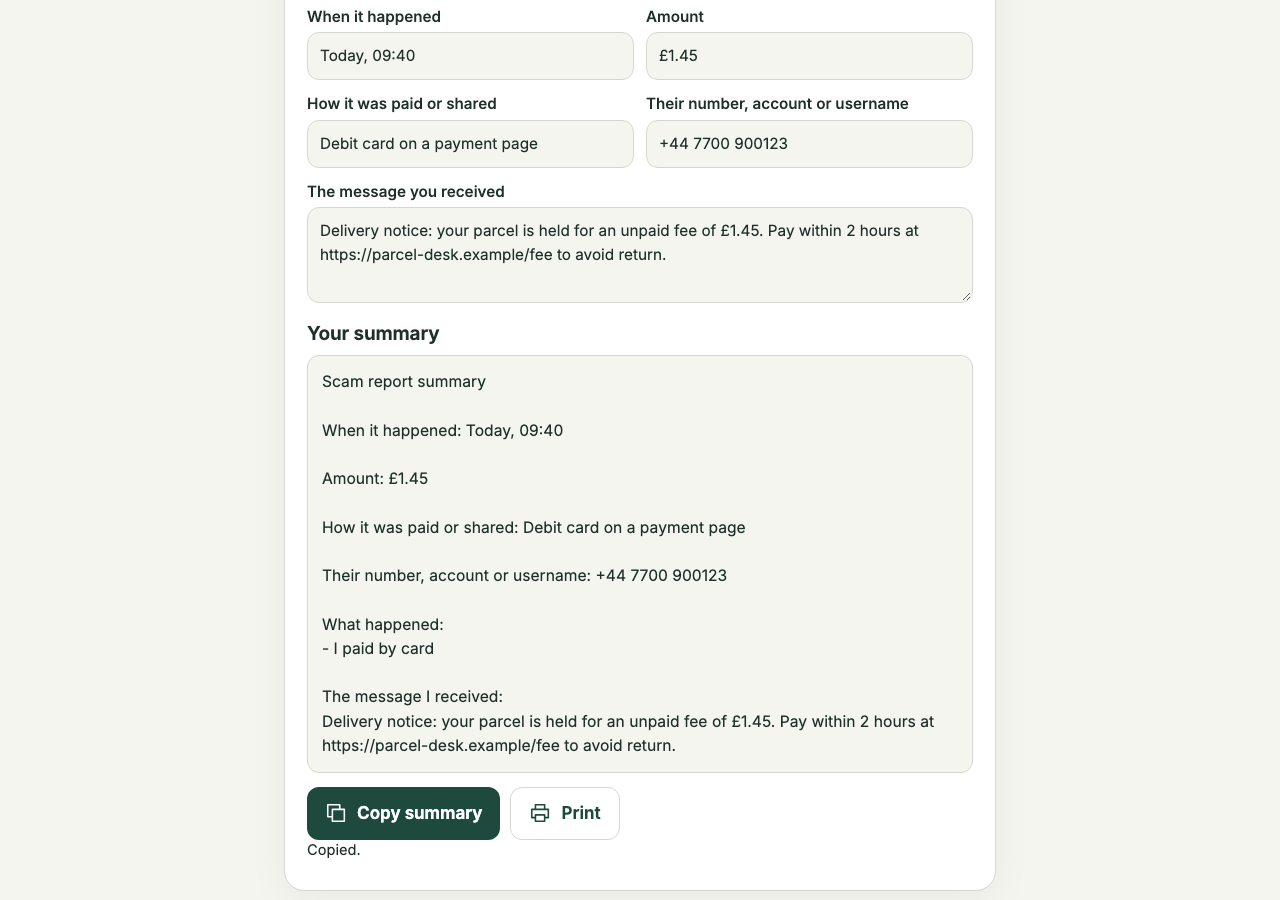
Turn the details you entered into a summary to copy or print. You choose what to share.
-
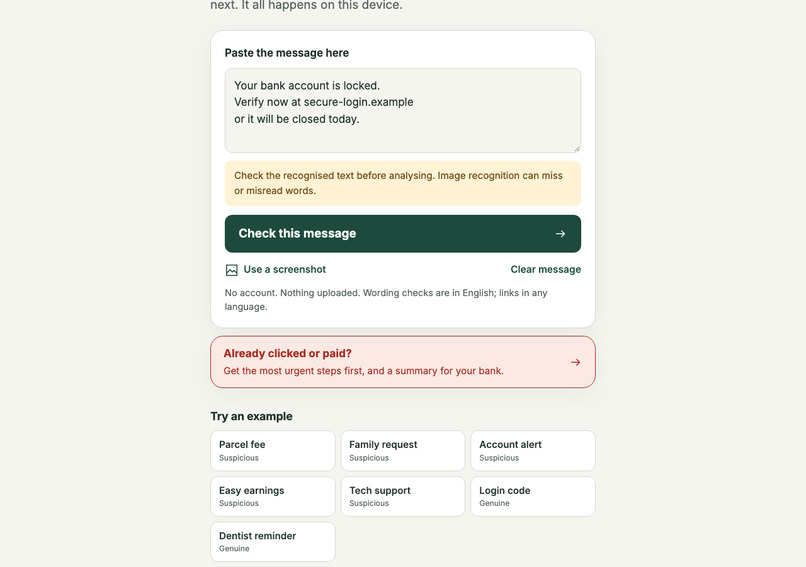
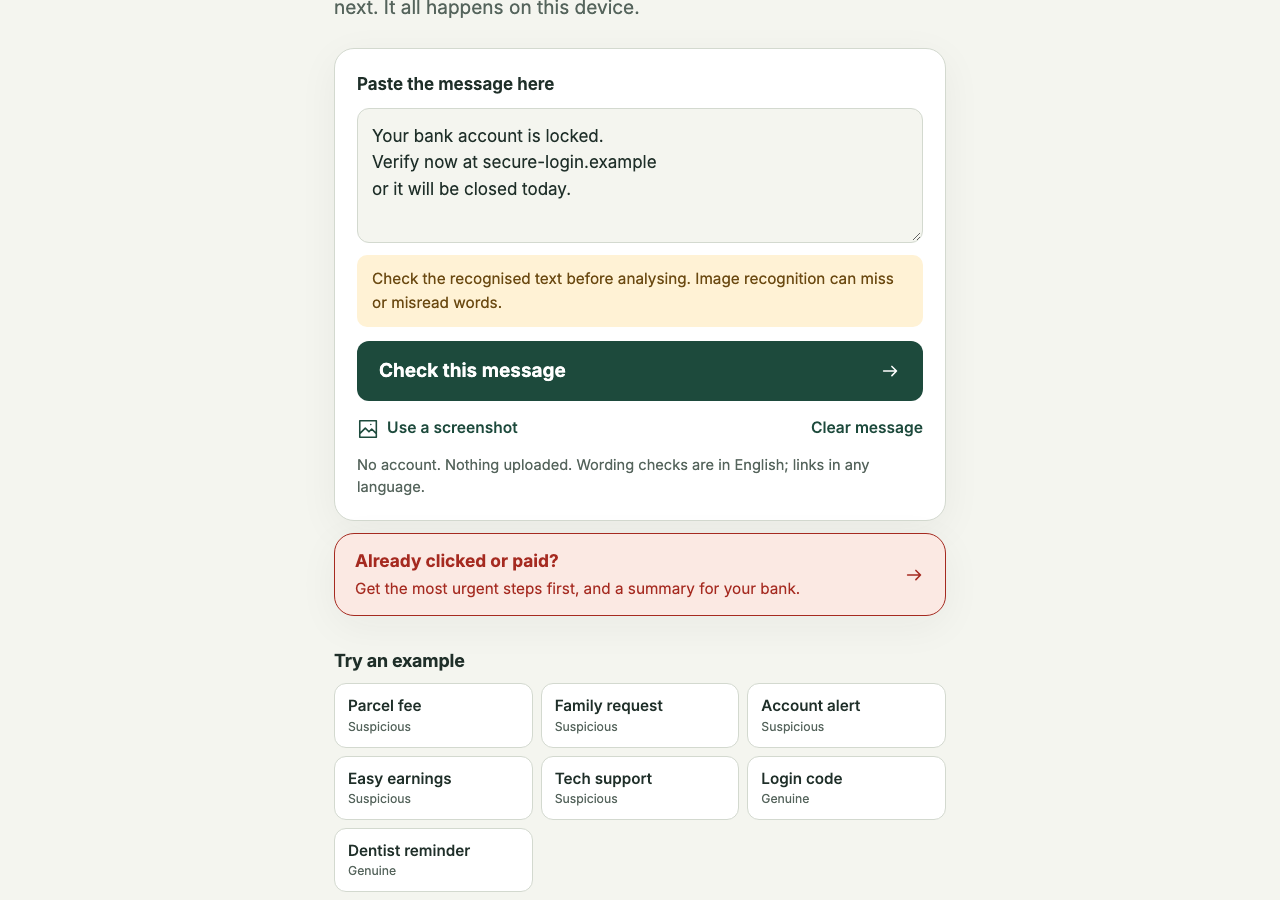
Review the text read from a screenshot, including numbers and links, before checking the message.
-
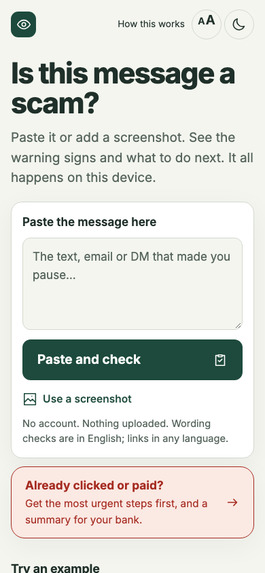
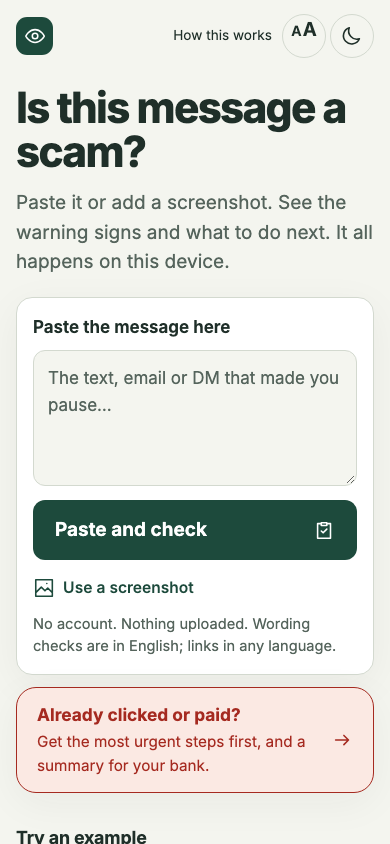
On a phone: check a message, or go straight to recovery steps if you already clicked or paid.
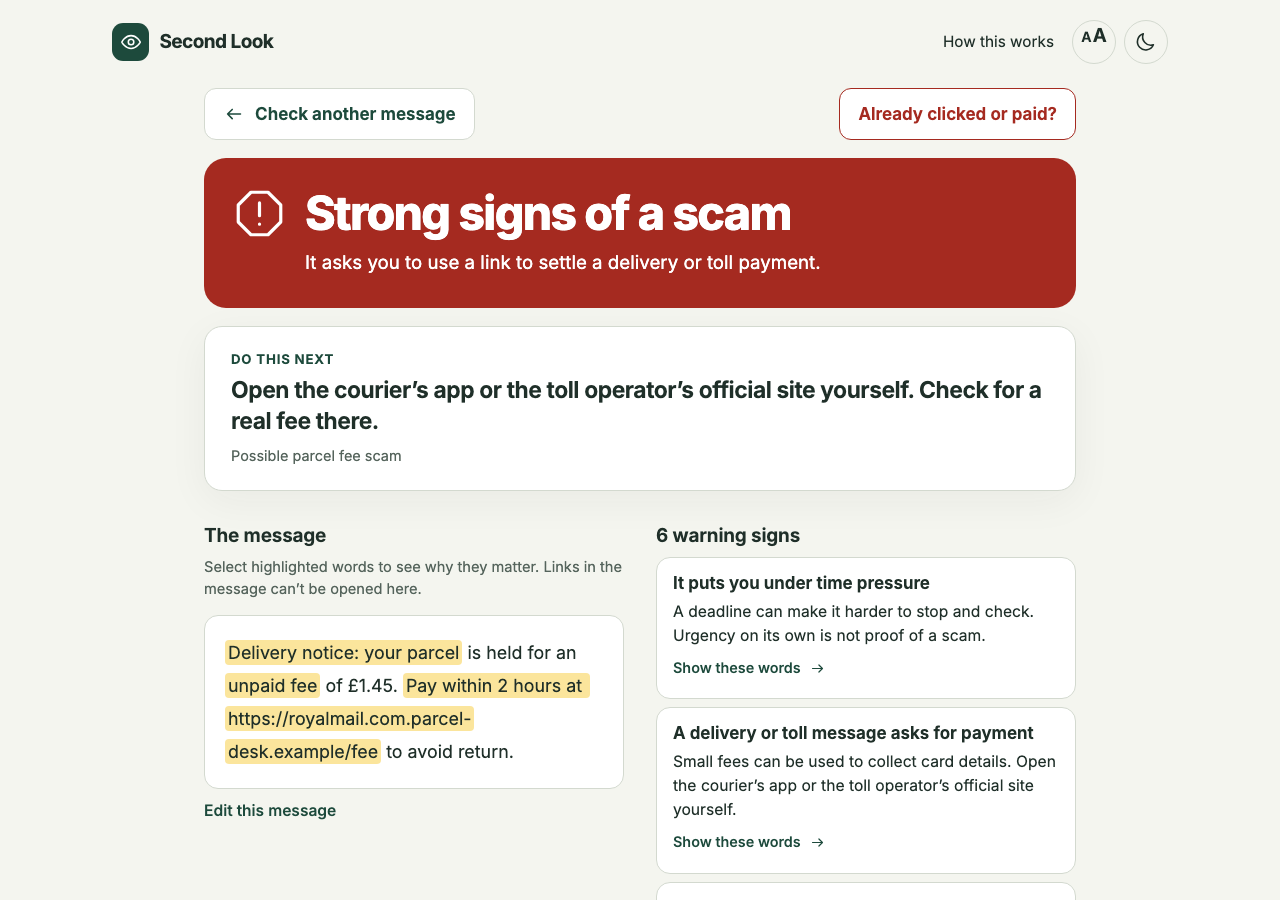
For anyone who hesitates over a text: Second Look checks it on the device, shows the exact words behind each warning, and never says "safe". Tested blind on 228 messages it had never seen.
Try it in a minute: open the link, choose the "Parcel fee" example, then paste a message with no known signs (for example: Hi, it's Jo from the school office. The trip money for Friday hasn't come through yet. Could you send the £35 today so Mia can still go?), answer "Yes" to the money question, and finally open "Already clicked or paid?". No setup or account needed.
The problem
You get a text about a parcel fee or a locked account, and you hesitate. That moment is the whole opportunity: what helps is a calm second opinion and a safe way to check, without handing a private message to a company or creating an account first. And if you have already clicked or paid, you need to know what to do first, right now.
Second Look is for that person: often an older relative, a busy student, or anyone who wants to check before acting.
What it does: three paths
1. Check a message. Press "Paste and check", or add a screenshot. Everything runs on the device. The screen fills with one of three outcomes: strong signs of a scam, some warning signs, or no known signs. It never says "safe".
- Clues you can see. Each finding highlights the exact words behind it and explains why they matter, in plain language.
- Where the links point. It shows the main address written in each link and flags lookalikes, encoded hosts, raw IP addresses and
name@hosttricks. Links are never opened or followed. - A safe next step that fits the pattern, such as "open the courier's app yourself".
2. When nothing stands out. The result is titled "Check before you act", says plainly that no known signs does not mean safe, and shows that in our original frozen test, 30 of 60 synthetic scam messages also got this result. Three questions follow: does it ask for a code or password, for money, or for you to open a link or install something? A "yes" or "not sure" shows advice for that request right under the question, and turns the top of the result into "Treat it as suspicious", naming what the message asks for.
3. Already clicked or paid? One button on the home page and on every result. Tick everything that happened and get one checklist: what to do now (call the bank, freeze the card, disconnect the device) and what to do next, one action per tick. It gives official reporting routes for your region, each linked to its source with the date it was checked, and builds a summary to copy or print for your bank or the police, already filled in with how you paid. A price in pounds, yuan or Canadian dollars picks that region's routes first. It says honestly that money may not come back, and warns about "recovery" scammers.
Also: "Ask someone you trust" builds an editable note that tries to remove phone numbers, emails and long numbers, makes links unclickable, and asks you to check names and codes before sending. One button makes all the text larger. Text checks work offline once the page is ready, and it installs like an app; on Android you can share a message to it from your messages app.
Privacy you can check. The message is never uploaded. A strict Content Security Policy blocks requests to other sites, and a live counter shows the requests to other sites that the page can see: it reads 0 through every check in our tests. Turn on airplane mode and text checks still work.
Example workflow: a safer outcome
A text says your parcel is held for an unpaid £1.45 fee, payable within 2 hours at a link. Second Look highlights the fee, the deadline and the link, shows that a link dressed up as Royal Mail (royalmail.com.parcel-desk.example) really belongs to parcel-desk.example, and suggests opening the courier's app yourself. You check the delivery without giving anyone your card details. If you had already paid, "Already clicked or paid?" puts "call the card issuer on the number on your card" first.
How well it works, and one limitation
A separate AI agent, with no access to the rules, wrote 60 scam and 60 genuine messages in modern wording. We scored them once with the frozen rules:
- 30 of 60 scams were flagged (12 as strong signs).
- 3 of 60 genuine messages were flagged, 1 of them as strong signs.
A second blind test replicated it. On 19 November a new agent, again without the rules, wrote 54 scams and 54 genuine messages across more scam types. Scored once with the live rules: 25 of 54 scams flagged (12 as strong signs), 5 of 54 genuine messages flagged. We also tried new rules written from the first test's misses: 27 of 54 and 6 of 54 on the same set, a gain within noise, so we did not ship them. More wording rules have diminishing returns; what the tool does when it finds nothing matters more.
On the held-out half of a public smishing dataset (Mishra and Soni, 2022), it flagged 81 of 160 smishing messages and 1 of 273 genuine ones. That half was scored twice during development, so treat it as possibly optimistic. On the held-out half of the 2012 UCI SMS Spam Collection, it flagged 4 of 2,434 genuine messages. On 18 November we fixed one bug found in an outside review ("don't worry" could cancel a request that followed it) and re-ran every set: every number is unchanged. That re-run is a regression check, not a second blind test. Full method: evaluation method and results.
Limitation: about half of the scams in both blind tests got "no known signs". That is why the result never says "safe", why that page leads with "Check before you act" and the three questions, and why every outcome points to a way of checking for yourself. Wording checks are English only: common Spanish, French, German, Portuguese and Italian wording is recognised and gets "We could not judge the wording" rather than a no-signs result. It cannot confirm who sent a message. It doesn't replace emergency services.
How we built it
An explainable rule engine in TypeScript runs in the browser. It checks for common scam patterns, including a claimed problem or windfall followed by a request to act, plus specific patterns such as requests for one-time codes, gift-card payments and remote-access apps. Screenshots are turned into text by Tesseract.js, using its English OCR model served from the same site; the person checks that text before it is analysed. QR codes are read by jsQR, and domains are parsed with tldts. Text analysis and OCR run locally; the app files and the OCR model are downloaded from this site, and the message itself is never sent anywhere.
Challenges
The first numbers were flattering. Our first rules caught all of our own test messages, then 2 of 20 scams worded differently: they had learned our phrasing. A small on-device word model looked even better on a 2012 corpus (82%, 0.5% false alarms) but raised 9 false alarms on 30 modern genuine messages, because that corpus taught it that a commercial tone means spam. We removed it, rebuilt the rules around the structure of a scam rather than its keywords, and had a separate agent write a blind test.
What we learned
For a safety tool, the honest number is the one from messages you couldn't have prepared for. A false "all clear" can do more harm than no answer, so what the tool says when it finds nothing matters as much as what it catches.
What's next
Watching real people use it, with their consent: checking a message, reading a no-signs result, and finding the first step after paying by card. Then more languages, starting with Spanish and Chinese, and a browser extension for checking in place.
Built during the event, and credits
The original application code and the project-specific evaluation were built during the event window, starting on 1 November 2026: the rule engine, link inspector, interface, three-question check, privacy counter, recovery checklist and summary, image pipeline, tests, evaluation and documentation.
Pre-existing open-source components, used as published: Preact, tldts and the Public Suffix List, Tesseract.js and its English model, jsQR, Workbox, the Inter typeface, vite-plugin-pwa, Vite, Vitest, Playwright, qrcode, sharp. See THIRD_PARTY_NOTICES.md.
Datasets, for local evaluation only and not shipped: UCI SMS Spam Collection (Almeida and Hidalgo, 2012, CC BY 4.0), SMS Phishing Dataset (Mishra and Soni, 2022, CC BY 4.0).
AI assistance: Claude Code and Codex wrote the code under Yi Yu's direction, and an AI agent wrote the blind test set. No AI model judges messages: the result comes from fixed rules. The only model in the app is Tesseract's English OCR model, which reads screenshots on the device.
All example messages are made up and use reserved domains. No third-party system was targeted or probed.
Team: Yi Yu (solo).
Source: https://github.com/yy5652-hash/second-look
To run it locally: npm ci, npm run build, npm run preview.
Built With
- inter
- jsqr
- playwright
- preact
- tesseract.js
- tldts
- typescript
- vite
- vitest
- workbox
