The situation
Cleaning a gutter, changing a bulb, hanging lights: most people climb a ladder a few times a year without ever being taught how. Ladder falls send a huge number of people to emergency rooms every year, and they usually come from a few simple mistakes:
- the ladder is set at the wrong angle, so the feet slide out or the top tips back
- the footing is unstable
- someone overreaches
- someone falls while nobody knows they're up there
Everyone has the tool to prevent most of this already in their pocket. A phone has an accelerometer precise enough to act as a spirit level.
What it does
Steady turns your phone into a ladder-safety partner, in four quick steps:
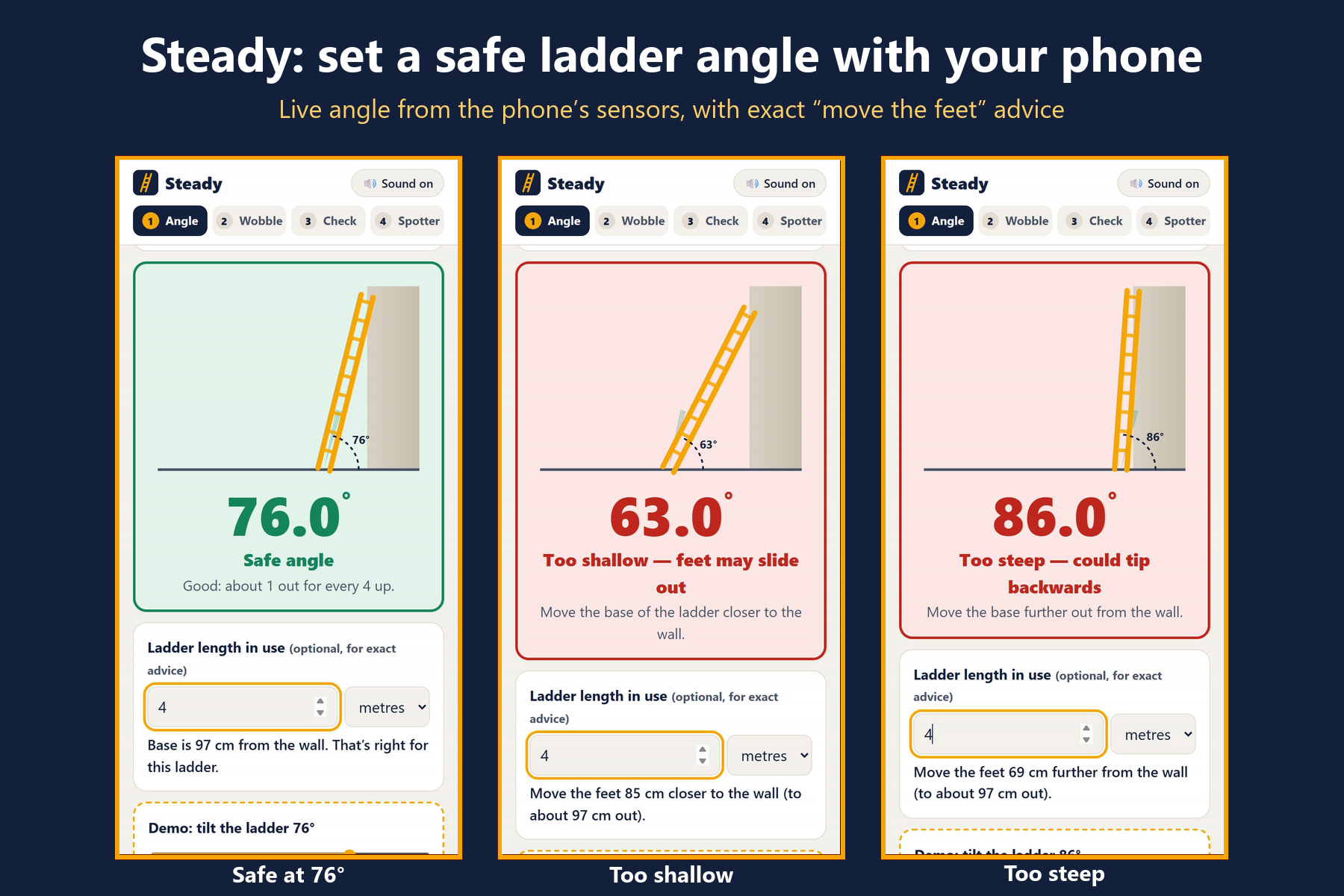
- Angle: lay the phone flat along a side rail. Steady reads the angle live, draws your ladder against a wall, and turns green at the safe angle (about 76°, the "1 out for every 4 up" rule).
- Enter the ladder length and it gives exact advice: "Move the feet 33 cm closer to the wall."
- Sound guidance means you don't have to look: low ticks mean too shallow, high ticks mean too steep, and a chime means safe.
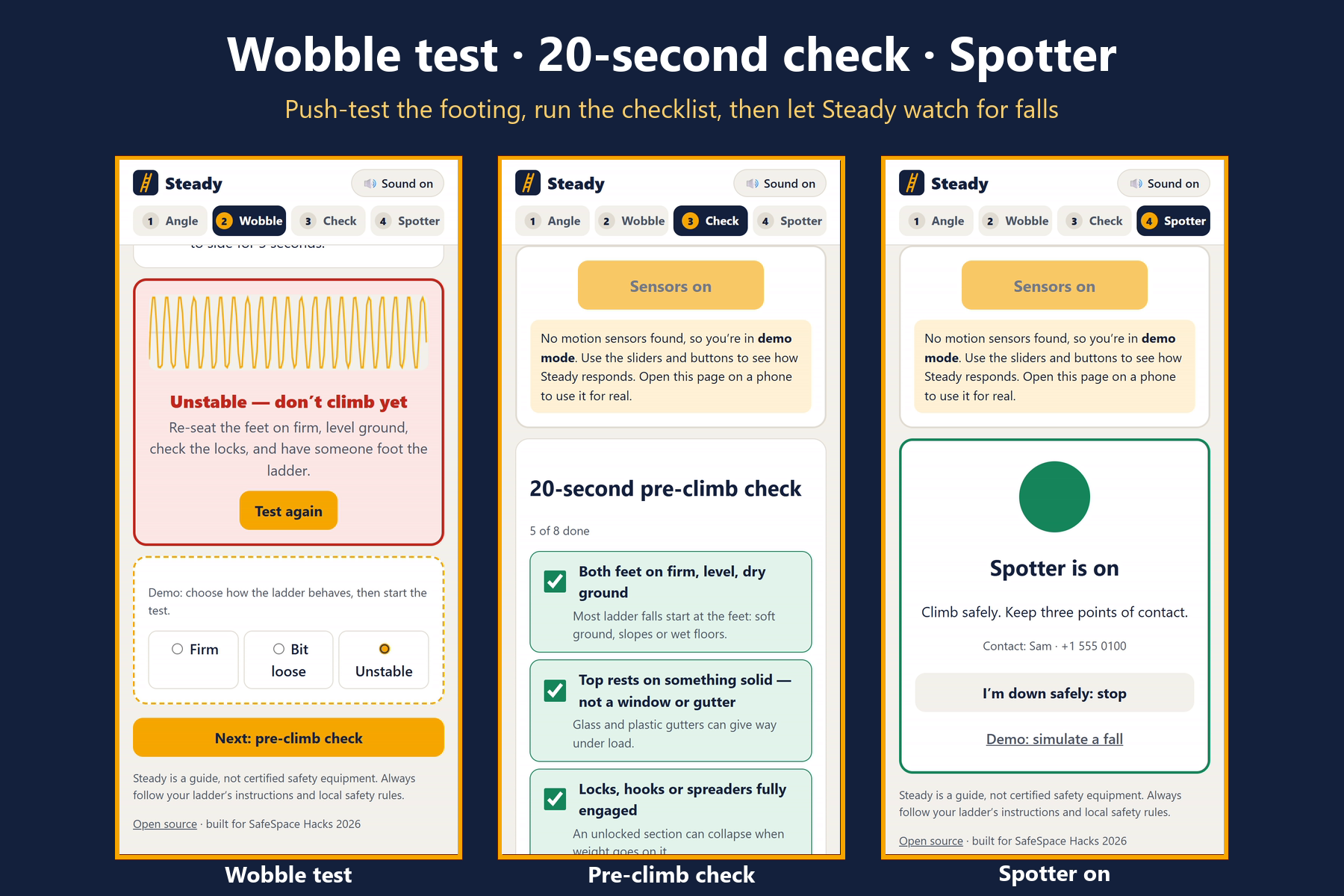
- Wobble test: rest the phone on a rung, tap Start and push the ladder side to side. Steady measures the movement and tells you whether the footing is steady, a bit loose, or "Unstable, don't climb yet".
- 20-second pre-climb check: eight checks, each with the reason behind it (for example, "Most ladder falls start at the feet").
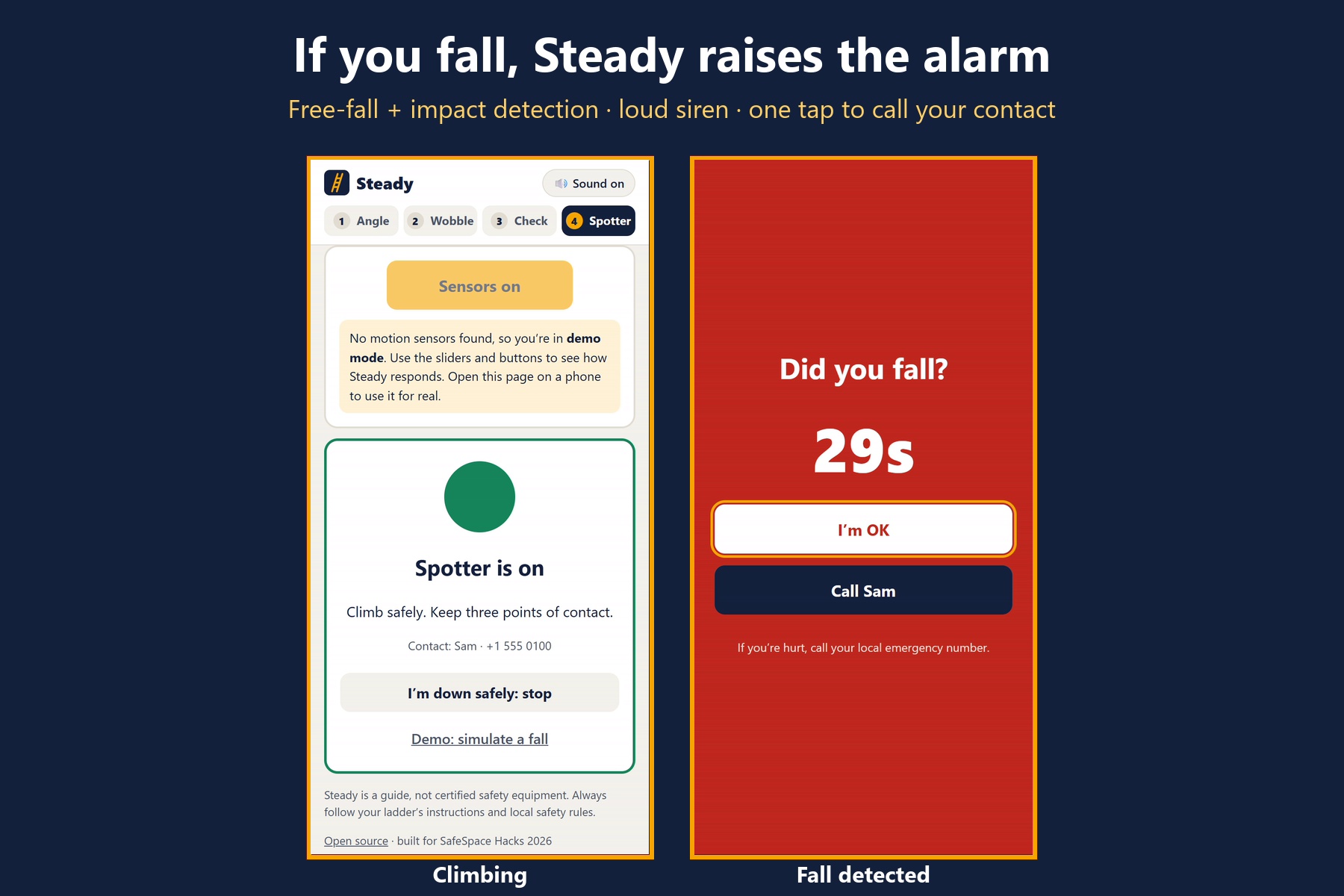
- Spotter: put the phone in your pocket and climb.
- If Steady detects a fall (near free-fall followed by a hard impact), it sounds a loud siren, vibrates, and shows "Did you fall?" with a 30-second countdown and a big one-tap Call [your contact] button.
- I'm OK cancels it.
On a laptop there are no motion sensors, so Steady switches to demo mode automatically. Sliders and buttons let judges see every state without a phone.
Why it's different
Safety apps usually react after something goes wrong. Steady prevents the most common causes of a fall before you climb, using hardware you already own, then stays with you while you're up there. It's built for one specific, everyday, under-served situation.
Trust & responsible design
- No data leaves the phone. There's no account, server, analytics or AI. A Content Security Policy with
connect-src 'none'blocks the page from sending anything, even by accident. - The emergency contact is saved only if you tick "Remember on this phone only".
- Works offline (service worker), useful in a garage, loft or back garden with weak signal.
- Honest limits on screen and in the README:
- It's a guide, not certified safety equipment.
- A web page can't place calls by itself, so Steady makes calling one tap away.
- Detection uses thresholds, so it can miss falls or raise false alarms.
- The angle check is for leaning ladders.
- Accessible: large type and touch targets (usable with gloves), high contrast for outdoor light, sound and vibration feedback, keyboard support, reduced-motion support and dark mode.
How we built it
- Plain HTML, CSS and JavaScript, with no build step or dependencies, hosted on GitHub Pages and installable as a PWA.
- The maths, unit-tested in
src/ladder.js:- Rail angle =
asin(|g_y| / |g|)from the smoothed gravity vector, with the phone's long axis along the rail. It's correct whichever way the screen faces and however the phone is twisted about the rail, and the tests check this across many orientations. - Base advice = ladder length × (cos(current angle) − cos(76°)).
- Wobble = standard deviation of acceleration magnitude over 3 seconds, so it doesn't depend on how the phone is oriented.
- Fall detector = a state machine looking for ≥120 ms below 0.35 g, followed within 1.2 s by an impact above 2.3 g. Tests confirm that normal climbing steps, bounces, a drop with no impact, and an impact with no drop do not trigger it.
- Rail angle =
- Sensors and output:
devicemotion(with the iOS motion-permission prompt), Web Audio for ticks, chimes and the siren, the Vibration API, the Screen Wake Lock API, and an SVG ladder scene redrawn every frame.
Challenges
- Orientation independence: the browser's ready-made tilt angles change meaning when the phone is rotated on the rail. We compute the angle straight from the gravity vector instead, and test it across many twists and screen directions.
- Sensor access: iPhones only allow motion data after a tap-triggered permission prompt over https, so everything starts from one "Start sensors" button, and the app falls back cleanly if there's no permission or no sensor.
- No false alarms while climbing: each step on a rung produces brief spikes, so the detector requires a sustained free-fall followed by an impact, not either one alone.
- Making it fully usable on a laptop for judging without pretending to be real. That's the clearly labelled demo mode.
What's next
- Step-ladder mode: check that the ground is level by laying the phone on the top step.
- An optional auto-SMS through the phone's share sheet, sent after the countdown.
- Calibrating fall thresholds with real drop-test data on more devices.
AI disclosure
Built with Claude (Anthropic) as an AI coding assistant for design, code, tests and this write-up. Steady itself uses no AI.
Built With
- css3
- github
- html5
- javascript
- node.js
- pwa
- service-worker
- web-audio-api
