Inspiration
Most scams don't beat people with technology. They beat them with a feeling: a deadline, a threat, a "Hi Mum, new number", a prize. In that moment, a person needs three things:
someone calm to say "wait, here's what's going on",
a clear safe next step, and
if it's too late, a plan.
Existing tools mostly give a red/green verdict from a cloud service. That means pasting your bank alerts or private texts into someone else's server, and "green" quietly teaches people that a message is safe. We wanted a tool that explains instead of judging, that is honest about uncertainty, and that can't leak what you paste.
Who it helps
Everyday people who get a suspicious text, email or DM, especially those most targeted: older adults, students, and people new to a country or to online banking. It's also for their helpers: the grandchild or friend who gets asked "is this real?"
The situation: you've received a message that makes you hesitate. The risk: you tap, reply, pay or share a code under pressure. The improvement: you pause, understand the trick being used, verify through a channel you trust, and if you already acted, you know exactly what to do first.
What it does
- Check a message. Paste any text, email, DM, or notes from a phone call. Second Look:
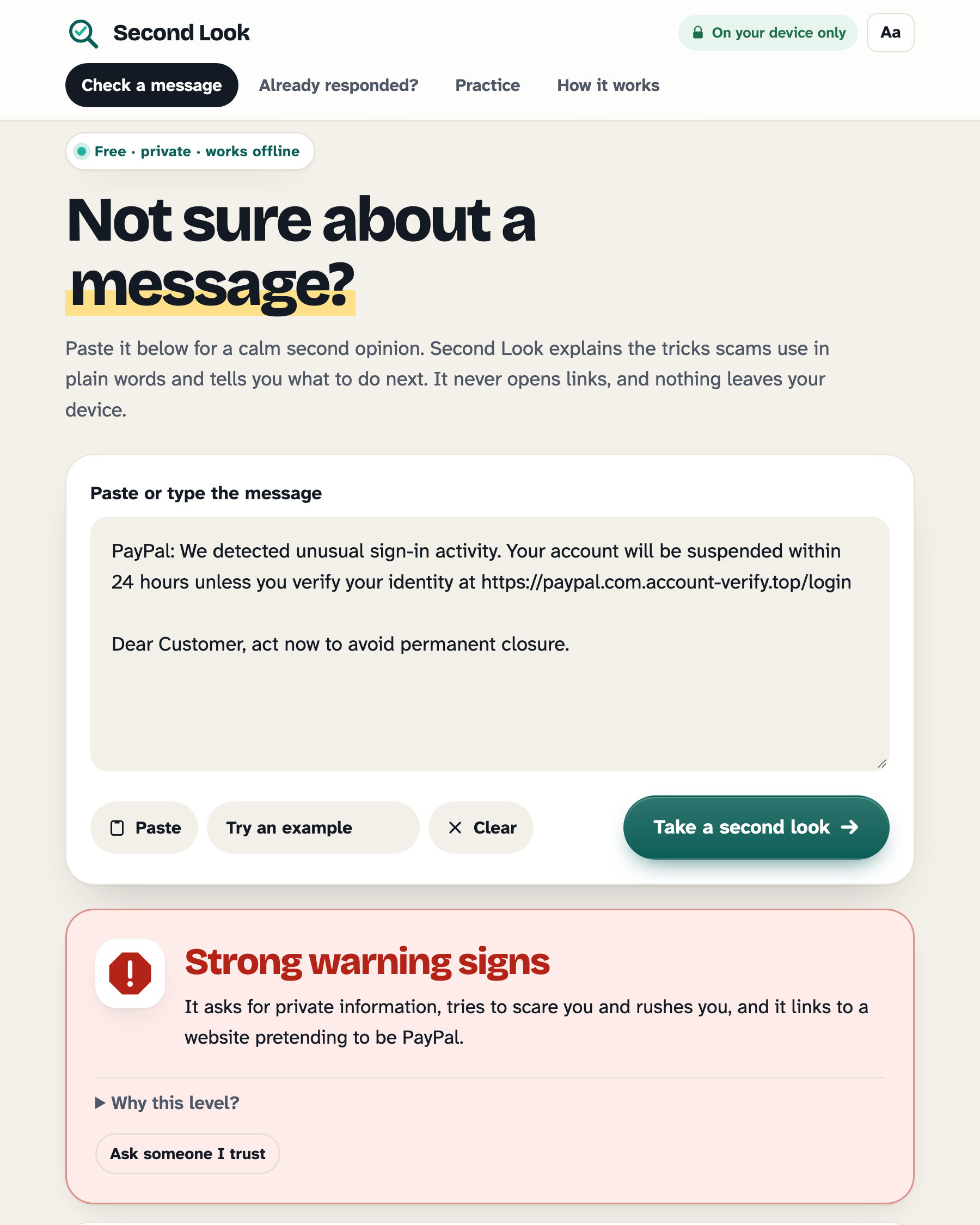
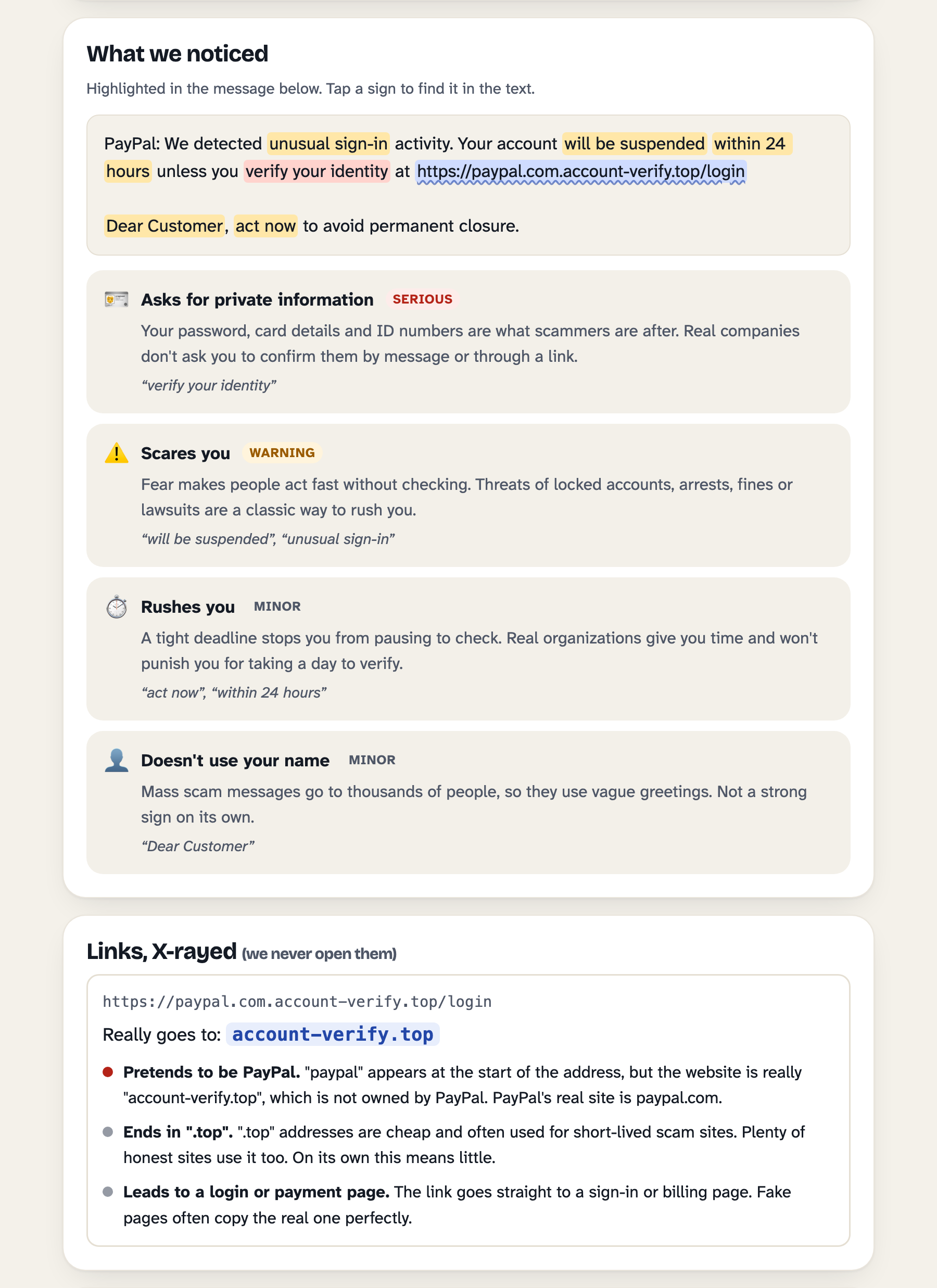
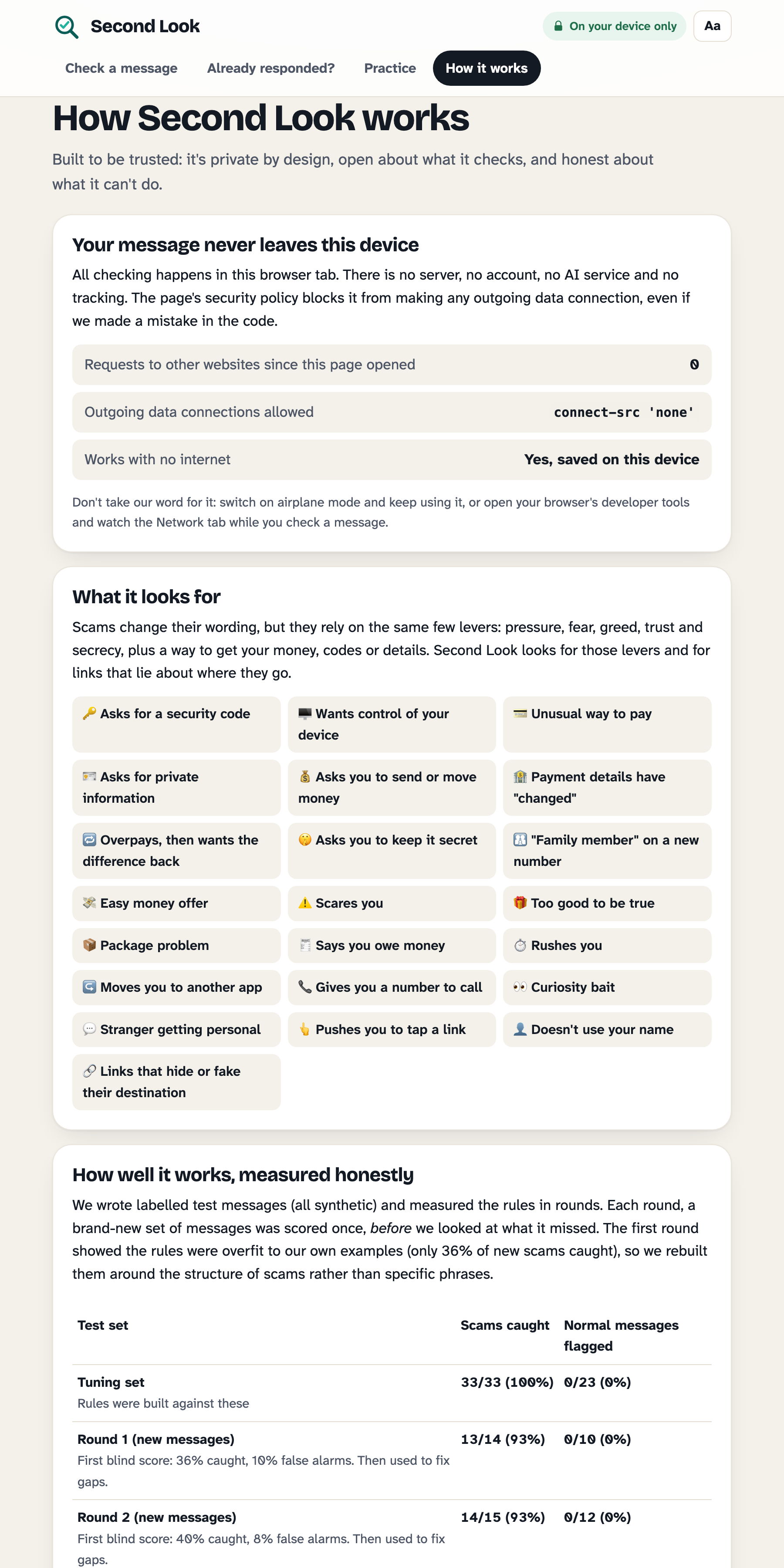
Highlights the exact words that use a pressure tactic, and explains each one in one or two plain sentences. It looks for 20 tactics, such as asks for a security code, payment details have "changed", "family member" on a new number, wants control of your device, rushes you and curiosity bait.
X-rays every link without opening it. It shows where the link really goes (e.g. paypal.com.account-verify.top → account-verify.top). It catches lookalike spellings (netf1ix), look-alike letters from other alphabets (Cyrillic "а" in аpple.com), brand names in someone else's domain, @ tricks, raw IP addresses and link shorteners.
Gives three levels, never "safe": Strong warning signs, Some warning signs, or No common warning signs found. The last always says: that doesn't mean it's safe.
Tells you what to do now, in order, and how to verify based on who the message claims to be (bank, delivery, government, tech company, family, employer).
Asks three questions only you can answer: were you expecting it, do you know the sender, does it ask you to do something? The text can't know these. Your answers can raise the warning level, never lower it, because a known contact's account can be hacked.
Shows its working ("Why this level?"). Every point each warning sign added, the thresholds, and the one serious sign that decided it, if there was one. No black box.
Check a QR code before you scan it. Fake QR stickers on parking meters, parcel notes and posters lead to lookalike payment pages, and "scan this to receive your refund" codes actually start a payment from you. Point the camera at a code or pick a photo. Second Look decodes it on your device with the browser's built-in scanner (no library, no upload) and shows what it would do: open a website (then X-rayed like any link), send money (UPI, Bitcoin and other payment codes are always a strong warning: "you never scan a code to receive money"), join a Wi-Fi network, call or text a number.
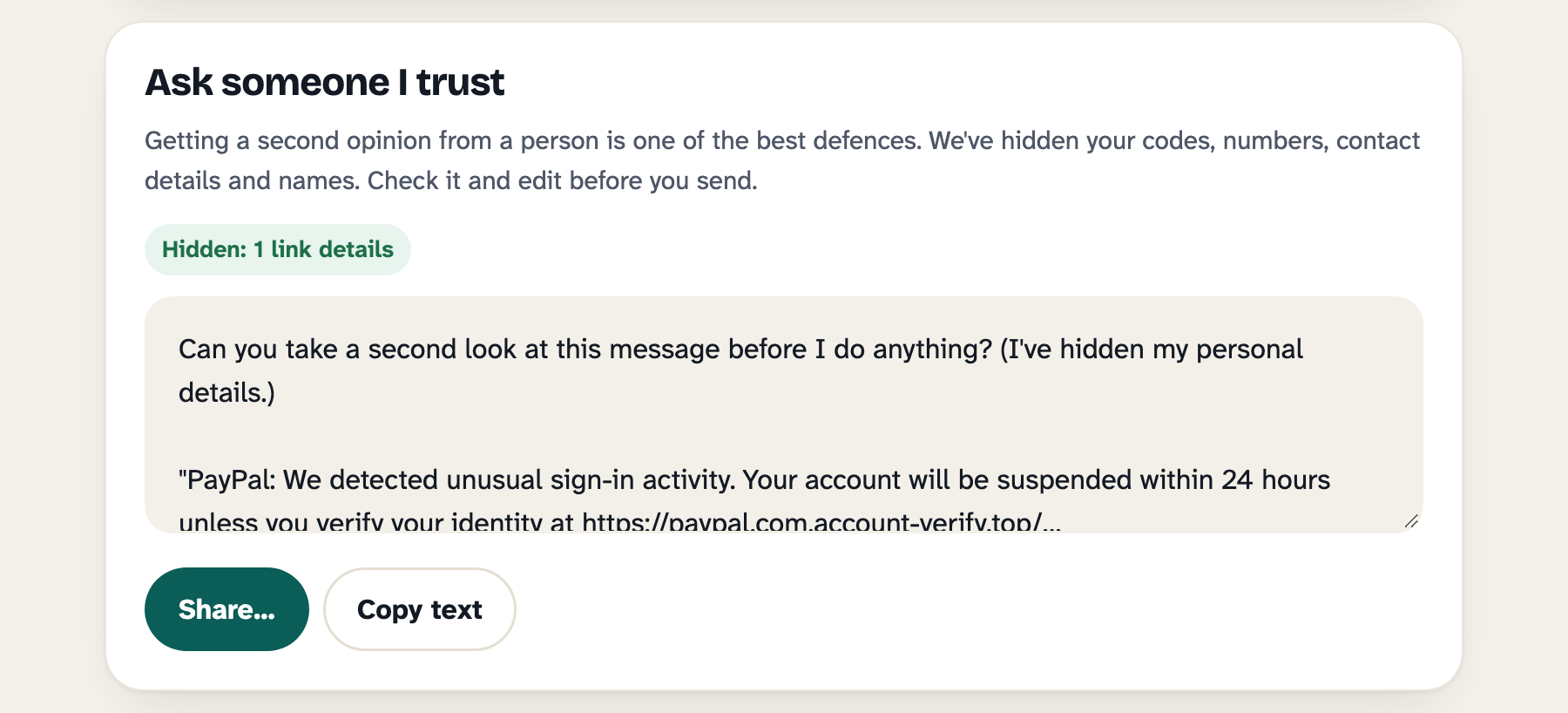
Ask someone I trust. One tap creates a copy for a friend or family member with your codes, card and account numbers, phone numbers, emails, names, addresses and link tracking IDs removed. You can edit it before sending. Asking a person is one of the best defences, and this makes it safe to do.
On a call right now? Phone scams take the most money from older adults, and there's no message to paste. One big button opens a checklist to tick while the caller talks ("they want a code", "they say don't hang up", "they say a family member is in trouble"…). A sticky banner answers instantly: "Hang up now. It's OK to hang up.", followed by exactly what to say and how to call back on a number you find yourself.
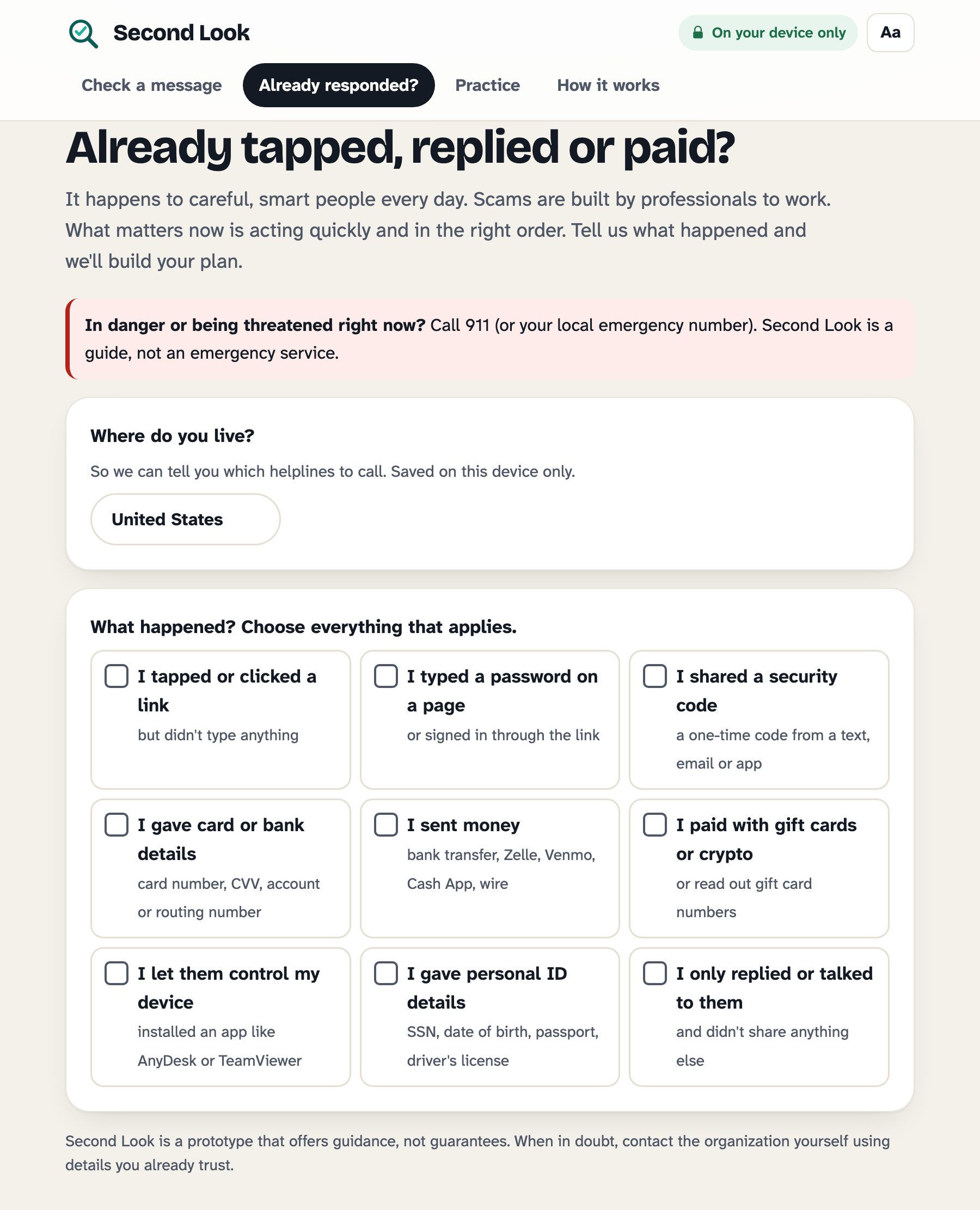
"Already responded?" Tick what happened (shared a code, sent money, gave remote access, paid with gift cards…) and get an ordered recovery plan: Right now (next 15 minutes), Today, Over the next few days. It's deduplicated, saved only on your device, and printable. It opens with "this happens to careful, smart people" because shame stops people from acting fast.
Report it, for your country. Reporting help, the emergency number and the recovery steps follow the country you pick (guessed from your browser): the US, UK, India, Canada and Australia, with general advice elsewhere. In India, for example, calling the 1930 cyber-crime helpline moves to Right now when money was lost, because it can freeze money still moving between accounts.
Practice. Ten synthetic messages, including real ones and ones where the right answer is "I'd check first." We deliberately reward checking, because that habit beats nearly every scam.
How we built it
Plain HTML, CSS and JavaScript, with no libraries, frameworks, trackers or build step. The two fonts (Atkinson Hyperlegible Next, made by the Braille Institute for low-vision readers, and Bricolage Grotesque, both SIL Open Font License) are bundled in the app, so nothing is fetched from other websites. It works as a static site, from a downloaded folder, or installed as an app.
On-device rule engine (js/analyzer.js, js/links.js). Scores are explainable: every warning points to exact words or a specific link finding, and the app shows the full point breakdown.
QR X-ray (js/qr.js) uses the browser's built-in BarcodeDetector on camera frames or a photo, then parses the payload (upi://pay, bitcoin:, WIFI:, tel:, SMSTO:, mailto:, vCard, URLs) into plain language. The parser is pure and unit-tested; payment codes feed a "critical" sign into the same engine.
Privacy enforced by the browser, not just promised. The page's Content Security Policy sets connect-src 'none' and form-action 'none'. Even if our code had a bug, the browser would refuse to send data anywhere. The "How it works" tab shows a live counter of requests to other websites since the page opened (it stays at 0).
Works offline via a service worker. Read-aloud uses on-device voices only (some browsers' cloud voices would send the text away, so we filter them out).
Installable app with "Share to Second Look" (Web Share Target) on Android. Shared text is served from the offline cache so it never reaches the web server, and it's wiped from the address bar immediately.
Accessible: semantic HTML, keyboard support, visible focus, screen-reader labels on every highlight, colour never used alone (shapes and words too), three text sizes, dark mode, reduced-motion support, works at phone width.
Separated, data-driven modules (js/call.js, js/regions.js, js/qr.js …): adding a warning sign, brand, country or QR type is one entry in a list. See docs/EXTENDING.md.
24 automated tests (node --test), including one that fails if the page and the offline cache ever load different versions of a file, and an evaluation script (node eval/run.js).
How we measured it (evidence of a safer outcome)
We wrote labelled synthetic test messages and evaluated in rounds. Each round, a new set was scored once, blind, before we looked at what it missed:
Round
Scams caught
Normal messages wrongly flagged
Round 1, first blind score
36%
10%
Round 2, first blind score (after rebuilding around scam structure)
40%
8%
Round 3, first blind score
67% (10/15)
0% (0/12)
Round 4: frozen, never tuned
73% (11/15)
8% (1/12)
Round 1 showed our first rules were overfit: they knew our own examples, not scams. So we changed the approach from matching phrases to detecting the shape of a scam: an ask (send money, move savings, share a code, change bank details) combined with a lever (pressure, fear, secrecy, greed) and a redirect (a link or phone number). Round 4 is the number we stand behind. We wrote it before fixing round 3's misses (overpayment checks, survey "rewards", data-entry job offers), scored it once before the fixes (counts only, without reading the misses) and once after. The fixes caught every round-3 miss but didn't move round 4 at all, which is exactly why we only quote held-out numbers. Judges can re-run every round in the app ("How it works" → Re-run the test on this device).
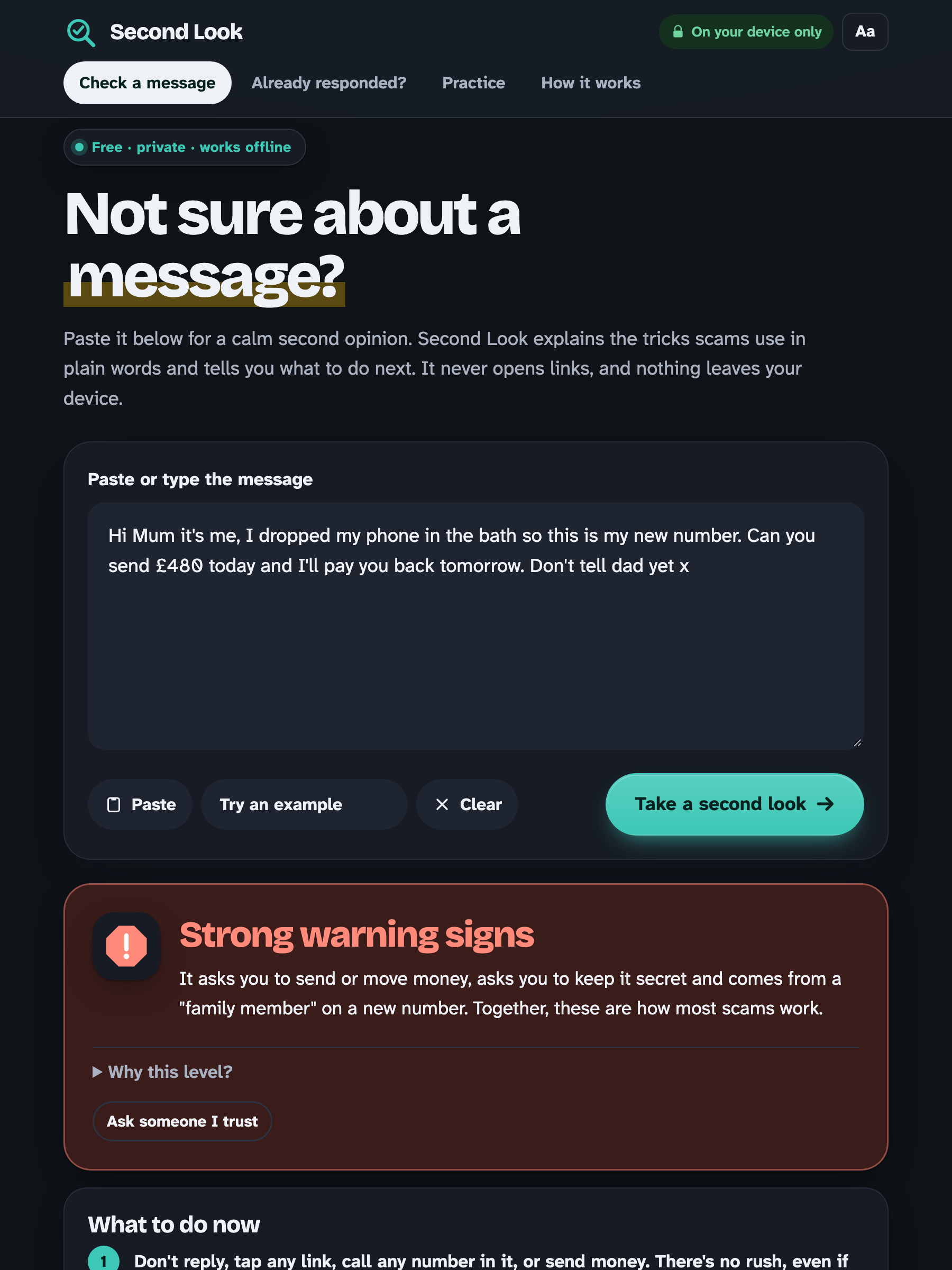
One example of the safer outcome: a "Hi Mum, I dropped my phone, this is my new number… can you send £480… don't tell dad" message is rated Strong warning signs. Second Look highlights the new-number story, the money request and the secrecy request. Its first instruction is "Call your family member on the number you already have saved." That one call ends this scam every time.
Challenges we ran into
Overfitting our own test data. Our first blind round caught only 36% of new scams. Being honest about that number changed the whole design (see above).
Never saying "safe." Every tool wants to give a green tick. We had to design an interface where the best outcome still keeps people alert without scaring them.
False positives on real messages. Real bank alerts say "unusual activity" and real 2FA texts mention "codes". We handle negation ("never share this code"), only treat payment apps as a red flag when you're asked to pay, and test against real-style alerts.
Redaction that still helps. The helper needs to see the link's website to judge it, but not the tracking ID in its path, so we keep the domain and cut the rest.
Proving privacy. "We don't collect data" is easy to claim. We made the browser enforce it and show it.
Accomplishments we're proud of
A protective tool that creates no new risk: no accounts, no uploads, no cloud AI, and no stored messages.
An evaluation process that reports our failures, not just our best number.
Turning "I think I've been scammed" from panic into a checklist with a clear first step.
What we learned
Scams are a persuasion problem more than a technology problem. The most protective output isn't a verdict; it's naming the trick ("this message is rushing you") and giving people permission to pause. We also learned how easily a detector can look perfect on its own data, and why you need held-out tests.
Limitations (honest)
It can't tell you a message is safe. It reads words and link addresses only. It can't see the real sender, check numbers, or visit pages.
It misses about 1 in 4 new scams in our frozen test from the text alone, especially ones that start innocently ("Is this still Megan's number?"), and it wrongly flagged 1 of 12 ordinary messages. The three questions help, but don't fix this.
English only. Reporting help covers the US, UK, India, Canada and Australia; elsewhere it gives general advice.
Rules need maintenance as scams evolve. Our test sets are small (≈150 synthetic messages) and written by us, so the numbers are indicative, not a benchmark.
Text and QR codes only: no screenshots or voice yet. QR reading needs a browser with a built-in scanner (Chrome and Edge on Android, Mac and ChromeOS); elsewhere you can type the address your camera shows.
What's next
Hindi and Spanish; more countries in js/regions.js; on-device OCR for screenshots (most people receive scams as screenshots forwarded by family); Spanish and other languages; an optional small on-device language model to catch scams that don't use known phrases (keeping the no-network guarantee); a browser extension that adds "Take a second look" to the right-click menu.
Event work vs pre-existing work
Everything in this repository was created during Next Byte Hacks V5 (first commit Oct 28, 2026; the event runs Oct 6 – Nov 8, 2026). No pre-existing code, templates, libraries, images or datasets were used. The only third-party files are the two open-licence fonts in fonts/, with their licences alongside. The project hasn't been submitted to any other hackathon.
Credits
No third-party libraries, assets or datasets. All example and test messages are synthetic and were written for this project; phone numbers use the fictional 555 range.
Guidance draws on public consumer advice from the US Federal Trade Commission (ReportFraud.ftc.gov, IdentityTheft.gov), the FBI's IC3, and national cyber-security agencies.
AI assistance: Claude (Anthropic) was used to help write code, test messages. I reviewed, tested and edited all of it, and checked every rule and message myself
Try it
Live demo: https://hasini0.github.io/second-look/
Built With
- barcodedetector-api
- content-security-policy
- css
- getusermedia
- html
- javascript
- node.js
- pwa
- service-worker
- web-share-target
