-
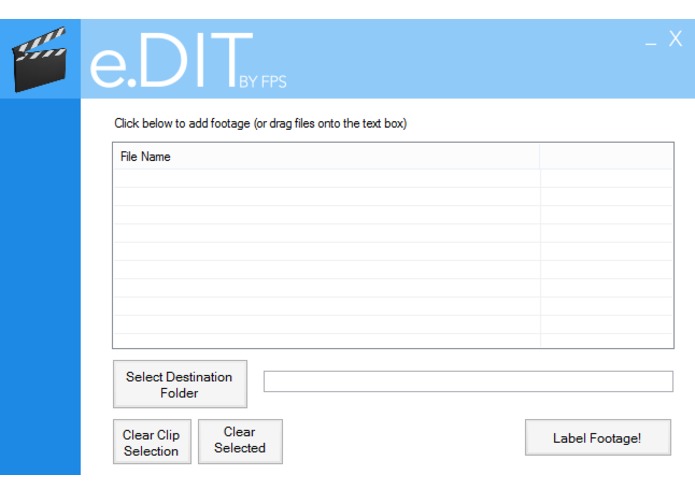
The eDIT GUI

Inspiration
We love movies. We love watching them, we love talking about them, but most of all, we love making them. And anyone who's ever tried making a short film knows that it takes a lot of work to make even a 5 minute film. Films take a long time to plan, a long time to shoot, and a very long time to edit.
Three of the four of us are editors. And as much as we love editing, the one thing we really hate about the process was organizing the footage, which requires us to look at every single piece of footage, scrub through the first few seconds to find the film slate, find out what scene and take the current shot is, and rename the clip accordingly.
At best, we lose several hours organizing footage. At worst, we could miss out on an entire DAY of editing because of this.
There had to be a better way.
So we made one.
What e.DIT does
In the film world, the Digital Imaging Technician (DIT for short) handles footage organization. So our Electronic Digital Imaging Technician (e.DIT for short) does exactly that. e.DIT is a piece of software we developed to go through footage, label it with its scene and take, and sort it into folders by scene. And even though it's in the very early development stages right now, we are excited to have a prototype up and running, with a 64% success rate.
How we built it
Using a film slate is more or less a standardized practice in the film industry. If you wanna see how it's normally done in film sets, take a look here: https://youtu.be/bd7BPX8oEeE?t=2m1s
Because of how formulaic slating is, we can reliably assume:
- The location will be mostly quiet since only a few people are allowed to talk in a film set once the camera starts rolling.
- We will actually see the slate at some point in the shot.
- We will hear the person using the slate (the 2nd AC) say "take" at some point, followed by a number which indicates the take.
- We will hear a number (and optionally a word) before the word "take" which indicates the scene.
- We will hear a loud spike in audio when the slate actually claps.
We had access to the Microsoft Cognitive Services API, which included Cognitive Vision and Speech to Text. Initially we wanted to use Cognitive Vision to read the slate and extract the scene and take information, but because the slates in amateur productions are rarely in the camera's focus and because Cognitive Vision has some difficulty reading handwritten text, we opted to use the Bing Speech API.
Because we knew that slating almost always happens at the beginning of every take, we pass the first 30 seconds to Bing Speech for analysis. Then, we search for the word "take" in those 30 seconds and if we find it, we check for the take number immediately after it and the scene number immediately before it. Reading the take was trivial since it was guaranteed to be a number right after the word "take." Reading the scene number was a little trickier because in the film world, when slating for scene "2D take 5," a 2nd AC can substitute saying the letter "D" for any word that starts with the letter D. So to read the scene number, we simply captured the word (or words) immediately before "take" but after a number, and appended the first letter of the first word to the end of the scene number. Afterwards, we label the shot and move on to the next shot selected.
Challenges we ran into
We ran into numerous challenges during this project.
- Early on in the project, we ran into a lot of difficulty extracting the correct information from a string. It was especially difficult to pull the correct scene letter from the string since again, literally ANY word could be used as long as its first letter was the same as the scene letter. Combined with the Bing Speech API's tendency to output homophones of the target words we wanted ("too" instead of "two," "won" instead of "one," etc), it was very difficult to reliably extract the information we wanted from footage.
- The Bing Speech API initially had a LOT of trouble coming up with results that were close to the ones we were expecting. It would frequently output nonsensical words that were quite far from our expected outputs, so we wanted to "teach" it the correct format for slating. We created a custom language model for the Custom Speech API using 740,000 randomly generated yet "grammatically correct" slate phrases composed of random numbers, food, NATO alphabet words, and Pokemon names.
- The Bing Speech API isn't 100% accurate, so we would sometimes run into a file where we could only read one or two of the three fields we needed to accurately label these files. Thus, we came up with a way to label these "partial matches" through interpolation. We could reasonably assume that scene "2A take 1" would be shot before "2A take 2" which would also be shot before "2B take 1" and that those files would be inputted one after another. Thus, we wrote code that could could "fill in the gaps" depending on the known footage that was nearest to it. With this process, we can also figure out some "no matches," again depending on the context of the other footage around it.
Accomplishments that we're proud of
Not only are we proud that we made a tool that can save editors a lot of time during post production, we're also proud of all the things we learned while doing this project. This was our first experience in a hackathon and we learned things like how to get the Microsoft Custom Speech API to work in a C# application with a customized language model, how to design some basic UI for an application, and how to create something that merged our coding interests with our love for filmmaking.
What's next for e.DIT
As we made more and more progress with e.DIT, we became more and more excited because we really do believe it can be an amazing asset for editors. We will continue to develop and refine e.DIT in order to raise our 64% success rate to something higher, maybe even 100%.
Built With
- microsoft-cognitive-services-api
Log in or sign up for Devpost to join the conversation.