🧠 Inspiration
We spend hours online every day — learning, working, and doom-scrolling — but rarely stop to ask how we’re spending that time. We wanted a tool that didn’t just track our activity but actually helped us grow from it — without sending a single byte to the cloud.
That’s how ScreenSage Lite was born: a privacy-first digital wellness mentor powered by Chrome’s built-in Gemini Nano AI, capable of turning your browsing habits into mindful insights and personal nudges — all locally, right on your device.
💡 What it does
ScreenSage Lite transforms your daily browsing into actionable self-reflection.
- 🕒 Tracks your time across websites in real time — locally, not on a server.
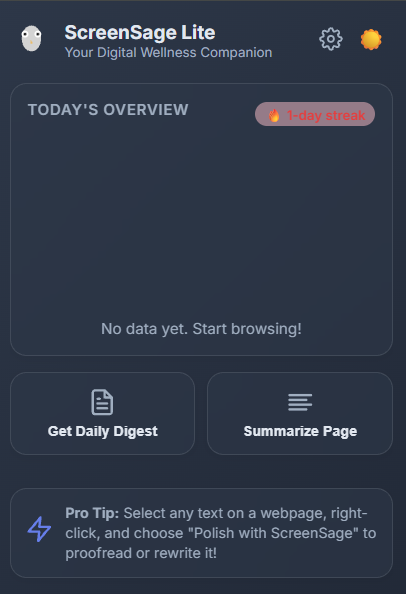
- 📊 Visualizes your day in an elegant dashboard with charts and streaks.
- 🧠 Summarizes your habits using Chrome’s on-device Gemini Nano AI.
- 💬 Provides nudges to improve focus and balance (“Try a 10-minute break before your next scroll session”).
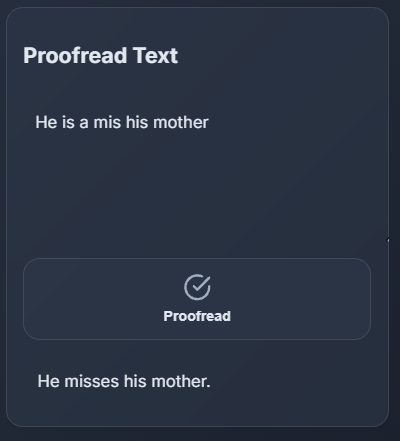
- ✍️ Proofreads and rewrites text with a right-click, using built-in AI APIs.
- ☁️ Falls back seamlessly to Gemini Flash 2.5 if the local AI isn’t available.
It’s like having a calm, insightful mentor built right into your browser — one who never judges, never tracks you, and never leaks your data.
⚙️ How we built it
We built ScreenSage Lite as a Chrome Extension using the new Built-in AI APIs available in Canary (v127+).
- Frontend: HTML, CSS, vanilla JS (modularized with ES modules)
- UI/UX: Custom animated popup with light/dark themes, smooth parallax, and confetti feedback
- Charts: Chart.js (locally bundled)
- Tracking Engine: Background service worker managing tab focus, idle states, and time logs via
chrome.storage.local AI Logic:
- Primary:
window.ai.summarizerandwindow.ai.prompt(Gemini Nano) - Fallback: Gemini Flash 2.5 through
https://generativelanguage.googleapis.com
- Primary:
Privacy Core: All data stays on the device; summaries use anonymized strings.
Writing Tools: Context-menu integrations for “Polish” and “Rewrite” actions inside web pages.
The result is a hybrid AI experience that feels as responsive as a local app while still having the depth of a cloud model when needed.
🧩 Challenges we ran into
- Stability of Built-in AI APIs — Gemini Nano is still in Early Preview, so its behavior changed between Chrome updates.
- Manifest V3 restrictions — The new
content_security_policyrules prevented using CDNs, so we had to self-host libraries and sanitize all CSPs. - Syncing popup and background data in real time without race conditions.
- Balancing privacy and UX — ensuring summaries were helpful without revealing identifiable data.
- Testing in Canary environments — every team member had slightly different AI availability statuses, making debugging... interesting 😅.
🏆 Accomplishments that we're proud of
- Created one of the first working Chrome extensions that successfully uses both Gemini Nano and Gemini Flash 2.5 in harmony.
- Built a fluid, animated UI that feels more like a polished desktop app than a browser extension.
- Designed a privacy-first architecture that never sends personal data to any external server.
- Developed AI-powered writing tools that run entirely inside the browser context — no backend, no latency.
- Achieved stable local tracking and AI summaries without performance degradation.
📚 What we learned
- Chrome’s new AI stack is incredibly capable. Gemini Nano is fast, lightweight, and surprisingly fluent.
- Privacy and intelligence can coexist. On-device AI opens a new paradigm for personal software — one where users remain in control.
- CSP and Manifest v3 can be strict, but they push you toward safer, cleaner extension design.
- Hybrid AI strategies (local + cloud) are the future — not everything needs a massive server backend.
🚀 What’s next for ScreenSage
- 🖼️ Multimodal Gemini Nano — integrate vision and audio summarization (e.g., summarize YouTube watch history visually).
- 🧘 Mindful notifications — gentle, AI-generated reminders to rest or focus when patterns suggest burnout.
- 📱 Cross-device sync using encrypted Chrome Storage.
- 🔒 Advanced privacy controls — user-defined retention policies and per-domain exclusions.
- 🌙 Mood-adaptive themes — interface subtly shifts tone based on time of day and browsing behavior.
- 🧩 Public release on Chrome Web Store after Gemini Nano exits preview.
ScreenSage Lite started as a hackathon idea — but we believe it can become a foundation for a new category of local-first, self-aware productivity tools.

Log in or sign up for Devpost to join the conversation.