-
-
The privacy linter for video. Catch what you didn't mean to publish, before you post it.
-
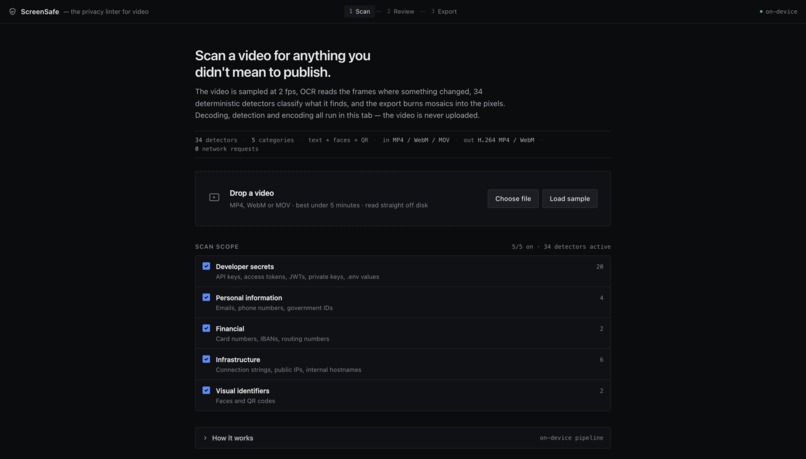
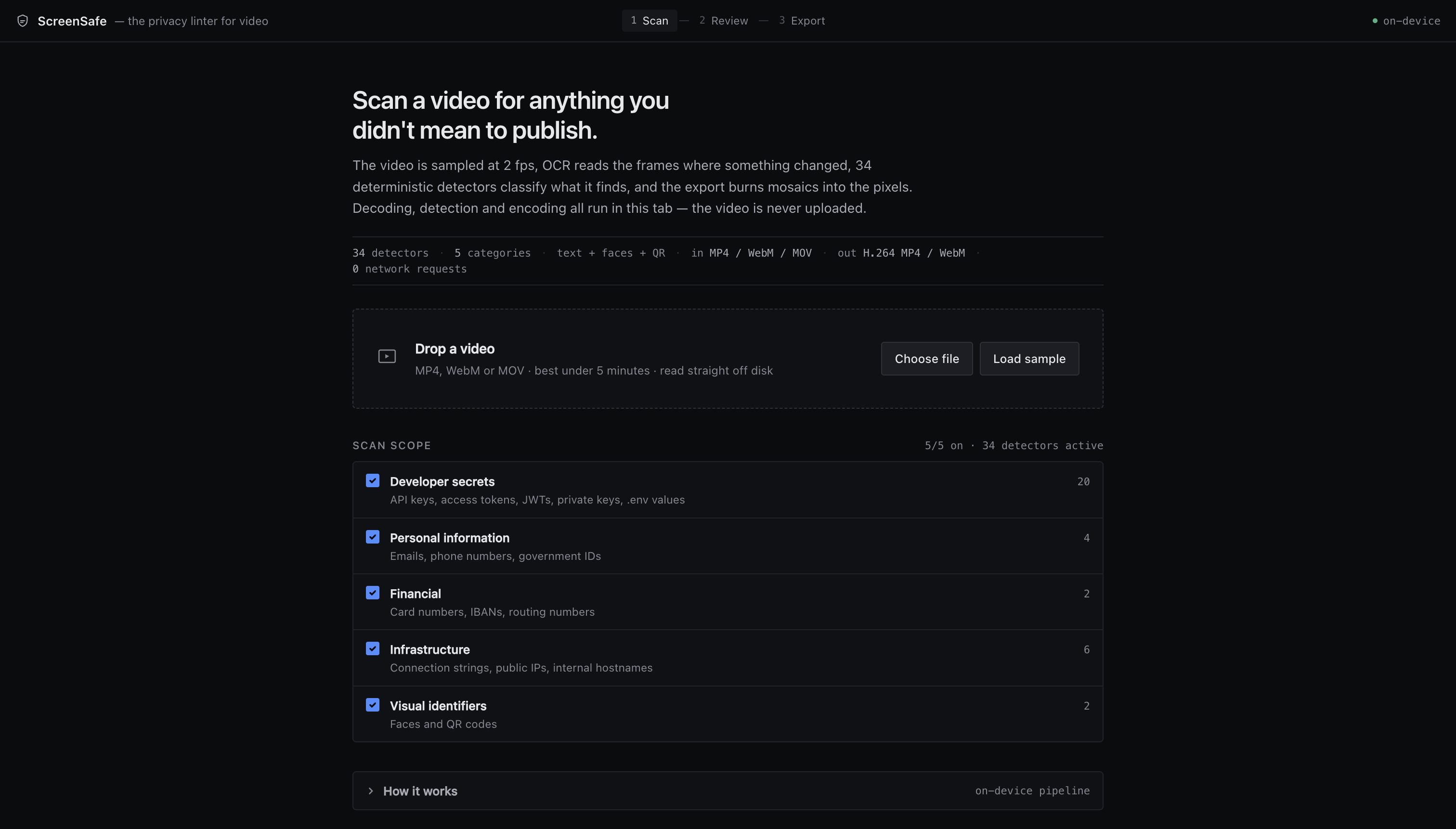
Drop in any video. Choose what to scan for across 34 deterministic detectors. Decoding, detection and encoding all run in your browser.
-
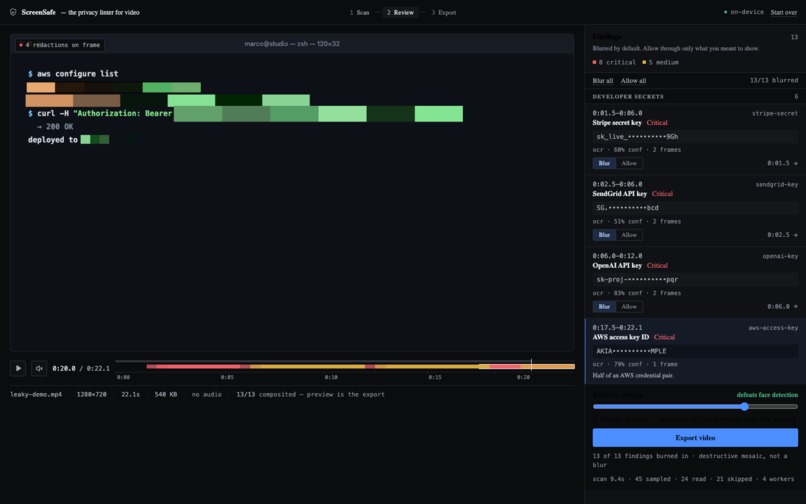
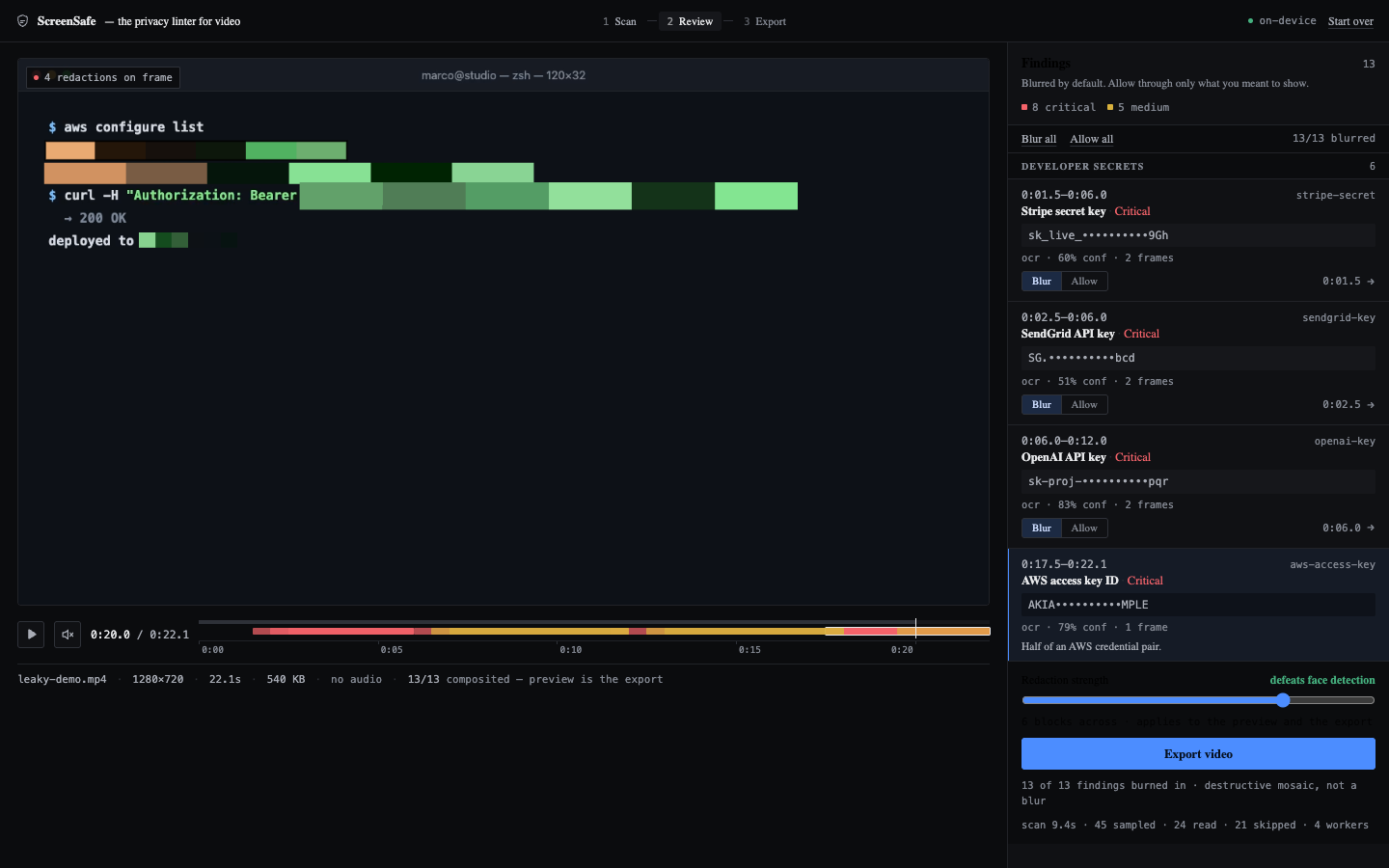
The review queue: 13 findings, grouped by time, values masked, blurred by default. Allow through only what you meant to show, then export.
-
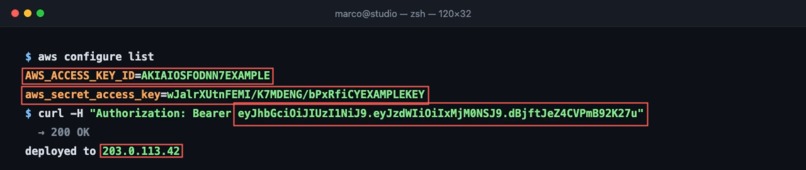
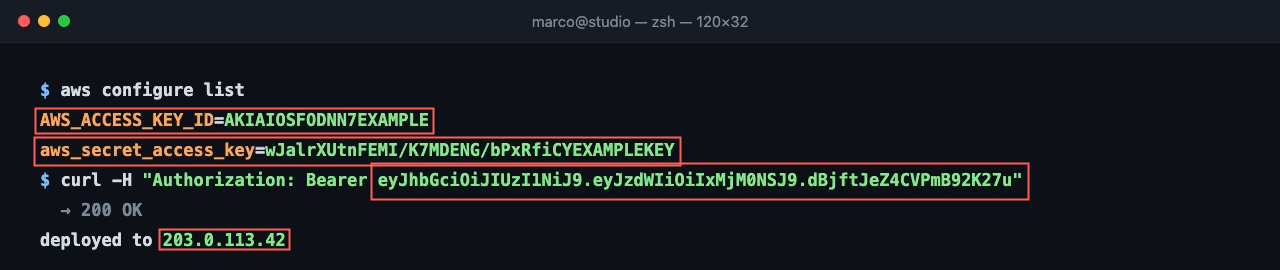
One frame at 0:20. The scan flags an AWS key pair, a bearer token inside a curl command, and a public IP, each boxed exactly where it sits.
-
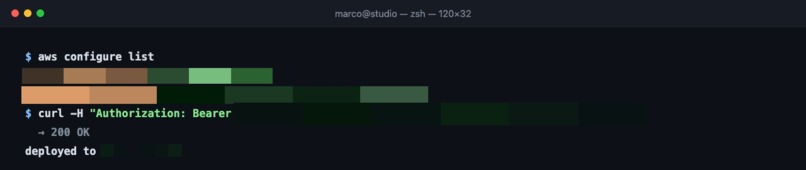
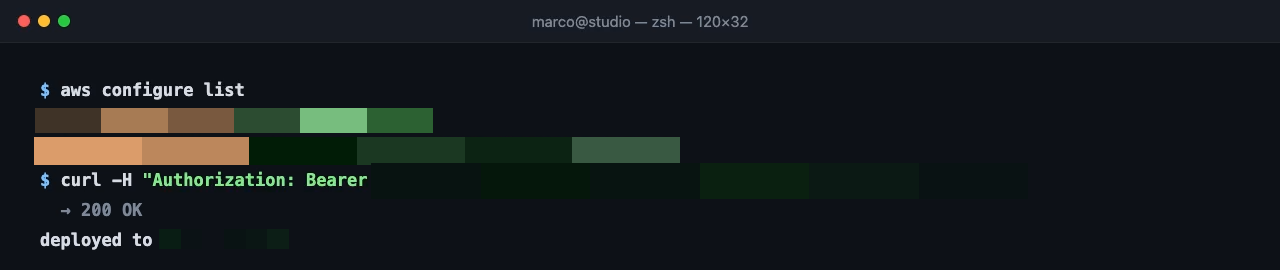
The same frame, decoded back out of the exported MP4. The values are mosaicked out of the pixels. The command around them stays readable.
Inspiration
Social media is the fastest way to leak your own private information, and almost nobody does it on purpose.
A streamer alt-tabs and their email client is on screen for two seconds. A tutorial video shows a terminal with a live API key in it. Someone films an unboxing and the phone number on the shipping label is legible for a frame. A creator demos an app and a real customer's email and phone are sitting in the dashboard. A payment screen flashes a card number. A QR code — a boarding pass, a wifi code, a 2FA enrolment — stays in frame long enough for anyone to scan on pause. Somebody's face walks through the background of a shot they never agreed to be in.
The thing all of these have in common is that they last a second or two, and nobody watching the playback is auditing pixels — they are watching the content. By the time someone points it out in the comments, the video has been downloaded, clipped, and reuploaded. You cannot unpublish a phone number.
What makes this a workflow problem rather than a discipline problem is volume. Creators publish constantly, often daily, frequently on a same-day turnaround. Nobody is going to scrub a timeline frame by frame before every upload, and the current advice — "just be careful" — has failed every single time this has happened. It is a job for software, and it is the last unautomated step before publish.
What it does
ScreenSafe is a privacy linter for video. It is the automated check that runs between "done editing" and "upload." You drop in a file and it:
- Samples the video at 2 fps and skips frames where nothing changed.
- Reads each changed frame with OCR, and looks for faces and QR codes.
- Classifies what it finds with 34 deterministic detectors — API keys and tokens, emails, phone numbers, SSNs, payment cards, IBANs, database connection strings, IPs, plus faces and QR codes.
- Groups repeated sightings into one finding with a time range, instead of one row per frame.
- Lets you review every finding, with values masked so the review queue is not itself a leak. Everything is redacted by default — you opt things out, never in.
- Exports an H.264/AAC MP4 with mosaics burned into the pixels.
- Verifies the result by re-running the entire detector pipeline over the exported file.
That last step is the one I care most about. On the bundled 22-second sample, the source scan finds 13 exposures and the rescan of the export finds 0. A redaction tool that never checks its own output is asking you to take its word for it.
The review step is deliberate rather than fully automatic. A creator often means to show their business email or their own face, and a tool that silently blurred them would be useless. So ScreenSafe covers everything by default and asks you to release what you meant to publish — the safe direction to fail in.
The whole thing runs in the browser. There is no backend, no account, no upload. Which matters more than usual here: the entire point is that this video contains something private, and shipping it to someone else's server for scanning would be an odd way to protect it. The OCR data, face model, and encoder are all served from the repo, so a scan makes zero third-party requests — including no CDN fetch for models, which is the usual quiet leak in browser-ML demos.
How I built it
React, TypeScript, and Vite on the front, with the actual work done by:
- Tesseract.js in a pool of 4 Web Workers for OCR. Frames are inverted before recognition when they are dark, because Tesseract is trained on dark-text-on-light-paper and a lot of creator footage is terminals, editors, and dark-mode apps.
- MediaPipe BlazeFace for faces, run over the full frame and over overlapping native-resolution tiles so smaller faces stay above the detector's floor.
- jsQR for QR codes, wrapped in a validator that checks payload printability, quad geometry, side ratio, interior angles, and pixels-per-module.
- WebCodecs + mp4-muxer for the export, with a MediaRecorder/WebM fallback for browsers without WebCodecs.
Detection rules are patterns plus validators rather than a model, so they are readable and you can tell exactly what they do: a card has to pass Luhn, a JWT has to decode, an IBAN has to checksum. Findings are tracked across time, deduplicated, and padded outward in both time and space, because over-blurring is recoverable and a leak is not.
Challenges I ran into
Two QR codes in one frame decode to nothing. Not "one of them" — nothing at all. jsQR returns a single result per call, and when two codes are present its locator pairs finder patterns across both of them and every candidate quad fails validation. I measured this in every arrangement I tried. The fix is to paint out each decoded region and re-scan, then also sweep the frame in overlapping tiles.
jsQR also hallucinates codes. Over 359 frames of real webcam footage containing no QR code at all, it returned three "successful" decodes — one with sides differing by 280x and interior angles of 0.6 and 179 degrees, another cramming 21 modules into 5 pixels. All three decoded to empty payloads. They became high-severity findings with enormous blur boxes over the speaker's face, because the old size check measured the bounding box of that collapsed quad rather than the quad itself.
Face tracks got hijacked. Track association allowed a match to move 3× its size + 40px between samples, which is sensible for scrolling text and about 1400px for a head-sized box. Any face-shaped blob in the frame joined the nearest real face's track and inherited its confidence: a 0.53 detection over a chair rode along on a 0.97 face and became a second redaction the reviewer could not dismiss on its own.
And it hallucinated faces in a video with no people in it. My synthetic demo is a code editor, and it produced two "Face" findings at 46% and 48%. Within a single frame you can drop a doubtful box next to a confident one, but footage with no faces has nothing confident to compare against. Judging each track by the best score it ever reached fixed it — real faces measure 0.72 to 0.94 — while keeping the weak frames of a genuine face covered.
The mosaic was measured wrong, and a face survived it. The strength rule was a fixed block size, which quietly meant the number of surviving cells grew with the region. A line of text got 33×2 cells and was destroyed; a 446×485 face got 35×38 and stayed plainly recognizable in the export. Re-running the face detector on the redacted pixels found it again at 0.89 confidence. The rule had passed every test it had, because nothing ever checked what survived. Pinning a cell count instead of a block size fixed both ends.
The exporter silently produced files with holes in them. mp4-muxer rejects a non-zero first timestamp by default, and the first frame a video element presents is not reliably at exactly 0. The rejection threw inside VideoEncoder's output callback, where nothing awaited it — so the frame vanished, the encoder was poisoned, and the export finished and reported success over a damaged file. For a redaction tool that is not a degraded output, it is a wrong one.
Seeking to every frame was pathologically slow. Keyframes sit two seconds apart, so seeking to each of 660 frames re-decodes up to 60 frames each time, roughly 20,000 decodes for a 22-second clip. Playing the video and catching frames through requestVideoFrameCallback decodes each one exactly once and is about 20× faster.
Accomplishments that I'm proud of
The export is verified, not asserted. tools/verify-e2e.html scans the sample, exports it, decodes the exported file, and runs the same detectors over the output. 13 exposures in, 0 detectable out.
It fails closed everywhere. If OCR fails on any frame the scan throws rather than returning a short list you would read as "all clear." If one frame fails to encode there is no file at all. If the tab is hidden the export refuses to run, because a backgrounded tab reports a currentTime it is not actually presenting and the compositor could hand the encoder a stale frame.
131 deterministic tests, including false-positive traps: checkerboards, window grids, barcodes, and dithered gradients that a naive QR detector reports as codes.
Nothing leaves the machine. No backend, no account, no third-party request during a scan — which means a creator can run it on footage they would never upload to a scanning service.
What I learned
That a privacy tool failing quietly is worse than no tool at all, because you ship anyway and you feel fine about it. Most of my design decisions came from asking what happens when a stage fails, and making that outcome loud.
That you have to be careful about what your evidence actually shows. My mosaic testing proves the face detector no longer re-identifies a redacted face. That is the strongest measurement I have, and it is not the same claim as "no human could identify it." I went back through the README, the UI copy, and the code comments to scope every claim to what was measured — including replacing a line calling Gaussian blur "a reversible convolution," which is stronger than the forensics supports.
And that tests only cover what you thought to check. The mosaic bug passed every test it had while leaving a recognizable face in the output, because no test asked what survived the redaction.
What's next for ScreenSafe
- Into the publishing pipeline. The natural home for this is between export and upload: a watch folder, a batch mode for a content backlog, or a step in a scheduling tool that refuses to publish a video with unreviewed critical findings.
- More languages. OCR is English-only today, which is a hard limit for a creator audience that is not.
- Real-world objects. License plates, street signs, and addresses are out of scope, because text detection wants legible, roughly upright text — the normal case on a screen and the hard case out in the world. That needs a different detector, not a wider regex.
- Faster scans on camera footage. Change gating is what makes a screen recording cheap to scan (21 of the sample's 45 frames get skipped). Handheld video changes every frame, so the gate rarely fires.
- Longer videos, via chunked processing so a 30-minute stream VOD does not have to be held in memory.
- Audio. Right now a spoken password or an address read aloud sails straight through.
Built With
- blazeface
- canvas
- computer-vision
- html5-video
- javascript
- jsqr
- mediapipe
- mediarecorder
- mp4-muxer
- ocr
- offscreencanvas
- react
- tesseract.js
- typescript
- vite
- web-workers
- webcodecs


Log in or sign up for Devpost to join the conversation.