-
-
thumbnail
-
system architecture
-
finding venues with qloo
-
media analysis pipeline
-
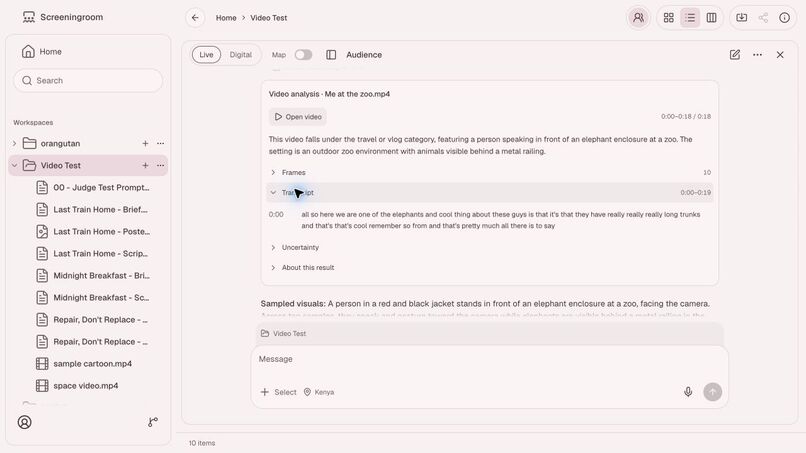
media analysis
-
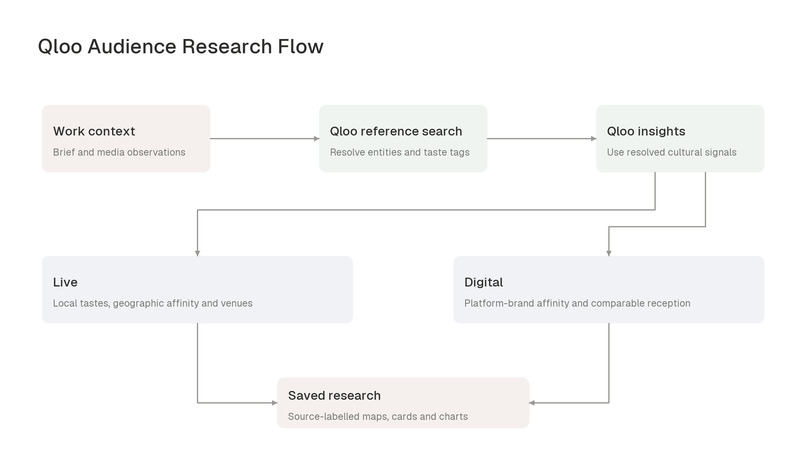
qloo audience research flow
-
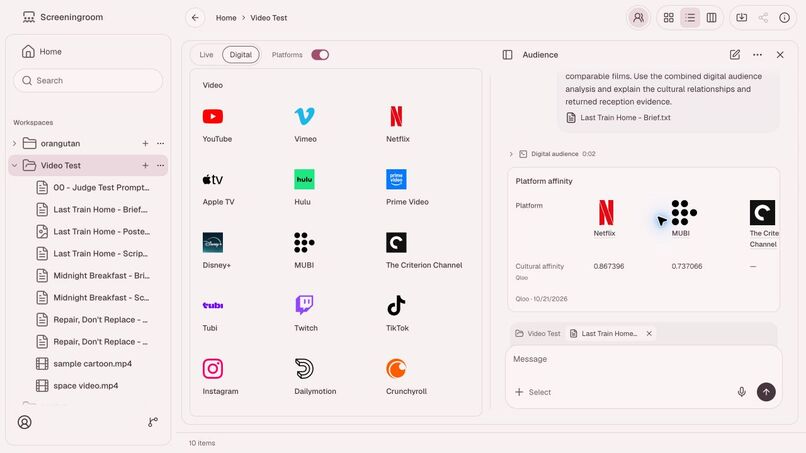
determining platform affinity
-
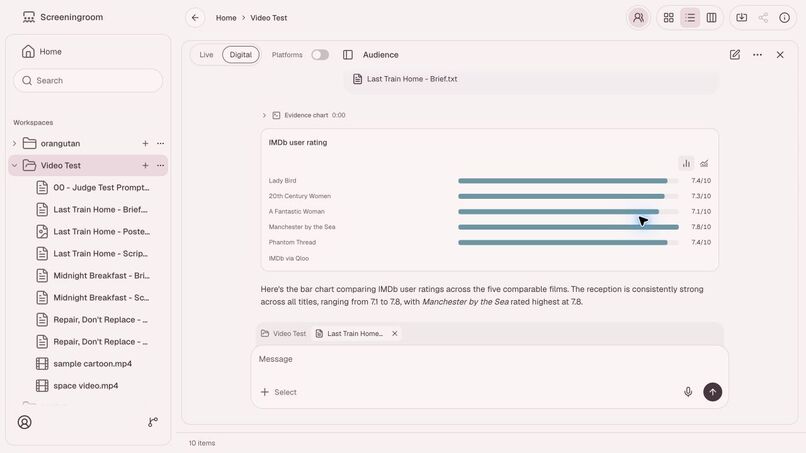
comparing evidence
-
finding live locations with qloo
Screening Room: finding an audience for your work
Screening Room helps creators find audiences for the work they make. A filmmaker can bring a film or a brief, a musician can bring a recording, and a writer can bring text, then investigate who may connect with it and where to reach them. The application analyzes the material and uses Qloo's cultural relationships to explore audience interests, geographic areas, venues, and digital platforms.
Try Screening Room · Source code and MIT license
Inspiration
You have made a film, recorded a song, or written a book. Now you need to decide who to put it in front of. Which interests connect people to this kind of work? Should a video's distribution research start with YouTube, Netflix, or another platform? Would a live performance find a more relevant audience in New york or seychelles? Making the work and finding its audience are two decisions, and the second needs evidence about people, places, and cultural interests.
A work can also find its audience long after its first release. The British Film Institute describes how The Shawshank Redemption struggled at the box office in 1994, subsequently became a widely rented VHS release in 1995, and reached television audiences through repeated TNT broadcasts beginning in 1997. The same film reached people through different release channels over time. Read the BFI account.
Screening Room exists to help a creator investigate that connection between a work and its possible audience. The user brings the material and asks who it might resonate with and where to take it. Qloo supplies cultural relationships among comparable works, interests, places, and brands. Screening Room uses those relationships to help the creator identify audiences to investigate, venues to consider, and digital platforms to research.
What it does
Bring the work you want to find an audience for
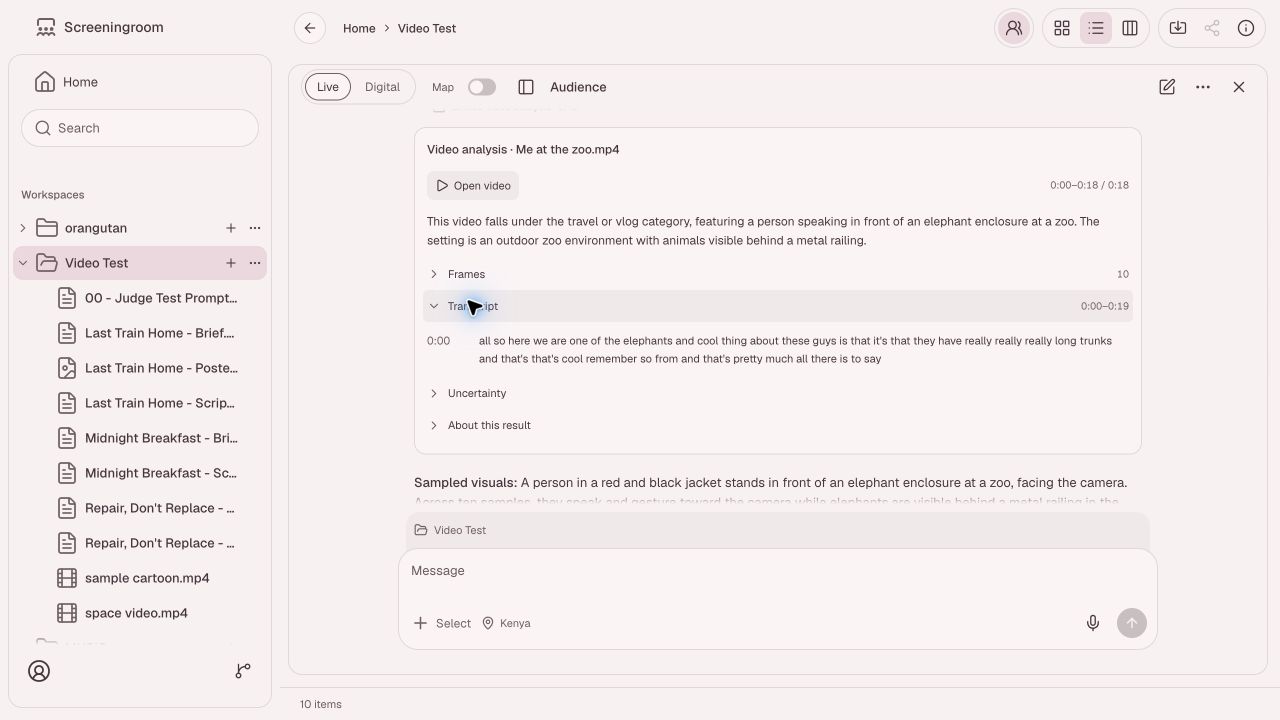
Users bring briefs, scripts, images, audio, video, and supported links into a workspace, then select the material they want the assistant to use. The application reads selected text, inspects images, samples video frames, and transcribes processable audio. Public YouTube videos can use a direct Gemini analysis path. The resulting observations and transcripts provide context for the conversation and remain available for follow-up questions.
For an original production, the assistant identifies relevant existing works or supported taste tags. It resolves those references through Qloo before using them in audience queries. This connects the characteristics of a new work to cultural relationships that the user can inspect.
Decide where to look for that audience
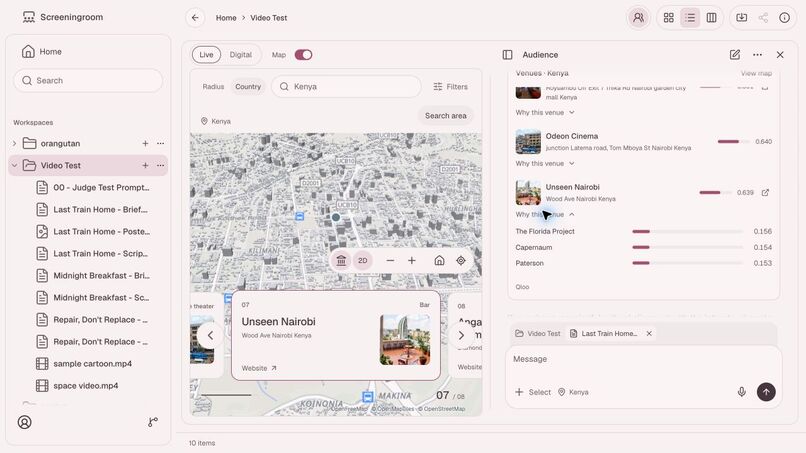
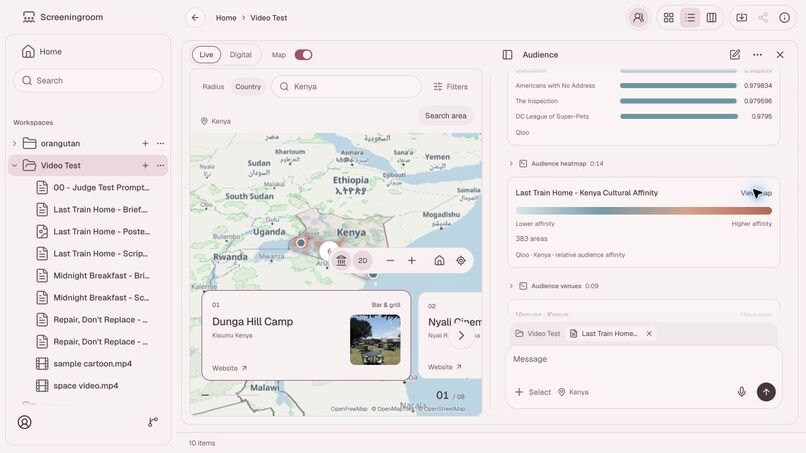
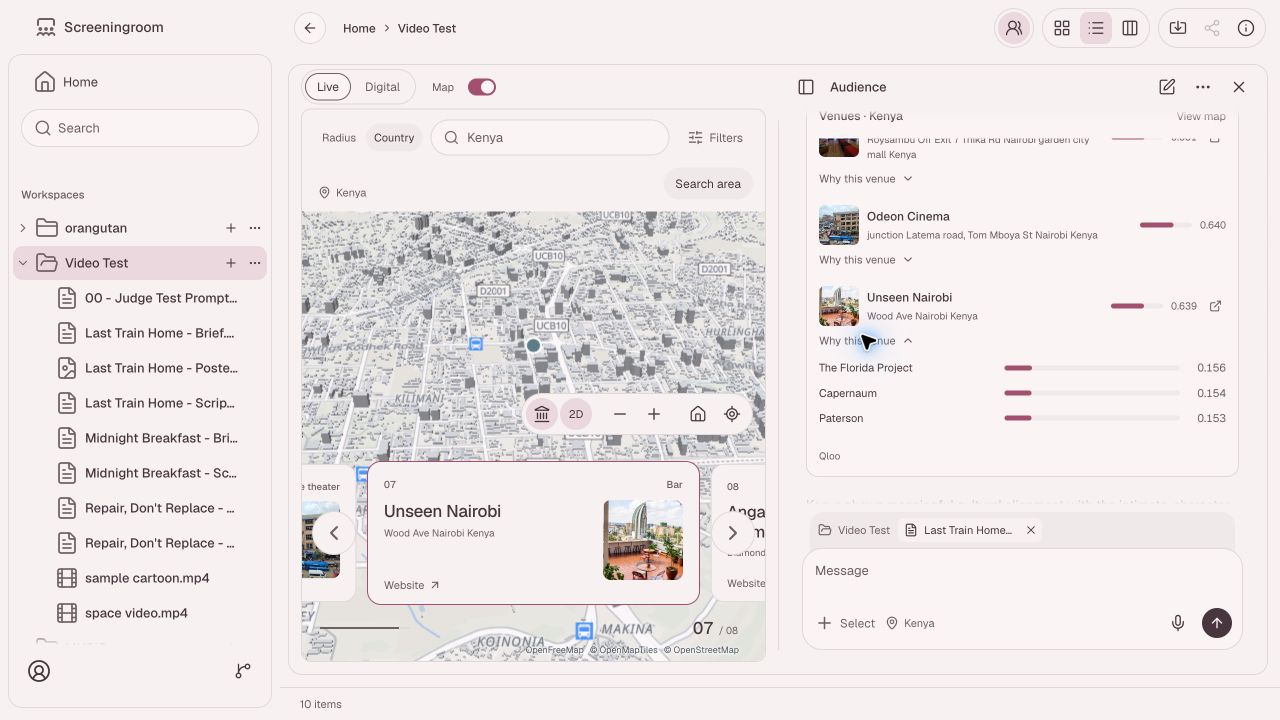
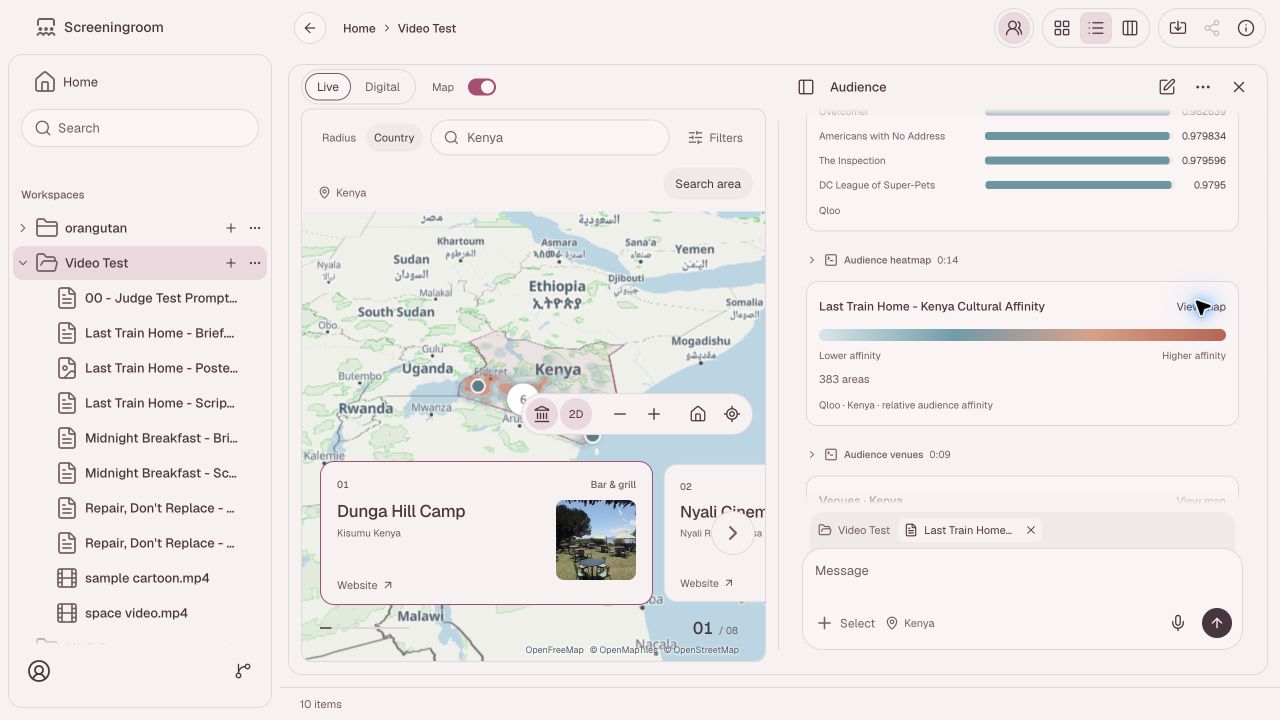
Live helps investigate where to screen, perform, or exhibit the work. A creator chooses a location and radius or an entire country, then explores local cultural interests and geographic affinity for relevant references. The assistant can retrieve possible venues using the same cultural signals. Selecting a venue focuses it on the map, and its explanation shows which references contributed to the result.
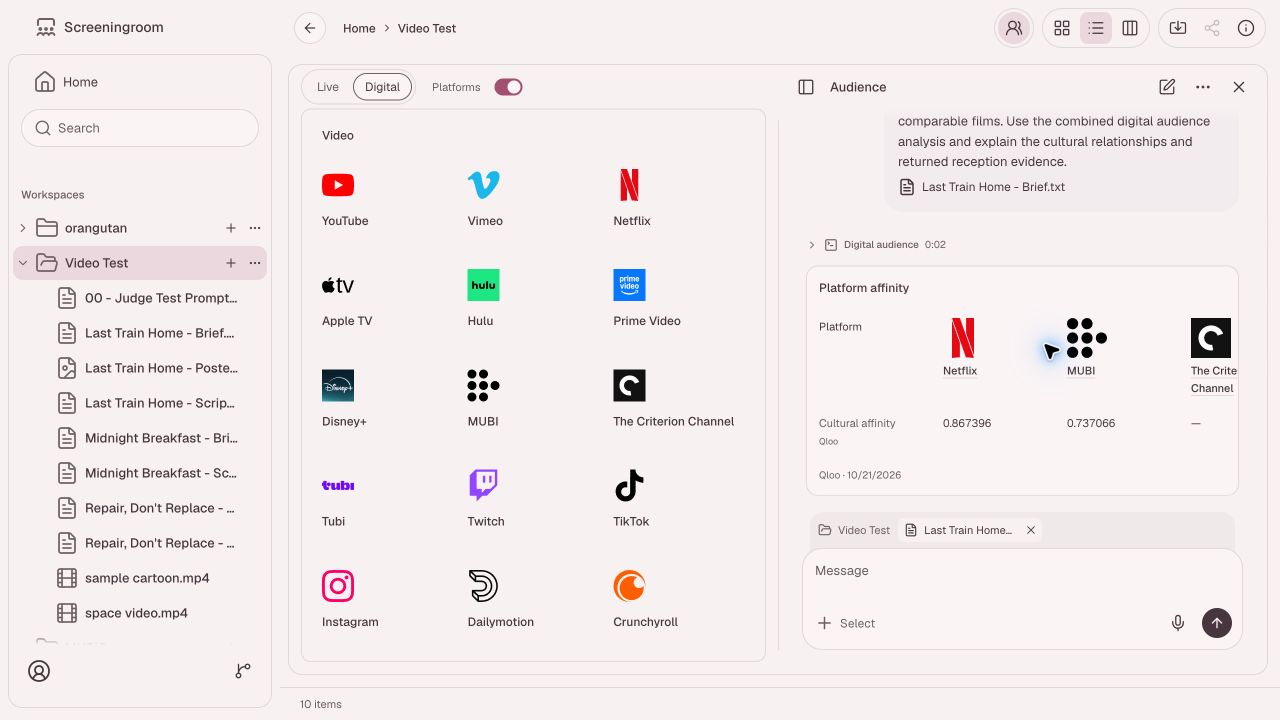
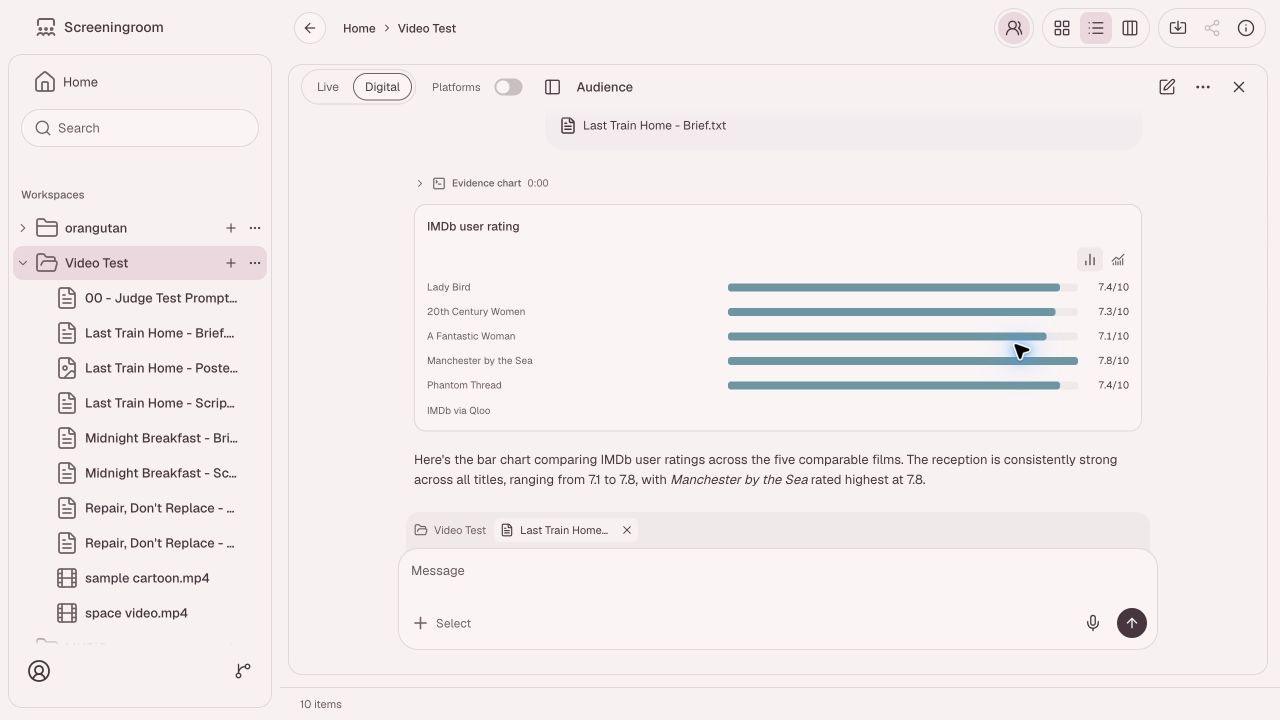
Digital helps investigate online audiences and potential distribution platforms. Starting from the work's themes and cultural references, the assistant explores audience interests, compares relevant platform brands through Qloo, and retrieves reception evidence for comparable works. A creator can examine how those connections support a possible platform choice and ask for a comparison or chart using the same evidence.
Follow one investigation
We tested the workflow with Last Train Home, a fictional short-drama brief already in the demo workspace. It describes a bakery worker returning from an unsuccessful music audition and a conversation about rejection, family, and belonging. We selected the brief and asked the assistant to investigate an audience in Kenya.
For that sample brief and query, the live request returned local film affinities, a geographic heatmap containing 383 areas, and eight venue results. Opening Unseen Nairobi's explanation exposed contributions from references including The Florida Project, Capernaum, and Paterson. Switching to Digital returned platform-brand affinities and a reception comparison containing Lady Bird, 20th Century Women, and other films.
Try the workflow
Open the application and use its Demo action to fill the sign-in form, then choose Sign in. The Info control opens a scripted walkthrough. To run an investigation, open a workspace, open Audience, and use Select in the composer to attach a brief or supported media file. Choose Live or Digital and ask a question about the selected work. Reopen the conversation to inspect its saved results or continue the research.
How we built it
Qloo and the agent
Qloo provides the cultural relationships used to investigate a work's audience. It connects supported films, artists, books, games, interests, places, and brands, giving the assistant evidence for questions such as which local tastes relate to a film or which platform brands align with its references. That connection is the basis of Screening Room's Live and Digital research.
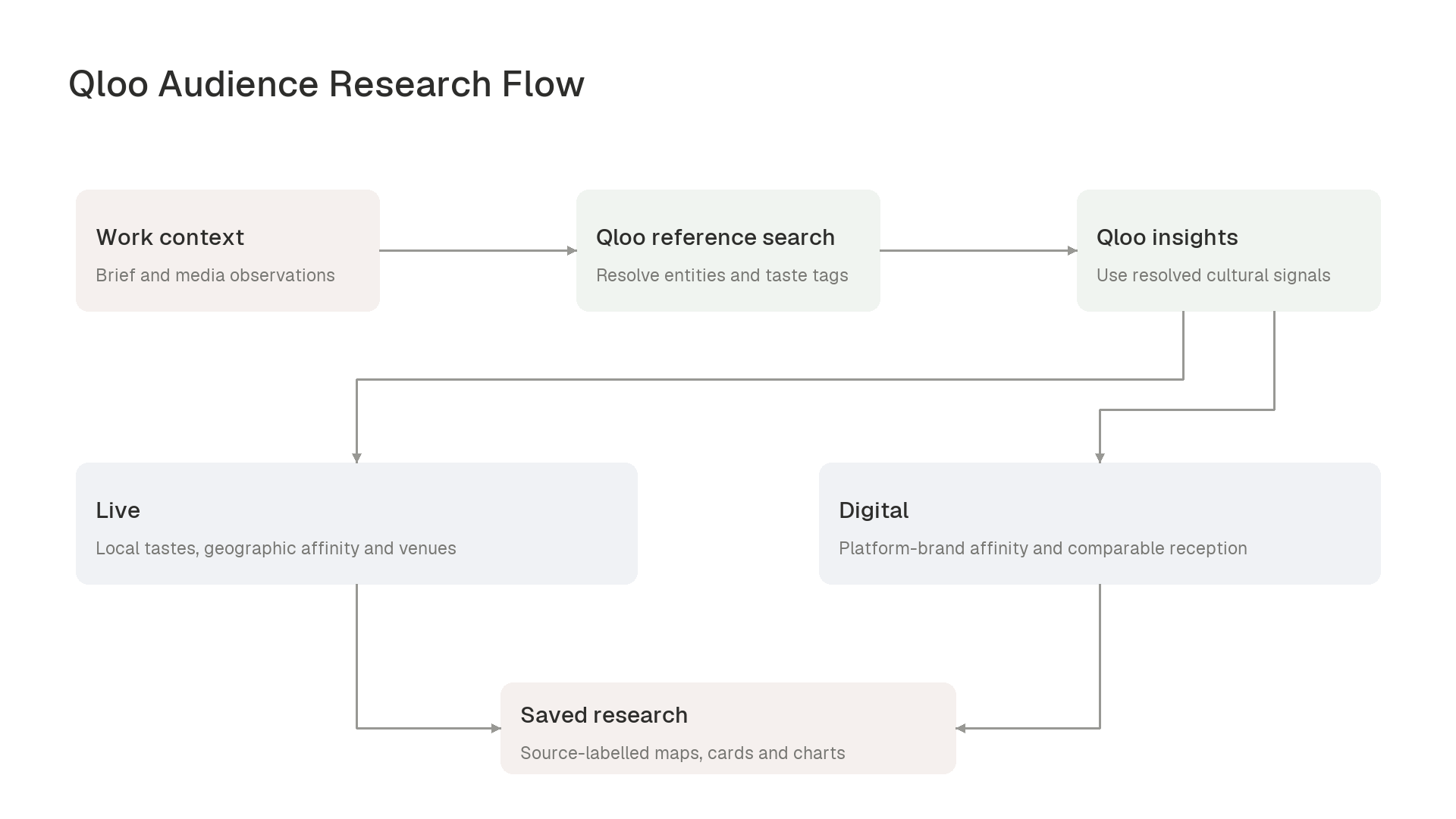
The agent starts by understanding the user's work from a substantive brief or selected-media observations. For an original production, it identifies relevant existing works or taste tags and resolves them through Qloo. It then queries the cultural relationships for those references and uses the returned evidence to investigate audience interests, geographic areas, venues, or platform brands. The model's interpretation of the work and Qloo's returned signals remain identifiable throughout the result.
We built this workflow with the Vercel AI SDK's ToolLoopAgent, a conversational model on Bedrock, and typed server tools for Qloo queries. Zod schemas validate results before the interface renders maps, cards, tables, or charts. Reference contributions help explain individual recommendations, and structured results save with the conversation so a creator can inspect the basis of an answer and continue from the same evidence.
Brief or selected-media observations
                 |
                 v
Agent establishes the work
                 |
                 v
Qloo: resolve entities and taste tags
                 |
                 v
Qloo: query cultural relationships
                 |
         +-------+-------+
         |               |
         v               v
       Live            Digital
  Local tastes     Platform brands
  Geographic       Comparable-title
  affinity         reception
  Venue affinity
         |               |
         +-------+-------+
                 |
                 v
Source-labelled maps, cards and charts
                 |
                 v
Saved conversation evidence
Media analysis
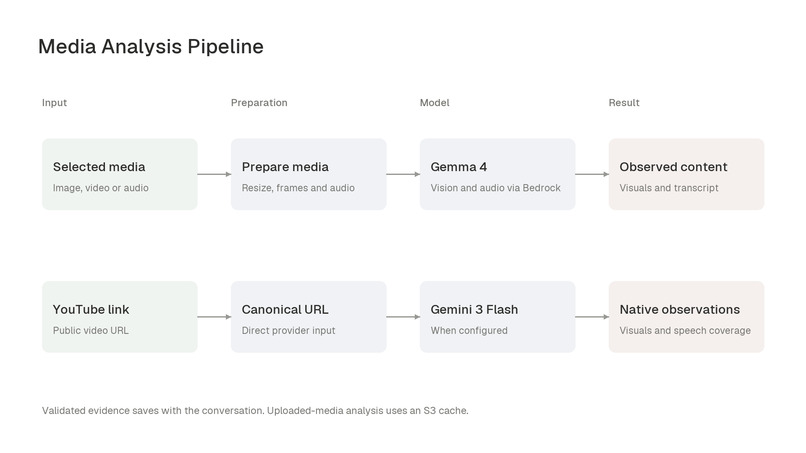
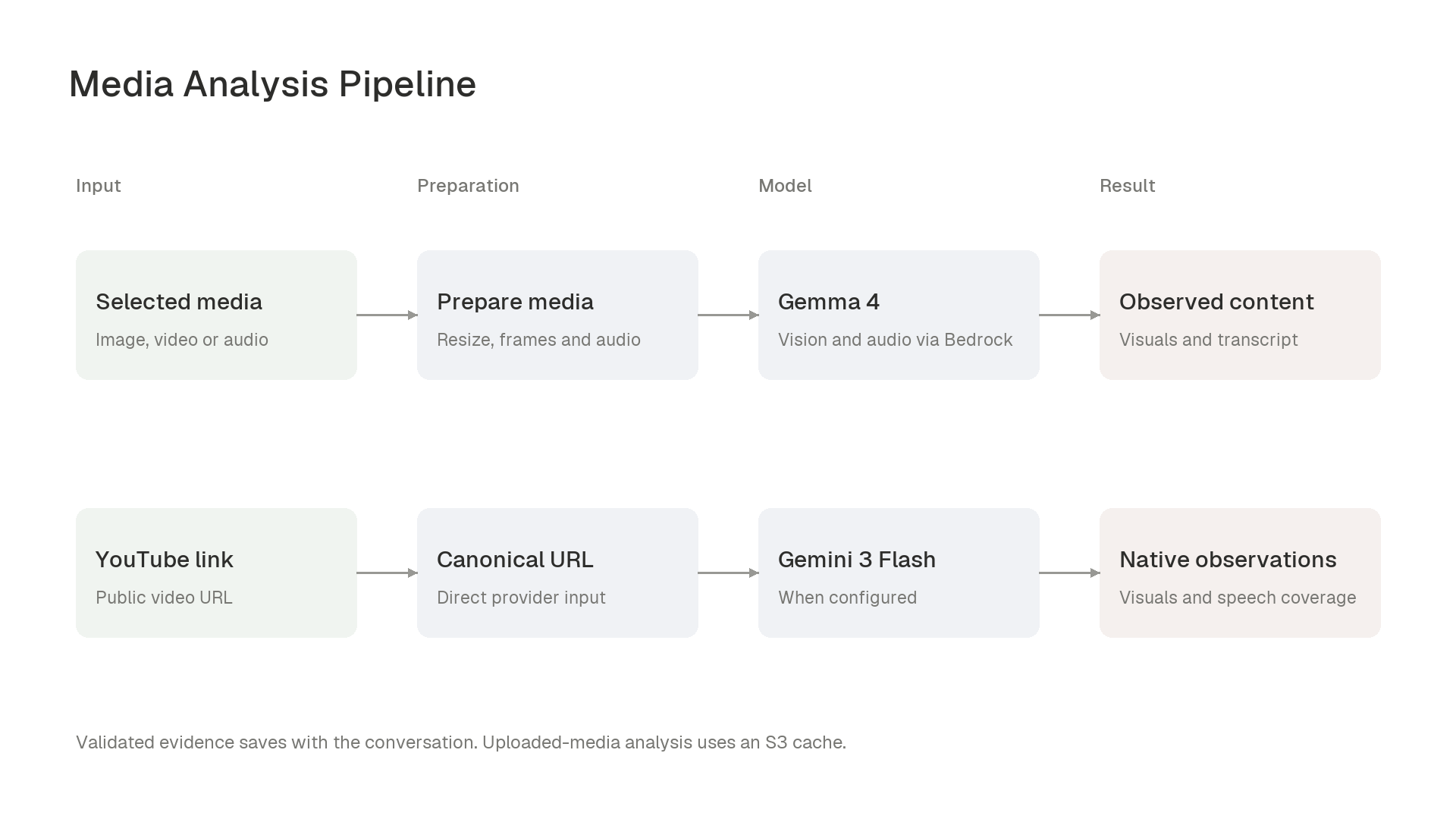
The assistant invokes structured media tools for the selected source. Uploaded images are resized before vision analysis. Video and audio processing uses FFmpeg and FFprobe to prepare representative frames and audio windows for Gemma 4 models through Bedrock. A configured Gemini path sends public YouTube URLs directly for native video analysis. Each result records its observations and processing coverage, and successful uploaded-media analysis can be reused from an account-scoped S3 cache.
Selected image / video / audio
             |
             v
Resize / FFmpeg / FFprobe
             |
             v
Gemma 4 via Bedrock
             |
             v
Visual observations / transcript coverage

Public YouTube URL (when configured)
             |
             v
Gemini native video analysis
             |
             v
Timestamped observations / speech

Validated results -> saved conversation
Uploaded-media results -> owner-scoped S3 cache
Application and persistence
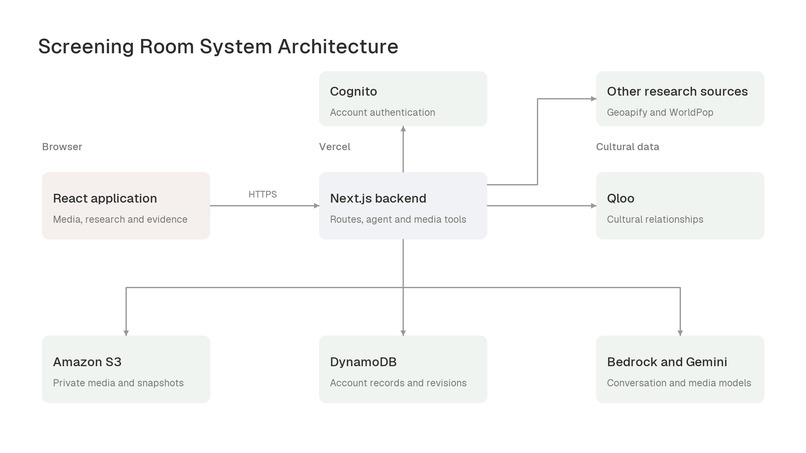
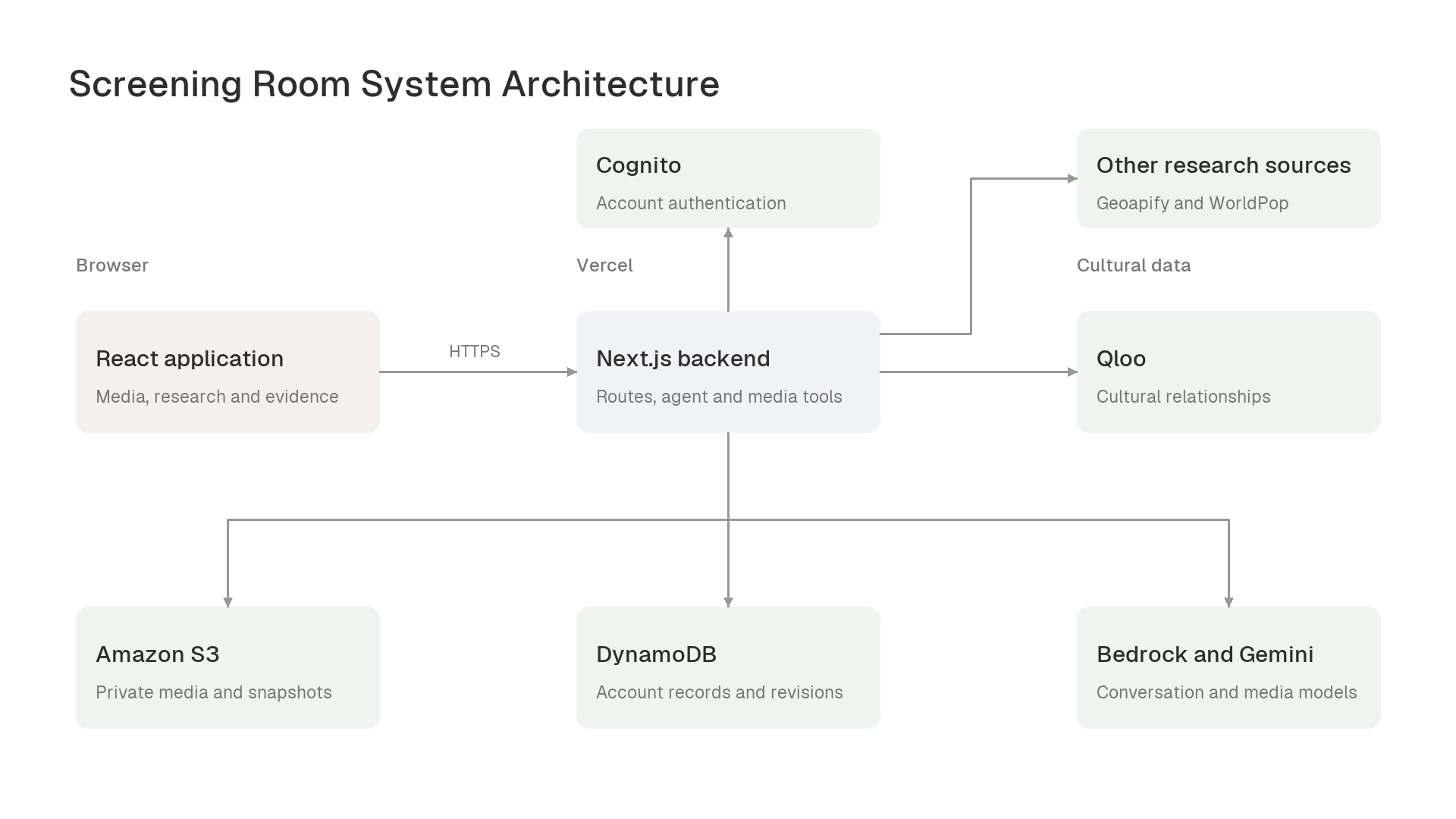
The frontend uses Next.js, React, TypeScript, and component-specific CSS. Next.js server routes run alongside the application on Vercel. Cognito authenticates requests through HttpOnly session cookies. S3 holds private project files, workspace snapshots, and analysis assets; DynamoDB stores account records and the revisions used to commit changes. The server derives file ownership from the authenticated account.
Browser: React workspace
          |
          v
Next.js server routes (Vercel)
  |
  +-- Cognito: session verification
  +-- AI SDK agent
  |     +-- Bedrock: conversation and media models
  |     +-- Gemini: configured YouTube analysis
  |     +-- Qloo: cultural research
  |     +-- Geoapify / WorldPop: other research
  |
  +-- S3: private media, snapshots and analysis cache
  +-- DynamoDB: account records and revisions
WorldPop supplies dated modeled population estimates when requested, and Geoapify is supported as a configured venue-catalogue source. Their results retain their own provenance alongside Qloo research.
Challenges we ran into
Connecting original material to a cultural catalogue required an explicit intermediate step. A new short film may have no existing entity in Qloo. We separated media understanding from reference resolution: the model identifies relevant characteristics, Qloo resolves supported references, and subsequent queries use those IDs. Keeping that chain visible makes the research traceable.
Media analysis required careful control of the input. Video frames and spoken words carry different information, so the pipeline records sampled visual observations and transcript coverage separately. Preparing a source once and caching successful results avoids repeating downloads and extraction for the same material. When one part fails, the result retains the evidence that was actually processed and surfaces the failure.
Different research signals also needed different presentations. Geographic affinity, venue affinity, platform-brand affinity, and published title ratings use distinct scopes and scales. We preserved those distinctions in the result schemas and interface, and derived charts from validated evidence rather than asking the language model to invent chart values.
Accomplishments that we're proud of
The core workflow now takes a creator from their own material to an audience investigation they can inspect: relevant cultural references, geographic signals, possible venues, and digital platform comparisons. We ran the Kenya and Digital investigations through the deployed application while preparing this submission, then generated a comparison chart from the saved reception evidence.
Research remains attached to its project context. Users can reopen source material, inspect a venue's contributing references, and request another view of existing evidence. The same workspace supports text, image, video, and audio inputs, while the server applies account ownership checks to stored files and research context. The repository includes an MIT license.
What we learned
Finding an audience starts with understanding what is distinctive about the work, then connecting those characteristics to evidence about cultural interests. The choice of comparable references matters: it determines what the subsequent audience research is actually about. Making those references and their contributions visible gives the creator a way to question and refine the recommendation.
We also learned to preserve the meaning of each result throughout the interface. Naming a value's source, unit, and query scope is part of the product's behavior. It allows a creator to compare supported evidence and ask a more specific next question.
What's next for Screening Room
Further work could add richer document extraction, saved research exports, and a clearer comparison workflow across investigations. Broader evaluation across media, languages, and locations would also help assess how well the selected references represent each source work. These additions would help creators carry a documented research finding into a screening proposal, release plan, or audience test.
