
Inspiration
We're living in the age of technology, where the average person spends seven hours daily staring into screens, whether for work, school, or leisure. Yet we rarely pause to consider the physical toll: poor posture leading to neck and back pain, reduced blinking causing eye strain, and increasingly, long-term vision problems. We also know there are people for whom this strain builds up even faster, including those with sensory sensitivities. One of our project founders has monocular vision and a very limited “safe” screen time window; by the time their eye feels strained, it’s often already too late. For them, small moments of discomfort can quickly turn into real barriers to learning. Screen Care is our way of making screen time more inclusive by adding a protective layer, looking out for everyone, not just the “average” user.
What it does
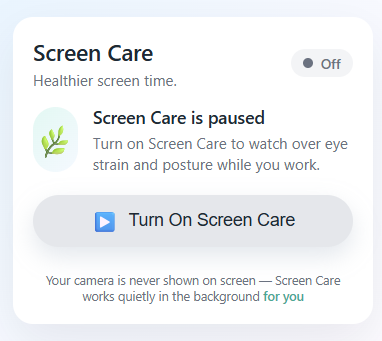
Screen Care is a smart health guardian that monitors your screen time as you work. It uses computer vision to detect two key health markers:
- Posture distance: Measuring how close your face is to the screen and alerting you when you drift too close.
- Blink rate: Tracking your natural eye blinks and warning you when reduced blinking indicates eye strain.
When issues are detected, Screen Care displays a non-intrusive alert that interrupts your workflow just enough to remind you to adjust, then automatically disappears once resolved. It tracks posture status, face detection, and eye health metrics, providing real-time feedback and a means to self correct.
How we built it
- Backend (Python + Flask): A Flask REST API runs locally and directly accesses your webcam using OpenCV with Windows DirectShow backend. MediaPipe Face Detection measures real-time face bounding box size relative to frame (posture proxy), and MediaPipe Face Mesh provides 468 facial landmarks for precise eye tracking.
- Eye Detection (MediaPipe + EAR): We implemented Eye Aspect Ratio (EAR) calculations on specific eye landmarks to detect blinks, with tuned thresholds (EAR < 0.3 for 3+ consecutive frames = confirmed blink).
- Rolling Window Smoothing: Rather than react to every frame, we use 10-second rolling windows (300 frames @ 30fps) to smooth noise. Posture alerts trigger on percentage-based thresholds (50% bad posture, 60% warning+bad combined).
- Blink Rate Tracking: A sliding 60-second window of blink timestamps detects when your blink rate drops below 11 blinks/minute, a sign of digital eye strain, and 7 blinks/minute, a sign of a more serious eye strain.
- Frontend (Chrome Extension + Offscreen API): A lightweight Service Worker polls the Flask backend every 500ms. When alerts trigger, we use Chrome's Offscreen API to display full-screen modals visible across the browser.
Challenges we ran into
- Windows Camera Access: Initial attempts with standard OpenCV failed until we switched to the DirectShow backend (cv2.CAP_DSHOW), a Windows-specific solution that required debugging environment-specific issues.
- Blink Detection Sensitivity: Eye blink detection is surprisingly tricky. We iterated through multiple EAR thresholds and consecutive frame counts. Too sensitive = false positives; too loose = missed blinks. We eventually matched a reference implementation pattern (ear_threshold=0.3, consec_frames=4).
- Full-Screen Alert Visibility: Getting alerts to appear on top of the browser window across all tabs proved difficult. Content script injection didn't reliably work. We solved this by pivoting to Chrome's Offscreen API, which creates a hidden document specifically designed for overlays—much more reliable than DOM injection.
- State Persistence: The extension state was resetting on restart. We solved this by separating concerns: the backend manages continuous detection in a daemon thread, while the extension acts as a stateless polling client that can be stopped/started without losing backend state.
- Flickering Alerts: Raw frame-by-frame detection created jittery, frequent alerts. We implemented rolling window averaging with configurable thresholds to smooth temporary fluctuations.
- Presage SmartSpectra Integration Failure: We initially attempted to use the Presage SDK for blinking and face metrics, but WSL2’s limited OpenGL ES support prevented the face-landmark graph from running at all. After hours of debugging SDK callbacks, protobuf structures, and GPU logs, we pivoted to our own MediaPipe based solution due to time constraints.
Accomplishments that we're proud of
- Fully Functional Real-Time Detection: Achieved simultaneous posture and blink rate detection with minimal latency (~100ms processing time per frame).
- Intelligent Alert System: Alerts only trigger based on trend data, not individual frames, reducing alert fatigue while maintaining sensitivity.
- Clean Architecture: Backend-first design decouples detection logic from UI, making the system modular and testable.
- User Privacy: The camera feed never leaves your machine. No cloud uploads, no data collection, no privacy concerns.
- Cross-Platform Browser Integration: Successfully integrated with Chrome using modern Manifest v3 APIs, avoiding deprecated methods.
- Eye Tracking Visualization: Implemented real-time eye landmark visualization (green/red dots) for debugging and user feedback.
- We are proud that we were able to achieve this with a light-weight model, with no use of AI.
What we learned
- Computer vision is difficult. Small threshold changes can develop into drastically different and unwanted behavior. We learned the importance of iterative tuning and visual debugging.
- Data processing matters. Raw sensor data is noisy. Rolling windows and percentage-based thresholds dramatically improved usage by reducing false positives.
- Architecture decisions early: Choosing to move camera access to the backend early saved us hours of browser based frame tunneling.
What's next for Screen Care
For next steps, we'd love to take Screen Care beyond the browser and turn it into a standalone desktop app that isn’t tied to Chrome, with the ability to truly lock the screen at the OS level when needed and even adjust screen brightness dynamically. The same core ideas could be used in other contexts too, like detecting driver drowsiness in cars by monitoring blink rate and fatigue signals. On the health side, historical analytics could be shared (with consent) with doctors or researchers, or used in partnerships with companies building new eye- and posture-friendly technologies, to see if their interventions actually reduce strain over time. Longer term, we’d like the system to adapt to each person’s natural blinking instead of using one-size-fits-all thresholds, so the experience stays personalized and open to new ideas.

Log in or sign up for Devpost to join the conversation.