-
-
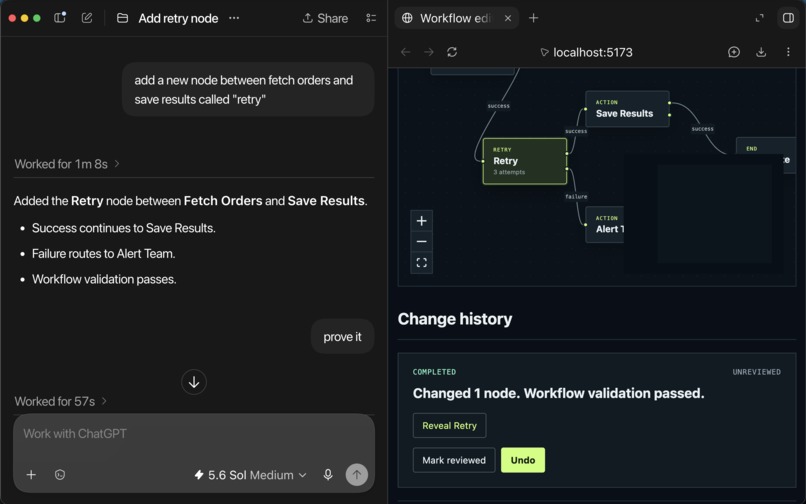
screenshot of chatGPT and the in app browser with the user requesting "prove it" and a flow editor on the right.
-
Inspiration
Screen reader tech has sophisticated ways of navigating web content, but reading complex UI such as diagrams, maps, charts, boards, slides, etc can quickly break down. With enough engineering investment, these applications can be exposed accessibly, often through alternative presentations (for example a visually hidden table of data), but even then they require a lot of navigation and working memory to understand the whole picture.
AI can make this easier by interpreting and operating on the user's behalf, but there’s still a gap in the verification step. Spot-checking a result can mean laboriously retracing a complex UI, asking a sighted person, or trusting the agent without an independent way to verify its work.
The same people who get the most out of AI cannot always get the proof they need to trust it.
A study of 16 programmers who use screen readers backs this up, showing that the most time-consuming part of their workflow was verifying agent output. Participants had a hard time tracking the scope and location of changes, verifying results across multiple views and determining if the agent had completed every requested task.
What it does
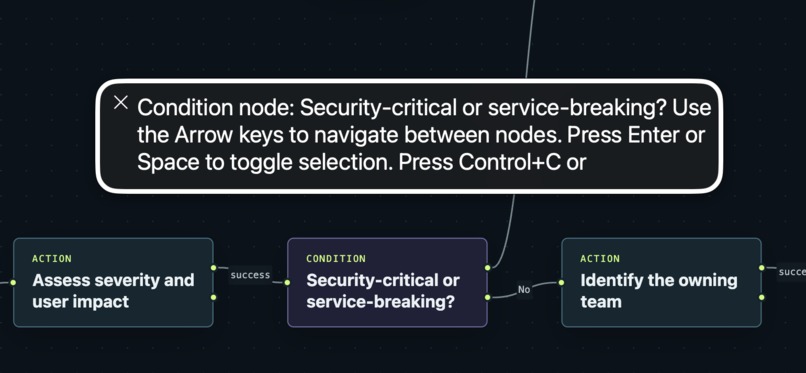
The application itself is a multi-purpose 2D flow diagram editor. Users can add, edit, and delete nodes, create or delete connections to represent workflows and sequences. It is keyboard accessible and screen reader accessible, insofar as a UI like this can be.
WebMCP plays several important roles: it exposes tools to create and edit complex flows and deep link to a part of the UI for evidence of an action; effectively a shortcut to evidence that a change took place. It works with a text or image prompt to generate complex, inspectable flows. The response that includes fields for changes in the application’s state, so that agents and screen reader users can verify the change. The list of state changes can support other evidence the agent gathers from the UI state (via screenshotting or the accessibility API diffs), but most importantly, they can be inspected by a screen reader user to get confidence.
Impact
An assistive technology user can hand off a complex task without giving up the ability to fully understand the result. Verification is fast and reliable and doesn’t replay the same complexity the agent abstracted away. This improves user confidence, removes barriers, and unlocks creativity.
How I built it
I built a workflow editor with a 2D editable canvas that exposes tools to agents (and proximately to screen readers) via WebMCP. These include evaluation, editing, and undo tools, as well as a focus management tool. I used the webmcp-evals CLI to run evals and iterate on the tool definitions that worked well in this context and domain. Once I had the evals in place I was able to iteratively improve using Codex to increase the scores.
What I learned
Using evals and iterating on those helped me arrive at 100% completion rates with 2% of requests retrying due to errors; 9.52s (p50) duration. More data here. The webmcp-evals tooling drove vast improvements over my initial efforts. These gain we largely driven by reducing tool calls and better tool descriptions along with a more interpretable schema for the agent reducing errors and retries.
Early on I attempted to add detailed output that included a serialized output schema, but it had little impact on the results compared to simpler response strings, and cost roughly 45% additional input tokens per trial (very little change in output tokens). I adjusted my responses accordingly, and continued to iterate.
What's next
I'm continuing to work with screen reader users to iterate and improve on the UX, and intend to write up the results.
Research
Blind screen-reader users have described the cognitive burden of working with two-dimensional artboards even when object details and coordinates are available:
“It’s too much information and not enough at the same time.”
Schaadhardt, Hiniker, and Wobbrock, Understanding Blind Screen-Reader Users’ Experiences of Digital Artboards · Evidence discussion
Accessible tables are familiar and necessary, but they can still make overview and comparison difficult. One participant facing 393 rows said:
“I can’t really get a snapshot.”
Zong et al., Rich Screen Reader Experiences for Accessible Data Visualization · Evidence discussion
Blind users already test and cross-check AI rather than treating it as automatically reliable. One participant advised:
“Just play with it. Don’t rely on them.”
Alharbi et al., Misfitting With AI: How Blind People Verify and Contest AI Errors · Evidence discussion
Built With
- chatgpt
- codex
- react
- typescript
- webmcp


Log in or sign up for Devpost to join the conversation.