-
-
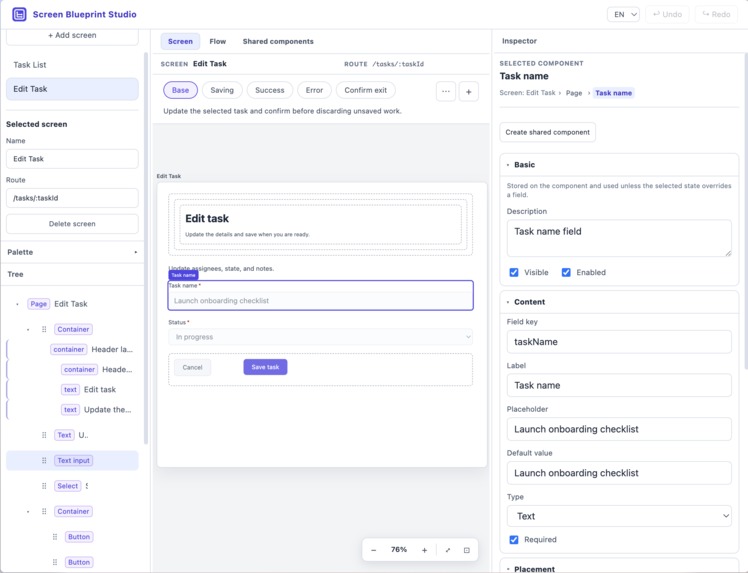
Editor overview
-
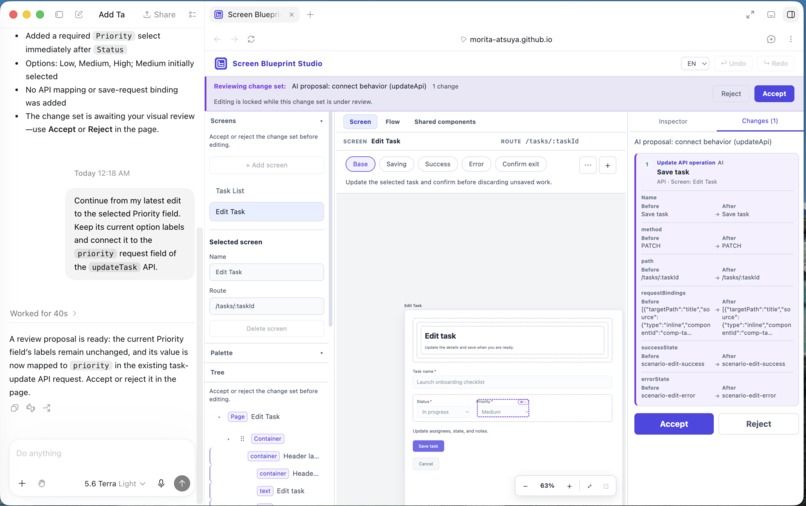
AI proposal
Screen Blueprint Studio — Project Story
Inspiration
Text and tables alone make it difficult to visualize a finished web interface, especially for non-engineers and people who have just joined a project. Adding wireframes helps, but teams still have to maintain the relationship between each part of the screen and each part of the specification. Every new field or layout change means updating the visuals, the specification, and the links between them.
We wanted to solve this problem not by collecting more documents in one place, but by making the wireframe and the specification two representations of the same structured data. When a screen is assembled from semantic UI components, its visible wireframe, states, behaviors, and API mappings can all live in one blueprint.
That structured model also creates a meeting point between human and AI strengths. People can look at the whole screen and make intuitive decisions about layout and wording. AI is good at working with text and structured data, applying repetitive changes, and maintaining relationships consistently. Asking it to infer a screen's meaning from screenshots and coordinates alone does not make full use of those strengths.
In Screen Blueprint Studio, people work directly on the canvas, while AI uses the same editing capabilities as named, typed WebMCP tools. WebMCP connects human visual judgment and AI's structural editing on the same live model.
What it does
Screen Blueprint Studio is a visual editor for building screen specifications from semantic UI components. People can arrange components and edit their content and behavior while viewing the screen. From the same blueprint, they can inspect screen states and transitions and manage how user actions relate to APIs.
Through WebMCP, AI can read the current screen, the selected component, and the latest values edited by a person. It can then update structure and behavior using typed operations and stable IDs. Proposed changes appear on the same canvas for a person to accept or reject. If the person adjusts the proposal in the UI, the AI can read and build on that result in its next action.
How we built it
First, we designed a conceptual model that connects UI components, states, behaviors, screen transitions, and APIs—not just their visual appearance. Next, we turned that model into an editor where people can work directly on the screen and visually inspect its states and relationships. Finally, we identified the available actions that play to AI's strengths, such as understanding text and structure or applying repetitive changes, and exposed them as WebMCP tools.
Challenges we ran into
The hardest design decision was choosing the right granularity for the tools exposed to an agent. Combining a wide range of actions into a few general-purpose tools produced oversized schemas, while splitting every UI action into its own tool would leave the agent with too many choices. Our first schema mirrored the domain model too closely: it was about 95 KB and contained 376 union branches. We kept the tools organized around user intent, simplified their inputs, and made detailed context available progressively. This reduced the schema to about 29 KB with no union branches, while strict validation remained inside the application.
Accomplishments that we're proud of
We are most proud of using WebMCP to build a collaborative workflow that plays to the different ways humans and AI understand information and interact, rather than forcing both through the same interface. People edit by viewing the entire canvas and using direct actions such as dragging and selecting. AI reads the same screen specification as text and structure, then changes it through named, typed tools. Because the wireframe and specification share one model, both approaches modify the same underlying work.
Comparing other ways to connect AI with an interface shows why WebMCP fit this division of roles:
| Approach | Strength | Weakness |
|---|---|---|
| In-app AI | A tailored experience with direct access to internal state | External context and confidential project information can be difficult to bring in |
| Backend MCP | Direct access to server-side data and external services | Browser-local state requires separate synchronization |
| Computer Use | Can operate existing interfaces without custom tools | Repetitive and bulk changes require many sequential UI actions |
| WebMCP | Exposes page context and semantic actions to the user's existing agent | Limited to actions designed and exposed in advance |
With WebMCP, the live page itself exposes its current context and meaningful editing capabilities. Users can give meeting notes or requirements to the agent they already use and ask it to update the screen without leaving that context behind. A person can then review and refine the proposal on the same canvas, and the agent can pick up the result again. Instead of making AI imitate human interaction, we connected people and AI in one creative workflow through interfaces suited to each.
What we learned
This project deepened our understanding of how people and AI process information and interact differently. LLMs are relatively strong at reading text and structured information and generating changes from it. People are relatively strong at visually grasping the whole screen and fine-tuning details through direct actions such as dragging and scrolling. Effective human-AI collaboration depends on designing for those differences, so each can contribute to the same work in the way that suits it best.
What's next for Screen Blueprint Studio
Product development has a translation problem. The same intent is repeatedly translated into meeting notes, requirements, designs, tickets, implementation, and tests, losing information each time. We want Screen Blueprint Studio to become a shared language across roles and between people and AI—one where decisions about an interface can be seen, understood, and carried forward as structure. Ultimately, we want ideas born in conversation to retain their meaning all the way through team agreement, implementation, and validation.
Built With
- react
- typescript
- vite

Log in or sign up for Devpost to join the conversation.