Inspiration
Getting an algebra problem wrong is frustrating when you’ve filled half a page and still can’t tell where you went off track. We wanted students to get feedback on the exact line they could fix while their reasoning was still fresh.
What it does
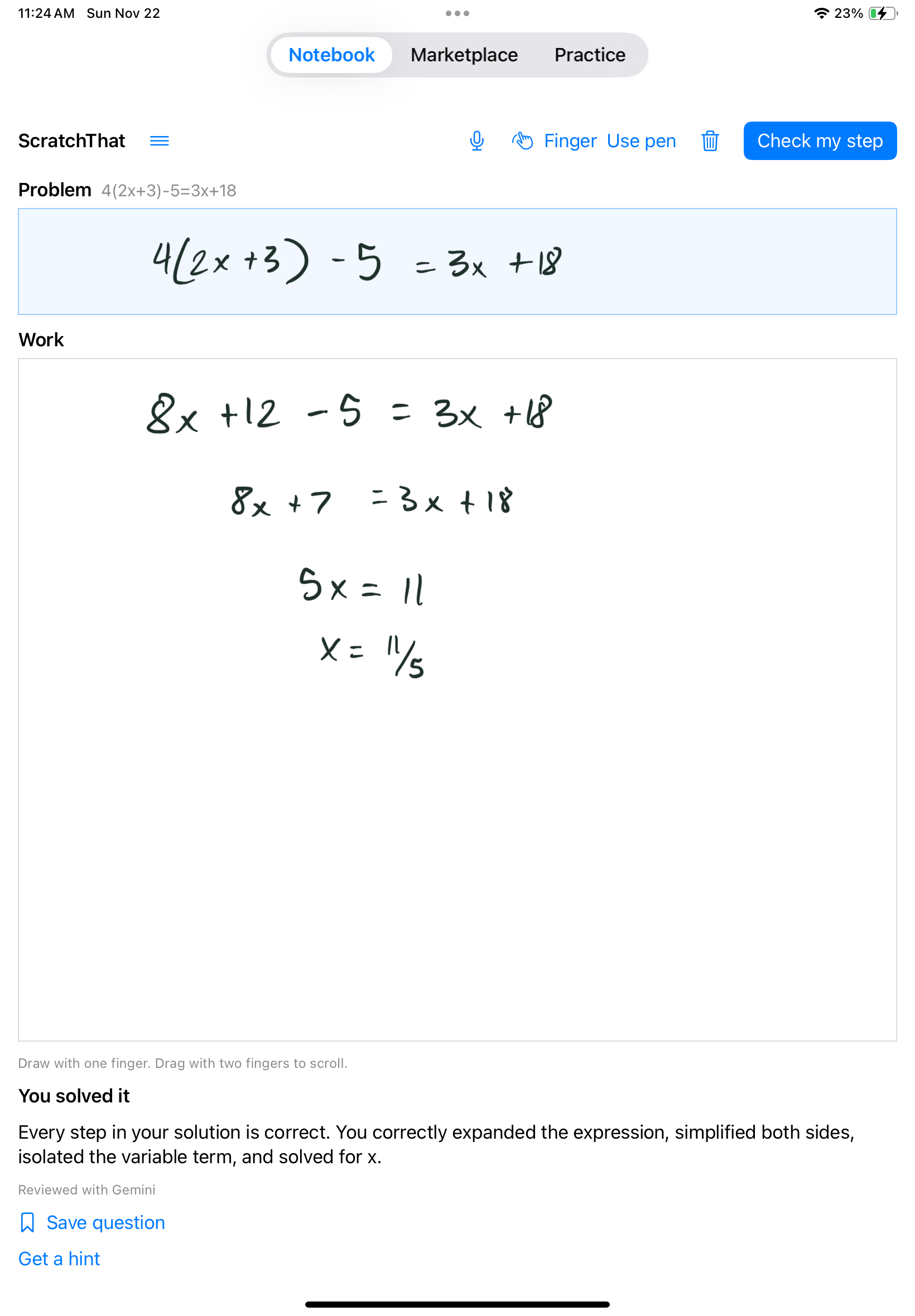
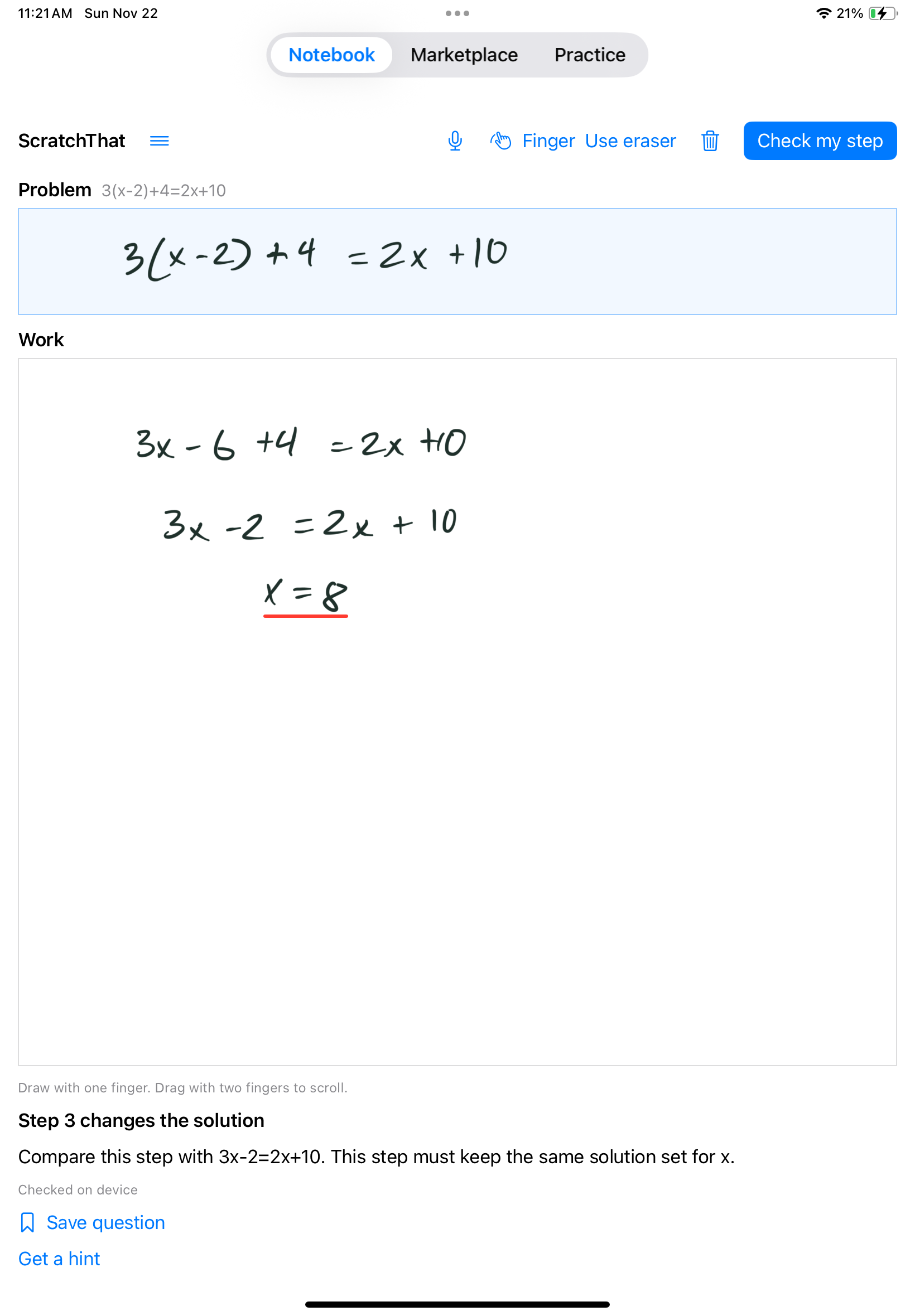
ScratchThat is an iPad math notebook that checks handwritten work one line at a time. Write with Apple Pencil, tap Check my step, and confirm or correct the transcription. ScratchThat marks the first incorrect step and offers a hint so you can make the correction yourself.
For example, if you go from 2(x + 3) = 12 to 2x + 3 = 12, ScratchThat flags that line. A hint might ask which terms inside the parentheses need to be multiplied by 2.
You can import a PDF worksheet and work through its questions in the notebook. Save a problem you want to revisit, and ScratchThat can generate a five-question practice set based on your saved problems. The app also includes a marketplace for study materials and tutoring sessions, with checkout using test SOL on Solana devnet.
What tools we use
🧠 Gemini API: a second opinion, not a crutch
Our on-device engine checks each line first. Gemini steps in only when needed.
- Reads handwriting. Ink rows become PNGs that Gemini transcribes. Apple Vision is the offline fallback.
- Finds the first wrong step. We send the steps plus the line our checker flagged.
- Hints without answers, labeled by source.
- Think out loud. Speech is transcribed on device, and only the text goes to Gemini.
◎ Solana: a payment we verify ourselves
Tutors sell in SOL on devnet, and the app proves each purchase on-chain.
- Reference key per order. The Solana Pay QR carries it, so we find the payment without watching a wallet.
- We check the transaction. Exact recipient, lamports and reference, finalized only.
- Safe payouts. Tutor wallets are validated as Base58 before publishing.
☁️ Vultr: one server between the iPad and the AI
All AI and marketplace calls go through our tutor API on Vultr.
- No keys on the device.
- No accounts. A random Keychain credential per install.
🐯 TigerDB: remembering what each student learns
TigerDB stores saved questions, practice sets, the catalog and purchases.
- Practice from the student's own work. Gemini builds sets from saved questions.
- Safe retries. A request ID prevents duplicate sets.
- Purchases tied to proof. Confirmed only after the Solana signature.
How it fits together
The iPad checks first, Vultr holds the keys, Gemini teaches, TigerDB remembers, and Solana settles payment.
How we built it
We built the native iPad app with SwiftUI and PencilKit, and used PDFKit for worksheet import. Gemini reads handwriting, generates coaching hints, and creates practice questions. The on-device math checker verifies steps for problems such as linear equations in one variable. Gemini can review some expressions outside the checker’s scope. The Node.js backend uses PostgreSQL for saved questions, practice sets, purchases, and bookings.
Challenges we ran into
At first we were using Apple's Vision framework to read our handwriting into text, but we found that it was consistently making mistakes in reading the handwriting. To get around this, we used Gemini API to pass in a screenshot of what's currently written and have Gemini transcribe it into text which was giving us way better results. We also added an editable transcription step before grading and tied feedback to the handwritten line it came from.
What we’re proud of
Students can write the way they would on paper and get feedback right on the line they need to revisit. A problem they choose to save can become the starting point for their next practice session.
What we learned
Handwriting recognition and math checking need different kinds of feedback. Letting students correct what the app read before it evaluates their reasoning makes both steps easier to trust.
What’s next
We want to build practice exams around recurring, verified mistakes so students can spend more time on the skills they’re still working on.
Built With
- apple-vision
- geminiapi
- github
- ipados
- javascript
- node.js
- pencilkit
- postgresql
- solana
- swift
- swiftui
- tigerdata
- vultr
- xcode
