Scrappy — Devpost Project Story
Inspiration
The idea came from a specific, embarrassing moment: buying a bag of spinach for one recipe, using a handful, and throwing the rest away a week later without ever touching it. Multiply that by every fridge in every apartment in the country and you have a staggering amount of food — and money — going quietly into the bin.
The people most likely to do this aren't careless. They're busy. They cook occasionally, they shop optimistically, and then life happens. What they need isn't a meal-planning app that asks them to shop with intention — it's something that meets them where they are: standing in the kitchen on a Sunday, looking at what's left, wondering if any of it can become dinner.
That's Scrappy. Not "here are recipes." "Here's what to cook with what's already rotting."
What it does
Scrappy is a voice-first PWA that turns the contents of your fridge into a full meal plan — prioritizing whatever's closest to going bad.
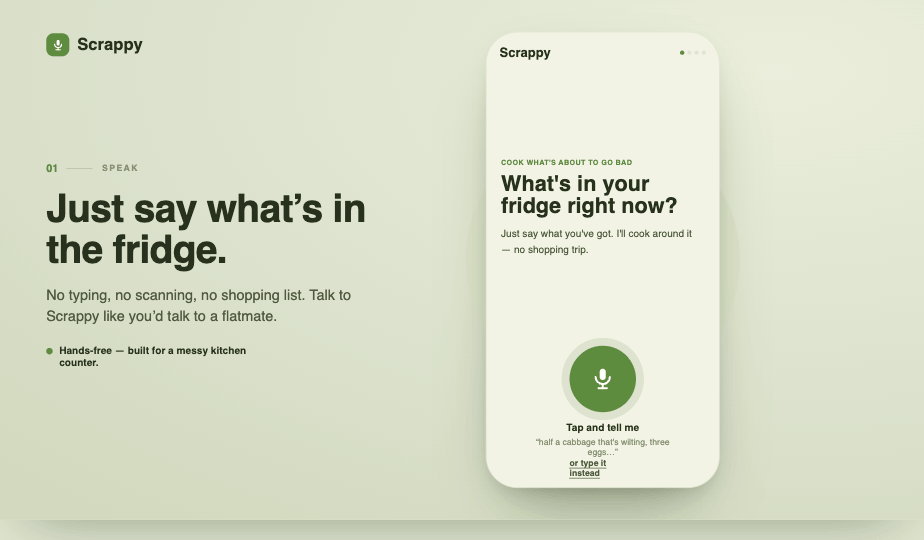
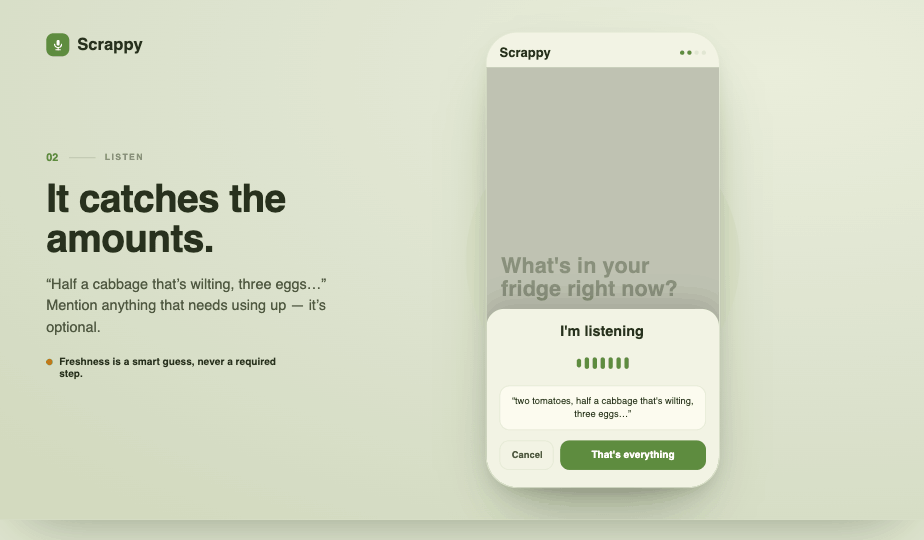
- Speak your ingredients. Open the app, tap the mic, and say what you've got. Amounts are optional. Scrappy listens, transcribes, and extracts a structured ingredient list — no typing, no forms.
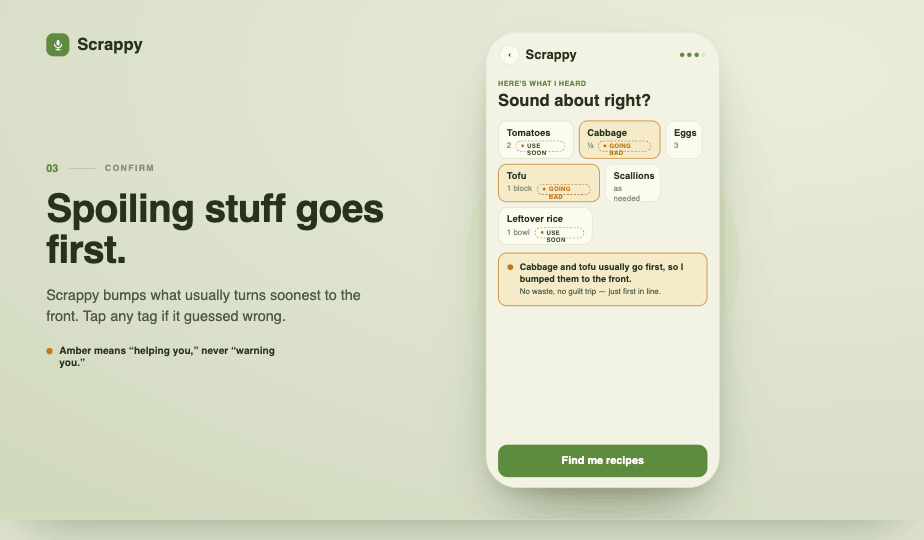
- It flags what's about to turn. Using ingredient category knowledge, Scrappy automatically sorts your list by perishability. Leafy greens and tofu go to the top; onions and eggs can wait. You see which items it's treating as urgent, with a one-tap override if it guesses wrong.
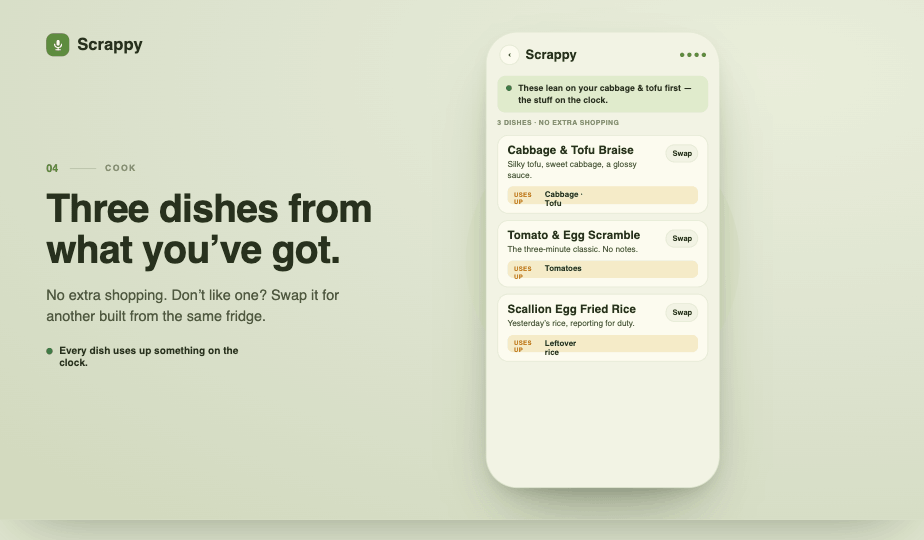
- Recipes built around waste, not around ideals. Scrappy generates dishes using only what you have. It won't suggest a dish that needs an ingredient you didn't mention. Each recipe card shows exactly which about-to-spoil items it rescues.
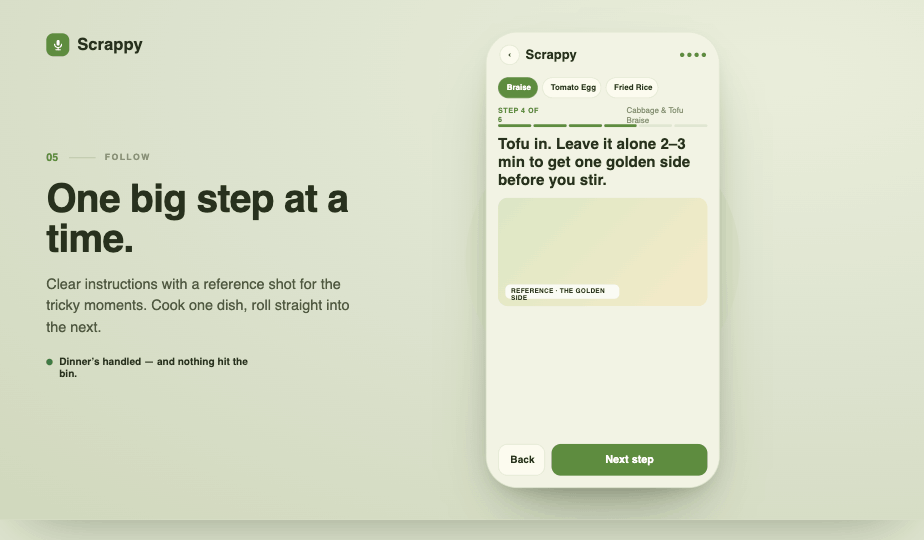
- Step-by-step cooking with reference photos. Expand any recipe and follow along step by step. For the moments that are genuinely hard to describe in text — how to score a fillet, what "golden brown" actually looks like, when scrambled eggs are done — Scrappy generates a reference image so you don't have to jump to YouTube mid-cook.
- Finish screen. When you're done, Scrappy tells you exactly which items you saved from the bin. A small thing, but a satisfying one.
How we built it
We went fully AI-native from day one — not by reaching for AI where it was convenient, but by asking at each step whether a human or an AI tool was actually better suited to the job.
Design: Claude Design (claude.ai/design) We wrote a detailed design brief capturing the core philosophy — voice-first, zero friction, anti-preachy — and handed it to Claude Design to produce the full interactive prototype in HTML/CSS/JS. It made several calls we hadn't specified: a warm amber rescue palette (not red — the tone is "helping you," not "warning you"), a three-tier freshness system (going bad / use soon / fresh), and the decision to merge the ingredient confirmation and preference screens into one scroll. All of these were the right calls. Having a working prototype in hours — not days — meant we spent most of our time on the parts that actually needed us.
Tech Stack: Next.js 16 (App Router) · React 19 · TypeScript · Tailwind v4 · PWA · We implemented the Claude Design prototype pixel-for-pixel in React, building it as a PWA so judges could open it on their own phones by scanning a QR code — no install, no friction, just the product.
Voice input: Deepgram We chose voice as the primary interaction mode for a specific reason: typing out "half a cabbage, three eggs, a block of tofu, some scallions, and leftover rice" is a chore. Saying it takes five seconds. Deepgram's real-time transcription handles the stream; a Claude API call extracts structured ingredient data and perishability guesses from the transcript.
Recipe generation: Claude API The constraint-satisfaction piece — "build me dishes using only these ingredients, ranked by perishability, without suggesting anything I need to buy" — lives in a carefully prompted Claude call with a post-generation validation pass. LLMs tend to silently add ingredients that aren't in the list. We wrote a checker that flags any recipe ingredient not present in the user's pantry and forces a retry. This is the core of the product working honestly.
Reference image generation: Midjourney We generate reference images only for steps that genuinely need them. "Add two spoons of salt" does not need a photo. "Tear the cabbage into palm-sized pieces, rougher than feels right" does. Midjourney generates these in the background, staggered by step order — by the time you've read Step 1, the image for Step 2 is ready. The delay is absorbed by the cooking itself.
Coded with: Claude Code We used Claude Code throughout implementation — not just for boilerplate, but for the harder integration work: the Deepgram WebSocket stream, the ingredient extraction prompt loop, and the image generation queue with staggered loading.
Challenges we ran into
The freshness inference problem. The biggest logic gap we hit: after a user speaks their ingredient list, the app knows what they have, but not how old it is. Our first prototype had freshness tags hardcoded. The real solution was a two-layer approach: LLMs have strong category-level priors (spinach goes before carrots, always), so we use those as defaults, then let users correct individual items with a single tap. It flips the burden — the app does the work by default, the user only intervenes when it's wrong.
Keeping the constraint real. "Only use what I have" is easy to say and surprisingly hard to enforce. Claude — like any LLM trained on full recipes — has a strong pull toward adding that one ingredient that would complete the dish. We went through several prompt iterations and added an explicit validation layer before we trusted the output to be genuinely constraint-respecting.
Image generation timing. Midjourney is slow. Running images serially would mean waiting at the start of every step. Running them all at once at recipe load would mean a long upfront wait. The solution was to kick off images in step order as soon as the user enters cooking mode — by the time they've read and acted on Step 1, Step 2's image is already there. The latency is hidden inside the user's own pace.
Demo-ing voice on stage. Live voice demos are the riskiest kind of live demo. We solved this by locking in a canonical demo ingredient set, pre-caching all recipe and image outputs for it, and treating the live voice capture as a "nice-to-have show" over a stable pre-rendered result — so even if Deepgram has a bad moment, the demo doesn't die.
Accomplishments that we're proud of
- The anti-waste framing is structural, not cosmetic. Plenty of recipe apps claim to reduce food waste. Scrappy's constraint solver actually enforces it — it can't generate a recipe that requires a shopping trip, by design.
- Honest freshness inference. We resisted the temptation to assert things the app can't know ("your cabbage is going bad") and instead built a model that says "cabbage usually goes first — here's my guess, tap to fix it." It's a small epistemic honesty thing, but it's the right call.
- The AI stack actually fits. Voice for input, LLM for constraint solving, diffusion for reference images — each tool is doing what it's genuinely good at, not what we could do with it.
- It runs in a browser on your phone. No install. Scan, cook.
What we learned
Voice as primary input is underused in kitchen apps. Hands are busy in a kitchen. The moment we switched from "type your ingredients" to "say your ingredients," the whole product felt different — more appropriate to the context, less like filling out a form.
Design tooling has caught up enough to be a real force multiplier. Handing a well-written brief to Claude Design and getting a high-fidelity, interactive, themeable prototype in return is genuinely new. It changes the shape of a hackathon: less time on "what should this look like," more time on "does this actually work."
Constraint satisfaction with LLMs needs an explicit enforcement layer. Prompting is not enough. You need a validation pass, and you need to be willing to retry. The LLM's defaults are trained on ideal recipes; your product's logic is about imperfect pantries.
The emotional tone of utility apps matters more than it seems. We made a deliberate choice early on: no red warning labels, no guilt-trip language, no "you're wasting food" lecturing. The app's voice is a resourceful, slightly cheeky kitchen companion. That decision shaped everything from the color palette to the copy to the finish screen.
What's next for Scrappy
- Camera input. Point your phone at the fridge shelf, get back a structured ingredient list. The multimodal piece is the most natural next step for removing friction.
- True expiry tracking. Right now freshness is inferred from ingredient category. With a persistent pantry log, the app could track actual purchase dates and give real expiry estimates.
- Household mode. Shared pantries are the hardest case — different people add and remove things, nobody has the full picture. A shared ingredient list with voice-add from any household member is the logical extension.
- Nutritional constraint layer. High-protein week, low-sodium for a parent, allergen-free for a guest — layering dietary constraints on top of the waste-first logic without breaking the "no extra shopping" rule.
- The stat we want to show. Average US household throws away ~$1,500 of food per year. We'd like to build the tracking to show users exactly how much of that Scrappy has helped them recover.
Built With
- anthropic
- claude
- deepgram
- midjourney
- next.js
- pwa
- react
- tailwind
- typescript


Log in or sign up for Devpost to join the conversation.