-
-
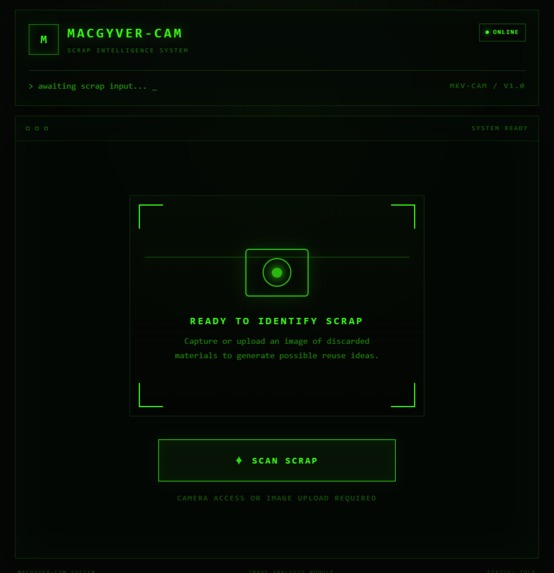
landing page
-
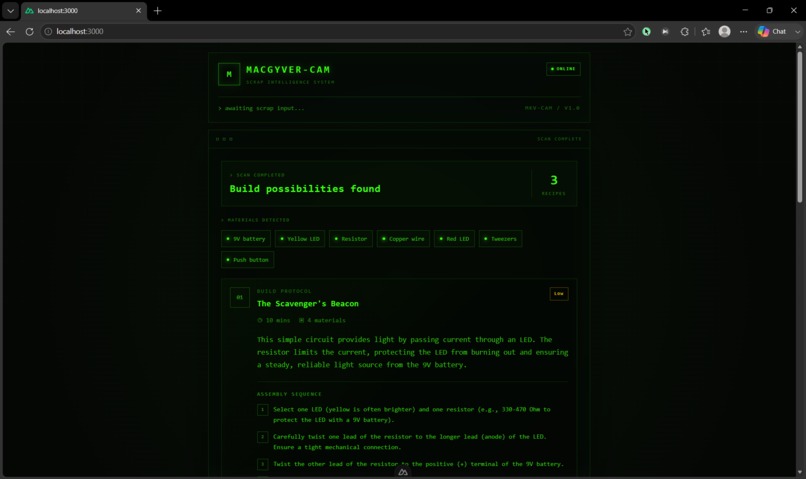
recipe
-
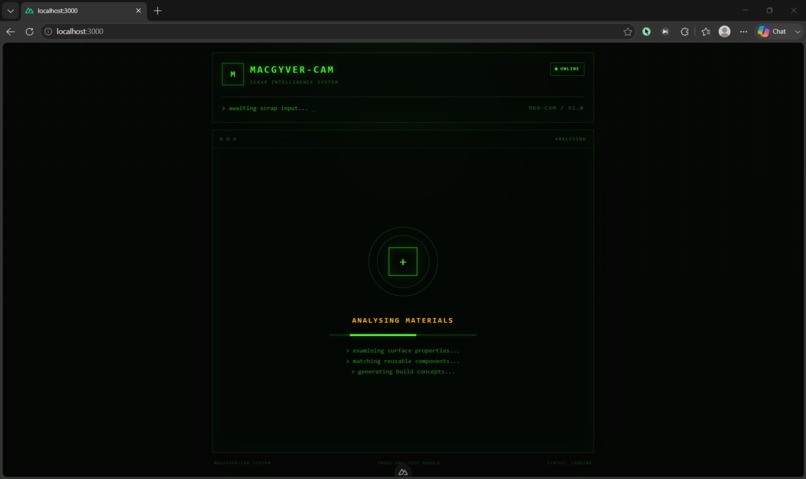
analysing
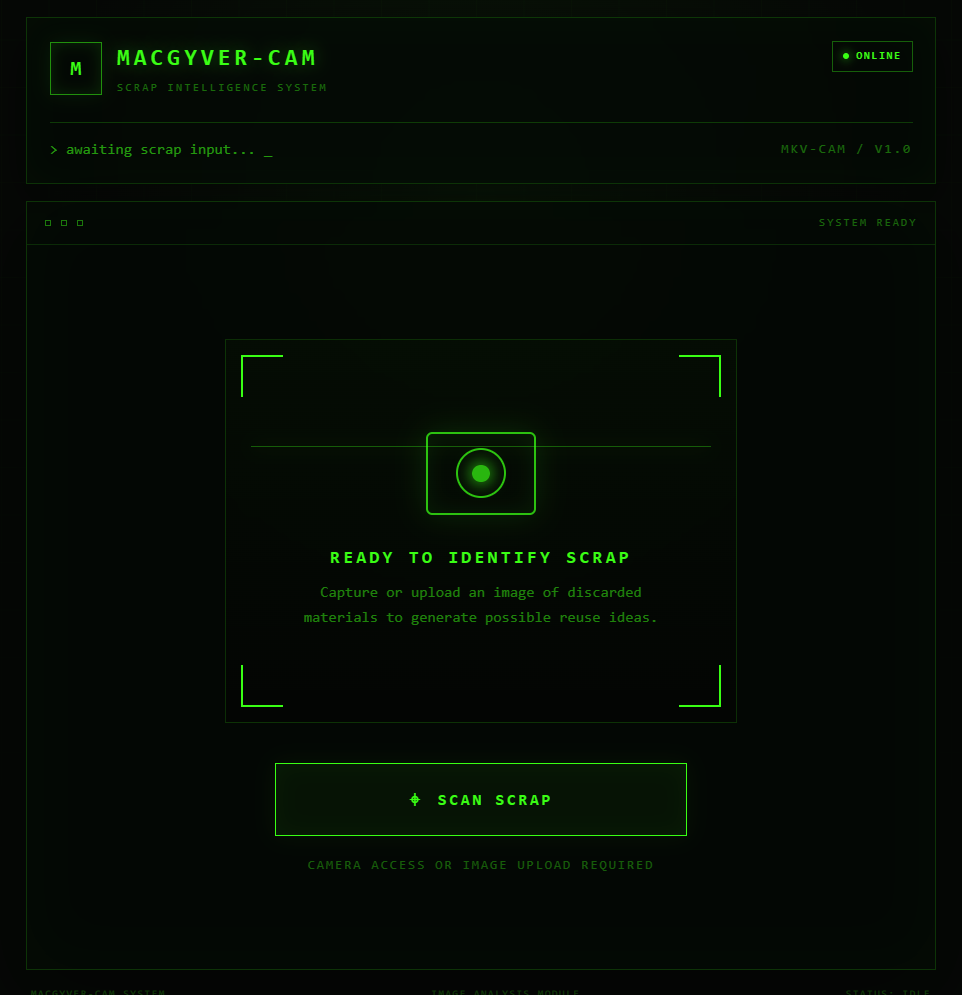
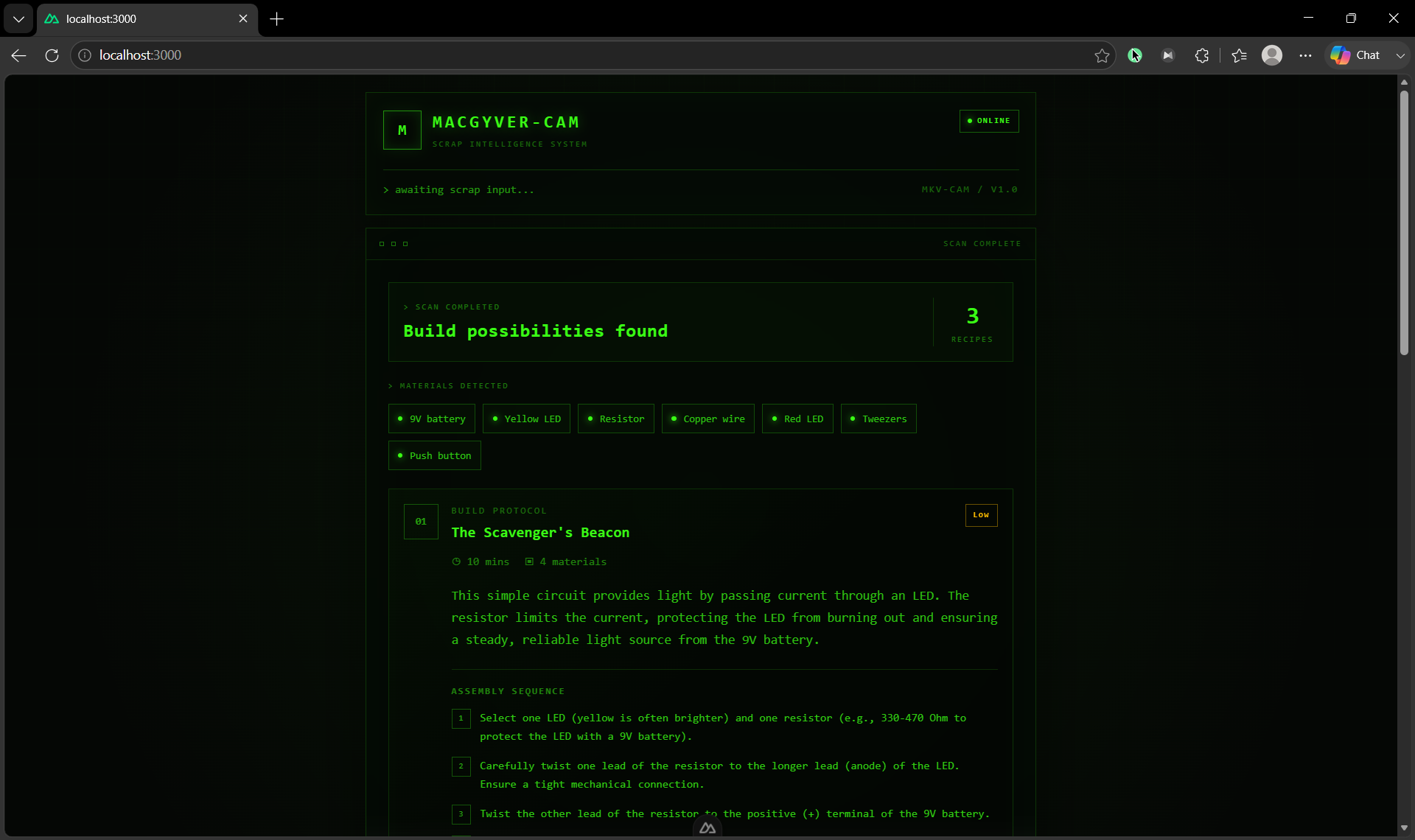
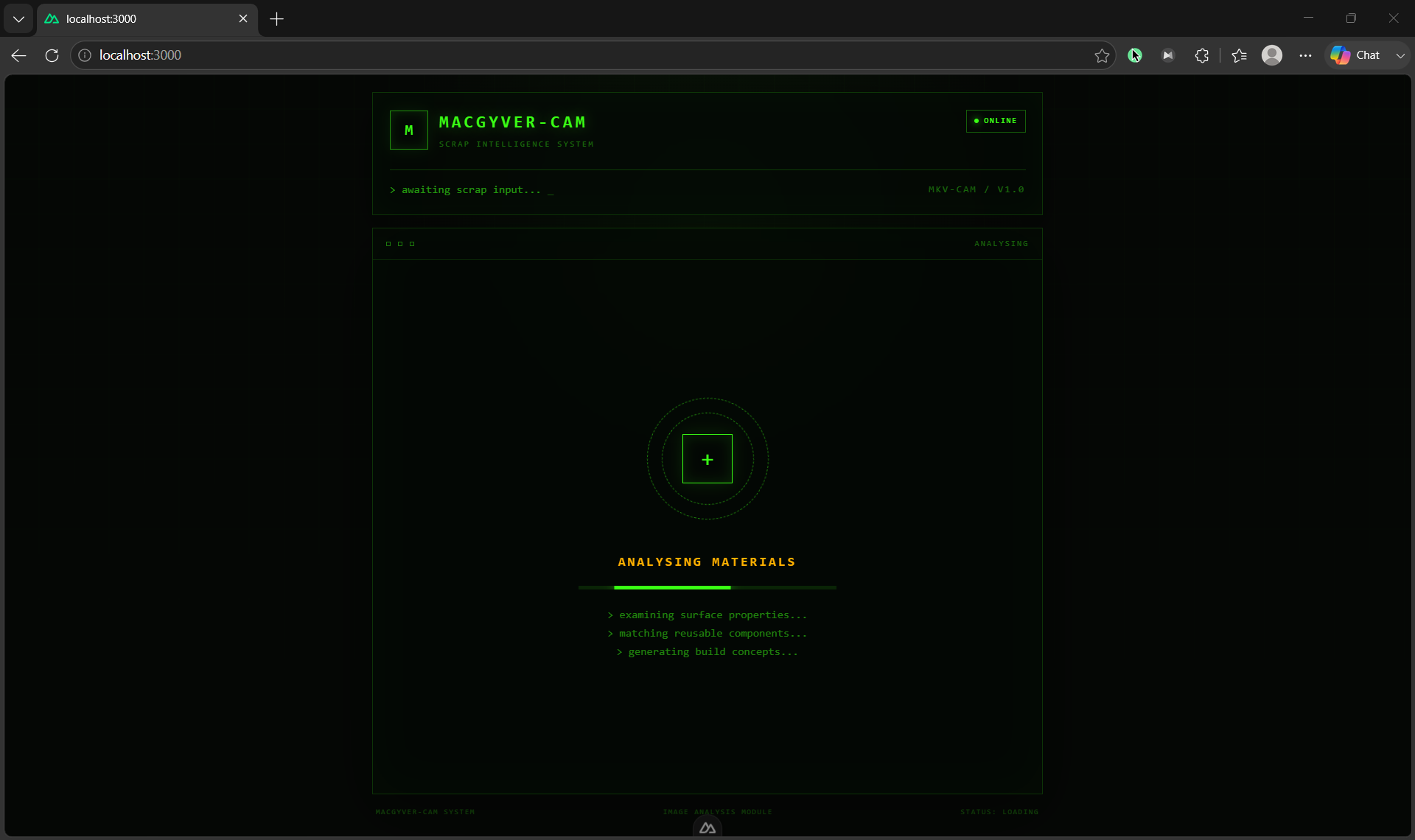
ScrapCam
Inspiration
The grid has collapsed.
Electricity is unreliable, supply chains no longer function, and useful equipment is difficult to find. Yet the ruins are filled with discarded electronics, broken appliances, loose wires, damaged metal parts, circuit boards, motors, plastic casings, and other materials that were once treated as waste.
In this world, survival depends not only on what you have, but on what you can create from it.
ScrapCam was inspired by a simple question:
What useful object can be built from the scrap directly in front of you?
Many people can recognise a broken fan, cable, motor, metal container, or electronic board, but may not know how those materials can be reused. ScrapCam was created to close that gap.
Instead of requiring users to understand engineering, electronics, or fabrication, the application allows them to take a photograph of scrap items and receive practical suggestions for things they can build.
The central idea is simple:
Scan the scrap. Identify the materials. Discover what they can become.
ScrapCam combines artificial intelligence, upcycling, survival creativity, and accessible mobile technology into one focused experience.
What It Does
ScrapCam is a mobile-friendly Progressive Web App that scans discarded materials and suggests useful projects that can be built from them.
A user opens the application, presses Scan Scrap, and takes a photograph using their smartphone camera. The system analyses the image, identifies the visible scrap items, and matches those materials with suitable recipes stored in a local database.
Each generated recipe explains:
- What can be built
- Which scanned materials are used
- Why the suggested object may be useful
- The estimated construction time
- The level of difficulty or danger
- The steps required to build it
For example, a user might scan:
- Copper wire
- A small motor
- A plastic bottle
- A metal container
- An old switch
ScrapCam may then suggest useful builds such as:
- A simple hand-powered generator
- A basic warning alarm
- A cable organiser
- A small storage container
- A low-power ventilation device
ScrapCam does not simply identify the items in an image. It connects those items to practical possibilities.
The purpose of the application is not:
“Tell me what this object is.”
It is:
“Tell me what useful thing I can build from these objects.”
Key Features
Native Camera Capture
ScrapCam uses optimised HTML5 camera constraints to open the smartphone’s native camera directly.
This allows users to capture an image quickly without requiring a heavy WebRTC video stream or a complicated camera interface. On supported mobile devices, pressing the scan button immediately opens the rear-facing camera.
This approach keeps the application:
- Lightweight
- Fast
- Mobile-friendly
- Easy to use
- Suitable for lower-powered devices
Users may also upload an existing image when camera capture is unavailable.
Context-Aware Scrap Analysis
Real scrap is rarely arranged neatly.
Items may be dirty, rusted, broken, overlapping, partially hidden, or surrounded by unrelated objects. To address this, ScrapCam uses a constrained Vision Large Language Model pipeline to analyse messy, real-world images.
The system attempts to extract distinct and potentially useful hardware assets from the photograph, such as:
- Wires
- Motors
- Switches
- Batteries
- Circuit boards
- Metal containers
- Plastic panels
- Screws and fasteners
- Cables
- Mechanical parts
The analysis is context-aware. It focuses on identifying components that may contribute to a functional build rather than merely describing the entire scene.
The model is constrained to return structured information, reducing vague or overly imaginative results.
Relational Recipe Mapping
Once the scrap items are identified, ScrapCam compares them against local database layers containing available recipes and material relationships.
Each recipe is associated with:
- Required components
- Optional components
- Material categories
- Possible substitutes
- Expected functionality
- Estimated build time
- Risk level
- Construction steps
The system evaluates which recipes are most closely matched to the materials detected in the image.
This means the final suggestion is not based only on AI creativity. It is grounded in a structured relationship between the identified scrap and the recipes available in the application.
For example:
Detected materials:
- Copper wire
- Small DC motor
- Plastic fan blade
- Toggle switch

Suggested recipe:
- Portable ventilation fan
The database ensures that the recommendation has a reasonable connection to the materials found in the scan.
Post-Apocalyptic “Cozy Hacker” Interface
ScrapCam uses a high-contrast terminal-style interface inspired by survival equipment, old computer systems, and improvised technology.
The design includes:
- Bright green terminal text
- Dark backgrounds
- Scanning animations
- System status indicators
- Structured recipe cards
- Material detection labels
- Clear danger warnings
- Numbered construction steps
Although the interface has a post-apocalyptic personality, readability remains the main priority.
The high contrast helps users read instructions quickly on smaller mobile screens. The interface is intentionally focused, with one primary action: scanning scrap.
The visual style supports the story of ScrapCam without distracting users from its core function.
Offline-Ready PWA Architecture
ScrapCam is built as a Progressive Web App.
This allows it to be installed or pinned directly to a smartphone’s home screen, where it can behave more like a mobile application than a traditional website.
The PWA architecture provides the foundation for:
- Home-screen installation
- Cached interface assets
- Faster repeat loading
- Reduced dependence on browser navigation
- Future offline recipe access
- A more app-like mobile experience
This architecture also fits the project’s off-grid theme. In a survival scenario, stable internet access cannot always be assumed.
While advanced image analysis may still require a backend or AI connection, the PWA structure allows important interface components and selected recipe information to be made available locally.
How We Built It
ScrapCam was developed as a mobile-first application because the camera is the main entry point into the experience.
The frontend was built using Nuxt, Vue, TypeScript, and Tailwind CSS. These technologies allowed us to create a responsive interface while keeping the application modular and maintainable.
The user journey was designed to remain extremely simple:
- Open ScrapCam.
- Press Scan Scrap.
- Take or upload a photograph.
- Wait for the image analysis.
- Review the detected materials.
- View the suggested recipes.
- Follow the build instructions.
The application uses a hidden HTML file input with mobile camera capture enabled:
<input
  type="file"
  accept="image/*"
  capture="environment"
/>
This opens the device’s native rear-facing camera on supported smartphones, avoiding the need to build and maintain a custom live video interface.
After an image is selected, it is passed to the backend for analysis. The Vision LLM is prompted to identify distinct scrap components and return them in a controlled format.
A simplified response may resemble:
{
  "detected_items": [
    "copper wire",
    "small DC motor",
    "plastic container",
    "toggle switch"
  ]
}
These detected items are then compared against the local recipe database.
A recipe record may contain:
{
  "title": "Portable Ventilation Fan",
  "required_items": [
    "small DC motor",
    "fan blade",
    "wire"
  ],
  "optional_items": [
    "toggle switch",
    "plastic casing"
  ],
  "danger_level": "Low",
  "estimated_time": "30–45 minutes",
  "steps": [
    "Inspect the motor and wiring for damage.",
    "Attach the fan blade securely to the motor shaft.",
    "Connect the wire and optional switch.",
    "Mount the components inside the casing.",
    "Test the fan using a suitable low-voltage power source."
  ]
}
The application then returns the closest useful matches to the frontend, where the recipes are displayed as structured cards.
Challenges We Ran Into
Recognising Scrap in Messy Environments
Scrap materials are difficult to analyse because they rarely appear as clean, isolated objects.
The image may contain:
- Poor lighting
- Rust and dirt
- Overlapping items
- Broken components
- Partial objects
- Similar-looking materials
- Distracting backgrounds
A normal image classifier may identify only the largest object or describe the scene generally. We needed the Vision LLM to focus specifically on distinct reusable components.
We addressed this by constraining the analysis prompt and requesting structured output rather than a general description.
Preventing Unrealistic Recipes
A generative AI model can produce creative suggestions, but creativity alone does not guarantee that a recipe is practical.
The model might recommend a build that:
- Requires missing components
- Uses incompatible materials
- Is too complex
- Cannot realistically function
- Introduces unnecessary danger
To reduce this issue, the AI is used primarily for material recognition, while the recipe selection is supported by a local relational database.
This creates a more controlled flow:
Image analysis
      ↓
Detected scrap items
      ↓
Database matching
      ↓
Relevant build recipes
The system therefore does not rely completely on unrestricted AI-generated instructions.
Balancing Theme and Usability
We wanted ScrapCam to feel like a tactical device recovered from a post-apocalyptic workshop.
However, too many visual effects could make the application difficult to use. The interface had to remain readable, especially on small mobile screens.
We kept the design focused by using:
- One clear scan button
- High-contrast text
- Minimal navigation
- Short status messages
- Consistent recipe layouts
- Clear error and loading states
The theme supports the application rather than controlling it.
Handling Safety
Discarded materials can be hazardous.
Potential risks include:
- Sharp metal edges
- Broken glass
- Damaged lithium batteries
- Leaking battery chemicals
- Exposed electrical wires
- Charged capacitors
- Rusted components
- Heat-generating devices
An image alone cannot confirm whether a component is safe.
This means ScrapCam must avoid presenting every detected object as usable. Recipes need clear danger labels, inspection instructions, and warnings when uncertain materials are involved.
Safety remains one of the most important areas for future development.
Building for Mobile Devices
The application had to work well on different phone sizes while maintaining a visually distinctive interface.
We needed to manage:
- Native camera behaviour
- Responsive spacing
- Long recipe instructions
- Loading feedback
- Button accessibility
- Image upload errors
- Different browser implementations
Using the native HTML5 camera input simplified the capture process and reduced the technical weight of the application.
Accomplishments That We’re Proud Of
We are proud that ScrapCam maintains a clear and focused purpose.
The entire project revolves around one simple action:
Scan discarded materials and discover something useful that can be built from them.
We did not attempt to turn the application into a general image recognition platform. Every component serves the same workflow, from the camera capture to the recipe cards.
We are especially proud of the connection between Vision AI and the local recipe database.
The AI provides flexibility when analysing unpredictable real-world images, while the database provides structure and consistency when selecting builds. Together, they create a system that is more practical than using either approach alone.
We are also proud of the mobile experience. Users do not need to configure a camera stream or navigate through several pages. They can open the application, press one button, and begin scanning.
The visual identity is another accomplishment. The terminal-inspired “cozy hacker” design gives ScrapCam a memorable character while remaining readable and functional.
Most importantly, ScrapCam encourages users to reconsider the value of discarded materials.
A broken object may no longer serve its original purpose, but its components may still be useful.
What We Learned
AI Performs Better with Clear Constraints
We learned that giving the Vision LLM a broad instruction such as “describe this image” was not enough.
The model produced more useful results when asked to:
- Focus only on scrap and hardware
- Separate distinct items
- Ignore irrelevant background objects
- Avoid guessing when uncertain
- Return structured data
- Use consistent material names
AI becomes more reliable when the output format and intended purpose are clearly defined.
Recognition and Recommendation Are Different Tasks
Identifying an object does not automatically explain what can be built from it.
The system may correctly recognise copper wire, but it must still determine:
- Which recipes use copper wire
- What other parts are required
- Whether those parts were also detected
- Which project provides the most practical value
- Whether the build is reasonably safe
Separating the recognition process from the recipe-matching process helped create a stronger application architecture.
A Local Database Adds Reliability
We learned that a local recipe database provides an important layer of control.
It allows us to define:
- Approved recipes
- Material requirements
- Substitutes
- Risk levels
- Build steps
- Explanations
- Expected outcomes
This makes the application easier to test and expand. It also reduces the risk of receiving inconsistent recipes for similar scans.
Mobile Simplicity Matters
The best camera experience was not necessarily the most technically complicated one.
Using native HTML5 camera capture created a faster and more familiar experience than implementing a continuous WebRTC stream.
For ScrapCam, users only need to take one photograph. A lightweight camera input therefore suits the application better than a full live-camera interface.
Design Can Strengthen the Concept
The terminal design is not only decorative.
It helps communicate the idea that ScrapCam is a tactical tool built for limited resources. The scanning interface, system messages, and recipe protocols make the user feel that they are operating a specialised survival device.
We learned that a strong visual identity can make a simple workflow feel much more engaging.
What’s Next for ScrapCam
The next step is to improve the accuracy and usefulness of the recommendations.
Better Material Confidence Scoring
Future versions could assign a confidence score to each detected item:
Copper wire — 96%
Small DC motor — 88%
Lithium battery — 54%
Low-confidence items could be marked for user confirmation before recipe matching begins.
User-Confirmed Scrap Inventory
After scanning, users could remove incorrect items or add components that the model missed.
For example:
Detected items:

✓ Copper wire
✓ DC motor
✕ Battery
+ Add another item
This would improve recipe accuracy without requiring perfect Vision AI performance.
Recipe Compatibility Scores
ScrapCam could display how closely the scanned items match each build:
Portable Fan

Compatibility: 85%

Available:
✓ DC motor
✓ Copper wire
✓ Plastic casing

Missing:
✕ Fan blade
This would help users understand why a recipe was suggested and what additional materials are required.
Expanded Recipe Database
We plan to create more useful builds across categories such as:
- Lighting
- Storage
- Water collection
- Communication
- Signalling
- Basic power
- Ventilation
- Repair tools
- Shelter improvements
- Organisation systems
The focus will remain on realistic, practical builds rather than overly complex inventions.
Stronger Safety Validation
Future recipes could include mandatory safety checks based on the detected materials.
For example, detecting a battery could trigger:
CAUTION

Do not use batteries that are swollen, punctured, leaking,
corroded, unusually hot, or producing an unusual smell.
Certain dangerous materials could also be excluded automatically from recipe generation.
Offline Recipe Library
A future offline mode could store essential recipes directly on the device.
When internet access is unavailable, users could manually select the materials they have and search the local recipe catalogue.
This would strengthen the PWA’s off-grid purpose.
Saved Scans and Material Inventory
Users could save previous scans and gradually build a digital inventory of collected scrap.
ScrapCam could then recommend projects based on materials collected across several scans rather than a single photograph.
For example:
Stored inventory:

12 copper wires
3 small motors
6 switches
2 plastic panels
18 screws

New build available:
Portable tool organiser
Community-Tested Recipes
A future community layer could allow users to:
- Submit their own builds
- Upload completed projects
- Rate recipe accuracy
- Suggest safer alternatives
- Recommend material substitutions
- Mark recipes as successfully tested
Community validation could make the recipe library more practical and trustworthy.
Final Vision
ScrapCam begins with a very simple concept:
Take a picture of scrap and receive useful ideas for what can be built from it.
However, the project represents something larger.
It encourages creativity, repair, upcycling, engineering awareness, and more responsible attitudes towards electronic waste.
ScrapCam does not see a pile of broken materials.
It sees components, opportunities, and the beginning of the next useful build.


Log in or sign up for Devpost to join the conversation.