@Scout
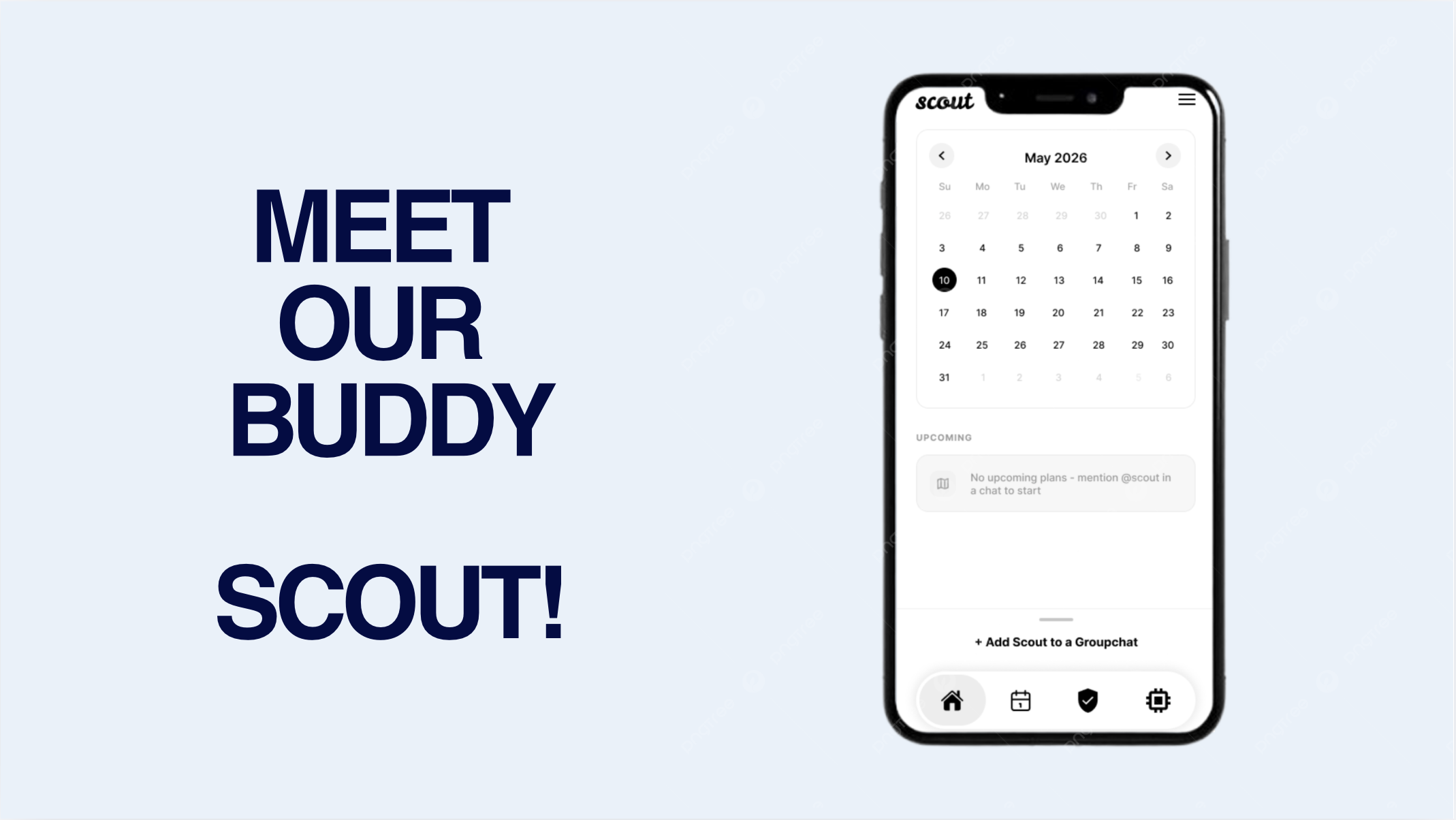
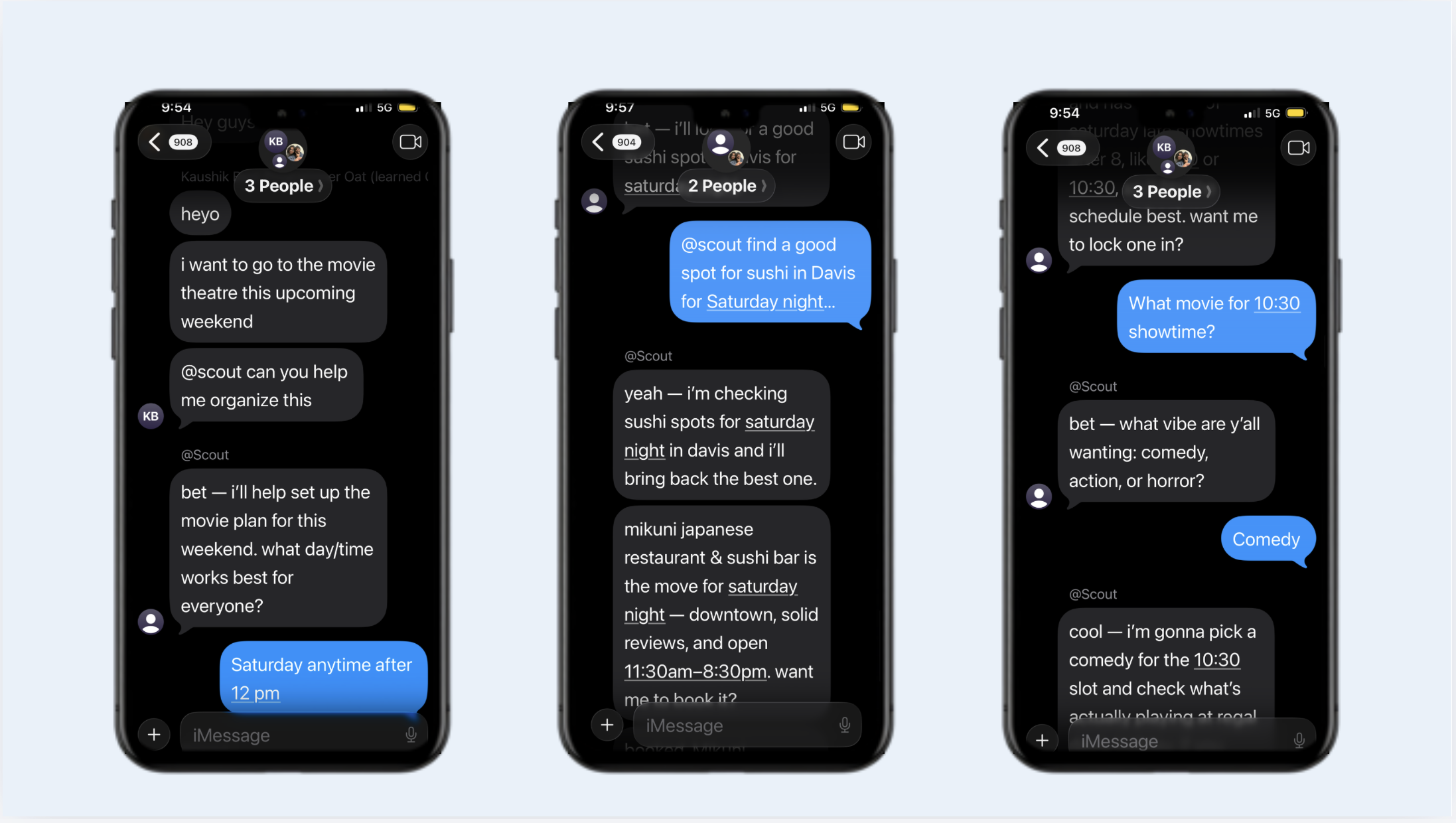
Scout is an iMessage native AI planning assistant that will help you actually get your plans out of the group chat! It acts just like another friend you're talking to in the group chat, but it actually is a multi-agent system that can turns multiple chat chaos and planning into actions and reservations. Instead of forcing people to leave Messages and open a separate app, Scout lives inside the conversation where plans already happen. A simple mention like @scout find dinner in davis becomes a full workflow: Scout interprets the request, retrieves the group's learned preferences, researches real-world options, creates an approval when needed, and syncs everything back to the iPhone in real time.
Scout comes together from parts of a whole system that we engineered and hacked: a typed knowledge graph, a semantic memory system, a multi-agent orchestration pipeline, and a realtime mobile application. Furthermore, it has LLM Reasoning integrations as a core component in a larger system that routes, ranks, remembers, notifies, and synchronizes state across iMessage, the backend, and the iOS app.
Inspiration
We built Scout because group planning is one of the most fragmented workflows on a phone. Important context gets buried in long chat threads. Preferences get repeated. Decisions get lost. And the actual execution of a plan usually happens across multiple apps: Messages, Maps, Calendar, Notes, reminders, and screenshots. At when you actually figure out all this planning, no one wants to actually go hang out anymore :(
We wanted to build an assistant that stays inside the conversation, learns the group's preferences over time, and helps the group move from "we should do something" to "this is the plan" without ever even leaving group chat.
The bigger idea was this: AI should not just answer questions. It should help groups make decisions together in a manner that feels more "human-like". That's why Scout is not just another chatbot that we're giving you, it acts like another friend and organizer helping you with scheduling and booking. This is also why Scout always routes important actions through an approval step before anything is finalized.
What We Built
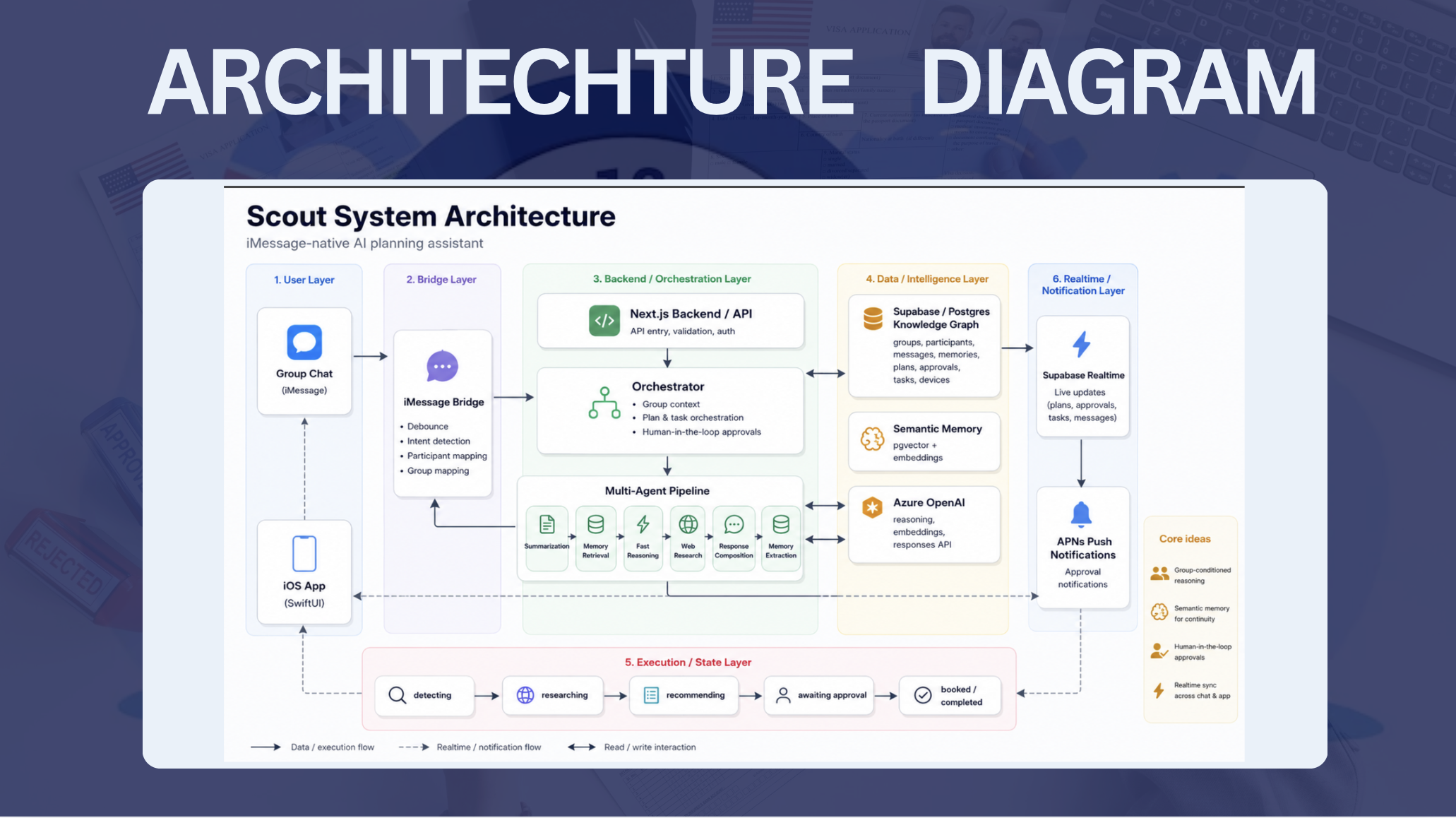
Scout is a full-stack system with three tightly connected pieces:
- An iMessage bridge that reads Messages.app, maps each chat to a backend group, and routes messages into the system.
- A backend planning engine in Next.js that uses specialized agents for summarization, memory retrieval, reasoning, web research, and response composition.
- A SwiftUI iOS app that shows plans, approvals, memories, and live updates through Supabase Realtime and push notifications.
At a high level, the flow looks like this:
iMessage chat
  -> bridge (debounce + intent detection + participant mapping)
  -> /api/chat
  -> orchestrator
      -> summarize old context
      -> retrieve semantic memories
      -> fast reasoning model decides what to do
      -> optional research agent finds real-world options
      -> create plan / approval / task records
      -> send APNs push if approval is needed
  -> iOS app updates instantly through Supabase Realtime
Technical Architecture
1. Typed Knowledge Graph in Postgres
Scout's knowledge graph is implemented as a typed relational graph in Supabase/Postgres.
We model the product state as linked entities:
groupsare the root nodes for each conversation.participantsrepresent the people in each group.messagescapture the full chat history.memoriesstore learned preferences and facts.plansrepresent the planning lifecycle.approvalsgate any action that needs human confirmation.taskstrack background work like research.devicesstore push notification targets.
This is what makes Scout personalized. Every piece of state is partitioned by groupId, so two different groups can ask the same question and get different answers because they have different histories, memories, and active plans.
2. Semantic Memory and Retrieval
Scout uses Azure OpenAI embeddings plus Supabase pgvector to build a semantic memory layer.
When Scout learns a preference, it stores that memory as:
- a text fact
- a participant reference
- a group reference
- a confidence score
- an embedding vector
That allows the system to retrieve memories by meaning, not just keyword match. For example, if one group has memories like "vegetarian", "budget-friendly", and "before 8 PM", the planner will retrieve those facts whenever a request about dinner or booking appears.
Technically, this works like a retrieval augmented memory index (RAG pipeline):
- The current request is embedded.
- The backend queries
match_memorieswith cosine similarity. - The top relevant memories are returned for that exact group.
- Those memories are injected into the reasoning context for the model.
We also deduplicate memories with similarity thresholds, so Scout does not keep storing the same preference over and over. That keeps the memory graph clean and makes the profile more reliable over time.
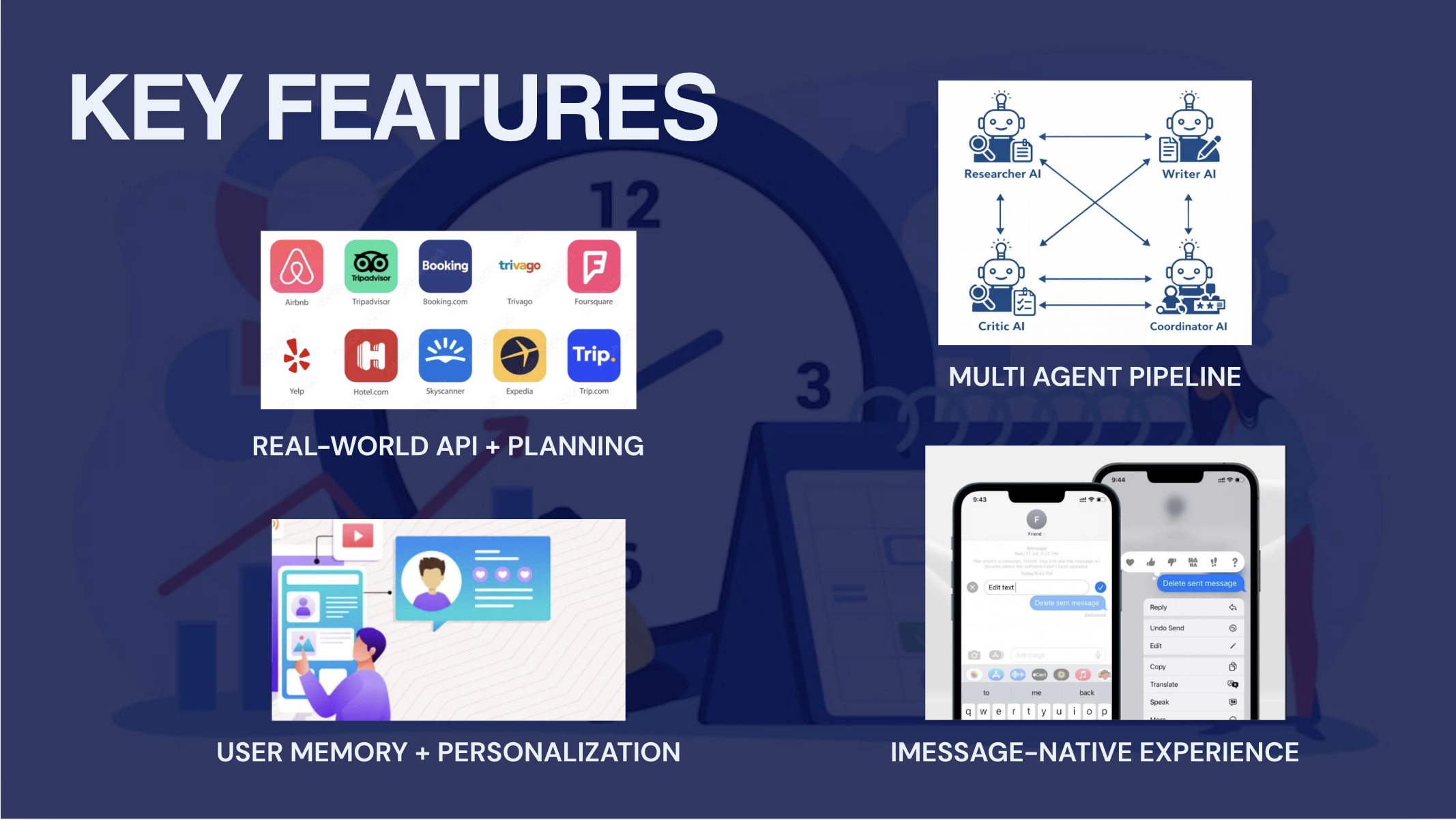
3. Multi-Agent Orchestration
Scout does not rely on one giant prompt. We split the job into specialized agents with clear responsibilities.
The main orchestrator coordinates:
- Conversation summarization
- Memory retrieval
- Fast reasoning
- Live web research
- Response composition
- Memory extraction
- Approval notifications
Each agent has a different job:
summarizercompresses older conversation into a short group summary so long threads stay manageable.retrieveRelevantMemoriesfinds the most semantically relevant group memories using cosine similarity.fastReplyis the low-latency reasoning agent that decides whether Scout should just answer, create a plan, or trigger research.researchAgentuses the Azure OpenAI Responses API with web search tooling to gather real current options.composeResponseturns structured research results into a short, natural group-chat message.extractMemoriespulls durable facts out of the conversation and stores them back into the memory graph.sendApprovalNotificationsends a push notification when a pending approval is created.
This separation is important because it makes Scout behave more like a system of coordinated workers than a single text generator.
4. Group-Conditioned Reasoning
Scout's main reasoning step is group-conditioned.
When a message arrives, the orchestrator builds a prompt packet from:
- the most recent chat messages
- a summary of older conversation
- active plans for that group
- top semantic memories for that group
- recent Scout messages to avoid repetitive phrasing
That prompt packet is what the reasoning model sees. So when two different groups ask "good dinner spots?", the model is reasoning over different evidence:
- different preferences
- different prior approvals
- different memories
- different active plans
- different recent context
That is how the same request turns into different recommendations.
We also require the fast reasoning model to return structured JSON instead of freeform text. That makes the backend deterministic. The model does not just "talk"; it emits flags like:
shouldCreatePlanshouldResearchplanTypeplanTitleconstraintsresearchQuerymemoriesToStore
That schema is what turns Scout into a real planning engine and full-stack application model.
5. Semantic Ranking of Recommendations
Scout's recommendation flow is not just a "search and reply" that's wholly being done through an LLM wrapper. It is a NLP based semantic ranking pipeline that we engineered.
For a planning request, the system:
- Parses the request and extracts constraints.
- Retrieves the group's relevant semantic memories.
- Searches the web for real options.
- Ranks those options against the group's preferences and constraints.
- Returns one clear recommendation plus supporting alternatives.
So if one group likes cheap, casual places and another likes nicer, reservation-only spots, Scout's ranking context will bias the result differently for each group.
That is the core personalization algorithm:
- semantic retrieval
- constraint extraction
- group preference conditioning
- candidate reranking
- final reasoned recommendation
6. Planning, Approval, and Execution State Machine
Scout is also a state machine.
Plans move through statuses like:
detectingresearchingrecommendingawaiting_approvalbookedcompletedcancelled
When Scout decides an action requires confirmation, it creates an approval row with a structured payload. That payload includes the exact booking details the iOS app needs to show.
When the user approves:
- the approval status updates
- the plan transitions to booked
- Scout sends a confirmation message back into the chat
This gives the user a human-in-the-loop execution flow instead of an unsafe "LLM does everything" experience.
Realtime iOS Experience
The iOS app is not just a static viewer. It subscribes to Supabase Realtime channels for:
messagesplansapprovalstasks
Those subscriptions are filtered by group_id, so the app only reacts to the currently selected group. When the user switches groups, Scout tears down the old channel and re-subscribes to the new one. That means the UI is always showing the live state of the selected conversation.
The iOS app also receives APNs push notifications when an approval is created. The push payload includes the approvalId, groupId, planId, and the target tab, so tapping the notification deep-links directly into the approvals flow.
iMessage Bridge
The iMessage bridge is probably the coolest thing we engineered for this project, and it's the core piece that Scout feel native to the group chat. You can just @Scout message it like you would anyone else.
The bridge:
- keeps per-chat state
- buffers messages in short bursts
- uses debounce logic so Scout does not respond to every tiny bubble individually
- runs an intent check to decide whether a message is actually meant for Scout
- maps each chat to a backend group
- creates participants automatically when new senders appear
That bridge layer is what keeps the chat experience conversational while the backend does the heavy lifting.
NLP and Personalization
The personalization story in Scout is built on semantic memory, context compression, and group-specific retrieval.
When a new message arrives, Scout:
- Inserts the message into the group's conversation history.
- Summarizes older context if the thread is getting long.
- Generates an embedding for the incoming request.
- Retrieves the most relevant memories for that exact group with cosine similarity.
- Passes the summary, memories, and recent messages into the planner model.
- Lets the model decide whether to respond, research, create a plan, or ask for clarification.
This means Scout is not just matching keywords. It is reasoning over a semantic profile of each group.
The model output is also structured, so Scout can safely route the result into downstream systems:
- memory extraction for long-term learning
- plan creation for task tracking
- research for real-world ranking
- approvals for human confirmation
- response composition for natural chat output
In practice, this is what lets Scout behave differently across groups. A dinner request from one group may surface budget-friendly spots near campus, while another group may get a higher-end recommendation with a reservation slot, because the retrieved memories and prior approvals are different.
Challenges We Faced
The biggest challenge was context. Group chats are long, noisy, and full of irrelevant chatter. A naive LLM prompt would either get too expensive or too confused. We solved that with summarization, memory retrieval, and strict group partitioning.
Another challenge was reliability. We did not want Scout to hallucinate a booking or act before the group agreed. The answer was a structured orchestration pipeline with explicit approvals and a state machine for plan lifecycle.
Realtime synchronization was also tricky. The iOS app, backend, and bridge all need to stay in sync without lag. We solved that with group-scoped Supabase Realtime plus APNs push notifications for important approval events.
The iMessage bridge had its own challenges too. Chats are bursty, and not every message is meant for Scout. We used per-chat buffering and intent detection so Scout only reacts when it should.
What We Learned
We learned that the best AI products are not just a GPT wrapper or a basic prompt. AI/ML applications work best when they are built by surrounding a model (or an agent!) with the right infrastructure and engineering algorithms.
A few big lessons stood out:
- Memory is more useful when it is semantic, not just textual.
- Specialized agents are easier to debug than one giant prompt.
- A knowledge graph makes personalization explainable.
- Human approval makes AI feel trustworthy.
- Realtime sync matters as much as the model itself.
Most importantly, we learned that the product becomes much more compelling when the model is treated as one component in a larger system: retrieval, orchestration, ranking, state management, notifications, and UX all matter.
Tech Stack
- Frontend iOS: SwiftUI, Supabase Swift SDK, UserNotifications, EventKit, MapKit
- Backend: Next.js App Router, TypeScript, Supabase Admin, Postgres
- Semantic Layer: Azure OpenAI embeddings,
pgvector, cosine similarity search - Reasoning/Agents: Azure OpenAI, `, Responses API with web search
- Messaging Bridge: Node.js,
tsx, a lot of pain - Realtime: Supabase Realtime
- Push Notifications: APNs with JWT signing
- State and Storage: relational group graph, memory index, approvals, plans, tasks, devices
Code
Built With
- azure-openai-embeddings
- eventkit
- next.js-app-router
- node.js
- openai
- pgvector
- postgressql
- supabase-admin
- supabase-swift-sdk
- swiftui
- typescript
- usernotifications

Log in or sign up for Devpost to join the conversation.