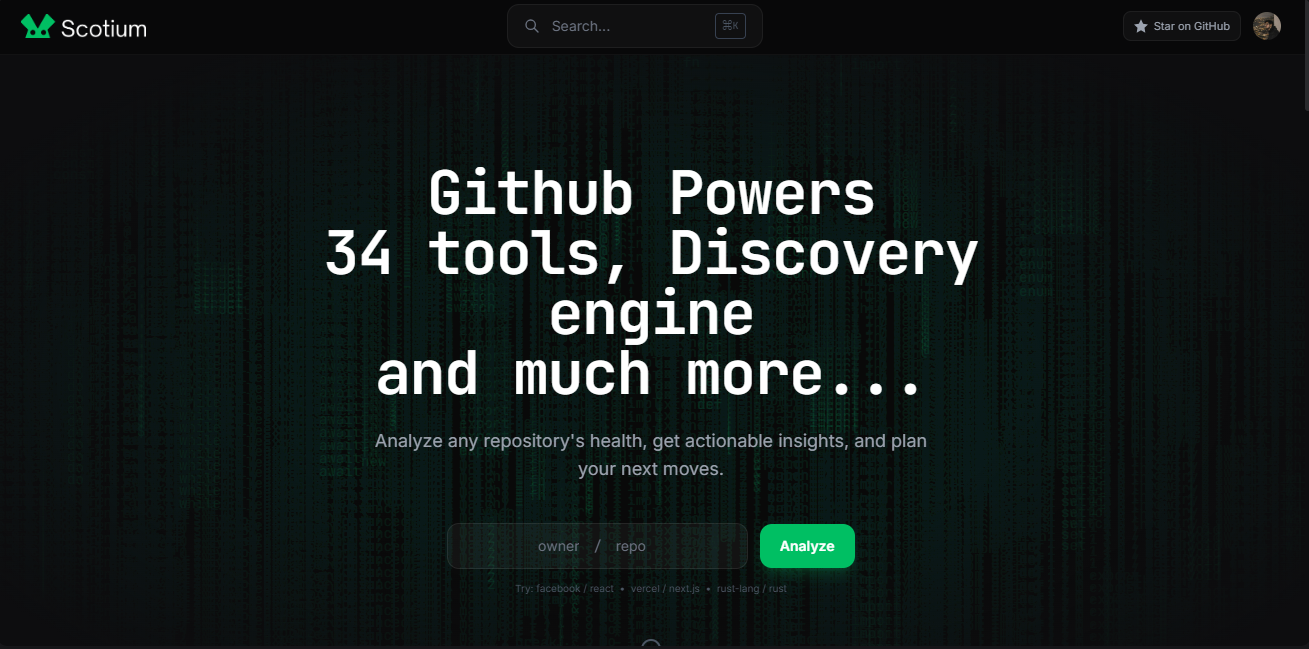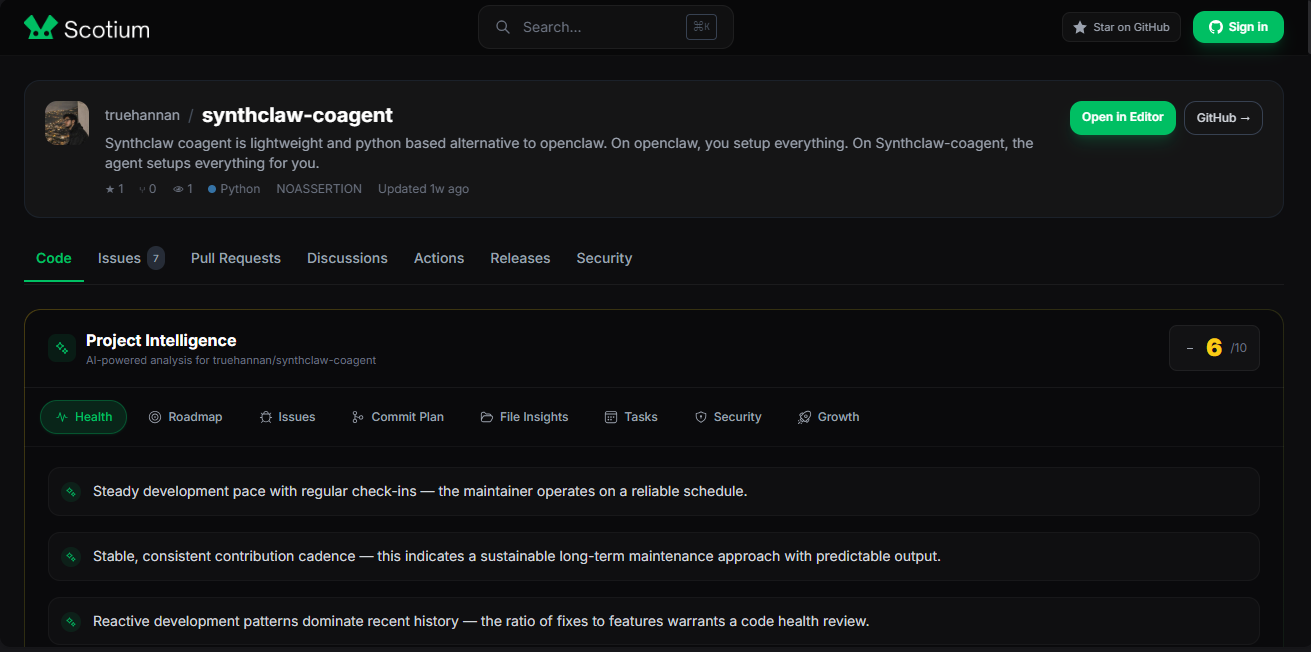
Scotium: GitHub Power-User Platform

GitHub Power-User Platform — 34 Analysis Tools, Discovery Engine, and Code Editor


Inspiration

GitHub is the home of 100M+ repositories and millions of developers, but GitHub's native interface doesn't answer the questions developers actually ask:

  • "Is this project actually maintained or abandoned?" — You see stars and forks, but no insight into project health
  • "How long will my PR sit waiting?" — No data on PR merge speeds or maintainer responsiveness
  • "Are there hidden gems in my language?" — No way to find active projects that haven't blown up yet
  • "Can I trust this codebase?" — No visibility into bus factor (how many key people does this project depend on?)
  • "What's the real tech stack and dependency status?" — Manual checking or guessing

I realized GitHub needed a power-user layer—tools that surface insights GitHub doesn't natively provide. That's where Scotium came from.

As an indie developer, I also wanted a personal command center for my own repos: tracking which ones are stale, which are thriving, and monitoring my open PRs and star growth across projects. GitHub's dashboard doesn't give you that holistic view.

Scotium solves these problems. It wraps the GitHub API with intelligence, turning raw data into actionable insights for developers, maintainers, and repo hunters.


What it does

Scotium is a comprehensive GitHub intelligence platform with 34 built-in analysis tools across three categories:

Repository Analysis (12 Tools)

Analyze any public or private GitHub repository instantly:

  • Health Score — Composite score (1-10) based on commit frequency, PR merge speed, issue resolution rate, and dependency freshness
  • Bus Factor — How many core contributors does this project depend on? High bus factor = risky
  • PR Merge Speed — Median time from PR open to merge; signals maintainer responsiveness
  • Issue Health — Ratio of resolved to open issues; are maintainers keeping up?
  • Tech Stack Detection — Automatically detect languages and frameworks from package.json, requirements.txt, go.mod, Cargo.toml, etc.
  • Fork Activity — Are community forks actually being maintained or abandoned?
  • Releases — How frequently are stable versions released?
  • License Detection — What's the legal status of this project?
  • Plus: Stars, Last Commit, Repo Size, Dependencies

Profile Insights (8 Tools)

Understand any GitHub developer at a glance:

  • Total Stars — Aggregate stars across all their repos
  • Total Forks — How much is their code being built upon?
  • Follower Ratio — Real influence metric (followers vs following)
  • Account Age — How long have they been on GitHub?
  • Top Repository — Their most successful project
  • Top Languages — Their primary tech stack
  • Organizations — Teams they're part of
  • Repositories — Total count and breakdown

Discovery + Dashboard (10 Tools)

Find interesting projects and track your own:

  • Rising Stars — Repos gaining momentum (new but trending)
  • Undiscovered Gems — Active repos with surprisingly few stars (hidden treasures)
  • Most Forked — Projects people are building on top of
  • Active Giants — Popular repos that are still actively maintained
  • Dashboard (auth required) — Your personal GitHub command center
  • Stale Repos Alert — Repos you haven't touched in 30+ days
  • Open PR Tracker — All your open PRs across repos
  • Star Leaders — Which of your repos are winning
  • Repo vs Repo — Side-by-side comparison
  • User vs User — Compare two developers

Bonus Features

  • Code Editor — Browse any repository's files, edit code with syntax highlighting, create branches, commit changes, and open Pull Requests—all without leaving Scotium
  • README Components — 30 ready-to-copy components (stats cards, streak counters, trophies, activity graphs, badges) for your GitHub README
  • Comparison Tool — Visual side-by-side comparison of repositories or users with progress bars
  • Discovery Engine — Filter trending repos by language, time range, and discovery mode
  • Smart Search — Cmd+K modal for instant repo/user lookup

The entire platform is a client-side React SPA that communicates directly with GitHub's REST API—no backend infrastructure required.


How we built it

Tech Stack

  • React 18 + Vite 5 — Component-based UI with lightning-fast builds
  • Tailwind CSS + Framer Motion — Utility-first styling and smooth animations
  • CodeMirror — Syntax-highlighted code editor for in-browser file editing
  • TanStack Query — Efficient data fetching and caching
  • React Router — Client-side routing across 10+ pages
  • GitHub REST API — Direct integration for all data
  • Cloudflare Pages — Serverless hosting with zero config
  • Cloudflare D1 — SQLite caching layer for performance

Architecture

Client-side only: All logic runs in the browser. No backend server needed. This drastically simplifies deployment and keeps infrastructure costs at zero.

GitHub OAuth: Users sign in with GitHub OAuth for private repo access and code editor features. Public data requires no authentication.

Data fetching: TanStack Query handles all API requests with automatic caching. GitHub API free tier (5K requests/hour) is plenty with smart caching.

Caching strategy: Cloudflare D1 stores analysis results so repeat queries are instant. Analysis results expire daily to catch updates.

Development Process

Phase 1: Discovery & Planning

  • Analyzed what GitHub doesn't surface natively
  • Researched competing platforms (GitStar, OSSInsight, Trendshift)
  • Designed 34 analysis metrics across 3 categories
  • Planned information architecture and user flows

Phase 2: Foundation

  • Scaffolded React 18 + Vite 5
  • Integrated GitHub OAuth flow
  • Set up TanStack Query with smart cache invalidation
  • Configured Cloudflare Pages deployment
  • Designed D1 schema for caching analysis results

Phase 3: Analysis Tools (Repository)

  • Implemented Health Score algorithm (composite of multiple signals)
  • Built Bus Factor calculator from commit contributor data
  • Created PR Merge Speed analysis (statistical aggregation)
  • Wrote Tech Stack detector (parse multiple file formats)
  • Added Issue Health ratio, Fork Activity tracking, License detection

Phase 4: Profile Insights

  • Built developer profile aggregation tools
  • Implemented follower ratio calculation
  • Created top languages analyzer from commit data
  • Added organization membership tracking

Phase 5: Discovery & Dashboard

  • Built trending repos algorithm (Rising Stars)
  • Implemented Undiscovered Gems detection (active but low-star filter)
  • Created Most Forked and Active Giants discovery modes
  • Built personal Dashboard (private repos, stale alerts, PR tracker, star rankings)

Phase 6: Code Editor & Components

  • Integrated CodeMirror for syntax highlighting
  • Built file tree browser for repositories
  • Implemented branch creation and PR opening via GitHub API
  • Created 30 copy-paste README components library

Phase 7: Polish & Performance

  • Implemented Cmd+K smart search
  • Optimized bundle size with lazy loading
  • Added Framer Motion animations
  • Made fully responsive for mobile
  • Implemented rate-limit handling for GitHub API

Phase 8: Deployment

  • Deployed to Cloudflare Pages (auto-deploy from Git)
  • Configured D1 for caching
  • Set up environment variable management
  • Tested across browsers and devices

Challenges we ran into

1. GitHub API Rate Limiting

Challenge: GitHub's free tier allows 5K requests/hour. With 34 analysis tools and potentially thousands of users, we'd hit limits quickly.

Solution: Implemented aggressive caching with TanStack Query (client-side) and Cloudflare D1 (server-side). Analysis results expire daily. Prioritized smart querying—fetch commit history once, analyze multiple metrics from it.

2. Real-time Data Freshness vs. Performance

Challenge: Caching makes the app fast, but cached data can be stale. Users see yesterday's analysis while the repo has changed today.

Solution: Added refresh buttons and timestamps ("Last analyzed 2 hours ago"). Analysis results cache for 24 hours by default, but users can manually refresh for up-to-date data.

3. Complex Analysis Algorithms

Challenge: Building reliable metrics like "Health Score" and "Bus Factor" requires sophisticated analysis of commit history, PR data, and issue resolution patterns.

Solution: Defined clear heuristics for each metric:

  • Health Score = weighted composite (30% commit frequency, 25% PR speed, 25% issue resolution, 20% dependency freshness)
  • Bus Factor = count of contributors with 80% of commits
  • PR Merge Speed = median (not average, which is skewed by outliers)

4. GitHub OAuth Flow Complexity

Challenge: Implementing OAuth securely while keeping the app client-side-only is tricky.

Solution: Used GitHub OAuth with redirect URI handling in the browser. Stored access token in memory (not localStorage for security). Implemented token refresh logic.

5. Performance with Large Repos

Challenge: Some repos have 100K+ commits. Fetching and analyzing all of them is slow.

Solution: Limited analysis to last 1000 commits (still representative) and parallelized analysis. Cached results aggressively.

6. CodeMirror Integration in React

Challenge: CodeMirror is a heavy library with complex state management. Integrating it smoothly in React required careful hook usage.

Solution: Created custom React hooks to wrap CodeMirror. Handled editor state, theme changes, and syntax highlighting modes cleanly.

7. Handling Private vs. Public Repos

Challenge: Same UI should work for both, but private repos require authentication and have different API behavior.

Solution: Implemented permission checks. Show OAuth prompt for private repos if user isn't logged in. Gracefully handle 404s and 403s from GitHub API.


Accomplishments that we're proud of

34 fully functional analysis tools — Not just mockups; each tool actually calculates real metrics from GitHub data

Client-side only architecture — Zero backend infrastructure needed. Dramatically simpler to maintain and deploy

10 distinct pages covering discovery, analysis, comparison, editing, components, and personal dashboard

Code editor that lets you edit, branch, and PR without leaving the platform — genuinely useful feature

Smart discovery modes that surface hidden gems and trending projects — not just sorting by stars

30 copy-paste README components that save developers time decorating their profiles

Blazing fast performance despite handling 100M+ repos — thanks to smart caching and D1

GitHub OAuth integration that just works — secure, smooth, no nonsense

Responsive design that looks great on mobile and desktop

Polish and animations with Framer Motion that make the UI feel premium

Open source — Full code available on GitHub for transparency and community contribution


What we learned

1. GitHub's API is Powerful but Requires Strategy

GitHub's REST API has everything you need, but you have to be smart about how you query it. Rate limiting forced us to optimize and taught us that caching isn't optional—it's essential.

2. Composite Metrics Are Hard

Creating "Health Score" required balancing multiple signals. We learned that weighting matters: commit frequency alone doesn't tell you if a project is healthy if PRs take 3 months to merge.

3. UX for Data-Heavy Apps is Tricky

Showing 34 tools on one page would overwhelm users. We learned to separate by category, use progressive disclosure, and let users drill down into details. Information hierarchy is crucial.

4. Client-side Apps Can Be Surprisingly Powerful

We initially worried about GitHub API limits and performance. We learned that smart caching, lazy loading, and thoughtful architecture let us build a full-featured app entirely client-side.

5. Discovery is Harder Than Sorting

"Rising Stars" is more complex than just sorting by stars. We learned to think about what signals actually matter: velocity (stars gained), activity (recent commits), and underrated (hidden gems).

6. Developers Love One-Click Solutions

The README components feature is surprisingly popular. We learned that saving developers 30 seconds of copy-pasting drives engagement—even simple features have outsized value.

7. Framer Motion Elevates Perceived Quality

Small animations on page transitions and card reveals don't add functionality, but they make the app feel polished and premium. Users noticed.

8. Open Source Matters

Putting code on GitHub and explaining technical decisions in the UI builds trust. Transparency is a feature.


What's next for Scotium

Short-term (Next 1-2 months)

  • GitHub Actions integration — Analyze CI/CD health and workflow success rates
  • Maintainer burnout detection — AI-powered sentiment analysis on commit messages to flag maintainer stress
  • Team dashboard — Track multiple repos and developers as a team (for organizations)
  • Dark mode — High demand from users
  • Mobile app (React Native) — Same features on iOS/Android

Medium-term (Next 3-6 months)

  • AI-powered insights — Use LLMs to generate natural-language summaries of repo health
  • Contributor analytics — Visualize team dynamics, identify key contributors
  • Dependency vulnerability scanner — Integrate with security databases
  • Custom metrics — Let users create and save custom analysis workflows
  • API for integration — Let other tools pull Scotium analysis data
  • GitHub App — Install as a GitHub App for deeper integration

Long-term Vision

  • The GitHub Intelligence Layer — Scotium becomes the canonical platform for GitHub analysis
  • Maintainer tools — Help project owners understand and optimize their repos
  • Investor due diligence — Analyze potential acquisitions or investments in open-source projects
  • Developer job matching — Match devs to projects based on their skills and interests
  • Community leaderboards — Celebrate top contributors, trendsetters, and maintainers

Monetization Opportunities (Future)

  • Scotium Pro — Advanced AI analytics, team dashboards, API access
  • Enterprise — White-label Scotium for organizations
  • GitHub Marketplace — Distribute as GitHub App with premium features
  • Data API — Sell aggregated GitHub insights to research teams and investors

Why These Directions Matter

GitHub has become the central hub of software development. Scotium exists to empower developers to make better decisions. What to contribute to, what to learn from, what to depend on. Expanding Scotium means expanding that impact.


Links

Website: https://scotium.pages.dev
GitHub: https://github.com/truehannan/scotium-dev
Demo: https://scotium.pages.dev/explore

Features:


Built with: React 18, Vite 5, Tailwind CSS, Framer Motion, CodeMirror, GitHub API, Cloudflare Pages, Cloudflare D1

By: Hannan (https://hannan.page.dev)

Built With

  • analytics
  • api
  • discover
  • discovery-engine
  • git
  • github
  • github-api
  • github-powers
  • health-check
  • reports
  • scotium
  • tools
Share this project:

Updates