-
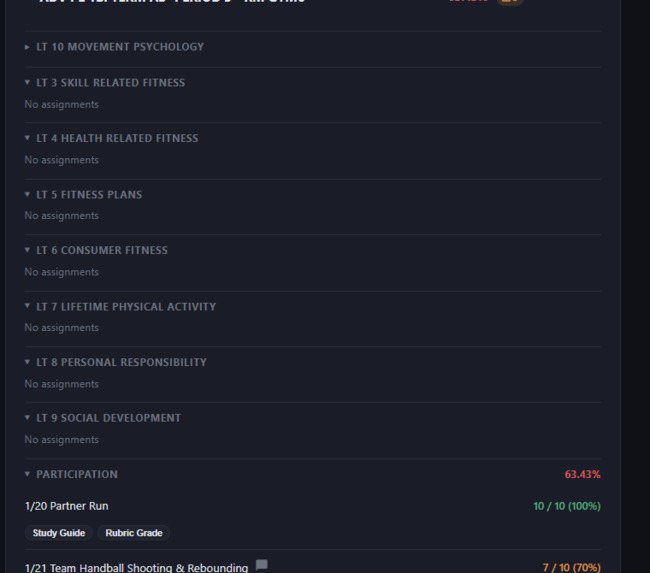
Advanced Insights tab
-
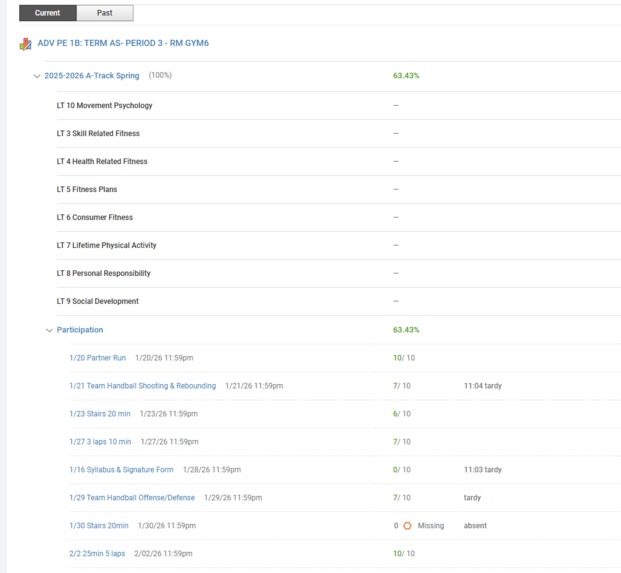
Normal LAUSD grade page
-
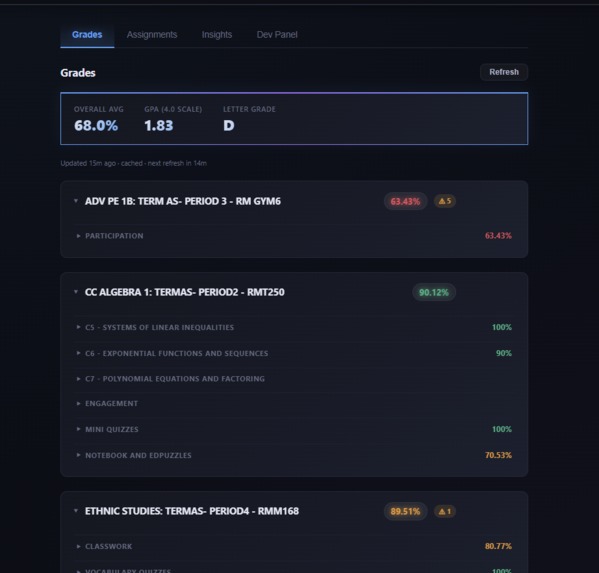
Grades tab
-
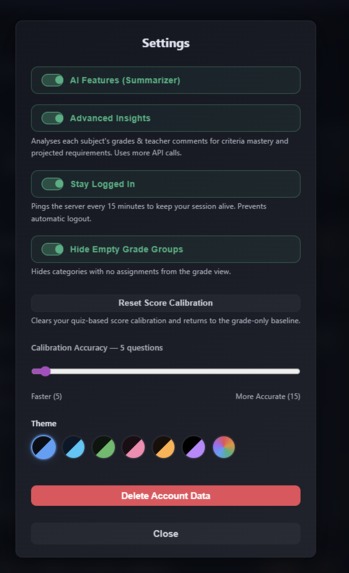
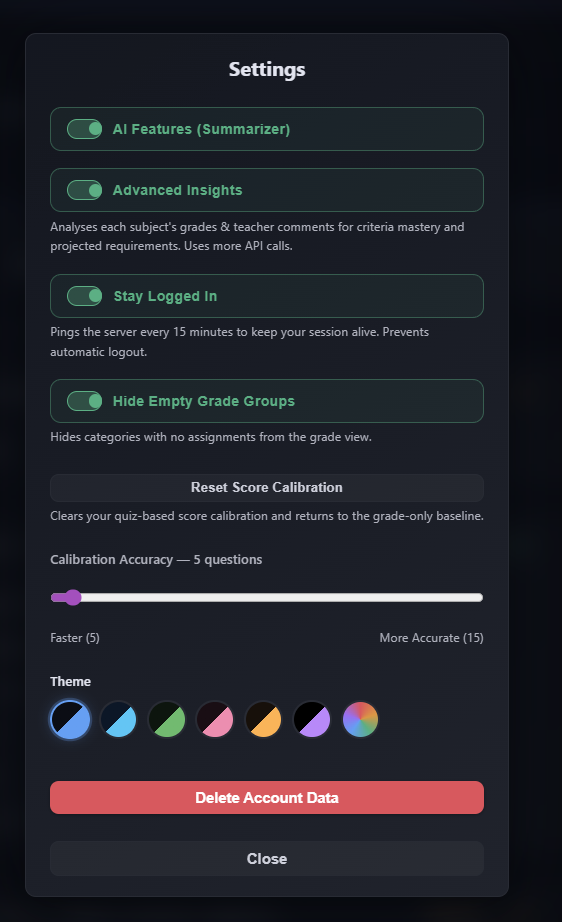
Settings page
-
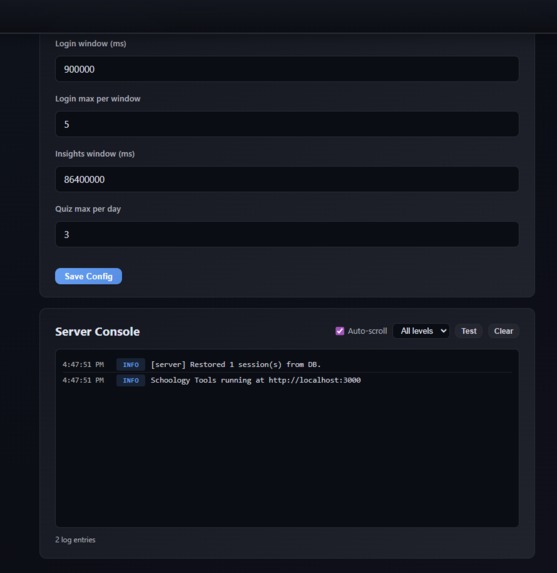
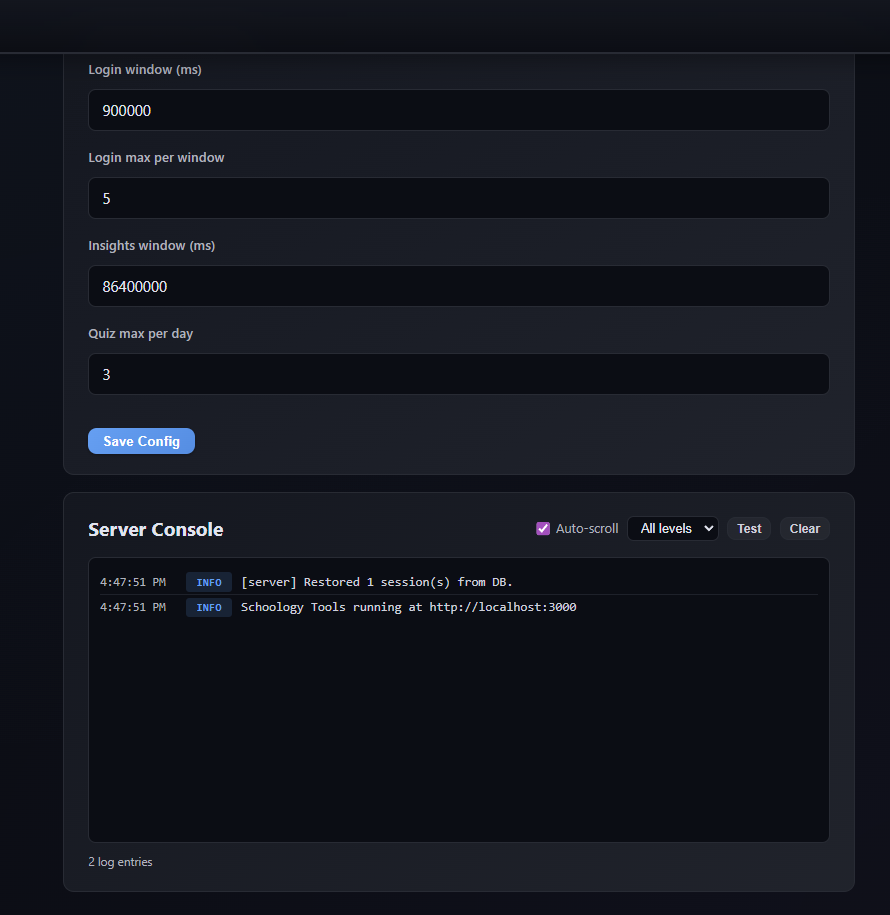
Dev panel
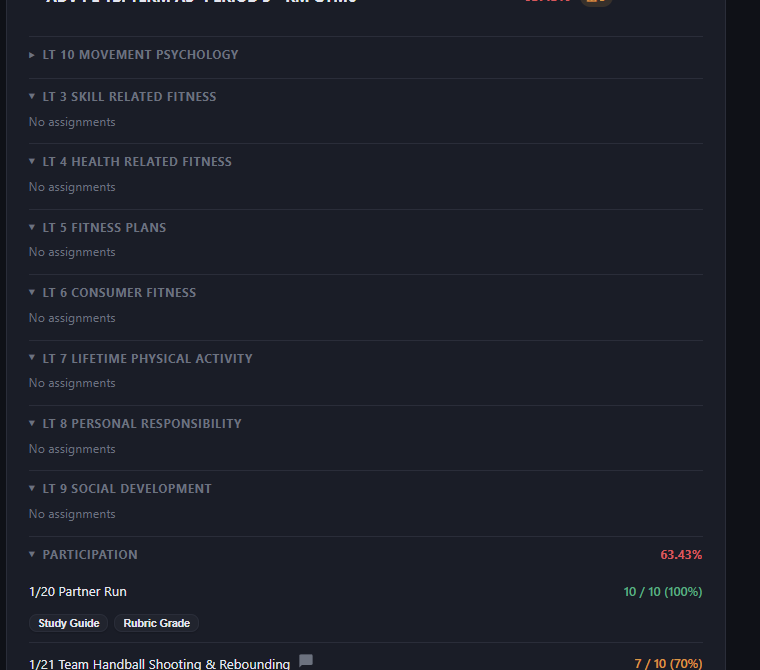
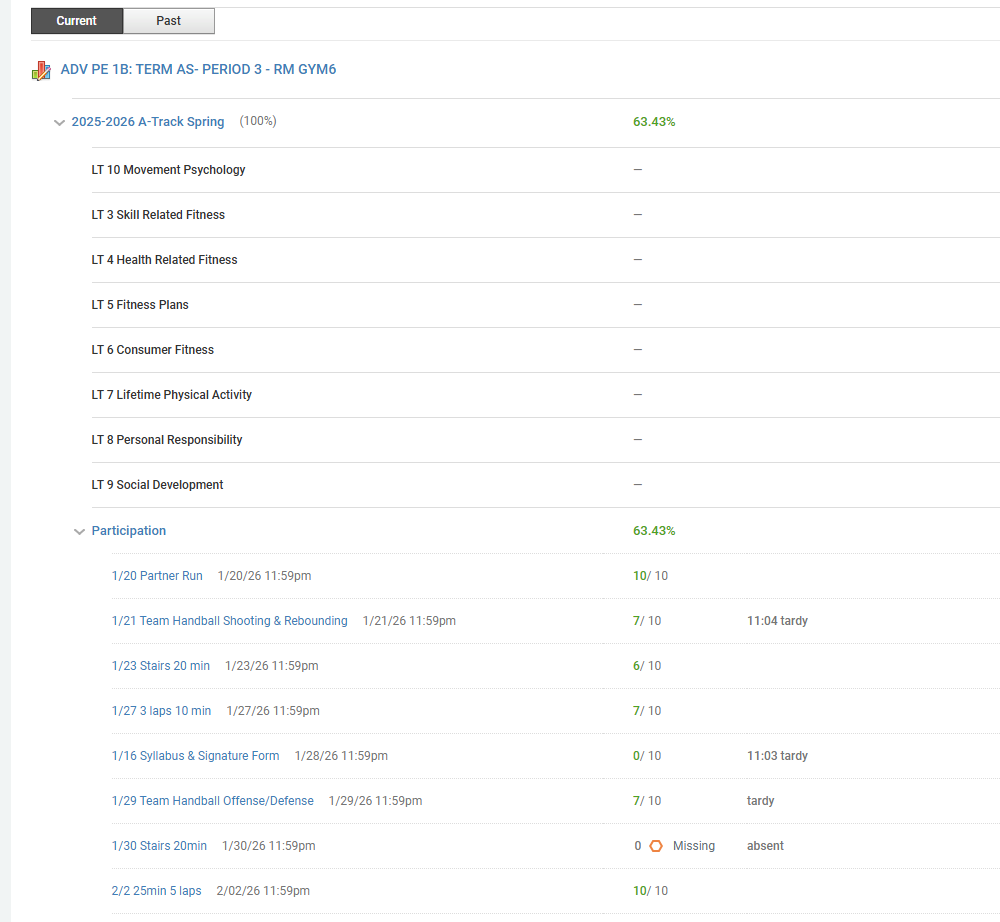
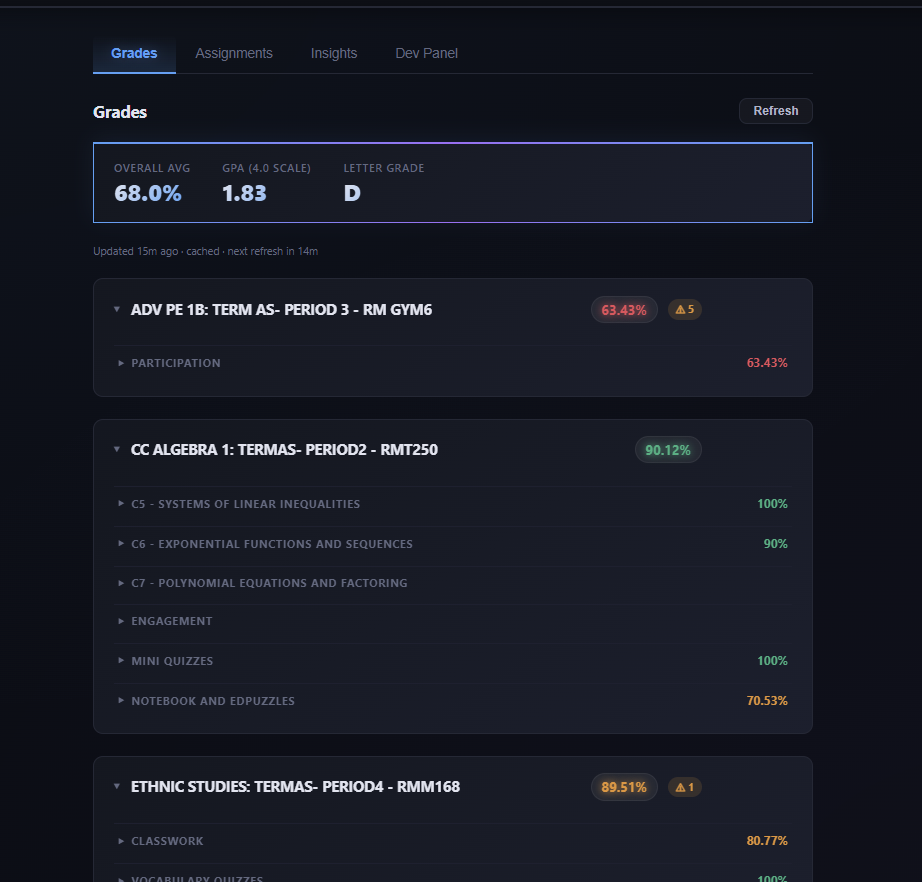
Inspiration
Hi. I'm Jay. I am a student at LAUSD. One thing about LAUSD that I dislike is their grade page, and grades in general. I don't like any of it at all. Graphically, the bad design, harsh brightness, and confusing layout made the entire page an eyesore. Programmatically, there was nearly nothing. As someone with ADHD, I found it unhelpful. So what if you knew your grade? What's the point? It seemed impossible.
However, with code, nothing is impossible. With the help of Claude code and hard work, I wrote this application. I hope that it will grow in the future and help students with doing assignments. Maybe even helping teachers too?
That's all I have for here.
What it does
Schoology Tools is a web app for students on Schoology-based school systems. It logs into Schoology on your behalf and transforms the clunky, information-buried gradebook into a clean, unified dashboard - then layers AI-powered academic support on top.
It supports LAUSD out of the box, and any other Schoology district via Microsoft SSO, Google SSO, or Schoology's direct login form.
Grades
- All courses in one view with percentage, letter grade, color-coded progress bar, and category breakdowns
- Grade history sparklines showing your grade trajectory per course over time
- GPA calculated automatically (weighted and unweighted)
- Missing assignment priority list ranked by category weight (grade impact), not just due date
- "Can't submit" checkmarks - dismiss assignments you can't recover, persisted across sessions
- Grade preview - shows what your grades would be if all recoverable missing work were submitted, assuming you'd score the category average on each
Assignments
- Unified upcoming and overdue list across all courses, sorted by urgency
- AI study plan - a prioritized multi-session study schedule with time estimates per assignment
- Assignments are cached server-side (30 min TTL) so tab switches are instant
- Automatic session recovery - expired sessions trigger auto-relogin or show a clear login prompt
AI Insights
- Academic performance score derived from GPA, grade trend, and missing work
- Skill bars across five dimensions: Knowledge Recall, Applied Knowledge, Critical Analysis, Engagement, and Comprehensive Mastery
- Per-course grade projections with trend direction (improving / declining / neutral)
- Teacher comment summarizer - turns scattered gradebook feedback into 3–4 actionable bullet points
- Next assignment predictions based on your gradebook history
- Deep unit analysis with mastery by criterion and focus tips
- Syllabus summarization - upload a syllabus (PDF, DOCX, text) and AI distills it into a structured outline that enriches predictions and study tools
Rubric Grader
- On every assignment, the app first tries to fetch the rubric directly from the assignment URL
- If no rubric is found, it prompts the student to upload a file (PDF, image, DOCX)
- If nothing is provided, it grades against common rubric templates for that subject
- The student uploads their own work file and the AI scores it 0–100 with specific strengths and gaps
Study Tools
- Study guide generator for any assignment - key concepts, terms, and tips
- Quiz generator based on what you're currently studying, with unit labels and skip-topic navigation
Customization
- 6 built-in themes (Midnight, Ocean, Forest, Sunset, Ember, Abyss) plus a custom color picker
- Customize background, surface, primary, accent, danger, and text colors - all secondary colors auto-derived
- Theme persisted to localStorage, loads instantly on boot
Mobile & Offline
- Installable as a PWA - add it to your phone's home screen like a native app
- Offline mode serves cached grades and assignments without internet
Features
- Backend - Node.js + Express serving a REST API and SSE streams for real-time progress
- Login automation - Playwright + headless Chromium handles Microsoft SSO, Google SSO, and Schoology direct login. Supports any Schoology district - LAUSD is pre-configured; others enter their school URL. Credentials stay in memory only - never written to disk
- Auto-relogin - when a session cookie expires, the server automatically re-authenticates using encrypted stored credentials and retries the request transparently. If no credentials are stored, the frontend shows a clear login prompt
- Encryption - AES-256-GCM with per-user derived keys via scrypt. Each session's data is encrypted independently. Passwords are encrypted at rest for auto-relogin on cookie expiry
- AI - OpenAI API (
gpt-4o-miniby default, operator-configurable viaOPENAI_MODEL). Used for study guides, quiz generation, grade projection, rubric analysis, teacher feedback summarization, syllabus summarization, and assignment study plans - Frontend - Vanilla JS single-page app with no framework. Server-Sent Events for streaming live progress on long AI operations. Theme engine with 6 presets and custom color picker
- File grading - multipart form upload (PDF, image, DOCX, text), server-side text and vision extraction, graded by AI against a rubric
- Grade preview - client-side what-if calculator that simulates submitting all recoverable missing work, recalculating weighted category grades and projected GPA
- Caching - server-side caching for both grades (30 min) and assignments (30 min) with stale-while-revalidate on fetch errors
- PWA - Web App Manifest + service worker for install-to-home-screen and offline caching of static assets
- Grade history - daily grade snapshots stored per user, powering per-course trend sparklines
- Dev panel - runtime-configurable rate limits, session management, usage stats, and live server console with level filtering, user attribution, and auto-scroll
- Self-hosting -
install.shsets up the environment and optionally creates a systemd service. A first-run web wizard handles configuration with no terminal required
Challenges
The main issue was parsing the HTML manually. LAUSD doesn't have an easily accessible API for students/devs alike, so I had to find a way to parse the grades from the HTML. Another thing was finding the right AI model to use. I considered a free model, but it wasn't powerful enough. Finding the right model that was cheap but intelligent was quite the challenge, not to mention shrinking and building custom structures to save tokens...
Accomplishments
I'm proud of how I was able to engineer the prompt and debug in order to build this in such a small amount of time. This is definitely one of my biggest projects, and a big part of that is in thanks to Claude. I am also proud of debugging the complex layout of the grading page(LAUSD). There is no public easy-access API for it so I designed my own.
What I learned
This app was my first experience coding with AI. I have used AI previously but only as a user feature - using AI to help my code was very helpful, as we were both necessary to building it. I helped debug what the AI couldn't.
What's next
- Teacher messaging - compose and send messages to teachers directly from the app
- Attendance tracker - surface Schoology attendance data in one place
- Course materials browser - view files and resources posted by teachers
- Multi-account support - switch between accounts for siblings or parent monitoring
- What-if GPA scenarios - simulate how a future grade on a specific assignment affects your overall GPA before it's entered
- District partnerships - work with LAUSD IT for official API access instead of HTML scraping -Teacher side - add support for teachers so they can view student's levels and personalize learning for them.

Log in or sign up for Devpost to join the conversation.