-
-
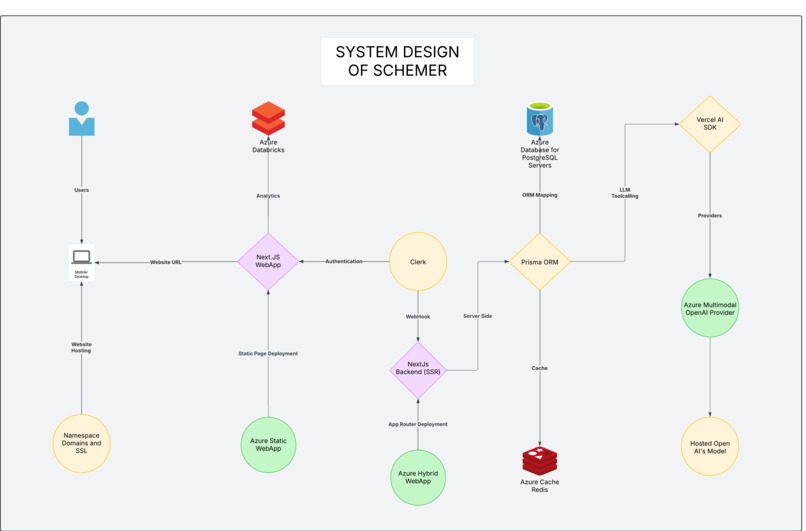
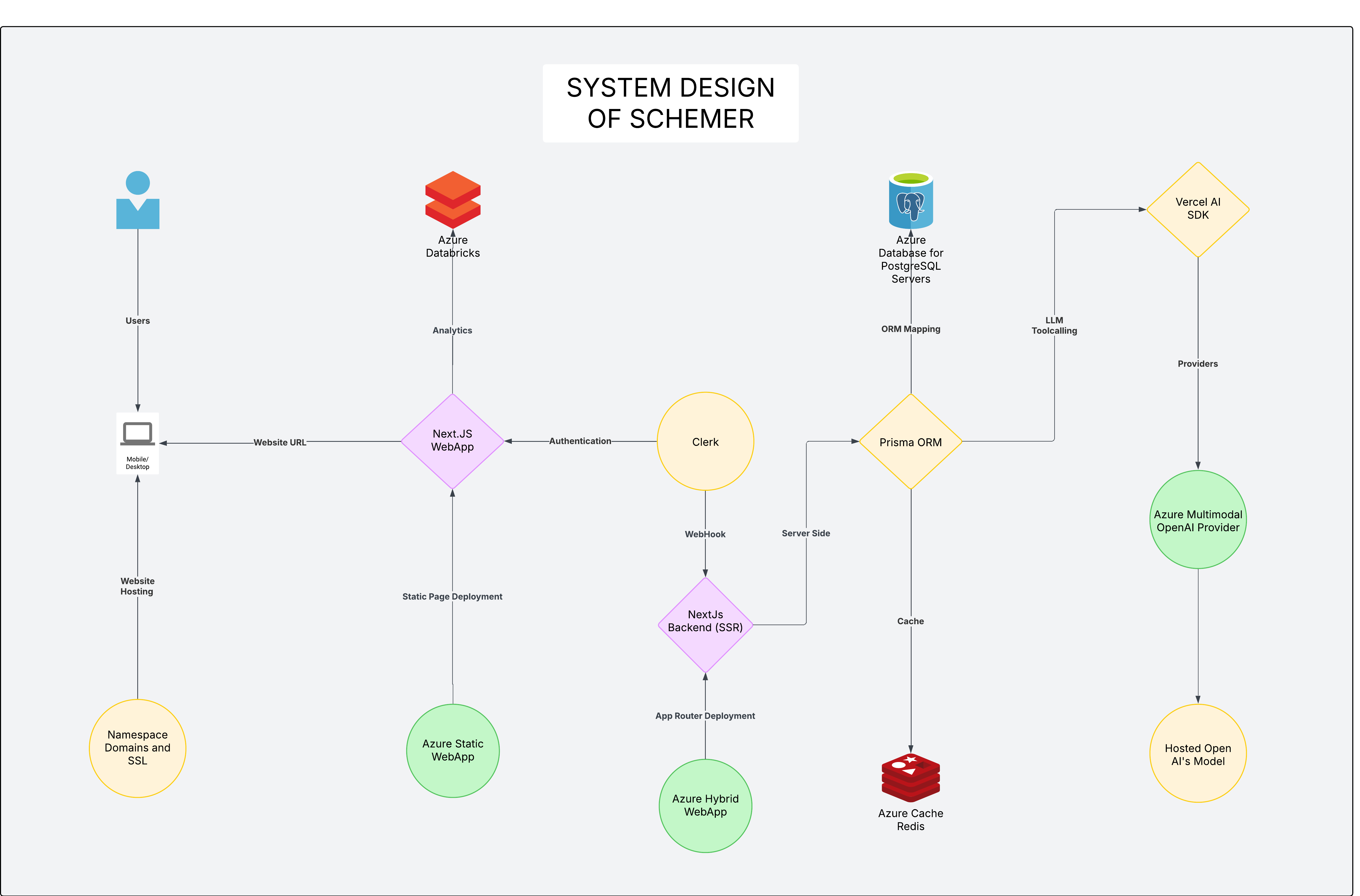
System Design
-
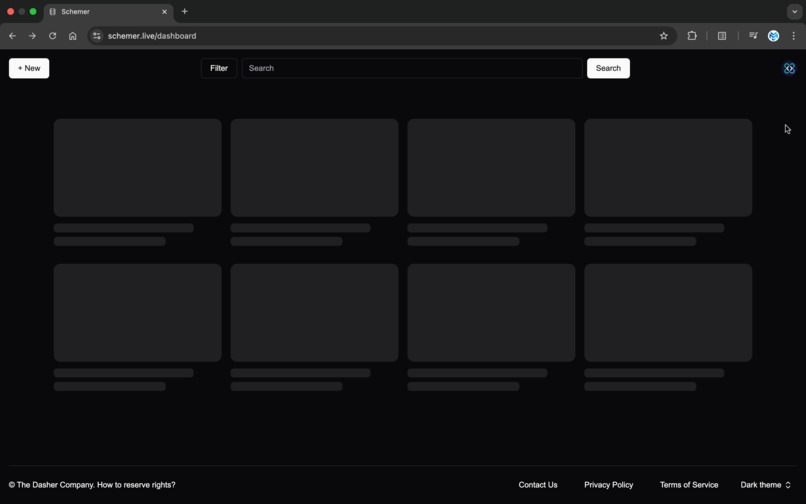
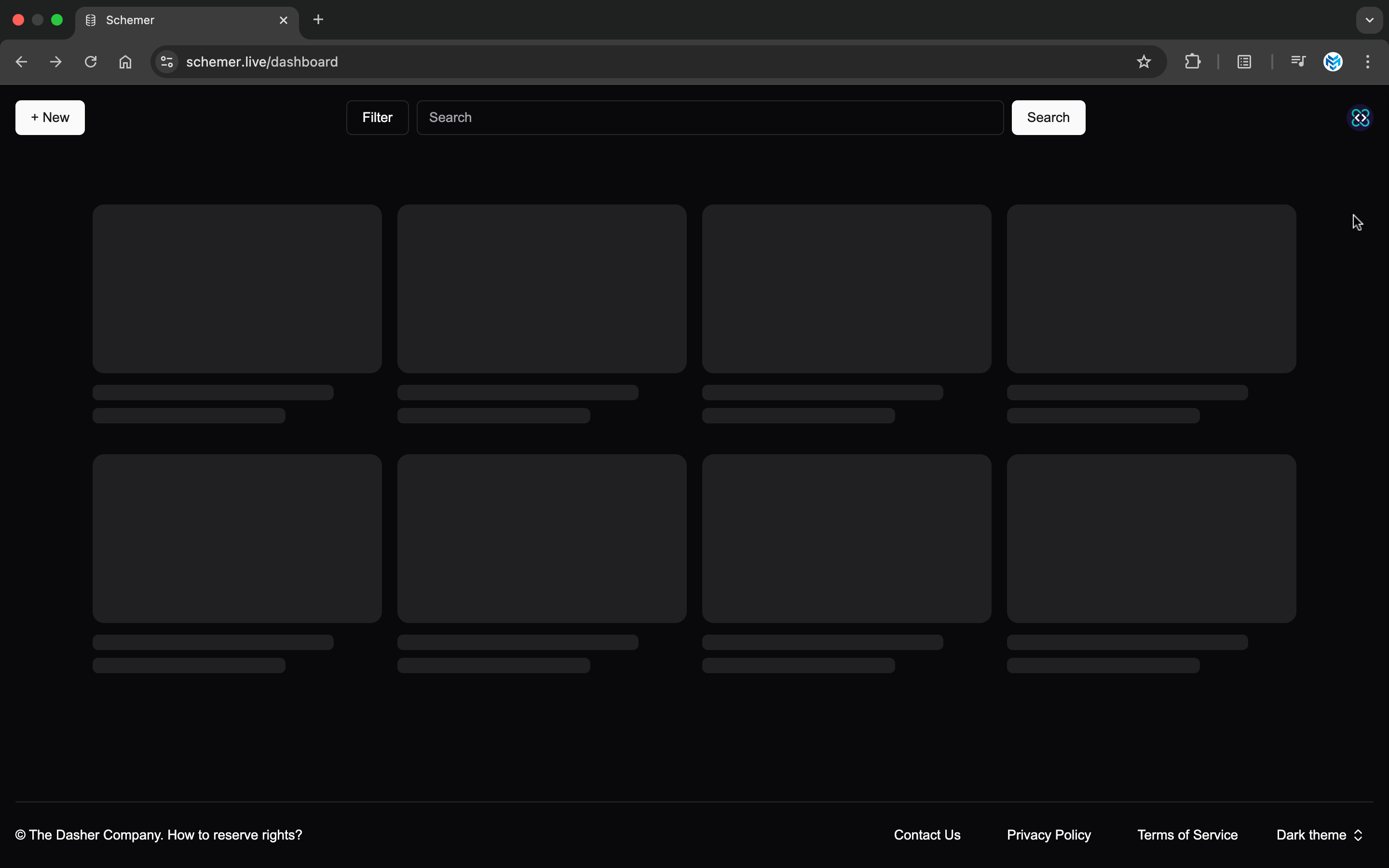
Dashboard
-
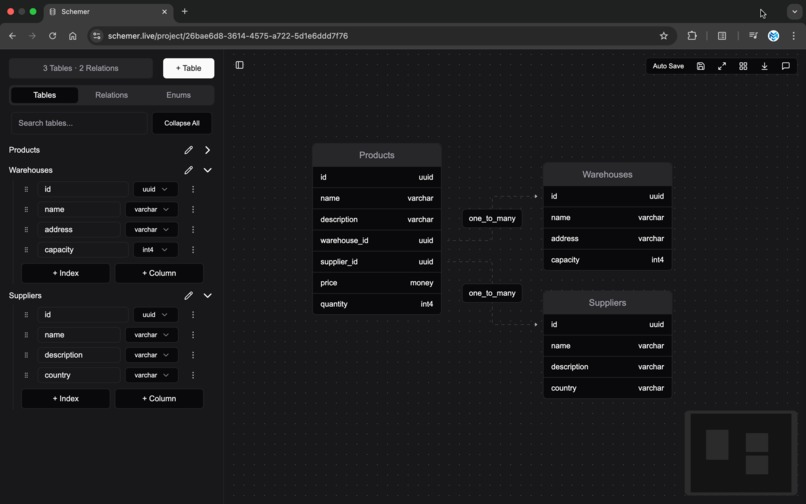
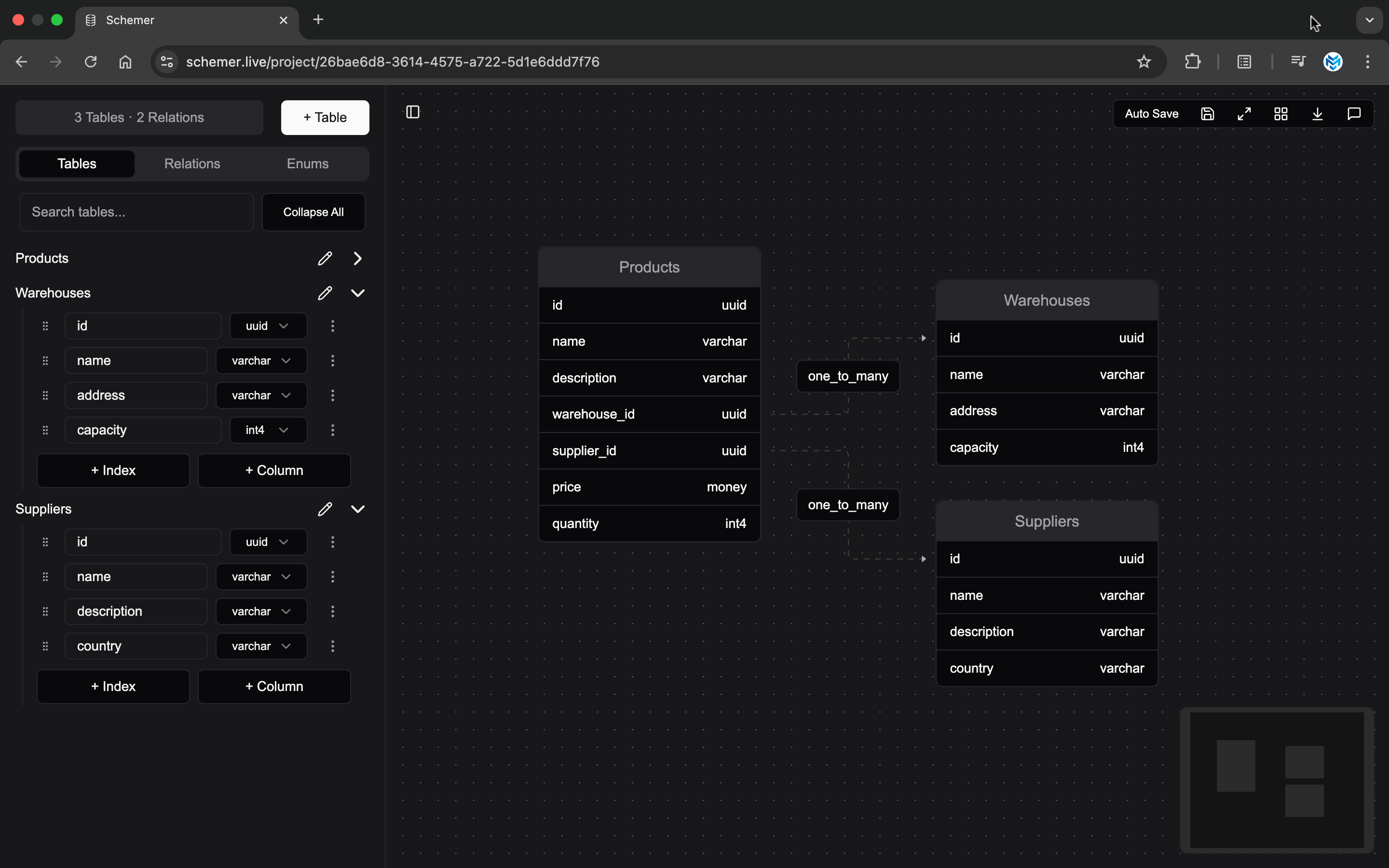
Schema Editor
-
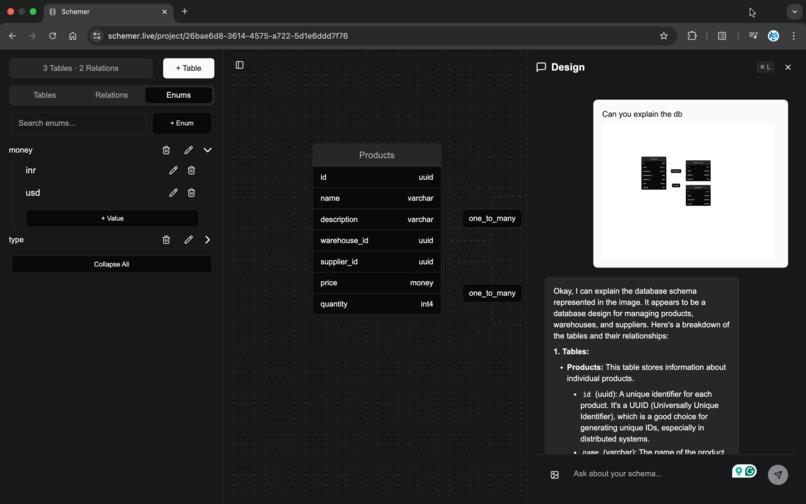
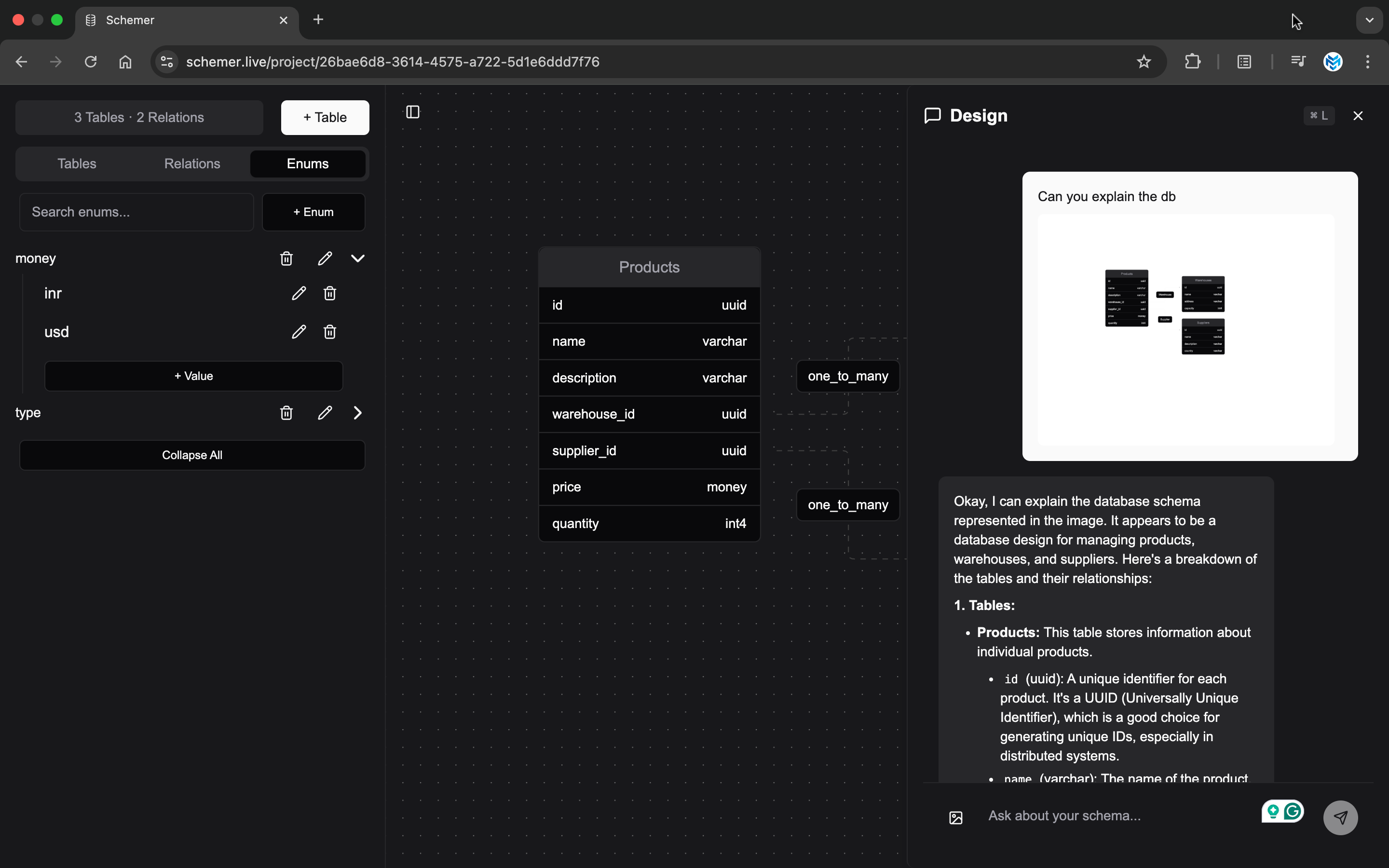
LLM Designer
Summary
I would like to start with a short summary, to set the context for the project quickly. What Schemer Does is that it revolutionizes database design by combining a powerful visual schema builder with a context-aware AI assistant. Create your database schema visually with drag-and-drop tables, columns, relationships, and indexes. Then, leverage our integrated AI to generate SQL, suggest optimizations, explain complex relationships, and even convert your hand-drawn sketches into structured designs. Unlike other tools with useless chatbots, Schemer's AI understands your specific database context, making suggestions relevant to your actual schema. With web search integration, real-time collaboration, and a beautiful modern interface, Schemer isn't just another database designer—it's your intelligent partner in creating efficient, well-structured databases faster than ever before. And the best part? It's completely free and open source.
Inspiration
With the advent of coding with LLM, we have created something unique: a new way to interact with the codebase and add features. Though we are yet not there, where we can just say and it will add the changes on its own, companies have tried such as Devin, but not succeeded, I would say failed, the thing they are missing and LLM will never be able to replicate is the laziness aspect of human beings. (until we are able to add emotions to it, that will be the end of humanity though :)). The human coder is lazy, yes you heard it right, we don't want to write a lot of code and want to do any given task with the least effort and time it can be possibly done. LLM doesn't think like that, it doesn't care, you want it to write everything again, sure it will do, with this "I can do this all day" attitude, it isn't even close to capabilities of a human coder, the context size and the ability to think outside the given task and add a feature to it is what only a human can do. With this being said, it doesn't mean LLM aren't helpful, the rise of Github Copilot, Cursor and Windsurf editors is the proof that LLM are going to be tightly knit into coding. I will be using the name for this shift as the Cursor Shift, since they were one of the most famous pioneers. The way Cursor solved the problem was interesting, they didn't see LLM as a standalone thing that can perform tasks automatically, instead they reimagined it to be a buddy, which can grab the low-hanging fruits easily and help it to code faster. The difference was the code was being wrote as the human counterpart wanted, not the other way round, the ability to quickly chat with a certain line in codebase with the context of other files and ability to point the file you want it to act on, resulted in a new paradigm shift in the way we code. LLM was never about performing complex tasks and the thinking on behalf of a human, because even a client doesn't know what they want, how on earth is an LLM supposed to understand a client's need and code the feature for it. The features of autocomplete tab, quick import, git summaries on changes (seriously, who likes to write what changes are we making whenever we commit, (I usually did Fix 1, Fix 2, Fix final.. like that for the local commits for a feature), the ability to make docs based on the changes you have done (yes, finally), these are the things which LLM was supposed to do and is finally doing it. Cursor way of thinking allows you to be in control of the code and be up to date with the changes that have been done. This inspired me to think, why can't we do the same thing for the db design as well. Just like the code editor, we will have access to the table schema in the visualizer, and on the right side using cmd + L we can interact, point out and suggest changes with the DB. And hence, the Schemer was born.
What it does
Hmm.. what it does, well everything that you would expect a schema designer and visualiser to do, add table, columns, indexes, enums, relationships, edit them quickly, add meaningless notes, chat with it and ask it to do shitty things and then realise the LLM suggestion wasn't shitty it was your prompt that was :). And the best part is that we have this beautiful ShadCN look (Yeah I love it, and thank god everyone is not using it, but yeah, the website now looks like an official vercel website). I won't say that there weren't alternatives, there were many, I would say a lot, all have a few things common, no LLM integration and even if there was it was just a useless chat bot. I seriously don't understand why companies are adding chatbots in the name of AIficatioin of their website, why would I use a slow chatbot, which doesn't have context of your website, access to your docs, or even the tables that you have, it's just there. And yeah, don't ask me about the UI, I don't know if people don't have design sense, or mine is too high (yeah too high that even I can't create the design that I want :)), it was just terrible, bad, outdated, unthought, repetitive and not useful at all. So, I decided to crush them, and yeah they were charging money for it, (And you know what the worse thing was, people are actually paying for it). So, its free, open source, and you can even have a free chat with the Open AI's greatest model yet, (GPT 4o-mini), well you may ask why, its cheap, its fast, I mean tremendously fast and mostly accurate for low level stuff, and most importantly that's what I was able to afford with 100$ free Azure plan, tears of pain incoming ;). You can also hand draw something, yeah, use excalidraw or tldraw, (again don't use other useless alternatives, they are the best and free too), they inspired a lot too, how a minimalistic, fast and simple yet powerful app can create such an impact, I support images too, the azure's multimodal thing were a huge help, and the Chat will add it to your db design and would be great, just draw in excalidray, iterate and give the image, it will recognise and add it. It also has access to web search, special thanks to Azure's Capabilities, so you can verify that the changes are actually up to date and correct. Easy Peasy.
How we built it
Okay, how we built it, well it's actually I, okay fine it's We, couldn't have built it without Azure Cloud. (Paid sponsorship Incoming:)). Be it multimodal chatbot, Open AI's superfast, (or superslow when load it too high for free limits), seamless deployment, and yeah, a few analytics for it, namely PostHog. I initially built it by using Neon DB -> shifted to Azure Database, used Vercel's default deployment -> shifted to Azure's static Web App deployment, and used Google gemini -> shifted to Azure OpenAI Service, used Vercel analytics -> shifted to Azure's default analytics. Yeah, I would appreciate the questions of Why, well because I didn't wanted to empty my 100$ credits before even the project was submitted, and I was too comfortable with those tools, but after these changes I realised, the benefits of using these single service apps, because its too easy and seamless to connect, would be using this as my default now onwards, at least till the 100$ credit is there. Speaking of that, I would like to proudly say that I was wrong about the credit charges, after 12 days of several users testing, (they are my variants, and a few users who accidentally came to my site), I was charged an astonishing 3$, well it's super cheap. Yeah, now coming to tech stack, I used everyone's favourite Next.js, with everyone's favourite ShadCn, with everyone's favourite Prisma ORM, with everyone's favourite PostHog, with everyone's favorite PostgresSQL, with everyone's favourite Clerk for authentication (okay not everyone's but definitely mine, when you have less than 10k MAU's, because after that its paid :)) and yeah finally with everyone's favourite react-flow (super fast, fun and easy to use for schema visualiser). Yeah, most of these were used because it was a solo project (seriously how much do you want me to work, I have a life too). The clerk's API's were helpful, and yeah, I didn't want an overhead of keeping user management. ShadCn made life easy and yeah these rival websites will be stunned to see how well UI can be made, ( Yeah of course not without me). And yeah, of course, with poker appreciation face I would like to thank those rival websites, because yeah they help me to visualise, and make something better and allowed me to know what mistakes not to make (you really thought that I will appreciate you without sarcasm :)). Azure's Multimodal integration was super sleek with Vercel AI SDK, yeah tough choice between Langchain and it, but yeah I again went with the site having super stunning UI (guess it's my weakness nowadays). And yeah posthog's analytics were simple enough to integrate and helped me to get all the data (evil smile), kidding only collecting to detect crashes, will be autodeleted every weekend. Yeah, that's it, I guess, a website (mobile support is there for those pro coders trying to code it on mobile) with new age techstack (yeah, obviously I have used typescript). And yeah, almost forgot it, VS Code with GitHub Copilot, can't really go without appreciating the quick auto complete tab snippets, quick import, and seamless help chat, just a shortcut key. Ability of it to do indexing, mentioning quick changes helped me to code faster and more reliably, and most useful, which many people don't use, is the code review ability of it, helps you to catch quickly those sneaky bugs which crash the site and take hours to catch off. Test cases generation, doc generation, commit message generation was just sick. Enjoyed it, and would say that it was a great product, especially the free features of it, which far exceed the paid pro plan.
Challenges we ran into
Again I, yeah no one is there to help this time, fine We, the community support nextjs, vercel ai, clerk and prisma was just gorgeous, I was able to debug it with their help. I would like to tell about some notable challenges, first was of the backend schema, I was confused, like how to efficiently store table structure in tables, the answer was pretty basic and shocking as well, by creating tables and columns, yeah exactly, the challenge however I quickly faced was the slow saving rates and fetching, then I came across the wonderful world of async storage in browser, I also leant a lot about local first storage, notably dexie, and how they run a sync engine to do so. I decided to go ahead with a simple local storage first, and running the saving in the background, because even though if the browser is closed or anything else like network error happens, I can restart it. Pretty simple right? Well, no, it took a lot of complications and errors to do so. The second one I should highlight is the integration of tool calling, this was the first one I was doing, and I just missed the release of the Agentic API of Open AI. But, yeah, solving this with Vercel AI was a great way to learn it. Web Search was made way easier by the Vercel. Next were the few errors related to react flow, the most important one was the algorithm through which I was supposed to rearrange it, namely auto layout, which was pretty hard to implement, and I got the help of already existing open source algorithms. Overall, it was a torturous debugging session, but yeah, what you say, debugging is the true test of a software developer.
Accomplishments that we're proud of
Yeah, Yeah, proud of it obviously, strange thing to ask though, something to I would like to mention is that this was the first project that was fully utilising the capabilities of the multi-modal LLM and actually integrating it with the site and data, enjoyed it and it paved the way for more ideas into my mind, would be actually doing those as my side project, hope you will go through it. And this time, I started with the deployment first, usually I used to keep it as the last step, but the past couple of projects it have been a real headache, so yeah started it, and git support with CI/CD pipelines of the Azure Devops is just incredible, just loved it. And followed all the eslint rules this time :), not even a single ignore in the comment, okay yeah a few, too lazy to fix, not really, new things to learn, well yeah, would be changing that in a few days.
What we learned
I learnt a lot, from debugging, to actually getting a domain and setting it up, yeah, wasted my 2 days on it, but yeah, was fun, didn't even have a clue what C and A name were, but figured it out eventually. Was using clerk for prod for the first time, learnt a few things too, like the redirect URLs' importance, always used to take that one for granted. Also, I tried doing the vibe coding too, yeah, copilot was able to keep up with it barely, I think it was at its limit, even Claude 3.7 started hallucinating, but yeah, real problem it didn't work for me, it actually me. I can't stand a useless piece of ill-written code, so I actually code most of it, but I like autocomplete tab a lot. It's like doing a time skip, because it started making really good suggestions the 3rd day into coding itself. I also used Code Rabbit and Copilot reviews, they were actually useful. Got to learn about XSS attacks and how to use dompurify to sanitise input, (yeah, most of you won't have a clue about a single word, but it's really useful, you know typical hacker stuff). Improved the things a lot each time I coded, wanted to make it as perfect as it. And yeah, learning async storage and local first DB was pretty interesting too. I hope you like it (Obviously you will). Recommend to your friends and open to PR as well. Would love to improve it.
What's next for Schemer
Yes, the next thing I want is to get YCombinator's seed fund, oh-no just kidding, I thought we were supposed to say the truth :). Would like to get the contributions for it, the next thing on the roadmap is the incremental change display in the code changes by agent, you know the little cmd + Y and cmd + N buttons in changes of the copilot code. Yes, those are pretty hard to implement and would require a lot of changes in the front end as well. Then the most important sync engine with local first storage, yeah Dexie is the one that I have chosen. Also I would like to make my Helper Agent multimodal and allow the support of custom API keys, and finally include revenue, no not for me, it will be free always, I mean for the AI Companys, yeah we need to pay them for good agents, would like to make a simple 10$ plan as pro, so that cluade the great can be included, also I have not enabled the agent mode in the deployed version, because you know I only have 100$, feel free to clone it and use your own bucks for it. These are pretty much it, had a few weird ideas also on top of my head, but won't be mentioning those :).
That's it I guess, and I actually typed it, I am pretty fast 80 WPM, well more like 40 WPM because can't think that fast, and you ask why I didn't use LLM, I don't know, I like to do creative things myself, I know no one actually will read my poorly written about the project, but if you are here, I would like to say, thanks for reading and I hope you got to know about the way of my thinking and the reason why I created it. A big thanks, (To me :)).
Built With
- azure
- clerk
- copilot
- next.js
- openai
- postgresql
- posthog
- typescript
- vscode


Log in or sign up for Devpost to join the conversation.